

Introduction
Overview
Welcome to ZAP API Documentation! The Zed Attack Proxy (ZAP) is one of the world's most popular free security tools which lets you automatically find security vulnerabilities in your applications. ZAP also has an extremely powerful API that allows you to do nearly everything that is possible via the desktop interface. This allows the developers to automate pentesting and security regression testing of the application in the CI/CD pipeline.
This document provides example guides & API definitions for ZAP APIs. You can view code examples in the dark area to the right; switch the programming language of the examples with the tabs on the top right. If anything is missing or seems incorrect, please check the FAQs or the GitHub issues for existing known issues. Also, if you are new to ZAP, then check out the getting started guide to learn the basic concepts behind ZAP.
An OpenAPI definition for the ZAP API is available in the main repository, which can be used to generate custom API clients. This definition is planned to be kept up to date for the latest core and add-on releases. Note that currently the definition does not declare the most appropriate types for the parameters and does not contain the responses.
The following are some of the features provided by ZAP:
- Intercepting Proxy
- Active and Passive Scanners
- Traditional and Ajax Spiders
- Brute Force Scanner
- Port Scanner
- Web Sockets
Have a look at the examples below to learn how to use each of these features via ZAP API.
Documentation Structure
The API documentation is divided into nine main sections.
- Introduction section contains introductory information of ZAP and installation guide to set up ZAP for testing.
- Exploring the App section contains examples on how to explore the web application.
- Attacking the App section contains examples on how to scan or attack a web application.
- Getting the Results section contains examples on how to retrieve alerts and generate Reports from ZAP.
- Getting Authenticated section contains examples on how to authenticate the web application with ZAP.
- Advanced Settings section contains advanced configurations on how to fine tune ZAP results.
- Contributions section contains guidelines and instructions on how to contribute to ZAP's documentation.
- API Catalogue section contains OpenAPI definitions and auto generated code for ZAP APIs.
- Troubleshooting section contains solutions for trouble shooting ZAP API related issues.
Basics on the API Request
ZAP APIs provide access to most of the core features of ZAP such as the active scanner and spider. ZAP API is enabled by default in the daemon mode and the desktop mode. If you are using ZAP desktop, then the API can be configured by visiting the following screen:
Tools -> Options -> API.
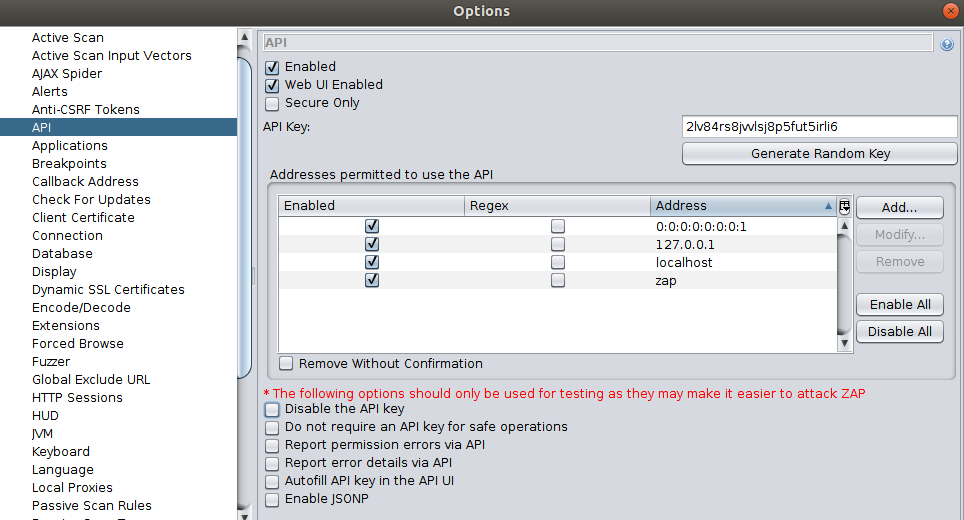
Please note that not all the operations which are available in the desktop interface are available via the APIs. Future versions of ZAP will increase the functionality/scope available via the APIs.
API URL Format
The API is available via GET and POST endpoints and the response is available in JSON, XML, HTML, and OTHER (custom formats, e.g. HAR) formats.
All the response formats return the same information, just in a different format. Based on the use case, choose the appropriate format.
For example, to generate easily readable reports use the HTML format and use XML/JSON based response to parse the results quickly.
The following example shows the API URL format of ZAP:
http://zap/<format>/<component>/<operation>/<operation name>[/?<parameters>]
The format can be either JSON, XML or HTML. The operation can be either view or action or other. The view operation is used to return
information and the action is used to control ZAP. For example, views can be used to generated reports or retrieve results and
action can be used to start or stop the Spider. The components, operation names and parameters can all be discovered by
browsing the API Catalogue.
Access the API
The REST API can be accessed directly or via one of the client implementations detailed below.
A simple web UI is also available to explore and use the APIs via the browser. This web UI can be accessed via http://zap/
when you are proxying through ZAP, or via the host and port ZAP is listening on, e.g. http://localhost:8080/.
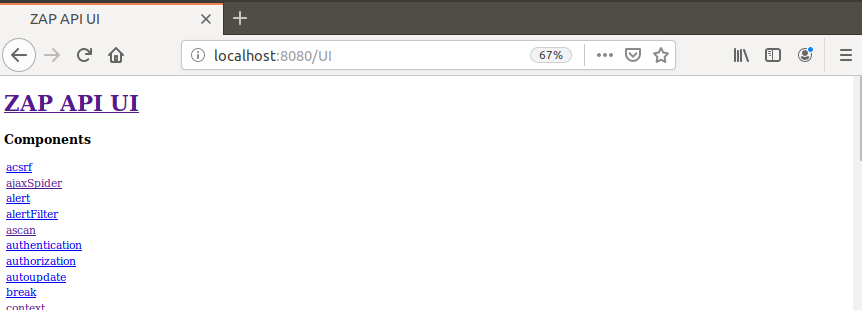
By default only the machine ZAP is running on is able to access the APIs. You can allow other machines, that are able to use ZAP as a proxy, access to the API.
Using the ZAP API with curl
When interacting with the ZAP API using curl, keep the following points in mind:
- All parameter values must be URL-encoded.
- Some boolean parameters (for example
enabled) may need to be explicitly provided when deviating from default values.
curl "http://zap/<format>/<component>/<operation>/<operation-name>/?param1=value1¶m2=value2"
Client SDKs
API clients are available for the following languages:
| Language | Download links | Notes |
|---|---|---|
| .NET | NuGet | Official API |
| Java | GitHub Maven Central | Official API |
| Node.js | NPM | Official API |
| PHP | GitHub Packagist | In process of becoming an official API |
| Python | PyPI | Official API |
| Ruby | GitHub |
Quick Setup Guide
The quick setup guide focuses on setting up ZAP and a testing application. If you have already setup ZAP then Jump to specific example to experiment with specific features.
Start ZAP
# For Linux, Option: 1, using "headless/daemon" mode
<ZAP_HOME>./zap.sh -daemon -config api.key=change-me-9203935709
# For Linux, Option: 2, using ZAP desktop App
<ZAP_HOME>./zap.sh

# For Windows, Run the exe file or zap.bat script to start ZAP
// For Linux, Option: 1, using "headless/daemon" mode
<ZAP_HOME>./zap.sh -daemon -config api.key=change-me-9203935709
// For Linux, Option: 2, using ZAP desktop App
<ZAP_HOME>./zap.sh

// For Windows, Run the exe file or zap.bat script to start ZAP
# For Linux, Option: 1, using "headless/daemon" mode
$ <ZAP_HOME>./zap.sh -daemon -config api.key=change-me-9203935709
# For Linux, Option: 2, using ZAP desktop App
$ <ZAP_HOME>./zap.sh

# For Windows, Run the exe file or zap.bat script to start ZAP
To install ZAP, go to ZAP's home page and download the installer specific to the operating system. After extracting the bundle you can start ZAP by issuing the following command shown in the right column.
The API key must be specified on all API actions and some other operations. The API key is used to prevent malicious
sites from accessing ZAP API.
Setup a Testing Application
If you already have a website to scan or to perform security testing, then obtain the URL/IP of the application to begin the scanning. The example guide uses Google's Firing Range and OWASP Juice Shop to perform the security testing. The Spidering and Attacking examples use the public instance of the Firing Range, and OWASP Juice Shop are used to showcase the Authentication examples of ZAP.
The following is a list of publicly available vulnerable applications that you can also used in conjunction with ZAP.
Getting Help
All available APIs are documented in the API Catalogue. If you are new to ZAP, then it's highly recommended that you experiment with the desktop UI before trying out the APIs. Because ZAP's APIs strongly resemble the desktop UI. Therefore by working with the UI, you will get a good understanding on how to orchestrate ZAP's APIs. Also, use the export config functionality from the desktop UI to export complex configurations such as contexts, scan policies, etc. Then use the exported configurations when creating the automation scripts.
ZAP has a very friendly and active developer community. Always feel free to raise a question in the ZAP users forum or Stack Overflow for issues related to ZAP. Also, use the ZAP's GitHub repository to raise a bug report or to make any feature requests.
Stay tuned on twitter @zaproxy.
Exploring the App
In order to expose content and functionality for ZAP to test the target the application should be explored before performing any scan or attack. The more you explore your App the more accurate the results will be. If the application is not explored very well then it will impact or reduce the vulnerabilities ZAP can find.
The following are some of the options to explore the site by using ZAP. You can use multiple approaches in a combination to get more complete coverage of the application.
Traditional Spider (Crawler): Use this approach to crawl the HTML resources (hyperlinks etc) in the web application.
Ajax Spider: Use this feature if the application heavily relies with Ajax calls.
Proxy Regression / Unit Tests This is the recommended approach for security regression testing. Use this approach to explore the application, if you already have a test suite or unit tests in place.
OpenAPI/SOAP Definition: Use this approach if you have a well defined OpenAPI definition. The OpenAPI plugin can be downloaded via the marketplace.
Using Spider
#!/usr/bin/env python
import time
from zapv2 import ZAPv2

# The URL of the application to be tested
target = 'https://public-firing-range.appspot.com'
# Change to match the API key set in ZAP, or use None if the API key is disabled
apiKey = 'changeMe'

# By default ZAP API client will connect to port 8080
zap = ZAPv2(apikey=apiKey)
# Use the line below if ZAP is not listening on port 8080, for example, if listening on port 8090
# zap = ZAPv2(apikey=apiKey, proxies={'http': 'http://127.0.0.1:8090', 'https': 'http://127.0.0.1:8090'})

print('Spidering target {}'.format(target))
# The scan returns a scan id to support concurrent scanning
scanID = zap.spider.scan(target)
while int(zap.spider.status(scanID)) < 100:
    # Poll the status until it completes
    print('Spider progress %: {}'.format(zap.spider.status(scanID)))
    time.sleep(1)

print('Spider has completed!')
# Prints the URLs the spider has crawled
print('\n'.join(map(str, zap.spider.results(scanID))))
# If required post process the spider results

# TODO: Explore the Application more with Ajax Spider or Start scanning the application for vulnerabilities
public class Spider {

    private static final String ZAP_ADDRESS = "localhost";
    private static final int ZAP_PORT = 8080;
    // Change to match the API key set in ZAP, or use NULL if the API key is disabled
    private static final String ZAP_API_KEY = "change me";
    // The URL of the application to be tested
    private static final String TARGET = "https://public-firing-range.appspot.com";

    public static void main(String[] args) {
        ClientApi api = new ClientApi(ZAP_ADDRESS, ZAP_PORT, ZAP_API_KEY);

        try {
            // Start spidering the target
            System.out.println("Spidering target : " + TARGET);
            ApiResponse resp = api.spider.scan(TARGET, null, null, null, null);
            String scanID;
            int progress;

            // The scan returns a scan id to support concurrent scanning
            scanID = ((ApiResponseElement) resp).getValue();
            // Poll the status until it completes
            while (true) {
                Thread.sleep(1000);
                progress = Integer.parseInt(((ApiResponseElement) api.spider.status(scanID)).getValue());
                System.out.println("Spider progress : " + progress + "%");
                if (progress >= 100) {
                    break;
                }
            }
            System.out.println("Spider completed");
            // If required post process the spider results
            List<ApiResponse> spiderResults = ((ApiResponseList) api.spider.results(scanID)).getItems();

            // TODO: Explore the Application more with Ajax Spider or Start scanning the application for vulnerabilities

        } catch (Exception e) {
            System.out.println("Exception : " + e.getMessage());
            e.printStackTrace();
        }
    }
}
# To start the Spider scan (Response: Scan ID). Modify the API Key and URL to suite the target
$ curl "http://localhost:8080/JSON/spider/action/scan/?apikey=<ZAP_API_KEY>&url=https://public-firing-range.appspot.com&contextName=&recurse="

# To view the scan status/ percentage of work done
$ curl "http://localhost:8080/JSON/spider/view/status/?apikey=<ZAP_API_KEY>&scanId=<SCAN_ID>"

# To view the scan results
$ curl "http://localhost:8080/JSON/spider/view/results/?apikey=<ZAP_API_KEY>&scanId=<SCAN_ID>"

# To stop the scanning
$ curl "http://localhost:8080/JSON/spider/action/stop/?apikey=<ZAP_API_KEY>&scanId=<SCAN_ID>"
# To pause the scanning
$ curl "http://localhost:8080/JSON/spider/action/pause/?apikey=<ZAP_API_KEY>&scanId=<SCAN_ID>"
# To resume the scanning
$ curl "http://localhost:8080/JSON/spider/action/resume/?apikey=<ZAP_API_KEY>&scanId=<SCAN_ID>"
The Spider is a tool that is used to automatically discover new resources (URLs) on a particular site. It begins with a list of URLs to visit, called the seeds, which depends on how the Spider is started. The Spider then visits these URLs, it identifies all the hyperlinks in the page and adds them to the list of URLs to visit, and the process continues recursively as long as new resources are found. Each response type is processed differently in ZAP. All the available endpoints for the spider can be found in spider section.
Start the Spider
The Spiders explore the site and they don't actually do any scanning. The resources crawled by the Spider(s) are passively scanned in the background via the Passive Scanner. The scan API runs the spider against the given URL. Optionally, the 'maxChildren' parameter can be set to limit the number of children scanned and the 'recurse' parameter can be used to prevent the spider from seeding recursively. The parameter 'subtreeOnly' allows to restrict the spider under a site's subtree (using the specified 'URL'). The parameter 'contextName' can be used to constrain the scan to a Context. View the context example to understand how to create a context with ZAP API.
The code sample on the right recursively scans the application with the provided URL. The scan ID is returned as a response when starting the Spider. Use this scan ID to perform any additional actions or to retrieve any views from the Spider API.
View Status
The spider scan is a async request and the time to complete the task will vary depending on the complexity of the web application. The scan ID returned via starting the spider should be used to obtain the results of the crawling. Execute the status API to get the status/percentage of work done by the Spider.
View Spider Results
The results of the crawling can be obtained via the results API. The following image shows the JSON sample response provided by the results API, listing all the resources crawled by Spider.

Stop or Pause the Spider
If the scanning takes more time than expected you can stop or pause the scanning via using the stop or pause APIs. Additional APIs are available in the API Catalogue to pause or resume or to stop All the scanning processes.
The advanced section on Spider contains more examples on how to tweak/improve the Spider results.
Using Ajax Spider
#!/usr/bin/env python
import time
from zapv2 import ZAPv2

# The URL of the application to be tested
target = 'https://public-firing-range.appspot.com'
# Change to match the API key set in ZAP, or use None if the API key is disabled
apiKey = 'changeme'

# By default ZAP API client will connect to port 8080
zap = ZAPv2(apikey=apiKey)
# Use the line below if ZAP is not listening on port 8080, for example, if listening on port 8090
# zap = ZAPv2(apikey=apiKey, proxies={'http': 'http://127.0.0.1:8090', 'https': 'http://127.0.0.1:8090'})

print('Ajax Spider target {}'.format(target))
scanID = zap.ajaxSpider.scan(target)

timeout = time.time() + 60*2   # 2 minutes from now
# Loop until the ajax spider has finished or the timeout has exceeded
while zap.ajaxSpider.status == 'running':
    if time.time() > timeout:
        break
    print('Ajax Spider status' + zap.ajaxSpider.status)
    time.sleep(2)

print('Ajax Spider completed')
ajaxResults = zap.ajaxSpider.results(start=0, count=10)
# If required perform additional operations with the Ajax Spider results

# TODO: Start scanning the application to find vulnerabilities
public class AjaxSpider {

    private static final int ZAP_PORT = 8080;
    private static final String ZAP_API_KEY = null;
    private static final String ZAP_ADDRESS = "localhost";
    private static final String TARGET = "https://public-firing-range.appspot.com";

    public static void main(String[] args) {
        // Create the ZAP Client
        ClientApi api = new ClientApi(ZAP_ADDRESS, ZAP_PORT, ZAP_API_KEY);

        try {
            // Start spidering the target
            System.out.println("Ajax Spider target : " + TARGET);
            ApiResponse resp = api.ajaxSpider.scan(TARGET, null, null, null);
            String status;

            long startTime = System.currentTimeMillis();
            long timeout = TimeUnit.MINUTES.toMillis(2); // Two minutes in milli seconds
            // Loop until the ajax spider has finished or the timeout has exceeded
            while (true) {
                Thread.sleep(2000);
                status = (((ApiResponseElement) api.ajaxSpider.status()).getValue());
                System.out.println("Spider status : " + status);
                if (!("stopped".equals(status)) || (System.currentTimeMillis() - startTime) < timeout) {
                    break;
                }
            }
            System.out.println("Ajax Spider completed");
            // Perform additional operations with the Ajax Spider results
            List<ApiResponse> ajaxSpiderResponse = ((ApiResponseList) api.ajaxSpider.results("0", "10")).getItems();

            // TODO: Start scanning(passive/active scan) the application to find vulnerabilities

        } catch (Exception e) {
            System.out.println("Exception : " + e.getMessage());
            e.printStackTrace();
        }
    }
}
# To start the Ajax Spider
$ curl "http://localhost:8080/JSON/ajaxSpider/action/scan/?apikey=<ZAP_API_KEY>&url=<URL>&inScope=&contextName=&subtreeOnly="

# To view the status
$ curl "http://localhost:8080/JSON/ajaxSpider/view/status/?apikey=<ZAP_API_KEY>"

# To view the number of results
$ curl "http://localhost:8080/JSON/ajaxSpider/view/numberOfResults/?apikey=<ZAP_API_KEY>"

# To view the results
$ curl "http://localhost:8080/JSON/ajaxSpider/view/fullResults/?apikey=<ZAP_API_KEY>"

# To stop the Ajax Spider
$ curl "http://localhost:8080/JSON/ajaxSpider/action/stop/?apikey=<ZAP_API_KEY>"
Use the Ajax Spider if you have applications which heavily depend on Ajax or JavaScript. The Ajax Spider allows you to crawl web applications written in Ajax in far more depth than the traditional Spider.You should also use the traditional Spider as well for complete coverage of a application (e.g. to cover HTML comments).
Start Ajax Spider
The scan API starts the Ajax Spider based on a given URL. Similar to the Traditional Spider, Ajax Spider can be also limited to a context or scope. The parameter 'contextName' can be used to constrain the scan to a Context, the option 'inScope' is ignored if a context was also specified. The parameter 'subtreeOnly' allows to restrict the spider under a site's subtree (using the specified 'URL').
View Status
Unlike the traditional Spider, Ajax Spider does not provide a percentage for the work to be done. Use the status endpoint to identify whether the Ajax Spider is still active or finished.
View Results
Similar to the Traditional Spider, the Ajax Spider's results API can be used to view the resources which are crawled by the Ajax Spider. The following image shows a sample response given by the API.

Stop the Ajax Spider
Ajax spider does not have an indication on how much resources are left to be crawled. Therefore if the Ajax spider takes too much time than expected, then it can be stopped by using the stop API.
View the advanced section on Ajax Spider to learn more about how to further fine-tune the results of the Ajax Spider.
Attacking the App
The application should be explored before starting to scan for security vulnerabilities. If you haven't done that look at the explore section on how to explore the web application. The following section provides examples on how to use the Passive and Active Scanner to find security vulnerabilities in the application.
Using Passive Scan
public class PassiveScan {

    private static final int ZAP_PORT = 8080;
    private static final String ZAP_API_KEY = null;
    private static final String ZAP_ADDRESS = "localhost";

    public static void main(String[] args) {
        ClientApi api = new ClientApi(ZAP_ADDRESS, ZAP_PORT, ZAP_API_KEY);
        int numberOfRecords;

        try {
            // TODO : explore the app (Spider, etc) before using the Passive Scan API, Refer the explore section for details
            // Loop until the passive scan has finished
            while (true) {
                Thread.sleep(2000);
                api.pscan.recordsToScan();
                numberOfRecords = Integer.parseInt(((ApiResponseElement) api.pscan.recordsToScan()).getValue());
                System.out.println("Number of records left for scanning : " + numberOfRecords);
                if (numberOfRecords == 0) {
                    break;
                }
            }
            System.out.println("Passive Scan completed");

            // Print Passive scan results/alerts
            System.out.println("Alerts:");
            System.out.println(new String(api.core.xmlreport(), StandardCharsets.UTF_8));

        } catch (Exception e) {
            System.out.println("Exception : " + e.getMessage());
            e.printStackTrace();
        }
    }
}
#!/usr/bin/env python
import time
from pprint import pprint
from zapv2 import ZAPv2

apiKey = 'changeme'
target = 'https://public-firing-range.appspot.com'
zap = ZAPv2(apikey=apiKey, proxies={'http': 'http://127.0.0.1:8080', 'https': 'http://127.0.0.1:8080'})

# TODO : explore the app (Spider, etc) before using the Passive Scan API, Refer the explore section for details
while int(zap.pscan.records_to_scan) > 0:
    # Loop until the passive scan has finished
    print('Records to passive scan : ' + zap.pscan.records_to_scan)
    time.sleep(2)

print('Passive Scan completed')

# Print Passive scan results/alerts
print('Hosts: {}'.format(', '.join(zap.core.hosts)))
print('Alerts: ')
pprint(zap.core.alerts())
# To view the number of records left to be scanned
$ curl "http://localhost:8080/JSON/pscan/view/recordsToScan/?apikey=<ZAP_API_KEY>"

# To view the alerts of passive scan
$ curl "http://localhost:8080/JSON/core/view/alerts/?apikey=<ZAP_API_KEY>&baseurl=<TARGET_URL>&start=0&count=10"
All requests that are proxied through ZAP or initialised by tools like the Spider are passively scanned. You do not have
to manually start the passive scan process, ZAP by default passively scans all HTTP and WebSocket messages (requests and responses)
which are sent to the application.
Passive scanning does not change the requests nor the responses in any way and is therefore safe to use. This is good for finding problems like missing security headers or missing anti CSRF tokens but is no good for finding vulnerabilities like XSS which require malicious requests to be sent - that's the job of the active scanner.
View the Status
As the records are passively scanned it will take additional time to complete the full scan. After the crawling is completed use the recordsToScan API to obtain the number of records left to be scanned. After the scanning has completed the alerts can be obtained via the alerts endpoint(s).
View the advanced section to know how to configure additional parameters of Passive Scan.
Using Active Scan
Active scanning attempts to find potential vulnerabilities by using known attacks against the selected targets. Active scanning is an attack on those targets. You should NOT use it on applications that you do not have permission to.
Start Active Scanner
public class ActiveScan {

    private static final int ZAP_PORT = 8080;
    private static final String ZAP_API_KEY = null;
    private static final String ZAP_ADDRESS = "localhost";
    private static final String TARGET = "https://public-firing-range.appspot.com";

    public static void main(String[] args) {

        ClientApi api = new ClientApi(ZAP_ADDRESS, ZAP_PORT, ZAP_API_KEY);

        try {
            // TODO : explore the app (Spider, etc) before using the Active Scan API, Refer the explore section
            System.out.println("Active Scanning target : " + TARGET);
            ApiResponse resp = api.ascan.scan(TARGET, "True", "False", null, null, null);
            String scanid;
            int progress;

            // The scan now returns a scan id to support concurrent scanning
            scanid = ((ApiResponseElement) resp).getValue();
            // Poll the status until it completes
            while (true) {
                Thread.sleep(5000);
                progress =
                        Integer.parseInt(
                                ((ApiResponseElement) api.ascan.status(scanid)).getValue());
                System.out.println("Active Scan progress : " + progress + "%");
                if (progress >= 100) {
                    break;
                }
            }

            System.out.println("Active Scan complete");
            // Print vulnerabilities found by the scanning
            System.out.println("Alerts:");
            System.out.println(new String(api.core.xmlreport(), StandardCharsets.UTF_8));

        } catch (Exception e) {
            System.out.println("Exception : " + e.getMessage());
            e.printStackTrace();
        }
    }
}
#!/usr/bin/env python
import time
from pprint import pprint
from zapv2 import ZAPv2

apiKey = 'changeme'
target = 'https://public-firing-range.appspot.com'
zap = ZAPv2(apikey=apiKey, proxies={'http': 'http://127.0.0.1:8080', 'https': 'http://127.0.0.1:8080'})

# TODO : explore the app (Spider, etc) before using the Active Scan API, Refer the explore section
print('Active Scanning target {}'.format(target))
scanID = zap.ascan.scan(target)
while int(zap.ascan.status(scanID)) < 100:
    # Loop until the scanner has finished
    print('Scan progress %: {}'.format(zap.ascan.status(scanID)))
    time.sleep(5)

print('Active Scan completed')
# Print vulnerabilities found by the scanning
print('Hosts: {}'.format(', '.join(zap.core.hosts)))
print('Alerts: ')
pprint(zap.core.alerts(baseurl=target))
# To start the the active scan
$ curl "http://localhost:8080/JSON/ascan/action/scan/?apikey=<ZAP_API_KEY>&url=<TARGET_URL>&recurse=true&inScopeOnly=&scanPolicyName=&method=&postData=&contextId="

# To view the the status of active scan
$ curl "http://localhost:8080/JSON/ascan/view/status/?apikey=<ZAP_API_KEY>&scanId=<SCAN_ID>"

# To view the alerts of active scan
$ curl "http://localhost:8080/JSON/core/view/alerts/?apikey=<ZAP_API_KEY>&baseurl=<TARGET_URL>&start=0&count=10"

# To stop the active scan
$ curl "http://localhost:8080/JSON/ascan/action/stop/?apikey=<ZAP_API_KEY>&scanId=<SCAN_ID>"
The scan endpoint runs the active scanner against the given URL or Context. Optionally, the 'recurse' parameter can be used to scan URLs under the given URL, the parameter 'inScopeOnly' can be used to constrain the scan to URLs that are in scope (ignored if a Context is specified). The parameter 'scanPolicyName' allows to specify the scan policy (if none is given it uses the default scan policy). The parameters 'method' and 'postData' allow to select a given request in conjunction with the given URL.
View advanced settings to learn, how to configure the context, scope, and scan policy with ZAP APIs.
View Status
The status API provides the percentage of scanning done by the active scanner. The scan ID returned via starting the Active Scan should be used to query the status of the scanner.
View Results
Similar to the passive scan results, the active scan results can be viewed using the same alerts endpoint(s). The alerts endpoint(s) will show the consolidated results of Passive and Active Scan.
Stop Active Scanning
Use the stop API to stop a long running active scan. Optionally you can use the stopAllScans endpoints or pause endpoint to stop and pause the active scanning.
It should be noted that active scanning can only find certain types of vulnerabilities. Logical vulnerabilities, such as broken access control, will not be found by any active or automated vulnerability scanning. Manual penetration testing should always be performed in addition to active scanning to find all types of vulnerabilities.
Getting the Results
#!/usr/bin/env python
from zapv2 import ZAPv2

# The URL of the application to be tested
target = 'https://public-firing-range.appspot.com'
# Change to match the API key set in ZAP, or use None if the API key is disabled
apiKey = 'changeMe'

# By default ZAP API client will connect to port 8080
zap = ZAPv2(apikey=apiKey)
# Use the line below if ZAP is not listening on port 8080, for example, if listening on port 8090
# zap = ZAPv2(apikey=apiKey, proxies={'http': 'http://127.0.0.1:8090', 'https': 'http://127.0.0.1:8090'})

# TODO: Check if the scanning has completed

# Retrieve the alerts using paging in case there are lots of them
st = 0
pg = 5000
alert_dict = {}
alert_count = 0
alerts = zap.alert.alerts(baseurl=target, start=st, count=pg)
blacklist = [1,2]
while len(alerts) > 0:
    print('Reading ' + str(pg) + ' alerts from ' + str(st))
    alert_count += len(alerts)
    for alert in alerts:
        plugin_id = alert.get('pluginId')
        if plugin_id in blacklist:
            continue
        if alert.get('risk') == 'High':
            # Trigger any relevant postprocessing
            continue
        if alert.get('risk') == 'Informational':
            # Ignore all info alerts - some of them may have been downgraded by security annotations
            continue
    st += pg
    alerts = zap.alert.alerts(start=st, count=pg)
print('Total number of alerts: ' + str(alert_count))
public class Alerts {

    private static final String ZAP_ADDRESS = "localhost";
    private static final int ZAP_PORT = 8080;
    // Change to match the API key set in ZAP, or use NULL if the API key is disabled
    private static final String ZAP_API_KEY = "change me";
    // The URL of the application to be tested
    private static final String TARGET = "https://public-firing-range.appspot.com";

    private static List<String> blackListPlugins = Arrays.asList("1000", "1025");


    public static void main(String[] args) {
        ClientApi api = new ClientApi(ZAP_ADDRESS, ZAP_PORT, ZAP_API_KEY);

        try {
            // TODO: Check if the scanning has completed

            // Retrieve the alerts using paging in case there are lots of them
            int start = 0;
            int count = 5000;
            int alertCount = 0;
            ApiResponse resp = api.alert.alerts(TARGET, String.valueOf(start), String.valueOf(count), null);

            while (((ApiResponseList) resp).getItems().size() != 0) {
                System.out.println("Reading " + count + " alerts from " + start);
                alertCount += ((ApiResponseList) resp).getItems().size();

                for (ApiResponse l : (((ApiResponseList) resp).getItems())) {

                    Map<String, ApiResponse> element = ((ApiResponseSet) l).getValuesMap();
                    if (blackListPlugins.contains(element.get("pluginId").toString())) {
                        // TODO: Trigger any relevant postprocessing
                    } else if ("High".equals(element.get("risk").toString())) {
                        // TODO: Trigger any relevant postprocessing
                    } else if ("Informational".equals(element.get("risk").toString())) {
                        // TODO: Ignore all info alerts - some of them may have been downgraded by security annotations
                    }
                }
                start += count;
                resp = api.alert.alerts(TARGET, String.valueOf(start), String.valueOf(count), null);
            }
            System.out.println("Total number of Alerts: " + alertCount);

        } catch (Exception e) {
            System.out.println("Exception : " + e.getMessage());
            e.printStackTrace();
        }
    }
}
# To view the alerts
$ curl "http://localhost:8080/JSON/alert/view/alerts/?apikey=<ZAP_API_KEY>&baseurl=<BASE_URL>&start=0&count=5000&riskId="

# To view the summary of the alerts
$ curl "http://localhost:8080/JSON/alert/view/alertsSummary/?apikey=<ZAP_API_KEY>baseurl=<BASE_URL>"

# To view alerts by risk category
$ curl "http://localhost:8080/JSON/alert/view/alertsByRisk/?apikey=<ZAP_API_KEY>&url=<BASE_URL>&recurse="
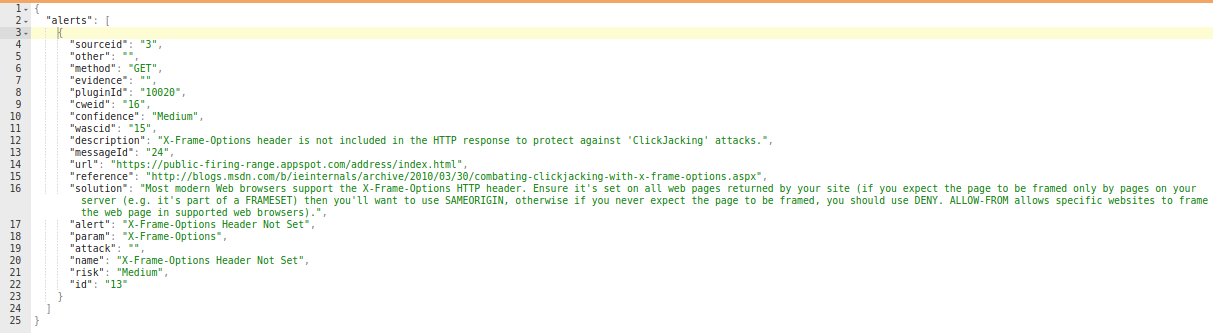
After the scanning (Active/Passive) completes, ZAP provides the security vulnerabilities in the form of alerts. The alerts are categorized into high-priority, medium-priority, low-priority and informational priority risks. The priority indicates the degree of risk associated with each alert. For example, a high priority risk means that the issues listed in that category has more threat or risk potential than a medium-priority alert.
The alerts endpoint provides all the alerts which are identified by ZAP. View the sample code on the right to retrieve the alerts from the alerts endpoint. The results can be used to raise security alerts in the CI/CD pipeline or to trigger any custom workflows.
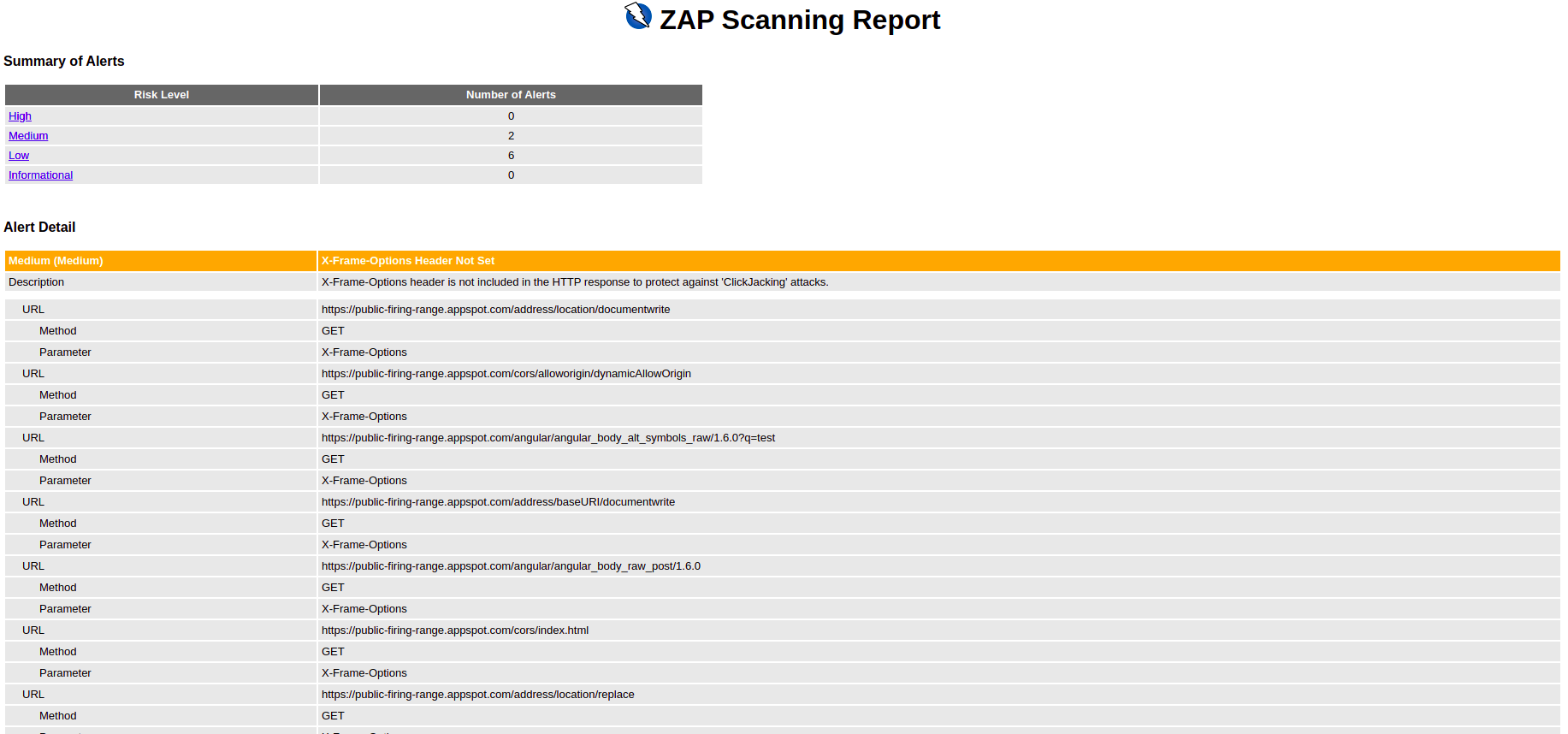
The alerts summary gets the number of alerts grouped by each risk level and optionally filtering by URL. A Summary report can be also generated using the core module. Use the htmlreport or jsonreport or xmlreport endpoint to generate this summary report. The following image shows the report generated via the HTML report API. The report categories the alerts to risk level and provides a brief description about each alert.
Getting Authenticated
The target application for testing might have a portion of the functionality that is only available for a logged-in user. In order to get full test coverage of the application you need to test the application with a logged-in user as well. Therefore it's very important to understand how to perform authenticated scans with ZAP. ZAP has several means to authenticate your application and keep track of the authentication state. The following are some of the options available for authentication with ZAP.
- Form-based authentication
- Script-based authentication
- JSON-based authentication
- HTTP/NTLM based authentication
The examples below show three authentication workflows. A simple form-based authentication is showcased with the use of the Bodgeit application. The second example shows the script-based authentication using the Damn Vulnerable Web Application(DVWA). The third example shows a more complicated authentication workflow using the JSON and script-based authentication using the OWASP Juice Shop.
General Steps
The following are the general steps when configuring the application authentication with ZAP.
Step 1. Define a context
Contexts are a way of relating a set of URLs together. The URLs are defined as a set of regular expressions (regex). You should include the target application inside the context. The unwanted URLs such as the logout page, password change functionality should be added to the exclude in context section.
Step 2. Set the authentication mechanism
Choose the appropriate login mechanism for your application. If your application supports a simple form-based login, then choose the form-based authentication method. For complex login workflows, you can use the script-based login to define custom authentication workflows.
Step 3. Define your auth parameters
In general, you need to provide the settings on how to communicate to the authentication service of your application. In general, the settings would include the login URL and payload format (username & password). The required parameters will be different for different authentication methods.
Step 4. Set relevant logged in/out indicators
ZAP additionally needs hints to identify whether the application is authenticated or not. To verify the authentication status, ZAP supports logged in/out regexes. These are regex patterns that you should configure to match strings in the responses which indicate if the user is logged in or logged out.
Step 5. Add a valid user and password
Add a user account (an existing user in your application) with valid credentials in ZAP. You can create multiple users if your application exposes different functionality based on user roles. Additionally, you should also set valid session management when configuring the authentication for your application. Currently, ZAP supports cookie-based session management and HTTP authentication based session management.
Step 6. Enable forced user mode (Optional)
Now enable the  "Forced User Mode disabled - click to enable"
button. Pressing this button will cause ZAP to resend the authentication request whenever it detects that the user is no
longer logged in, ie by using the 'logged in' or 'logged out' indicator. But the forced user mode is ignored for scans that already have a user set.
"Forced User Mode disabled - click to enable"
button. Pressing this button will cause ZAP to resend the authentication request whenever it detects that the user is no
longer logged in, ie by using the 'logged in' or 'logged out' indicator. But the forced user mode is ignored for scans that already have a user set.
Form Based Authentication
#!/usr/bin/env python
import urllib.parse
from zapv2 import ZAPv2

context_id = 1
apikey = 'changeMe'
context_name = 'Default Context'
target_url = 'http://localhost:8090/bodgeit'

# By default ZAP API client will connect to port 8080
zap = ZAPv2(apikey=apikey)


# Use the line below if ZAP is not listening on port 8080, for example, if listening on port 8090
# zap = ZAPv2(apikey=apikey, proxies={'http': 'http://127.0.0.1:8090', 'https': 'http://127.0.0.1:8090'})

def set_include_in_context():
    exclude_url = 'http://localhost:8090/bodgeit/logout.jsp'
    include_url = 'http://localhost:8090/bodgeit.*'
    zap.context.include_in_context(context_name, include_url)
    zap.context.exclude_from_context(context_name, exclude_url)
    print('Configured include and exclude regex(s) in context')


def set_logged_in_indicator():
    logged_in_regex = '\Q<a href="logout.jsp">Logout</a>\E'
    zap.authentication.set_logged_in_indicator(context_id, logged_in_regex)
    print('Configured logged in indicator regex: ')


def set_form_based_auth():
    login_url = 'http://localhost:8090/bodgeit/login.jsp'
    login_request_data = 'username={%username%}&password={%password%}'
    form_based_config = 'loginUrl=' + urllib.parse.quote(login_url) + '&loginRequestData=' + urllib.parse.quote(login_request_data)
    zap.authentication.set_authentication_method(context_id, 'formBasedAuthentication', form_based_config)
    print('Configured form based authentication')


def set_user_auth_config():
    user = 'Test User'
    username = '[email protected]'
    password = 'weakPassword'

    user_id = zap.users.new_user(context_id, user)
    user_auth_config = 'username=' + urllib.parse.quote(username) + '&password=' + urllib.parse.quote(password)
    zap.users.set_authentication_credentials(context_id, user_id, user_auth_config)
    zap.users.set_user_enabled(context_id, user_id, 'true')
    zap.forcedUser.set_forced_user(context_id, user_id)
    zap.forcedUser.set_forced_user_mode_enabled('true')
    print('User Auth Configured')
    return user_id


def start_spider(user_id):
    zap.spider.scan_as_user(context_id, user_id, target_url, recurse='true')
    print('Started Scanning with Authentication')


set_include_in_context()
set_form_based_auth()
set_logged_in_indicator()
user_id_response = set_user_auth_config()
start_spider(user_id_response)
public class FormAuth {

    private static final String ZAP_ADDRESS = "localhost";
    private static final int ZAP_PORT = 8080;
    private static final String ZAP_API_KEY = null;
    private static final String contextId = "1";
    private static final String contextName = "Default Context";
    private static final String target = "http://localhost:8090/bodgeit";

    private static void setIncludeAndExcludeInContext(ClientApi clientApi) throws UnsupportedEncodingException, ClientApiException {
        String includeInContext = "http://localhost:8090/bodgeit.*";
        String excludeInContext = "http://localhost:8090/bodgeit/logout.jsp";

        clientApi.context.includeInContext(contextName, includeInContext);
        clientApi.context.excludeFromContext(contextName, excludeInContext);
    }


    private static void setLoggedInIndicator(ClientApi clientApi) throws UnsupportedEncodingException, ClientApiException {
        // Prepare values to set, with the logged in indicator as a regex matching the logout link
        String loggedInIndicator = "<a href=\"logout.jsp\">Logout</a>";

        // Actually set the logged in indicator
        clientApi.authentication.setLoggedInIndicator(contextId, java.util.regex.Pattern.quote(loggedInIndicator));

        // Check out the logged in indicator that is set
        System.out.println("Configured logged in indicator regex: "
                + ((ApiResponseElement) clientApi.authentication.getLoggedInIndicator(contextId)).getValue());
    }

    private static void setFormBasedAuthenticationForBodgeit(ClientApi clientApi) throws ClientApiException,
            UnsupportedEncodingException {
        // Setup the authentication method

        String loginUrl = "http://localhost:8090/bodgeit/login.jsp";
        String loginRequestData = "username={%username%}&password={%password%}";

        // Prepare the configuration in a format similar to how URL parameters are formed. This
        // means that any value we add for the configuration values has to be URL encoded.
        StringBuilder formBasedConfig = new StringBuilder();
        formBasedConfig.append("loginUrl=").append(URLEncoder.encode(loginUrl, "UTF-8"));
        formBasedConfig.append("&loginRequestData=").append(URLEncoder.encode(loginRequestData, "UTF-8"));

        System.out.println("Setting form based authentication configuration as: "
                + formBasedConfig.toString());
        clientApi.authentication.setAuthenticationMethod(contextId, "formBasedAuthentication",
                formBasedConfig.toString());

        // Check if everything is set up ok
        System.out
                .println("Authentication config: " + clientApi.authentication.getAuthenticationMethod(contextId).toString(0));
    }

    private static String setUserAuthConfigForBodgeit(ClientApi clientApi) throws ClientApiException, UnsupportedEncodingException {
        // Prepare info
        String user = "Test User";
        String username = "[email protected]";
        String password = "weakPassword";

        // Make sure we have at least one user
        String userId = extractUserId(clientApi.users.newUser(contextId, user));

        // Prepare the configuration in a format similar to how URL parameters are formed. This
        // means that any value we add for the configuration values has to be URL encoded.
        StringBuilder userAuthConfig = new StringBuilder();
        userAuthConfig.append("username=").append(URLEncoder.encode(username, "UTF-8"));
        userAuthConfig.append("&password=").append(URLEncoder.encode(password, "UTF-8"));

        System.out.println("Setting user authentication configuration as: " + userAuthConfig.toString());
        clientApi.users.setAuthenticationCredentials(contextId, userId, userAuthConfig.toString());
        clientApi.users.setUserEnabled(contextId, userId, "true");
        clientApi.forcedUser.setForcedUser(contextId, userId);
        clientApi.forcedUser.setForcedUserModeEnabled(true);

        // Check if everything is set up ok
        System.out.println("Authentication config: " + clientApi.users.getUserById(contextId, userId).toString(0));
        return userId;
    }

    private static String extractUserId(ApiResponse response) {
        return ((ApiResponseElement) response).getValue();
    }

    private static void scanAsUser(ClientApi clientApi, String userId) throws ClientApiException {
        clientApi.spider.scanAsUser(contextId, userId, target, null, "true", null);
    }

    /**
     * The main method.
     *
     * @param args the arguments
     * @throws ClientApiException
     * @throws UnsupportedEncodingException
     */
    public static void main(String[] args) throws ClientApiException, UnsupportedEncodingException {
        ClientApi clientApi = new ClientApi(ZAP_ADDRESS, ZAP_PORT, ZAP_API_KEY);

        setIncludeAndExcludeInContext(clientApi);
        setFormBasedAuthenticationForBodgeit(clientApi);
        setLoggedInIndicator(clientApi);
        String userId = setUserAuthConfigForBodgeit(clientApi);
        scanAsUser(clientApi, userId);
    }
}
# To include in default context
curl 'http://localhost:8080/JSON/context/action/includeInContext/?contextName=Default+Context®ex=http%3A%2F%2Flocalhost%3A8090%2Fbodgeit.*'
# Set login details (URL Encoded)
curl 'http://localhost:8080/JSON/authentication/action/setAuthenticationMethod/?contextId=1&authMethodName=formBasedAuthentication&authMethodConfigParams=loginUrl%3Dhttp%3A%2F%2Flocalhost%3A8090%2Fbodgeit%2Flogin.jsp%26loginRequestData%3Dusername%253D%257B%2525username%2525%257D%2526password%253D%257B%2525password%2525%257D'
# To set the login indicator
curl 'http://localhost:8080/JSON/authentication/action/setLoggedInIndicator/?contextId=1&loggedInIndicatorRegex=%5CQ%3Ca+href%3D%22logout.jsp%22%3ELogout%3C%2Fa%3E%5CE'
# To create a user (The first user id is: 0)
curl 'http://localhost:8080/JSON/users/action/newUser/?contextId=1&name=Test+User'
# To add the credentials for the user
curl 'http://localhost:8080/JSON/users/action/setAuthenticationCredentials/?contextId=1&userId=0&authCredentialsConfigParams=username%3Dtest%40example.com%26password%3DweakPassword'
# To enable the user
curl 'http://localhost:8080/JSON/users/action/setUserEnabled/?contextId=1&userId=0&enabled=true'
# To set forced user
curl 'http://localhost:8080/JSON/forcedUser/action/setForcedUser/?contextId=1&userId=0'
# To enable forced user mode
curl 'http://localhost:8080/JSON/forcedUser/action/setForcedUserModeEnabled/?boolean=true'
The following example performs a simple form-based authentication using the Bodgeit vulnerable application. It's recommended that you configure the authentication via the desktop UI before attempting the APIs.
Setup Target Application
Bodgeit uses a simple form-based authentication to authenticate the users to the application. Use the following command
to start a docker instance of the Bodgeit application: docker run --rm -p 8090:8080 -i -t psiinon/bodgeit
Register a User
Register a user in the application by navigating to the following URL: http://localhost:8090/bodgeit/register.jsp. For the purpose of this example, use the following credentials.
- username: [email protected]
- password: weakPass
Login
After registering the user, browse (proxied via ZAP) to the following URL (http://localhost:8090/bodgeit/login.jsp),
and log in to the application. When you log in to the application, the request will be added to the History tab in ZAP.
Search for the POST request to the following URL: http://localhost:8090/bodgeit/login.jsp.
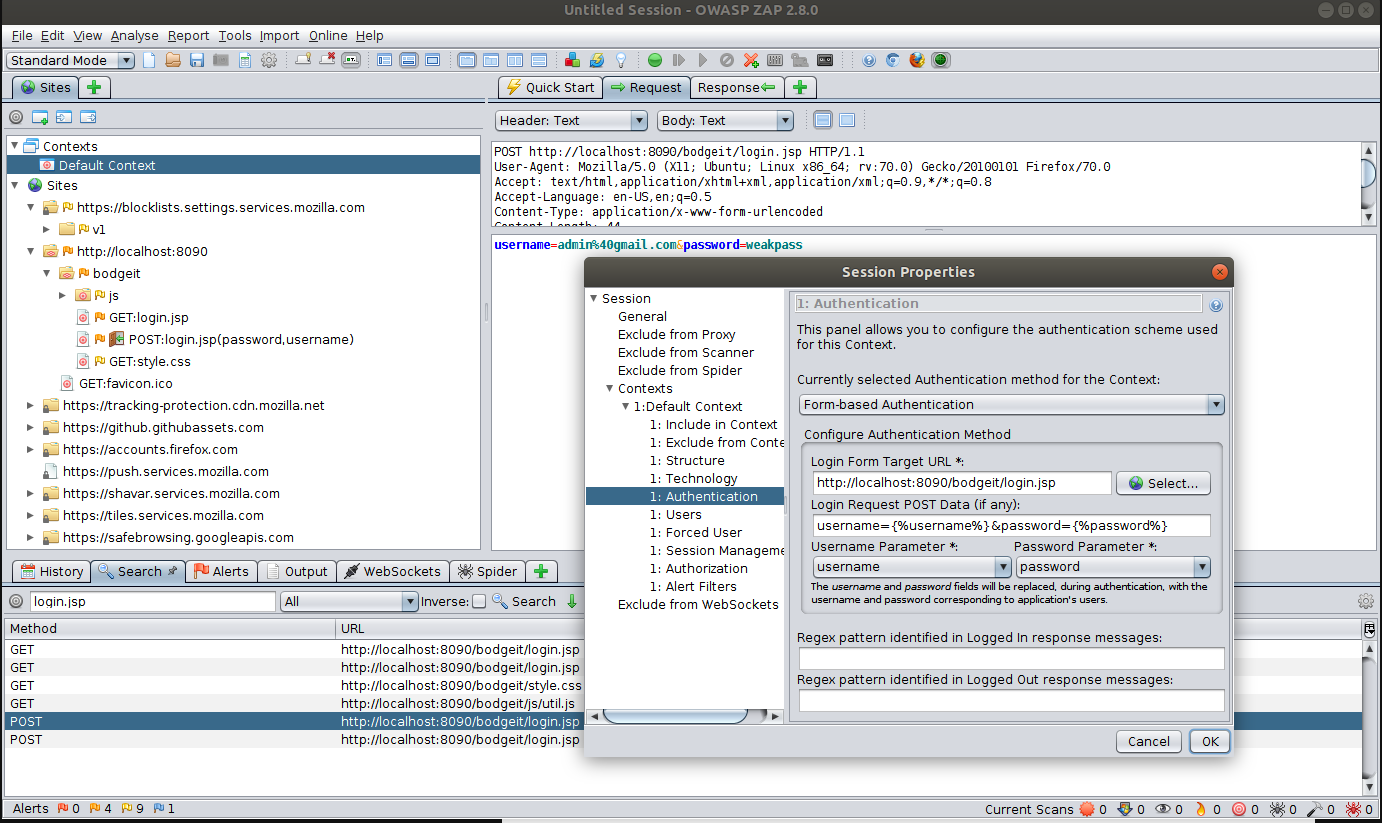
Right-click on the post request, and select Flag as Context -> Default Context : Form based Login Request option. This will
open the context authentication editor. You can notice it has auto-selected the form-based authentication, auto-filled the login URL, and the post data.
Select the correct form parameter as the username and password in the dropdown and click Ok.
Now you need to inform ZAP whether the application is logged in or out. The Bodgeit application includes the logout URL
<a href="logout.jsp">Logout</a> as the successful response. You can view this by navigating to the response tab of the login request.
Highlight the text and right click and select the Flag as Context -> Default Context, Loggedin Indicator option. This will autofill
the regex needed for the login indicator. The following image shows the completed set up for the authentication tab of the context menu.
Now let's add the user credentials by going to the context -> users -> Add section. After adding the credentials, enable
the "Forced User"
mode in the desktop UI to forcefully authenticate the user prior to the testing of the application.
Now let's test the authentication by performing an authenticated Spidering with ZAP. To accomplish this, go to the Spider and select the default
context and the test user to perform the authentication. After this, you should see the Spider crawling all the protected resources.
Steps to Reproduce via API
If you have configured the authentication via the desktop UI, then export the context and import it using the importContext API. Otherwise follow the steps below to configure the authentication setting for the context.
Include in Context
In order to proceed with authentication, the URL of the application should be added to the context. As Bodgeit is available via http://localhost:8090/bodgeit use the includeInContext API to add the URL to a context.
Set Authentication Method
Use the setAuthenticationMethod to set up the authentication method and
the configuration parameters. The setAuthenticationMethod takes contextId, authMethodName, and authMethodConfigParams as
parameters. As Bodgeit uses the form-based authentication, use formBasedAuthentication for the authMethodName and use the contextID
from Step 1 as the contextId parameter.
The authMethodConfigParams requires the loginUrl and loginRequestData. Therefore you should set the values to authMethodConfigParams in the following format:
authMethodConfigParams : loginUrl=http://localhost:8090/bodgeit/login.jsp&loginRequestData=username%3D%7B%25username%25%7D%26password%3D%7B%25password%25%7D
The values for authMethodConfigParams parameters must be URL encoded, in this case loginRequestData is username={%username%}&password={%password%}.
Set Login and Logout Indicators
Use the setLoggedOutIndicator to set the logout indicators of the application.
The Following is the regex command to match the successful response with the Bodgeit application.
\Q<a href=\"logout.jsp\"></a>\E
Create User and Enable Forced User Mode
Now add the user credentials via the setAuthenticationCredentials API and use the SetForcedUserModeEnabled to enable the forced user mode in ZAP.
Script Based Authentication
#!/usr/bin/env python
import urllib.parse
from zapv2 import ZAPv2

context_id = 1
apikey = 'changeMe'
context_name = 'Default Context'
target_url = 'http://localhost:3000'

# By default ZAP API client will connect to port 8080
zap = ZAPv2(apikey=apikey)

# Use the line below if ZAP is not listening on port 8080, for example, if listening on port 8090
# zap = ZAPv2(apikey=apikey, proxies={'http': 'http://127.0.0.1:8090', 'https': 'http://127.0.0.1:8090'})


def set_include_in_context():
    include_url = 'http://localhost:3000.*'

    zap.context.include_in_context(context_name, include_url)

    zap.context.exclude_from_context(context_name, '\\Qhttp://localhost:3000/login.php\\E')
    zap.context.exclude_from_context(context_name, '\\Qhttp://localhost:3000/logout.php\\E')
    zap.context.exclude_from_context(context_name, '\\Qhttp://localhost:3000/setup.php\\E')
    zap.context.exclude_from_context(context_name, '\\Qhttp://localhost:3000/security.php\\E')
    print('Configured include and exclude regex(s) in context')


def set_logged_in_indicator():

    logged_in_regex = "\\Q<a href=\"logout.php\">Logout</a>\\E"
    logged_out_regex = "(?:Location: [./]*login\\.php)|(?:\\Q<form action=\"login.php\" method=\"post\">\\E)"

    zap.authentication.set_logged_in_indicator(context_id, logged_in_regex)
    zap.authentication.set_logged_out_indicator(context_id, logged_out_regex)
    print('Configured logged in indicator regex ')


def set_script_based_auth():
    post_data = "username={%username%}&password={%password%}" + "&Login=Login&user_token={%user_token%}"
    post_data_encoded = urllib.parse.quote(post_data)
    login_request_data = "scriptName=auth-dvwa.js&Login_URL=http://localhost:3000/login.php&CSRF_Field=user_token" \
                         "&POST_Data=" + post_data_encoded

    zap.authentication.set_authentication_method(context_id, 'scriptBasedAuthentication', login_request_data)
    print('Configured script based authentication')


def set_user_auth_config():
    user = 'Administrator'
    username = 'admin'
    password = 'password'

    user_id = zap.users.new_user(context_id, user)
    user_auth_config = 'Username=' + urllib.parse.quote(username) + '&Password=' + urllib.parse.quote(password)
    zap.users.set_authentication_credentials(context_id, user_id, user_auth_config)
    zap.users.set_user_enabled(context_id, user_id, 'true')
    zap.forcedUser.set_forced_user(context_id, user_id)
    zap.forcedUser.set_forced_user_mode_enabled('true')
    print('User Auth Configured')
    return user_id


def upload_script():
    script_name = 'auth-dvwa.js'
    script_type = 'authentication'
    script_engine = 'Oracle Nashorn'
    file_name = '/tmp/auth-dvwa.js'
    charset = 'UTF-8'
    zap.script.load(script_name, script_type, script_engine, file_name, charset=charset)


def start_spider(user_id):
    zap.spider.scan_as_user(context_id, user_id, target_url, recurse='true')
    print('Started Scanning with Authentication')


set_include_in_context()
upload_script()
set_script_based_auth()
set_logged_in_indicator()
user_id_response = set_user_auth_config()
start_spider(user_id_response)
public class ScriptAuth {

    private static final String ZAP_ADDRESS = "localhost";
    private static final int ZAP_PORT = 8080;
    private static final String ZAP_API_KEY = null;
    private static final String contextId = "1";
    private static final String contextName = "Default Context";
    private static final String target = "http://localhost:3000";
    private static void setIncludeAndExcludeInContext(ClientApi clientApi) throws UnsupportedEncodingException, ClientApiException {
        String includeInContext = "http://localhost:3000.*";
        clientApi.context.includeInContext(contextName, includeInContext);
        clientApi.context.excludeFromContext(contextName, "\\Qhttp://localhost:3000/login.php\\E");
        clientApi.context.excludeFromContext(contextName, "\\Qhttp://localhost:3000/logout.php\\E");
        clientApi.context.excludeFromContext(contextName, "\\Qhttp://localhost:3000/setup.php\\E");
        clientApi.context.excludeFromContext(contextName, "\\Qhttp://localhost:3000/security.php\\E");
    }
    private static void setLoggedInIndicator(ClientApi clientApi) throws UnsupportedEncodingException, ClientApiException {
        // Prepare values to set, with the logged in indicator as a regex matching the logout link
        String loggedInIndicator = "\\Q<a href=\"logout.php\">Logout</a>\\E";
        String loggedOutIndicator = "(?:Location: [./]*login\\.php)|(?:\\Q<form action=\"login.php\" method=\"post\">\\E)";
        // Actually set the logged in indicator
        clientApi.authentication.setLoggedInIndicator( contextId, loggedInIndicator);
        clientApi.authentication.setLoggedOutIndicator( contextId, loggedOutIndicator);
        // Check out the logged in indicator that is set
        System.out.println("Configured logged in indicator regex: "
                + ((ApiResponseElement) clientApi.authentication.getLoggedInIndicator(contextId)).getValue());
    }
    private static void setScriptBasedAuthenticationForDVWA(ClientApi clientApi) throws ClientApiException,
            UnsupportedEncodingException {
        String postData = "username={%username%}&password={%password%}" + "&Login=Login&user_token={%user_token%}";
        String postDataEncode = URLEncoder.encode(postData, "UTF-8");
        String sb = ("scriptName=auth-dvwa.js&Login_URL=http://localhost:3000/login.php&CSRF_Field=user_token&")
                .concat("POST_Data=").concat(postDataEncode);

        clientApi.authentication.setAuthenticationMethod(contextId, "scriptBasedAuthentication", sb.toString());
        System.out.println("Authentication config: " + clientApi.authentication.getAuthenticationMethod(contextId).toString(0));
    }
    private static String setUserAuthConfigForDVWA(ClientApi clientApi) throws ClientApiException, UnsupportedEncodingException {
        // Prepare info
        String user = "Admin";
        String username = "admin";
        String password = "password";

        // Make sure we have at least one user
        String userId = extractUserId(clientApi.users.newUser(contextId, user));

        // Prepare the configuration in a format similar to how URL parameters are formed. This
        // means that any value we add for the configuration values has to be URL encoded.
        StringBuilder userAuthConfig = new StringBuilder();
        userAuthConfig.append("Username=").append(URLEncoder.encode(username, "UTF-8"));
        userAuthConfig.append("&Password=").append(URLEncoder.encode(password, "UTF-8"));

        System.out.println("Setting user authentication configuration as: " + userAuthConfig.toString());
        clientApi.users.setAuthenticationCredentials(contextId, userId, userAuthConfig.toString());
        clientApi.users.setUserEnabled(contextId, userId, "true");
        clientApi.forcedUser.setForcedUser(contextId, userId);
        clientApi.forcedUser.setForcedUserModeEnabled(true);

        // Check if everything is set up ok
        System.out.println("Authentication config: " + clientApi.users.getUserById(contextId, userId).toString(0));
        return userId;
    }
    private static void uploadScript(ClientApi clientApi) throws ClientApiException {
        String script_name = "auth-dvwa.js";
        String script_type = "authentication";
        String script_engine = "Oracle Nashorn";
        String file_name = "/tmp/auth-dvwa.js";
        clientApi.script.load(script_name, script_type, script_engine, file_name, null);
    }
    private static String extractUserId(ApiResponse response) {
        return ((ApiResponseElement) response).getValue();
    }
    private static void scanAsUser(ClientApi clientApi, String userId) throws ClientApiException {
        clientApi.spider.scanAsUser(contextId, userId, target, null, "true", null);
    }
    /**
     * The main method.
     *
     * @param args the arguments
     * @throws ClientApiException
     * @throws UnsupportedEncodingException
     */
    public static void main(String[] args) throws ClientApiException, UnsupportedEncodingException {
        ClientApi clientApi = new ClientApi(ZAP_ADDRESS, ZAP_PORT, ZAP_API_KEY);
        uploadScript(clientApi);
        setIncludeAndExcludeInContext(clientApi);
        setScriptBasedAuthenticationForDVWA(clientApi);
        setLoggedInIndicator(clientApi);
        String userId = setUserAuthConfigForDVWA(clientApi);
        scanAsUser(clientApi, userId);
    }
}
# To add in default context
curl 'http://localhost:8080/JSON/context/action/includeInContext/?contextName=Default+Context®ex=http%3A%2F%2Flocalhost%3A3000.*'
# To add exclude in context
curl 'http://localhost:8080/JSON/context/action/excludeFromContext/?contextName=Default+Context®ex=%5CQhttp%3A%2F%2Flocalhost%3A3000%2Flogout.php%5CE'
# To upload the script
curl 'http://localhost:8080/JSON/script/action/load/?scriptName=auth-dvwa.js&scriptType=authentication&scriptEngine=Oracle+Nashorn&fileName=%2Ftmp%2Fauth-dvwa.js&scriptDescription=&charset='
# To set up authentication information
curl 'http://localhost:8080/JSON/authentication/action/setAuthenticationMethod/?contextId=1&authMethodName=scriptBasedAuthentication&authMethodConfigParams=scriptName%3Dauth-dvwa.js%26Login_URL%3Dhttp%3A%2F%2Flocalhost%3A3000%2Flogin.php%26CSRF_Field%3Duser_token%26POST_Data%3Dusername%253D%257B%2525username%2525%257D%2526password%253D%257B%2525password%2525%257D%2526Login%253DLogin%2526user_token%253D%257B%2525user_token%2525%257D'
# To set the login indicator
curl 'http://localhost:8080/JSON/authentication/action/setLoggedInIndicator/?contextId=1&loggedInIndicatorRegex=%5CQ%3Ca+href%3D%5C%22logout.php%5C%22%3ELogout%3C%2Fa%3E%5CE'
# To set logged out indicator
curl 'http://localhost:8080/JSON/authentication/action/setLoggedOutIndicator/?contextId=1&loggedOutIndicatorRegex=%28%3F%3ALocation%3A+%5B.%2F%5D*login%5C.php%29%7C%28%3F%3A%5CQ%3Cform+action%3D%22login.php%22+method%3D%22post%22%3E%5CE%29'
# To create a user (The first user id is: 0)
curl 'http://localhost:8080/JSON/users/action/newUser/?contextId=1&name=Test+User'
# To add the credentials for the user
curl 'http://localhost:8080/JSON/users/action/setAuthenticationCredentials/?contextId=1&userId=0&authCredentialsConfigParams=Username%3Dadmin%26Password%3Dpassword'
# To enable the user
curl 'http://localhost:8080/JSON/users/action/setUserEnabled/?contextId=1&userId=0&enabled=true'
# To set forced user
curl 'http://localhost:8080/JSON/forcedUser/action/setForcedUser/?contextId=1&userId=0'
# To enable forced user mode
curl 'http://localhost:8080/JSON/forcedUser/action/setForcedUserModeEnabled/?boolean=true'
ZAP has scripting support for most of the popular languages. The following are some of the scripting languages supported by ZAP.
- JavaScript
- Python
- Ruby
- Groovy
- Zest
ZAP has an Add-on Marketplace where you can get add-ons for additional scripting engines. Click the red, blue, & green box stacked icon in ZAP to bring up the marketplace modal. After it pops up, switch to the Marketplace and install the appropriate scripting engine.
The following example performs a script based authentication for the Damn Vulnerable Web Application. Similar to the
Bodgeit example DVWA also uses POST request to authenticate the users. But apart from username and password DVWA sends an
additional token to protect against the Cross-Site request forgery attacks. This token is obtained from the landing page.
The following image shows the embedded token in the login page.

If the token is not included with the login script as a POST parameter, the request will be rejected. In order to send this token, lets use the script based authentication technique. The authentication script will parse the HTML content and extract the token and append it in the POST request.
Setup Target Application
Use the following docker command to start the DVWA. In order to fully complete the setup you need to login (http://localhost:3000) to the application and press the configure button. Use the default credentials of the application to login and finish the setup (Username: admin, Password: password).
docker run --rm -it -p 3000:80 vulnerables/web-dvwa
Create the Script
Go to the Scripts tab and create a new Authentication script. Provide a name to the script and select
JavaScript/Nashorn as the engine and replace the script contents with the following script.
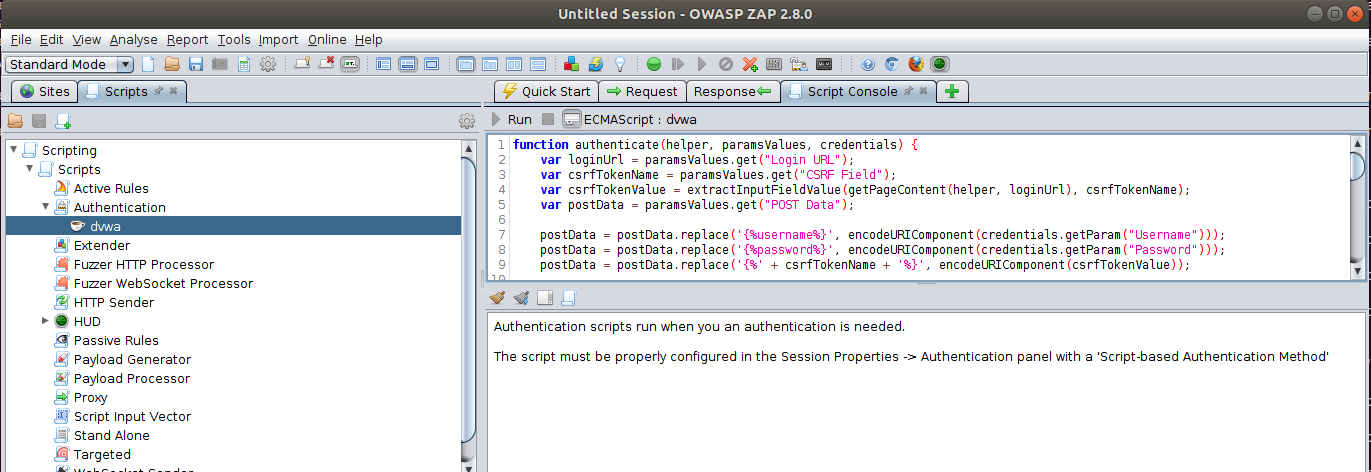
Configure Context Authentication
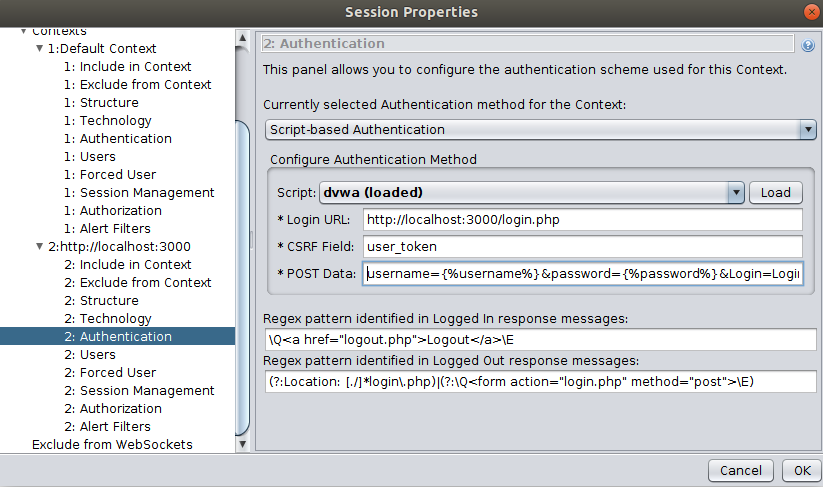
Now navigate to http://localhost:3000 and add the URL to the default context. Then double click on the default context and select the script-based authentication as the authentication method. Now load the script from the drop down provided and the following parameter values.
- Login URL:
http://localhost:3000/login.php - CSRF Field:
user_token - POST Data:
username={%username%}&password={%password%}&Login=Login&user_token={%user_token%} - Logged in regex:
\Q<a href="logout.php">Logout</a>\E - Logged out regex:
(?:Location: [./]*login\.php)|(?:\Q<form action="login.php" method="post">\E)
Now add the default admin user to the users tab and enable the user.
- User Name:
Administrator - Username:
admin - Password:
password
As the login operation is performed by the script lets add the login URL as out of context. Additionally you should add pages which will disrupt the login process to out of context. For example, by not excluding the logout URL, the Spider will trigger unwanted logouts (ex.: logoff/password change, etc.). Therefore, add the following regex(s) to the "Exclude from Context" tab.
\Qhttp://localhost:3000/login.php\E\Qhttp://localhost:3000/logout.php\E\Qhttp://localhost:3000/setup.php\E\Qhttp://localhost:3000/security.php\E
Now you can enable the forced user mode and start the Spider or manually select the admin user for the Spider scan. If you have selected the forced user mode and also manually selected a user; then the manually selected user/context will supersede the forced user mode. After this you should see the Spider crawling all the protected resources. The authentication results will be available through the Output panel and you can also select the login POST request in the History tab to verify the token has been sent to the application.
Steps to Reproduce via API
Use the scripts endpoint to upload the script file. Thereafter the configurations are very similar to the form based authentication with the Bodgeit application. Use the includeInContext API to add the URL to the default context and use the setAuthenticationMethod to setup the authentication method and the configuration parameters. Finally use the users API to create the admin user. Refer the script in the right column on how to use the above APIs.
JSON Based Authentication
#!/usr/bin/env python
import urllib.parse
from zapv2 import ZAPv2

context_id = 1
apiKey = 'changeMe'
context_name = 'Default Context'
target_url = 'http://localhost:3000'

# By default ZAP API client will connect to port 8080
zap = ZAPv2(apikey=apiKey)

# Use the line below if ZAP is not listening on port 8080, for example, if listening on port 8090
# zap = ZAPv2(apikey=apiKey, proxies={'http': 'http://127.0.0.1:8090', 'https': 'http://127.0.0.1:8090'})


def set_include_in_context():
    include_url = 'http://localhost:3000.*'
    zap.context.include_in_context(context_name, include_url)
    print('Configured include and exclude regex(s) in context')


def set_logged_in_indicator():
    logged_in_regex = '\Q<a href="logout.php">Logout</a>\E'
    logged_out_regex = '(?:Location: [./]*login\.php)|(?:\Q<form action="login.php" method="post">\E)'

    zap.authentication.set_logged_in_indicator(context_id, logged_in_regex)
    zap.authentication.set_logged_out_indicator(context_id, logged_out_regex)
    print('Configured logged in indicator regex: ')


def set_json_based_auth():
    login_url = "http://localhost:3000/rest/user/login"
    login_request_data = 'email={%username%}&password={%password%}'

    json_based_config = 'loginUrl=' + urllib.parse.quote(login_url) + '&loginRequestData=' + urllib.parse.quote(login_request_data)
    zap.authentication.set_authentication_method(context_id, 'jsonBasedAuthentication', json_based_config)
    print('Configured form based authentication')


def set_user_auth_config():
    user = 'Test User'
    username = '[email protected]'
    password = 'testtest'

    user_id = zap.users.new_user(context_id, user)
    user_auth_config = 'username=' + urllib.parse.quote(username) + '&password=' + urllib.parse.quote(password)
    zap.users.set_authentication_credentials(context_id, user_id, user_auth_config)


def add_script():
    script_name = 'jwtScript.js'
    script_type = 'httpsender'
    script_engine = 'Oracle Nashorn'
    file_name = '/tmp/jwtScript.js'
    zap.script.load(script_name, script_type, script_engine, file_name)


set_include_in_context()
add_script()
set_json_based_auth()
set_logged_in_indicator()
set_user_auth_config()
public class JSONAuth {

    private static final String ZAP_ADDRESS = "localhost";
    private static final int ZAP_PORT = 8090;
    private static final String ZAP_API_KEY = null;
    private static final String contextId = "1";
    private static final String target = "http://localhost:3000";

    private static void setJSONBasedAuthentication(ClientApi clientApi) throws ClientApiException, UnsupportedEncodingException {
        String loginUrl = "http://localhost:3000/rest/user/login";
        String loginRequestData = "username={%username%}&password={%password%}";

        // Prepare the configuration in a format similar to how URL parameters are formed. This
        // means that any value we add for the configuration values has to be URL encoded.
        StringBuilder jsonBasedConfig = new StringBuilder();
        jsonBasedConfig.append("loginUrl=").append(URLEncoder.encode(loginUrl, "UTF-8"));
        jsonBasedConfig.append("&loginRequestData=").append(URLEncoder.encode(loginRequestData, "UTF-8"));

        System.out.println("Setting JSON based authentication configuration as: " + jsonBasedConfig.toString());
        clientApi.authentication.setAuthenticationMethod(contextId, "jsonBasedAuthentication", jsonBasedConfig.toString());

        // Check if everything is set up ok
        System.out.println("Authentication config: " + clientApi.authentication.getAuthenticationMethod(contextId).toString(0));
    }

    private static String setUserAuthConfig(ClientApi clientApi) throws ClientApiException, UnsupportedEncodingException {
        // Prepare info
        String user = "Test User";
        String username = "[email protected]";
        String password = "testtest";

        // Make sure we have at least one user
        String userId = extractUserId(clientApi.users.newUser(contextId, user));

        // Prepare the configuration in a format similar to how URL parameters are formed. This
        // means that any value we add for the configuration values has to be URL encoded.
        StringBuilder userAuthConfig = new StringBuilder();
        userAuthConfig.append("username=").append(URLEncoder.encode(username, "UTF-8"));
        userAuthConfig.append("&password=").append(URLEncoder.encode(password, "UTF-8"));

        System.out.println("Setting user authentication configuration as: " + userAuthConfig.toString());
        clientApi.users.setAuthenticationCredentials(contextId, userId, userAuthConfig.toString());
        clientApi.users.setUserEnabled(contextId, userId, "true");
        clientApi.forcedUser.setForcedUser(contextId, userId);
        clientApi.forcedUser.setForcedUserModeEnabled(true);

        // Check if everything is set up ok
        System.out.println("Authentication config: " + clientApi.users.getUserById(contextId, userId).toString(0));
        return userId;
    }

    private static void addScript(ClientApi clientApi) throws ClientApiException {

        String script_name = "jwtScript.js";
        String script_type = "httpsender";
        String script_engine = "Oracle Nashorn";
        String file_name = "/tmp/authscript.js";

        clientApi.script.load(script_name, script_type, script_engine, file_name, null);
    }

    private static void scanAsUser(ClientApi clientApi, String userId) throws ClientApiException {
        clientApi.spider.scanAsUser(contextId, userId, target, null, "true", null);
    }

    private static String extractUserId(ApiResponse response) {
        return ((ApiResponseElement) response).getValue();
    }

    /**
     * The main method.
     *
     * @param args the arguments
     * @throws ClientApiException
     * @throws UnsupportedEncodingException
     */
    public static void main(String[] args) throws ClientApiException, UnsupportedEncodingException {
        ClientApi clientApi = new ClientApi(ZAP_ADDRESS, ZAP_PORT, ZAP_API_KEY);

        addScript(clientApi);
        setJSONBasedAuthentication(clientApi);
        String userId = setUserAuthConfig(clientApi);
        scanAsUser(clientApi, userId);
    }
}
# To add the script
curl 'http://localhost:8080/JSON/script/action/load/?scriptName=authscript.js&scriptType=authentication&scriptEngine=Oracle+Nashorn&fileName=%2Ftmp%2Fauthscript.js&scriptDescription=&charset=UTF-8'

# To set up authentication information
curl 'http://localhost:8080/JSON/authentication/action/setAuthenticationMethod/?contextId=1&authMethodName=scriptBasedAuthentication&authMethodConfigParams=scriptName%3Dauthscript.js%26Login+URL%3Dhttp%3A%2F%2Flocalhost%3A3000%2Flogin.php%26CSRF+Field%3Duser_token%26POST+Data%3Dusername%3D%7B%25username%25%7D%26password%3D%7B%25password%25%7D%26Login%3DLogin%26user_token%3D%7B%25user_token%25%7D'

# To set the login indicator
curl 'http://localhost:8080/JSON/authentication/action/setLoggedInIndicator/?contextId=1&loggedInIndicatorRegex=%5CQ%3Ca+href%3D%22logout.jsp%22%3ELogout%3C%2Fa%3E%5CE'

# To create a user (The first user id is: 0)
curl 'http://localhost:8080/JSON/users/action/newUser/?contextId=1&name=Test+User'

# To add the credentials for the user
curl 'http://localhost:8080/JSON/users/action/setAuthenticationCredentials/?contextId=1&userId=0&authCredentialsConfigParams=username%3Dtest%40example.com%26password%3DweakPassword'

# To enable the user
curl 'http://localhost:8080/JSON/users/action/setUserEnabled/?contextId=1&userId=0&enabled=true'

# To set forced user
curl 'http://localhost:8080/JSON/forcedUser/action/setForcedUser/?contextId=1&userId=0'

# To enable forced user mode
curl 'http://localhost:8080/JSON/forcedUser/action/setForcedUserModeEnabled/?boolean=true'
The following example performs a script based authentication for the OWASP Juice Shop. Juice Shop is a modern application and it contrary to the previous examples the protected resources are accessed by sending an authorization header(JSON web token).
Setup Target Application
Use the following docker command to start the OWASP Juice Shop.
docker run -d -p 3000:3000 bkimminich/juice-shop
Register User
Register a user in the application by navigating to the following URL: http://localhost:3000/#/register. For the purpose of this example, use the following information.
- Email: [email protected]
- Password: testtest
- Security Question: Select Your eldest siblings middle name (enter any text)
Login
After registering the user, browse (proxied via ZAP) to the following URL (http://localhost:3000/#/login)
and login to the application. When you login to the application the request will be added to the History tab in ZAP.
Search for the POST request to the following URL: http://localhost:3000/rest/user/login.
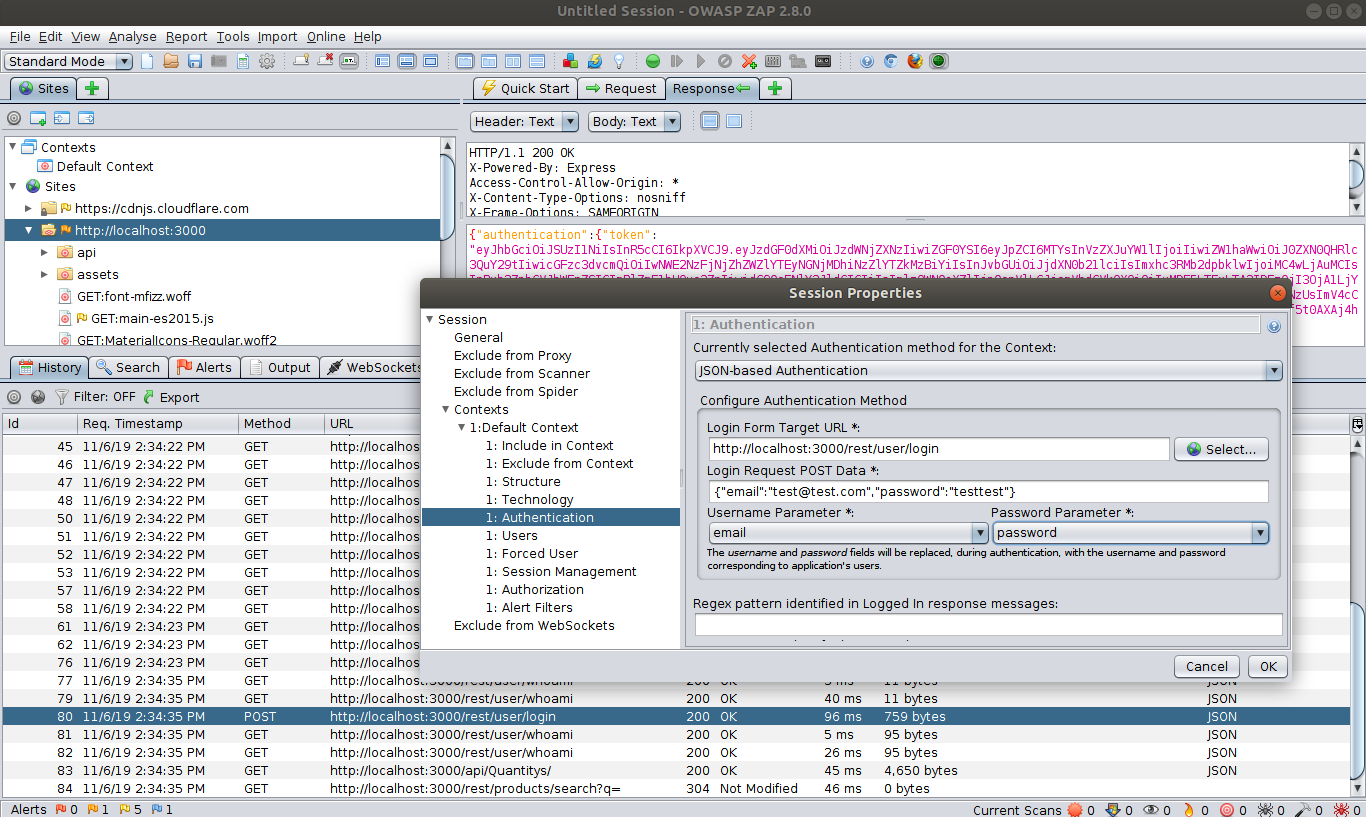
Right-click on the POST request, and select Flag as Context -> Default Context : JSON-based Auth Login Request option. This will open the context authentication editor.
You can notice it has auto selected the JSON-based authentication, auto-filled the login URL and the post data.
Select the correct JSON attribute as the username and password in the dropdown and click Ok. The following image shows the completed setup for the authentication tab of the context menu.
Exit the context editor and go back to the login request. You will notice in the login response headers there is no set cookie. In the response body you will find the response data.
The request that follows is GET http://localhost:3000/rest/user/whoami which you will notice has a header called Authorization
which uses the token from the response body of the login request. In body of the response, you should see some info about your
user: {"user":{"id":1,"email":"[email protected]"}}. If you visit that url directly, with your browser, the content of the page is
{"user":{}} - the Authorization header is not added to request and it is not authenticated.
This request is initiated as a client side AJAX request using a spec called JWT. Currently ZAP doesn't have a notion of the Authorization header for sessions so this is where ZAPs scripting engine will come into play! With ZAP's scripting engine, we can easily add to or augment it's functionality.
Add the Script
Now in the left sidebar next to the Sites click + to add Scripts. This will bring into focus in the sidebar. Drill into
Scripting > Scripts > HTTP Sender. Then right click on the HTTP Sender and with that context menu click New Script. Name
the script jwtScript.js and set the Script Engine to ECMAScript (do not check the box that says enable).
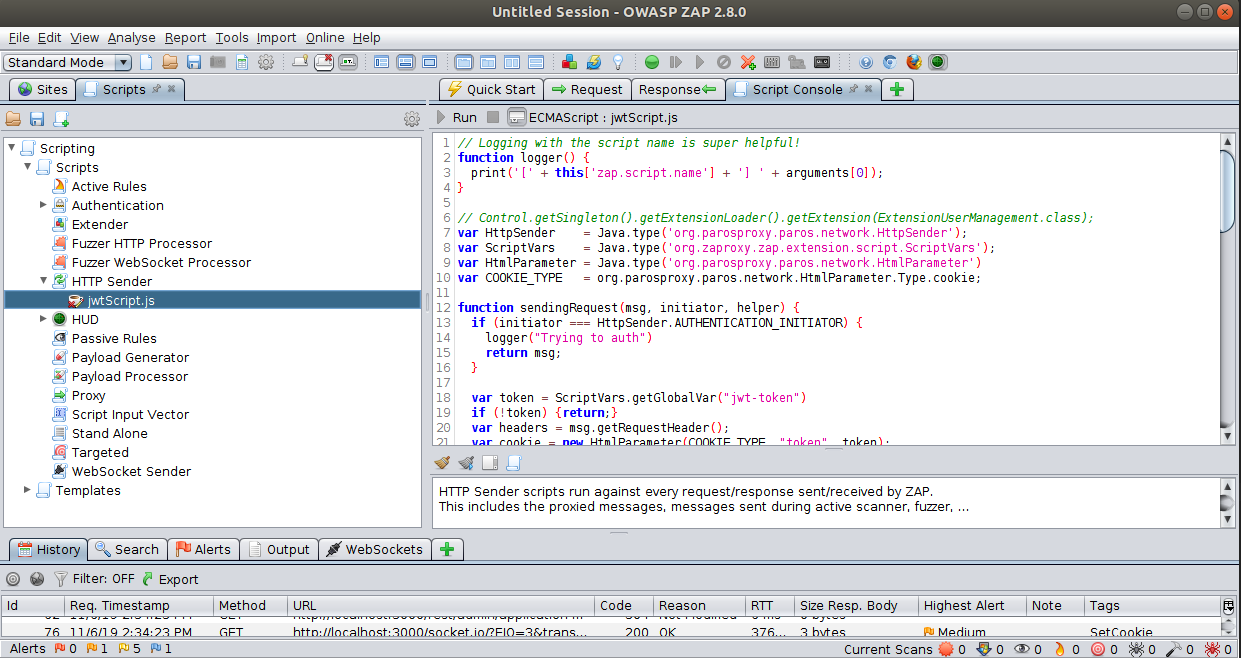
Now that we have that script setup, let's test it out! Go ahead and visit the login page http://localhost:3000/#/login
with the browser launched with ZAP and use your test account to login. After you login, back in ZAP in the Script Console
tab you should see a message that says Capturing token for JWT.
Now visit http://localhost:3000/rest/user/whoami directly in the browser and you will see you get JSON data with the
user {"user":{"id":9,"email":"[email protected]"}}! Back in the Script Console you will see the script went ahead and added the header!
Now that we have a script ensuring we have the right headers & cookies for authentication, let's go ahead and try spidering the application again! So let's use the same settings we used earlier from the AJAX Spider Settings. Once the scan starts, check out the browser running the scan - you'll notice the user is logged in! (Logout & Your Basket links visible). Now the AJAX Spider will pick up some new paths that it couldn't find before!
Steps to Reproduce via API
Use the scripts endpoint to add the script file. Thereafter the configurations are very similar to the form based authentication
with the Bodgeit application. Use the includeInContext API to add the URL to the default context
and use the setAuthenticationMethod to setup the authentication method and
the configuration parameters. Finally use the users API to create the admin user. Refer the script in the right column
on how to use the above APIs.
Advanced Settings
The following section shows advanced configurations of the APIs.
Spider Settings
The following image shows the advanced configurations tab of Spider in the desktop UI.
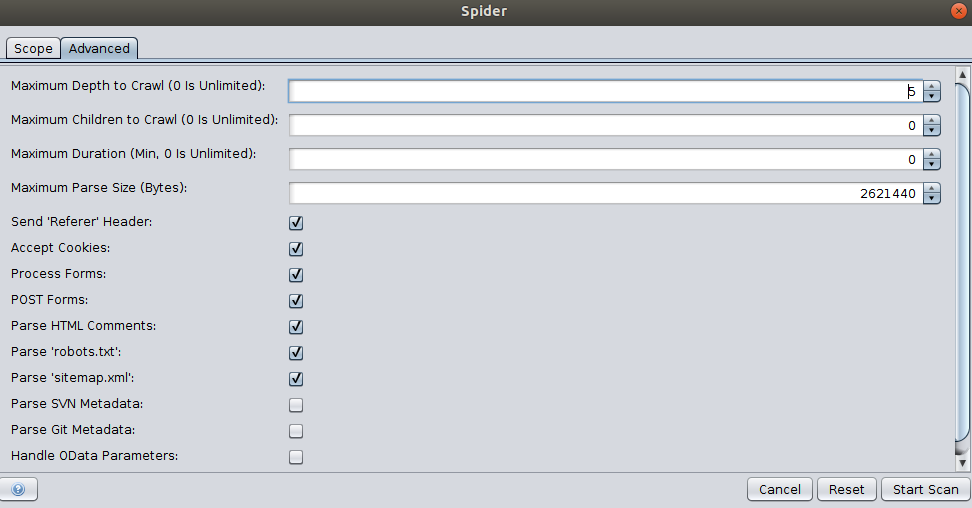
Use the setOptionMaxDepth API to set the maximum depth the spider can crawl, where 0 refers to unlimited depth. The setOptionMaxChildren API sets the maximum number of child nodes (per node) that can be crawled, where 0 means no limit. The setOptionMaxDuration API can be used to set the maximum duration the Spider will run. Use the setOptionMaxParseSizeBytes API to limit the amount of data parsed by the spider. This allows the spider to skip big responses/files.
View the Spider section in the API Catalogue for additional APIs.
Ajax Spider Settings
The following image shows the advanced configurations tab of Ajax Spider in the desktop UI.
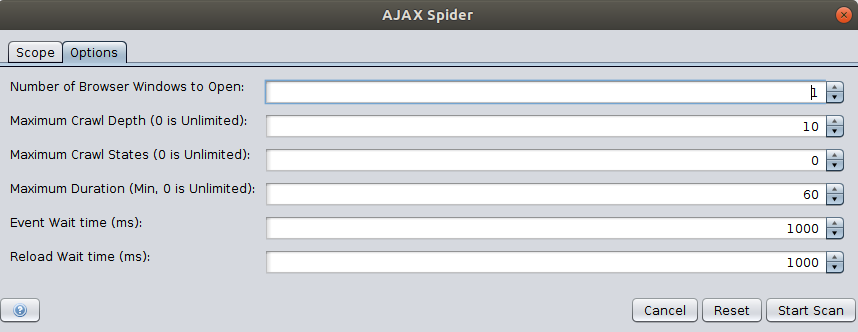
Similar to the Spider API, the Ajax spider also provides APIs to set the maximum depth, crawl state, and maximum duration.
Passive Scan Settings
The scanning rules can be enabled/disabled using the enableScanners and disableScanners APIs. Also use the setScanOnlyInScope API to limit the passive scanning to a scope. View the advanced section to learn how to configure a context or scope using ZAP APIs.
Passive scanning can also be used to automatically add tags and raise alerts for potential issues. A set of rules for automatic tagging are provided by default. These can be changed, deleted or added to via the Options Passive Scan Tags Screen.
Active Scan Settings
General Options
The general options for Active Scan can be configured using the options tab in the desktop UI shown below.
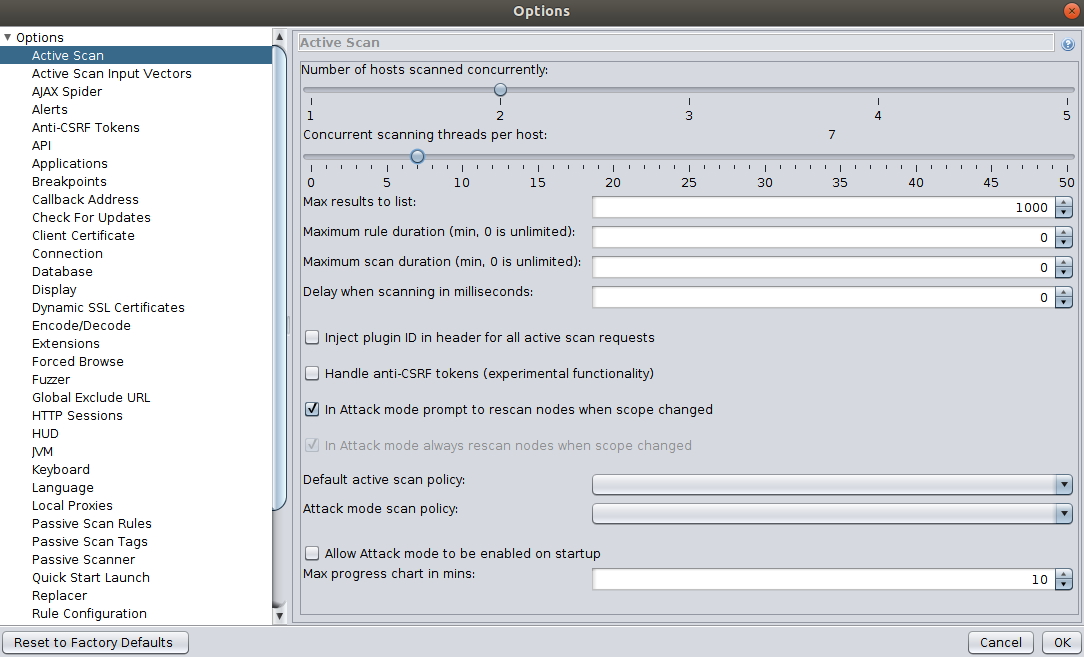
Use the setOptionMaxScanDurationInMins API to limit the duration of scan and setOptionMaxRuleDurationInMins API to limit the time of individual active scan rules. This can be used to prevent rules from running for an excessive amount of time.
Use the setOptionHostPerScan API to set the maximum number of hosts that will be scanned at the same time. Furthermore, use the setOptionThreadPerHost API to set the number of threads the scanner will use per host. Increasing both of these values will reduce the active scanning time but this may put extra strain on the server ZAP is running on.
Use the setOptionDelayInMs API to delay each request from ZAP in milliseconds. Setting this to a non zero value will increase the time an active scan takes, but will put less of a strain on the target host. View the Active Scan section in the API Catalogue for additional information regarding the APIs.
Input Vectors
Input vectors refers to the elements that Active Scan will target. Specifying the exact elements to target will improve the scanning time and accuracy of the results. For example, for the following configuration the optionTargetParamsInjectable and optionTargetParamsEnabledRPC will yield the results of 11 and 39. The numbers can be deconstructed in the following manner:
- 1+2+8 = 11 [Query String(1), Post Data(2), HTTP Headers(8)]
- 1+2+4+32 = 39 [Multipart (1), XML (2), JSON (4), DWR (32)]
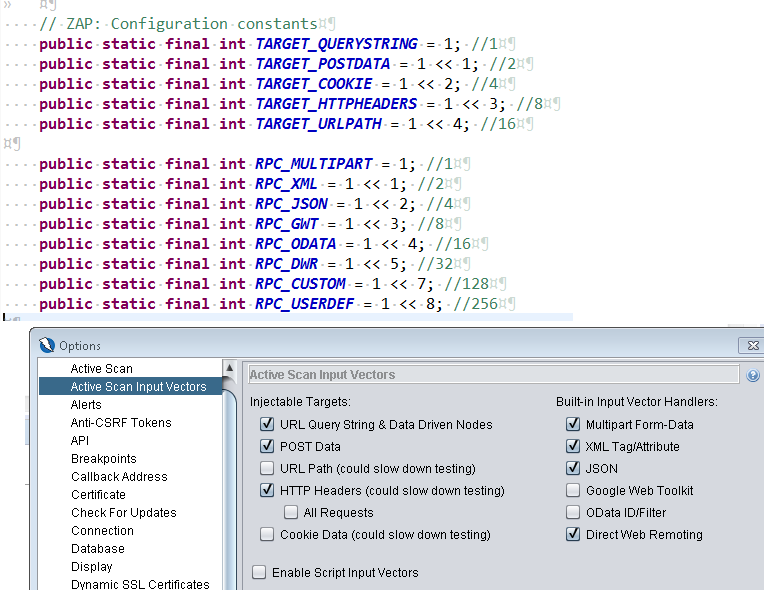
Thus, to change the values of Injectable targets and Input Vector Handlers calculate the exact values and
use the setoptiontargetparamsinjectable and setoptiontargetparamsenabledrpc APIs accordingly.
The Add URL query parameter option under the Injectable Tragets sets whether or not the active scanner should add a query param
to GET requests which do not have parameters to start with. This option can be enabled using the setoptionaddqueryparam API.
Technology
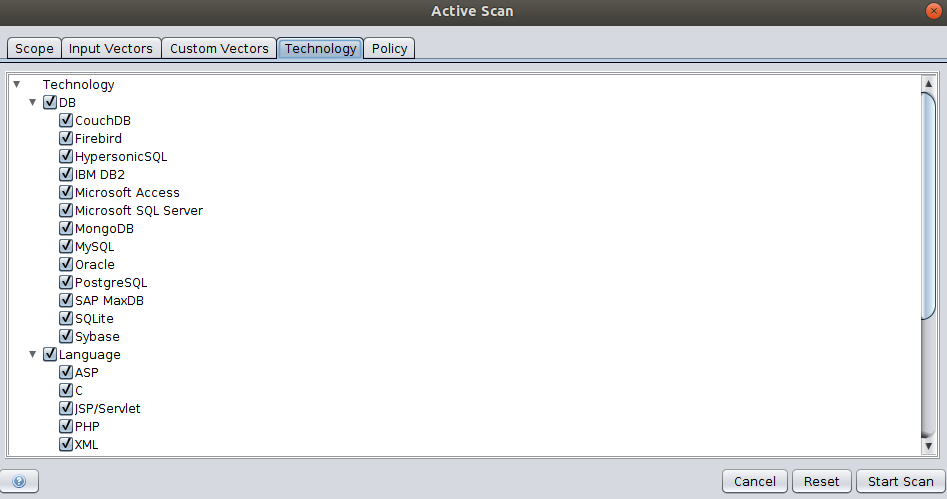
The Technology tab allows you to specify which types of technologies to scan. Un-selecting technologies that you know are not present in the target application may speed up the scan, as rules which target that technology can skip those tests. For an example, if the target web application does not have a database then removing it will increase the performance of the Active Scan.
Use the includeContextTechnologies and excludeContextTechnologies API endpoints to include and exclude the technology list from the context.
Policy
A scan policy defines exactly which rules are run as part of an active scan. It also defines how these rules run influencing how many requests are made and how likely potential issues are to be flagged. You can define as many scan policies as you like and select the most appropriate one when you start the scan via the Active Scan.
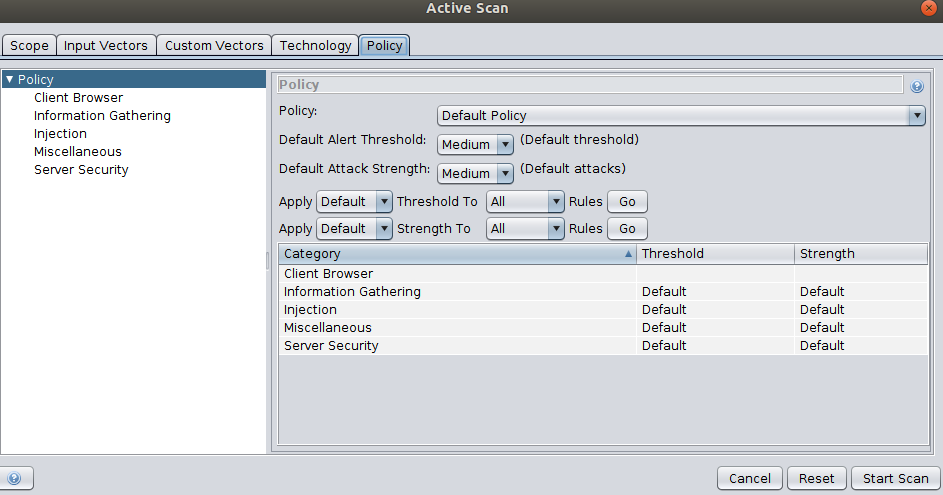
The Policy tab shown in the above image allows you to override any of the settings specified in the selected scan policy.
Contributions Welcome!
Contributions are welcome! There are many ways you can contribute to ZAP, both as a user and as a developer.
1. Creating High-level API/Automation Docs
Create high level docs or example guides on how to use the APIs to perform any action/view with ZAP.
The source files for the ZAP API documentation is hosted on GitHub. The repository is available at Github.
The source files are in Markdown (md) format.
2. REST API Documentation
ZAP's rest API is documented using the OpenAPI specification. The specification could be improved by enhancing the description of parameters/ results/ data types etc. The open API specification is available via GitHub.
3. Feature Documentation
Feature documentation related to ZAP is available on ZAP wiki, ZAP user guide, and ZAP extensions repositories.
How to Contribute
The ZAP API documentation is developed according to the docs as code philosophy. The most direct and effective way to contribute to the docs is to submit a pull request(PR) or raise an issue in the GitHub repository containing the docs content that you want to change.
There are 2 different workflows which you can use to make changes or PRs. Use what you are most comfortable with!
1. "Edit this File on GitHub"
You can edit the documentation in the browser via navigating to the relevant source file and clicking the edit this file button. This workflow is recommended for minor changes. For example correcting typos/spellings/grammar etc. For extensive changes, please use the local setup and editing option.
2. Local Setup and Editing
You can fork the repository on GitHub and submit the changes via pull requests. Please see the local setup for API docs section to setup and render the docs locally.
Local Setup for API Docs
ZAP uses git for its code repository. To submit a documentation update, use the following steps:
1. Clone the ZAP Docs repository:
git clone https://github.com/zaproxy/zap-api-docs
2. Navigate to the cloned repository:
cd zap-api-docs
3. Use the following guide to install Ruby
4. To install the dependencies: $ bundle install
5. To start the server: $ bundle exec middleman server
Documentation Style
This style guide provides a set of editorial guidelines for anyone writing documentation for ZAP.
General Guidelines
Check for the grammar and spellings before sending the pull request. Most of the modern editors comes with a spell check option or plugin.
Use a friendly and conversational tone. Always use simple sentences. If the sentence is lengthy try to break it in to smaller sentences. Also avoid sentences with complicated words or jargon.
Write positively and avoid using negative sentences.
- Recommended: If you are not familiar with the Spider, then read this documentation.
- Not Recommended: Read this documentation to get familiarized with the Spider.
The documentation should be neutral, without judgments, opinions. For example, words like "easily" or "simple" come with a lot of assumptions. Things that are easier for you might be difficult for another person. Avoid this type of wordings when contributing to the document.
Language and Grammar
Abbreviation
Spell out the abbreviation or acronym before introducing them in the sentence. If the abbreviation is well known such as API or ZAP or HTML, you can use it without spelling it first.
Active Voice
In general use active voice when formulating the sentence instead of passive voice. A sentence written in the active voice will emphasize the person or thing who is performing an action (eg.The dog chased the ball). In contrast, the passive voice will highlight the recipient of the action (The ball was chased by the dog). Therefor use the passive voice, only when it's less important who or what completed the action and more important that the action was completed. For example:
- Recommended: The Spider crawls the URLs.
- Not recommended: The URLs are crawled by the Spider.
Gender References
Use gender neutral pronouns (they/their/them) when referring to a hypothetical person such as "a user with a logged in session". For example, instead of: - he or she, use they; - him or her, use them; - his or her, use their; - his or hers, use theirs; - himself or herself, use themselves;
Method Description
When you're writing reference documentation for a method, phrase the main method description in terms of what it does ("Gets," "Starts," "Creates," "Lists"), rather than what the developer would use it to do ("Get," "Start," "Create," "List").
- Recommended: action.scan: Starts the Spider on the specified URL.
- Not recommended: action.scan: Start the Spider on the specified URL.
Second Person
In general, use second person in your docs rather than first person. For example:
- Recommended: You are recommended to use the Spider.
- Not Recommended: We recommend to use the Spider.
Spellings
Use American spellings when contributing to the documentation.
Formatting
Capitalization:
- Use the Chicago manual for capitalization rules for the documentation.
- For titles of a section, Capitalize of the first letter of each word except for the closed-class words
such as determiners, pronouns, conjunctions, and prepositions. Use the following link for guidance.
- Recommended: The Spider Tutorial with APIs
- For normal sentences don't capitalize random words in the middle of the sentences.
Number formatting
- In general spell out the number if it starts a sentence or is less than ten or an ordinal number.
- Recommended: Seventeen requests has been intercepted by the passive scanner.
- Recommended: The passive scan showed nine warnings.
- Recommended: The fifth alert was a high priority alert.
- Use numerals for numbers higher than ten or fractions or unit prices.
- Recommended: The active scanner detected 24 issues.
- Recommended: The scanner took 23.4 seconds to complete the crawling.
- In general spell out the number if it starts a sentence or is less than ten or an ordinal number.
Punctuation
Commas
- Use oxford commas when writing a list of three or more items
- Recommended: The API can return the results in XML, JSON, and HTML.
- Not Recommended: The API can return the results in XML, JSON and HTML.
- Use oxford commas when writing a list of three or more items
Periods
- Do not add period to headings or titles.
- Avoid using periods at the end of URLs. Try to modify the sentence so the URL can be in the middle of the sentence.
- Do not add period to headings or titles.
Markdown Syntax
The API docs are created using standard markdown files. This section contains information regarding the syntax and linting of the Markdown files. Refer to the Slate documentation. Also refer to this document to properly lint the Markdown files.
Writing Code
Inline Code
Put `backticks` around the following symbols when used in text:
- Data types:
json,xml,html - File name:
test.py,/path-to-your-data/xml/example-name
Code Block
Use three back ticks to open and close a code block. Specify the programming language after the first backtick group.
The documentation currently supports python, java, and shell languages.

Troubleshooting
This section explains how to troubleshoot issues that might occur when interacting with the ZAP API.
Enable Useful Dev Options
While developing scripts/programs that interact with ZAP API it's recommended that the following ZAP API options are enabled, to have more information about possible errors:
Report permission errors via APIReport error details via API
The API response will then contain the details about why the API request was rejected or was not successful.
Common Errors
Wrong API Key or Address Not Allowed
//org.zaproxy.clientapi.core.ClientApiException: java.net.SocketException: Unexpected end of file from server
//  at org.zaproxy.clientapi.core.ClientApi.callApiDom(ClientApi.java:366)
//  at org.zaproxy.clientapi.core.ClientApi.callApi(ClientApi.java:350)
//  at org.zaproxy.clientapi.gen.Spider.scan(Spider.java:242)
requests.exceptions.ProxyError: HTTPConnectionPool(host='127.0.0.1', port=8080): Max retries exceeded with
url: http://zap/JSON/spider/action/scan/?apikey=changeMe&url=https%3A%2F%2Fexample.com
(Caused by ProxyError('Cannot connect to proxy.', RemoteDisconnected('Remote end closed connection without response')))
By default, ZAP will close the connection without a response if an API request is not from an allowed address or the API key is wrong. If you get exceptions similar to the following ensure that the API client is using the correct API key and that the address is allowed.
No Connection to ZAP
//org.zaproxy.clientapi.core.ClientApiException: java.net.ConnectException: Connection refused: connect
//  at org.zaproxy.clientapi.core.ClientApi.callApiDom(ClientApi.java:366)
//  at org.zaproxy.clientapi.core.ClientApi.callApi(ClientApi.java:350)
//  at org.zaproxy.clientapi.gen.Spider.scan(Spider.java:242)
//  at ZAP_tests.Spider.main(Spider.java:25)
requests.exceptions.ProxyError: HTTPConnectionPool(host='127.0.0.1', port=8080): Max retries exceeded with
url: http://zap/JSON/spider/action/scan/?apikey=changeMe&url=https%3A%2F%2Fexample.com
(Caused by ProxyError('Cannot connect to proxy.', NewConnectionError('<urllib3.connection.HTTPConnection object at
0x101be78e0>: Failed to establish a new connection: [Errno 61] Connection refused')))
There are several reasons that the API client might not be able to connect to ZAP:
- ZAP is not yet started, some clients might have methods to wait for ZAP;
- ZAP is not listening on the address, for example, if the API client is connecting from an external machine then ZAP will have to listen on the external address (or all addresses
0.0.0.0) - The API client is not configured with correct address/port;
Error: No Implementor
If you come across the No Implementor Error while invoking the APIs: Check the necessary add-on or component is installed and enabled.
(For example if you receive "no_implementor" in relation to Ajax Spider calls, perhaps the Ajax Spider add-on isn't installed.)
API Catalogue
Scroll down for code samples, example requests and responses. Select a language for code samples from the tabs above or the mobile navigation menu.
The HTTP API for controlling and accessing ZAP.
Base URLs:
-
- address - The address ZAP is listening on. Default: 127.0.0.1
- port - The port ZAP is bound to. Default: 8080
Email: ZAP User Group Web: ZAP User Group License: Apache 2.0
undefined
accessControl
accessControlActionScan
Code samples
# You can also use wget
curl -X GET http://zap/JSON/accessControl/action/scan/?contextId=string&userId=string \
  -H 'Accept: application/json'
URL obj = new URL("http://zap/JSON/accessControl/action/scan/?contextId=string&userId=string");
HttpURLConnection con = (HttpURLConnection) obj.openConnection();
con.setRequestMethod("GET");
int responseCode = con.getResponseCode();
BufferedReader in = new BufferedReader(
    new InputStreamReader(con.getInputStream()));
String inputLine;
StringBuffer response = new StringBuffer();
while ((inputLine = in.readLine()) != null) {
    response.append(inputLine);
}
in.close();
System.out.println(response.toString());
import requests
headers = {
  'Accept': 'application/json'
}

r = requests.get('http://zap/JSON/accessControl/action/scan/', params={
  'contextId': 'string',  'userId': 'string'
}, headers = headers)

print(r.json())
GET /JSON/accessControl/action/scan/
Starts an Access Control scan with the given context ID and user ID. (Optional parameters: user ID for Unauthenticated user, boolean identifying whether or not Alerts are raised, and the Risk level for the Alerts.) [This assumes the Access Control rules were previously established via ZAP gui and the necessary Context exported/imported.]
Parameters
| Name | In | Type | Required | Description |
|---|---|---|---|---|
| contextId | query | string | true | none |
| userId | query | string | true | none |
| scanAsUnAuthUser | query | string | false | none |
| raiseAlert | query | string | false | none |
| alertRiskLevel | query | string | false | none |
Example responses
default Response
{
  "code": "string",
  "message": "string",
  "detail": "string"
}
Responses
| Status | Meaning | Description | Schema |
|---|---|---|---|
| default | Default | Error of JSON endpoints. | ErrorJson |
accessControlActionWriteHTMLreport
Code samples
# You can also use wget
curl -X GET http://zap/JSON/accessControl/action/writeHTMLreport/?contextId=string&fileName=string \
  -H 'Accept: application/json'
URL obj = new URL("http://zap/JSON/accessControl/action/writeHTMLreport/?contextId=string&fileName=string");
HttpURLConnection con = (HttpURLConnection) obj.openConnection();
con.setRequestMethod("GET");
int responseCode = con.getResponseCode();
BufferedReader in = new BufferedReader(
    new InputStreamReader(con.getInputStream()));
String inputLine;
StringBuffer response = new StringBuffer();
while ((inputLine = in.readLine()) != null) {
    response.append(inputLine);
}
in.close();
System.out.println(response.toString());
import requests
headers = {
  'Accept': 'application/json'
}

r = requests.get('http://zap/JSON/accessControl/action/writeHTMLreport/', params={
  'contextId': 'string',  'fileName': 'string'
}, headers = headers)

print(r.json())
GET /JSON/accessControl/action/writeHTMLreport/
Generates an Access Control report for the given context ID and saves it based on the provided filename (path).
Parameters
| Name | In | Type | Required | Description |
|---|---|---|---|---|
| contextId | query | string | true | none |
| fileName | query | string | true | none |
Example responses
default Response
{
  "code": "string",
  "message": "string",
  "detail": "string"
}
Responses
| Status | Meaning | Description | Schema |
|---|---|---|---|
| default | Default | Error of JSON endpoints. | ErrorJson |
accessControlViewGetScanProgress
Code samples
# You can also use wget
curl -X GET http://zap/JSON/accessControl/view/getScanProgress/?contextId=string \
  -H 'Accept: application/json'
URL obj = new URL("http://zap/JSON/accessControl/view/getScanProgress/?contextId=string");
HttpURLConnection con = (HttpURLConnection) obj.openConnection();
con.setRequestMethod("GET");
int responseCode = con.getResponseCode();
BufferedReader in = new BufferedReader(
    new InputStreamReader(con.getInputStream()));
String inputLine;
StringBuffer response = new StringBuffer();
while ((inputLine = in.readLine()) != null) {
    response.append(inputLine);
}
in.close();
System.out.println(response.toString());
import requests
headers = {
  'Accept': 'application/json'
}

r = requests.get('http://zap/JSON/accessControl/view/getScanProgress/', params={
  'contextId': 'string'
}, headers = headers)

print(r.json())
GET /JSON/accessControl/view/getScanProgress/
Gets the Access Control scan progress (percentage integer) for the given context ID.
Parameters
| Name | In | Type | Required | Description |
|---|---|---|---|---|
| contextId | query | string | true | none |
Example responses
default Response
{
  "code": "string",
  "message": "string",
  "detail": "string"
}
Responses
| Status | Meaning | Description | Schema |
|---|---|---|---|
| default | Default | Error of JSON endpoints. | ErrorJson |
accessControlViewGetScanStatus
Code samples
# You can also use wget
curl -X GET http://zap/JSON/accessControl/view/getScanStatus/?contextId=string \
  -H 'Accept: application/json'
URL obj = new URL("http://zap/JSON/accessControl/view/getScanStatus/?contextId=string");
HttpURLConnection con = (HttpURLConnection) obj.openConnection();
con.setRequestMethod("GET");
int responseCode = con.getResponseCode();
BufferedReader in = new BufferedReader(
    new InputStreamReader(con.getInputStream()));
String inputLine;
StringBuffer response = new StringBuffer();
while ((inputLine = in.readLine()) != null) {
    response.append(inputLine);
}
in.close();
System.out.println(response.toString());
import requests
headers = {
  'Accept': 'application/json'
}

r = requests.get('http://zap/JSON/accessControl/view/getScanStatus/', params={
  'contextId': 'string'
}, headers = headers)

print(r.json())
GET /JSON/accessControl/view/getScanStatus/
Gets the Access Control scan status (description string) for the given context ID.
Parameters
| Name | In | Type | Required | Description |
|---|---|---|---|---|
| contextId | query | string | true | none |
Example responses
default Response
{
  "code": "string",
  "message": "string",
  "detail": "string"
}
Responses
| Status | Meaning | Description | Schema |
|---|---|---|---|
| default | Default | Error of JSON endpoints. | ErrorJson |
acsrf
acsrfActionAddOptionToken
Code samples
# You can also use wget
curl -X GET http://zap/JSON/acsrf/action/addOptionToken/?String=string \
  -H 'Accept: application/json'
URL obj = new URL("http://zap/JSON/acsrf/action/addOptionToken/?String=string");
HttpURLConnection con = (HttpURLConnection) obj.openConnection();
con.setRequestMethod("GET");
int responseCode = con.getResponseCode();
BufferedReader in = new BufferedReader(
    new InputStreamReader(con.getInputStream()));
String inputLine;
StringBuffer response = new StringBuffer();
while ((inputLine = in.readLine()) != null) {
    response.append(inputLine);
}
in.close();
System.out.println(response.toString());
import requests
headers = {
  'Accept': 'application/json'
}

r = requests.get('http://zap/JSON/acsrf/action/addOptionToken/', params={
  'String': 'string'
}, headers = headers)

print(r.json())
GET /JSON/acsrf/action/addOptionToken/
Adds an anti-CSRF token with the given name, enabled by default
Parameters
| Name | In | Type | Required | Description |
|---|---|---|---|---|
| String | query | string | true | none |
Example responses
default Response
{
  "code": "string",
  "message": "string",
  "detail": "string"
}
Responses
| Status | Meaning | Description | Schema |
|---|---|---|---|
| default | Default | Error of JSON endpoints. | ErrorJson |
acsrfActionRemoveOptionToken
Code samples
# You can also use wget
curl -X GET http://zap/JSON/acsrf/action/removeOptionToken/?String=string \
  -H 'Accept: application/json'
URL obj = new URL("http://zap/JSON/acsrf/action/removeOptionToken/?String=string");
HttpURLConnection con = (HttpURLConnection) obj.openConnection();
con.setRequestMethod("GET");
int responseCode = con.getResponseCode();
BufferedReader in = new BufferedReader(
    new InputStreamReader(con.getInputStream()));
String inputLine;
StringBuffer response = new StringBuffer();
while ((inputLine = in.readLine()) != null) {
    response.append(inputLine);
}
in.close();
System.out.println(response.toString());
import requests
headers = {
  'Accept': 'application/json'
}

r = requests.get('http://zap/JSON/acsrf/action/removeOptionToken/', params={
  'String': 'string'
}, headers = headers)

print(r.json())
GET /JSON/acsrf/action/removeOptionToken/
Removes the anti-CSRF token with the given name
Parameters
| Name | In | Type | Required | Description |
|---|---|---|---|---|
| String | query | string | true | none |
Example responses
default Response
{
  "code": "string",
  "message": "string",
  "detail": "string"
}
Responses
| Status | Meaning | Description | Schema |
|---|---|---|---|
| default | Default | Error of JSON endpoints. | ErrorJson |
acsrfActionSetOptionPartialMatchingEnabled
Code samples
# You can also use wget
curl -X GET http://zap/JSON/acsrf/action/setOptionPartialMatchingEnabled/?Boolean=true \
  -H 'Accept: application/json'
URL obj = new URL("http://zap/JSON/acsrf/action/setOptionPartialMatchingEnabled/?Boolean=true");
HttpURLConnection con = (HttpURLConnection) obj.openConnection();
con.setRequestMethod("GET");
int responseCode = con.getResponseCode();
BufferedReader in = new BufferedReader(
    new InputStreamReader(con.getInputStream()));
String inputLine;
StringBuffer response = new StringBuffer();
while ((inputLine = in.readLine()) != null) {
    response.append(inputLine);
}
in.close();
System.out.println(response.toString());
import requests
headers = {
  'Accept': 'application/json'
}

r = requests.get('http://zap/JSON/acsrf/action/setOptionPartialMatchingEnabled/', params={
  'Boolean': 'true'
}, headers = headers)

print(r.json())
GET /JSON/acsrf/action/setOptionPartialMatchingEnabled/
Define if ZAP should detect CSRF tokens by searching for partial matches.
Parameters
| Name | In | Type | Required | Description |
|---|---|---|---|---|
| Boolean | query | boolean | true | none |
Example responses
default Response
{
  "code": "string",
  "message": "string",
  "detail": "string"
}
Responses
| Status | Meaning | Description | Schema |
|---|---|---|---|
| default | Default | Error of JSON endpoints. | ErrorJson |
acsrfOtherGenForm
Code samples
# You can also use wget
curl -X GET http://zap/OTHER/acsrf/other/genForm/?hrefId=string \
  -H 'Accept: */*'
URL obj = new URL("http://zap/OTHER/acsrf/other/genForm/?hrefId=string");
HttpURLConnection con = (HttpURLConnection) obj.openConnection();
con.setRequestMethod("GET");
int responseCode = con.getResponseCode();
BufferedReader in = new BufferedReader(
    new InputStreamReader(con.getInputStream()));
String inputLine;
StringBuffer response = new StringBuffer();
while ((inputLine = in.readLine()) != null) {
    response.append(inputLine);
}
in.close();
System.out.println(response.toString());
import requests
headers = {
  'Accept': '*/*'
}

r = requests.get('http://zap/OTHER/acsrf/other/genForm/', params={
  'hrefId': 'string'
}, headers = headers)

print(r.content)
GET /OTHER/acsrf/other/genForm/
Generate a form for testing lack of anti-CSRF tokens - typically invoked via ZAP
Parameters
| Name | In | Type | Required | Description |
|---|---|---|---|---|
| hrefId | query | string | true | Define which request will be used |
| actionUrl | query | string | false | Define the action URL to be used in the generated form |
Example responses
Responses
| Status | Meaning | Description | Schema |
|---|---|---|---|
| default | Default | Error of OTHER endpoints. | None |
Response Schema
acsrfViewOptionPartialMatchingEnabled
Code samples
# You can also use wget
curl -X GET http://zap/JSON/acsrf/view/optionPartialMatchingEnabled/ \
  -H 'Accept: application/json'
URL obj = new URL("http://zap/JSON/acsrf/view/optionPartialMatchingEnabled/");
HttpURLConnection con = (HttpURLConnection) obj.openConnection();
con.setRequestMethod("GET");
int responseCode = con.getResponseCode();
BufferedReader in = new BufferedReader(
    new InputStreamReader(con.getInputStream()));
String inputLine;
StringBuffer response = new StringBuffer();
while ((inputLine = in.readLine()) != null) {
    response.append(inputLine);
}
in.close();
System.out.println(response.toString());
import requests
headers = {
  'Accept': 'application/json'
}

r = requests.get('http://zap/JSON/acsrf/view/optionPartialMatchingEnabled/', headers = headers)

print(r.json())
GET /JSON/acsrf/view/optionPartialMatchingEnabled/
Define if ZAP should detect CSRF tokens by searching for partial matches
Example responses
default Response
{
  "code": "string",
  "message": "string",
  "detail": "string"
}
Responses
| Status | Meaning | Description | Schema |
|---|---|---|---|
| default | Default | Error of JSON endpoints. | ErrorJson |
acsrfViewOptionTokensNames
Code samples
# You can also use wget
curl -X GET http://zap/JSON/acsrf/view/optionTokensNames/ \
  -H 'Accept: application/json'
URL obj = new URL("http://zap/JSON/acsrf/view/optionTokensNames/");
HttpURLConnection con = (HttpURLConnection) obj.openConnection();
con.setRequestMethod("GET");
int responseCode = con.getResponseCode();
BufferedReader in = new BufferedReader(
    new InputStreamReader(con.getInputStream()));
String inputLine;
StringBuffer response = new StringBuffer();
while ((inputLine = in.readLine()) != null) {
    response.append(inputLine);
}
in.close();
System.out.println(response.toString());
import requests
headers = {
  'Accept': 'application/json'
}

r = requests.get('http://zap/JSON/acsrf/view/optionTokensNames/', headers = headers)

print(r.json())
GET /JSON/acsrf/view/optionTokensNames/
Lists the names of all anti-CSRF tokens
Example responses
default Response
{
  "code": "string",
  "message": "string",
  "detail": "string"
}
Responses
| Status | Meaning | Description | Schema |
|---|---|---|---|
| default | Default | Error of JSON endpoints. | ErrorJson |
ajaxSpider
ajaxSpiderActionAddAllowedResource
Code samples
# You can also use wget
curl -X GET http://zap/JSON/ajaxSpider/action/addAllowedResource/?regex=string \
  -H 'Accept: application/json'
URL obj = new URL("http://zap/JSON/ajaxSpider/action/addAllowedResource/?regex=string");
HttpURLConnection con = (HttpURLConnection) obj.openConnection();
con.setRequestMethod("GET");
int responseCode = con.getResponseCode();
BufferedReader in = new BufferedReader(
    new InputStreamReader(con.getInputStream()));
String inputLine;
StringBuffer response = new StringBuffer();
while ((inputLine = in.readLine()) != null) {
    response.append(inputLine);
}
in.close();
System.out.println(response.toString());
import requests
headers = {
  'Accept': 'application/json'
}

r = requests.get('http://zap/JSON/ajaxSpider/action/addAllowedResource/', params={
  'regex': 'string'
}, headers = headers)

print(r.json())
GET /JSON/ajaxSpider/action/addAllowedResource/
Adds an allowed resource.
Parameters
| Name | In | Type | Required | Description |
|---|---|---|---|---|
| regex | query | string | true | The regular expression of the allowed resource. |
| enabled | query | string | false | If the allowed resource should be enabled or not. |
Example responses
default Response
{
  "code": "string",
  "message": "string",
  "detail": "string"
}
Responses
| Status | Meaning | Description | Schema |
|---|---|---|---|
| default | Default | Error of JSON endpoints. | ErrorJson |
ajaxSpiderActionAddExcludedElement
Code samples
# You can also use wget
curl -X GET http://zap/JSON/ajaxSpider/action/addExcludedElement/?contextName=string&description=string&element=string \
  -H 'Accept: application/json'
URL obj = new URL("http://zap/JSON/ajaxSpider/action/addExcludedElement/?contextName=string&description=string&element=string");
HttpURLConnection con = (HttpURLConnection) obj.openConnection();
con.setRequestMethod("GET");
int responseCode = con.getResponseCode();
BufferedReader in = new BufferedReader(
    new InputStreamReader(con.getInputStream()));
String inputLine;
StringBuffer response = new StringBuffer();
while ((inputLine = in.readLine()) != null) {
    response.append(inputLine);
}
in.close();
System.out.println(response.toString());
import requests
headers = {
  'Accept': 'application/json'
}

r = requests.get('http://zap/JSON/ajaxSpider/action/addExcludedElement/', params={
  'contextName': 'string',  'description': 'string',  'element': 'string'
}, headers = headers)

print(r.json())
GET /JSON/ajaxSpider/action/addExcludedElement/
Adds an excluded element to a context.
Parameters
| Name | In | Type | Required | Description |
|---|---|---|---|---|
| contextName | query | string | true | The name of the context. |
| description | query | string | true | The description of the excluded element. |
| element | query | string | true | The element to exclude. |
| xpath | query | string | false | The XPath of the element. |
| text | query | string | false | The text of the element. |
| attributeName | query | string | false | The attribute name of the element. |
| attributeValue | query | string | false | The attribute value of the element. |
| enabled | query | string | false | The enabled state, true or false. |
Example responses
default Response
{
  "code": "string",
  "message": "string",
  "detail": "string"
}
Responses
| Status | Meaning | Description | Schema |
|---|---|---|---|
| default | Default | Error of JSON endpoints. | ErrorJson |
ajaxSpiderActionModifyExcludedElement
Code samples
# You can also use wget
curl -X GET http://zap/JSON/ajaxSpider/action/modifyExcludedElement/?contextName=string&description=string&element=string \
  -H 'Accept: application/json'
URL obj = new URL("http://zap/JSON/ajaxSpider/action/modifyExcludedElement/?contextName=string&description=string&element=string");
HttpURLConnection con = (HttpURLConnection) obj.openConnection();
con.setRequestMethod("GET");
int responseCode = con.getResponseCode();
BufferedReader in = new BufferedReader(
    new InputStreamReader(con.getInputStream()));
String inputLine;
StringBuffer response = new StringBuffer();
while ((inputLine = in.readLine()) != null) {
    response.append(inputLine);
}
in.close();
System.out.println(response.toString());
import requests
headers = {
  'Accept': 'application/json'
}

r = requests.get('http://zap/JSON/ajaxSpider/action/modifyExcludedElement/', params={
  'contextName': 'string',  'description': 'string',  'element': 'string'
}, headers = headers)

print(r.json())
GET /JSON/ajaxSpider/action/modifyExcludedElement/
Modifies an excluded element of a context.
Parameters
| Name | In | Type | Required | Description |
|---|---|---|---|---|
| contextName | query | string | true | The name of the context. |
| description | query | string | true | The description of the excluded element. |
| element | query | string | true | The element to exclude. |
| descriptionNew | query | string | false | The new description. |
| xpath | query | string | false | The XPath of the element. |
| text | query | string | false | The text of the element. |
| attributeName | query | string | false | The attribute name of the element. |
| attributeValue | query | string | false | The attribute value of the element. |
| enabled | query | string | false | The enabled state, true or false. |
Example responses
default Response
{
  "code": "string",
  "message": "string",
  "detail": "string"
}
Responses
| Status | Meaning | Description | Schema |
|---|---|---|---|
| default | Default | Error of JSON endpoints. | ErrorJson |
ajaxSpiderActionRemoveAllowedResource
Code samples
# You can also use wget
curl -X GET http://zap/JSON/ajaxSpider/action/removeAllowedResource/?regex=string \
  -H 'Accept: application/json'
URL obj = new URL("http://zap/JSON/ajaxSpider/action/removeAllowedResource/?regex=string");
HttpURLConnection con = (HttpURLConnection) obj.openConnection();
con.setRequestMethod("GET");
int responseCode = con.getResponseCode();
BufferedReader in = new BufferedReader(
    new InputStreamReader(con.getInputStream()));
String inputLine;
StringBuffer response = new StringBuffer();
while ((inputLine = in.readLine()) != null) {
    response.append(inputLine);
}
in.close();
System.out.println(response.toString());
import requests
headers = {
  'Accept': 'application/json'
}

r = requests.get('http://zap/JSON/ajaxSpider/action/removeAllowedResource/', params={
  'regex': 'string'
}, headers = headers)

print(r.json())
GET /JSON/ajaxSpider/action/removeAllowedResource/
Removes an allowed resource.
Parameters
| Name | In | Type | Required | Description |
|---|---|---|---|---|
| regex | query | string | true | The regular expression of the allowed resource. |
Example responses
default Response
{
  "code": "string",
  "message": "string",
  "detail": "string"
}
Responses
| Status | Meaning | Description | Schema |
|---|---|---|---|
| default | Default | Error of JSON endpoints. | ErrorJson |
ajaxSpiderActionRemoveExcludedElement
Code samples
# You can also use wget
curl -X GET http://zap/JSON/ajaxSpider/action/removeExcludedElement/?contextName=string&description=string \
  -H 'Accept: application/json'
URL obj = new URL("http://zap/JSON/ajaxSpider/action/removeExcludedElement/?contextName=string&description=string");
HttpURLConnection con = (HttpURLConnection) obj.openConnection();
con.setRequestMethod("GET");
int responseCode = con.getResponseCode();
BufferedReader in = new BufferedReader(
    new InputStreamReader(con.getInputStream()));
String inputLine;
StringBuffer response = new StringBuffer();
while ((inputLine = in.readLine()) != null) {
    response.append(inputLine);
}
in.close();
System.out.println(response.toString());
import requests
headers = {
  'Accept': 'application/json'
}

r = requests.get('http://zap/JSON/ajaxSpider/action/removeExcludedElement/', params={
  'contextName': 'string',  'description': 'string'
}, headers = headers)

print(r.json())
GET /JSON/ajaxSpider/action/removeExcludedElement/
Removes an excluded element from a context.
Parameters
| Name | In | Type | Required | Description |
|---|---|---|---|---|
| contextName | query | string | true | The name of the context. |
| description | query | string | true | The description of the excluded element. |
Example responses
default Response
{
  "code": "string",
  "message": "string",
  "detail": "string"
}
Responses
| Status | Meaning | Description | Schema |
|---|---|---|---|
| default | Default | Error of JSON endpoints. | ErrorJson |
ajaxSpiderActionScan
Code samples
# You can also use wget
curl -X GET http://zap/JSON/ajaxSpider/action/scan/ \
  -H 'Accept: application/json'
URL obj = new URL("http://zap/JSON/ajaxSpider/action/scan/");
HttpURLConnection con = (HttpURLConnection) obj.openConnection();
con.setRequestMethod("GET");
int responseCode = con.getResponseCode();
BufferedReader in = new BufferedReader(
    new InputStreamReader(con.getInputStream()));
String inputLine;
StringBuffer response = new StringBuffer();
while ((inputLine = in.readLine()) != null) {
    response.append(inputLine);
}
in.close();
System.out.println(response.toString());
import requests
headers = {
  'Accept': 'application/json'
}

r = requests.get('http://zap/JSON/ajaxSpider/action/scan/', headers = headers)

print(r.json())
GET /JSON/ajaxSpider/action/scan/
Runs the AJAX Spider against a given target.
Parameters
| Name | In | Type | Required | Description |
|---|---|---|---|---|
| url | query | string | false | The starting URL (needs to include the 'scheme'). |
| inScope | query | string | false | A boolean (true/false) indicating whether or not the scan should be restricted to 'inScope' only resources (default value is false). |
| contextName | query | string | false | The name for any defined context. If the value does not match a defined context then an error will occur. |
| subtreeOnly | query | string | false | A boolean (true/false) indicating whether or not the crawl should be constrained to a specific path (default value is false). |
Example responses
default Response
{
  "code": "string",
  "message": "string",
  "detail": "string"
}
Responses
| Status | Meaning | Description | Schema |
|---|---|---|---|
| default | Default | Error of JSON endpoints. | ErrorJson |
ajaxSpiderActionScanAsUser
Code samples
# You can also use wget
curl -X GET http://zap/JSON/ajaxSpider/action/scanAsUser/?contextName=string&userName=string \
  -H 'Accept: application/json'
URL obj = new URL("http://zap/JSON/ajaxSpider/action/scanAsUser/?contextName=string&userName=string");
HttpURLConnection con = (HttpURLConnection) obj.openConnection();
con.setRequestMethod("GET");
int responseCode = con.getResponseCode();
BufferedReader in = new BufferedReader(
    new InputStreamReader(con.getInputStream()));
String inputLine;
StringBuffer response = new StringBuffer();
while ((inputLine = in.readLine()) != null) {
    response.append(inputLine);
}
in.close();
System.out.println(response.toString());
import requests
headers = {
  'Accept': 'application/json'
}

r = requests.get('http://zap/JSON/ajaxSpider/action/scanAsUser/', params={
  'contextName': 'string',  'userName': 'string'
}, headers = headers)

print(r.json())
GET /JSON/ajaxSpider/action/scanAsUser/
Runs the AJAX Spider from the perspective of a User of the web application.
Parameters
| Name | In | Type | Required | Description |
|---|---|---|---|---|
| contextName | query | string | true | The name for any defined context. If the value does not match a defined context then an error will occur. |
| userName | query | string | true | The name of the user to be used when crawling. The "userName" should be previously defined on the context configuration. |
| url | query | string | false | The starting URL (needs to include the 'scheme'). |
| subtreeOnly | query | string | false | A boolean (true/false) indicating whether or not the crawl should be constrained to a specific path (default value is false). |
Example responses
default Response
{
  "code": "string",
  "message": "string",
  "detail": "string"
}
Responses
| Status | Meaning | Description | Schema |
|---|---|---|---|
| default | Default | Error of JSON endpoints. | ErrorJson |
ajaxSpiderActionSetEnabledAllowedResource
Code samples
# You can also use wget
curl -X GET http://zap/JSON/ajaxSpider/action/setEnabledAllowedResource/?regex=string&enabled=string \
  -H 'Accept: application/json'
URL obj = new URL("http://zap/JSON/ajaxSpider/action/setEnabledAllowedResource/?regex=string&enabled=string");
HttpURLConnection con = (HttpURLConnection) obj.openConnection();
con.setRequestMethod("GET");
int responseCode = con.getResponseCode();
BufferedReader in = new BufferedReader(
    new InputStreamReader(con.getInputStream()));
String inputLine;
StringBuffer response = new StringBuffer();
while ((inputLine = in.readLine()) != null) {
    response.append(inputLine);
}
in.close();
System.out.println(response.toString());
import requests
headers = {
  'Accept': 'application/json'
}

r = requests.get('http://zap/JSON/ajaxSpider/action/setEnabledAllowedResource/', params={
  'regex': 'string',  'enabled': 'string'
}, headers = headers)

print(r.json())
GET /JSON/ajaxSpider/action/setEnabledAllowedResource/
Sets whether or not an allowed resource is enabled.
Parameters
| Name | In | Type | Required | Description |
|---|---|---|---|---|
| regex | query | string | true | The regular expression of the allowed resource. |
| enabled | query | string | true | If the allowed resource should be enabled or not. |
Example responses
default Response
{
  "code": "string",
  "message": "string",
  "detail": "string"
}
Responses
| Status | Meaning | Description | Schema |
|---|---|---|---|
| default | Default | Error of JSON endpoints. | ErrorJson |
ajaxSpiderActionSetOptionBrowserId
Code samples
# You can also use wget
curl -X GET http://zap/JSON/ajaxSpider/action/setOptionBrowserId/?String=string \
  -H 'Accept: application/json'
URL obj = new URL("http://zap/JSON/ajaxSpider/action/setOptionBrowserId/?String=string");
HttpURLConnection con = (HttpURLConnection) obj.openConnection();
con.setRequestMethod("GET");
int responseCode = con.getResponseCode();
BufferedReader in = new BufferedReader(
    new InputStreamReader(con.getInputStream()));
String inputLine;
StringBuffer response = new StringBuffer();
while ((inputLine = in.readLine()) != null) {
    response.append(inputLine);
}
in.close();
System.out.println(response.toString());
import requests
headers = {
  'Accept': 'application/json'
}

r = requests.get('http://zap/JSON/ajaxSpider/action/setOptionBrowserId/', params={
  'String': 'string'
}, headers = headers)

print(r.json())
GET /JSON/ajaxSpider/action/setOptionBrowserId/
Sets the configuration of the AJAX Spider to use one of the supported browsers.
Parameters
| Name | In | Type | Required | Description |
|---|---|---|---|---|
| String | query | string | true | The name of the browser to be used by the AJAX Spider. (See the Selenium add-on help for a list of supported browsers.) |
Example responses
default Response
{
  "code": "string",
  "message": "string",
  "detail": "string"
}
Responses
| Status | Meaning | Description | Schema |
|---|---|---|---|
| default | Default | Error of JSON endpoints. | ErrorJson |
ajaxSpiderActionSetOptionClickDefaultElems
Code samples
# You can also use wget
curl -X GET http://zap/JSON/ajaxSpider/action/setOptionClickDefaultElems/?Boolean=true \
  -H 'Accept: application/json'
URL obj = new URL("http://zap/JSON/ajaxSpider/action/setOptionClickDefaultElems/?Boolean=true");
HttpURLConnection con = (HttpURLConnection) obj.openConnection();
con.setRequestMethod("GET");
int responseCode = con.getResponseCode();
BufferedReader in = new BufferedReader(
    new InputStreamReader(con.getInputStream()));
String inputLine;
StringBuffer response = new StringBuffer();
while ((inputLine = in.readLine()) != null) {
    response.append(inputLine);
}
in.close();
System.out.println(response.toString());
import requests
headers = {
  'Accept': 'application/json'
}

r = requests.get('http://zap/JSON/ajaxSpider/action/setOptionClickDefaultElems/', params={
  'Boolean': 'true'
}, headers = headers)

print(r.json())
GET /JSON/ajaxSpider/action/setOptionClickDefaultElems/
Sets whether or not the AJAX Spider will only click on the default HTML elements.
Parameters
| Name | In | Type | Required | Description |
|---|---|---|---|---|
| Boolean | query | boolean | true | A boolean (true/false) indicating if only default elements such as 'a' 'button' 'input' should be clicked (default is true). |
Example responses
default Response
{
  "code": "string",
  "message": "string",
  "detail": "string"
}
Responses
| Status | Meaning | Description | Schema |
|---|---|---|---|
| default | Default | Error of JSON endpoints. | ErrorJson |
ajaxSpiderActionSetOptionClickElemsOnce
Code samples
# You can also use wget
curl -X GET http://zap/JSON/ajaxSpider/action/setOptionClickElemsOnce/?Boolean=true \
  -H 'Accept: application/json'
URL obj = new URL("http://zap/JSON/ajaxSpider/action/setOptionClickElemsOnce/?Boolean=true");
HttpURLConnection con = (HttpURLConnection) obj.openConnection();
con.setRequestMethod("GET");
int responseCode = con.getResponseCode();
BufferedReader in = new BufferedReader(
    new InputStreamReader(con.getInputStream()));
String inputLine;
StringBuffer response = new StringBuffer();
while ((inputLine = in.readLine()) != null) {
    response.append(inputLine);
}
in.close();
System.out.println(response.toString());
import requests
headers = {
  'Accept': 'application/json'
}

r = requests.get('http://zap/JSON/ajaxSpider/action/setOptionClickElemsOnce/', params={
  'Boolean': 'true'
}, headers = headers)

print(r.json())
GET /JSON/ajaxSpider/action/setOptionClickElemsOnce/
When enabled, the crawler attempts to interact with each element (e.g., by clicking) only once.
Parameters
| Name | In | Type | Required | Description |
|---|---|---|---|---|
| Boolean | query | boolean | true | A boolean (true/false) indicating whether or not the AJAX Spider should only click on elements once. If this is set to false, the crawler will attempt to click multiple times; which is more rigorous but may take considerably more time (default is true). |
Example responses
default Response
{
  "code": "string",
  "message": "string",
  "detail": "string"
}
Responses
| Status | Meaning | Description | Schema |
|---|---|---|---|
| default | Default | Error of JSON endpoints. | ErrorJson |
ajaxSpiderActionSetOptionEnableExtensions
Code samples
# You can also use wget
curl -X GET http://zap/JSON/ajaxSpider/action/setOptionEnableExtensions/?Boolean=true \
  -H 'Accept: application/json'
URL obj = new URL("http://zap/JSON/ajaxSpider/action/setOptionEnableExtensions/?Boolean=true");
HttpURLConnection con = (HttpURLConnection) obj.openConnection();
con.setRequestMethod("GET");
int responseCode = con.getResponseCode();
BufferedReader in = new BufferedReader(
    new InputStreamReader(con.getInputStream()));
String inputLine;
StringBuffer response = new StringBuffer();
while ((inputLine = in.readLine()) != null) {
    response.append(inputLine);
}
in.close();
System.out.println(response.toString());
import requests
headers = {
  'Accept': 'application/json'
}

r = requests.get('http://zap/JSON/ajaxSpider/action/setOptionEnableExtensions/', params={
  'Boolean': 'true'
}, headers = headers)

print(r.json())
GET /JSON/ajaxSpider/action/setOptionEnableExtensions/
Parameters
| Name | In | Type | Required | Description |
|---|---|---|---|---|
| Boolean | query | boolean | true | none |
Example responses
default Response
{
  "code": "string",
  "message": "string",
  "detail": "string"
}
Responses
| Status | Meaning | Description | Schema |
|---|---|---|---|
| default | Default | Error of JSON endpoints. | ErrorJson |
ajaxSpiderActionSetOptionEventWait
Code samples
# You can also use wget
curl -X GET http://zap/JSON/ajaxSpider/action/setOptionEventWait/?Integer=0 \
  -H 'Accept: application/json'
URL obj = new URL("http://zap/JSON/ajaxSpider/action/setOptionEventWait/?Integer=0");
HttpURLConnection con = (HttpURLConnection) obj.openConnection();
con.setRequestMethod("GET");
int responseCode = con.getResponseCode();
BufferedReader in = new BufferedReader(
    new InputStreamReader(con.getInputStream()));
String inputLine;
StringBuffer response = new StringBuffer();
while ((inputLine = in.readLine()) != null) {
    response.append(inputLine);
}
in.close();
System.out.println(response.toString());
import requests
headers = {
  'Accept': 'application/json'
}

r = requests.get('http://zap/JSON/ajaxSpider/action/setOptionEventWait/', params={
  'Integer': '0'
}, headers = headers)

print(r.json())
GET /JSON/ajaxSpider/action/setOptionEventWait/
Sets the time to wait after an event (in milliseconds). For example: the wait delay after the cursor hovers over an element, in order for a menu to display, etc.
Parameters
| Name | In | Type | Required | Description |
|---|---|---|---|---|
| Integer | query | integer | true | The time that the AJAX Spider should wait for each event (default is 1000 milliseconds). |
Example responses
default Response
{
  "code": "string",
  "message": "string",
  "detail": "string"
}
Responses
| Status | Meaning | Description | Schema |
|---|---|---|---|
| default | Default | Error of JSON endpoints. | ErrorJson |
ajaxSpiderActionSetOptionLogoutAvoidance
Code samples
# You can also use wget
curl -X GET http://zap/JSON/ajaxSpider/action/setOptionLogoutAvoidance/?Boolean=true \
  -H 'Accept: application/json'
URL obj = new URL("http://zap/JSON/ajaxSpider/action/setOptionLogoutAvoidance/?Boolean=true");
HttpURLConnection con = (HttpURLConnection) obj.openConnection();
con.setRequestMethod("GET");
int responseCode = con.getResponseCode();
BufferedReader in = new BufferedReader(
    new InputStreamReader(con.getInputStream()));
String inputLine;
StringBuffer response = new StringBuffer();
while ((inputLine = in.readLine()) != null) {
    response.append(inputLine);
}
in.close();
System.out.println(response.toString());
import requests
headers = {
  'Accept': 'application/json'
}

r = requests.get('http://zap/JSON/ajaxSpider/action/setOptionLogoutAvoidance/', params={
  'Boolean': 'true'
}, headers = headers)

print(r.json())
GET /JSON/ajaxSpider/action/setOptionLogoutAvoidance/
Sets whether or not the AJAX Spider should avoid clicking logout elements.
Parameters
| Name | In | Type | Required | Description |
|---|---|---|---|---|
| Boolean | query | boolean | true | A boolean (true/false) indicating if logout elements should be avoided (default is false). |
Example responses
default Response
{
  "code": "string",
  "message": "string",
  "detail": "string"
}
Responses
| Status | Meaning | Description | Schema |
|---|---|---|---|
| default | Default | Error of JSON endpoints. | ErrorJson |
ajaxSpiderActionSetOptionMaxCrawlDepth
Code samples
# You can also use wget
curl -X GET http://zap/JSON/ajaxSpider/action/setOptionMaxCrawlDepth/?Integer=0 \
  -H 'Accept: application/json'
URL obj = new URL("http://zap/JSON/ajaxSpider/action/setOptionMaxCrawlDepth/?Integer=0");
HttpURLConnection con = (HttpURLConnection) obj.openConnection();
con.setRequestMethod("GET");
int responseCode = con.getResponseCode();
BufferedReader in = new BufferedReader(
    new InputStreamReader(con.getInputStream()));
String inputLine;
StringBuffer response = new StringBuffer();
while ((inputLine = in.readLine()) != null) {
    response.append(inputLine);
}
in.close();
System.out.println(response.toString());
import requests
headers = {
  'Accept': 'application/json'
}

r = requests.get('http://zap/JSON/ajaxSpider/action/setOptionMaxCrawlDepth/', params={
  'Integer': '0'
}, headers = headers)

print(r.json())
GET /JSON/ajaxSpider/action/setOptionMaxCrawlDepth/
Sets the maximum depth that the crawler can reach.
Parameters
| Name | In | Type | Required | Description |
|---|---|---|---|---|
| Integer | query | integer | true | The maximum depth that the crawler should explore (zero means unlimited depth, default is 10). |
Example responses
default Response
{
  "code": "string",
  "message": "string",
  "detail": "string"
}
Responses
| Status | Meaning | Description | Schema |
|---|---|---|---|
| default | Default | Error of JSON endpoints. | ErrorJson |
ajaxSpiderActionSetOptionMaxCrawlStates
Code samples
# You can also use wget
curl -X GET http://zap/JSON/ajaxSpider/action/setOptionMaxCrawlStates/?Integer=0 \
  -H 'Accept: application/json'
URL obj = new URL("http://zap/JSON/ajaxSpider/action/setOptionMaxCrawlStates/?Integer=0");
HttpURLConnection con = (HttpURLConnection) obj.openConnection();
con.setRequestMethod("GET");
int responseCode = con.getResponseCode();
BufferedReader in = new BufferedReader(
    new InputStreamReader(con.getInputStream()));
String inputLine;
StringBuffer response = new StringBuffer();
while ((inputLine = in.readLine()) != null) {
    response.append(inputLine);
}
in.close();
System.out.println(response.toString());
import requests
headers = {
  'Accept': 'application/json'
}

r = requests.get('http://zap/JSON/ajaxSpider/action/setOptionMaxCrawlStates/', params={
  'Integer': '0'
}, headers = headers)

print(r.json())
GET /JSON/ajaxSpider/action/setOptionMaxCrawlStates/
Sets the maximum number of states that the crawler should crawl.
Parameters
| Name | In | Type | Required | Description |
|---|---|---|---|---|
| Integer | query | integer | true | The maximum number of states that the AJAX Spider should explore (zero means unlimited crawl states, default is 0) |
Example responses
default Response
{
  "code": "string",
  "message": "string",
  "detail": "string"
}
Responses
| Status | Meaning | Description | Schema |
|---|---|---|---|
| default | Default | Error of JSON endpoints. | ErrorJson |
ajaxSpiderActionSetOptionMaxDuration
Code samples
# You can also use wget
curl -X GET http://zap/JSON/ajaxSpider/action/setOptionMaxDuration/?Integer=0 \
  -H 'Accept: application/json'
URL obj = new URL("http://zap/JSON/ajaxSpider/action/setOptionMaxDuration/?Integer=0");
HttpURLConnection con = (HttpURLConnection) obj.openConnection();
con.setRequestMethod("GET");
int responseCode = con.getResponseCode();
BufferedReader in = new BufferedReader(
    new InputStreamReader(con.getInputStream()));
String inputLine;
StringBuffer response = new StringBuffer();
while ((inputLine = in.readLine()) != null) {
    response.append(inputLine);
}
in.close();
System.out.println(response.toString());
import requests
headers = {
  'Accept': 'application/json'
}

r = requests.get('http://zap/JSON/ajaxSpider/action/setOptionMaxDuration/', params={
  'Integer': '0'
}, headers = headers)

print(r.json())
GET /JSON/ajaxSpider/action/setOptionMaxDuration/
The maximum time that the crawler is allowed to run.
Parameters
| Name | In | Type | Required | Description |
|---|---|---|---|---|
| Integer | query | integer | true | The maximum amount of time that the AJAX Spider is allowed to run (zero means unlimited running time, default is 60 minutes). |
Example responses
default Response
{
  "code": "string",
  "message": "string",
  "detail": "string"
}
Responses
| Status | Meaning | Description | Schema |
|---|---|---|---|
| default | Default | Error of JSON endpoints. | ErrorJson |
ajaxSpiderActionSetOptionNumberOfBrowsers
Code samples
# You can also use wget
curl -X GET http://zap/JSON/ajaxSpider/action/setOptionNumberOfBrowsers/?Integer=0 \
  -H 'Accept: application/json'
URL obj = new URL("http://zap/JSON/ajaxSpider/action/setOptionNumberOfBrowsers/?Integer=0");
HttpURLConnection con = (HttpURLConnection) obj.openConnection();
con.setRequestMethod("GET");
int responseCode = con.getResponseCode();
BufferedReader in = new BufferedReader(
    new InputStreamReader(con.getInputStream()));
String inputLine;
StringBuffer response = new StringBuffer();
while ((inputLine = in.readLine()) != null) {
    response.append(inputLine);
}
in.close();
System.out.println(response.toString());
import requests
headers = {
  'Accept': 'application/json'
}

r = requests.get('http://zap/JSON/ajaxSpider/action/setOptionNumberOfBrowsers/', params={
  'Integer': '0'
}, headers = headers)

print(r.json())
GET /JSON/ajaxSpider/action/setOptionNumberOfBrowsers/
Sets the number of windows to be used by AJAX Spider.
Parameters
| Name | In | Type | Required | Description |
|---|---|---|---|---|
| Integer | query | integer | true | The number of windows that the AJAX Spider can use. The more windows, the faster the process will be. However, more windows also means greater resource usage (CPU, Memory, etc), and could lead to concurrency issues depending on the app being explored (default is 1). |
Example responses
default Response
{
  "code": "string",
  "message": "string",
  "detail": "string"
}
Responses
| Status | Meaning | Description | Schema |
|---|---|---|---|
| default | Default | Error of JSON endpoints. | ErrorJson |
ajaxSpiderActionSetOptionRandomInputs
Code samples
# You can also use wget
curl -X GET http://zap/JSON/ajaxSpider/action/setOptionRandomInputs/?Boolean=true \
  -H 'Accept: application/json'
URL obj = new URL("http://zap/JSON/ajaxSpider/action/setOptionRandomInputs/?Boolean=true");
HttpURLConnection con = (HttpURLConnection) obj.openConnection();
con.setRequestMethod("GET");
int responseCode = con.getResponseCode();
BufferedReader in = new BufferedReader(
    new InputStreamReader(con.getInputStream()));
String inputLine;
StringBuffer response = new StringBuffer();
while ((inputLine = in.readLine()) != null) {
    response.append(inputLine);
}
in.close();
System.out.println(response.toString());
import requests
headers = {
  'Accept': 'application/json'
}

r = requests.get('http://zap/JSON/ajaxSpider/action/setOptionRandomInputs/', params={
  'Boolean': 'true'
}, headers = headers)

print(r.json())
GET /JSON/ajaxSpider/action/setOptionRandomInputs/
When enabled, inserts random values into form fields.
Parameters
| Name | In | Type | Required | Description |
|---|---|---|---|---|
| Boolean | query | boolean | true | A boolean (true/false) indicating whether or not random values should be use in form fields. Otherwise, empty values are submitted (default is true). |
Example responses
default Response
{
  "code": "string",
  "message": "string",
  "detail": "string"
}
Responses
| Status | Meaning | Description | Schema |
|---|---|---|---|
| default | Default | Error of JSON endpoints. | ErrorJson |
ajaxSpiderActionSetOptionReloadWait
Code samples
# You can also use wget
curl -X GET http://zap/JSON/ajaxSpider/action/setOptionReloadWait/?Integer=0 \
  -H 'Accept: application/json'
URL obj = new URL("http://zap/JSON/ajaxSpider/action/setOptionReloadWait/?Integer=0");
HttpURLConnection con = (HttpURLConnection) obj.openConnection();
con.setRequestMethod("GET");
int responseCode = con.getResponseCode();
BufferedReader in = new BufferedReader(
    new InputStreamReader(con.getInputStream()));
String inputLine;
StringBuffer response = new StringBuffer();
while ((inputLine = in.readLine()) != null) {
    response.append(inputLine);
}
in.close();
System.out.println(response.toString());
import requests
headers = {
  'Accept': 'application/json'
}

r = requests.get('http://zap/JSON/ajaxSpider/action/setOptionReloadWait/', params={
  'Integer': '0'
}, headers = headers)

print(r.json())
GET /JSON/ajaxSpider/action/setOptionReloadWait/
Sets the time to wait after the page is loaded before interacting with it.
Parameters
| Name | In | Type | Required | Description |
|---|---|---|---|---|
| Integer | query | integer | true | The number of milliseconds the AJAX Spider should wait after a page is loaded (default is 1000). |
Example responses
default Response
{
  "code": "string",
  "message": "string",
  "detail": "string"
}
Responses
| Status | Meaning | Description | Schema |
|---|---|---|---|
| default | Default | Error of JSON endpoints. | ErrorJson |
ajaxSpiderActionSetOptionScopeCheck
Code samples
# You can also use wget
curl -X GET http://zap/JSON/ajaxSpider/action/setOptionScopeCheck/?String=string \
  -H 'Accept: application/json'
URL obj = new URL("http://zap/JSON/ajaxSpider/action/setOptionScopeCheck/?String=string");
HttpURLConnection con = (HttpURLConnection) obj.openConnection();
con.setRequestMethod("GET");
int responseCode = con.getResponseCode();
BufferedReader in = new BufferedReader(
    new InputStreamReader(con.getInputStream()));
String inputLine;
StringBuffer response = new StringBuffer();
while ((inputLine = in.readLine()) != null) {
    response.append(inputLine);
}
in.close();
System.out.println(response.toString());
import requests
headers = {
  'Accept': 'application/json'
}

r = requests.get('http://zap/JSON/ajaxSpider/action/setOptionScopeCheck/', params={
  'String': 'string'
}, headers = headers)

print(r.json())
GET /JSON/ajaxSpider/action/setOptionScopeCheck/
Sets the scope check.
Parameters
| Name | In | Type | Required | Description |
|---|---|---|---|---|
| String | query | string | true | The scope check, either Strict or Flexible. Any other value will result in setting the default (Strict). |
Example responses
default Response
{
  "code": "string",
  "message": "string",
  "detail": "string"
}
Responses
| Status | Meaning | Description | Schema |
|---|---|---|---|
| default | Default | Error of JSON endpoints. | ErrorJson |
ajaxSpiderActionStop
Code samples
# You can also use wget
curl -X GET http://zap/JSON/ajaxSpider/action/stop/ \
  -H 'Accept: application/json'
URL obj = new URL("http://zap/JSON/ajaxSpider/action/stop/");
HttpURLConnection con = (HttpURLConnection) obj.openConnection();
con.setRequestMethod("GET");
int responseCode = con.getResponseCode();
BufferedReader in = new BufferedReader(
    new InputStreamReader(con.getInputStream()));
String inputLine;
StringBuffer response = new StringBuffer();
while ((inputLine = in.readLine()) != null) {
    response.append(inputLine);
}
in.close();
System.out.println(response.toString());
import requests
headers = {
  'Accept': 'application/json'
}

r = requests.get('http://zap/JSON/ajaxSpider/action/stop/', headers = headers)

print(r.json())
GET /JSON/ajaxSpider/action/stop/
Stops the AJAX Spider.
Example responses
default Response
{
  "code": "string",
  "message": "string",
  "detail": "string"
}
Responses
| Status | Meaning | Description | Schema |
|---|---|---|---|
| default | Default | Error of JSON endpoints. | ErrorJson |
ajaxSpiderViewAllowedResources
Code samples
# You can also use wget
curl -X GET http://zap/JSON/ajaxSpider/view/allowedResources/ \
  -H 'Accept: application/json'
URL obj = new URL("http://zap/JSON/ajaxSpider/view/allowedResources/");
HttpURLConnection con = (HttpURLConnection) obj.openConnection();
con.setRequestMethod("GET");
int responseCode = con.getResponseCode();
BufferedReader in = new BufferedReader(
    new InputStreamReader(con.getInputStream()));
String inputLine;
StringBuffer response = new StringBuffer();
while ((inputLine = in.readLine()) != null) {
    response.append(inputLine);
}
in.close();
System.out.println(response.toString());
import requests
headers = {
  'Accept': 'application/json'
}

r = requests.get('http://zap/JSON/ajaxSpider/view/allowedResources/', headers = headers)

print(r.json())
GET /JSON/ajaxSpider/view/allowedResources/
Gets the allowed resources. The allowed resources are always fetched even if out of scope, allowing to include necessary resources (e.g. scripts) from 3rd-parties.
Example responses
default Response
{
  "code": "string",
  "message": "string",
  "detail": "string"
}
Responses
| Status | Meaning | Description | Schema |
|---|---|---|---|
| default | Default | Error of JSON endpoints. | ErrorJson |
ajaxSpiderViewExcludedElements
Code samples
# You can also use wget
curl -X GET http://zap/JSON/ajaxSpider/view/excludedElements/?contextName=string \
  -H 'Accept: application/json'
URL obj = new URL("http://zap/JSON/ajaxSpider/view/excludedElements/?contextName=string");
HttpURLConnection con = (HttpURLConnection) obj.openConnection();
con.setRequestMethod("GET");
int responseCode = con.getResponseCode();
BufferedReader in = new BufferedReader(
    new InputStreamReader(con.getInputStream()));
String inputLine;
StringBuffer response = new StringBuffer();
while ((inputLine = in.readLine()) != null) {
    response.append(inputLine);
}
in.close();
System.out.println(response.toString());
import requests
headers = {
  'Accept': 'application/json'
}

r = requests.get('http://zap/JSON/ajaxSpider/view/excludedElements/', params={
  'contextName': 'string'
}, headers = headers)

print(r.json())
GET /JSON/ajaxSpider/view/excludedElements/
Gets the excluded elements. The excluded elements are not clicked during crawling, for example, to prevent logging out.
Parameters
| Name | In | Type | Required | Description |
|---|---|---|---|---|
| contextName | query | string | true | The name of the context. |
Example responses
default Response
{
  "code": "string",
  "message": "string",
  "detail": "string"
}
Responses
| Status | Meaning | Description | Schema |
|---|---|---|---|
| default | Default | Error of JSON endpoints. | ErrorJson |
ajaxSpiderViewFullResults
Code samples
# You can also use wget
curl -X GET http://zap/JSON/ajaxSpider/view/fullResults/ \
  -H 'Accept: application/json'
URL obj = new URL("http://zap/JSON/ajaxSpider/view/fullResults/");
HttpURLConnection con = (HttpURLConnection) obj.openConnection();
con.setRequestMethod("GET");
int responseCode = con.getResponseCode();
BufferedReader in = new BufferedReader(
    new InputStreamReader(con.getInputStream()));
String inputLine;
StringBuffer response = new StringBuffer();
while ((inputLine = in.readLine()) != null) {
    response.append(inputLine);
}
in.close();
System.out.println(response.toString());
import requests
headers = {
  'Accept': 'application/json'
}

r = requests.get('http://zap/JSON/ajaxSpider/view/fullResults/', headers = headers)

print(r.json())
GET /JSON/ajaxSpider/view/fullResults/
Gets the full crawled content detected by the AJAX Spider. Returns a set of values based on 'inScope' URLs, 'outOfScope' URLs, and 'errors' encountered during the last/current run of the AJAX Spider.
Example responses
default Response
{
  "code": "string",
  "message": "string",
  "detail": "string"
}
Responses
| Status | Meaning | Description | Schema |
|---|---|---|---|
| default | Default | Error of JSON endpoints. | ErrorJson |
ajaxSpiderViewNumberOfResults
Code samples
# You can also use wget
curl -X GET http://zap/JSON/ajaxSpider/view/numberOfResults/ \
  -H 'Accept: application/json'
URL obj = new URL("http://zap/JSON/ajaxSpider/view/numberOfResults/");
HttpURLConnection con = (HttpURLConnection) obj.openConnection();
con.setRequestMethod("GET");
int responseCode = con.getResponseCode();
BufferedReader in = new BufferedReader(
    new InputStreamReader(con.getInputStream()));
String inputLine;
StringBuffer response = new StringBuffer();
while ((inputLine = in.readLine()) != null) {
    response.append(inputLine);
}
in.close();
System.out.println(response.toString());
import requests
headers = {
  'Accept': 'application/json'
}

r = requests.get('http://zap/JSON/ajaxSpider/view/numberOfResults/', headers = headers)

print(r.json())
GET /JSON/ajaxSpider/view/numberOfResults/
Gets the number of resources found.
Example responses
default Response
{
  "code": "string",
  "message": "string",
  "detail": "string"
}
Responses
| Status | Meaning | Description | Schema |
|---|---|---|---|
| default | Default | Error of JSON endpoints. | ErrorJson |
ajaxSpiderViewOptionBrowserId
Code samples
# You can also use wget
curl -X GET http://zap/JSON/ajaxSpider/view/optionBrowserId/ \
  -H 'Accept: application/json'
URL obj = new URL("http://zap/JSON/ajaxSpider/view/optionBrowserId/");
HttpURLConnection con = (HttpURLConnection) obj.openConnection();
con.setRequestMethod("GET");
int responseCode = con.getResponseCode();
BufferedReader in = new BufferedReader(
    new InputStreamReader(con.getInputStream()));
String inputLine;
StringBuffer response = new StringBuffer();
while ((inputLine = in.readLine()) != null) {
    response.append(inputLine);
}
in.close();
System.out.println(response.toString());
import requests
headers = {
  'Accept': 'application/json'
}

r = requests.get('http://zap/JSON/ajaxSpider/view/optionBrowserId/', headers = headers)

print(r.json())
GET /JSON/ajaxSpider/view/optionBrowserId/
Gets the configured browser to use for crawling.
Example responses
default Response
{
  "code": "string",
  "message": "string",
  "detail": "string"
}
Responses
| Status | Meaning | Description | Schema |
|---|---|---|---|
| default | Default | Error of JSON endpoints. | ErrorJson |
ajaxSpiderViewOptionClickDefaultElems
Code samples
# You can also use wget
curl -X GET http://zap/JSON/ajaxSpider/view/optionClickDefaultElems/ \
  -H 'Accept: application/json'
URL obj = new URL("http://zap/JSON/ajaxSpider/view/optionClickDefaultElems/");
HttpURLConnection con = (HttpURLConnection) obj.openConnection();
con.setRequestMethod("GET");
int responseCode = con.getResponseCode();
BufferedReader in = new BufferedReader(
    new InputStreamReader(con.getInputStream()));
String inputLine;
StringBuffer response = new StringBuffer();
while ((inputLine = in.readLine()) != null) {
    response.append(inputLine);
}
in.close();
System.out.println(response.toString());
import requests
headers = {
  'Accept': 'application/json'
}

r = requests.get('http://zap/JSON/ajaxSpider/view/optionClickDefaultElems/', headers = headers)

print(r.json())
GET /JSON/ajaxSpider/view/optionClickDefaultElems/
Gets the configured value for 'Click Default Elements Only', HTML elements such as 'a', 'button', 'input', all associated with some action or links on the page.
Example responses
default Response
{
  "code": "string",
  "message": "string",
  "detail": "string"
}
Responses
| Status | Meaning | Description | Schema |
|---|---|---|---|
| default | Default | Error of JSON endpoints. | ErrorJson |
ajaxSpiderViewOptionClickElemsOnce
Code samples
# You can also use wget
curl -X GET http://zap/JSON/ajaxSpider/view/optionClickElemsOnce/ \
  -H 'Accept: application/json'
URL obj = new URL("http://zap/JSON/ajaxSpider/view/optionClickElemsOnce/");
HttpURLConnection con = (HttpURLConnection) obj.openConnection();
con.setRequestMethod("GET");
int responseCode = con.getResponseCode();
BufferedReader in = new BufferedReader(
    new InputStreamReader(con.getInputStream()));
String inputLine;
StringBuffer response = new StringBuffer();
while ((inputLine = in.readLine()) != null) {
    response.append(inputLine);
}
in.close();
System.out.println(response.toString());
import requests
headers = {
  'Accept': 'application/json'
}

r = requests.get('http://zap/JSON/ajaxSpider/view/optionClickElemsOnce/', headers = headers)

print(r.json())
GET /JSON/ajaxSpider/view/optionClickElemsOnce/
Gets the value configured for the AJAX Spider to know if it should click on the elements only once.
Example responses
default Response
{
  "code": "string",
  "message": "string",
  "detail": "string"
}
Responses
| Status | Meaning | Description | Schema |
|---|---|---|---|
| default | Default | Error of JSON endpoints. | ErrorJson |
ajaxSpiderViewOptionEnableExtensions
Code samples
# You can also use wget
curl -X GET http://zap/JSON/ajaxSpider/view/optionEnableExtensions/ \
  -H 'Accept: application/json'
URL obj = new URL("http://zap/JSON/ajaxSpider/view/optionEnableExtensions/");
HttpURLConnection con = (HttpURLConnection) obj.openConnection();
con.setRequestMethod("GET");
int responseCode = con.getResponseCode();
BufferedReader in = new BufferedReader(
    new InputStreamReader(con.getInputStream()));
String inputLine;
StringBuffer response = new StringBuffer();
while ((inputLine = in.readLine()) != null) {
    response.append(inputLine);
}
in.close();
System.out.println(response.toString());
import requests
headers = {
  'Accept': 'application/json'
}

r = requests.get('http://zap/JSON/ajaxSpider/view/optionEnableExtensions/', headers = headers)

print(r.json())
GET /JSON/ajaxSpider/view/optionEnableExtensions/
Example responses
default Response
{
  "code": "string",
  "message": "string",
  "detail": "string"
}
Responses
| Status | Meaning | Description | Schema |
|---|---|---|---|
| default | Default | Error of JSON endpoints. | ErrorJson |
ajaxSpiderViewOptionEventWait
Code samples
# You can also use wget
curl -X GET http://zap/JSON/ajaxSpider/view/optionEventWait/ \
  -H 'Accept: application/json'
URL obj = new URL("http://zap/JSON/ajaxSpider/view/optionEventWait/");
HttpURLConnection con = (HttpURLConnection) obj.openConnection();
con.setRequestMethod("GET");
int responseCode = con.getResponseCode();
BufferedReader in = new BufferedReader(
    new InputStreamReader(con.getInputStream()));
String inputLine;
StringBuffer response = new StringBuffer();
while ((inputLine = in.readLine()) != null) {
    response.append(inputLine);
}
in.close();
System.out.println(response.toString());
import requests
headers = {
  'Accept': 'application/json'
}

r = requests.get('http://zap/JSON/ajaxSpider/view/optionEventWait/', headers = headers)

print(r.json())
GET /JSON/ajaxSpider/view/optionEventWait/
Gets the time to wait after an event (in milliseconds). For example: the wait delay after the cursor hovers over an element, in order for a menu to display, etc.
Example responses
default Response
{
  "code": "string",
  "message": "string",
  "detail": "string"
}
Responses
| Status | Meaning | Description | Schema |
|---|---|---|---|
| default | Default | Error of JSON endpoints. | ErrorJson |
ajaxSpiderViewOptionLogoutAvoidance
Code samples
# You can also use wget
curl -X GET http://zap/JSON/ajaxSpider/view/optionLogoutAvoidance/ \
  -H 'Accept: application/json'
URL obj = new URL("http://zap/JSON/ajaxSpider/view/optionLogoutAvoidance/");
HttpURLConnection con = (HttpURLConnection) obj.openConnection();
con.setRequestMethod("GET");
int responseCode = con.getResponseCode();
BufferedReader in = new BufferedReader(
    new InputStreamReader(con.getInputStream()));
String inputLine;
StringBuffer response = new StringBuffer();
while ((inputLine = in.readLine()) != null) {
    response.append(inputLine);
}
in.close();
System.out.println(response.toString());
import requests
headers = {
  'Accept': 'application/json'
}

r = requests.get('http://zap/JSON/ajaxSpider/view/optionLogoutAvoidance/', headers = headers)

print(r.json())
GET /JSON/ajaxSpider/view/optionLogoutAvoidance/
Gets the value of the Logout Avoidance option.
Example responses
default Response
{
  "code": "string",
  "message": "string",
  "detail": "string"
}
Responses
| Status | Meaning | Description | Schema |
|---|---|---|---|
| default | Default | Error of JSON endpoints. | ErrorJson |
ajaxSpiderViewOptionMaxCrawlDepth
Code samples
# You can also use wget
curl -X GET http://zap/JSON/ajaxSpider/view/optionMaxCrawlDepth/ \
  -H 'Accept: application/json'
URL obj = new URL("http://zap/JSON/ajaxSpider/view/optionMaxCrawlDepth/");
HttpURLConnection con = (HttpURLConnection) obj.openConnection();
con.setRequestMethod("GET");
int responseCode = con.getResponseCode();
BufferedReader in = new BufferedReader(
    new InputStreamReader(con.getInputStream()));
String inputLine;
StringBuffer response = new StringBuffer();
while ((inputLine = in.readLine()) != null) {
    response.append(inputLine);
}
in.close();
System.out.println(response.toString());
import requests
headers = {
'Accept': 'application/json'
}
r = requests.get('http://zap/JSON/ajaxSpider/view/optionMaxCrawlDepth/', headers = headers)
print(r.json())
GET /JSON/ajaxSpider/view/optionMaxCrawlDepth/
Gets the configured value for the max crawl depth.
Example responses
default Response
{
"code": "string",
"message": "string",
"detail": "string"
}
Responses
| Status | Meaning | Description | Schema |
|---|---|---|---|
| default | Default | Error of JSON endpoints. | ErrorJson |
ajaxSpiderViewOptionMaxCrawlStates
Code samples
# You can also use wget
curl -X GET http://zap/JSON/ajaxSpider/view/optionMaxCrawlStates/ \
-H 'Accept: application/json'
URL obj = new URL("http://zap/JSON/ajaxSpider/view/optionMaxCrawlStates/");
HttpURLConnection con = (HttpURLConnection) obj.openConnection();
con.setRequestMethod("GET");
int responseCode = con.getResponseCode();
BufferedReader in = new BufferedReader(
new InputStreamReader(con.getInputStream()));
String inputLine;
StringBuffer response = new StringBuffer();
while ((inputLine = in.readLine()) != null) {
response.append(inputLine);
}
in.close();
System.out.println(response.toString());
import requests
headers = {
'Accept': 'application/json'
}
r = requests.get('http://zap/JSON/ajaxSpider/view/optionMaxCrawlStates/', headers = headers)
print(r.json())
GET /JSON/ajaxSpider/view/optionMaxCrawlStates/
Gets the configured value for the maximum crawl states allowed.
Example responses
default Response
{
"code": "string",
"message": "string",
"detail": "string"
}
Responses
| Status | Meaning | Description | Schema |
|---|---|---|---|
| default | Default | Error of JSON endpoints. | ErrorJson |
ajaxSpiderViewOptionMaxDuration
Code samples
# You can also use wget
curl -X GET http://zap/JSON/ajaxSpider/view/optionMaxDuration/ \
-H 'Accept: application/json'
URL obj = new URL("http://zap/JSON/ajaxSpider/view/optionMaxDuration/");
HttpURLConnection con = (HttpURLConnection) obj.openConnection();
con.setRequestMethod("GET");
int responseCode = con.getResponseCode();
BufferedReader in = new BufferedReader(
new InputStreamReader(con.getInputStream()));
String inputLine;
StringBuffer response = new StringBuffer();
while ((inputLine = in.readLine()) != null) {
response.append(inputLine);
}
in.close();
System.out.println(response.toString());
import requests
headers = {
'Accept': 'application/json'
}
r = requests.get('http://zap/JSON/ajaxSpider/view/optionMaxDuration/', headers = headers)
print(r.json())
GET /JSON/ajaxSpider/view/optionMaxDuration/
Gets the configured max duration of the crawl, the value is in minutes.
Example responses
default Response
{
"code": "string",
"message": "string",
"detail": "string"
}
Responses
| Status | Meaning | Description | Schema |
|---|---|---|---|
| default | Default | Error of JSON endpoints. | ErrorJson |
ajaxSpiderViewOptionNumberOfBrowsers
Code samples
# You can also use wget
curl -X GET http://zap/JSON/ajaxSpider/view/optionNumberOfBrowsers/ \
-H 'Accept: application/json'
URL obj = new URL("http://zap/JSON/ajaxSpider/view/optionNumberOfBrowsers/");
HttpURLConnection con = (HttpURLConnection) obj.openConnection();
con.setRequestMethod("GET");
int responseCode = con.getResponseCode();
BufferedReader in = new BufferedReader(
new InputStreamReader(con.getInputStream()));
String inputLine;
StringBuffer response = new StringBuffer();
while ((inputLine = in.readLine()) != null) {
response.append(inputLine);
}
in.close();
System.out.println(response.toString());
import requests
headers = {
'Accept': 'application/json'
}
r = requests.get('http://zap/JSON/ajaxSpider/view/optionNumberOfBrowsers/', headers = headers)
print(r.json())
GET /JSON/ajaxSpider/view/optionNumberOfBrowsers/
Gets the configured number of browsers to be used.
Example responses
default Response
{
"code": "string",
"message": "string",
"detail": "string"
}
Responses
| Status | Meaning | Description | Schema |
|---|---|---|---|
| default | Default | Error of JSON endpoints. | ErrorJson |
ajaxSpiderViewOptionRandomInputs
Code samples
# You can also use wget
curl -X GET http://zap/JSON/ajaxSpider/view/optionRandomInputs/ \
-H 'Accept: application/json'
URL obj = new URL("http://zap/JSON/ajaxSpider/view/optionRandomInputs/");
HttpURLConnection con = (HttpURLConnection) obj.openConnection();
con.setRequestMethod("GET");
int responseCode = con.getResponseCode();
BufferedReader in = new BufferedReader(
new InputStreamReader(con.getInputStream()));
String inputLine;
StringBuffer response = new StringBuffer();
while ((inputLine = in.readLine()) != null) {
response.append(inputLine);
}
in.close();
System.out.println(response.toString());
import requests
headers = {
'Accept': 'application/json'
}
r = requests.get('http://zap/JSON/ajaxSpider/view/optionRandomInputs/', headers = headers)
print(r.json())
GET /JSON/ajaxSpider/view/optionRandomInputs/
Gets if the AJAX Spider will use random values in form fields when crawling, if set to true.
Example responses
default Response
{
"code": "string",
"message": "string",
"detail": "string"
}
Responses
| Status | Meaning | Description | Schema |
|---|---|---|---|
| default | Default | Error of JSON endpoints. | ErrorJson |
ajaxSpiderViewOptionReloadWait
Code samples
# You can also use wget
curl -X GET http://zap/JSON/ajaxSpider/view/optionReloadWait/ \
-H 'Accept: application/json'
URL obj = new URL("http://zap/JSON/ajaxSpider/view/optionReloadWait/");
HttpURLConnection con = (HttpURLConnection) obj.openConnection();
con.setRequestMethod("GET");
int responseCode = con.getResponseCode();
BufferedReader in = new BufferedReader(
new InputStreamReader(con.getInputStream()));
String inputLine;
StringBuffer response = new StringBuffer();
while ((inputLine = in.readLine()) != null) {
response.append(inputLine);
}
in.close();
System.out.println(response.toString());
import requests
headers = {
'Accept': 'application/json'
}
r = requests.get('http://zap/JSON/ajaxSpider/view/optionReloadWait/', headers = headers)
print(r.json())
GET /JSON/ajaxSpider/view/optionReloadWait/
Gets the configured time to wait after reloading the page, this value is in milliseconds.
Example responses
default Response
{
"code": "string",
"message": "string",
"detail": "string"
}
Responses
| Status | Meaning | Description | Schema |
|---|---|---|---|
| default | Default | Error of JSON endpoints. | ErrorJson |
ajaxSpiderViewOptionScopeCheck
Code samples
# You can also use wget
curl -X GET http://zap/JSON/ajaxSpider/view/optionScopeCheck/ \
-H 'Accept: application/json'
URL obj = new URL("http://zap/JSON/ajaxSpider/view/optionScopeCheck/");
HttpURLConnection con = (HttpURLConnection) obj.openConnection();
con.setRequestMethod("GET");
int responseCode = con.getResponseCode();
BufferedReader in = new BufferedReader(
new InputStreamReader(con.getInputStream()));
String inputLine;
StringBuffer response = new StringBuffer();
while ((inputLine = in.readLine()) != null) {
response.append(inputLine);
}
in.close();
System.out.println(response.toString());
import requests
headers = {
'Accept': 'application/json'
}
r = requests.get('http://zap/JSON/ajaxSpider/view/optionScopeCheck/', headers = headers)
print(r.json())
GET /JSON/ajaxSpider/view/optionScopeCheck/
Gets the configured scope check.
Example responses
default Response
{
"code": "string",
"message": "string",
"detail": "string"
}
Responses
| Status | Meaning | Description | Schema |
|---|---|---|---|
| default | Default | Error of JSON endpoints. | ErrorJson |
ajaxSpiderViewResults
Code samples
# You can also use wget
curl -X GET http://zap/JSON/ajaxSpider/view/results/ \
-H 'Accept: application/json'
URL obj = new URL("http://zap/JSON/ajaxSpider/view/results/");
HttpURLConnection con = (HttpURLConnection) obj.openConnection();
con.setRequestMethod("GET");
int responseCode = con.getResponseCode();
BufferedReader in = new BufferedReader(
new InputStreamReader(con.getInputStream()));
String inputLine;
StringBuffer response = new StringBuffer();
while ((inputLine = in.readLine()) != null) {
response.append(inputLine);
}
in.close();
System.out.println(response.toString());
import requests
headers = {
'Accept': 'application/json'
}
r = requests.get('http://zap/JSON/ajaxSpider/view/results/', headers = headers)
print(r.json())
GET /JSON/ajaxSpider/view/results/
Gets the current results of the crawler.
Parameters
| Name | In | Type | Required | Description |
|---|---|---|---|---|
| start | query | string | false | The position (or offset) within the results to use as a starting position for the information returned. |
| count | query | string | false | The number of results to return. |
Example responses
default Response
{
"code": "string",
"message": "string",
"detail": "string"
}
Responses
| Status | Meaning | Description | Schema |
|---|---|---|---|
| default | Default | Error of JSON endpoints. | ErrorJson |
ajaxSpiderViewStatus
Code samples
# You can also use wget
curl -X GET http://zap/JSON/ajaxSpider/view/status/ \
-H 'Accept: application/json'
URL obj = new URL("http://zap/JSON/ajaxSpider/view/status/");
HttpURLConnection con = (HttpURLConnection) obj.openConnection();
con.setRequestMethod("GET");
int responseCode = con.getResponseCode();
BufferedReader in = new BufferedReader(
new InputStreamReader(con.getInputStream()));
String inputLine;
StringBuffer response = new StringBuffer();
while ((inputLine = in.readLine()) != null) {
response.append(inputLine);
}
in.close();
System.out.println(response.toString());
import requests
headers = {
'Accept': 'application/json'
}
r = requests.get('http://zap/JSON/ajaxSpider/view/status/', headers = headers)
print(r.json())
GET /JSON/ajaxSpider/view/status/
Gets the current status of the crawler. Actual values are Stopped and Running.
Example responses
default Response
{
"code": "string",
"message": "string",
"detail": "string"
}
Responses
| Status | Meaning | Description | Schema |
|---|---|---|---|
| default | Default | Error of JSON endpoints. | ErrorJson |
alert
alertActionAddAlert
Code samples
# You can also use wget
curl -X GET http://zap/JSON/alert/action/addAlert/?messageId=string&name=string&riskId=string&confidenceId=string&description=string \
-H 'Accept: application/json'
URL obj = new URL("http://zap/JSON/alert/action/addAlert/?messageId=string&name=string&riskId=string&confidenceId=string&description=string");
HttpURLConnection con = (HttpURLConnection) obj.openConnection();
con.setRequestMethod("GET");
int responseCode = con.getResponseCode();
BufferedReader in = new BufferedReader(
new InputStreamReader(con.getInputStream()));
String inputLine;
StringBuffer response = new StringBuffer();
while ((inputLine = in.readLine()) != null) {
response.append(inputLine);
}
in.close();
System.out.println(response.toString());
import requests
headers = {
'Accept': 'application/json'
}
r = requests.get('http://zap/JSON/alert/action/addAlert/', params={
'messageId': 'string', 'name': 'string', 'riskId': 'string', 'confidenceId': 'string', 'description': 'string'
}, headers = headers)
print(r.json())
GET /JSON/alert/action/addAlert/
Add an alert associated with the given message ID, with the provided details. (The ID of the created alert is returned.)
Parameters
| Name | In | Type | Required | Description |
|---|---|---|---|---|
| messageId | query | string | true | The ID of the message to which the alert should be associated. |
| name | query | string | true | The name of the alert. |
| riskId | query | string | true | The numeric risk representation ('0 - Informational' through '3 - High'). |
| confidenceId | query | string | true | The numeric confidence representation ('1 - Low' through '3 - High' [user set values '0 - False Positive', and '4 - User Confirmed' are also available]). |
| description | query | string | true | The description to be set to the alert. |
| param | query | string | false | The name of the parameter applicable to the alert. |
| attack | query | string | false | The attack (ex: injected string) used by the scan rule. |
| otherInfo | query | string | false | Other information about the alert or test. |
| solution | query | string | false | The solution for the alert. |
| references | query | string | false | The reference details for the alert. |
| evidence | query | string | false | The evidence associated with the alert. |
| cweId | query | string | false | The CWE identifier associated with the alert. |
| wascId | query | string | false | The WASC identifier associated with the alert. |
Example responses
default Response
{
"code": "string",
"message": "string",
"detail": "string"
}
Responses
| Status | Meaning | Description | Schema |
|---|---|---|---|
| default | Default | Error of JSON endpoints. | ErrorJson |
alertActionDeleteAlert
Code samples
# You can also use wget
curl -X GET http://zap/JSON/alert/action/deleteAlert/?id=string \
-H 'Accept: application/json'
URL obj = new URL("http://zap/JSON/alert/action/deleteAlert/?id=string");
HttpURLConnection con = (HttpURLConnection) obj.openConnection();
con.setRequestMethod("GET");
int responseCode = con.getResponseCode();
BufferedReader in = new BufferedReader(
new InputStreamReader(con.getInputStream()));
String inputLine;
StringBuffer response = new StringBuffer();
while ((inputLine = in.readLine()) != null) {
response.append(inputLine);
}
in.close();
System.out.println(response.toString());
import requests
headers = {
'Accept': 'application/json'
}
r = requests.get('http://zap/JSON/alert/action/deleteAlert/', params={
'id': 'string'
}, headers = headers)
print(r.json())
GET /JSON/alert/action/deleteAlert/
Deletes the alert with the given ID.
Parameters
| Name | In | Type | Required | Description |
|---|---|---|---|---|
| id | query | string | true | none |
Example responses
default Response
{
"code": "string",
"message": "string",
"detail": "string"
}
Responses
| Status | Meaning | Description | Schema |
|---|---|---|---|
| default | Default | Error of JSON endpoints. | ErrorJson |
alertActionDeleteAlerts
Code samples
# You can also use wget
curl -X GET http://zap/JSON/alert/action/deleteAlerts/ \
-H 'Accept: application/json'
URL obj = new URL("http://zap/JSON/alert/action/deleteAlerts/");
HttpURLConnection con = (HttpURLConnection) obj.openConnection();
con.setRequestMethod("GET");
int responseCode = con.getResponseCode();
BufferedReader in = new BufferedReader(
new InputStreamReader(con.getInputStream()));
String inputLine;
StringBuffer response = new StringBuffer();
while ((inputLine = in.readLine()) != null) {
response.append(inputLine);
}
in.close();
System.out.println(response.toString());
import requests
headers = {
'Accept': 'application/json'
}
r = requests.get('http://zap/JSON/alert/action/deleteAlerts/', headers = headers)
print(r.json())
GET /JSON/alert/action/deleteAlerts/
Deletes all the alerts optionally filtered by URL which fall within the Context with the provided name, risk, or base URL.
Parameters
| Name | In | Type | Required | Description |
|---|---|---|---|---|
| contextName | query | string | false | The name of the Context for which the alerts should be deleted. |
| baseurl | query | string | false | The highest URL in the Sites tree under which alerts should be deleted. |
| riskId | query | string | false | The numeric risk representation ('0 - Informational' through '3 - High'). |
Example responses
default Response
{
"code": "string",
"message": "string",
"detail": "string"
}
Responses
| Status | Meaning | Description | Schema |
|---|---|---|---|
| default | Default | Error of JSON endpoints. | ErrorJson |
alertActionDeleteAllAlerts
Code samples
# You can also use wget
curl -X GET http://zap/JSON/alert/action/deleteAllAlerts/ \
-H 'Accept: application/json'
URL obj = new URL("http://zap/JSON/alert/action/deleteAllAlerts/");
HttpURLConnection con = (HttpURLConnection) obj.openConnection();
con.setRequestMethod("GET");
int responseCode = con.getResponseCode();
BufferedReader in = new BufferedReader(
new InputStreamReader(con.getInputStream()));
String inputLine;
StringBuffer response = new StringBuffer();
while ((inputLine = in.readLine()) != null) {
response.append(inputLine);
}
in.close();
System.out.println(response.toString());
import requests
headers = {
'Accept': 'application/json'
}
r = requests.get('http://zap/JSON/alert/action/deleteAllAlerts/', headers = headers)
print(r.json())
GET /JSON/alert/action/deleteAllAlerts/
Deletes all alerts of the current session.
Example responses
default Response
{
"code": "string",
"message": "string",
"detail": "string"
}
Responses
| Status | Meaning | Description | Schema |
|---|---|---|---|
| default | Default | Error of JSON endpoints. | ErrorJson |
alertActionUpdateAlert
Code samples
# You can also use wget
curl -X GET http://zap/JSON/alert/action/updateAlert/?id=string&name=string&riskId=string&confidenceId=string&description=string \
-H 'Accept: application/json'
URL obj = new URL("http://zap/JSON/alert/action/updateAlert/?id=string&name=string&riskId=string&confidenceId=string&description=string");
HttpURLConnection con = (HttpURLConnection) obj.openConnection();
con.setRequestMethod("GET");
int responseCode = con.getResponseCode();
BufferedReader in = new BufferedReader(
new InputStreamReader(con.getInputStream()));
String inputLine;
StringBuffer response = new StringBuffer();
while ((inputLine = in.readLine()) != null) {
response.append(inputLine);
}
in.close();
System.out.println(response.toString());
import requests
headers = {
'Accept': 'application/json'
}
r = requests.get('http://zap/JSON/alert/action/updateAlert/', params={
'id': 'string', 'name': 'string', 'riskId': 'string', 'confidenceId': 'string', 'description': 'string'
}, headers = headers)
print(r.json())
GET /JSON/alert/action/updateAlert/
Update the alert with the given ID, with the provided details.
Parameters
| Name | In | Type | Required | Description |
|---|---|---|---|---|
| id | query | string | true | The ID of the alert to update. |
| name | query | string | true | The name of the alert. |
| riskId | query | string | true | The numeric risk representation ('0 - Informational' through '3 - High'). |
| confidenceId | query | string | true | The numeric confidence representation ('1 - Low' through '3 - High' [user set values '0 - False Positive', and '4 - User Confirmed' are also available]). |
| description | query | string | true | The description to be set to the alert. |
| param | query | string | false | The name of the parameter applicable to the alert. |
| attack | query | string | false | The attack (ex: injected string) used by the scan rule. |
| otherInfo | query | string | false | Other information about the alert or test. |
| solution | query | string | false | The solution for the alert. |
| references | query | string | false | The reference details for the alert. |
| evidence | query | string | false | The evidence associated with the alert. |
| cweId | query | string | false | The CWE identifier associated with the alert. |
| wascId | query | string | false | The WASC identifier associated with the alert. |
Example responses
default Response
{
"code": "string",
"message": "string",
"detail": "string"
}
Responses
| Status | Meaning | Description | Schema |
|---|---|---|---|
| default | Default | Error of JSON endpoints. | ErrorJson |
alertActionUpdateAlertsConfidence
Code samples
# You can also use wget
curl -X GET http://zap/JSON/alert/action/updateAlertsConfidence/?ids=string&confidenceId=string \
-H 'Accept: application/json'
URL obj = new URL("http://zap/JSON/alert/action/updateAlertsConfidence/?ids=string&confidenceId=string");
HttpURLConnection con = (HttpURLConnection) obj.openConnection();
con.setRequestMethod("GET");
int responseCode = con.getResponseCode();
BufferedReader in = new BufferedReader(
new InputStreamReader(con.getInputStream()));
String inputLine;
StringBuffer response = new StringBuffer();
while ((inputLine = in.readLine()) != null) {
response.append(inputLine);
}
in.close();
System.out.println(response.toString());
import requests
headers = {
'Accept': 'application/json'
}
r = requests.get('http://zap/JSON/alert/action/updateAlertsConfidence/', params={
'ids': 'string', 'confidenceId': 'string'
}, headers = headers)
print(r.json())
GET /JSON/alert/action/updateAlertsConfidence/
Update the confidence of the alerts.
Parameters
| Name | In | Type | Required | Description |
|---|---|---|---|---|
| ids | query | string | true | The IDs of the alerts to update (comma separated values). |
| confidenceId | query | string | true | The numeric confidence representation ('1 - Low' through '3 - High' [user set values '0 - False Positive', and '4 - User Confirmed' are also available]). |
Example responses
default Response
{
"code": "string",
"message": "string",
"detail": "string"
}
Responses
| Status | Meaning | Description | Schema |
|---|---|---|---|
| default | Default | Error of JSON endpoints. | ErrorJson |
alertActionUpdateAlertsRisk
Code samples
# You can also use wget
curl -X GET http://zap/JSON/alert/action/updateAlertsRisk/?ids=string&riskId=string \
-H 'Accept: application/json'
URL obj = new URL("http://zap/JSON/alert/action/updateAlertsRisk/?ids=string&riskId=string");
HttpURLConnection con = (HttpURLConnection) obj.openConnection();
con.setRequestMethod("GET");
int responseCode = con.getResponseCode();
BufferedReader in = new BufferedReader(
new InputStreamReader(con.getInputStream()));
String inputLine;
StringBuffer response = new StringBuffer();
while ((inputLine = in.readLine()) != null) {
response.append(inputLine);
}
in.close();
System.out.println(response.toString());
import requests
headers = {
'Accept': 'application/json'
}
r = requests.get('http://zap/JSON/alert/action/updateAlertsRisk/', params={
'ids': 'string', 'riskId': 'string'
}, headers = headers)
print(r.json())
GET /JSON/alert/action/updateAlertsRisk/
Update the risk of the alerts.
Parameters
| Name | In | Type | Required | Description |
|---|---|---|---|---|
| ids | query | string | true | The IDs of the alerts to update (comma separated values). |
| riskId | query | string | true | The numeric risk representation ('0 - Informational' through '3 - High'). |
Example responses
default Response
{
"code": "string",
"message": "string",
"detail": "string"
}
Responses
| Status | Meaning | Description | Schema |
|---|---|---|---|
| default | Default | Error of JSON endpoints. | ErrorJson |
alertViewAlert
Code samples
# You can also use wget
curl -X GET http://zap/JSON/alert/view/alert/?id=string \
-H 'Accept: application/json'
URL obj = new URL("http://zap/JSON/alert/view/alert/?id=string");
HttpURLConnection con = (HttpURLConnection) obj.openConnection();
con.setRequestMethod("GET");
int responseCode = con.getResponseCode();
BufferedReader in = new BufferedReader(
new InputStreamReader(con.getInputStream()));
String inputLine;
StringBuffer response = new StringBuffer();
while ((inputLine = in.readLine()) != null) {
response.append(inputLine);
}
in.close();
System.out.println(response.toString());
import requests
headers = {
'Accept': 'application/json'
}
r = requests.get('http://zap/JSON/alert/view/alert/', params={
'id': 'string'
}, headers = headers)
print(r.json())
GET /JSON/alert/view/alert/
Gets the alert with the given ID, the corresponding HTTP message can be obtained with the 'messageId' field and 'message' API method
Parameters
| Name | In | Type | Required | Description |
|---|---|---|---|---|
| id | query | string | true | none |
Example responses
default Response
{
"code": "string",
"message": "string",
"detail": "string"
}
Responses
| Status | Meaning | Description | Schema |
|---|---|---|---|
| default | Default | Error of JSON endpoints. | ErrorJson |
alertViewAlertCountsByRisk
Code samples
# You can also use wget
curl -X GET http://zap/JSON/alert/view/alertCountsByRisk/ \
-H 'Accept: application/json'
URL obj = new URL("http://zap/JSON/alert/view/alertCountsByRisk/");
HttpURLConnection con = (HttpURLConnection) obj.openConnection();
con.setRequestMethod("GET");
int responseCode = con.getResponseCode();
BufferedReader in = new BufferedReader(
new InputStreamReader(con.getInputStream()));
String inputLine;
StringBuffer response = new StringBuffer();
while ((inputLine = in.readLine()) != null) {
response.append(inputLine);
}
in.close();
System.out.println(response.toString());
import requests
headers = {
'Accept': 'application/json'
}
r = requests.get('http://zap/JSON/alert/view/alertCountsByRisk/', headers = headers)
print(r.json())
GET /JSON/alert/view/alertCountsByRisk/
Gets a count of the alerts, optionally filtered as per alertsPerRisk
Parameters
| Name | In | Type | Required | Description |
|---|---|---|---|---|
| url | query | string | false | none |
| recurse | query | string | false | none |
Example responses
default Response
{
"code": "string",
"message": "string",
"detail": "string"
}
Responses
| Status | Meaning | Description | Schema |
|---|---|---|---|
| default | Default | Error of JSON endpoints. | ErrorJson |
alertViewAlerts
Code samples
# You can also use wget
curl -X GET http://zap/JSON/alert/view/alerts/ \
-H 'Accept: application/json'
URL obj = new URL("http://zap/JSON/alert/view/alerts/");
HttpURLConnection con = (HttpURLConnection) obj.openConnection();
con.setRequestMethod("GET");
int responseCode = con.getResponseCode();
BufferedReader in = new BufferedReader(
new InputStreamReader(con.getInputStream()));
String inputLine;
StringBuffer response = new StringBuffer();
while ((inputLine = in.readLine()) != null) {
response.append(inputLine);
}
in.close();
System.out.println(response.toString());
import requests
headers = {
'Accept': 'application/json'
}
r = requests.get('http://zap/JSON/alert/view/alerts/', headers = headers)
print(r.json())
GET /JSON/alert/view/alerts/
Gets the alerts raised by ZAP, optionally filtering by URL or riskId, and paginating with 'start' position and 'count' of alerts
Parameters
| Name | In | Type | Required | Description |
|---|---|---|---|---|
| baseurl | query | string | false | The highest URL in the Sites tree under which alerts should be included. |
| start | query | string | false | none |
| count | query | string | false | none |
| riskId | query | string | false | none |
| contextName | query | string | false | Optionally, the Context name which the Alerts' URLs are associated with. |
Example responses
default Response
{
"code": "string",
"message": "string",
"detail": "string"
}
Responses
| Status | Meaning | Description | Schema |
|---|---|---|---|
| default | Default | Error of JSON endpoints. | ErrorJson |
alertViewAlertsByRisk
Code samples
# You can also use wget
curl -X GET http://zap/JSON/alert/view/alertsByRisk/ \
-H 'Accept: application/json'
URL obj = new URL("http://zap/JSON/alert/view/alertsByRisk/");
HttpURLConnection con = (HttpURLConnection) obj.openConnection();
con.setRequestMethod("GET");
int responseCode = con.getResponseCode();
BufferedReader in = new BufferedReader(
new InputStreamReader(con.getInputStream()));
String inputLine;
StringBuffer response = new StringBuffer();
while ((inputLine = in.readLine()) != null) {
response.append(inputLine);
}
in.close();
System.out.println(response.toString());
import requests
headers = {
'Accept': 'application/json'
}
r = requests.get('http://zap/JSON/alert/view/alertsByRisk/', headers = headers)
print(r.json())
GET /JSON/alert/view/alertsByRisk/
Gets a summary of the alerts, optionally filtered by a 'url'. If 'recurse' is true then all alerts that apply to urls that start with the specified 'url' will be returned, otherwise only those on exactly the same 'url' (ignoring url parameters)
Parameters
| Name | In | Type | Required | Description |
|---|---|---|---|---|
| url | query | string | false | none |
| recurse | query | string | false | none |
Example responses
default Response
{
"code": "string",
"message": "string",
"detail": "string"
}
Responses
| Status | Meaning | Description | Schema |
|---|---|---|---|
| default | Default | Error of JSON endpoints. | ErrorJson |
alertViewAlertsSummary
Code samples
# You can also use wget
curl -X GET http://zap/JSON/alert/view/alertsSummary/ \
-H 'Accept: application/json'
URL obj = new URL("http://zap/JSON/alert/view/alertsSummary/");
HttpURLConnection con = (HttpURLConnection) obj.openConnection();
con.setRequestMethod("GET");
int responseCode = con.getResponseCode();
BufferedReader in = new BufferedReader(
new InputStreamReader(con.getInputStream()));
String inputLine;
StringBuffer response = new StringBuffer();
while ((inputLine = in.readLine()) != null) {
response.append(inputLine);
}
in.close();
System.out.println(response.toString());
import requests
headers = {
'Accept': 'application/json'
}
r = requests.get('http://zap/JSON/alert/view/alertsSummary/', headers = headers)
print(r.json())
GET /JSON/alert/view/alertsSummary/
Gets number of alerts grouped by each risk level, optionally filtering by URL
Parameters
| Name | In | Type | Required | Description |
|---|---|---|---|---|
| baseurl | query | string | false | The highest URL in the Sites tree under which alerts should be included. |
Example responses
default Response
{
"code": "string",
"message": "string",
"detail": "string"
}
Responses
| Status | Meaning | Description | Schema |
|---|---|---|---|
| default | Default | Error of JSON endpoints. | ErrorJson |
alertViewNumberOfAlerts
Code samples
# You can also use wget
curl -X GET http://zap/JSON/alert/view/numberOfAlerts/ \
-H 'Accept: application/json'
URL obj = new URL("http://zap/JSON/alert/view/numberOfAlerts/");
HttpURLConnection con = (HttpURLConnection) obj.openConnection();
con.setRequestMethod("GET");
int responseCode = con.getResponseCode();
BufferedReader in = new BufferedReader(
new InputStreamReader(con.getInputStream()));
String inputLine;
StringBuffer response = new StringBuffer();
while ((inputLine = in.readLine()) != null) {
response.append(inputLine);
}
in.close();
System.out.println(response.toString());
import requests
headers = {
'Accept': 'application/json'
}
r = requests.get('http://zap/JSON/alert/view/numberOfAlerts/', headers = headers)
print(r.json())
GET /JSON/alert/view/numberOfAlerts/
Gets the number of alerts, optionally filtering by URL or riskId
Parameters
| Name | In | Type | Required | Description |
|---|---|---|---|---|
| baseurl | query | string | false | The highest URL in the Sites tree under which alerts should be included. |
| riskId | query | string | false | none |
Example responses
default Response
{
"code": "string",
"message": "string",
"detail": "string"
}
Responses
| Status | Meaning | Description | Schema |
|---|---|---|---|
| default | Default | Error of JSON endpoints. | ErrorJson |
alertFilter
alertFilterActionAddAlertFilter
Code samples
# You can also use wget
curl -X GET http://zap/JSON/alertFilter/action/addAlertFilter/?contextId=string&ruleId=string&newLevel=string \
-H 'Accept: application/json'
URL obj = new URL("http://zap/JSON/alertFilter/action/addAlertFilter/?contextId=string&ruleId=string&newLevel=string");
HttpURLConnection con = (HttpURLConnection) obj.openConnection();
con.setRequestMethod("GET");
int responseCode = con.getResponseCode();
BufferedReader in = new BufferedReader(
new InputStreamReader(con.getInputStream()));
String inputLine;
StringBuffer response = new StringBuffer();
while ((inputLine = in.readLine()) != null) {
response.append(inputLine);
}
in.close();
System.out.println(response.toString());
import requests
headers = {
'Accept': 'application/json'
}
r = requests.get('http://zap/JSON/alertFilter/action/addAlertFilter/', params={
'contextId': 'string', 'ruleId': 'string', 'newLevel': 'string'
}, headers = headers)
print(r.json())
GET /JSON/alertFilter/action/addAlertFilter/
Adds a new alert filter for the context with the given ID.
Parameters
| Name | In | Type | Required | Description |
|---|---|---|---|---|
| contextId | query | string | true | The numeric ID of the context for which the filter should be added. |
| ruleId | query | string | true | The numeric ID of the rule for which the filter should apply. |
| newLevel | query | string | true | The numeric risk representation ('0 - Informational' through '3 - High') ['-1 - False Positive']. |
| url | query | string | false | The URL for which the filter should apply (can be regex). |
| urlIsRegex | query | string | false | A boolean indicating whether or not the URL is a regex. |
| parameter | query | string | false | The parameter name for which the filter should apply (can be regex). |
| enabled | query | string | false | A boolean indicating whether or not the filter should be enabled. |
| parameterIsRegex | query | string | false | A boolean indicating whether or not the parameter name is a regex. |
| attack | query | string | false | The attack value for which the filter should apply (can be regex). |
| attackIsRegex | query | string | false | A boolean indicating whether or not the attack value is a regex. |
| evidence | query | string | false | The evidence value for which the filter should apply (can be regex). |
| evidenceIsRegex | query | string | false | A boolean indicating whether or not the evidence value is a regex. |
| methods | query | string | false | The HTTP methods (comma separated) for which the filter should apply. |
Example responses
default Response
{
"code": "string",
"message": "string",
"detail": "string"
}
Responses
| Status | Meaning | Description | Schema |
|---|---|---|---|
| default | Default | Error of JSON endpoints. | ErrorJson |
alertFilterActionAddGlobalAlertFilter
Code samples
# You can also use wget
curl -X GET http://zap/JSON/alertFilter/action/addGlobalAlertFilter/?ruleId=string&newLevel=string \
-H 'Accept: application/json'
URL obj = new URL("http://zap/JSON/alertFilter/action/addGlobalAlertFilter/?ruleId=string&newLevel=string");
HttpURLConnection con = (HttpURLConnection) obj.openConnection();
con.setRequestMethod("GET");
int responseCode = con.getResponseCode();
BufferedReader in = new BufferedReader(
new InputStreamReader(con.getInputStream()));
String inputLine;
StringBuffer response = new StringBuffer();
while ((inputLine = in.readLine()) != null) {
response.append(inputLine);
}
in.close();
System.out.println(response.toString());
import requests
headers = {
'Accept': 'application/json'
}
r = requests.get('http://zap/JSON/alertFilter/action/addGlobalAlertFilter/', params={
'ruleId': 'string', 'newLevel': 'string'
}, headers = headers)
print(r.json())
GET /JSON/alertFilter/action/addGlobalAlertFilter/
Adds a new global alert filter.
Parameters
| Name | In | Type | Required | Description |
|---|---|---|---|---|
| ruleId | query | string | true | The numeric ID of the rule for which the filter should apply. |
| newLevel | query | string | true | The numeric risk representation ('0 - Informational' through '3 - High') ['-1 - False Positive']. |
| url | query | string | false | The URL for which the filter should apply (can be regex). |
| urlIsRegex | query | string | false | A boolean indicating whether or not the URL is a regex. |
| parameter | query | string | false | The parameter name for which the filter should apply (can be regex). |
| enabled | query | string | false | A boolean indicating whether or not the filter should be enabled. |
| parameterIsRegex | query | string | false | A boolean indicating whether or not the parameter name is a regex. |
| attack | query | string | false | The attack value for which the filter should apply (can be regex). |
| attackIsRegex | query | string | false | A boolean indicating whether or not the attack value is a regex. |
| evidence | query | string | false | The evidence value for which the filter should apply (can be regex). |
| evidenceIsRegex | query | string | false | A boolean indicating whether or not the evidence value is a regex. |
| methods | query | string | false | The HTTP methods (comma separated) for which the filter should apply. |
Example responses
default Response
{
"code": "string",
"message": "string",
"detail": "string"
}
Responses
| Status | Meaning | Description | Schema |
|---|---|---|---|
| default | Default | Error of JSON endpoints. | ErrorJson |
alertFilterActionApplyAll
Code samples
# You can also use wget
curl -X GET http://zap/JSON/alertFilter/action/applyAll/ \
-H 'Accept: application/json'
URL obj = new URL("http://zap/JSON/alertFilter/action/applyAll/");
HttpURLConnection con = (HttpURLConnection) obj.openConnection();
con.setRequestMethod("GET");
int responseCode = con.getResponseCode();
BufferedReader in = new BufferedReader(
new InputStreamReader(con.getInputStream()));
String inputLine;
StringBuffer response = new StringBuffer();
while ((inputLine = in.readLine()) != null) {
response.append(inputLine);
}
in.close();
System.out.println(response.toString());
import requests
headers = {
'Accept': 'application/json'
}
r = requests.get('http://zap/JSON/alertFilter/action/applyAll/', headers = headers)
print(r.json())
GET /JSON/alertFilter/action/applyAll/
Applies all currently enabled Global and Context alert filters.
Example responses
default Response
{
"code": "string",
"message": "string",
"detail": "string"
}
Responses
| Status | Meaning | Description | Schema |
|---|---|---|---|
| default | Default | Error of JSON endpoints. | ErrorJson |
alertFilterActionApplyContext
Code samples
# You can also use wget
curl -X GET http://zap/JSON/alertFilter/action/applyContext/ \
-H 'Accept: application/json'
URL obj = new URL("http://zap/JSON/alertFilter/action/applyContext/");
HttpURLConnection con = (HttpURLConnection) obj.openConnection();
con.setRequestMethod("GET");
int responseCode = con.getResponseCode();
BufferedReader in = new BufferedReader(
new InputStreamReader(con.getInputStream()));
String inputLine;
StringBuffer response = new StringBuffer();
while ((inputLine = in.readLine()) != null) {
response.append(inputLine);
}
in.close();
System.out.println(response.toString());
import requests
headers = {
'Accept': 'application/json'
}
r = requests.get('http://zap/JSON/alertFilter/action/applyContext/', headers = headers)
print(r.json())
GET /JSON/alertFilter/action/applyContext/
Applies all currently enabled Context alert filters.
Example responses
default Response
{
"code": "string",
"message": "string",
"detail": "string"
}
Responses
| Status | Meaning | Description | Schema |
|---|---|---|---|
| default | Default | Error of JSON endpoints. | ErrorJson |
alertFilterActionApplyGlobal
Code samples
# You can also use wget
curl -X GET http://zap/JSON/alertFilter/action/applyGlobal/ \
-H 'Accept: application/json'
URL obj = new URL("http://zap/JSON/alertFilter/action/applyGlobal/");
HttpURLConnection con = (HttpURLConnection) obj.openConnection();
con.setRequestMethod("GET");
int responseCode = con.getResponseCode();
BufferedReader in = new BufferedReader(
new InputStreamReader(con.getInputStream()));
String inputLine;
StringBuffer response = new StringBuffer();
while ((inputLine = in.readLine()) != null) {
response.append(inputLine);
}
in.close();
System.out.println(response.toString());
import requests
headers = {
'Accept': 'application/json'
}
r = requests.get('http://zap/JSON/alertFilter/action/applyGlobal/', headers = headers)
print(r.json())
GET /JSON/alertFilter/action/applyGlobal/
Applies all currently enabled Global alert filters.
Example responses
default Response
{
"code": "string",
"message": "string",
"detail": "string"
}
Responses
| Status | Meaning | Description | Schema |
|---|---|---|---|
| default | Default | Error of JSON endpoints. | ErrorJson |
alertFilterActionRemoveAlertFilter
Code samples
# You can also use wget
curl -X GET http://zap/JSON/alertFilter/action/removeAlertFilter/?contextId=string&ruleId=string&newLevel=string \
-H 'Accept: application/json'
URL obj = new URL("http://zap/JSON/alertFilter/action/removeAlertFilter/?contextId=string&ruleId=string&newLevel=string");
HttpURLConnection con = (HttpURLConnection) obj.openConnection();
con.setRequestMethod("GET");
int responseCode = con.getResponseCode();
BufferedReader in = new BufferedReader(
new InputStreamReader(con.getInputStream()));
String inputLine;
StringBuffer response = new StringBuffer();
while ((inputLine = in.readLine()) != null) {
response.append(inputLine);
}
in.close();
System.out.println(response.toString());
import requests
headers = {
'Accept': 'application/json'
}
r = requests.get('http://zap/JSON/alertFilter/action/removeAlertFilter/', params={
'contextId': 'string', 'ruleId': 'string', 'newLevel': 'string'
}, headers = headers)
print(r.json())
GET /JSON/alertFilter/action/removeAlertFilter/
Removes an alert filter from the context with the given ID.
Parameters
| Name | In | Type | Required | Description |
|---|---|---|---|---|
| contextId | query | string | true | The numeric ID of the context for which the filter should be removed. |
| ruleId | query | string | true | The numeric ID of the rule for which the filter applies. |
| newLevel | query | string | true | The numeric risk representation ('0 - Informational' through '3 - High') ['-1 - False Positive']. |
| url | query | string | false | The URL for which the filter applies (can be regex). |
| urlIsRegex | query | string | false | A boolean indicating whether or not the URL is a regex. |
| parameter | query | string | false | The parameter name for which the filter applies (can be regex). |
| enabled | query | string | false | A boolean indicating whether or not the filter should be enabled. |
| parameterIsRegex | query | string | false | A boolean indicating whether or not the parameter name is a regex. |
| attack | query | string | false | The attack value for which the filter applies (can be regex). |
| attackIsRegex | query | string | false | A boolean indicating whether or not the attack value is a regex. |
| evidence | query | string | false | The evidence value for which the filter applies (can be regex). |
| evidenceIsRegex | query | string | false | A boolean indicating whether or not the evidence value is a regex. |
| methods | query | string | false | The HTTP methods (comma separated) for which the filter applies. |
Example responses
default Response
{
"code": "string",
"message": "string",
"detail": "string"
}
Responses
| Status | Meaning | Description | Schema |
|---|---|---|---|
| default | Default | Error of JSON endpoints. | ErrorJson |
alertFilterActionRemoveGlobalAlertFilter
Code samples
# You can also use wget
curl -X GET http://zap/JSON/alertFilter/action/removeGlobalAlertFilter/?ruleId=string&newLevel=string \
-H 'Accept: application/json'
URL obj = new URL("http://zap/JSON/alertFilter/action/removeGlobalAlertFilter/?ruleId=string&newLevel=string");
HttpURLConnection con = (HttpURLConnection) obj.openConnection();
con.setRequestMethod("GET");
int responseCode = con.getResponseCode();
BufferedReader in = new BufferedReader(
new InputStreamReader(con.getInputStream()));
String inputLine;
StringBuffer response = new StringBuffer();
while ((inputLine = in.readLine()) != null) {
response.append(inputLine);
}
in.close();
System.out.println(response.toString());
import requests
headers = {
'Accept': 'application/json'
}
r = requests.get('http://zap/JSON/alertFilter/action/removeGlobalAlertFilter/', params={
'ruleId': 'string', 'newLevel': 'string'
}, headers = headers)
print(r.json())
GET /JSON/alertFilter/action/removeGlobalAlertFilter/
Removes a global alert filter.
Parameters
| Name | In | Type | Required | Description |
|---|---|---|---|---|
| ruleId | query | string | true | The numeric ID of the rule for which the filter applies. |
| newLevel | query | string | true | The numeric risk representation ('0 - Informational' through '3 - High') ['-1 - False Positive']. |
| url | query | string | false | The URL for which the filter applies (can be regex). |
| urlIsRegex | query | string | false | A boolean indicating whether or not the URL is a regex. |
| parameter | query | string | false | The parameter name for which the filter applies (can be regex). |
| enabled | query | string | false | A boolean indicating whether or not the filter should be enabled. |
| parameterIsRegex | query | string | false | A boolean indicating whether or not the parameter name is a regex. |
| attack | query | string | false | The attack value for which the filter applies (can be regex). |
| attackIsRegex | query | string | false | A boolean indicating whether or not the attack value is a regex. |
| evidence | query | string | false | The evidence value for which the filter applies (can be regex). |
| evidenceIsRegex | query | string | false | A boolean indicating whether or not the evidence value is a regex. |
| methods | query | string | false | The HTTP methods (comma separated) for which the filter applies. |
Example responses
default Response
{
"code": "string",
"message": "string",
"detail": "string"
}
Responses
| Status | Meaning | Description | Schema |
|---|---|---|---|
| default | Default | Error of JSON endpoints. | ErrorJson |
alertFilterActionTestAll
Code samples
# You can also use wget
curl -X GET http://zap/JSON/alertFilter/action/testAll/ \
-H 'Accept: application/json'
URL obj = new URL("http://zap/JSON/alertFilter/action/testAll/");
HttpURLConnection con = (HttpURLConnection) obj.openConnection();
con.setRequestMethod("GET");
int responseCode = con.getResponseCode();
BufferedReader in = new BufferedReader(
new InputStreamReader(con.getInputStream()));
String inputLine;
StringBuffer response = new StringBuffer();
while ((inputLine = in.readLine()) != null) {
response.append(inputLine);
}
in.close();
System.out.println(response.toString());
import requests
headers = {
'Accept': 'application/json'
}
r = requests.get('http://zap/JSON/alertFilter/action/testAll/', headers = headers)
print(r.json())
GET /JSON/alertFilter/action/testAll/
Tests all currently enabled Global and Context alert filters.
Example responses
default Response
{
"code": "string",
"message": "string",
"detail": "string"
}
Responses
| Status | Meaning | Description | Schema |
|---|---|---|---|
| default | Default | Error of JSON endpoints. | ErrorJson |
alertFilterActionTestContext
Code samples
# You can also use wget
curl -X GET http://zap/JSON/alertFilter/action/testContext/ \
-H 'Accept: application/json'
URL obj = new URL("http://zap/JSON/alertFilter/action/testContext/");
HttpURLConnection con = (HttpURLConnection) obj.openConnection();
con.setRequestMethod("GET");
int responseCode = con.getResponseCode();
BufferedReader in = new BufferedReader(
new InputStreamReader(con.getInputStream()));
String inputLine;
StringBuffer response = new StringBuffer();
while ((inputLine = in.readLine()) != null) {
response.append(inputLine);
}
in.close();
System.out.println(response.toString());
import requests
headers = {
'Accept': 'application/json'
}
r = requests.get('http://zap/JSON/alertFilter/action/testContext/', headers = headers)
print(r.json())
GET /JSON/alertFilter/action/testContext/
Tests all currently enabled Context alert filters.
Example responses
default Response
{
"code": "string",
"message": "string",
"detail": "string"
}
Responses
| Status | Meaning | Description | Schema |
|---|---|---|---|
| default | Default | Error of JSON endpoints. | ErrorJson |
alertFilterActionTestGlobal
Code samples
# You can also use wget
curl -X GET http://zap/JSON/alertFilter/action/testGlobal/ \
-H 'Accept: application/json'
URL obj = new URL("http://zap/JSON/alertFilter/action/testGlobal/");
HttpURLConnection con = (HttpURLConnection) obj.openConnection();
con.setRequestMethod("GET");
int responseCode = con.getResponseCode();
BufferedReader in = new BufferedReader(
new InputStreamReader(con.getInputStream()));
String inputLine;
StringBuffer response = new StringBuffer();
while ((inputLine = in.readLine()) != null) {
response.append(inputLine);
}
in.close();
System.out.println(response.toString());
import requests
headers = {
'Accept': 'application/json'
}
r = requests.get('http://zap/JSON/alertFilter/action/testGlobal/', headers = headers)
print(r.json())
GET /JSON/alertFilter/action/testGlobal/
Tests all currently enabled Global alert filters.
Example responses
default Response
{
"code": "string",
"message": "string",
"detail": "string"
}
Responses
| Status | Meaning | Description | Schema |
|---|---|---|---|
| default | Default | Error of JSON endpoints. | ErrorJson |
alertFilterViewAlertFilterList
Code samples
# You can also use wget
curl -X GET http://zap/JSON/alertFilter/view/alertFilterList/?contextId=string \
-H 'Accept: application/json'
URL obj = new URL("http://zap/JSON/alertFilter/view/alertFilterList/?contextId=string");
HttpURLConnection con = (HttpURLConnection) obj.openConnection();
con.setRequestMethod("GET");
int responseCode = con.getResponseCode();
BufferedReader in = new BufferedReader(
new InputStreamReader(con.getInputStream()));
String inputLine;
StringBuffer response = new StringBuffer();
while ((inputLine = in.readLine()) != null) {
response.append(inputLine);
}
in.close();
System.out.println(response.toString());
import requests
headers = {
'Accept': 'application/json'
}
r = requests.get('http://zap/JSON/alertFilter/view/alertFilterList/', params={
'contextId': 'string'
}, headers = headers)
print(r.json())
GET /JSON/alertFilter/view/alertFilterList/
Lists the alert filters of the context with the given ID.
Parameters
| Name | In | Type | Required | Description |
|---|---|---|---|---|
| contextId | query | string | true | The numeric ID of the context for which the filters should be listed. |
Example responses
default Response
{
"code": "string",
"message": "string",
"detail": "string"
}
Responses
| Status | Meaning | Description | Schema |
|---|---|---|---|
| default | Default | Error of JSON endpoints. | ErrorJson |
alertFilterViewGlobalAlertFilterList
Code samples
# You can also use wget
curl -X GET http://zap/JSON/alertFilter/view/globalAlertFilterList/ \
-H 'Accept: application/json'
URL obj = new URL("http://zap/JSON/alertFilter/view/globalAlertFilterList/");
HttpURLConnection con = (HttpURLConnection) obj.openConnection();
con.setRequestMethod("GET");
int responseCode = con.getResponseCode();
BufferedReader in = new BufferedReader(
new InputStreamReader(con.getInputStream()));
String inputLine;
StringBuffer response = new StringBuffer();
while ((inputLine = in.readLine()) != null) {
response.append(inputLine);
}
in.close();
System.out.println(response.toString());
import requests
headers = {
'Accept': 'application/json'
}
r = requests.get('http://zap/JSON/alertFilter/view/globalAlertFilterList/', headers = headers)
print(r.json())
GET /JSON/alertFilter/view/globalAlertFilterList/
Lists the global alert filters.
Example responses
default Response
{
"code": "string",
"message": "string",
"detail": "string"
}
Responses
| Status | Meaning | Description | Schema |
|---|---|---|---|
| default | Default | Error of JSON endpoints. | ErrorJson |
ascan
ascanActionAddExcludedParam
Code samples
# You can also use wget
curl -X GET http://zap/JSON/ascan/action/addExcludedParam/?name=string \
-H 'Accept: application/json'
URL obj = new URL("http://zap/JSON/ascan/action/addExcludedParam/?name=string");
HttpURLConnection con = (HttpURLConnection) obj.openConnection();
con.setRequestMethod("GET");
int responseCode = con.getResponseCode();
BufferedReader in = new BufferedReader(
new InputStreamReader(con.getInputStream()));
String inputLine;
StringBuffer response = new StringBuffer();
while ((inputLine = in.readLine()) != null) {
response.append(inputLine);
}
in.close();
System.out.println(response.toString());
import requests
headers = {
'Accept': 'application/json'
}
r = requests.get('http://zap/JSON/ascan/action/addExcludedParam/', params={
'name': 'string'
}, headers = headers)
print(r.json())
GET /JSON/ascan/action/addExcludedParam/
Adds a new parameter excluded from the scan, using the specified name. Optionally sets if the new entry applies to a specific URL (default, all URLs) and sets the ID of the type of the parameter (default, ID of any type). The type IDs can be obtained with the view excludedParamTypes.
Parameters
| Name | In | Type | Required | Description |
|---|---|---|---|---|
| name | query | string | true | none |
| type | query | string | false | none |
| url | query | string | false | none |
Example responses
default Response
{
"code": "string",
"message": "string",
"detail": "string"
}
Responses
| Status | Meaning | Description | Schema |
|---|---|---|---|
| default | Default | Error of JSON endpoints. | ErrorJson |
ascanActionAddScanPolicy
Code samples
# You can also use wget
curl -X GET http://zap/JSON/ascan/action/addScanPolicy/?scanPolicyName=string \
-H 'Accept: application/json'
URL obj = new URL("http://zap/JSON/ascan/action/addScanPolicy/?scanPolicyName=string");
HttpURLConnection con = (HttpURLConnection) obj.openConnection();
con.setRequestMethod("GET");
int responseCode = con.getResponseCode();
BufferedReader in = new BufferedReader(
new InputStreamReader(con.getInputStream()));
String inputLine;
StringBuffer response = new StringBuffer();
while ((inputLine = in.readLine()) != null) {
response.append(inputLine);
}
in.close();
System.out.println(response.toString());
import requests
headers = {
'Accept': 'application/json'
}
r = requests.get('http://zap/JSON/ascan/action/addScanPolicy/', params={
'scanPolicyName': 'string'
}, headers = headers)
print(r.json())
GET /JSON/ascan/action/addScanPolicy/
Parameters
| Name | In | Type | Required | Description |
|---|---|---|---|---|
| scanPolicyName | query | string | true | none |
| alertThreshold | query | string | false | none |
| attackStrength | query | string | false | none |
Example responses
default Response
{
"code": "string",
"message": "string",
"detail": "string"
}
Responses
| Status | Meaning | Description | Schema |
|---|---|---|---|
| default | Default | Error of JSON endpoints. | ErrorJson |
ascanActionClearExcludedFromScan
Code samples
# You can also use wget
curl -X GET http://zap/JSON/ascan/action/clearExcludedFromScan/ \
-H 'Accept: application/json'
URL obj = new URL("http://zap/JSON/ascan/action/clearExcludedFromScan/");
HttpURLConnection con = (HttpURLConnection) obj.openConnection();
con.setRequestMethod("GET");
int responseCode = con.getResponseCode();
BufferedReader in = new BufferedReader(
new InputStreamReader(con.getInputStream()));
String inputLine;
StringBuffer response = new StringBuffer();
while ((inputLine = in.readLine()) != null) {
response.append(inputLine);
}
in.close();
System.out.println(response.toString());
import requests
headers = {
'Accept': 'application/json'
}
r = requests.get('http://zap/JSON/ascan/action/clearExcludedFromScan/', headers = headers)
print(r.json())
GET /JSON/ascan/action/clearExcludedFromScan/
Clears the regexes of URLs excluded from the active scans.
Example responses
default Response
{
"code": "string",
"message": "string",
"detail": "string"
}
Responses
| Status | Meaning | Description | Schema |
|---|---|---|---|
| default | Default | Error of JSON endpoints. | ErrorJson |
ascanActionDisableAllScanners
Code samples
# You can also use wget
curl -X GET http://zap/JSON/ascan/action/disableAllScanners/ \
-H 'Accept: application/json'
URL obj = new URL("http://zap/JSON/ascan/action/disableAllScanners/");
HttpURLConnection con = (HttpURLConnection) obj.openConnection();
con.setRequestMethod("GET");
int responseCode = con.getResponseCode();
BufferedReader in = new BufferedReader(
new InputStreamReader(con.getInputStream()));
String inputLine;
StringBuffer response = new StringBuffer();
while ((inputLine = in.readLine()) != null) {
response.append(inputLine);
}
in.close();
System.out.println(response.toString());
import requests
headers = {
'Accept': 'application/json'
}
r = requests.get('http://zap/JSON/ascan/action/disableAllScanners/', headers = headers)
print(r.json())
GET /JSON/ascan/action/disableAllScanners/
Disables all scan rules of the scan policy with the given name, or the default if none given.
Parameters
| Name | In | Type | Required | Description |
|---|---|---|---|---|
| scanPolicyName | query | string | false | none |
Example responses
default Response
{
"code": "string",
"message": "string",
"detail": "string"
}
Responses
| Status | Meaning | Description | Schema |
|---|---|---|---|
| default | Default | Error of JSON endpoints. | ErrorJson |
ascanActionDisableScanners
Code samples
# You can also use wget
curl -X GET http://zap/JSON/ascan/action/disableScanners/?ids=string \
-H 'Accept: application/json'
URL obj = new URL("http://zap/JSON/ascan/action/disableScanners/?ids=string");
HttpURLConnection con = (HttpURLConnection) obj.openConnection();
con.setRequestMethod("GET");
int responseCode = con.getResponseCode();
BufferedReader in = new BufferedReader(
new InputStreamReader(con.getInputStream()));
String inputLine;
StringBuffer response = new StringBuffer();
while ((inputLine = in.readLine()) != null) {
response.append(inputLine);
}
in.close();
System.out.println(response.toString());
import requests
headers = {
'Accept': 'application/json'
}
r = requests.get('http://zap/JSON/ascan/action/disableScanners/', params={
'ids': 'string'
}, headers = headers)
print(r.json())
GET /JSON/ascan/action/disableScanners/
Disables the scan rules with the given IDs (comma separated list of IDs) of the scan policy with the given name, or the default if none given.
Parameters
| Name | In | Type | Required | Description |
|---|---|---|---|---|
| ids | query | string | true | none |
| scanPolicyName | query | string | false | none |
Example responses
default Response
{
"code": "string",
"message": "string",
"detail": "string"
}
Responses
| Status | Meaning | Description | Schema |
|---|---|---|---|
| default | Default | Error of JSON endpoints. | ErrorJson |
ascanActionEnableAllScanners
Code samples
# You can also use wget
curl -X GET http://zap/JSON/ascan/action/enableAllScanners/ \
-H 'Accept: application/json'
URL obj = new URL("http://zap/JSON/ascan/action/enableAllScanners/");
HttpURLConnection con = (HttpURLConnection) obj.openConnection();
con.setRequestMethod("GET");
int responseCode = con.getResponseCode();
BufferedReader in = new BufferedReader(
new InputStreamReader(con.getInputStream()));
String inputLine;
StringBuffer response = new StringBuffer();
while ((inputLine = in.readLine()) != null) {
response.append(inputLine);
}
in.close();
System.out.println(response.toString());
import requests
headers = {
'Accept': 'application/json'
}
r = requests.get('http://zap/JSON/ascan/action/enableAllScanners/', headers = headers)
print(r.json())
GET /JSON/ascan/action/enableAllScanners/
Enables all scan rules of the scan policy with the given name, or the default if none given.
Parameters
| Name | In | Type | Required | Description |
|---|---|---|---|---|
| scanPolicyName | query | string | false | none |
Example responses
default Response
{
"code": "string",
"message": "string",
"detail": "string"
}
Responses
| Status | Meaning | Description | Schema |
|---|---|---|---|
| default | Default | Error of JSON endpoints. | ErrorJson |
ascanActionEnableScanners
Code samples
# You can also use wget
curl -X GET http://zap/JSON/ascan/action/enableScanners/?ids=string \
-H 'Accept: application/json'
URL obj = new URL("http://zap/JSON/ascan/action/enableScanners/?ids=string");
HttpURLConnection con = (HttpURLConnection) obj.openConnection();
con.setRequestMethod("GET");
int responseCode = con.getResponseCode();
BufferedReader in = new BufferedReader(
new InputStreamReader(con.getInputStream()));
String inputLine;
StringBuffer response = new StringBuffer();
while ((inputLine = in.readLine()) != null) {
response.append(inputLine);
}
in.close();
System.out.println(response.toString());
import requests
headers = {
'Accept': 'application/json'
}
r = requests.get('http://zap/JSON/ascan/action/enableScanners/', params={
'ids': 'string'
}, headers = headers)
print(r.json())
GET /JSON/ascan/action/enableScanners/
Enables the scan rules with the given IDs (comma separated list of IDs) of the scan policy with the given name, or the default if none given.
Parameters
| Name | In | Type | Required | Description |
|---|---|---|---|---|
| ids | query | string | true | none |
| scanPolicyName | query | string | false | none |
Example responses
default Response
{
"code": "string",
"message": "string",
"detail": "string"
}
Responses
| Status | Meaning | Description | Schema |
|---|---|---|---|
| default | Default | Error of JSON endpoints. | ErrorJson |
ascanActionExcludeFromScan
Code samples
# You can also use wget
curl -X GET http://zap/JSON/ascan/action/excludeFromScan/?regex=string \
-H 'Accept: application/json'
URL obj = new URL("http://zap/JSON/ascan/action/excludeFromScan/?regex=string");
HttpURLConnection con = (HttpURLConnection) obj.openConnection();
con.setRequestMethod("GET");
int responseCode = con.getResponseCode();
BufferedReader in = new BufferedReader(
new InputStreamReader(con.getInputStream()));
String inputLine;
StringBuffer response = new StringBuffer();
while ((inputLine = in.readLine()) != null) {
response.append(inputLine);
}
in.close();
System.out.println(response.toString());
import requests
headers = {
'Accept': 'application/json'
}
r = requests.get('http://zap/JSON/ascan/action/excludeFromScan/', params={
'regex': 'string'
}, headers = headers)
print(r.json())
GET /JSON/ascan/action/excludeFromScan/
Adds a regex of URLs that should be excluded from the active scans.
Parameters
| Name | In | Type | Required | Description |
|---|---|---|---|---|
| regex | query | string | true | none |
Example responses
default Response
{
"code": "string",
"message": "string",
"detail": "string"
}
Responses
| Status | Meaning | Description | Schema |
|---|---|---|---|
| default | Default | Error of JSON endpoints. | ErrorJson |
ascanActionImportScanPolicy
Code samples
# You can also use wget
curl -X GET http://zap/JSON/ascan/action/importScanPolicy/?path=string \
-H 'Accept: application/json'
URL obj = new URL("http://zap/JSON/ascan/action/importScanPolicy/?path=string");
HttpURLConnection con = (HttpURLConnection) obj.openConnection();
con.setRequestMethod("GET");
int responseCode = con.getResponseCode();
BufferedReader in = new BufferedReader(
new InputStreamReader(con.getInputStream()));
String inputLine;
StringBuffer response = new StringBuffer();
while ((inputLine = in.readLine()) != null) {
response.append(inputLine);
}
in.close();
System.out.println(response.toString());
import requests
headers = {
'Accept': 'application/json'
}
r = requests.get('http://zap/JSON/ascan/action/importScanPolicy/', params={
'path': 'string'
}, headers = headers)
print(r.json())
GET /JSON/ascan/action/importScanPolicy/
Imports a Scan Policy using the given file system path.
Parameters
| Name | In | Type | Required | Description |
|---|---|---|---|---|
| path | query | string | true | none |
Example responses
default Response
{
"code": "string",
"message": "string",
"detail": "string"
}
Responses
| Status | Meaning | Description | Schema |
|---|---|---|---|
| default | Default | Error of JSON endpoints. | ErrorJson |
ascanActionModifyExcludedParam
Code samples
# You can also use wget
curl -X GET http://zap/JSON/ascan/action/modifyExcludedParam/?idx=string \
-H 'Accept: application/json'
URL obj = new URL("http://zap/JSON/ascan/action/modifyExcludedParam/?idx=string");
HttpURLConnection con = (HttpURLConnection) obj.openConnection();
con.setRequestMethod("GET");
int responseCode = con.getResponseCode();
BufferedReader in = new BufferedReader(
new InputStreamReader(con.getInputStream()));
String inputLine;
StringBuffer response = new StringBuffer();
while ((inputLine = in.readLine()) != null) {
response.append(inputLine);
}
in.close();
System.out.println(response.toString());
import requests
headers = {
'Accept': 'application/json'
}
r = requests.get('http://zap/JSON/ascan/action/modifyExcludedParam/', params={
'idx': 'string'
}, headers = headers)
print(r.json())
GET /JSON/ascan/action/modifyExcludedParam/
Modifies a parameter excluded from the scan. Allows to modify the name, the URL and the type of parameter. The parameter is selected with its index, which can be obtained with the view excludedParams.
Parameters
| Name | In | Type | Required | Description |
|---|---|---|---|---|
| idx | query | string | true | none |
| name | query | string | false | none |
| type | query | string | false | none |
| url | query | string | false | none |
Example responses
default Response
{
"code": "string",
"message": "string",
"detail": "string"
}
Responses
| Status | Meaning | Description | Schema |
|---|---|---|---|
| default | Default | Error of JSON endpoints. | ErrorJson |
ascanActionPause
Code samples
# You can also use wget
curl -X GET http://zap/JSON/ascan/action/pause/?scanId=string \
-H 'Accept: application/json'
URL obj = new URL("http://zap/JSON/ascan/action/pause/?scanId=string");
HttpURLConnection con = (HttpURLConnection) obj.openConnection();
con.setRequestMethod("GET");
int responseCode = con.getResponseCode();
BufferedReader in = new BufferedReader(
new InputStreamReader(con.getInputStream()));
String inputLine;
StringBuffer response = new StringBuffer();
while ((inputLine = in.readLine()) != null) {
response.append(inputLine);
}
in.close();
System.out.println(response.toString());
import requests
headers = {
'Accept': 'application/json'
}
r = requests.get('http://zap/JSON/ascan/action/pause/', params={
'scanId': 'string'
}, headers = headers)
print(r.json())
GET /JSON/ascan/action/pause/
Parameters
| Name | In | Type | Required | Description |
|---|---|---|---|---|
| scanId | query | string | true | none |
Example responses
default Response
{
"code": "string",
"message": "string",
"detail": "string"
}
Responses
| Status | Meaning | Description | Schema |
|---|---|---|---|
| default | Default | Error of JSON endpoints. | ErrorJson |
ascanActionPauseAllScans
Code samples
# You can also use wget
curl -X GET http://zap/JSON/ascan/action/pauseAllScans/ \
-H 'Accept: application/json'
URL obj = new URL("http://zap/JSON/ascan/action/pauseAllScans/");
HttpURLConnection con = (HttpURLConnection) obj.openConnection();
con.setRequestMethod("GET");
int responseCode = con.getResponseCode();
BufferedReader in = new BufferedReader(
new InputStreamReader(con.getInputStream()));
String inputLine;
StringBuffer response = new StringBuffer();
while ((inputLine = in.readLine()) != null) {
response.append(inputLine);
}
in.close();
System.out.println(response.toString());
import requests
headers = {
'Accept': 'application/json'
}
r = requests.get('http://zap/JSON/ascan/action/pauseAllScans/', headers = headers)
print(r.json())
GET /JSON/ascan/action/pauseAllScans/
Example responses
default Response
{
"code": "string",
"message": "string",
"detail": "string"
}
Responses
| Status | Meaning | Description | Schema |
|---|---|---|---|
| default | Default | Error of JSON endpoints. | ErrorJson |
ascanActionRemoveAllScans
Code samples
# You can also use wget
curl -X GET http://zap/JSON/ascan/action/removeAllScans/ \
-H 'Accept: application/json'
URL obj = new URL("http://zap/JSON/ascan/action/removeAllScans/");
HttpURLConnection con = (HttpURLConnection) obj.openConnection();
con.setRequestMethod("GET");
int responseCode = con.getResponseCode();
BufferedReader in = new BufferedReader(
new InputStreamReader(con.getInputStream()));
String inputLine;
StringBuffer response = new StringBuffer();
while ((inputLine = in.readLine()) != null) {
response.append(inputLine);
}
in.close();
System.out.println(response.toString());
import requests
headers = {
'Accept': 'application/json'
}
r = requests.get('http://zap/JSON/ascan/action/removeAllScans/', headers = headers)
print(r.json())
GET /JSON/ascan/action/removeAllScans/
Example responses
default Response
{
"code": "string",
"message": "string",
"detail": "string"
}
Responses
| Status | Meaning | Description | Schema |
|---|---|---|---|
| default | Default | Error of JSON endpoints. | ErrorJson |
ascanActionRemoveExcludedParam
Code samples
# You can also use wget
curl -X GET http://zap/JSON/ascan/action/removeExcludedParam/?idx=string \
-H 'Accept: application/json'
URL obj = new URL("http://zap/JSON/ascan/action/removeExcludedParam/?idx=string");
HttpURLConnection con = (HttpURLConnection) obj.openConnection();
con.setRequestMethod("GET");
int responseCode = con.getResponseCode();
BufferedReader in = new BufferedReader(
new InputStreamReader(con.getInputStream()));
String inputLine;
StringBuffer response = new StringBuffer();
while ((inputLine = in.readLine()) != null) {
response.append(inputLine);
}
in.close();
System.out.println(response.toString());
import requests
headers = {
'Accept': 'application/json'
}
r = requests.get('http://zap/JSON/ascan/action/removeExcludedParam/', params={
'idx': 'string'
}, headers = headers)
print(r.json())
GET /JSON/ascan/action/removeExcludedParam/
Removes a parameter excluded from the scan, with the given index. The index can be obtained with the view excludedParams.
Parameters
| Name | In | Type | Required | Description |
|---|---|---|---|---|
| idx | query | string | true | none |
Example responses
default Response
{
"code": "string",
"message": "string",
"detail": "string"
}
Responses
| Status | Meaning | Description | Schema |
|---|---|---|---|
| default | Default | Error of JSON endpoints. | ErrorJson |
ascanActionRemoveScan
Code samples
# You can also use wget
curl -X GET http://zap/JSON/ascan/action/removeScan/?scanId=string \
-H 'Accept: application/json'
URL obj = new URL("http://zap/JSON/ascan/action/removeScan/?scanId=string");
HttpURLConnection con = (HttpURLConnection) obj.openConnection();
con.setRequestMethod("GET");
int responseCode = con.getResponseCode();
BufferedReader in = new BufferedReader(
new InputStreamReader(con.getInputStream()));
String inputLine;
StringBuffer response = new StringBuffer();
while ((inputLine = in.readLine()) != null) {
response.append(inputLine);
}
in.close();
System.out.println(response.toString());
import requests
headers = {
'Accept': 'application/json'
}
r = requests.get('http://zap/JSON/ascan/action/removeScan/', params={
'scanId': 'string'
}, headers = headers)
print(r.json())
GET /JSON/ascan/action/removeScan/
Parameters
| Name | In | Type | Required | Description |
|---|---|---|---|---|
| scanId | query | string | true | none |
Example responses
default Response
{
"code": "string",
"message": "string",
"detail": "string"
}
Responses
| Status | Meaning | Description | Schema |
|---|---|---|---|
| default | Default | Error of JSON endpoints. | ErrorJson |
ascanActionRemoveScanPolicy
Code samples
# You can also use wget
curl -X GET http://zap/JSON/ascan/action/removeScanPolicy/?scanPolicyName=string \
-H 'Accept: application/json'
URL obj = new URL("http://zap/JSON/ascan/action/removeScanPolicy/?scanPolicyName=string");
HttpURLConnection con = (HttpURLConnection) obj.openConnection();
con.setRequestMethod("GET");
int responseCode = con.getResponseCode();
BufferedReader in = new BufferedReader(
new InputStreamReader(con.getInputStream()));
String inputLine;
StringBuffer response = new StringBuffer();
while ((inputLine = in.readLine()) != null) {
response.append(inputLine);
}
in.close();
System.out.println(response.toString());
import requests
headers = {
'Accept': 'application/json'
}
r = requests.get('http://zap/JSON/ascan/action/removeScanPolicy/', params={
'scanPolicyName': 'string'
}, headers = headers)
print(r.json())
GET /JSON/ascan/action/removeScanPolicy/
Parameters
| Name | In | Type | Required | Description |
|---|---|---|---|---|
| scanPolicyName | query | string | true | none |
Example responses
default Response
{
"code": "string",
"message": "string",
"detail": "string"
}
Responses
| Status | Meaning | Description | Schema |
|---|---|---|---|
| default | Default | Error of JSON endpoints. | ErrorJson |
ascanActionResume
Code samples
# You can also use wget
curl -X GET http://zap/JSON/ascan/action/resume/?scanId=string \
-H 'Accept: application/json'
URL obj = new URL("http://zap/JSON/ascan/action/resume/?scanId=string");
HttpURLConnection con = (HttpURLConnection) obj.openConnection();
con.setRequestMethod("GET");
int responseCode = con.getResponseCode();
BufferedReader in = new BufferedReader(
new InputStreamReader(con.getInputStream()));
String inputLine;
StringBuffer response = new StringBuffer();
while ((inputLine = in.readLine()) != null) {
response.append(inputLine);
}
in.close();
System.out.println(response.toString());
import requests
headers = {
'Accept': 'application/json'
}
r = requests.get('http://zap/JSON/ascan/action/resume/', params={
'scanId': 'string'
}, headers = headers)
print(r.json())
GET /JSON/ascan/action/resume/
Parameters
| Name | In | Type | Required | Description |
|---|---|---|---|---|
| scanId | query | string | true | none |
Example responses
default Response
{
"code": "string",
"message": "string",
"detail": "string"
}
Responses
| Status | Meaning | Description | Schema |
|---|---|---|---|
| default | Default | Error of JSON endpoints. | ErrorJson |
ascanActionResumeAllScans
Code samples
# You can also use wget
curl -X GET http://zap/JSON/ascan/action/resumeAllScans/ \
-H 'Accept: application/json'
URL obj = new URL("http://zap/JSON/ascan/action/resumeAllScans/");
HttpURLConnection con = (HttpURLConnection) obj.openConnection();
con.setRequestMethod("GET");
int responseCode = con.getResponseCode();
BufferedReader in = new BufferedReader(
new InputStreamReader(con.getInputStream()));
String inputLine;
StringBuffer response = new StringBuffer();
while ((inputLine = in.readLine()) != null) {
response.append(inputLine);
}
in.close();
System.out.println(response.toString());
import requests
headers = {
'Accept': 'application/json'
}
r = requests.get('http://zap/JSON/ascan/action/resumeAllScans/', headers = headers)
print(r.json())
GET /JSON/ascan/action/resumeAllScans/
Example responses
default Response
{
"code": "string",
"message": "string",
"detail": "string"
}
Responses
| Status | Meaning | Description | Schema |
|---|---|---|---|
| default | Default | Error of JSON endpoints. | ErrorJson |
ascanActionScan
Code samples
# You can also use wget
curl -X GET http://zap/JSON/ascan/action/scan/ \
-H 'Accept: application/json'
URL obj = new URL("http://zap/JSON/ascan/action/scan/");
HttpURLConnection con = (HttpURLConnection) obj.openConnection();
con.setRequestMethod("GET");
int responseCode = con.getResponseCode();
BufferedReader in = new BufferedReader(
new InputStreamReader(con.getInputStream()));
String inputLine;
StringBuffer response = new StringBuffer();
while ((inputLine = in.readLine()) != null) {
response.append(inputLine);
}
in.close();
System.out.println(response.toString());
import requests
headers = {
'Accept': 'application/json'
}
r = requests.get('http://zap/JSON/ascan/action/scan/', headers = headers)
print(r.json())
GET /JSON/ascan/action/scan/
Runs the active scanner against the given URL or Context. Optionally, the 'recurse' parameter can be used to scan URLs under the given URL, the parameter 'inScopeOnly' can be used to constrain the scan to URLs that are in scope (ignored if a Context is specified), the parameter 'scanPolicyName' allows to specify the scan policy (if none is given it uses the default scan policy), the parameters 'method' and 'postData' allow to select a given request in conjunction with the given URL.
Parameters
| Name | In | Type | Required | Description |
|---|---|---|---|---|
| url | query | string | false | none |
| recurse | query | string | false | none |
| inScopeOnly | query | string | false | none |
| scanPolicyName | query | string | false | none |
| method | query | string | false | none |
| postData | query | string | false | none |
| contextId | query | string | false | none |
Example responses
default Response
{
"code": "string",
"message": "string",
"detail": "string"
}
Responses
| Status | Meaning | Description | Schema |
|---|---|---|---|
| default | Default | Error of JSON endpoints. | ErrorJson |
ascanActionScanAsUser
Code samples
# You can also use wget
curl -X GET http://zap/JSON/ascan/action/scanAsUser/ \
-H 'Accept: application/json'
URL obj = new URL("http://zap/JSON/ascan/action/scanAsUser/");
HttpURLConnection con = (HttpURLConnection) obj.openConnection();
con.setRequestMethod("GET");
int responseCode = con.getResponseCode();
BufferedReader in = new BufferedReader(
new InputStreamReader(con.getInputStream()));
String inputLine;
StringBuffer response = new StringBuffer();
while ((inputLine = in.readLine()) != null) {
response.append(inputLine);
}
in.close();
System.out.println(response.toString());
import requests
headers = {
'Accept': 'application/json'
}
r = requests.get('http://zap/JSON/ascan/action/scanAsUser/', headers = headers)
print(r.json())
GET /JSON/ascan/action/scanAsUser/
Active Scans from the perspective of a User, obtained using the given Context ID and User ID. See 'scan' action for more details.
Parameters
| Name | In | Type | Required | Description |
|---|---|---|---|---|
| url | query | string | false | none |
| contextId | query | string | false | none |
| userId | query | string | false | none |
| recurse | query | string | false | none |
| scanPolicyName | query | string | false | none |
| method | query | string | false | none |
| postData | query | string | false | none |
Example responses
default Response
{
"code": "string",
"message": "string",
"detail": "string"
}
Responses
| Status | Meaning | Description | Schema |
|---|---|---|---|
| default | Default | Error of JSON endpoints. | ErrorJson |
ascanActionSetEnabledPolicies
Code samples
# You can also use wget
curl -X GET http://zap/JSON/ascan/action/setEnabledPolicies/?ids=string \
-H 'Accept: application/json'
URL obj = new URL("http://zap/JSON/ascan/action/setEnabledPolicies/?ids=string");
HttpURLConnection con = (HttpURLConnection) obj.openConnection();
con.setRequestMethod("GET");
int responseCode = con.getResponseCode();
BufferedReader in = new BufferedReader(
new InputStreamReader(con.getInputStream()));
String inputLine;
StringBuffer response = new StringBuffer();
while ((inputLine = in.readLine()) != null) {
response.append(inputLine);
}
in.close();
System.out.println(response.toString());
import requests
headers = {
'Accept': 'application/json'
}
r = requests.get('http://zap/JSON/ascan/action/setEnabledPolicies/', params={
'ids': 'string'
}, headers = headers)
print(r.json())
GET /JSON/ascan/action/setEnabledPolicies/
Parameters
| Name | In | Type | Required | Description |
|---|---|---|---|---|
| ids | query | string | true | none |
| scanPolicyName | query | string | false | none |
Example responses
default Response
{
"code": "string",
"message": "string",
"detail": "string"
}
Responses
| Status | Meaning | Description | Schema |
|---|---|---|---|
| default | Default | Error of JSON endpoints. | ErrorJson |
ascanActionSetOptionAddQueryParam
Code samples
# You can also use wget
curl -X GET http://zap/JSON/ascan/action/setOptionAddQueryParam/?Boolean=true \
-H 'Accept: application/json'
URL obj = new URL("http://zap/JSON/ascan/action/setOptionAddQueryParam/?Boolean=true");
HttpURLConnection con = (HttpURLConnection) obj.openConnection();
con.setRequestMethod("GET");
int responseCode = con.getResponseCode();
BufferedReader in = new BufferedReader(
new InputStreamReader(con.getInputStream()));
String inputLine;
StringBuffer response = new StringBuffer();
while ((inputLine = in.readLine()) != null) {
response.append(inputLine);
}
in.close();
System.out.println(response.toString());
import requests
headers = {
'Accept': 'application/json'
}
r = requests.get('http://zap/JSON/ascan/action/setOptionAddQueryParam/', params={
'Boolean': 'true'
}, headers = headers)
print(r.json())
GET /JSON/ascan/action/setOptionAddQueryParam/
Sets whether or not the active scanner should add a query param to GET requests which do not have parameters to start with.
Parameters
| Name | In | Type | Required | Description |
|---|---|---|---|---|
| Boolean | query | boolean | true | none |
Example responses
default Response
{
"code": "string",
"message": "string",
"detail": "string"
}
Responses
| Status | Meaning | Description | Schema |
|---|---|---|---|
| default | Default | Error of JSON endpoints. | ErrorJson |
ascanActionSetOptionAllowAttackOnStart
Code samples
# You can also use wget
curl -X GET http://zap/JSON/ascan/action/setOptionAllowAttackOnStart/?Boolean=true \
-H 'Accept: application/json'
URL obj = new URL("http://zap/JSON/ascan/action/setOptionAllowAttackOnStart/?Boolean=true");
HttpURLConnection con = (HttpURLConnection) obj.openConnection();
con.setRequestMethod("GET");
int responseCode = con.getResponseCode();
BufferedReader in = new BufferedReader(
new InputStreamReader(con.getInputStream()));
String inputLine;
StringBuffer response = new StringBuffer();
while ((inputLine = in.readLine()) != null) {
response.append(inputLine);
}
in.close();
System.out.println(response.toString());
import requests
headers = {
'Accept': 'application/json'
}
r = requests.get('http://zap/JSON/ascan/action/setOptionAllowAttackOnStart/', params={
'Boolean': 'true'
}, headers = headers)
print(r.json())
GET /JSON/ascan/action/setOptionAllowAttackOnStart/
Parameters
| Name | In | Type | Required | Description |
|---|---|---|---|---|
| Boolean | query | boolean | true | none |
Example responses
default Response
{
"code": "string",
"message": "string",
"detail": "string"
}
Responses
| Status | Meaning | Description | Schema |
|---|---|---|---|
| default | Default | Error of JSON endpoints. | ErrorJson |
ascanActionSetOptionAttackPolicy
Code samples
# You can also use wget
curl -X GET http://zap/JSON/ascan/action/setOptionAttackPolicy/?String=string \
-H 'Accept: application/json'
URL obj = new URL("http://zap/JSON/ascan/action/setOptionAttackPolicy/?String=string");
HttpURLConnection con = (HttpURLConnection) obj.openConnection();
con.setRequestMethod("GET");
int responseCode = con.getResponseCode();
BufferedReader in = new BufferedReader(
new InputStreamReader(con.getInputStream()));
String inputLine;
StringBuffer response = new StringBuffer();
while ((inputLine = in.readLine()) != null) {
response.append(inputLine);
}
in.close();
System.out.println(response.toString());
import requests
headers = {
'Accept': 'application/json'
}
r = requests.get('http://zap/JSON/ascan/action/setOptionAttackPolicy/', params={
'String': 'string'
}, headers = headers)
print(r.json())
GET /JSON/ascan/action/setOptionAttackPolicy/
Parameters
| Name | In | Type | Required | Description |
|---|---|---|---|---|
| String | query | string | true | none |
Example responses
default Response
{
"code": "string",
"message": "string",
"detail": "string"
}
Responses
| Status | Meaning | Description | Schema |
|---|---|---|---|
| default | Default | Error of JSON endpoints. | ErrorJson |
ascanActionSetOptionDefaultPolicy
Code samples
# You can also use wget
curl -X GET http://zap/JSON/ascan/action/setOptionDefaultPolicy/?String=string \
-H 'Accept: application/json'
URL obj = new URL("http://zap/JSON/ascan/action/setOptionDefaultPolicy/?String=string");
HttpURLConnection con = (HttpURLConnection) obj.openConnection();
con.setRequestMethod("GET");
int responseCode = con.getResponseCode();
BufferedReader in = new BufferedReader(
new InputStreamReader(con.getInputStream()));
String inputLine;
StringBuffer response = new StringBuffer();
while ((inputLine = in.readLine()) != null) {
response.append(inputLine);
}
in.close();
System.out.println(response.toString());
import requests
headers = {
'Accept': 'application/json'
}
r = requests.get('http://zap/JSON/ascan/action/setOptionDefaultPolicy/', params={
'String': 'string'
}, headers = headers)
print(r.json())
GET /JSON/ascan/action/setOptionDefaultPolicy/
Parameters
| Name | In | Type | Required | Description |
|---|---|---|---|---|
| String | query | string | true | none |
Example responses
default Response
{
"code": "string",
"message": "string",
"detail": "string"
}
Responses
| Status | Meaning | Description | Schema |
|---|---|---|---|
| default | Default | Error of JSON endpoints. | ErrorJson |
ascanActionSetOptionDelayInMs
Code samples
# You can also use wget
curl -X GET http://zap/JSON/ascan/action/setOptionDelayInMs/?Integer=0 \
-H 'Accept: application/json'
URL obj = new URL("http://zap/JSON/ascan/action/setOptionDelayInMs/?Integer=0");
HttpURLConnection con = (HttpURLConnection) obj.openConnection();
con.setRequestMethod("GET");
int responseCode = con.getResponseCode();
BufferedReader in = new BufferedReader(
new InputStreamReader(con.getInputStream()));
String inputLine;
StringBuffer response = new StringBuffer();
while ((inputLine = in.readLine()) != null) {
response.append(inputLine);
}
in.close();
System.out.println(response.toString());
import requests
headers = {
'Accept': 'application/json'
}
r = requests.get('http://zap/JSON/ascan/action/setOptionDelayInMs/', params={
'Integer': '0'
}, headers = headers)
print(r.json())
GET /JSON/ascan/action/setOptionDelayInMs/
This option has been superseded. Use the API rate limit endpoints in the 'network' component instead.
Parameters
| Name | In | Type | Required | Description |
|---|---|---|---|---|
| Integer | query | integer | true | none |
Example responses
default Response
{
"code": "string",
"message": "string",
"detail": "string"
}
Responses
| Status | Meaning | Description | Schema |
|---|---|---|---|
| default | Default | Error of JSON endpoints. | ErrorJson |
ascanActionSetOptionEncodeCookieValues
Code samples
# You can also use wget
curl -X GET http://zap/JSON/ascan/action/setOptionEncodeCookieValues/?Boolean=true \
-H 'Accept: application/json'
URL obj = new URL("http://zap/JSON/ascan/action/setOptionEncodeCookieValues/?Boolean=true");
HttpURLConnection con = (HttpURLConnection) obj.openConnection();
con.setRequestMethod("GET");
int responseCode = con.getResponseCode();
BufferedReader in = new BufferedReader(
new InputStreamReader(con.getInputStream()));
String inputLine;
StringBuffer response = new StringBuffer();
while ((inputLine = in.readLine()) != null) {
response.append(inputLine);
}
in.close();
System.out.println(response.toString());
import requests
headers = {
'Accept': 'application/json'
}
r = requests.get('http://zap/JSON/ascan/action/setOptionEncodeCookieValues/', params={
'Boolean': 'true'
}, headers = headers)
print(r.json())
GET /JSON/ascan/action/setOptionEncodeCookieValues/
Sets whether or not the active scanner should encode cookie values.
Parameters
| Name | In | Type | Required | Description |
|---|---|---|---|---|
| Boolean | query | boolean | true | none |
Example responses
default Response
{
"code": "string",
"message": "string",
"detail": "string"
}
Responses
| Status | Meaning | Description | Schema |
|---|---|---|---|
| default | Default | Error of JSON endpoints. | ErrorJson |
ascanActionSetOptionHandleAntiCSRFTokens
Code samples
# You can also use wget
curl -X GET http://zap/JSON/ascan/action/setOptionHandleAntiCSRFTokens/?Boolean=true \
-H 'Accept: application/json'
URL obj = new URL("http://zap/JSON/ascan/action/setOptionHandleAntiCSRFTokens/?Boolean=true");
HttpURLConnection con = (HttpURLConnection) obj.openConnection();
con.setRequestMethod("GET");
int responseCode = con.getResponseCode();
BufferedReader in = new BufferedReader(
new InputStreamReader(con.getInputStream()));
String inputLine;
StringBuffer response = new StringBuffer();
while ((inputLine = in.readLine()) != null) {
response.append(inputLine);
}
in.close();
System.out.println(response.toString());
import requests
headers = {
'Accept': 'application/json'
}
r = requests.get('http://zap/JSON/ascan/action/setOptionHandleAntiCSRFTokens/', params={
'Boolean': 'true'
}, headers = headers)
print(r.json())
GET /JSON/ascan/action/setOptionHandleAntiCSRFTokens/
Parameters
| Name | In | Type | Required | Description |
|---|---|---|---|---|
| Boolean | query | boolean | true | none |
Example responses
default Response
{
"code": "string",
"message": "string",
"detail": "string"
}
Responses
| Status | Meaning | Description | Schema |
|---|---|---|---|
| default | Default | Error of JSON endpoints. | ErrorJson |
ascanActionSetOptionHostPerScan
Code samples
# You can also use wget
curl -X GET http://zap/JSON/ascan/action/setOptionHostPerScan/?Integer=0 \
-H 'Accept: application/json'
URL obj = new URL("http://zap/JSON/ascan/action/setOptionHostPerScan/?Integer=0");
HttpURLConnection con = (HttpURLConnection) obj.openConnection();
con.setRequestMethod("GET");
int responseCode = con.getResponseCode();
BufferedReader in = new BufferedReader(
new InputStreamReader(con.getInputStream()));
String inputLine;
StringBuffer response = new StringBuffer();
while ((inputLine = in.readLine()) != null) {
response.append(inputLine);
}
in.close();
System.out.println(response.toString());
import requests
headers = {
'Accept': 'application/json'
}
r = requests.get('http://zap/JSON/ascan/action/setOptionHostPerScan/', params={
'Integer': '0'
}, headers = headers)
print(r.json())
GET /JSON/ascan/action/setOptionHostPerScan/
Parameters
| Name | In | Type | Required | Description |
|---|---|---|---|---|
| Integer | query | integer | true | none |
Example responses
default Response
{
"code": "string",
"message": "string",
"detail": "string"
}
Responses
| Status | Meaning | Description | Schema |
|---|---|---|---|
| default | Default | Error of JSON endpoints. | ErrorJson |
ascanActionSetOptionInjectPluginIdInHeader
Code samples
# You can also use wget
curl -X GET http://zap/JSON/ascan/action/setOptionInjectPluginIdInHeader/?Boolean=true \
-H 'Accept: application/json'
URL obj = new URL("http://zap/JSON/ascan/action/setOptionInjectPluginIdInHeader/?Boolean=true");
HttpURLConnection con = (HttpURLConnection) obj.openConnection();
con.setRequestMethod("GET");
int responseCode = con.getResponseCode();
BufferedReader in = new BufferedReader(
new InputStreamReader(con.getInputStream()));
String inputLine;
StringBuffer response = new StringBuffer();
while ((inputLine = in.readLine()) != null) {
response.append(inputLine);
}
in.close();
System.out.println(response.toString());
import requests
headers = {
'Accept': 'application/json'
}
r = requests.get('http://zap/JSON/ascan/action/setOptionInjectPluginIdInHeader/', params={
'Boolean': 'true'
}, headers = headers)
print(r.json())
GET /JSON/ascan/action/setOptionInjectPluginIdInHeader/
Sets whether or not the active scanner should inject the HTTP request header X-ZAP-Scan-ID, with the ID of the scan rule that's sending the requests.
Parameters
| Name | In | Type | Required | Description |
|---|---|---|---|---|
| Boolean | query | boolean | true | none |
Example responses
default Response
{
"code": "string",
"message": "string",
"detail": "string"
}
Responses
| Status | Meaning | Description | Schema |
|---|---|---|---|
| default | Default | Error of JSON endpoints. | ErrorJson |
ascanActionSetOptionMaxAlertsPerRule
Code samples
# You can also use wget
curl -X GET http://zap/JSON/ascan/action/setOptionMaxAlertsPerRule/?Integer=0 \
-H 'Accept: application/json'
URL obj = new URL("http://zap/JSON/ascan/action/setOptionMaxAlertsPerRule/?Integer=0");
HttpURLConnection con = (HttpURLConnection) obj.openConnection();
con.setRequestMethod("GET");
int responseCode = con.getResponseCode();
BufferedReader in = new BufferedReader(
new InputStreamReader(con.getInputStream()));
String inputLine;
StringBuffer response = new StringBuffer();
while ((inputLine = in.readLine()) != null) {
response.append(inputLine);
}
in.close();
System.out.println(response.toString());
import requests
headers = {
'Accept': 'application/json'
}
r = requests.get('http://zap/JSON/ascan/action/setOptionMaxAlertsPerRule/', params={
'Integer': '0'
}, headers = headers)
print(r.json())
GET /JSON/ascan/action/setOptionMaxAlertsPerRule/
Sets the maximum number of alerts that a rule can raise before being skipped.
Parameters
| Name | In | Type | Required | Description |
|---|---|---|---|---|
| Integer | query | integer | true | The maximum alerts. |
Example responses
default Response
{
"code": "string",
"message": "string",
"detail": "string"
}
Responses
| Status | Meaning | Description | Schema |
|---|---|---|---|
| default | Default | Error of JSON endpoints. | ErrorJson |
ascanActionSetOptionMaxChartTimeInMins
Code samples
# You can also use wget
curl -X GET http://zap/JSON/ascan/action/setOptionMaxChartTimeInMins/?Integer=0 \
-H 'Accept: application/json'
URL obj = new URL("http://zap/JSON/ascan/action/setOptionMaxChartTimeInMins/?Integer=0");
HttpURLConnection con = (HttpURLConnection) obj.openConnection();
con.setRequestMethod("GET");
int responseCode = con.getResponseCode();
BufferedReader in = new BufferedReader(
new InputStreamReader(con.getInputStream()));
String inputLine;
StringBuffer response = new StringBuffer();
while ((inputLine = in.readLine()) != null) {
response.append(inputLine);
}
in.close();
System.out.println(response.toString());
import requests
headers = {
'Accept': 'application/json'
}
r = requests.get('http://zap/JSON/ascan/action/setOptionMaxChartTimeInMins/', params={
'Integer': '0'
}, headers = headers)
print(r.json())
GET /JSON/ascan/action/setOptionMaxChartTimeInMins/
Parameters
| Name | In | Type | Required | Description |
|---|---|---|---|---|
| Integer | query | integer | true | none |
Example responses
default Response
{
"code": "string",
"message": "string",
"detail": "string"
}
Responses
| Status | Meaning | Description | Schema |
|---|---|---|---|
| default | Default | Error of JSON endpoints. | ErrorJson |
ascanActionSetOptionMaxResultsToList
Code samples
# You can also use wget
curl -X GET http://zap/JSON/ascan/action/setOptionMaxResultsToList/?Integer=0 \
-H 'Accept: application/json'
URL obj = new URL("http://zap/JSON/ascan/action/setOptionMaxResultsToList/?Integer=0");
HttpURLConnection con = (HttpURLConnection) obj.openConnection();
con.setRequestMethod("GET");
int responseCode = con.getResponseCode();
BufferedReader in = new BufferedReader(
new InputStreamReader(con.getInputStream()));
String inputLine;
StringBuffer response = new StringBuffer();
while ((inputLine = in.readLine()) != null) {
response.append(inputLine);
}
in.close();
System.out.println(response.toString());
import requests
headers = {
'Accept': 'application/json'
}
r = requests.get('http://zap/JSON/ascan/action/setOptionMaxResultsToList/', params={
'Integer': '0'
}, headers = headers)
print(r.json())
GET /JSON/ascan/action/setOptionMaxResultsToList/
Parameters
| Name | In | Type | Required | Description |
|---|---|---|---|---|
| Integer | query | integer | true | none |
Example responses
default Response
{
"code": "string",
"message": "string",
"detail": "string"
}
Responses
| Status | Meaning | Description | Schema |
|---|---|---|---|
| default | Default | Error of JSON endpoints. | ErrorJson |
ascanActionSetOptionMaxRuleDurationInMins
Code samples
# You can also use wget
curl -X GET http://zap/JSON/ascan/action/setOptionMaxRuleDurationInMins/?Integer=0 \
-H 'Accept: application/json'
URL obj = new URL("http://zap/JSON/ascan/action/setOptionMaxRuleDurationInMins/?Integer=0");
HttpURLConnection con = (HttpURLConnection) obj.openConnection();
con.setRequestMethod("GET");
int responseCode = con.getResponseCode();
BufferedReader in = new BufferedReader(
new InputStreamReader(con.getInputStream()));
String inputLine;
StringBuffer response = new StringBuffer();
while ((inputLine = in.readLine()) != null) {
response.append(inputLine);
}
in.close();
System.out.println(response.toString());
import requests
headers = {
'Accept': 'application/json'
}
r = requests.get('http://zap/JSON/ascan/action/setOptionMaxRuleDurationInMins/', params={
'Integer': '0'
}, headers = headers)
print(r.json())
GET /JSON/ascan/action/setOptionMaxRuleDurationInMins/
Parameters
| Name | In | Type | Required | Description |
|---|---|---|---|---|
| Integer | query | integer | true | none |
Example responses
default Response
{
"code": "string",
"message": "string",
"detail": "string"
}
Responses
| Status | Meaning | Description | Schema |
|---|---|---|---|
| default | Default | Error of JSON endpoints. | ErrorJson |
ascanActionSetOptionMaxScanDurationInMins
Code samples
# You can also use wget
curl -X GET http://zap/JSON/ascan/action/setOptionMaxScanDurationInMins/?Integer=0 \
-H 'Accept: application/json'
URL obj = new URL("http://zap/JSON/ascan/action/setOptionMaxScanDurationInMins/?Integer=0");
HttpURLConnection con = (HttpURLConnection) obj.openConnection();
con.setRequestMethod("GET");
int responseCode = con.getResponseCode();
BufferedReader in = new BufferedReader(
new InputStreamReader(con.getInputStream()));
String inputLine;
StringBuffer response = new StringBuffer();
while ((inputLine = in.readLine()) != null) {
response.append(inputLine);
}
in.close();
System.out.println(response.toString());
import requests
headers = {
'Accept': 'application/json'
}
r = requests.get('http://zap/JSON/ascan/action/setOptionMaxScanDurationInMins/', params={
'Integer': '0'
}, headers = headers)
print(r.json())
GET /JSON/ascan/action/setOptionMaxScanDurationInMins/
Parameters
| Name | In | Type | Required | Description |
|---|---|---|---|---|
| Integer | query | integer | true | none |
Example responses
default Response
{
"code": "string",
"message": "string",
"detail": "string"
}
Responses
| Status | Meaning | Description | Schema |
|---|---|---|---|
| default | Default | Error of JSON endpoints. | ErrorJson |
ascanActionSetOptionMaxScansInUI
Code samples
# You can also use wget
curl -X GET http://zap/JSON/ascan/action/setOptionMaxScansInUI/?Integer=0 \
-H 'Accept: application/json'
URL obj = new URL("http://zap/JSON/ascan/action/setOptionMaxScansInUI/?Integer=0");
HttpURLConnection con = (HttpURLConnection) obj.openConnection();
con.setRequestMethod("GET");
int responseCode = con.getResponseCode();
BufferedReader in = new BufferedReader(
new InputStreamReader(con.getInputStream()));
String inputLine;
StringBuffer response = new StringBuffer();
while ((inputLine = in.readLine()) != null) {
response.append(inputLine);
}
in.close();
System.out.println(response.toString());
import requests
headers = {
'Accept': 'application/json'
}
r = requests.get('http://zap/JSON/ascan/action/setOptionMaxScansInUI/', params={
'Integer': '0'
}, headers = headers)
print(r.json())
GET /JSON/ascan/action/setOptionMaxScansInUI/
Parameters
| Name | In | Type | Required | Description |
|---|---|---|---|---|
| Integer | query | integer | true | none |
Example responses
default Response
{
"code": "string",
"message": "string",
"detail": "string"
}
Responses
| Status | Meaning | Description | Schema |
|---|---|---|---|
| default | Default | Error of JSON endpoints. | ErrorJson |
ascanActionSetOptionPromptInAttackMode
Code samples
# You can also use wget
curl -X GET http://zap/JSON/ascan/action/setOptionPromptInAttackMode/?Boolean=true \
-H 'Accept: application/json'
URL obj = new URL("http://zap/JSON/ascan/action/setOptionPromptInAttackMode/?Boolean=true");
HttpURLConnection con = (HttpURLConnection) obj.openConnection();
con.setRequestMethod("GET");
int responseCode = con.getResponseCode();
BufferedReader in = new BufferedReader(
new InputStreamReader(con.getInputStream()));
String inputLine;
StringBuffer response = new StringBuffer();
while ((inputLine = in.readLine()) != null) {
response.append(inputLine);
}
in.close();
System.out.println(response.toString());
import requests
headers = {
'Accept': 'application/json'
}
r = requests.get('http://zap/JSON/ascan/action/setOptionPromptInAttackMode/', params={
'Boolean': 'true'
}, headers = headers)
print(r.json())
GET /JSON/ascan/action/setOptionPromptInAttackMode/
Parameters
| Name | In | Type | Required | Description |
|---|---|---|---|---|
| Boolean | query | boolean | true | none |
Example responses
default Response
{
"code": "string",
"message": "string",
"detail": "string"
}
Responses
| Status | Meaning | Description | Schema |
|---|---|---|---|
| default | Default | Error of JSON endpoints. | ErrorJson |
ascanActionSetOptionPromptToClearFinishedScans
Code samples
# You can also use wget
curl -X GET http://zap/JSON/ascan/action/setOptionPromptToClearFinishedScans/?Boolean=true \
-H 'Accept: application/json'
URL obj = new URL("http://zap/JSON/ascan/action/setOptionPromptToClearFinishedScans/?Boolean=true");
HttpURLConnection con = (HttpURLConnection) obj.openConnection();
con.setRequestMethod("GET");
int responseCode = con.getResponseCode();
BufferedReader in = new BufferedReader(
new InputStreamReader(con.getInputStream()));
String inputLine;
StringBuffer response = new StringBuffer();
while ((inputLine = in.readLine()) != null) {
response.append(inputLine);
}
in.close();
System.out.println(response.toString());
import requests
headers = {
'Accept': 'application/json'
}
r = requests.get('http://zap/JSON/ascan/action/setOptionPromptToClearFinishedScans/', params={
'Boolean': 'true'
}, headers = headers)
print(r.json())
GET /JSON/ascan/action/setOptionPromptToClearFinishedScans/
Parameters
| Name | In | Type | Required | Description |
|---|---|---|---|---|
| Boolean | query | boolean | true | none |
Example responses
default Response
{
"code": "string",
"message": "string",
"detail": "string"
}
Responses
| Status | Meaning | Description | Schema |
|---|---|---|---|
| default | Default | Error of JSON endpoints. | ErrorJson |
ascanActionSetOptionRescanInAttackMode
Code samples
# You can also use wget
curl -X GET http://zap/JSON/ascan/action/setOptionRescanInAttackMode/?Boolean=true \
-H 'Accept: application/json'
URL obj = new URL("http://zap/JSON/ascan/action/setOptionRescanInAttackMode/?Boolean=true");
HttpURLConnection con = (HttpURLConnection) obj.openConnection();
con.setRequestMethod("GET");
int responseCode = con.getResponseCode();
BufferedReader in = new BufferedReader(
new InputStreamReader(con.getInputStream()));
String inputLine;
StringBuffer response = new StringBuffer();
while ((inputLine = in.readLine()) != null) {
response.append(inputLine);
}
in.close();
System.out.println(response.toString());
import requests
headers = {
'Accept': 'application/json'
}
r = requests.get('http://zap/JSON/ascan/action/setOptionRescanInAttackMode/', params={
'Boolean': 'true'
}, headers = headers)
print(r.json())
GET /JSON/ascan/action/setOptionRescanInAttackMode/
Parameters
| Name | In | Type | Required | Description |
|---|---|---|---|---|
| Boolean | query | boolean | true | none |
Example responses
default Response
{
"code": "string",
"message": "string",
"detail": "string"
}
Responses
| Status | Meaning | Description | Schema |
|---|---|---|---|
| default | Default | Error of JSON endpoints. | ErrorJson |
ascanActionSetOptionScanHeadersAllRequests
Code samples
# You can also use wget
curl -X GET http://zap/JSON/ascan/action/setOptionScanHeadersAllRequests/?Boolean=true \
-H 'Accept: application/json'
URL obj = new URL("http://zap/JSON/ascan/action/setOptionScanHeadersAllRequests/?Boolean=true");
HttpURLConnection con = (HttpURLConnection) obj.openConnection();
con.setRequestMethod("GET");
int responseCode = con.getResponseCode();
BufferedReader in = new BufferedReader(
new InputStreamReader(con.getInputStream()));
String inputLine;
StringBuffer response = new StringBuffer();
while ((inputLine = in.readLine()) != null) {
response.append(inputLine);
}
in.close();
System.out.println(response.toString());
import requests
headers = {
'Accept': 'application/json'
}
r = requests.get('http://zap/JSON/ascan/action/setOptionScanHeadersAllRequests/', params={
'Boolean': 'true'
}, headers = headers)
print(r.json())
GET /JSON/ascan/action/setOptionScanHeadersAllRequests/
Sets whether or not the HTTP Headers of all requests should be scanned. Not just requests that send parameters, through the query or request body.
Parameters
| Name | In | Type | Required | Description |
|---|---|---|---|---|
| Boolean | query | boolean | true | none |
Example responses
default Response
{
"code": "string",
"message": "string",
"detail": "string"
}
Responses
| Status | Meaning | Description | Schema |
|---|---|---|---|
| default | Default | Error of JSON endpoints. | ErrorJson |
ascanActionSetOptionScanNullJsonValues
Code samples
# You can also use wget
curl -X GET http://zap/JSON/ascan/action/setOptionScanNullJsonValues/?Boolean=true \
-H 'Accept: application/json'
URL obj = new URL("http://zap/JSON/ascan/action/setOptionScanNullJsonValues/?Boolean=true");
HttpURLConnection con = (HttpURLConnection) obj.openConnection();
con.setRequestMethod("GET");
int responseCode = con.getResponseCode();
BufferedReader in = new BufferedReader(
new InputStreamReader(con.getInputStream()));
String inputLine;
StringBuffer response = new StringBuffer();
while ((inputLine = in.readLine()) != null) {
response.append(inputLine);
}
in.close();
System.out.println(response.toString());
import requests
headers = {
'Accept': 'application/json'
}
r = requests.get('http://zap/JSON/ascan/action/setOptionScanNullJsonValues/', params={
'Boolean': 'true'
}, headers = headers)
print(r.json())
GET /JSON/ascan/action/setOptionScanNullJsonValues/
Sets whether or not the active scanner should scan null JSON values.
Parameters
| Name | In | Type | Required | Description |
|---|---|---|---|---|
| Boolean | query | boolean | true | true to scan null values, false otherwise. |
Example responses
default Response
{
"code": "string",
"message": "string",
"detail": "string"
}
Responses
| Status | Meaning | Description | Schema |
|---|---|---|---|
| default | Default | Error of JSON endpoints. | ErrorJson |
ascanActionSetOptionShowAdvancedDialog
Code samples
# You can also use wget
curl -X GET http://zap/JSON/ascan/action/setOptionShowAdvancedDialog/?Boolean=true \
-H 'Accept: application/json'
URL obj = new URL("http://zap/JSON/ascan/action/setOptionShowAdvancedDialog/?Boolean=true");
HttpURLConnection con = (HttpURLConnection) obj.openConnection();
con.setRequestMethod("GET");
int responseCode = con.getResponseCode();
BufferedReader in = new BufferedReader(
new InputStreamReader(con.getInputStream()));
String inputLine;
StringBuffer response = new StringBuffer();
while ((inputLine = in.readLine()) != null) {
response.append(inputLine);
}
in.close();
System.out.println(response.toString());
import requests
headers = {
'Accept': 'application/json'
}
r = requests.get('http://zap/JSON/ascan/action/setOptionShowAdvancedDialog/', params={
'Boolean': 'true'
}, headers = headers)
print(r.json())
GET /JSON/ascan/action/setOptionShowAdvancedDialog/
Parameters
| Name | In | Type | Required | Description |
|---|---|---|---|---|
| Boolean | query | boolean | true | none |
Example responses
default Response
{
"code": "string",
"message": "string",
"detail": "string"
}
Responses
| Status | Meaning | Description | Schema |
|---|---|---|---|
| default | Default | Error of JSON endpoints. | ErrorJson |
ascanActionSetOptionTargetParamsEnabledRPC
Code samples
# You can also use wget
curl -X GET http://zap/JSON/ascan/action/setOptionTargetParamsEnabledRPC/?Integer=0 \
-H 'Accept: application/json'
URL obj = new URL("http://zap/JSON/ascan/action/setOptionTargetParamsEnabledRPC/?Integer=0");
HttpURLConnection con = (HttpURLConnection) obj.openConnection();
con.setRequestMethod("GET");
int responseCode = con.getResponseCode();
BufferedReader in = new BufferedReader(
new InputStreamReader(con.getInputStream()));
String inputLine;
StringBuffer response = new StringBuffer();
while ((inputLine = in.readLine()) != null) {
response.append(inputLine);
}
in.close();
System.out.println(response.toString());
import requests
headers = {
'Accept': 'application/json'
}
r = requests.get('http://zap/JSON/ascan/action/setOptionTargetParamsEnabledRPC/', params={
'Integer': '0'
}, headers = headers)
print(r.json())
GET /JSON/ascan/action/setOptionTargetParamsEnabledRPC/
Parameters
| Name | In | Type | Required | Description |
|---|---|---|---|---|
| Integer | query | integer | true | none |
Example responses
default Response
{
"code": "string",
"message": "string",
"detail": "string"
}
Responses
| Status | Meaning | Description | Schema |
|---|---|---|---|
| default | Default | Error of JSON endpoints. | ErrorJson |
ascanActionSetOptionTargetParamsInjectable
Code samples
# You can also use wget
curl -X GET http://zap/JSON/ascan/action/setOptionTargetParamsInjectable/?Integer=0 \
-H 'Accept: application/json'
URL obj = new URL("http://zap/JSON/ascan/action/setOptionTargetParamsInjectable/?Integer=0");
HttpURLConnection con = (HttpURLConnection) obj.openConnection();
con.setRequestMethod("GET");
int responseCode = con.getResponseCode();
BufferedReader in = new BufferedReader(
new InputStreamReader(con.getInputStream()));
String inputLine;
StringBuffer response = new StringBuffer();
while ((inputLine = in.readLine()) != null) {
response.append(inputLine);
}
in.close();
System.out.println(response.toString());
import requests
headers = {
'Accept': 'application/json'
}
r = requests.get('http://zap/JSON/ascan/action/setOptionTargetParamsInjectable/', params={
'Integer': '0'
}, headers = headers)
print(r.json())
GET /JSON/ascan/action/setOptionTargetParamsInjectable/
Parameters
| Name | In | Type | Required | Description |
|---|---|---|---|---|
| Integer | query | integer | true | none |
Example responses
default Response
{
"code": "string",
"message": "string",
"detail": "string"
}
Responses
| Status | Meaning | Description | Schema |
|---|---|---|---|
| default | Default | Error of JSON endpoints. | ErrorJson |
ascanActionSetOptionThreadPerHost
Code samples
# You can also use wget
curl -X GET http://zap/JSON/ascan/action/setOptionThreadPerHost/?Integer=0 \
-H 'Accept: application/json'
URL obj = new URL("http://zap/JSON/ascan/action/setOptionThreadPerHost/?Integer=0");
HttpURLConnection con = (HttpURLConnection) obj.openConnection();
con.setRequestMethod("GET");
int responseCode = con.getResponseCode();
BufferedReader in = new BufferedReader(
new InputStreamReader(con.getInputStream()));
String inputLine;
StringBuffer response = new StringBuffer();
while ((inputLine = in.readLine()) != null) {
response.append(inputLine);
}
in.close();
System.out.println(response.toString());
import requests
headers = {
'Accept': 'application/json'
}
r = requests.get('http://zap/JSON/ascan/action/setOptionThreadPerHost/', params={
'Integer': '0'
}, headers = headers)
print(r.json())
GET /JSON/ascan/action/setOptionThreadPerHost/
Parameters
| Name | In | Type | Required | Description |
|---|---|---|---|---|
| Integer | query | integer | true | none |
Example responses
default Response
{
"code": "string",
"message": "string",
"detail": "string"
}
Responses
| Status | Meaning | Description | Schema |
|---|---|---|---|
| default | Default | Error of JSON endpoints. | ErrorJson |
ascanActionSetPolicyAlertThreshold
Code samples
# You can also use wget
curl -X GET http://zap/JSON/ascan/action/setPolicyAlertThreshold/?id=string&alertThreshold=string \
-H 'Accept: application/json'
URL obj = new URL("http://zap/JSON/ascan/action/setPolicyAlertThreshold/?id=string&alertThreshold=string");
HttpURLConnection con = (HttpURLConnection) obj.openConnection();
con.setRequestMethod("GET");
int responseCode = con.getResponseCode();
BufferedReader in = new BufferedReader(
new InputStreamReader(con.getInputStream()));
String inputLine;
StringBuffer response = new StringBuffer();
while ((inputLine = in.readLine()) != null) {
response.append(inputLine);
}
in.close();
System.out.println(response.toString());
import requests
headers = {
'Accept': 'application/json'
}
r = requests.get('http://zap/JSON/ascan/action/setPolicyAlertThreshold/', params={
'id': 'string', 'alertThreshold': 'string'
}, headers = headers)
print(r.json())
GET /JSON/ascan/action/setPolicyAlertThreshold/
Parameters
| Name | In | Type | Required | Description |
|---|---|---|---|---|
| id | query | string | true | none |
| alertThreshold | query | string | true | none |
| scanPolicyName | query | string | false | none |
Example responses
default Response
{
"code": "string",
"message": "string",
"detail": "string"
}
Responses
| Status | Meaning | Description | Schema |
|---|---|---|---|
| default | Default | Error of JSON endpoints. | ErrorJson |
ascanActionSetPolicyAttackStrength
Code samples
# You can also use wget
curl -X GET http://zap/JSON/ascan/action/setPolicyAttackStrength/?id=string&attackStrength=string \
-H 'Accept: application/json'
URL obj = new URL("http://zap/JSON/ascan/action/setPolicyAttackStrength/?id=string&attackStrength=string");
HttpURLConnection con = (HttpURLConnection) obj.openConnection();
con.setRequestMethod("GET");
int responseCode = con.getResponseCode();
BufferedReader in = new BufferedReader(
new InputStreamReader(con.getInputStream()));
String inputLine;
StringBuffer response = new StringBuffer();
while ((inputLine = in.readLine()) != null) {
response.append(inputLine);
}
in.close();
System.out.println(response.toString());
import requests
headers = {
'Accept': 'application/json'
}
r = requests.get('http://zap/JSON/ascan/action/setPolicyAttackStrength/', params={
'id': 'string', 'attackStrength': 'string'
}, headers = headers)
print(r.json())
GET /JSON/ascan/action/setPolicyAttackStrength/
Parameters
| Name | In | Type | Required | Description |
|---|---|---|---|---|
| id | query | string | true | none |
| attackStrength | query | string | true | none |
| scanPolicyName | query | string | false | none |
Example responses
default Response
{
"code": "string",
"message": "string",
"detail": "string"
}
Responses
| Status | Meaning | Description | Schema |
|---|---|---|---|
| default | Default | Error of JSON endpoints. | ErrorJson |
ascanActionSetScannerAlertThreshold
Code samples
# You can also use wget
curl -X GET http://zap/JSON/ascan/action/setScannerAlertThreshold/?id=string&alertThreshold=string \
-H 'Accept: application/json'
URL obj = new URL("http://zap/JSON/ascan/action/setScannerAlertThreshold/?id=string&alertThreshold=string");
HttpURLConnection con = (HttpURLConnection) obj.openConnection();
con.setRequestMethod("GET");
int responseCode = con.getResponseCode();
BufferedReader in = new BufferedReader(
new InputStreamReader(con.getInputStream()));
String inputLine;
StringBuffer response = new StringBuffer();
while ((inputLine = in.readLine()) != null) {
response.append(inputLine);
}
in.close();
System.out.println(response.toString());
import requests
headers = {
'Accept': 'application/json'
}
r = requests.get('http://zap/JSON/ascan/action/setScannerAlertThreshold/', params={
'id': 'string', 'alertThreshold': 'string'
}, headers = headers)
print(r.json())
GET /JSON/ascan/action/setScannerAlertThreshold/
Parameters
| Name | In | Type | Required | Description |
|---|---|---|---|---|
| id | query | string | true | none |
| alertThreshold | query | string | true | none |
| scanPolicyName | query | string | false | none |
Example responses
default Response
{
"code": "string",
"message": "string",
"detail": "string"
}
Responses
| Status | Meaning | Description | Schema |
|---|---|---|---|
| default | Default | Error of JSON endpoints. | ErrorJson |
ascanActionSetScannerAttackStrength
Code samples
# You can also use wget
curl -X GET http://zap/JSON/ascan/action/setScannerAttackStrength/?id=string&attackStrength=string \
-H 'Accept: application/json'
URL obj = new URL("http://zap/JSON/ascan/action/setScannerAttackStrength/?id=string&attackStrength=string");
HttpURLConnection con = (HttpURLConnection) obj.openConnection();
con.setRequestMethod("GET");
int responseCode = con.getResponseCode();
BufferedReader in = new BufferedReader(
new InputStreamReader(con.getInputStream()));
String inputLine;
StringBuffer response = new StringBuffer();
while ((inputLine = in.readLine()) != null) {
response.append(inputLine);
}
in.close();
System.out.println(response.toString());
import requests
headers = {
'Accept': 'application/json'
}
r = requests.get('http://zap/JSON/ascan/action/setScannerAttackStrength/', params={
'id': 'string', 'attackStrength': 'string'
}, headers = headers)
print(r.json())
GET /JSON/ascan/action/setScannerAttackStrength/
Parameters
| Name | In | Type | Required | Description |
|---|---|---|---|---|
| id | query | string | true | none |
| attackStrength | query | string | true | none |
| scanPolicyName | query | string | false | none |
Example responses
default Response
{
"code": "string",
"message": "string",
"detail": "string"
}
Responses
| Status | Meaning | Description | Schema |
|---|---|---|---|
| default | Default | Error of JSON endpoints. | ErrorJson |
ascanActionSkipScanner
Code samples
# You can also use wget
curl -X GET http://zap/JSON/ascan/action/skipScanner/?scanId=string&scannerId=string \
-H 'Accept: application/json'
URL obj = new URL("http://zap/JSON/ascan/action/skipScanner/?scanId=string&scannerId=string");
HttpURLConnection con = (HttpURLConnection) obj.openConnection();
con.setRequestMethod("GET");
int responseCode = con.getResponseCode();
BufferedReader in = new BufferedReader(
new InputStreamReader(con.getInputStream()));
String inputLine;
StringBuffer response = new StringBuffer();
while ((inputLine = in.readLine()) != null) {
response.append(inputLine);
}
in.close();
System.out.println(response.toString());
import requests
headers = {
'Accept': 'application/json'
}
r = requests.get('http://zap/JSON/ascan/action/skipScanner/', params={
'scanId': 'string', 'scannerId': 'string'
}, headers = headers)
print(r.json())
GET /JSON/ascan/action/skipScanner/
Skips the scan rule using the given IDs of the scan and the scan rule.
Parameters
| Name | In | Type | Required | Description |
|---|---|---|---|---|
| scanId | query | string | true | none |
| scannerId | query | string | true | none |
Example responses
default Response
{
"code": "string",
"message": "string",
"detail": "string"
}
Responses
| Status | Meaning | Description | Schema |
|---|---|---|---|
| default | Default | Error of JSON endpoints. | ErrorJson |
ascanActionStop
Code samples
# You can also use wget
curl -X GET http://zap/JSON/ascan/action/stop/?scanId=string \
-H 'Accept: application/json'
URL obj = new URL("http://zap/JSON/ascan/action/stop/?scanId=string");
HttpURLConnection con = (HttpURLConnection) obj.openConnection();
con.setRequestMethod("GET");
int responseCode = con.getResponseCode();
BufferedReader in = new BufferedReader(
new InputStreamReader(con.getInputStream()));
String inputLine;
StringBuffer response = new StringBuffer();
while ((inputLine = in.readLine()) != null) {
response.append(inputLine);
}
in.close();
System.out.println(response.toString());
import requests
headers = {
'Accept': 'application/json'
}
r = requests.get('http://zap/JSON/ascan/action/stop/', params={
'scanId': 'string'
}, headers = headers)
print(r.json())
GET /JSON/ascan/action/stop/
Parameters
| Name | In | Type | Required | Description |
|---|---|---|---|---|
| scanId | query | string | true | none |
Example responses
default Response
{
"code": "string",
"message": "string",
"detail": "string"
}
Responses
| Status | Meaning | Description | Schema |
|---|---|---|---|
| default | Default | Error of JSON endpoints. | ErrorJson |
ascanActionStopAllScans
Code samples
# You can also use wget
curl -X GET http://zap/JSON/ascan/action/stopAllScans/ \
-H 'Accept: application/json'
URL obj = new URL("http://zap/JSON/ascan/action/stopAllScans/");
HttpURLConnection con = (HttpURLConnection) obj.openConnection();
con.setRequestMethod("GET");
int responseCode = con.getResponseCode();
BufferedReader in = new BufferedReader(
new InputStreamReader(con.getInputStream()));
String inputLine;
StringBuffer response = new StringBuffer();
while ((inputLine = in.readLine()) != null) {
response.append(inputLine);
}
in.close();
System.out.println(response.toString());
import requests
headers = {
'Accept': 'application/json'
}
r = requests.get('http://zap/JSON/ascan/action/stopAllScans/', headers = headers)
print(r.json())
GET /JSON/ascan/action/stopAllScans/
Example responses
default Response
{
"code": "string",
"message": "string",
"detail": "string"
}
Responses
| Status | Meaning | Description | Schema |
|---|---|---|---|
| default | Default | Error of JSON endpoints. | ErrorJson |
ascanActionUpdateScanPolicy
Code samples
# You can also use wget
curl -X GET http://zap/JSON/ascan/action/updateScanPolicy/?scanPolicyName=string \
-H 'Accept: application/json'
URL obj = new URL("http://zap/JSON/ascan/action/updateScanPolicy/?scanPolicyName=string");
HttpURLConnection con = (HttpURLConnection) obj.openConnection();
con.setRequestMethod("GET");
int responseCode = con.getResponseCode();
BufferedReader in = new BufferedReader(
new InputStreamReader(con.getInputStream()));
String inputLine;
StringBuffer response = new StringBuffer();
while ((inputLine = in.readLine()) != null) {
response.append(inputLine);
}
in.close();
System.out.println(response.toString());
import requests
headers = {
'Accept': 'application/json'
}
r = requests.get('http://zap/JSON/ascan/action/updateScanPolicy/', params={
'scanPolicyName': 'string'
}, headers = headers)
print(r.json())
GET /JSON/ascan/action/updateScanPolicy/
Parameters
| Name | In | Type | Required | Description |
|---|---|---|---|---|
| scanPolicyName | query | string | true | none |
| alertThreshold | query | string | false | none |
| attackStrength | query | string | false | none |
Example responses
default Response
{
"code": "string",
"message": "string",
"detail": "string"
}
Responses
| Status | Meaning | Description | Schema |
|---|---|---|---|
| default | Default | Error of JSON endpoints. | ErrorJson |
ascanViewAlertsIds
Code samples
# You can also use wget
curl -X GET http://zap/JSON/ascan/view/alertsIds/?scanId=string \
-H 'Accept: application/json'
URL obj = new URL("http://zap/JSON/ascan/view/alertsIds/?scanId=string");
HttpURLConnection con = (HttpURLConnection) obj.openConnection();
con.setRequestMethod("GET");
int responseCode = con.getResponseCode();
BufferedReader in = new BufferedReader(
new InputStreamReader(con.getInputStream()));
String inputLine;
StringBuffer response = new StringBuffer();
while ((inputLine = in.readLine()) != null) {
response.append(inputLine);
}
in.close();
System.out.println(response.toString());
import requests
headers = {
'Accept': 'application/json'
}
r = requests.get('http://zap/JSON/ascan/view/alertsIds/', params={
'scanId': 'string'
}, headers = headers)
print(r.json())
GET /JSON/ascan/view/alertsIds/
Gets the IDs of the alerts raised during the scan with the given ID. An alert can be obtained with 'alert' core view.
Parameters
| Name | In | Type | Required | Description |
|---|---|---|---|---|
| scanId | query | string | true | none |
Example responses
default Response
{
"code": "string",
"message": "string",
"detail": "string"
}
Responses
| Status | Meaning | Description | Schema |
|---|---|---|---|
| default | Default | Error of JSON endpoints. | ErrorJson |
ascanViewAttackModeQueue
Code samples
# You can also use wget
curl -X GET http://zap/JSON/ascan/view/attackModeQueue/ \
-H 'Accept: application/json'
URL obj = new URL("http://zap/JSON/ascan/view/attackModeQueue/");
HttpURLConnection con = (HttpURLConnection) obj.openConnection();
con.setRequestMethod("GET");
int responseCode = con.getResponseCode();
BufferedReader in = new BufferedReader(
new InputStreamReader(con.getInputStream()));
String inputLine;
StringBuffer response = new StringBuffer();
while ((inputLine = in.readLine()) != null) {
response.append(inputLine);
}
in.close();
System.out.println(response.toString());
import requests
headers = {
'Accept': 'application/json'
}
r = requests.get('http://zap/JSON/ascan/view/attackModeQueue/', headers = headers)
print(r.json())
GET /JSON/ascan/view/attackModeQueue/
Example responses
default Response
{
"code": "string",
"message": "string",
"detail": "string"
}
Responses
| Status | Meaning | Description | Schema |
|---|---|---|---|
| default | Default | Error of JSON endpoints. | ErrorJson |
ascanViewExcludedFromScan
Code samples
# You can also use wget
curl -X GET http://zap/JSON/ascan/view/excludedFromScan/ \
-H 'Accept: application/json'
URL obj = new URL("http://zap/JSON/ascan/view/excludedFromScan/");
HttpURLConnection con = (HttpURLConnection) obj.openConnection();
con.setRequestMethod("GET");
int responseCode = con.getResponseCode();
BufferedReader in = new BufferedReader(
new InputStreamReader(con.getInputStream()));
String inputLine;
StringBuffer response = new StringBuffer();
while ((inputLine = in.readLine()) != null) {
response.append(inputLine);
}
in.close();
System.out.println(response.toString());
import requests
headers = {
'Accept': 'application/json'
}
r = requests.get('http://zap/JSON/ascan/view/excludedFromScan/', headers = headers)
print(r.json())
GET /JSON/ascan/view/excludedFromScan/
Gets the regexes of URLs excluded from the active scans.
Example responses
default Response
{
"code": "string",
"message": "string",
"detail": "string"
}
Responses
| Status | Meaning | Description | Schema |
|---|---|---|---|
| default | Default | Error of JSON endpoints. | ErrorJson |
ascanViewExcludedParamTypes
Code samples
# You can also use wget
curl -X GET http://zap/JSON/ascan/view/excludedParamTypes/ \
-H 'Accept: application/json'
URL obj = new URL("http://zap/JSON/ascan/view/excludedParamTypes/");
HttpURLConnection con = (HttpURLConnection) obj.openConnection();
con.setRequestMethod("GET");
int responseCode = con.getResponseCode();
BufferedReader in = new BufferedReader(
new InputStreamReader(con.getInputStream()));
String inputLine;
StringBuffer response = new StringBuffer();
while ((inputLine = in.readLine()) != null) {
response.append(inputLine);
}
in.close();
System.out.println(response.toString());
import requests
headers = {
'Accept': 'application/json'
}
r = requests.get('http://zap/JSON/ascan/view/excludedParamTypes/', headers = headers)
print(r.json())
GET /JSON/ascan/view/excludedParamTypes/
Gets all the types of excluded parameters. For each type the following are shown: the ID and the name.
Example responses
default Response
{
"code": "string",
"message": "string",
"detail": "string"
}
Responses
| Status | Meaning | Description | Schema |
|---|---|---|---|
| default | Default | Error of JSON endpoints. | ErrorJson |
ascanViewExcludedParams
Code samples
# You can also use wget
curl -X GET http://zap/JSON/ascan/view/excludedParams/ \
-H 'Accept: application/json'
URL obj = new URL("http://zap/JSON/ascan/view/excludedParams/");
HttpURLConnection con = (HttpURLConnection) obj.openConnection();
con.setRequestMethod("GET");
int responseCode = con.getResponseCode();
BufferedReader in = new BufferedReader(
new InputStreamReader(con.getInputStream()));
String inputLine;
StringBuffer response = new StringBuffer();
while ((inputLine = in.readLine()) != null) {
response.append(inputLine);
}
in.close();
System.out.println(response.toString());
import requests
headers = {
'Accept': 'application/json'
}
r = requests.get('http://zap/JSON/ascan/view/excludedParams/', headers = headers)
print(r.json())
GET /JSON/ascan/view/excludedParams/
Gets all the parameters that are excluded. For each parameter the following are shown: the name, the URL, and the parameter type.
Example responses
default Response
{
"code": "string",
"message": "string",
"detail": "string"
}
Responses
| Status | Meaning | Description | Schema |
|---|---|---|---|
| default | Default | Error of JSON endpoints. | ErrorJson |
ascanViewMessagesIds
Code samples
# You can also use wget
curl -X GET http://zap/JSON/ascan/view/messagesIds/?scanId=string \
-H 'Accept: application/json'
URL obj = new URL("http://zap/JSON/ascan/view/messagesIds/?scanId=string");
HttpURLConnection con = (HttpURLConnection) obj.openConnection();
con.setRequestMethod("GET");
int responseCode = con.getResponseCode();
BufferedReader in = new BufferedReader(
new InputStreamReader(con.getInputStream()));
String inputLine;
StringBuffer response = new StringBuffer();
while ((inputLine = in.readLine()) != null) {
response.append(inputLine);
}
in.close();
System.out.println(response.toString());
import requests
headers = {
'Accept': 'application/json'
}
r = requests.get('http://zap/JSON/ascan/view/messagesIds/', params={
'scanId': 'string'
}, headers = headers)
print(r.json())
GET /JSON/ascan/view/messagesIds/
Gets the IDs of the messages sent during the scan with the given ID. A message can be obtained with 'message' core view.
Parameters
| Name | In | Type | Required | Description |
|---|---|---|---|---|
| scanId | query | string | true | none |
Example responses
default Response
{
"code": "string",
"message": "string",
"detail": "string"
}
Responses
| Status | Meaning | Description | Schema |
|---|---|---|---|
| default | Default | Error of JSON endpoints. | ErrorJson |
ascanViewOptionAddQueryParam
Code samples
# You can also use wget
curl -X GET http://zap/JSON/ascan/view/optionAddQueryParam/ \
-H 'Accept: application/json'
URL obj = new URL("http://zap/JSON/ascan/view/optionAddQueryParam/");
HttpURLConnection con = (HttpURLConnection) obj.openConnection();
con.setRequestMethod("GET");
int responseCode = con.getResponseCode();
BufferedReader in = new BufferedReader(
new InputStreamReader(con.getInputStream()));
String inputLine;
StringBuffer response = new StringBuffer();
while ((inputLine = in.readLine()) != null) {
response.append(inputLine);
}
in.close();
System.out.println(response.toString());
import requests
headers = {
'Accept': 'application/json'
}
r = requests.get('http://zap/JSON/ascan/view/optionAddQueryParam/', headers = headers)
print(r.json())
GET /JSON/ascan/view/optionAddQueryParam/
Tells whether or not the active scanner should add a query parameter to GET request that don't have parameters to start with.
Example responses
default Response
{
"code": "string",
"message": "string",
"detail": "string"
}
Responses
| Status | Meaning | Description | Schema |
|---|---|---|---|
| default | Default | Error of JSON endpoints. | ErrorJson |
ascanViewOptionAllowAttackOnStart
Code samples
# You can also use wget
curl -X GET http://zap/JSON/ascan/view/optionAllowAttackOnStart/ \
-H 'Accept: application/json'
URL obj = new URL("http://zap/JSON/ascan/view/optionAllowAttackOnStart/");
HttpURLConnection con = (HttpURLConnection) obj.openConnection();
con.setRequestMethod("GET");
int responseCode = con.getResponseCode();
BufferedReader in = new BufferedReader(
new InputStreamReader(con.getInputStream()));
String inputLine;
StringBuffer response = new StringBuffer();
while ((inputLine = in.readLine()) != null) {
response.append(inputLine);
}
in.close();
System.out.println(response.toString());
import requests
headers = {
'Accept': 'application/json'
}
r = requests.get('http://zap/JSON/ascan/view/optionAllowAttackOnStart/', headers = headers)
print(r.json())
GET /JSON/ascan/view/optionAllowAttackOnStart/
Example responses
default Response
{
"code": "string",
"message": "string",
"detail": "string"
}
Responses
| Status | Meaning | Description | Schema |
|---|---|---|---|
| default | Default | Error of JSON endpoints. | ErrorJson |
ascanViewOptionAttackPolicy
Code samples
# You can also use wget
curl -X GET http://zap/JSON/ascan/view/optionAttackPolicy/ \
-H 'Accept: application/json'
URL obj = new URL("http://zap/JSON/ascan/view/optionAttackPolicy/");
HttpURLConnection con = (HttpURLConnection) obj.openConnection();
con.setRequestMethod("GET");
int responseCode = con.getResponseCode();
BufferedReader in = new BufferedReader(
new InputStreamReader(con.getInputStream()));
String inputLine;
StringBuffer response = new StringBuffer();
while ((inputLine = in.readLine()) != null) {
response.append(inputLine);
}
in.close();
System.out.println(response.toString());
import requests
headers = {
'Accept': 'application/json'
}
r = requests.get('http://zap/JSON/ascan/view/optionAttackPolicy/', headers = headers)
print(r.json())
GET /JSON/ascan/view/optionAttackPolicy/
Example responses
default Response
{
"code": "string",
"message": "string",
"detail": "string"
}
Responses
| Status | Meaning | Description | Schema |
|---|---|---|---|
| default | Default | Error of JSON endpoints. | ErrorJson |
ascanViewOptionDefaultPolicy
Code samples
# You can also use wget
curl -X GET http://zap/JSON/ascan/view/optionDefaultPolicy/ \
-H 'Accept: application/json'
URL obj = new URL("http://zap/JSON/ascan/view/optionDefaultPolicy/");
HttpURLConnection con = (HttpURLConnection) obj.openConnection();
con.setRequestMethod("GET");
int responseCode = con.getResponseCode();
BufferedReader in = new BufferedReader(
new InputStreamReader(con.getInputStream()));
String inputLine;
StringBuffer response = new StringBuffer();
while ((inputLine = in.readLine()) != null) {
response.append(inputLine);
}
in.close();
System.out.println(response.toString());
import requests
headers = {
'Accept': 'application/json'
}
r = requests.get('http://zap/JSON/ascan/view/optionDefaultPolicy/', headers = headers)
print(r.json())
GET /JSON/ascan/view/optionDefaultPolicy/
Example responses
default Response
{
"code": "string",
"message": "string",
"detail": "string"
}
Responses
| Status | Meaning | Description | Schema |
|---|---|---|---|
| default | Default | Error of JSON endpoints. | ErrorJson |
ascanViewOptionDelayInMs
Code samples
# You can also use wget
curl -X GET http://zap/JSON/ascan/view/optionDelayInMs/ \
-H 'Accept: application/json'
URL obj = new URL("http://zap/JSON/ascan/view/optionDelayInMs/");
HttpURLConnection con = (HttpURLConnection) obj.openConnection();
con.setRequestMethod("GET");
int responseCode = con.getResponseCode();
BufferedReader in = new BufferedReader(
new InputStreamReader(con.getInputStream()));
String inputLine;
StringBuffer response = new StringBuffer();
while ((inputLine = in.readLine()) != null) {
response.append(inputLine);
}
in.close();
System.out.println(response.toString());
import requests
headers = {
'Accept': 'application/json'
}
r = requests.get('http://zap/JSON/ascan/view/optionDelayInMs/', headers = headers)
print(r.json())
GET /JSON/ascan/view/optionDelayInMs/
This option has been superseded. Use the API rate limit endpoints in the 'network' component instead.
Example responses
default Response
{
"code": "string",
"message": "string",
"detail": "string"
}
Responses
| Status | Meaning | Description | Schema |
|---|---|---|---|
| default | Default | Error of JSON endpoints. | ErrorJson |
ascanViewOptionEncodeCookieValues
Code samples
# You can also use wget
curl -X GET http://zap/JSON/ascan/view/optionEncodeCookieValues/ \
-H 'Accept: application/json'
URL obj = new URL("http://zap/JSON/ascan/view/optionEncodeCookieValues/");
HttpURLConnection con = (HttpURLConnection) obj.openConnection();
con.setRequestMethod("GET");
int responseCode = con.getResponseCode();
BufferedReader in = new BufferedReader(
new InputStreamReader(con.getInputStream()));
String inputLine;
StringBuffer response = new StringBuffer();
while ((inputLine = in.readLine()) != null) {
response.append(inputLine);
}
in.close();
System.out.println(response.toString());
import requests
headers = {
'Accept': 'application/json'
}
r = requests.get('http://zap/JSON/ascan/view/optionEncodeCookieValues/', headers = headers)
print(r.json())
GET /JSON/ascan/view/optionEncodeCookieValues/
Tells whether or not the active scanner should encode cookie values.
Example responses
default Response
{
"code": "string",
"message": "string",
"detail": "string"
}
Responses
| Status | Meaning | Description | Schema |
|---|---|---|---|
| default | Default | Error of JSON endpoints. | ErrorJson |
ascanViewOptionExcludedParamList
Code samples
# You can also use wget
curl -X GET http://zap/JSON/ascan/view/optionExcludedParamList/ \
-H 'Accept: application/json'
URL obj = new URL("http://zap/JSON/ascan/view/optionExcludedParamList/");
HttpURLConnection con = (HttpURLConnection) obj.openConnection();
con.setRequestMethod("GET");
int responseCode = con.getResponseCode();
BufferedReader in = new BufferedReader(
new InputStreamReader(con.getInputStream()));
String inputLine;
StringBuffer response = new StringBuffer();
while ((inputLine = in.readLine()) != null) {
response.append(inputLine);
}
in.close();
System.out.println(response.toString());
import requests
headers = {
'Accept': 'application/json'
}
r = requests.get('http://zap/JSON/ascan/view/optionExcludedParamList/', headers = headers)
print(r.json())
GET /JSON/ascan/view/optionExcludedParamList/
Use view excludedParams instead.
Example responses
default Response
{
"code": "string",
"message": "string",
"detail": "string"
}
Responses
| Status | Meaning | Description | Schema |
|---|---|---|---|
| default | Default | Error of JSON endpoints. | ErrorJson |
ascanViewOptionHandleAntiCSRFTokens
Code samples
# You can also use wget
curl -X GET http://zap/JSON/ascan/view/optionHandleAntiCSRFTokens/ \
-H 'Accept: application/json'
URL obj = new URL("http://zap/JSON/ascan/view/optionHandleAntiCSRFTokens/");
HttpURLConnection con = (HttpURLConnection) obj.openConnection();
con.setRequestMethod("GET");
int responseCode = con.getResponseCode();
BufferedReader in = new BufferedReader(
new InputStreamReader(con.getInputStream()));
String inputLine;
StringBuffer response = new StringBuffer();
while ((inputLine = in.readLine()) != null) {
response.append(inputLine);
}
in.close();
System.out.println(response.toString());
import requests
headers = {
'Accept': 'application/json'
}
r = requests.get('http://zap/JSON/ascan/view/optionHandleAntiCSRFTokens/', headers = headers)
print(r.json())
GET /JSON/ascan/view/optionHandleAntiCSRFTokens/
Example responses
default Response
{
"code": "string",
"message": "string",
"detail": "string"
}
Responses
| Status | Meaning | Description | Schema |
|---|---|---|---|
| default | Default | Error of JSON endpoints. | ErrorJson |
ascanViewOptionHostPerScan
Code samples
# You can also use wget
curl -X GET http://zap/JSON/ascan/view/optionHostPerScan/ \
-H 'Accept: application/json'
URL obj = new URL("http://zap/JSON/ascan/view/optionHostPerScan/");
HttpURLConnection con = (HttpURLConnection) obj.openConnection();
con.setRequestMethod("GET");
int responseCode = con.getResponseCode();
BufferedReader in = new BufferedReader(
new InputStreamReader(con.getInputStream()));
String inputLine;
StringBuffer response = new StringBuffer();
while ((inputLine = in.readLine()) != null) {
response.append(inputLine);
}
in.close();
System.out.println(response.toString());
import requests
headers = {
'Accept': 'application/json'
}
r = requests.get('http://zap/JSON/ascan/view/optionHostPerScan/', headers = headers)
print(r.json())
GET /JSON/ascan/view/optionHostPerScan/
Example responses
default Response
{
"code": "string",
"message": "string",
"detail": "string"
}
Responses
| Status | Meaning | Description | Schema |
|---|---|---|---|
| default | Default | Error of JSON endpoints. | ErrorJson |
ascanViewOptionInjectPluginIdInHeader
Code samples
# You can also use wget
curl -X GET http://zap/JSON/ascan/view/optionInjectPluginIdInHeader/ \
-H 'Accept: application/json'
URL obj = new URL("http://zap/JSON/ascan/view/optionInjectPluginIdInHeader/");
HttpURLConnection con = (HttpURLConnection) obj.openConnection();
con.setRequestMethod("GET");
int responseCode = con.getResponseCode();
BufferedReader in = new BufferedReader(
new InputStreamReader(con.getInputStream()));
String inputLine;
StringBuffer response = new StringBuffer();
while ((inputLine = in.readLine()) != null) {
response.append(inputLine);
}
in.close();
System.out.println(response.toString());
import requests
headers = {
'Accept': 'application/json'
}
r = requests.get('http://zap/JSON/ascan/view/optionInjectPluginIdInHeader/', headers = headers)
print(r.json())
GET /JSON/ascan/view/optionInjectPluginIdInHeader/
Tells whether or not the active scanner should inject the HTTP request header X-ZAP-Scan-ID, with the ID of the scan rule that's sending the requests.
Example responses
default Response
{
"code": "string",
"message": "string",
"detail": "string"
}
Responses
| Status | Meaning | Description | Schema |
|---|---|---|---|
| default | Default | Error of JSON endpoints. | ErrorJson |
ascanViewOptionMaxAlertsPerRule
Code samples
# You can also use wget
curl -X GET http://zap/JSON/ascan/view/optionMaxAlertsPerRule/ \
-H 'Accept: application/json'
URL obj = new URL("http://zap/JSON/ascan/view/optionMaxAlertsPerRule/");
HttpURLConnection con = (HttpURLConnection) obj.openConnection();
con.setRequestMethod("GET");
int responseCode = con.getResponseCode();
BufferedReader in = new BufferedReader(
new InputStreamReader(con.getInputStream()));
String inputLine;
StringBuffer response = new StringBuffer();
while ((inputLine = in.readLine()) != null) {
response.append(inputLine);
}
in.close();
System.out.println(response.toString());
import requests
headers = {
'Accept': 'application/json'
}
r = requests.get('http://zap/JSON/ascan/view/optionMaxAlertsPerRule/', headers = headers)
print(r.json())
GET /JSON/ascan/view/optionMaxAlertsPerRule/
Gets the maximum number of alerts that a rule can raise before being skipped.
Example responses
default Response
{
"code": "string",
"message": "string",
"detail": "string"
}
Responses
| Status | Meaning | Description | Schema |
|---|---|---|---|
| default | Default | Error of JSON endpoints. | ErrorJson |
ascanViewOptionMaxChartTimeInMins
Code samples
# You can also use wget
curl -X GET http://zap/JSON/ascan/view/optionMaxChartTimeInMins/ \
-H 'Accept: application/json'
URL obj = new URL("http://zap/JSON/ascan/view/optionMaxChartTimeInMins/");
HttpURLConnection con = (HttpURLConnection) obj.openConnection();
con.setRequestMethod("GET");
int responseCode = con.getResponseCode();
BufferedReader in = new BufferedReader(
new InputStreamReader(con.getInputStream()));
String inputLine;
StringBuffer response = new StringBuffer();
while ((inputLine = in.readLine()) != null) {
response.append(inputLine);
}
in.close();
System.out.println(response.toString());
import requests
headers = {
'Accept': 'application/json'
}
r = requests.get('http://zap/JSON/ascan/view/optionMaxChartTimeInMins/', headers = headers)
print(r.json())
GET /JSON/ascan/view/optionMaxChartTimeInMins/
Example responses
default Response
{
"code": "string",
"message": "string",
"detail": "string"
}
Responses
| Status | Meaning | Description | Schema |
|---|---|---|---|
| default | Default | Error of JSON endpoints. | ErrorJson |
ascanViewOptionMaxResultsToList
Code samples
# You can also use wget
curl -X GET http://zap/JSON/ascan/view/optionMaxResultsToList/ \
-H 'Accept: application/json'
URL obj = new URL("http://zap/JSON/ascan/view/optionMaxResultsToList/");
HttpURLConnection con = (HttpURLConnection) obj.openConnection();
con.setRequestMethod("GET");
int responseCode = con.getResponseCode();
BufferedReader in = new BufferedReader(
new InputStreamReader(con.getInputStream()));
String inputLine;
StringBuffer response = new StringBuffer();
while ((inputLine = in.readLine()) != null) {
response.append(inputLine);
}
in.close();
System.out.println(response.toString());
import requests
headers = {
'Accept': 'application/json'
}
r = requests.get('http://zap/JSON/ascan/view/optionMaxResultsToList/', headers = headers)
print(r.json())
GET /JSON/ascan/view/optionMaxResultsToList/
Example responses
default Response
{
"code": "string",
"message": "string",
"detail": "string"
}
Responses
| Status | Meaning | Description | Schema |
|---|---|---|---|
| default | Default | Error of JSON endpoints. | ErrorJson |
ascanViewOptionMaxRuleDurationInMins
Code samples
# You can also use wget
curl -X GET http://zap/JSON/ascan/view/optionMaxRuleDurationInMins/ \
-H 'Accept: application/json'
URL obj = new URL("http://zap/JSON/ascan/view/optionMaxRuleDurationInMins/");
HttpURLConnection con = (HttpURLConnection) obj.openConnection();
con.setRequestMethod("GET");
int responseCode = con.getResponseCode();
BufferedReader in = new BufferedReader(
new InputStreamReader(con.getInputStream()));
String inputLine;
StringBuffer response = new StringBuffer();
while ((inputLine = in.readLine()) != null) {
response.append(inputLine);
}
in.close();
System.out.println(response.toString());
import requests
headers = {
'Accept': 'application/json'
}
r = requests.get('http://zap/JSON/ascan/view/optionMaxRuleDurationInMins/', headers = headers)
print(r.json())
GET /JSON/ascan/view/optionMaxRuleDurationInMins/
Example responses
default Response
{
"code": "string",
"message": "string",
"detail": "string"
}
Responses
| Status | Meaning | Description | Schema |
|---|---|---|---|
| default | Default | Error of JSON endpoints. | ErrorJson |
ascanViewOptionMaxScanDurationInMins
Code samples
# You can also use wget
curl -X GET http://zap/JSON/ascan/view/optionMaxScanDurationInMins/ \
-H 'Accept: application/json'
URL obj = new URL("http://zap/JSON/ascan/view/optionMaxScanDurationInMins/");
HttpURLConnection con = (HttpURLConnection) obj.openConnection();
con.setRequestMethod("GET");
int responseCode = con.getResponseCode();
BufferedReader in = new BufferedReader(
new InputStreamReader(con.getInputStream()));
String inputLine;
StringBuffer response = new StringBuffer();
while ((inputLine = in.readLine()) != null) {
response.append(inputLine);
}
in.close();
System.out.println(response.toString());
import requests
headers = {
'Accept': 'application/json'
}
r = requests.get('http://zap/JSON/ascan/view/optionMaxScanDurationInMins/', headers = headers)
print(r.json())
GET /JSON/ascan/view/optionMaxScanDurationInMins/
Example responses
default Response
{
"code": "string",
"message": "string",
"detail": "string"
}
Responses
| Status | Meaning | Description | Schema |
|---|---|---|---|
| default | Default | Error of JSON endpoints. | ErrorJson |
ascanViewOptionMaxScansInUI
Code samples
# You can also use wget
curl -X GET http://zap/JSON/ascan/view/optionMaxScansInUI/ \
-H 'Accept: application/json'
URL obj = new URL("http://zap/JSON/ascan/view/optionMaxScansInUI/");
HttpURLConnection con = (HttpURLConnection) obj.openConnection();
con.setRequestMethod("GET");
int responseCode = con.getResponseCode();
BufferedReader in = new BufferedReader(
new InputStreamReader(con.getInputStream()));
String inputLine;
StringBuffer response = new StringBuffer();
while ((inputLine = in.readLine()) != null) {
response.append(inputLine);
}
in.close();
System.out.println(response.toString());
import requests
headers = {
'Accept': 'application/json'
}
r = requests.get('http://zap/JSON/ascan/view/optionMaxScansInUI/', headers = headers)
print(r.json())
GET /JSON/ascan/view/optionMaxScansInUI/
Example responses
default Response
{
"code": "string",
"message": "string",
"detail": "string"
}
Responses
| Status | Meaning | Description | Schema |
|---|---|---|---|
| default | Default | Error of JSON endpoints. | ErrorJson |
ascanViewOptionPromptInAttackMode
Code samples
# You can also use wget
curl -X GET http://zap/JSON/ascan/view/optionPromptInAttackMode/ \
-H 'Accept: application/json'
URL obj = new URL("http://zap/JSON/ascan/view/optionPromptInAttackMode/");
HttpURLConnection con = (HttpURLConnection) obj.openConnection();
con.setRequestMethod("GET");
int responseCode = con.getResponseCode();
BufferedReader in = new BufferedReader(
new InputStreamReader(con.getInputStream()));
String inputLine;
StringBuffer response = new StringBuffer();
while ((inputLine = in.readLine()) != null) {
response.append(inputLine);
}
in.close();
System.out.println(response.toString());
import requests
headers = {
'Accept': 'application/json'
}
r = requests.get('http://zap/JSON/ascan/view/optionPromptInAttackMode/', headers = headers)
print(r.json())
GET /JSON/ascan/view/optionPromptInAttackMode/
Example responses
default Response
{
"code": "string",
"message": "string",
"detail": "string"
}
Responses
| Status | Meaning | Description | Schema |
|---|---|---|---|
| default | Default | Error of JSON endpoints. | ErrorJson |
ascanViewOptionPromptToClearFinishedScans
Code samples
# You can also use wget
curl -X GET http://zap/JSON/ascan/view/optionPromptToClearFinishedScans/ \
-H 'Accept: application/json'
URL obj = new URL("http://zap/JSON/ascan/view/optionPromptToClearFinishedScans/");
HttpURLConnection con = (HttpURLConnection) obj.openConnection();
con.setRequestMethod("GET");
int responseCode = con.getResponseCode();
BufferedReader in = new BufferedReader(
new InputStreamReader(con.getInputStream()));
String inputLine;
StringBuffer response = new StringBuffer();
while ((inputLine = in.readLine()) != null) {
response.append(inputLine);
}
in.close();
System.out.println(response.toString());
import requests
headers = {
'Accept': 'application/json'
}
r = requests.get('http://zap/JSON/ascan/view/optionPromptToClearFinishedScans/', headers = headers)
print(r.json())
GET /JSON/ascan/view/optionPromptToClearFinishedScans/
Example responses
default Response
{
"code": "string",
"message": "string",
"detail": "string"
}
Responses
| Status | Meaning | Description | Schema |
|---|---|---|---|
| default | Default | Error of JSON endpoints. | ErrorJson |
ascanViewOptionRescanInAttackMode
Code samples
# You can also use wget
curl -X GET http://zap/JSON/ascan/view/optionRescanInAttackMode/ \
-H 'Accept: application/json'
URL obj = new URL("http://zap/JSON/ascan/view/optionRescanInAttackMode/");
HttpURLConnection con = (HttpURLConnection) obj.openConnection();
con.setRequestMethod("GET");
int responseCode = con.getResponseCode();
BufferedReader in = new BufferedReader(
new InputStreamReader(con.getInputStream()));
String inputLine;
StringBuffer response = new StringBuffer();
while ((inputLine = in.readLine()) != null) {
response.append(inputLine);
}
in.close();
System.out.println(response.toString());
import requests
headers = {
'Accept': 'application/json'
}
r = requests.get('http://zap/JSON/ascan/view/optionRescanInAttackMode/', headers = headers)
print(r.json())
GET /JSON/ascan/view/optionRescanInAttackMode/
Example responses
default Response
{
"code": "string",
"message": "string",
"detail": "string"
}
Responses
| Status | Meaning | Description | Schema |
|---|---|---|---|
| default | Default | Error of JSON endpoints. | ErrorJson |
ascanViewOptionScanHeadersAllRequests
Code samples
# You can also use wget
curl -X GET http://zap/JSON/ascan/view/optionScanHeadersAllRequests/ \
-H 'Accept: application/json'
URL obj = new URL("http://zap/JSON/ascan/view/optionScanHeadersAllRequests/");
HttpURLConnection con = (HttpURLConnection) obj.openConnection();
con.setRequestMethod("GET");
int responseCode = con.getResponseCode();
BufferedReader in = new BufferedReader(
new InputStreamReader(con.getInputStream()));
String inputLine;
StringBuffer response = new StringBuffer();
while ((inputLine = in.readLine()) != null) {
response.append(inputLine);
}
in.close();
System.out.println(response.toString());
import requests
headers = {
'Accept': 'application/json'
}
r = requests.get('http://zap/JSON/ascan/view/optionScanHeadersAllRequests/', headers = headers)
print(r.json())
GET /JSON/ascan/view/optionScanHeadersAllRequests/
Tells whether or not the HTTP Headers of all requests should be scanned. Not just requests that send parameters, through the query or request body.
Example responses
default Response
{
"code": "string",
"message": "string",
"detail": "string"
}
Responses
| Status | Meaning | Description | Schema |
|---|---|---|---|
| default | Default | Error of JSON endpoints. | ErrorJson |
ascanViewOptionScanNullJsonValues
Code samples
# You can also use wget
curl -X GET http://zap/JSON/ascan/view/optionScanNullJsonValues/ \
-H 'Accept: application/json'
URL obj = new URL("http://zap/JSON/ascan/view/optionScanNullJsonValues/");
HttpURLConnection con = (HttpURLConnection) obj.openConnection();
con.setRequestMethod("GET");
int responseCode = con.getResponseCode();
BufferedReader in = new BufferedReader(
new InputStreamReader(con.getInputStream()));
String inputLine;
StringBuffer response = new StringBuffer();
while ((inputLine = in.readLine()) != null) {
response.append(inputLine);
}
in.close();
System.out.println(response.toString());
import requests
headers = {
'Accept': 'application/json'
}
r = requests.get('http://zap/JSON/ascan/view/optionScanNullJsonValues/', headers = headers)
print(r.json())
GET /JSON/ascan/view/optionScanNullJsonValues/
Tells whether or not the active scanner should scan null JSON values.
Example responses
default Response
{
"code": "string",
"message": "string",
"detail": "string"
}
Responses
| Status | Meaning | Description | Schema |
|---|---|---|---|
| default | Default | Error of JSON endpoints. | ErrorJson |
ascanViewOptionShowAdvancedDialog
Code samples
# You can also use wget
curl -X GET http://zap/JSON/ascan/view/optionShowAdvancedDialog/ \
-H 'Accept: application/json'
URL obj = new URL("http://zap/JSON/ascan/view/optionShowAdvancedDialog/");
HttpURLConnection con = (HttpURLConnection) obj.openConnection();
con.setRequestMethod("GET");
int responseCode = con.getResponseCode();
BufferedReader in = new BufferedReader(
new InputStreamReader(con.getInputStream()));
String inputLine;
StringBuffer response = new StringBuffer();
while ((inputLine = in.readLine()) != null) {
response.append(inputLine);
}
in.close();
System.out.println(response.toString());
import requests
headers = {
'Accept': 'application/json'
}
r = requests.get('http://zap/JSON/ascan/view/optionShowAdvancedDialog/', headers = headers)
print(r.json())
GET /JSON/ascan/view/optionShowAdvancedDialog/
Example responses
default Response
{
"code": "string",
"message": "string",
"detail": "string"
}
Responses
| Status | Meaning | Description | Schema |
|---|---|---|---|
| default | Default | Error of JSON endpoints. | ErrorJson |
ascanViewOptionTargetParamsEnabledRPC
Code samples
# You can also use wget
curl -X GET http://zap/JSON/ascan/view/optionTargetParamsEnabledRPC/ \
-H 'Accept: application/json'
URL obj = new URL("http://zap/JSON/ascan/view/optionTargetParamsEnabledRPC/");
HttpURLConnection con = (HttpURLConnection) obj.openConnection();
con.setRequestMethod("GET");
int responseCode = con.getResponseCode();
BufferedReader in = new BufferedReader(
new InputStreamReader(con.getInputStream()));
String inputLine;
StringBuffer response = new StringBuffer();
while ((inputLine = in.readLine()) != null) {
response.append(inputLine);
}
in.close();
System.out.println(response.toString());
import requests
headers = {
'Accept': 'application/json'
}
r = requests.get('http://zap/JSON/ascan/view/optionTargetParamsEnabledRPC/', headers = headers)
print(r.json())
GET /JSON/ascan/view/optionTargetParamsEnabledRPC/
Example responses
default Response
{
"code": "string",
"message": "string",
"detail": "string"
}
Responses
| Status | Meaning | Description | Schema |
|---|---|---|---|
| default | Default | Error of JSON endpoints. | ErrorJson |
ascanViewOptionTargetParamsInjectable
Code samples
# You can also use wget
curl -X GET http://zap/JSON/ascan/view/optionTargetParamsInjectable/ \
-H 'Accept: application/json'
URL obj = new URL("http://zap/JSON/ascan/view/optionTargetParamsInjectable/");
HttpURLConnection con = (HttpURLConnection) obj.openConnection();
con.setRequestMethod("GET");
int responseCode = con.getResponseCode();
BufferedReader in = new BufferedReader(
new InputStreamReader(con.getInputStream()));
String inputLine;
StringBuffer response = new StringBuffer();
while ((inputLine = in.readLine()) != null) {
response.append(inputLine);
}
in.close();
System.out.println(response.toString());
import requests
headers = {
'Accept': 'application/json'
}
r = requests.get('http://zap/JSON/ascan/view/optionTargetParamsInjectable/', headers = headers)
print(r.json())
GET /JSON/ascan/view/optionTargetParamsInjectable/
Example responses
default Response
{
"code": "string",
"message": "string",
"detail": "string"
}
Responses
| Status | Meaning | Description | Schema |
|---|---|---|---|
| default | Default | Error of JSON endpoints. | ErrorJson |
ascanViewOptionThreadPerHost
Code samples
# You can also use wget
curl -X GET http://zap/JSON/ascan/view/optionThreadPerHost/ \
-H 'Accept: application/json'
URL obj = new URL("http://zap/JSON/ascan/view/optionThreadPerHost/");
HttpURLConnection con = (HttpURLConnection) obj.openConnection();
con.setRequestMethod("GET");
int responseCode = con.getResponseCode();
BufferedReader in = new BufferedReader(
new InputStreamReader(con.getInputStream()));
String inputLine;
StringBuffer response = new StringBuffer();
while ((inputLine = in.readLine()) != null) {
response.append(inputLine);
}
in.close();
System.out.println(response.toString());
import requests
headers = {
'Accept': 'application/json'
}
r = requests.get('http://zap/JSON/ascan/view/optionThreadPerHost/', headers = headers)
print(r.json())
GET /JSON/ascan/view/optionThreadPerHost/
Example responses
default Response
{
"code": "string",
"message": "string",
"detail": "string"
}
Responses
| Status | Meaning | Description | Schema |
|---|---|---|---|
| default | Default | Error of JSON endpoints. | ErrorJson |
ascanViewPolicies
Code samples
# You can also use wget
curl -X GET http://zap/JSON/ascan/view/policies/ \
-H 'Accept: application/json'
URL obj = new URL("http://zap/JSON/ascan/view/policies/");
HttpURLConnection con = (HttpURLConnection) obj.openConnection();
con.setRequestMethod("GET");
int responseCode = con.getResponseCode();
BufferedReader in = new BufferedReader(
new InputStreamReader(con.getInputStream()));
String inputLine;
StringBuffer response = new StringBuffer();
while ((inputLine = in.readLine()) != null) {
response.append(inputLine);
}
in.close();
System.out.println(response.toString());
import requests
headers = {
'Accept': 'application/json'
}
r = requests.get('http://zap/JSON/ascan/view/policies/', headers = headers)
print(r.json())
GET /JSON/ascan/view/policies/
Parameters
| Name | In | Type | Required | Description |
|---|---|---|---|---|
| scanPolicyName | query | string | false | none |
| policyId | query | string | false | none |
Example responses
default Response
{
"code": "string",
"message": "string",
"detail": "string"
}
Responses
| Status | Meaning | Description | Schema |
|---|---|---|---|
| default | Default | Error of JSON endpoints. | ErrorJson |
ascanViewScanPolicyNames
Code samples
# You can also use wget
curl -X GET http://zap/JSON/ascan/view/scanPolicyNames/ \
-H 'Accept: application/json'
URL obj = new URL("http://zap/JSON/ascan/view/scanPolicyNames/");
HttpURLConnection con = (HttpURLConnection) obj.openConnection();
con.setRequestMethod("GET");
int responseCode = con.getResponseCode();
BufferedReader in = new BufferedReader(
new InputStreamReader(con.getInputStream()));
String inputLine;
StringBuffer response = new StringBuffer();
while ((inputLine = in.readLine()) != null) {
response.append(inputLine);
}
in.close();
System.out.println(response.toString());
import requests
headers = {
'Accept': 'application/json'
}
r = requests.get('http://zap/JSON/ascan/view/scanPolicyNames/', headers = headers)
print(r.json())
GET /JSON/ascan/view/scanPolicyNames/
Example responses
default Response
{
"code": "string",
"message": "string",
"detail": "string"
}
Responses
| Status | Meaning | Description | Schema |
|---|---|---|---|
| default | Default | Error of JSON endpoints. | ErrorJson |
ascanViewScanProgress
Code samples
# You can also use wget
curl -X GET http://zap/JSON/ascan/view/scanProgress/ \
-H 'Accept: application/json'
URL obj = new URL("http://zap/JSON/ascan/view/scanProgress/");
HttpURLConnection con = (HttpURLConnection) obj.openConnection();
con.setRequestMethod("GET");
int responseCode = con.getResponseCode();
BufferedReader in = new BufferedReader(
new InputStreamReader(con.getInputStream()));
String inputLine;
StringBuffer response = new StringBuffer();
while ((inputLine = in.readLine()) != null) {
response.append(inputLine);
}
in.close();
System.out.println(response.toString());
import requests
headers = {
'Accept': 'application/json'
}
r = requests.get('http://zap/JSON/ascan/view/scanProgress/', headers = headers)
print(r.json())
GET /JSON/ascan/view/scanProgress/
Parameters
| Name | In | Type | Required | Description |
|---|---|---|---|---|
| scanId | query | string | false | none |
Example responses
default Response
{
"code": "string",
"message": "string",
"detail": "string"
}
Responses
| Status | Meaning | Description | Schema |
|---|---|---|---|
| default | Default | Error of JSON endpoints. | ErrorJson |
ascanViewScanners
Code samples
# You can also use wget
curl -X GET http://zap/JSON/ascan/view/scanners/ \
-H 'Accept: application/json'
URL obj = new URL("http://zap/JSON/ascan/view/scanners/");
HttpURLConnection con = (HttpURLConnection) obj.openConnection();
con.setRequestMethod("GET");
int responseCode = con.getResponseCode();
BufferedReader in = new BufferedReader(
new InputStreamReader(con.getInputStream()));
String inputLine;
StringBuffer response = new StringBuffer();
while ((inputLine = in.readLine()) != null) {
response.append(inputLine);
}
in.close();
System.out.println(response.toString());
import requests
headers = {
'Accept': 'application/json'
}
r = requests.get('http://zap/JSON/ascan/view/scanners/', headers = headers)
print(r.json())
GET /JSON/ascan/view/scanners/
Gets the scan rules, optionally, of the given scan policy or scanner policy/category ID.
Parameters
| Name | In | Type | Required | Description |
|---|---|---|---|---|
| scanPolicyName | query | string | false | none |
| policyId | query | string | false | none |
Example responses
default Response
{
"code": "string",
"message": "string",
"detail": "string"
}
Responses
| Status | Meaning | Description | Schema |
|---|---|---|---|
| default | Default | Error of JSON endpoints. | ErrorJson |
ascanViewScans
Code samples
# You can also use wget
curl -X GET http://zap/JSON/ascan/view/scans/ \
-H 'Accept: application/json'
URL obj = new URL("http://zap/JSON/ascan/view/scans/");
HttpURLConnection con = (HttpURLConnection) obj.openConnection();
con.setRequestMethod("GET");
int responseCode = con.getResponseCode();
BufferedReader in = new BufferedReader(
new InputStreamReader(con.getInputStream()));
String inputLine;
StringBuffer response = new StringBuffer();
while ((inputLine = in.readLine()) != null) {
response.append(inputLine);
}
in.close();
System.out.println(response.toString());
import requests
headers = {
'Accept': 'application/json'
}
r = requests.get('http://zap/JSON/ascan/view/scans/', headers = headers)
print(r.json())
GET /JSON/ascan/view/scans/
Example responses
default Response
{
"code": "string",
"message": "string",
"detail": "string"
}
Responses
| Status | Meaning | Description | Schema |
|---|---|---|---|
| default | Default | Error of JSON endpoints. | ErrorJson |
ascanViewStatus
Code samples
# You can also use wget
curl -X GET http://zap/JSON/ascan/view/status/ \
-H 'Accept: application/json'
URL obj = new URL("http://zap/JSON/ascan/view/status/");
HttpURLConnection con = (HttpURLConnection) obj.openConnection();
con.setRequestMethod("GET");
int responseCode = con.getResponseCode();
BufferedReader in = new BufferedReader(
new InputStreamReader(con.getInputStream()));
String inputLine;
StringBuffer response = new StringBuffer();
while ((inputLine = in.readLine()) != null) {
response.append(inputLine);
}
in.close();
System.out.println(response.toString());
import requests
headers = {
'Accept': 'application/json'
}
r = requests.get('http://zap/JSON/ascan/view/status/', headers = headers)
print(r.json())
GET /JSON/ascan/view/status/
Parameters
| Name | In | Type | Required | Description |
|---|---|---|---|---|
| scanId | query | string | false | none |
Example responses
default Response
{
"code": "string",
"message": "string",
"detail": "string"
}
Responses
| Status | Meaning | Description | Schema |
|---|---|---|---|
| default | Default | Error of JSON endpoints. | ErrorJson |
authentication
authenticationActionSetAuthenticationMethod
Code samples
# You can also use wget
curl -X GET http://zap/JSON/authentication/action/setAuthenticationMethod/?contextId=string&authMethodName=string \
-H 'Accept: application/json'
URL obj = new URL("http://zap/JSON/authentication/action/setAuthenticationMethod/?contextId=string&authMethodName=string");
HttpURLConnection con = (HttpURLConnection) obj.openConnection();
con.setRequestMethod("GET");
int responseCode = con.getResponseCode();
BufferedReader in = new BufferedReader(
new InputStreamReader(con.getInputStream()));
String inputLine;
StringBuffer response = new StringBuffer();
while ((inputLine = in.readLine()) != null) {
response.append(inputLine);
}
in.close();
System.out.println(response.toString());
import requests
headers = {
'Accept': 'application/json'
}
r = requests.get('http://zap/JSON/authentication/action/setAuthenticationMethod/', params={
'contextId': 'string', 'authMethodName': 'string'
}, headers = headers)
print(r.json())
GET /JSON/authentication/action/setAuthenticationMethod/
Sets the authentication method for the context with the given ID.
Parameters
| Name | In | Type | Required | Description |
|---|---|---|---|---|
| contextId | query | string | true | none |
| authMethodName | query | string | true | none |
| authMethodConfigParams | query | string | false | none |
Example responses
default Response
{
"code": "string",
"message": "string",
"detail": "string"
}
Responses
| Status | Meaning | Description | Schema |
|---|---|---|---|
| default | Default | Error of JSON endpoints. | ErrorJson |
authenticationActionSetLoggedInIndicator
Code samples
# You can also use wget
curl -X GET http://zap/JSON/authentication/action/setLoggedInIndicator/?contextId=string&loggedInIndicatorRegex=string \
-H 'Accept: application/json'
URL obj = new URL("http://zap/JSON/authentication/action/setLoggedInIndicator/?contextId=string&loggedInIndicatorRegex=string");
HttpURLConnection con = (HttpURLConnection) obj.openConnection();
con.setRequestMethod("GET");
int responseCode = con.getResponseCode();
BufferedReader in = new BufferedReader(
new InputStreamReader(con.getInputStream()));
String inputLine;
StringBuffer response = new StringBuffer();
while ((inputLine = in.readLine()) != null) {
response.append(inputLine);
}
in.close();
System.out.println(response.toString());
import requests
headers = {
'Accept': 'application/json'
}
r = requests.get('http://zap/JSON/authentication/action/setLoggedInIndicator/', params={
'contextId': 'string', 'loggedInIndicatorRegex': 'string'
}, headers = headers)
print(r.json())
GET /JSON/authentication/action/setLoggedInIndicator/
Sets the logged in indicator for the context with the given ID.
Parameters
| Name | In | Type | Required | Description |
|---|---|---|---|---|
| contextId | query | string | true | none |
| loggedInIndicatorRegex | query | string | true | none |
Example responses
default Response
{
"code": "string",
"message": "string",
"detail": "string"
}
Responses
| Status | Meaning | Description | Schema |
|---|---|---|---|
| default | Default | Error of JSON endpoints. | ErrorJson |
authenticationActionSetLoggedOutIndicator
Code samples
# You can also use wget
curl -X GET http://zap/JSON/authentication/action/setLoggedOutIndicator/?contextId=string&loggedOutIndicatorRegex=string \
-H 'Accept: application/json'
URL obj = new URL("http://zap/JSON/authentication/action/setLoggedOutIndicator/?contextId=string&loggedOutIndicatorRegex=string");
HttpURLConnection con = (HttpURLConnection) obj.openConnection();
con.setRequestMethod("GET");
int responseCode = con.getResponseCode();
BufferedReader in = new BufferedReader(
new InputStreamReader(con.getInputStream()));
String inputLine;
StringBuffer response = new StringBuffer();
while ((inputLine = in.readLine()) != null) {
response.append(inputLine);
}
in.close();
System.out.println(response.toString());
import requests
headers = {
'Accept': 'application/json'
}
r = requests.get('http://zap/JSON/authentication/action/setLoggedOutIndicator/', params={
'contextId': 'string', 'loggedOutIndicatorRegex': 'string'
}, headers = headers)
print(r.json())
GET /JSON/authentication/action/setLoggedOutIndicator/
Sets the logged out indicator for the context with the given ID.
Parameters
| Name | In | Type | Required | Description |
|---|---|---|---|---|
| contextId | query | string | true | none |
| loggedOutIndicatorRegex | query | string | true | none |
Example responses
default Response
{
"code": "string",
"message": "string",
"detail": "string"
}
Responses
| Status | Meaning | Description | Schema |
|---|---|---|---|
| default | Default | Error of JSON endpoints. | ErrorJson |
authenticationViewGetAuthenticationMethod
Code samples
# You can also use wget
curl -X GET http://zap/JSON/authentication/view/getAuthenticationMethod/?contextId=string \
-H 'Accept: application/json'
URL obj = new URL("http://zap/JSON/authentication/view/getAuthenticationMethod/?contextId=string");
HttpURLConnection con = (HttpURLConnection) obj.openConnection();
con.setRequestMethod("GET");
int responseCode = con.getResponseCode();
BufferedReader in = new BufferedReader(
new InputStreamReader(con.getInputStream()));
String inputLine;
StringBuffer response = new StringBuffer();
while ((inputLine = in.readLine()) != null) {
response.append(inputLine);
}
in.close();
System.out.println(response.toString());
import requests
headers = {
'Accept': 'application/json'
}
r = requests.get('http://zap/JSON/authentication/view/getAuthenticationMethod/', params={
'contextId': 'string'
}, headers = headers)
print(r.json())
GET /JSON/authentication/view/getAuthenticationMethod/
Gets the name of the authentication method for the context with the given ID.
Parameters
| Name | In | Type | Required | Description |
|---|---|---|---|---|
| contextId | query | string | true | none |
Example responses
default Response
{
"code": "string",
"message": "string",
"detail": "string"
}
Responses
| Status | Meaning | Description | Schema |
|---|---|---|---|
| default | Default | Error of JSON endpoints. | ErrorJson |
authenticationViewGetAuthenticationMethodConfigParams
Code samples
# You can also use wget
curl -X GET http://zap/JSON/authentication/view/getAuthenticationMethodConfigParams/?authMethodName=string \
-H 'Accept: application/json'
URL obj = new URL("http://zap/JSON/authentication/view/getAuthenticationMethodConfigParams/?authMethodName=string");
HttpURLConnection con = (HttpURLConnection) obj.openConnection();
con.setRequestMethod("GET");
int responseCode = con.getResponseCode();
BufferedReader in = new BufferedReader(
new InputStreamReader(con.getInputStream()));
String inputLine;
StringBuffer response = new StringBuffer();
while ((inputLine = in.readLine()) != null) {
response.append(inputLine);
}
in.close();
System.out.println(response.toString());
import requests
headers = {
'Accept': 'application/json'
}
r = requests.get('http://zap/JSON/authentication/view/getAuthenticationMethodConfigParams/', params={
'authMethodName': 'string'
}, headers = headers)
print(r.json())
GET /JSON/authentication/view/getAuthenticationMethodConfigParams/
Gets the configuration parameters for the authentication method with the given name.
Parameters
| Name | In | Type | Required | Description |
|---|---|---|---|---|
| authMethodName | query | string | true | none |
Example responses
default Response
{
"code": "string",
"message": "string",
"detail": "string"
}
Responses
| Status | Meaning | Description | Schema |
|---|---|---|---|
| default | Default | Error of JSON endpoints. | ErrorJson |
authenticationViewGetLoggedInIndicator
Code samples
# You can also use wget
curl -X GET http://zap/JSON/authentication/view/getLoggedInIndicator/?contextId=string \
-H 'Accept: application/json'
URL obj = new URL("http://zap/JSON/authentication/view/getLoggedInIndicator/?contextId=string");
HttpURLConnection con = (HttpURLConnection) obj.openConnection();
con.setRequestMethod("GET");
int responseCode = con.getResponseCode();
BufferedReader in = new BufferedReader(
new InputStreamReader(con.getInputStream()));
String inputLine;
StringBuffer response = new StringBuffer();
while ((inputLine = in.readLine()) != null) {
response.append(inputLine);
}
in.close();
System.out.println(response.toString());
import requests
headers = {
'Accept': 'application/json'
}
r = requests.get('http://zap/JSON/authentication/view/getLoggedInIndicator/', params={
'contextId': 'string'
}, headers = headers)
print(r.json())
GET /JSON/authentication/view/getLoggedInIndicator/
Gets the logged in indicator for the context with the given ID.
Parameters
| Name | In | Type | Required | Description |
|---|---|---|---|---|
| contextId | query | string | true | none |
Example responses
default Response
{
"code": "string",
"message": "string",
"detail": "string"
}
Responses
| Status | Meaning | Description | Schema |
|---|---|---|---|
| default | Default | Error of JSON endpoints. | ErrorJson |
authenticationViewGetLoggedOutIndicator
Code samples
# You can also use wget
curl -X GET http://zap/JSON/authentication/view/getLoggedOutIndicator/?contextId=string \
-H 'Accept: application/json'
URL obj = new URL("http://zap/JSON/authentication/view/getLoggedOutIndicator/?contextId=string");
HttpURLConnection con = (HttpURLConnection) obj.openConnection();
con.setRequestMethod("GET");
int responseCode = con.getResponseCode();
BufferedReader in = new BufferedReader(
new InputStreamReader(con.getInputStream()));
String inputLine;
StringBuffer response = new StringBuffer();
while ((inputLine = in.readLine()) != null) {
response.append(inputLine);
}
in.close();
System.out.println(response.toString());
import requests
headers = {
'Accept': 'application/json'
}
r = requests.get('http://zap/JSON/authentication/view/getLoggedOutIndicator/', params={
'contextId': 'string'
}, headers = headers)
print(r.json())
GET /JSON/authentication/view/getLoggedOutIndicator/
Gets the logged out indicator for the context with the given ID.
Parameters
| Name | In | Type | Required | Description |
|---|---|---|---|---|
| contextId | query | string | true | none |
Example responses
default Response
{
"code": "string",
"message": "string",
"detail": "string"
}
Responses
| Status | Meaning | Description | Schema |
|---|---|---|---|
| default | Default | Error of JSON endpoints. | ErrorJson |
authenticationViewGetSupportedAuthenticationMethods
Code samples
# You can also use wget
curl -X GET http://zap/JSON/authentication/view/getSupportedAuthenticationMethods/ \
-H 'Accept: application/json'
URL obj = new URL("http://zap/JSON/authentication/view/getSupportedAuthenticationMethods/");
HttpURLConnection con = (HttpURLConnection) obj.openConnection();
con.setRequestMethod("GET");
int responseCode = con.getResponseCode();
BufferedReader in = new BufferedReader(
new InputStreamReader(con.getInputStream()));
String inputLine;
StringBuffer response = new StringBuffer();
while ((inputLine = in.readLine()) != null) {
response.append(inputLine);
}
in.close();
System.out.println(response.toString());
import requests
headers = {
'Accept': 'application/json'
}
r = requests.get('http://zap/JSON/authentication/view/getSupportedAuthenticationMethods/', headers = headers)
print(r.json())
GET /JSON/authentication/view/getSupportedAuthenticationMethods/
Gets the name of the authentication methods.
Example responses
default Response
{
"code": "string",
"message": "string",
"detail": "string"
}
Responses
| Status | Meaning | Description | Schema |
|---|---|---|---|
| default | Default | Error of JSON endpoints. | ErrorJson |
authorization
authorizationActionSetBasicAuthorizationDetectionMethod
Code samples
# You can also use wget
curl -X GET http://zap/JSON/authorization/action/setBasicAuthorizationDetectionMethod/?contextId=string \
-H 'Accept: application/json'
URL obj = new URL("http://zap/JSON/authorization/action/setBasicAuthorizationDetectionMethod/?contextId=string");
HttpURLConnection con = (HttpURLConnection) obj.openConnection();
con.setRequestMethod("GET");
int responseCode = con.getResponseCode();
BufferedReader in = new BufferedReader(
new InputStreamReader(con.getInputStream()));
String inputLine;
StringBuffer response = new StringBuffer();
while ((inputLine = in.readLine()) != null) {
response.append(inputLine);
}
in.close();
System.out.println(response.toString());
import requests
headers = {
'Accept': 'application/json'
}
r = requests.get('http://zap/JSON/authorization/action/setBasicAuthorizationDetectionMethod/', params={
'contextId': 'string'
}, headers = headers)
print(r.json())
GET /JSON/authorization/action/setBasicAuthorizationDetectionMethod/
Sets the authorization detection method for a context as one that identifies un-authorized messages based on: the message's status code or a regex pattern in the response's header or body. Also, whether all conditions must match or just some can be specified via the logicalOperator parameter, which accepts two values: "AND" (default), "OR".
Parameters
| Name | In | Type | Required | Description |
|---|---|---|---|---|
| contextId | query | string | true | none |
| headerRegex | query | string | false | none |
| bodyRegex | query | string | false | none |
| statusCode | query | string | false | none |
| logicalOperator | query | string | false | none |
Example responses
default Response
{
"code": "string",
"message": "string",
"detail": "string"
}
Responses
| Status | Meaning | Description | Schema |
|---|---|---|---|
| default | Default | Error of JSON endpoints. | ErrorJson |
authorizationViewGetAuthorizationDetectionMethod
Code samples
# You can also use wget
curl -X GET http://zap/JSON/authorization/view/getAuthorizationDetectionMethod/?contextId=string \
-H 'Accept: application/json'
URL obj = new URL("http://zap/JSON/authorization/view/getAuthorizationDetectionMethod/?contextId=string");
HttpURLConnection con = (HttpURLConnection) obj.openConnection();
con.setRequestMethod("GET");
int responseCode = con.getResponseCode();
BufferedReader in = new BufferedReader(
new InputStreamReader(con.getInputStream()));
String inputLine;
StringBuffer response = new StringBuffer();
while ((inputLine = in.readLine()) != null) {
response.append(inputLine);
}
in.close();
System.out.println(response.toString());
import requests
headers = {
'Accept': 'application/json'
}
r = requests.get('http://zap/JSON/authorization/view/getAuthorizationDetectionMethod/', params={
'contextId': 'string'
}, headers = headers)
print(r.json())
GET /JSON/authorization/view/getAuthorizationDetectionMethod/
Obtains all the configuration of the authorization detection method that is currently set for a context.
Parameters
| Name | In | Type | Required | Description |
|---|---|---|---|---|
| contextId | query | string | true | none |
Example responses
default Response
{
"code": "string",
"message": "string",
"detail": "string"
}
Responses
| Status | Meaning | Description | Schema |
|---|---|---|---|
| default | Default | Error of JSON endpoints. | ErrorJson |
automation
automationActionEndDelayJob
Code samples
# You can also use wget
curl -X GET http://zap/JSON/automation/action/endDelayJob/ \
-H 'Accept: application/json'
URL obj = new URL("http://zap/JSON/automation/action/endDelayJob/");
HttpURLConnection con = (HttpURLConnection) obj.openConnection();
con.setRequestMethod("GET");
int responseCode = con.getResponseCode();
BufferedReader in = new BufferedReader(
new InputStreamReader(con.getInputStream()));
String inputLine;
StringBuffer response = new StringBuffer();
while ((inputLine = in.readLine()) != null) {
response.append(inputLine);
}
in.close();
System.out.println(response.toString());
import requests
headers = {
'Accept': 'application/json'
}
r = requests.get('http://zap/JSON/automation/action/endDelayJob/', headers = headers)
print(r.json())
GET /JSON/automation/action/endDelayJob/
Example responses
default Response
{
"code": "string",
"message": "string",
"detail": "string"
}
Responses
| Status | Meaning | Description | Schema |
|---|---|---|---|
| default | Default | Error of JSON endpoints. | ErrorJson |
automationActionRunPlan
Code samples
# You can also use wget
curl -X GET http://zap/JSON/automation/action/runPlan/?filePath=string \
-H 'Accept: application/json'
URL obj = new URL("http://zap/JSON/automation/action/runPlan/?filePath=string");
HttpURLConnection con = (HttpURLConnection) obj.openConnection();
con.setRequestMethod("GET");
int responseCode = con.getResponseCode();
BufferedReader in = new BufferedReader(
new InputStreamReader(con.getInputStream()));
String inputLine;
StringBuffer response = new StringBuffer();
while ((inputLine = in.readLine()) != null) {
response.append(inputLine);
}
in.close();
System.out.println(response.toString());
import requests
headers = {
'Accept': 'application/json'
}
r = requests.get('http://zap/JSON/automation/action/runPlan/', params={
'filePath': 'string'
}, headers = headers)
print(r.json())
GET /JSON/automation/action/runPlan/
Parameters
| Name | In | Type | Required | Description |
|---|---|---|---|---|
| filePath | query | string | true | none |
Example responses
default Response
{
"code": "string",
"message": "string",
"detail": "string"
}
Responses
| Status | Meaning | Description | Schema |
|---|---|---|---|
| default | Default | Error of JSON endpoints. | ErrorJson |
automationViewPlanProgress
Code samples
# You can also use wget
curl -X GET http://zap/JSON/automation/view/planProgress/?planId=string \
-H 'Accept: application/json'
URL obj = new URL("http://zap/JSON/automation/view/planProgress/?planId=string");
HttpURLConnection con = (HttpURLConnection) obj.openConnection();
con.setRequestMethod("GET");
int responseCode = con.getResponseCode();
BufferedReader in = new BufferedReader(
new InputStreamReader(con.getInputStream()));
String inputLine;
StringBuffer response = new StringBuffer();
while ((inputLine = in.readLine()) != null) {
response.append(inputLine);
}
in.close();
System.out.println(response.toString());
import requests
headers = {
'Accept': 'application/json'
}
r = requests.get('http://zap/JSON/automation/view/planProgress/', params={
'planId': 'string'
}, headers = headers)
print(r.json())
GET /JSON/automation/view/planProgress/
Parameters
| Name | In | Type | Required | Description |
|---|---|---|---|---|
| planId | query | string | true | none |
Example responses
default Response
{
"code": "string",
"message": "string",
"detail": "string"
}
Responses
| Status | Meaning | Description | Schema |
|---|---|---|---|
| default | Default | Error of JSON endpoints. | ErrorJson |
autoupdate
autoupdateActionDownloadLatestRelease
Code samples
# You can also use wget
curl -X GET http://zap/JSON/autoupdate/action/downloadLatestRelease/ \
-H 'Accept: application/json'
URL obj = new URL("http://zap/JSON/autoupdate/action/downloadLatestRelease/");
HttpURLConnection con = (HttpURLConnection) obj.openConnection();
con.setRequestMethod("GET");
int responseCode = con.getResponseCode();
BufferedReader in = new BufferedReader(
new InputStreamReader(con.getInputStream()));
String inputLine;
StringBuffer response = new StringBuffer();
while ((inputLine = in.readLine()) != null) {
response.append(inputLine);
}
in.close();
System.out.println(response.toString());
import requests
headers = {
'Accept': 'application/json'
}
r = requests.get('http://zap/JSON/autoupdate/action/downloadLatestRelease/', headers = headers)
print(r.json())
GET /JSON/autoupdate/action/downloadLatestRelease/
Downloads the latest release, if any
Example responses
default Response
{
"code": "string",
"message": "string",
"detail": "string"
}
Responses
| Status | Meaning | Description | Schema |
|---|---|---|---|
| default | Default | Error of JSON endpoints. | ErrorJson |
autoupdateActionInstallAddon
Code samples
# You can also use wget
curl -X GET http://zap/JSON/autoupdate/action/installAddon/?id=string \
-H 'Accept: application/json'
URL obj = new URL("http://zap/JSON/autoupdate/action/installAddon/?id=string");
HttpURLConnection con = (HttpURLConnection) obj.openConnection();
con.setRequestMethod("GET");
int responseCode = con.getResponseCode();
BufferedReader in = new BufferedReader(
new InputStreamReader(con.getInputStream()));
String inputLine;
StringBuffer response = new StringBuffer();
while ((inputLine = in.readLine()) != null) {
response.append(inputLine);
}
in.close();
System.out.println(response.toString());
import requests
headers = {
'Accept': 'application/json'
}
r = requests.get('http://zap/JSON/autoupdate/action/installAddon/', params={
'id': 'string'
}, headers = headers)
print(r.json())
GET /JSON/autoupdate/action/installAddon/
Installs or updates the specified add-on, returning when complete (i.e. not asynchronously)
Parameters
| Name | In | Type | Required | Description |
|---|---|---|---|---|
| id | query | string | true | none |
Example responses
default Response
{
"code": "string",
"message": "string",
"detail": "string"
}
Responses
| Status | Meaning | Description | Schema |
|---|---|---|---|
| default | Default | Error of JSON endpoints. | ErrorJson |
autoupdateActionInstallLocalAddon
Code samples
# You can also use wget
curl -X GET http://zap/JSON/autoupdate/action/installLocalAddon/?file=string \
-H 'Accept: application/json'
URL obj = new URL("http://zap/JSON/autoupdate/action/installLocalAddon/?file=string");
HttpURLConnection con = (HttpURLConnection) obj.openConnection();
con.setRequestMethod("GET");
int responseCode = con.getResponseCode();
BufferedReader in = new BufferedReader(
new InputStreamReader(con.getInputStream()));
String inputLine;
StringBuffer response = new StringBuffer();
while ((inputLine = in.readLine()) != null) {
response.append(inputLine);
}
in.close();
System.out.println(response.toString());
import requests
headers = {
'Accept': 'application/json'
}
r = requests.get('http://zap/JSON/autoupdate/action/installLocalAddon/', params={
'file': 'string'
}, headers = headers)
print(r.json())
GET /JSON/autoupdate/action/installLocalAddon/
Parameters
| Name | In | Type | Required | Description |
|---|---|---|---|---|
| file | query | string | true | none |
Example responses
default Response
{
"code": "string",
"message": "string",
"detail": "string"
}
Responses
| Status | Meaning | Description | Schema |
|---|---|---|---|
| default | Default | Error of JSON endpoints. | ErrorJson |
autoupdateActionSetOptionCheckAddonUpdates
Code samples
# You can also use wget
curl -X GET http://zap/JSON/autoupdate/action/setOptionCheckAddonUpdates/?Boolean=true \
-H 'Accept: application/json'
URL obj = new URL("http://zap/JSON/autoupdate/action/setOptionCheckAddonUpdates/?Boolean=true");
HttpURLConnection con = (HttpURLConnection) obj.openConnection();
con.setRequestMethod("GET");
int responseCode = con.getResponseCode();
BufferedReader in = new BufferedReader(
new InputStreamReader(con.getInputStream()));
String inputLine;
StringBuffer response = new StringBuffer();
while ((inputLine = in.readLine()) != null) {
response.append(inputLine);
}
in.close();
System.out.println(response.toString());
import requests
headers = {
'Accept': 'application/json'
}
r = requests.get('http://zap/JSON/autoupdate/action/setOptionCheckAddonUpdates/', params={
'Boolean': 'true'
}, headers = headers)
print(r.json())
GET /JSON/autoupdate/action/setOptionCheckAddonUpdates/
Parameters
| Name | In | Type | Required | Description |
|---|---|---|---|---|
| Boolean | query | boolean | true | none |
Example responses
default Response
{
"code": "string",
"message": "string",
"detail": "string"
}
Responses
| Status | Meaning | Description | Schema |
|---|---|---|---|
| default | Default | Error of JSON endpoints. | ErrorJson |
autoupdateActionSetOptionCheckOnStart
Code samples
# You can also use wget
curl -X GET http://zap/JSON/autoupdate/action/setOptionCheckOnStart/?Boolean=true \
-H 'Accept: application/json'
URL obj = new URL("http://zap/JSON/autoupdate/action/setOptionCheckOnStart/?Boolean=true");
HttpURLConnection con = (HttpURLConnection) obj.openConnection();
con.setRequestMethod("GET");
int responseCode = con.getResponseCode();
BufferedReader in = new BufferedReader(
new InputStreamReader(con.getInputStream()));
String inputLine;
StringBuffer response = new StringBuffer();
while ((inputLine = in.readLine()) != null) {
response.append(inputLine);
}
in.close();
System.out.println(response.toString());
import requests
headers = {
'Accept': 'application/json'
}
r = requests.get('http://zap/JSON/autoupdate/action/setOptionCheckOnStart/', params={
'Boolean': 'true'
}, headers = headers)
print(r.json())
GET /JSON/autoupdate/action/setOptionCheckOnStart/
Parameters
| Name | In | Type | Required | Description |
|---|---|---|---|---|
| Boolean | query | boolean | true | none |
Example responses
default Response
{
"code": "string",
"message": "string",
"detail": "string"
}
Responses
| Status | Meaning | Description | Schema |
|---|---|---|---|
| default | Default | Error of JSON endpoints. | ErrorJson |
autoupdateActionSetOptionDownloadNewRelease
Code samples
# You can also use wget
curl -X GET http://zap/JSON/autoupdate/action/setOptionDownloadNewRelease/?Boolean=true \
-H 'Accept: application/json'
URL obj = new URL("http://zap/JSON/autoupdate/action/setOptionDownloadNewRelease/?Boolean=true");
HttpURLConnection con = (HttpURLConnection) obj.openConnection();
con.setRequestMethod("GET");
int responseCode = con.getResponseCode();
BufferedReader in = new BufferedReader(
new InputStreamReader(con.getInputStream()));
String inputLine;
StringBuffer response = new StringBuffer();
while ((inputLine = in.readLine()) != null) {
response.append(inputLine);
}
in.close();
System.out.println(response.toString());
import requests
headers = {
'Accept': 'application/json'
}
r = requests.get('http://zap/JSON/autoupdate/action/setOptionDownloadNewRelease/', params={
'Boolean': 'true'
}, headers = headers)
print(r.json())
GET /JSON/autoupdate/action/setOptionDownloadNewRelease/
Parameters
| Name | In | Type | Required | Description |
|---|---|---|---|---|
| Boolean | query | boolean | true | none |
Example responses
default Response
{
"code": "string",
"message": "string",
"detail": "string"
}
Responses
| Status | Meaning | Description | Schema |
|---|---|---|---|
| default | Default | Error of JSON endpoints. | ErrorJson |
autoupdateActionSetOptionInstallAddonUpdates
Code samples
# You can also use wget
curl -X GET http://zap/JSON/autoupdate/action/setOptionInstallAddonUpdates/?Boolean=true \
-H 'Accept: application/json'
URL obj = new URL("http://zap/JSON/autoupdate/action/setOptionInstallAddonUpdates/?Boolean=true");
HttpURLConnection con = (HttpURLConnection) obj.openConnection();
con.setRequestMethod("GET");
int responseCode = con.getResponseCode();
BufferedReader in = new BufferedReader(
new InputStreamReader(con.getInputStream()));
String inputLine;
StringBuffer response = new StringBuffer();
while ((inputLine = in.readLine()) != null) {
response.append(inputLine);
}
in.close();
System.out.println(response.toString());
import requests
headers = {
'Accept': 'application/json'
}
r = requests.get('http://zap/JSON/autoupdate/action/setOptionInstallAddonUpdates/', params={
'Boolean': 'true'
}, headers = headers)
print(r.json())
GET /JSON/autoupdate/action/setOptionInstallAddonUpdates/
Parameters
| Name | In | Type | Required | Description |
|---|---|---|---|---|
| Boolean | query | boolean | true | none |
Example responses
default Response
{
"code": "string",
"message": "string",
"detail": "string"
}
Responses
| Status | Meaning | Description | Schema |
|---|---|---|---|
| default | Default | Error of JSON endpoints. | ErrorJson |
autoupdateActionSetOptionInstallScannerRules
Code samples
# You can also use wget
curl -X GET http://zap/JSON/autoupdate/action/setOptionInstallScannerRules/?Boolean=true \
-H 'Accept: application/json'
URL obj = new URL("http://zap/JSON/autoupdate/action/setOptionInstallScannerRules/?Boolean=true");
HttpURLConnection con = (HttpURLConnection) obj.openConnection();
con.setRequestMethod("GET");
int responseCode = con.getResponseCode();
BufferedReader in = new BufferedReader(
new InputStreamReader(con.getInputStream()));
String inputLine;
StringBuffer response = new StringBuffer();
while ((inputLine = in.readLine()) != null) {
response.append(inputLine);
}
in.close();
System.out.println(response.toString());
import requests
headers = {
'Accept': 'application/json'
}
r = requests.get('http://zap/JSON/autoupdate/action/setOptionInstallScannerRules/', params={
'Boolean': 'true'
}, headers = headers)
print(r.json())
GET /JSON/autoupdate/action/setOptionInstallScannerRules/
Parameters
| Name | In | Type | Required | Description |
|---|---|---|---|---|
| Boolean | query | boolean | true | none |
Example responses
default Response
{
"code": "string",
"message": "string",
"detail": "string"
}
Responses
| Status | Meaning | Description | Schema |
|---|---|---|---|
| default | Default | Error of JSON endpoints. | ErrorJson |
autoupdateActionSetOptionReportAlphaAddons
Code samples
# You can also use wget
curl -X GET http://zap/JSON/autoupdate/action/setOptionReportAlphaAddons/?Boolean=true \
-H 'Accept: application/json'
URL obj = new URL("http://zap/JSON/autoupdate/action/setOptionReportAlphaAddons/?Boolean=true");
HttpURLConnection con = (HttpURLConnection) obj.openConnection();
con.setRequestMethod("GET");
int responseCode = con.getResponseCode();
BufferedReader in = new BufferedReader(
new InputStreamReader(con.getInputStream()));
String inputLine;
StringBuffer response = new StringBuffer();
while ((inputLine = in.readLine()) != null) {
response.append(inputLine);
}
in.close();
System.out.println(response.toString());
import requests
headers = {
'Accept': 'application/json'
}
r = requests.get('http://zap/JSON/autoupdate/action/setOptionReportAlphaAddons/', params={
'Boolean': 'true'
}, headers = headers)
print(r.json())
GET /JSON/autoupdate/action/setOptionReportAlphaAddons/
Parameters
| Name | In | Type | Required | Description |
|---|---|---|---|---|
| Boolean | query | boolean | true | none |
Example responses
default Response
{
"code": "string",
"message": "string",
"detail": "string"
}
Responses
| Status | Meaning | Description | Schema |
|---|---|---|---|
| default | Default | Error of JSON endpoints. | ErrorJson |
autoupdateActionSetOptionReportBetaAddons
Code samples
# You can also use wget
curl -X GET http://zap/JSON/autoupdate/action/setOptionReportBetaAddons/?Boolean=true \
-H 'Accept: application/json'
URL obj = new URL("http://zap/JSON/autoupdate/action/setOptionReportBetaAddons/?Boolean=true");
HttpURLConnection con = (HttpURLConnection) obj.openConnection();
con.setRequestMethod("GET");
int responseCode = con.getResponseCode();
BufferedReader in = new BufferedReader(
new InputStreamReader(con.getInputStream()));
String inputLine;
StringBuffer response = new StringBuffer();
while ((inputLine = in.readLine()) != null) {
response.append(inputLine);
}
in.close();
System.out.println(response.toString());
import requests
headers = {
'Accept': 'application/json'
}
r = requests.get('http://zap/JSON/autoupdate/action/setOptionReportBetaAddons/', params={
'Boolean': 'true'
}, headers = headers)
print(r.json())
GET /JSON/autoupdate/action/setOptionReportBetaAddons/
Parameters
| Name | In | Type | Required | Description |
|---|---|---|---|---|
| Boolean | query | boolean | true | none |
Example responses
default Response
{
"code": "string",
"message": "string",
"detail": "string"
}
Responses
| Status | Meaning | Description | Schema |
|---|---|---|---|
| default | Default | Error of JSON endpoints. | ErrorJson |
autoupdateActionSetOptionReportReleaseAddons
Code samples
# You can also use wget
curl -X GET http://zap/JSON/autoupdate/action/setOptionReportReleaseAddons/?Boolean=true \
-H 'Accept: application/json'
URL obj = new URL("http://zap/JSON/autoupdate/action/setOptionReportReleaseAddons/?Boolean=true");
HttpURLConnection con = (HttpURLConnection) obj.openConnection();
con.setRequestMethod("GET");
int responseCode = con.getResponseCode();
BufferedReader in = new BufferedReader(
new InputStreamReader(con.getInputStream()));
String inputLine;
StringBuffer response = new StringBuffer();
while ((inputLine = in.readLine()) != null) {
response.append(inputLine);
}
in.close();
System.out.println(response.toString());
import requests
headers = {
'Accept': 'application/json'
}
r = requests.get('http://zap/JSON/autoupdate/action/setOptionReportReleaseAddons/', params={
'Boolean': 'true'
}, headers = headers)
print(r.json())
GET /JSON/autoupdate/action/setOptionReportReleaseAddons/
Parameters
| Name | In | Type | Required | Description |
|---|---|---|---|---|
| Boolean | query | boolean | true | none |
Example responses
default Response
{
"code": "string",
"message": "string",
"detail": "string"
}
Responses
| Status | Meaning | Description | Schema |
|---|---|---|---|
| default | Default | Error of JSON endpoints. | ErrorJson |
autoupdateActionUninstallAddon
Code samples
# You can also use wget
curl -X GET http://zap/JSON/autoupdate/action/uninstallAddon/?id=string \
-H 'Accept: application/json'
URL obj = new URL("http://zap/JSON/autoupdate/action/uninstallAddon/?id=string");
HttpURLConnection con = (HttpURLConnection) obj.openConnection();
con.setRequestMethod("GET");
int responseCode = con.getResponseCode();
BufferedReader in = new BufferedReader(
new InputStreamReader(con.getInputStream()));
String inputLine;
StringBuffer response = new StringBuffer();
while ((inputLine = in.readLine()) != null) {
response.append(inputLine);
}
in.close();
System.out.println(response.toString());
import requests
headers = {
'Accept': 'application/json'
}
r = requests.get('http://zap/JSON/autoupdate/action/uninstallAddon/', params={
'id': 'string'
}, headers = headers)
print(r.json())
GET /JSON/autoupdate/action/uninstallAddon/
Uninstalls the specified add-on
Parameters
| Name | In | Type | Required | Description |
|---|---|---|---|---|
| id | query | string | true | none |
Example responses
default Response
{
"code": "string",
"message": "string",
"detail": "string"
}
Responses
| Status | Meaning | Description | Schema |
|---|---|---|---|
| default | Default | Error of JSON endpoints. | ErrorJson |
autoupdateViewInstalledAddons
Code samples
# You can also use wget
curl -X GET http://zap/JSON/autoupdate/view/installedAddons/ \
-H 'Accept: application/json'
URL obj = new URL("http://zap/JSON/autoupdate/view/installedAddons/");
HttpURLConnection con = (HttpURLConnection) obj.openConnection();
con.setRequestMethod("GET");
int responseCode = con.getResponseCode();
BufferedReader in = new BufferedReader(
new InputStreamReader(con.getInputStream()));
String inputLine;
StringBuffer response = new StringBuffer();
while ((inputLine = in.readLine()) != null) {
response.append(inputLine);
}
in.close();
System.out.println(response.toString());
import requests
headers = {
'Accept': 'application/json'
}
r = requests.get('http://zap/JSON/autoupdate/view/installedAddons/', headers = headers)
print(r.json())
GET /JSON/autoupdate/view/installedAddons/
Return a list of all of the installed add-ons
Example responses
default Response
{
"code": "string",
"message": "string",
"detail": "string"
}
Responses
| Status | Meaning | Description | Schema |
|---|---|---|---|
| default | Default | Error of JSON endpoints. | ErrorJson |
autoupdateViewIsLatestVersion
Code samples
# You can also use wget
curl -X GET http://zap/JSON/autoupdate/view/isLatestVersion/ \
-H 'Accept: application/json'
URL obj = new URL("http://zap/JSON/autoupdate/view/isLatestVersion/");
HttpURLConnection con = (HttpURLConnection) obj.openConnection();
con.setRequestMethod("GET");
int responseCode = con.getResponseCode();
BufferedReader in = new BufferedReader(
new InputStreamReader(con.getInputStream()));
String inputLine;
StringBuffer response = new StringBuffer();
while ((inputLine = in.readLine()) != null) {
response.append(inputLine);
}
in.close();
System.out.println(response.toString());
import requests
headers = {
'Accept': 'application/json'
}
r = requests.get('http://zap/JSON/autoupdate/view/isLatestVersion/', headers = headers)
print(r.json())
GET /JSON/autoupdate/view/isLatestVersion/
Returns 'true' if ZAP is on the latest version
Example responses
default Response
{
"code": "string",
"message": "string",
"detail": "string"
}
Responses
| Status | Meaning | Description | Schema |
|---|---|---|---|
| default | Default | Error of JSON endpoints. | ErrorJson |
autoupdateViewLatestVersionNumber
Code samples
# You can also use wget
curl -X GET http://zap/JSON/autoupdate/view/latestVersionNumber/ \
-H 'Accept: application/json'
URL obj = new URL("http://zap/JSON/autoupdate/view/latestVersionNumber/");
HttpURLConnection con = (HttpURLConnection) obj.openConnection();
con.setRequestMethod("GET");
int responseCode = con.getResponseCode();
BufferedReader in = new BufferedReader(
new InputStreamReader(con.getInputStream()));
String inputLine;
StringBuffer response = new StringBuffer();
while ((inputLine = in.readLine()) != null) {
response.append(inputLine);
}
in.close();
System.out.println(response.toString());
import requests
headers = {
'Accept': 'application/json'
}
r = requests.get('http://zap/JSON/autoupdate/view/latestVersionNumber/', headers = headers)
print(r.json())
GET /JSON/autoupdate/view/latestVersionNumber/
Returns the latest version number
Example responses
default Response
{
"code": "string",
"message": "string",
"detail": "string"
}
Responses
| Status | Meaning | Description | Schema |
|---|---|---|---|
| default | Default | Error of JSON endpoints. | ErrorJson |
autoupdateViewLocalAddons
Code samples
# You can also use wget
curl -X GET http://zap/JSON/autoupdate/view/localAddons/ \
-H 'Accept: application/json'
URL obj = new URL("http://zap/JSON/autoupdate/view/localAddons/");
HttpURLConnection con = (HttpURLConnection) obj.openConnection();
con.setRequestMethod("GET");
int responseCode = con.getResponseCode();
BufferedReader in = new BufferedReader(
new InputStreamReader(con.getInputStream()));
String inputLine;
StringBuffer response = new StringBuffer();
while ((inputLine = in.readLine()) != null) {
response.append(inputLine);
}
in.close();
System.out.println(response.toString());
import requests
headers = {
'Accept': 'application/json'
}
r = requests.get('http://zap/JSON/autoupdate/view/localAddons/', headers = headers)
print(r.json())
GET /JSON/autoupdate/view/localAddons/
Returns a list with all local add-ons, installed or not.
Example responses
default Response
{
"code": "string",
"message": "string",
"detail": "string"
}
Responses
| Status | Meaning | Description | Schema |
|---|---|---|---|
| default | Default | Error of JSON endpoints. | ErrorJson |
autoupdateViewMarketplaceAddons
Code samples
# You can also use wget
curl -X GET http://zap/JSON/autoupdate/view/marketplaceAddons/ \
-H 'Accept: application/json'
URL obj = new URL("http://zap/JSON/autoupdate/view/marketplaceAddons/");
HttpURLConnection con = (HttpURLConnection) obj.openConnection();
con.setRequestMethod("GET");
int responseCode = con.getResponseCode();
BufferedReader in = new BufferedReader(
new InputStreamReader(con.getInputStream()));
String inputLine;
StringBuffer response = new StringBuffer();
while ((inputLine = in.readLine()) != null) {
response.append(inputLine);
}
in.close();
System.out.println(response.toString());
import requests
headers = {
'Accept': 'application/json'
}
r = requests.get('http://zap/JSON/autoupdate/view/marketplaceAddons/', headers = headers)
print(r.json())
GET /JSON/autoupdate/view/marketplaceAddons/
Return a list of all of the add-ons on the ZAP Marketplace (this information is read once and then cached)
Example responses
default Response
{
"code": "string",
"message": "string",
"detail": "string"
}
Responses
| Status | Meaning | Description | Schema |
|---|---|---|---|
| default | Default | Error of JSON endpoints. | ErrorJson |
autoupdateViewNewAddons
Code samples
# You can also use wget
curl -X GET http://zap/JSON/autoupdate/view/newAddons/ \
-H 'Accept: application/json'
URL obj = new URL("http://zap/JSON/autoupdate/view/newAddons/");
HttpURLConnection con = (HttpURLConnection) obj.openConnection();
con.setRequestMethod("GET");
int responseCode = con.getResponseCode();
BufferedReader in = new BufferedReader(
new InputStreamReader(con.getInputStream()));
String inputLine;
StringBuffer response = new StringBuffer();
while ((inputLine = in.readLine()) != null) {
response.append(inputLine);
}
in.close();
System.out.println(response.toString());
import requests
headers = {
'Accept': 'application/json'
}
r = requests.get('http://zap/JSON/autoupdate/view/newAddons/', headers = headers)
print(r.json())
GET /JSON/autoupdate/view/newAddons/
Return a list of any add-ons that have been added to the Marketplace since the last check for updates
Example responses
default Response
{
"code": "string",
"message": "string",
"detail": "string"
}
Responses
| Status | Meaning | Description | Schema |
|---|---|---|---|
| default | Default | Error of JSON endpoints. | ErrorJson |
autoupdateViewOptionAddonDirectories
Code samples
# You can also use wget
curl -X GET http://zap/JSON/autoupdate/view/optionAddonDirectories/ \
-H 'Accept: application/json'
URL obj = new URL("http://zap/JSON/autoupdate/view/optionAddonDirectories/");
HttpURLConnection con = (HttpURLConnection) obj.openConnection();
con.setRequestMethod("GET");
int responseCode = con.getResponseCode();
BufferedReader in = new BufferedReader(
new InputStreamReader(con.getInputStream()));
String inputLine;
StringBuffer response = new StringBuffer();
while ((inputLine = in.readLine()) != null) {
response.append(inputLine);
}
in.close();
System.out.println(response.toString());
import requests
headers = {
'Accept': 'application/json'
}
r = requests.get('http://zap/JSON/autoupdate/view/optionAddonDirectories/', headers = headers)
print(r.json())
GET /JSON/autoupdate/view/optionAddonDirectories/
Example responses
default Response
{
"code": "string",
"message": "string",
"detail": "string"
}
Responses
| Status | Meaning | Description | Schema |
|---|---|---|---|
| default | Default | Error of JSON endpoints. | ErrorJson |
autoupdateViewOptionCheckAddonUpdates
Code samples
# You can also use wget
curl -X GET http://zap/JSON/autoupdate/view/optionCheckAddonUpdates/ \
-H 'Accept: application/json'
URL obj = new URL("http://zap/JSON/autoupdate/view/optionCheckAddonUpdates/");
HttpURLConnection con = (HttpURLConnection) obj.openConnection();
con.setRequestMethod("GET");
int responseCode = con.getResponseCode();
BufferedReader in = new BufferedReader(
new InputStreamReader(con.getInputStream()));
String inputLine;
StringBuffer response = new StringBuffer();
while ((inputLine = in.readLine()) != null) {
response.append(inputLine);
}
in.close();
System.out.println(response.toString());
import requests
headers = {
'Accept': 'application/json'
}
r = requests.get('http://zap/JSON/autoupdate/view/optionCheckAddonUpdates/', headers = headers)
print(r.json())
GET /JSON/autoupdate/view/optionCheckAddonUpdates/
Example responses
default Response
{
"code": "string",
"message": "string",
"detail": "string"
}
Responses
| Status | Meaning | Description | Schema |
|---|---|---|---|
| default | Default | Error of JSON endpoints. | ErrorJson |
autoupdateViewOptionCheckOnStart
Code samples
# You can also use wget
curl -X GET http://zap/JSON/autoupdate/view/optionCheckOnStart/ \
-H 'Accept: application/json'
URL obj = new URL("http://zap/JSON/autoupdate/view/optionCheckOnStart/");
HttpURLConnection con = (HttpURLConnection) obj.openConnection();
con.setRequestMethod("GET");
int responseCode = con.getResponseCode();
BufferedReader in = new BufferedReader(
new InputStreamReader(con.getInputStream()));
String inputLine;
StringBuffer response = new StringBuffer();
while ((inputLine = in.readLine()) != null) {
response.append(inputLine);
}
in.close();
System.out.println(response.toString());
import requests
headers = {
'Accept': 'application/json'
}
r = requests.get('http://zap/JSON/autoupdate/view/optionCheckOnStart/', headers = headers)
print(r.json())
GET /JSON/autoupdate/view/optionCheckOnStart/
Example responses
default Response
{
"code": "string",
"message": "string",
"detail": "string"
}
Responses
| Status | Meaning | Description | Schema |
|---|---|---|---|
| default | Default | Error of JSON endpoints. | ErrorJson |
autoupdateViewOptionDayLastChecked
Code samples
# You can also use wget
curl -X GET http://zap/JSON/autoupdate/view/optionDayLastChecked/ \
-H 'Accept: application/json'
URL obj = new URL("http://zap/JSON/autoupdate/view/optionDayLastChecked/");
HttpURLConnection con = (HttpURLConnection) obj.openConnection();
con.setRequestMethod("GET");
int responseCode = con.getResponseCode();
BufferedReader in = new BufferedReader(
new InputStreamReader(con.getInputStream()));
String inputLine;
StringBuffer response = new StringBuffer();
while ((inputLine = in.readLine()) != null) {
response.append(inputLine);
}
in.close();
System.out.println(response.toString());
import requests
headers = {
'Accept': 'application/json'
}
r = requests.get('http://zap/JSON/autoupdate/view/optionDayLastChecked/', headers = headers)
print(r.json())
GET /JSON/autoupdate/view/optionDayLastChecked/
Example responses
default Response
{
"code": "string",
"message": "string",
"detail": "string"
}
Responses
| Status | Meaning | Description | Schema |
|---|---|---|---|
| default | Default | Error of JSON endpoints. | ErrorJson |
autoupdateViewOptionDayLastInstallWarned
Code samples
# You can also use wget
curl -X GET http://zap/JSON/autoupdate/view/optionDayLastInstallWarned/ \
-H 'Accept: application/json'
URL obj = new URL("http://zap/JSON/autoupdate/view/optionDayLastInstallWarned/");
HttpURLConnection con = (HttpURLConnection) obj.openConnection();
con.setRequestMethod("GET");
int responseCode = con.getResponseCode();
BufferedReader in = new BufferedReader(
new InputStreamReader(con.getInputStream()));
String inputLine;
StringBuffer response = new StringBuffer();
while ((inputLine = in.readLine()) != null) {
response.append(inputLine);
}
in.close();
System.out.println(response.toString());
import requests
headers = {
'Accept': 'application/json'
}
r = requests.get('http://zap/JSON/autoupdate/view/optionDayLastInstallWarned/', headers = headers)
print(r.json())
GET /JSON/autoupdate/view/optionDayLastInstallWarned/
Example responses
default Response
{
"code": "string",
"message": "string",
"detail": "string"
}
Responses
| Status | Meaning | Description | Schema |
|---|---|---|---|
| default | Default | Error of JSON endpoints. | ErrorJson |
autoupdateViewOptionDayLastUpdateWarned
Code samples
# You can also use wget
curl -X GET http://zap/JSON/autoupdate/view/optionDayLastUpdateWarned/ \
-H 'Accept: application/json'
URL obj = new URL("http://zap/JSON/autoupdate/view/optionDayLastUpdateWarned/");
HttpURLConnection con = (HttpURLConnection) obj.openConnection();
con.setRequestMethod("GET");
int responseCode = con.getResponseCode();
BufferedReader in = new BufferedReader(
new InputStreamReader(con.getInputStream()));
String inputLine;
StringBuffer response = new StringBuffer();
while ((inputLine = in.readLine()) != null) {
response.append(inputLine);
}
in.close();
System.out.println(response.toString());
import requests
headers = {
'Accept': 'application/json'
}
r = requests.get('http://zap/JSON/autoupdate/view/optionDayLastUpdateWarned/', headers = headers)
print(r.json())
GET /JSON/autoupdate/view/optionDayLastUpdateWarned/
Example responses
default Response
{
"code": "string",
"message": "string",
"detail": "string"
}
Responses
| Status | Meaning | Description | Schema |
|---|---|---|---|
| default | Default | Error of JSON endpoints. | ErrorJson |
autoupdateViewOptionDownloadDirectory
Code samples
# You can also use wget
curl -X GET http://zap/JSON/autoupdate/view/optionDownloadDirectory/ \
-H 'Accept: application/json'
URL obj = new URL("http://zap/JSON/autoupdate/view/optionDownloadDirectory/");
HttpURLConnection con = (HttpURLConnection) obj.openConnection();
con.setRequestMethod("GET");
int responseCode = con.getResponseCode();
BufferedReader in = new BufferedReader(
new InputStreamReader(con.getInputStream()));
String inputLine;
StringBuffer response = new StringBuffer();
while ((inputLine = in.readLine()) != null) {
response.append(inputLine);
}
in.close();
System.out.println(response.toString());
import requests
headers = {
'Accept': 'application/json'
}
r = requests.get('http://zap/JSON/autoupdate/view/optionDownloadDirectory/', headers = headers)
print(r.json())
GET /JSON/autoupdate/view/optionDownloadDirectory/
Example responses
default Response
{
"code": "string",
"message": "string",
"detail": "string"
}
Responses
| Status | Meaning | Description | Schema |
|---|---|---|---|
| default | Default | Error of JSON endpoints. | ErrorJson |
autoupdateViewOptionDownloadNewRelease
Code samples
# You can also use wget
curl -X GET http://zap/JSON/autoupdate/view/optionDownloadNewRelease/ \
-H 'Accept: application/json'
URL obj = new URL("http://zap/JSON/autoupdate/view/optionDownloadNewRelease/");
HttpURLConnection con = (HttpURLConnection) obj.openConnection();
con.setRequestMethod("GET");
int responseCode = con.getResponseCode();
BufferedReader in = new BufferedReader(
new InputStreamReader(con.getInputStream()));
String inputLine;
StringBuffer response = new StringBuffer();
while ((inputLine = in.readLine()) != null) {
response.append(inputLine);
}
in.close();
System.out.println(response.toString());
import requests
headers = {
'Accept': 'application/json'
}
r = requests.get('http://zap/JSON/autoupdate/view/optionDownloadNewRelease/', headers = headers)
print(r.json())
GET /JSON/autoupdate/view/optionDownloadNewRelease/
Example responses
default Response
{
"code": "string",
"message": "string",
"detail": "string"
}
Responses
| Status | Meaning | Description | Schema |
|---|---|---|---|
| default | Default | Error of JSON endpoints. | ErrorJson |
autoupdateViewOptionInstallAddonUpdates
Code samples
# You can also use wget
curl -X GET http://zap/JSON/autoupdate/view/optionInstallAddonUpdates/ \
-H 'Accept: application/json'
URL obj = new URL("http://zap/JSON/autoupdate/view/optionInstallAddonUpdates/");
HttpURLConnection con = (HttpURLConnection) obj.openConnection();
con.setRequestMethod("GET");
int responseCode = con.getResponseCode();
BufferedReader in = new BufferedReader(
new InputStreamReader(con.getInputStream()));
String inputLine;
StringBuffer response = new StringBuffer();
while ((inputLine = in.readLine()) != null) {
response.append(inputLine);
}
in.close();
System.out.println(response.toString());
import requests
headers = {
'Accept': 'application/json'
}
r = requests.get('http://zap/JSON/autoupdate/view/optionInstallAddonUpdates/', headers = headers)
print(r.json())
GET /JSON/autoupdate/view/optionInstallAddonUpdates/
Example responses
default Response
{
"code": "string",
"message": "string",
"detail": "string"
}
Responses
| Status | Meaning | Description | Schema |
|---|---|---|---|
| default | Default | Error of JSON endpoints. | ErrorJson |
autoupdateViewOptionInstallScannerRules
Code samples
# You can also use wget
curl -X GET http://zap/JSON/autoupdate/view/optionInstallScannerRules/ \
-H 'Accept: application/json'
URL obj = new URL("http://zap/JSON/autoupdate/view/optionInstallScannerRules/");
HttpURLConnection con = (HttpURLConnection) obj.openConnection();
con.setRequestMethod("GET");
int responseCode = con.getResponseCode();
BufferedReader in = new BufferedReader(
new InputStreamReader(con.getInputStream()));
String inputLine;
StringBuffer response = new StringBuffer();
while ((inputLine = in.readLine()) != null) {
response.append(inputLine);
}
in.close();
System.out.println(response.toString());
import requests
headers = {
'Accept': 'application/json'
}
r = requests.get('http://zap/JSON/autoupdate/view/optionInstallScannerRules/', headers = headers)
print(r.json())
GET /JSON/autoupdate/view/optionInstallScannerRules/
Example responses
default Response
{
"code": "string",
"message": "string",
"detail": "string"
}
Responses
| Status | Meaning | Description | Schema |
|---|---|---|---|
| default | Default | Error of JSON endpoints. | ErrorJson |
autoupdateViewOptionReportAlphaAddons
Code samples
# You can also use wget
curl -X GET http://zap/JSON/autoupdate/view/optionReportAlphaAddons/ \
-H 'Accept: application/json'
URL obj = new URL("http://zap/JSON/autoupdate/view/optionReportAlphaAddons/");
HttpURLConnection con = (HttpURLConnection) obj.openConnection();
con.setRequestMethod("GET");
int responseCode = con.getResponseCode();
BufferedReader in = new BufferedReader(
new InputStreamReader(con.getInputStream()));
String inputLine;
StringBuffer response = new StringBuffer();
while ((inputLine = in.readLine()) != null) {
response.append(inputLine);
}
in.close();
System.out.println(response.toString());
import requests
headers = {
'Accept': 'application/json'
}
r = requests.get('http://zap/JSON/autoupdate/view/optionReportAlphaAddons/', headers = headers)
print(r.json())
GET /JSON/autoupdate/view/optionReportAlphaAddons/
Example responses
default Response
{
"code": "string",
"message": "string",
"detail": "string"
}
Responses
| Status | Meaning | Description | Schema |
|---|---|---|---|
| default | Default | Error of JSON endpoints. | ErrorJson |
autoupdateViewOptionReportBetaAddons
Code samples
# You can also use wget
curl -X GET http://zap/JSON/autoupdate/view/optionReportBetaAddons/ \
-H 'Accept: application/json'
URL obj = new URL("http://zap/JSON/autoupdate/view/optionReportBetaAddons/");
HttpURLConnection con = (HttpURLConnection) obj.openConnection();
con.setRequestMethod("GET");
int responseCode = con.getResponseCode();
BufferedReader in = new BufferedReader(
new InputStreamReader(con.getInputStream()));
String inputLine;
StringBuffer response = new StringBuffer();
while ((inputLine = in.readLine()) != null) {
response.append(inputLine);
}
in.close();
System.out.println(response.toString());
import requests
headers = {
'Accept': 'application/json'
}
r = requests.get('http://zap/JSON/autoupdate/view/optionReportBetaAddons/', headers = headers)
print(r.json())
GET /JSON/autoupdate/view/optionReportBetaAddons/
Example responses
default Response
{
"code": "string",
"message": "string",
"detail": "string"
}
Responses
| Status | Meaning | Description | Schema |
|---|---|---|---|
| default | Default | Error of JSON endpoints. | ErrorJson |
autoupdateViewOptionReportReleaseAddons
Code samples
# You can also use wget
curl -X GET http://zap/JSON/autoupdate/view/optionReportReleaseAddons/ \
-H 'Accept: application/json'
URL obj = new URL("http://zap/JSON/autoupdate/view/optionReportReleaseAddons/");
HttpURLConnection con = (HttpURLConnection) obj.openConnection();
con.setRequestMethod("GET");
int responseCode = con.getResponseCode();
BufferedReader in = new BufferedReader(
new InputStreamReader(con.getInputStream()));
String inputLine;
StringBuffer response = new StringBuffer();
while ((inputLine = in.readLine()) != null) {
response.append(inputLine);
}
in.close();
System.out.println(response.toString());
import requests
headers = {
'Accept': 'application/json'
}
r = requests.get('http://zap/JSON/autoupdate/view/optionReportReleaseAddons/', headers = headers)
print(r.json())
GET /JSON/autoupdate/view/optionReportReleaseAddons/
Example responses
default Response
{
"code": "string",
"message": "string",
"detail": "string"
}
Responses
| Status | Meaning | Description | Schema |
|---|---|---|---|
| default | Default | Error of JSON endpoints. | ErrorJson |
autoupdateViewUpdatedAddons
Code samples
# You can also use wget
curl -X GET http://zap/JSON/autoupdate/view/updatedAddons/ \
-H 'Accept: application/json'
URL obj = new URL("http://zap/JSON/autoupdate/view/updatedAddons/");
HttpURLConnection con = (HttpURLConnection) obj.openConnection();
con.setRequestMethod("GET");
int responseCode = con.getResponseCode();
BufferedReader in = new BufferedReader(
new InputStreamReader(con.getInputStream()));
String inputLine;
StringBuffer response = new StringBuffer();
while ((inputLine = in.readLine()) != null) {
response.append(inputLine);
}
in.close();
System.out.println(response.toString());
import requests
headers = {
'Accept': 'application/json'
}
r = requests.get('http://zap/JSON/autoupdate/view/updatedAddons/', headers = headers)
print(r.json())
GET /JSON/autoupdate/view/updatedAddons/
Return a list of any add-ons that have been changed in the Marketplace since the last check for updates
Example responses
default Response
{
"code": "string",
"message": "string",
"detail": "string"
}
Responses
| Status | Meaning | Description | Schema |
|---|---|---|---|
| default | Default | Error of JSON endpoints. | ErrorJson |
break
breakActionAddHttpBreakpoint
Code samples
# You can also use wget
curl -X GET http://zap/JSON/break/action/addHttpBreakpoint/?string=string&location=string&match=string&inverse=string&ignorecase=string \
-H 'Accept: application/json'
URL obj = new URL("http://zap/JSON/break/action/addHttpBreakpoint/?string=string&location=string&match=string&inverse=string&ignorecase=string");
HttpURLConnection con = (HttpURLConnection) obj.openConnection();
con.setRequestMethod("GET");
int responseCode = con.getResponseCode();
BufferedReader in = new BufferedReader(
new InputStreamReader(con.getInputStream()));
String inputLine;
StringBuffer response = new StringBuffer();
while ((inputLine = in.readLine()) != null) {
response.append(inputLine);
}
in.close();
System.out.println(response.toString());
import requests
headers = {
'Accept': 'application/json'
}
r = requests.get('http://zap/JSON/break/action/addHttpBreakpoint/', params={
'string': 'string', 'location': 'string', 'match': 'string', 'inverse': 'string', 'ignorecase': 'string'
}, headers = headers)
print(r.json())
GET /JSON/break/action/addHttpBreakpoint/
Adds a custom HTTP breakpoint. The string is the string to match. Location may be one of: url, request_header, request_body, response_header or response_body. Match may be: contains or regex. Inverse (match) may be true or false. Lastly, ignorecase (when matching the string) may be true or false.
Parameters
| Name | In | Type | Required | Description |
|---|---|---|---|---|
| string | query | string | true | none |
| location | query | string | true | none |
| match | query | string | true | none |
| inverse | query | string | true | none |
| ignorecase | query | string | true | none |
Example responses
default Response
{
"code": "string",
"message": "string",
"detail": "string"
}
Responses
| Status | Meaning | Description | Schema |
|---|---|---|---|
| default | Default | Error of JSON endpoints. | ErrorJson |
breakActionBreak
Code samples
# You can also use wget
curl -X GET http://zap/JSON/break/action/break/?type=string&state=string \
-H 'Accept: application/json'
URL obj = new URL("http://zap/JSON/break/action/break/?type=string&state=string");
HttpURLConnection con = (HttpURLConnection) obj.openConnection();
con.setRequestMethod("GET");
int responseCode = con.getResponseCode();
BufferedReader in = new BufferedReader(
new InputStreamReader(con.getInputStream()));
String inputLine;
StringBuffer response = new StringBuffer();
while ((inputLine = in.readLine()) != null) {
response.append(inputLine);
}
in.close();
System.out.println(response.toString());
import requests
headers = {
'Accept': 'application/json'
}
r = requests.get('http://zap/JSON/break/action/break/', params={
'type': 'string', 'state': 'string'
}, headers = headers)
print(r.json())
GET /JSON/break/action/break/
Controls the global break functionality. The type may be one of: http-all, http-request or http-response. The state may be true (for turning break on for the specified type) or false (for turning break off). Scope is not currently used.
Parameters
| Name | In | Type | Required | Description |
|---|---|---|---|---|
| type | query | string | true | none |
| state | query | string | true | none |
| scope | query | string | false | none |
Example responses
default Response
{
"code": "string",
"message": "string",
"detail": "string"
}
Responses
| Status | Meaning | Description | Schema |
|---|---|---|---|
| default | Default | Error of JSON endpoints. | ErrorJson |
breakActionContinue
Code samples
# You can also use wget
curl -X GET http://zap/JSON/break/action/continue/ \
-H 'Accept: application/json'
URL obj = new URL("http://zap/JSON/break/action/continue/");
HttpURLConnection con = (HttpURLConnection) obj.openConnection();
con.setRequestMethod("GET");
int responseCode = con.getResponseCode();
BufferedReader in = new BufferedReader(
new InputStreamReader(con.getInputStream()));
String inputLine;
StringBuffer response = new StringBuffer();
while ((inputLine = in.readLine()) != null) {
response.append(inputLine);
}
in.close();
System.out.println(response.toString());
import requests
headers = {
'Accept': 'application/json'
}
r = requests.get('http://zap/JSON/break/action/continue/', headers = headers)
print(r.json())
GET /JSON/break/action/continue/
Submits the currently intercepted message and unsets the global request/response breakpoints
Example responses
default Response
{
"code": "string",
"message": "string",
"detail": "string"
}
Responses
| Status | Meaning | Description | Schema |
|---|---|---|---|
| default | Default | Error of JSON endpoints. | ErrorJson |
breakActionDrop
Code samples
# You can also use wget
curl -X GET http://zap/JSON/break/action/drop/ \
-H 'Accept: application/json'
URL obj = new URL("http://zap/JSON/break/action/drop/");
HttpURLConnection con = (HttpURLConnection) obj.openConnection();
con.setRequestMethod("GET");
int responseCode = con.getResponseCode();
BufferedReader in = new BufferedReader(
new InputStreamReader(con.getInputStream()));
String inputLine;
StringBuffer response = new StringBuffer();
while ((inputLine = in.readLine()) != null) {
response.append(inputLine);
}
in.close();
System.out.println(response.toString());
import requests
headers = {
'Accept': 'application/json'
}
r = requests.get('http://zap/JSON/break/action/drop/', headers = headers)
print(r.json())
GET /JSON/break/action/drop/
Drops the currently intercepted message
Example responses
default Response
{
"code": "string",
"message": "string",
"detail": "string"
}
Responses
| Status | Meaning | Description | Schema |
|---|---|---|---|
| default | Default | Error of JSON endpoints. | ErrorJson |
breakActionRemoveHttpBreakpoint
Code samples
# You can also use wget
curl -X GET http://zap/JSON/break/action/removeHttpBreakpoint/?string=string&location=string&match=string&inverse=string&ignorecase=string \
-H 'Accept: application/json'
URL obj = new URL("http://zap/JSON/break/action/removeHttpBreakpoint/?string=string&location=string&match=string&inverse=string&ignorecase=string");
HttpURLConnection con = (HttpURLConnection) obj.openConnection();
con.setRequestMethod("GET");
int responseCode = con.getResponseCode();
BufferedReader in = new BufferedReader(
new InputStreamReader(con.getInputStream()));
String inputLine;
StringBuffer response = new StringBuffer();
while ((inputLine = in.readLine()) != null) {
response.append(inputLine);
}
in.close();
System.out.println(response.toString());
import requests
headers = {
'Accept': 'application/json'
}
r = requests.get('http://zap/JSON/break/action/removeHttpBreakpoint/', params={
'string': 'string', 'location': 'string', 'match': 'string', 'inverse': 'string', 'ignorecase': 'string'
}, headers = headers)
print(r.json())
GET /JSON/break/action/removeHttpBreakpoint/
Removes the specified breakpoint
Parameters
| Name | In | Type | Required | Description |
|---|---|---|---|---|
| string | query | string | true | none |
| location | query | string | true | none |
| match | query | string | true | none |
| inverse | query | string | true | none |
| ignorecase | query | string | true | none |
Example responses
default Response
{
"code": "string",
"message": "string",
"detail": "string"
}
Responses
| Status | Meaning | Description | Schema |
|---|---|---|---|
| default | Default | Error of JSON endpoints. | ErrorJson |
breakActionSetHttpMessage
Code samples
# You can also use wget
curl -X GET http://zap/JSON/break/action/setHttpMessage/?httpHeader=string \
-H 'Accept: application/json'
URL obj = new URL("http://zap/JSON/break/action/setHttpMessage/?httpHeader=string");
HttpURLConnection con = (HttpURLConnection) obj.openConnection();
con.setRequestMethod("GET");
int responseCode = con.getResponseCode();
BufferedReader in = new BufferedReader(
new InputStreamReader(con.getInputStream()));
String inputLine;
StringBuffer response = new StringBuffer();
while ((inputLine = in.readLine()) != null) {
response.append(inputLine);
}
in.close();
System.out.println(response.toString());
import requests
headers = {
'Accept': 'application/json'
}
r = requests.get('http://zap/JSON/break/action/setHttpMessage/', params={
'httpHeader': 'string'
}, headers = headers)
print(r.json())
GET /JSON/break/action/setHttpMessage/
Overwrites the currently intercepted message with the data provided
Parameters
| Name | In | Type | Required | Description |
|---|---|---|---|---|
| httpHeader | query | string | true | none |
| httpBody | query | string | false | none |
Example responses
default Response
{
"code": "string",
"message": "string",
"detail": "string"
}
Responses
| Status | Meaning | Description | Schema |
|---|---|---|---|
| default | Default | Error of JSON endpoints. | ErrorJson |
breakActionStep
Code samples
# You can also use wget
curl -X GET http://zap/JSON/break/action/step/ \
-H 'Accept: application/json'
URL obj = new URL("http://zap/JSON/break/action/step/");
HttpURLConnection con = (HttpURLConnection) obj.openConnection();
con.setRequestMethod("GET");
int responseCode = con.getResponseCode();
BufferedReader in = new BufferedReader(
new InputStreamReader(con.getInputStream()));
String inputLine;
StringBuffer response = new StringBuffer();
while ((inputLine = in.readLine()) != null) {
response.append(inputLine);
}
in.close();
System.out.println(response.toString());
import requests
headers = {
'Accept': 'application/json'
}
r = requests.get('http://zap/JSON/break/action/step/', headers = headers)
print(r.json())
GET /JSON/break/action/step/
Submits the currently intercepted message, the next request or response will automatically be intercepted
Example responses
default Response
{
"code": "string",
"message": "string",
"detail": "string"
}
Responses
| Status | Meaning | Description | Schema |
|---|---|---|---|
| default | Default | Error of JSON endpoints. | ErrorJson |
breakViewHttpMessage
Code samples
# You can also use wget
curl -X GET http://zap/JSON/break/view/httpMessage/ \
-H 'Accept: application/json'
URL obj = new URL("http://zap/JSON/break/view/httpMessage/");
HttpURLConnection con = (HttpURLConnection) obj.openConnection();
con.setRequestMethod("GET");
int responseCode = con.getResponseCode();
BufferedReader in = new BufferedReader(
new InputStreamReader(con.getInputStream()));
String inputLine;
StringBuffer response = new StringBuffer();
while ((inputLine = in.readLine()) != null) {
response.append(inputLine);
}
in.close();
System.out.println(response.toString());
import requests
headers = {
'Accept': 'application/json'
}
r = requests.get('http://zap/JSON/break/view/httpMessage/', headers = headers)
print(r.json())
GET /JSON/break/view/httpMessage/
Returns the HTTP message currently intercepted (if any)
Example responses
default Response
{
"code": "string",
"message": "string",
"detail": "string"
}
Responses
| Status | Meaning | Description | Schema |
|---|---|---|---|
| default | Default | Error of JSON endpoints. | ErrorJson |
breakViewIsBreakAll
Code samples
# You can also use wget
curl -X GET http://zap/JSON/break/view/isBreakAll/ \
-H 'Accept: application/json'
URL obj = new URL("http://zap/JSON/break/view/isBreakAll/");
HttpURLConnection con = (HttpURLConnection) obj.openConnection();
con.setRequestMethod("GET");
int responseCode = con.getResponseCode();
BufferedReader in = new BufferedReader(
new InputStreamReader(con.getInputStream()));
String inputLine;
StringBuffer response = new StringBuffer();
while ((inputLine = in.readLine()) != null) {
response.append(inputLine);
}
in.close();
System.out.println(response.toString());
import requests
headers = {
'Accept': 'application/json'
}
r = requests.get('http://zap/JSON/break/view/isBreakAll/', headers = headers)
print(r.json())
GET /JSON/break/view/isBreakAll/
Returns True if ZAP will break on both requests and responses
Example responses
default Response
{
"code": "string",
"message": "string",
"detail": "string"
}
Responses
| Status | Meaning | Description | Schema |
|---|---|---|---|
| default | Default | Error of JSON endpoints. | ErrorJson |
breakViewIsBreakRequest
Code samples
# You can also use wget
curl -X GET http://zap/JSON/break/view/isBreakRequest/ \
-H 'Accept: application/json'
URL obj = new URL("http://zap/JSON/break/view/isBreakRequest/");
HttpURLConnection con = (HttpURLConnection) obj.openConnection();
con.setRequestMethod("GET");
int responseCode = con.getResponseCode();
BufferedReader in = new BufferedReader(
new InputStreamReader(con.getInputStream()));
String inputLine;
StringBuffer response = new StringBuffer();
while ((inputLine = in.readLine()) != null) {
response.append(inputLine);
}
in.close();
System.out.println(response.toString());
import requests
headers = {
'Accept': 'application/json'
}
r = requests.get('http://zap/JSON/break/view/isBreakRequest/', headers = headers)
print(r.json())
GET /JSON/break/view/isBreakRequest/
Returns True if ZAP will break on requests
Example responses
default Response
{
"code": "string",
"message": "string",
"detail": "string"
}
Responses
| Status | Meaning | Description | Schema |
|---|---|---|---|
| default | Default | Error of JSON endpoints. | ErrorJson |
breakViewIsBreakResponse
Code samples
# You can also use wget
curl -X GET http://zap/JSON/break/view/isBreakResponse/ \
-H 'Accept: application/json'
URL obj = new URL("http://zap/JSON/break/view/isBreakResponse/");
HttpURLConnection con = (HttpURLConnection) obj.openConnection();
con.setRequestMethod("GET");
int responseCode = con.getResponseCode();
BufferedReader in = new BufferedReader(
new InputStreamReader(con.getInputStream()));
String inputLine;
StringBuffer response = new StringBuffer();
while ((inputLine = in.readLine()) != null) {
response.append(inputLine);
}
in.close();
System.out.println(response.toString());
import requests
headers = {
'Accept': 'application/json'
}
r = requests.get('http://zap/JSON/break/view/isBreakResponse/', headers = headers)
print(r.json())
GET /JSON/break/view/isBreakResponse/
Returns True if ZAP will break on responses
Example responses
default Response
{
"code": "string",
"message": "string",
"detail": "string"
}
Responses
| Status | Meaning | Description | Schema |
|---|---|---|---|
| default | Default | Error of JSON endpoints. | ErrorJson |
client
clientActionExportClientMap
Code samples
# You can also use wget
curl -X GET http://zap/JSON/client/action/exportClientMap/?pathYaml=string \
-H 'Accept: application/json'
URL obj = new URL("http://zap/JSON/client/action/exportClientMap/?pathYaml=string");
HttpURLConnection con = (HttpURLConnection) obj.openConnection();
con.setRequestMethod("GET");
int responseCode = con.getResponseCode();
BufferedReader in = new BufferedReader(
new InputStreamReader(con.getInputStream()));
String inputLine;
StringBuffer response = new StringBuffer();
while ((inputLine = in.readLine()) != null) {
response.append(inputLine);
}
in.close();
System.out.println(response.toString());
import requests
headers = {
'Accept': 'application/json'
}
r = requests.get('http://zap/JSON/client/action/exportClientMap/', params={
'pathYaml': 'string'
}, headers = headers)
print(r.json())
GET /JSON/client/action/exportClientMap/
Exports the Client Map to a file.
Parameters
| Name | In | Type | Required | Description |
|---|---|---|---|---|
| pathYaml | query | string | true | The file system path to the file. |
Example responses
default Response
{
"code": "string",
"message": "string",
"detail": "string"
}
Responses
| Status | Meaning | Description | Schema |
|---|---|---|---|
| default | Default | Error of JSON endpoints. | ErrorJson |
clientActionReportEvent
Code samples
# You can also use wget
curl -X GET http://zap/JSON/client/action/reportEvent/?eventJson=string \
-H 'Accept: application/json'
URL obj = new URL("http://zap/JSON/client/action/reportEvent/?eventJson=string");
HttpURLConnection con = (HttpURLConnection) obj.openConnection();
con.setRequestMethod("GET");
int responseCode = con.getResponseCode();
BufferedReader in = new BufferedReader(
new InputStreamReader(con.getInputStream()));
String inputLine;
StringBuffer response = new StringBuffer();
while ((inputLine = in.readLine()) != null) {
response.append(inputLine);
}
in.close();
System.out.println(response.toString());
import requests
headers = {
'Accept': 'application/json'
}
r = requests.get('http://zap/JSON/client/action/reportEvent/', params={
'eventJson': 'string'
}, headers = headers)
print(r.json())
GET /JSON/client/action/reportEvent/
Parameters
| Name | In | Type | Required | Description |
|---|---|---|---|---|
| eventJson | query | string | true | none |
Example responses
default Response
{
"code": "string",
"message": "string",
"detail": "string"
}
Responses
| Status | Meaning | Description | Schema |
|---|---|---|---|
| default | Default | Error of JSON endpoints. | ErrorJson |
clientActionReportObject
Code samples
# You can also use wget
curl -X GET http://zap/JSON/client/action/reportObject/?objectJson=string \
-H 'Accept: application/json'
URL obj = new URL("http://zap/JSON/client/action/reportObject/?objectJson=string");
HttpURLConnection con = (HttpURLConnection) obj.openConnection();
con.setRequestMethod("GET");
int responseCode = con.getResponseCode();
BufferedReader in = new BufferedReader(
new InputStreamReader(con.getInputStream()));
String inputLine;
StringBuffer response = new StringBuffer();
while ((inputLine = in.readLine()) != null) {
response.append(inputLine);
}
in.close();
System.out.println(response.toString());
import requests
headers = {
'Accept': 'application/json'
}
r = requests.get('http://zap/JSON/client/action/reportObject/', params={
'objectJson': 'string'
}, headers = headers)
print(r.json())
GET /JSON/client/action/reportObject/
Parameters
| Name | In | Type | Required | Description |
|---|---|---|---|---|
| objectJson | query | string | true | none |
Example responses
default Response
{
"code": "string",
"message": "string",
"detail": "string"
}
Responses
| Status | Meaning | Description | Schema |
|---|---|---|---|
| default | Default | Error of JSON endpoints. | ErrorJson |
clientActionReportZestScript
Code samples
# You can also use wget
curl -X GET http://zap/JSON/client/action/reportZestScript/?scriptJson=string \
-H 'Accept: application/json'
URL obj = new URL("http://zap/JSON/client/action/reportZestScript/?scriptJson=string");
HttpURLConnection con = (HttpURLConnection) obj.openConnection();
con.setRequestMethod("GET");
int responseCode = con.getResponseCode();
BufferedReader in = new BufferedReader(
new InputStreamReader(con.getInputStream()));
String inputLine;
StringBuffer response = new StringBuffer();
while ((inputLine = in.readLine()) != null) {
response.append(inputLine);
}
in.close();
System.out.println(response.toString());
import requests
headers = {
'Accept': 'application/json'
}
r = requests.get('http://zap/JSON/client/action/reportZestScript/', params={
'scriptJson': 'string'
}, headers = headers)
print(r.json())
GET /JSON/client/action/reportZestScript/
Parameters
| Name | In | Type | Required | Description |
|---|---|---|---|---|
| scriptJson | query | string | true | none |
Example responses
default Response
{
"code": "string",
"message": "string",
"detail": "string"
}
Responses
| Status | Meaning | Description | Schema |
|---|---|---|---|
| default | Default | Error of JSON endpoints. | ErrorJson |
clientActionReportZestStatement
Code samples
# You can also use wget
curl -X GET http://zap/JSON/client/action/reportZestStatement/?statementJson=string \
-H 'Accept: application/json'
URL obj = new URL("http://zap/JSON/client/action/reportZestStatement/?statementJson=string");
HttpURLConnection con = (HttpURLConnection) obj.openConnection();
con.setRequestMethod("GET");
int responseCode = con.getResponseCode();
BufferedReader in = new BufferedReader(
new InputStreamReader(con.getInputStream()));
String inputLine;
StringBuffer response = new StringBuffer();
while ((inputLine = in.readLine()) != null) {
response.append(inputLine);
}
in.close();
System.out.println(response.toString());
import requests
headers = {
'Accept': 'application/json'
}
r = requests.get('http://zap/JSON/client/action/reportZestStatement/', params={
'statementJson': 'string'
}, headers = headers)
print(r.json())
GET /JSON/client/action/reportZestStatement/
Parameters
| Name | In | Type | Required | Description |
|---|---|---|---|---|
| statementJson | query | string | true | none |
Example responses
default Response
{
"code": "string",
"message": "string",
"detail": "string"
}
Responses
| Status | Meaning | Description | Schema |
|---|---|---|---|
| default | Default | Error of JSON endpoints. | ErrorJson |
clientSpider
clientSpiderActionScan
Code samples
# You can also use wget
curl -X GET http://zap/JSON/clientSpider/action/scan/ \
-H 'Accept: application/json'
URL obj = new URL("http://zap/JSON/clientSpider/action/scan/");
HttpURLConnection con = (HttpURLConnection) obj.openConnection();
con.setRequestMethod("GET");
int responseCode = con.getResponseCode();
BufferedReader in = new BufferedReader(
new InputStreamReader(con.getInputStream()));
String inputLine;
StringBuffer response = new StringBuffer();
while ((inputLine = in.readLine()) != null) {
response.append(inputLine);
}
in.close();
System.out.println(response.toString());
import requests
headers = {
'Accept': 'application/json'
}
r = requests.get('http://zap/JSON/clientSpider/action/scan/', headers = headers)
print(r.json())
GET /JSON/clientSpider/action/scan/
Starts a client spider scan.
Parameters
| Name | In | Type | Required | Description |
|---|---|---|---|---|
| browser | query | string | false | The ID of the browser. See Selenium documentation for valid IDs. |
| url | query | string | false | The URL from where to start the spider. |
| contextName | query | string | false | The name of the context. |
| userName | query | string | false | The name of the user. |
| subtreeOnly | query | string | false | true to spider only under the subtree, false otherwise. |
| maxCrawlDepth | query | string | false | Maximum Crawl Depth (0 is unlimited). |
| pageLoadTime | query | string | false | Page Load Time (seconds). |
Example responses
default Response
{
"code": "string",
"message": "string",
"detail": "string"
}
Responses
| Status | Meaning | Description | Schema |
|---|---|---|---|
| default | Default | Error of JSON endpoints. | ErrorJson |
clientSpiderActionStop
Code samples
# You can also use wget
curl -X GET http://zap/JSON/clientSpider/action/stop/?scanId=string \
-H 'Accept: application/json'
URL obj = new URL("http://zap/JSON/clientSpider/action/stop/?scanId=string");
HttpURLConnection con = (HttpURLConnection) obj.openConnection();
con.setRequestMethod("GET");
int responseCode = con.getResponseCode();
BufferedReader in = new BufferedReader(
new InputStreamReader(con.getInputStream()));
String inputLine;
StringBuffer response = new StringBuffer();
while ((inputLine = in.readLine()) != null) {
response.append(inputLine);
}
in.close();
System.out.println(response.toString());
import requests
headers = {
'Accept': 'application/json'
}
r = requests.get('http://zap/JSON/clientSpider/action/stop/', params={
'scanId': 'string'
}, headers = headers)
print(r.json())
GET /JSON/clientSpider/action/stop/
Stops a client spider scan.
Parameters
| Name | In | Type | Required | Description |
|---|---|---|---|---|
| scanId | query | string | true | The ID of the client spider scan. |
Example responses
default Response
{
"code": "string",
"message": "string",
"detail": "string"
}
Responses
| Status | Meaning | Description | Schema |
|---|---|---|---|
| default | Default | Error of JSON endpoints. | ErrorJson |
clientSpiderViewStatus
Code samples
# You can also use wget
curl -X GET http://zap/JSON/clientSpider/view/status/?scanId=string \
-H 'Accept: application/json'
URL obj = new URL("http://zap/JSON/clientSpider/view/status/?scanId=string");
HttpURLConnection con = (HttpURLConnection) obj.openConnection();
con.setRequestMethod("GET");
int responseCode = con.getResponseCode();
BufferedReader in = new BufferedReader(
new InputStreamReader(con.getInputStream()));
String inputLine;
StringBuffer response = new StringBuffer();
while ((inputLine = in.readLine()) != null) {
response.append(inputLine);
}
in.close();
System.out.println(response.toString());
import requests
headers = {
'Accept': 'application/json'
}
r = requests.get('http://zap/JSON/clientSpider/view/status/', params={
'scanId': 'string'
}, headers = headers)
print(r.json())
GET /JSON/clientSpider/view/status/
Gets the status of a client spider scan.
Parameters
| Name | In | Type | Required | Description |
|---|---|---|---|---|
| scanId | query | string | true | The ID of the client spider scan. |
Example responses
default Response
{
"code": "string",
"message": "string",
"detail": "string"
}
Responses
| Status | Meaning | Description | Schema |
|---|---|---|---|
| default | Default | Error of JSON endpoints. | ErrorJson |
context
contextActionExcludeAllContextTechnologies
Code samples
# You can also use wget
curl -X GET http://zap/JSON/context/action/excludeAllContextTechnologies/?contextName=string \
-H 'Accept: application/json'
URL obj = new URL("http://zap/JSON/context/action/excludeAllContextTechnologies/?contextName=string");
HttpURLConnection con = (HttpURLConnection) obj.openConnection();
con.setRequestMethod("GET");
int responseCode = con.getResponseCode();
BufferedReader in = new BufferedReader(
new InputStreamReader(con.getInputStream()));
String inputLine;
StringBuffer response = new StringBuffer();
while ((inputLine = in.readLine()) != null) {
response.append(inputLine);
}
in.close();
System.out.println(response.toString());
import requests
headers = {
'Accept': 'application/json'
}
r = requests.get('http://zap/JSON/context/action/excludeAllContextTechnologies/', params={
'contextName': 'string'
}, headers = headers)
print(r.json())
GET /JSON/context/action/excludeAllContextTechnologies/
Excludes all built in technologies from a context
Parameters
| Name | In | Type | Required | Description |
|---|---|---|---|---|
| contextName | query | string | true | The name of the context |
Example responses
default Response
{
"code": "string",
"message": "string",
"detail": "string"
}
Responses
| Status | Meaning | Description | Schema |
|---|---|---|---|
| default | Default | Error of JSON endpoints. | ErrorJson |
contextActionExcludeContextTechnologies
Code samples
# You can also use wget
curl -X GET http://zap/JSON/context/action/excludeContextTechnologies/?contextName=string&technologyNames=string \
-H 'Accept: application/json'
URL obj = new URL("http://zap/JSON/context/action/excludeContextTechnologies/?contextName=string&technologyNames=string");
HttpURLConnection con = (HttpURLConnection) obj.openConnection();
con.setRequestMethod("GET");
int responseCode = con.getResponseCode();
BufferedReader in = new BufferedReader(
new InputStreamReader(con.getInputStream()));
String inputLine;
StringBuffer response = new StringBuffer();
while ((inputLine = in.readLine()) != null) {
response.append(inputLine);
}
in.close();
System.out.println(response.toString());
import requests
headers = {
'Accept': 'application/json'
}
r = requests.get('http://zap/JSON/context/action/excludeContextTechnologies/', params={
'contextName': 'string', 'technologyNames': 'string'
}, headers = headers)
print(r.json())
GET /JSON/context/action/excludeContextTechnologies/
Excludes technologies with the given names, separated by a comma, from a context
Parameters
| Name | In | Type | Required | Description |
|---|---|---|---|---|
| contextName | query | string | true | The name of the context |
| technologyNames | query | string | true | none |
Example responses
default Response
{
"code": "string",
"message": "string",
"detail": "string"
}
Responses
| Status | Meaning | Description | Schema |
|---|---|---|---|
| default | Default | Error of JSON endpoints. | ErrorJson |
contextActionExcludeFromContext
Code samples
# You can also use wget
curl -X GET http://zap/JSON/context/action/excludeFromContext/?contextName=string®ex=string \
-H 'Accept: application/json'
URL obj = new URL("http://zap/JSON/context/action/excludeFromContext/?contextName=string®ex=string");
HttpURLConnection con = (HttpURLConnection) obj.openConnection();
con.setRequestMethod("GET");
int responseCode = con.getResponseCode();
BufferedReader in = new BufferedReader(
new InputStreamReader(con.getInputStream()));
String inputLine;
StringBuffer response = new StringBuffer();
while ((inputLine = in.readLine()) != null) {
response.append(inputLine);
}
in.close();
System.out.println(response.toString());
import requests
headers = {
'Accept': 'application/json'
}
r = requests.get('http://zap/JSON/context/action/excludeFromContext/', params={
'contextName': 'string', 'regex': 'string'
}, headers = headers)
print(r.json())
GET /JSON/context/action/excludeFromContext/
Add exclude regex to context
Parameters
| Name | In | Type | Required | Description |
|---|---|---|---|---|
| contextName | query | string | true | The name of the context |
| regex | query | string | true | none |
Example responses
default Response
{
"code": "string",
"message": "string",
"detail": "string"
}
Responses
| Status | Meaning | Description | Schema |
|---|---|---|---|
| default | Default | Error of JSON endpoints. | ErrorJson |
contextActionExportContext
Code samples
# You can also use wget
curl -X GET http://zap/JSON/context/action/exportContext/?contextName=string&contextFile=string \
-H 'Accept: application/json'
URL obj = new URL("http://zap/JSON/context/action/exportContext/?contextName=string&contextFile=string");
HttpURLConnection con = (HttpURLConnection) obj.openConnection();
con.setRequestMethod("GET");
int responseCode = con.getResponseCode();
BufferedReader in = new BufferedReader(
new InputStreamReader(con.getInputStream()));
String inputLine;
StringBuffer response = new StringBuffer();
while ((inputLine = in.readLine()) != null) {
response.append(inputLine);
}
in.close();
System.out.println(response.toString());
import requests
headers = {
'Accept': 'application/json'
}
r = requests.get('http://zap/JSON/context/action/exportContext/', params={
'contextName': 'string', 'contextFile': 'string'
}, headers = headers)
print(r.json())
GET /JSON/context/action/exportContext/
Exports the context with the given name to a file. If a relative file path is specified it will be resolved against the "contexts" directory in ZAP "home" dir.
Parameters
| Name | In | Type | Required | Description |
|---|---|---|---|---|
| contextName | query | string | true | The name of the context |
| contextFile | query | string | true | none |
Example responses
default Response
{
"code": "string",
"message": "string",
"detail": "string"
}
Responses
| Status | Meaning | Description | Schema |
|---|---|---|---|
| default | Default | Error of JSON endpoints. | ErrorJson |
contextActionImportContext
Code samples
# You can also use wget
curl -X GET http://zap/JSON/context/action/importContext/?contextFile=string \
-H 'Accept: application/json'
URL obj = new URL("http://zap/JSON/context/action/importContext/?contextFile=string");
HttpURLConnection con = (HttpURLConnection) obj.openConnection();
con.setRequestMethod("GET");
int responseCode = con.getResponseCode();
BufferedReader in = new BufferedReader(
new InputStreamReader(con.getInputStream()));
String inputLine;
StringBuffer response = new StringBuffer();
while ((inputLine = in.readLine()) != null) {
response.append(inputLine);
}
in.close();
System.out.println(response.toString());
import requests
headers = {
'Accept': 'application/json'
}
r = requests.get('http://zap/JSON/context/action/importContext/', params={
'contextFile': 'string'
}, headers = headers)
print(r.json())
GET /JSON/context/action/importContext/
Imports a context from a file. If a relative file path is specified it will be resolved against the "contexts" directory in ZAP "home" dir.
Parameters
| Name | In | Type | Required | Description |
|---|---|---|---|---|
| contextFile | query | string | true | none |
Example responses
default Response
{
"code": "string",
"message": "string",
"detail": "string"
}
Responses
| Status | Meaning | Description | Schema |
|---|---|---|---|
| default | Default | Error of JSON endpoints. | ErrorJson |
contextActionIncludeAllContextTechnologies
Code samples
# You can also use wget
curl -X GET http://zap/JSON/context/action/includeAllContextTechnologies/?contextName=string \
-H 'Accept: application/json'
URL obj = new URL("http://zap/JSON/context/action/includeAllContextTechnologies/?contextName=string");
HttpURLConnection con = (HttpURLConnection) obj.openConnection();
con.setRequestMethod("GET");
int responseCode = con.getResponseCode();
BufferedReader in = new BufferedReader(
new InputStreamReader(con.getInputStream()));
String inputLine;
StringBuffer response = new StringBuffer();
while ((inputLine = in.readLine()) != null) {
response.append(inputLine);
}
in.close();
System.out.println(response.toString());
import requests
headers = {
'Accept': 'application/json'
}
r = requests.get('http://zap/JSON/context/action/includeAllContextTechnologies/', params={
'contextName': 'string'
}, headers = headers)
print(r.json())
GET /JSON/context/action/includeAllContextTechnologies/
Includes all built in technologies in to a context
Parameters
| Name | In | Type | Required | Description |
|---|---|---|---|---|
| contextName | query | string | true | The name of the context |
Example responses
default Response
{
"code": "string",
"message": "string",
"detail": "string"
}
Responses
| Status | Meaning | Description | Schema |
|---|---|---|---|
| default | Default | Error of JSON endpoints. | ErrorJson |
contextActionIncludeContextTechnologies
Code samples
# You can also use wget
curl -X GET http://zap/JSON/context/action/includeContextTechnologies/?contextName=string&technologyNames=string \
-H 'Accept: application/json'
URL obj = new URL("http://zap/JSON/context/action/includeContextTechnologies/?contextName=string&technologyNames=string");
HttpURLConnection con = (HttpURLConnection) obj.openConnection();
con.setRequestMethod("GET");
int responseCode = con.getResponseCode();
BufferedReader in = new BufferedReader(
new InputStreamReader(con.getInputStream()));
String inputLine;
StringBuffer response = new StringBuffer();
while ((inputLine = in.readLine()) != null) {
response.append(inputLine);
}
in.close();
System.out.println(response.toString());
import requests
headers = {
'Accept': 'application/json'
}
r = requests.get('http://zap/JSON/context/action/includeContextTechnologies/', params={
'contextName': 'string', 'technologyNames': 'string'
}, headers = headers)
print(r.json())
GET /JSON/context/action/includeContextTechnologies/
Includes technologies with the given names, separated by a comma, to a context
Parameters
| Name | In | Type | Required | Description |
|---|---|---|---|---|
| contextName | query | string | true | The name of the context |
| technologyNames | query | string | true | none |
Example responses
default Response
{
"code": "string",
"message": "string",
"detail": "string"
}
Responses
| Status | Meaning | Description | Schema |
|---|---|---|---|
| default | Default | Error of JSON endpoints. | ErrorJson |
contextActionIncludeInContext
Code samples
# You can also use wget
curl -X GET http://zap/JSON/context/action/includeInContext/?contextName=string®ex=string \
-H 'Accept: application/json'
URL obj = new URL("http://zap/JSON/context/action/includeInContext/?contextName=string®ex=string");
HttpURLConnection con = (HttpURLConnection) obj.openConnection();
con.setRequestMethod("GET");
int responseCode = con.getResponseCode();
BufferedReader in = new BufferedReader(
new InputStreamReader(con.getInputStream()));
String inputLine;
StringBuffer response = new StringBuffer();
while ((inputLine = in.readLine()) != null) {
response.append(inputLine);
}
in.close();
System.out.println(response.toString());
import requests
headers = {
'Accept': 'application/json'
}
r = requests.get('http://zap/JSON/context/action/includeInContext/', params={
'contextName': 'string', 'regex': 'string'
}, headers = headers)
print(r.json())
GET /JSON/context/action/includeInContext/
Add include regex to context
Parameters
| Name | In | Type | Required | Description |
|---|---|---|---|---|
| contextName | query | string | true | The name of the context |
| regex | query | string | true | none |
Example responses
default Response
{
"code": "string",
"message": "string",
"detail": "string"
}
Responses
| Status | Meaning | Description | Schema |
|---|---|---|---|
| default | Default | Error of JSON endpoints. | ErrorJson |
contextActionNewContext
Code samples
# You can also use wget
curl -X GET http://zap/JSON/context/action/newContext/?contextName=string \
-H 'Accept: application/json'
URL obj = new URL("http://zap/JSON/context/action/newContext/?contextName=string");
HttpURLConnection con = (HttpURLConnection) obj.openConnection();
con.setRequestMethod("GET");
int responseCode = con.getResponseCode();
BufferedReader in = new BufferedReader(
new InputStreamReader(con.getInputStream()));
String inputLine;
StringBuffer response = new StringBuffer();
while ((inputLine = in.readLine()) != null) {
response.append(inputLine);
}
in.close();
System.out.println(response.toString());
import requests
headers = {
'Accept': 'application/json'
}
r = requests.get('http://zap/JSON/context/action/newContext/', params={
'contextName': 'string'
}, headers = headers)
print(r.json())
GET /JSON/context/action/newContext/
Creates a new context with the given name in the current session
Parameters
| Name | In | Type | Required | Description |
|---|---|---|---|---|
| contextName | query | string | true | The name of the context |
Example responses
default Response
{
"code": "string",
"message": "string",
"detail": "string"
}
Responses
| Status | Meaning | Description | Schema |
|---|---|---|---|
| default | Default | Error of JSON endpoints. | ErrorJson |
contextActionRemoveContext
Code samples
# You can also use wget
curl -X GET http://zap/JSON/context/action/removeContext/?contextName=string \
-H 'Accept: application/json'
URL obj = new URL("http://zap/JSON/context/action/removeContext/?contextName=string");
HttpURLConnection con = (HttpURLConnection) obj.openConnection();
con.setRequestMethod("GET");
int responseCode = con.getResponseCode();
BufferedReader in = new BufferedReader(
new InputStreamReader(con.getInputStream()));
String inputLine;
StringBuffer response = new StringBuffer();
while ((inputLine = in.readLine()) != null) {
response.append(inputLine);
}
in.close();
System.out.println(response.toString());
import requests
headers = {
'Accept': 'application/json'
}
r = requests.get('http://zap/JSON/context/action/removeContext/', params={
'contextName': 'string'
}, headers = headers)
print(r.json())
GET /JSON/context/action/removeContext/
Removes a context in the current session
Parameters
| Name | In | Type | Required | Description |
|---|---|---|---|---|
| contextName | query | string | true | The name of the context |
Example responses
default Response
{
"code": "string",
"message": "string",
"detail": "string"
}
Responses
| Status | Meaning | Description | Schema |
|---|---|---|---|
| default | Default | Error of JSON endpoints. | ErrorJson |
contextActionSetContextCheckingStrategy
Code samples
# You can also use wget
curl -X GET http://zap/JSON/context/action/setContextCheckingStrategy/?contextName=string&checkingStrategy=string \
-H 'Accept: application/json'
URL obj = new URL("http://zap/JSON/context/action/setContextCheckingStrategy/?contextName=string&checkingStrategy=string");
HttpURLConnection con = (HttpURLConnection) obj.openConnection();
con.setRequestMethod("GET");
int responseCode = con.getResponseCode();
BufferedReader in = new BufferedReader(
new InputStreamReader(con.getInputStream()));
String inputLine;
StringBuffer response = new StringBuffer();
while ((inputLine = in.readLine()) != null) {
response.append(inputLine);
}
in.close();
System.out.println(response.toString());
import requests
headers = {
'Accept': 'application/json'
}
r = requests.get('http://zap/JSON/context/action/setContextCheckingStrategy/', params={
'contextName': 'string', 'checkingStrategy': 'string'
}, headers = headers)
print(r.json())
GET /JSON/context/action/setContextCheckingStrategy/
Set the checking strategy for a context - this defines how ZAP checks that a request is authenticated
Parameters
| Name | In | Type | Required | Description |
|---|---|---|---|---|
| contextName | query | string | true | The name of the context |
| checkingStrategy | query | string | true | One of EACH_RESP, EACH_REQ, EACH_REQ_RESP, POLL_URL |
| pollUrl | query | string | false | The URL for ZAP to poll, must be supplied if checkingStrategy = POLL_URL, otherwise ignored |
| pollData | query | string | false | The POST data to supply to the pollUrl, option and only takes effect if checkingStrategy = POLL_URL |
| pollHeaders | query | string | false | Any additional headers that need to be added to the poll request, separated by '\n' characters, only takes effect if checkingStrategy = POLL_URL |
| pollFrequency | query | string | false | An integer greater than zero, must be supplied if checkingStrategy = POLL_URL, otherwise ignored |
| pollFrequencyUnits | query | string | false | One of REQUESTS, SECONDS, must be supplied if checkingStrategy = POLL_URL, otherwise ignored |
Example responses
default Response
{
"code": "string",
"message": "string",
"detail": "string"
}
Responses
| Status | Meaning | Description | Schema |
|---|---|---|---|
| default | Default | Error of JSON endpoints. | ErrorJson |
contextActionSetContextInScope
Code samples
# You can also use wget
curl -X GET http://zap/JSON/context/action/setContextInScope/?contextName=string&booleanInScope=string \
-H 'Accept: application/json'
URL obj = new URL("http://zap/JSON/context/action/setContextInScope/?contextName=string&booleanInScope=string");
HttpURLConnection con = (HttpURLConnection) obj.openConnection();
con.setRequestMethod("GET");
int responseCode = con.getResponseCode();
BufferedReader in = new BufferedReader(
new InputStreamReader(con.getInputStream()));
String inputLine;
StringBuffer response = new StringBuffer();
while ((inputLine = in.readLine()) != null) {
response.append(inputLine);
}
in.close();
System.out.println(response.toString());
import requests
headers = {
'Accept': 'application/json'
}
r = requests.get('http://zap/JSON/context/action/setContextInScope/', params={
'contextName': 'string', 'booleanInScope': 'string'
}, headers = headers)
print(r.json())
GET /JSON/context/action/setContextInScope/
Sets a context to in scope (contexts are in scope by default)
Parameters
| Name | In | Type | Required | Description |
|---|---|---|---|---|
| contextName | query | string | true | The name of the context |
| booleanInScope | query | string | true | none |
Example responses
default Response
{
"code": "string",
"message": "string",
"detail": "string"
}
Responses
| Status | Meaning | Description | Schema |
|---|---|---|---|
| default | Default | Error of JSON endpoints. | ErrorJson |
contextActionSetContextRegexs
Code samples
# You can also use wget
curl -X GET http://zap/JSON/context/action/setContextRegexs/?contextName=string&incRegexs=string&excRegexs=string \
-H 'Accept: application/json'
URL obj = new URL("http://zap/JSON/context/action/setContextRegexs/?contextName=string&incRegexs=string&excRegexs=string");
HttpURLConnection con = (HttpURLConnection) obj.openConnection();
con.setRequestMethod("GET");
int responseCode = con.getResponseCode();
BufferedReader in = new BufferedReader(
new InputStreamReader(con.getInputStream()));
String inputLine;
StringBuffer response = new StringBuffer();
while ((inputLine = in.readLine()) != null) {
response.append(inputLine);
}
in.close();
System.out.println(response.toString());
import requests
headers = {
'Accept': 'application/json'
}
r = requests.get('http://zap/JSON/context/action/setContextRegexs/', params={
'contextName': 'string', 'incRegexs': 'string', 'excRegexs': 'string'
}, headers = headers)
print(r.json())
GET /JSON/context/action/setContextRegexs/
Set the regexs to include and exclude for a context, both supplied as JSON string arrays
Parameters
| Name | In | Type | Required | Description |
|---|---|---|---|---|
| contextName | query | string | true | The name of the context |
| incRegexs | query | string | true | none |
| excRegexs | query | string | true | none |
Example responses
default Response
{
"code": "string",
"message": "string",
"detail": "string"
}
Responses
| Status | Meaning | Description | Schema |
|---|---|---|---|
| default | Default | Error of JSON endpoints. | ErrorJson |
contextViewContext
Code samples
# You can also use wget
curl -X GET http://zap/JSON/context/view/context/?contextName=string \
-H 'Accept: application/json'
URL obj = new URL("http://zap/JSON/context/view/context/?contextName=string");
HttpURLConnection con = (HttpURLConnection) obj.openConnection();
con.setRequestMethod("GET");
int responseCode = con.getResponseCode();
BufferedReader in = new BufferedReader(
new InputStreamReader(con.getInputStream()));
String inputLine;
StringBuffer response = new StringBuffer();
while ((inputLine = in.readLine()) != null) {
response.append(inputLine);
}
in.close();
System.out.println(response.toString());
import requests
headers = {
'Accept': 'application/json'
}
r = requests.get('http://zap/JSON/context/view/context/', params={
'contextName': 'string'
}, headers = headers)
print(r.json())
GET /JSON/context/view/context/
List the information about the named context
Parameters
| Name | In | Type | Required | Description |
|---|---|---|---|---|
| contextName | query | string | true | The name of the context |
Example responses
default Response
{
"code": "string",
"message": "string",
"detail": "string"
}
Responses
| Status | Meaning | Description | Schema |
|---|---|---|---|
| default | Default | Error of JSON endpoints. | ErrorJson |
contextViewContextList
Code samples
# You can also use wget
curl -X GET http://zap/JSON/context/view/contextList/ \
-H 'Accept: application/json'
URL obj = new URL("http://zap/JSON/context/view/contextList/");
HttpURLConnection con = (HttpURLConnection) obj.openConnection();
con.setRequestMethod("GET");
int responseCode = con.getResponseCode();
BufferedReader in = new BufferedReader(
new InputStreamReader(con.getInputStream()));
String inputLine;
StringBuffer response = new StringBuffer();
while ((inputLine = in.readLine()) != null) {
response.append(inputLine);
}
in.close();
System.out.println(response.toString());
import requests
headers = {
'Accept': 'application/json'
}
r = requests.get('http://zap/JSON/context/view/contextList/', headers = headers)
print(r.json())
GET /JSON/context/view/contextList/
List context names of current session
Example responses
default Response
{
"code": "string",
"message": "string",
"detail": "string"
}
Responses
| Status | Meaning | Description | Schema |
|---|---|---|---|
| default | Default | Error of JSON endpoints. | ErrorJson |
contextViewExcludeRegexs
Code samples
# You can also use wget
curl -X GET http://zap/JSON/context/view/excludeRegexs/?contextName=string \
-H 'Accept: application/json'
URL obj = new URL("http://zap/JSON/context/view/excludeRegexs/?contextName=string");
HttpURLConnection con = (HttpURLConnection) obj.openConnection();
con.setRequestMethod("GET");
int responseCode = con.getResponseCode();
BufferedReader in = new BufferedReader(
new InputStreamReader(con.getInputStream()));
String inputLine;
StringBuffer response = new StringBuffer();
while ((inputLine = in.readLine()) != null) {
response.append(inputLine);
}
in.close();
System.out.println(response.toString());
import requests
headers = {
'Accept': 'application/json'
}
r = requests.get('http://zap/JSON/context/view/excludeRegexs/', params={
'contextName': 'string'
}, headers = headers)
print(r.json())
GET /JSON/context/view/excludeRegexs/
List excluded regexs for context
Parameters
| Name | In | Type | Required | Description |
|---|---|---|---|---|
| contextName | query | string | true | The name of the context |
Example responses
default Response
{
"code": "string",
"message": "string",
"detail": "string"
}
Responses
| Status | Meaning | Description | Schema |
|---|---|---|---|
| default | Default | Error of JSON endpoints. | ErrorJson |
contextViewExcludedTechnologyList
Code samples
# You can also use wget
curl -X GET http://zap/JSON/context/view/excludedTechnologyList/?contextName=string \
-H 'Accept: application/json'
URL obj = new URL("http://zap/JSON/context/view/excludedTechnologyList/?contextName=string");
HttpURLConnection con = (HttpURLConnection) obj.openConnection();
con.setRequestMethod("GET");
int responseCode = con.getResponseCode();
BufferedReader in = new BufferedReader(
new InputStreamReader(con.getInputStream()));
String inputLine;
StringBuffer response = new StringBuffer();
while ((inputLine = in.readLine()) != null) {
response.append(inputLine);
}
in.close();
System.out.println(response.toString());
import requests
headers = {
'Accept': 'application/json'
}
r = requests.get('http://zap/JSON/context/view/excludedTechnologyList/', params={
'contextName': 'string'
}, headers = headers)
print(r.json())
GET /JSON/context/view/excludedTechnologyList/
Lists the names of all technologies excluded from a context
Parameters
| Name | In | Type | Required | Description |
|---|---|---|---|---|
| contextName | query | string | true | The name of the context |
Example responses
default Response
{
"code": "string",
"message": "string",
"detail": "string"
}
Responses
| Status | Meaning | Description | Schema |
|---|---|---|---|
| default | Default | Error of JSON endpoints. | ErrorJson |
contextViewIncludeRegexs
Code samples
# You can also use wget
curl -X GET http://zap/JSON/context/view/includeRegexs/?contextName=string \
-H 'Accept: application/json'
URL obj = new URL("http://zap/JSON/context/view/includeRegexs/?contextName=string");
HttpURLConnection con = (HttpURLConnection) obj.openConnection();
con.setRequestMethod("GET");
int responseCode = con.getResponseCode();
BufferedReader in = new BufferedReader(
new InputStreamReader(con.getInputStream()));
String inputLine;
StringBuffer response = new StringBuffer();
while ((inputLine = in.readLine()) != null) {
response.append(inputLine);
}
in.close();
System.out.println(response.toString());
import requests
headers = {
'Accept': 'application/json'
}
r = requests.get('http://zap/JSON/context/view/includeRegexs/', params={
'contextName': 'string'
}, headers = headers)
print(r.json())
GET /JSON/context/view/includeRegexs/
List included regexs for context
Parameters
| Name | In | Type | Required | Description |
|---|---|---|---|---|
| contextName | query | string | true | The name of the context |
Example responses
default Response
{
"code": "string",
"message": "string",
"detail": "string"
}
Responses
| Status | Meaning | Description | Schema |
|---|---|---|---|
| default | Default | Error of JSON endpoints. | ErrorJson |
contextViewIncludedTechnologyList
Code samples
# You can also use wget
curl -X GET http://zap/JSON/context/view/includedTechnologyList/?contextName=string \
-H 'Accept: application/json'
URL obj = new URL("http://zap/JSON/context/view/includedTechnologyList/?contextName=string");
HttpURLConnection con = (HttpURLConnection) obj.openConnection();
con.setRequestMethod("GET");
int responseCode = con.getResponseCode();
BufferedReader in = new BufferedReader(
new InputStreamReader(con.getInputStream()));
String inputLine;
StringBuffer response = new StringBuffer();
while ((inputLine = in.readLine()) != null) {
response.append(inputLine);
}
in.close();
System.out.println(response.toString());
import requests
headers = {
'Accept': 'application/json'
}
r = requests.get('http://zap/JSON/context/view/includedTechnologyList/', params={
'contextName': 'string'
}, headers = headers)
print(r.json())
GET /JSON/context/view/includedTechnologyList/
Lists the names of all technologies included in a context
Parameters
| Name | In | Type | Required | Description |
|---|---|---|---|---|
| contextName | query | string | true | The name of the context |
Example responses
default Response
{
"code": "string",
"message": "string",
"detail": "string"
}
Responses
| Status | Meaning | Description | Schema |
|---|---|---|---|
| default | Default | Error of JSON endpoints. | ErrorJson |
contextViewTechnologyList
Code samples
# You can also use wget
curl -X GET http://zap/JSON/context/view/technologyList/ \
-H 'Accept: application/json'
URL obj = new URL("http://zap/JSON/context/view/technologyList/");
HttpURLConnection con = (HttpURLConnection) obj.openConnection();
con.setRequestMethod("GET");
int responseCode = con.getResponseCode();
BufferedReader in = new BufferedReader(
new InputStreamReader(con.getInputStream()));
String inputLine;
StringBuffer response = new StringBuffer();
while ((inputLine = in.readLine()) != null) {
response.append(inputLine);
}
in.close();
System.out.println(response.toString());
import requests
headers = {
'Accept': 'application/json'
}
r = requests.get('http://zap/JSON/context/view/technologyList/', headers = headers)
print(r.json())
GET /JSON/context/view/technologyList/
Lists the names of all built in technologies
Example responses
default Response
{
"code": "string",
"message": "string",
"detail": "string"
}
Responses
| Status | Meaning | Description | Schema |
|---|---|---|---|
| default | Default | Error of JSON endpoints. | ErrorJson |
contextViewUrls
Code samples
# You can also use wget
curl -X GET http://zap/JSON/context/view/urls/?contextName=string \
-H 'Accept: application/json'
URL obj = new URL("http://zap/JSON/context/view/urls/?contextName=string");
HttpURLConnection con = (HttpURLConnection) obj.openConnection();
con.setRequestMethod("GET");
int responseCode = con.getResponseCode();
BufferedReader in = new BufferedReader(
new InputStreamReader(con.getInputStream()));
String inputLine;
StringBuffer response = new StringBuffer();
while ((inputLine = in.readLine()) != null) {
response.append(inputLine);
}
in.close();
System.out.println(response.toString());
import requests
headers = {
'Accept': 'application/json'
}
r = requests.get('http://zap/JSON/context/view/urls/', params={
'contextName': 'string'
}, headers = headers)
print(r.json())
GET /JSON/context/view/urls/
Lists the URLs accessed through/by ZAP, that belong to the context with the given name.
Parameters
| Name | In | Type | Required | Description |
|---|---|---|---|---|
| contextName | query | string | true | The name of the context |
Example responses
default Response
{
"code": "string",
"message": "string",
"detail": "string"
}
Responses
| Status | Meaning | Description | Schema |
|---|---|---|---|
| default | Default | Error of JSON endpoints. | ErrorJson |
core
coreActionAccessUrl
Code samples
# You can also use wget
curl -X GET http://zap/JSON/core/action/accessUrl/?url=string \
-H 'Accept: application/json'
URL obj = new URL("http://zap/JSON/core/action/accessUrl/?url=string");
HttpURLConnection con = (HttpURLConnection) obj.openConnection();
con.setRequestMethod("GET");
int responseCode = con.getResponseCode();
BufferedReader in = new BufferedReader(
new InputStreamReader(con.getInputStream()));
String inputLine;
StringBuffer response = new StringBuffer();
while ((inputLine = in.readLine()) != null) {
response.append(inputLine);
}
in.close();
System.out.println(response.toString());
import requests
headers = {
'Accept': 'application/json'
}
r = requests.get('http://zap/JSON/core/action/accessUrl/', params={
'url': 'string'
}, headers = headers)
print(r.json())
GET /JSON/core/action/accessUrl/
Convenient and simple action to access a URL, optionally following redirections. Returns the request sent and response received and followed redirections, if any. Other actions are available which offer more control on what is sent, like, 'sendRequest' or 'sendHarRequest'.
Parameters
| Name | In | Type | Required | Description |
|---|---|---|---|---|
| url | query | string | true | none |
| followRedirects | query | string | false | none |
Example responses
default Response
{
"code": "string",
"message": "string",
"detail": "string"
}
Responses
| Status | Meaning | Description | Schema |
|---|---|---|---|
| default | Default | Error of JSON endpoints. | ErrorJson |
coreActionAddProxyChainExcludedDomain
Code samples
# You can also use wget
curl -X GET http://zap/JSON/core/action/addProxyChainExcludedDomain/?value=string \
-H 'Accept: application/json'
URL obj = new URL("http://zap/JSON/core/action/addProxyChainExcludedDomain/?value=string");
HttpURLConnection con = (HttpURLConnection) obj.openConnection();
con.setRequestMethod("GET");
int responseCode = con.getResponseCode();
BufferedReader in = new BufferedReader(
new InputStreamReader(con.getInputStream()));
String inputLine;
StringBuffer response = new StringBuffer();
while ((inputLine = in.readLine()) != null) {
response.append(inputLine);
}
in.close();
System.out.println(response.toString());
import requests
headers = {
'Accept': 'application/json'
}
r = requests.get('http://zap/JSON/core/action/addProxyChainExcludedDomain/', params={
'value': 'string'
}, headers = headers)
print(r.json())
GET /JSON/core/action/addProxyChainExcludedDomain/
Use the API endpoints in the 'network' component instead.
Parameters
| Name | In | Type | Required | Description |
|---|---|---|---|---|
| value | query | string | true | none |
| isRegex | query | string | false | none |
| isEnabled | query | string | false | none |
Example responses
default Response
{
"code": "string",
"message": "string",
"detail": "string"
}
Responses
| Status | Meaning | Description | Schema |
|---|---|---|---|
| default | Default | Error of JSON endpoints. | ErrorJson |
coreActionClearExcludedFromProxy
Code samples
# You can also use wget
curl -X GET http://zap/JSON/core/action/clearExcludedFromProxy/ \
-H 'Accept: application/json'
URL obj = new URL("http://zap/JSON/core/action/clearExcludedFromProxy/");
HttpURLConnection con = (HttpURLConnection) obj.openConnection();
con.setRequestMethod("GET");
int responseCode = con.getResponseCode();
BufferedReader in = new BufferedReader(
new InputStreamReader(con.getInputStream()));
String inputLine;
StringBuffer response = new StringBuffer();
while ((inputLine = in.readLine()) != null) {
response.append(inputLine);
}
in.close();
System.out.println(response.toString());
import requests
headers = {
'Accept': 'application/json'
}
r = requests.get('http://zap/JSON/core/action/clearExcludedFromProxy/', headers = headers)
print(r.json())
GET /JSON/core/action/clearExcludedFromProxy/
Clears the regexes of URLs excluded from the local proxies.
Example responses
default Response
{
"code": "string",
"message": "string",
"detail": "string"
}
Responses
| Status | Meaning | Description | Schema |
|---|---|---|---|
| default | Default | Error of JSON endpoints. | ErrorJson |
coreActionCreateSbomZip
Code samples
# You can also use wget
curl -X GET http://zap/JSON/core/action/createSbomZip/?filePath=string \
-H 'Accept: application/json'
URL obj = new URL("http://zap/JSON/core/action/createSbomZip/?filePath=string");
HttpURLConnection con = (HttpURLConnection) obj.openConnection();
con.setRequestMethod("GET");
int responseCode = con.getResponseCode();
BufferedReader in = new BufferedReader(
new InputStreamReader(con.getInputStream()));
String inputLine;
StringBuffer response = new StringBuffer();
while ((inputLine = in.readLine()) != null) {
response.append(inputLine);
}
in.close();
System.out.println(response.toString());
import requests
headers = {
'Accept': 'application/json'
}
r = requests.get('http://zap/JSON/core/action/createSbomZip/', params={
'filePath': 'string'
}, headers = headers)
print(r.json())
GET /JSON/core/action/createSbomZip/
Create a zip file of the ZAP core and add-on SBOMs
Parameters
| Name | In | Type | Required | Description |
|---|---|---|---|---|
| filePath | query | string | true | The path of the zip file to create |
Example responses
default Response
{
"code": "string",
"message": "string",
"detail": "string"
}
Responses
| Status | Meaning | Description | Schema |
|---|---|---|---|
| default | Default | Error of JSON endpoints. | ErrorJson |
coreActionDeleteAlert
Code samples
# You can also use wget
curl -X GET http://zap/JSON/core/action/deleteAlert/?id=string \
-H 'Accept: application/json'
URL obj = new URL("http://zap/JSON/core/action/deleteAlert/?id=string");
HttpURLConnection con = (HttpURLConnection) obj.openConnection();
con.setRequestMethod("GET");
int responseCode = con.getResponseCode();
BufferedReader in = new BufferedReader(
new InputStreamReader(con.getInputStream()));
String inputLine;
StringBuffer response = new StringBuffer();
while ((inputLine = in.readLine()) != null) {
response.append(inputLine);
}
in.close();
System.out.println(response.toString());
import requests
headers = {
'Accept': 'application/json'
}
r = requests.get('http://zap/JSON/core/action/deleteAlert/', params={
'id': 'string'
}, headers = headers)
print(r.json())
GET /JSON/core/action/deleteAlert/
Use the API endpoint with the same name in the 'alert' component instead.
Parameters
| Name | In | Type | Required | Description |
|---|---|---|---|---|
| id | query | string | true | none |
Example responses
default Response
{
"code": "string",
"message": "string",
"detail": "string"
}
Responses
| Status | Meaning | Description | Schema |
|---|---|---|---|
| default | Default | Error of JSON endpoints. | ErrorJson |
coreActionDeleteAllAlerts
Code samples
# You can also use wget
curl -X GET http://zap/JSON/core/action/deleteAllAlerts/ \
-H 'Accept: application/json'
URL obj = new URL("http://zap/JSON/core/action/deleteAllAlerts/");
HttpURLConnection con = (HttpURLConnection) obj.openConnection();
con.setRequestMethod("GET");
int responseCode = con.getResponseCode();
BufferedReader in = new BufferedReader(
new InputStreamReader(con.getInputStream()));
String inputLine;
StringBuffer response = new StringBuffer();
while ((inputLine = in.readLine()) != null) {
response.append(inputLine);
}
in.close();
System.out.println(response.toString());
import requests
headers = {
'Accept': 'application/json'
}
r = requests.get('http://zap/JSON/core/action/deleteAllAlerts/', headers = headers)
print(r.json())
GET /JSON/core/action/deleteAllAlerts/
Use the API endpoint with the same name in the 'alert' component instead.
Example responses
default Response
{
"code": "string",
"message": "string",
"detail": "string"
}
Responses
| Status | Meaning | Description | Schema |
|---|---|---|---|
| default | Default | Error of JSON endpoints. | ErrorJson |
coreActionDeleteSiteNode
Code samples
# You can also use wget
curl -X GET http://zap/JSON/core/action/deleteSiteNode/?url=string \
-H 'Accept: application/json'
URL obj = new URL("http://zap/JSON/core/action/deleteSiteNode/?url=string");
HttpURLConnection con = (HttpURLConnection) obj.openConnection();
con.setRequestMethod("GET");
int responseCode = con.getResponseCode();
BufferedReader in = new BufferedReader(
new InputStreamReader(con.getInputStream()));
String inputLine;
StringBuffer response = new StringBuffer();
while ((inputLine = in.readLine()) != null) {
response.append(inputLine);
}
in.close();
System.out.println(response.toString());
import requests
headers = {
'Accept': 'application/json'
}
r = requests.get('http://zap/JSON/core/action/deleteSiteNode/', params={
'url': 'string'
}, headers = headers)
print(r.json())
GET /JSON/core/action/deleteSiteNode/
Deletes the site node found in the Sites Tree on the basis of the URL, HTTP method, and post data (if applicable and specified).
Parameters
| Name | In | Type | Required | Description |
|---|---|---|---|---|
| url | query | string | true | none |
| method | query | string | false | none |
| postData | query | string | false | none |
Example responses
default Response
{
"code": "string",
"message": "string",
"detail": "string"
}
Responses
| Status | Meaning | Description | Schema |
|---|---|---|---|
| default | Default | Error of JSON endpoints. | ErrorJson |
coreActionDisableAllProxyChainExcludedDomains
Code samples
# You can also use wget
curl -X GET http://zap/JSON/core/action/disableAllProxyChainExcludedDomains/ \
-H 'Accept: application/json'
URL obj = new URL("http://zap/JSON/core/action/disableAllProxyChainExcludedDomains/");
HttpURLConnection con = (HttpURLConnection) obj.openConnection();
con.setRequestMethod("GET");
int responseCode = con.getResponseCode();
BufferedReader in = new BufferedReader(
new InputStreamReader(con.getInputStream()));
String inputLine;
StringBuffer response = new StringBuffer();
while ((inputLine = in.readLine()) != null) {
response.append(inputLine);
}
in.close();
System.out.println(response.toString());
import requests
headers = {
'Accept': 'application/json'
}
r = requests.get('http://zap/JSON/core/action/disableAllProxyChainExcludedDomains/', headers = headers)
print(r.json())
GET /JSON/core/action/disableAllProxyChainExcludedDomains/
Use the API endpoints in the 'network' component instead.
Example responses
default Response
{
"code": "string",
"message": "string",
"detail": "string"
}
Responses
| Status | Meaning | Description | Schema |
|---|---|---|---|
| default | Default | Error of JSON endpoints. | ErrorJson |
coreActionDisableClientCertificate
Code samples
# You can also use wget
curl -X GET http://zap/JSON/core/action/disableClientCertificate/ \
-H 'Accept: application/json'
URL obj = new URL("http://zap/JSON/core/action/disableClientCertificate/");
HttpURLConnection con = (HttpURLConnection) obj.openConnection();
con.setRequestMethod("GET");
int responseCode = con.getResponseCode();
BufferedReader in = new BufferedReader(
new InputStreamReader(con.getInputStream()));
String inputLine;
StringBuffer response = new StringBuffer();
while ((inputLine = in.readLine()) != null) {
response.append(inputLine);
}
in.close();
System.out.println(response.toString());
import requests
headers = {
'Accept': 'application/json'
}
r = requests.get('http://zap/JSON/core/action/disableClientCertificate/', headers = headers)
print(r.json())
GET /JSON/core/action/disableClientCertificate/
Use the API endpoints in the 'network' component instead.
Example responses
default Response
{
"code": "string",
"message": "string",
"detail": "string"
}
Responses
| Status | Meaning | Description | Schema |
|---|---|---|---|
| default | Default | Error of JSON endpoints. | ErrorJson |
coreActionEnableAllProxyChainExcludedDomains
Code samples
# You can also use wget
curl -X GET http://zap/JSON/core/action/enableAllProxyChainExcludedDomains/ \
-H 'Accept: application/json'
URL obj = new URL("http://zap/JSON/core/action/enableAllProxyChainExcludedDomains/");
HttpURLConnection con = (HttpURLConnection) obj.openConnection();
con.setRequestMethod("GET");
int responseCode = con.getResponseCode();
BufferedReader in = new BufferedReader(
new InputStreamReader(con.getInputStream()));
String inputLine;
StringBuffer response = new StringBuffer();
while ((inputLine = in.readLine()) != null) {
response.append(inputLine);
}
in.close();
System.out.println(response.toString());
import requests
headers = {
'Accept': 'application/json'
}
r = requests.get('http://zap/JSON/core/action/enableAllProxyChainExcludedDomains/', headers = headers)
print(r.json())
GET /JSON/core/action/enableAllProxyChainExcludedDomains/
Use the API endpoints in the 'network' component instead.
Example responses
default Response
{
"code": "string",
"message": "string",
"detail": "string"
}
Responses
| Status | Meaning | Description | Schema |
|---|---|---|---|
| default | Default | Error of JSON endpoints. | ErrorJson |
coreActionEnablePKCS12ClientCertificate
Code samples
# You can also use wget
curl -X GET http://zap/JSON/core/action/enablePKCS12ClientCertificate/?filePath=string&password=string \
-H 'Accept: application/json'
URL obj = new URL("http://zap/JSON/core/action/enablePKCS12ClientCertificate/?filePath=string&password=string");
HttpURLConnection con = (HttpURLConnection) obj.openConnection();
con.setRequestMethod("GET");
int responseCode = con.getResponseCode();
BufferedReader in = new BufferedReader(
new InputStreamReader(con.getInputStream()));
String inputLine;
StringBuffer response = new StringBuffer();
while ((inputLine = in.readLine()) != null) {
response.append(inputLine);
}
in.close();
System.out.println(response.toString());
import requests
headers = {
'Accept': 'application/json'
}
r = requests.get('http://zap/JSON/core/action/enablePKCS12ClientCertificate/', params={
'filePath': 'string', 'password': 'string'
}, headers = headers)
print(r.json())
GET /JSON/core/action/enablePKCS12ClientCertificate/
Use the API endpoints in the 'network' component instead.
Parameters
| Name | In | Type | Required | Description |
|---|---|---|---|---|
| filePath | query | string | true | none |
| password | query | string | true | none |
| index | query | string | false | none |
Example responses
default Response
{
"code": "string",
"message": "string",
"detail": "string"
}
Responses
| Status | Meaning | Description | Schema |
|---|---|---|---|
| default | Default | Error of JSON endpoints. | ErrorJson |
coreActionExcludeFromProxy
Code samples
# You can also use wget
curl -X GET http://zap/JSON/core/action/excludeFromProxy/?regex=string \
-H 'Accept: application/json'
URL obj = new URL("http://zap/JSON/core/action/excludeFromProxy/?regex=string");
HttpURLConnection con = (HttpURLConnection) obj.openConnection();
con.setRequestMethod("GET");
int responseCode = con.getResponseCode();
BufferedReader in = new BufferedReader(
new InputStreamReader(con.getInputStream()));
String inputLine;
StringBuffer response = new StringBuffer();
while ((inputLine = in.readLine()) != null) {
response.append(inputLine);
}
in.close();
System.out.println(response.toString());
import requests
headers = {
'Accept': 'application/json'
}
r = requests.get('http://zap/JSON/core/action/excludeFromProxy/', params={
'regex': 'string'
}, headers = headers)
print(r.json())
GET /JSON/core/action/excludeFromProxy/
Adds a regex of URLs that should be excluded from the local proxies.
Parameters
| Name | In | Type | Required | Description |
|---|---|---|---|---|
| regex | query | string | true | none |
Example responses
default Response
{
"code": "string",
"message": "string",
"detail": "string"
}
Responses
| Status | Meaning | Description | Schema |
|---|---|---|---|
| default | Default | Error of JSON endpoints. | ErrorJson |
coreActionGenerateRootCA
Code samples
# You can also use wget
curl -X GET http://zap/JSON/core/action/generateRootCA/ \
-H 'Accept: application/json'
URL obj = new URL("http://zap/JSON/core/action/generateRootCA/");
HttpURLConnection con = (HttpURLConnection) obj.openConnection();
con.setRequestMethod("GET");
int responseCode = con.getResponseCode();
BufferedReader in = new BufferedReader(
new InputStreamReader(con.getInputStream()));
String inputLine;
StringBuffer response = new StringBuffer();
while ((inputLine = in.readLine()) != null) {
response.append(inputLine);
}
in.close();
System.out.println(response.toString());
import requests
headers = {
'Accept': 'application/json'
}
r = requests.get('http://zap/JSON/core/action/generateRootCA/', headers = headers)
print(r.json())
GET /JSON/core/action/generateRootCA/
Use the API endpoints in the 'network' component instead.
Example responses
default Response
{
"code": "string",
"message": "string",
"detail": "string"
}
Responses
| Status | Meaning | Description | Schema |
|---|---|---|---|
| default | Default | Error of JSON endpoints. | ErrorJson |
coreActionLoadSession
Code samples
# You can also use wget
curl -X GET http://zap/JSON/core/action/loadSession/?name=string \
-H 'Accept: application/json'
URL obj = new URL("http://zap/JSON/core/action/loadSession/?name=string");
HttpURLConnection con = (HttpURLConnection) obj.openConnection();
con.setRequestMethod("GET");
int responseCode = con.getResponseCode();
BufferedReader in = new BufferedReader(
new InputStreamReader(con.getInputStream()));
String inputLine;
StringBuffer response = new StringBuffer();
while ((inputLine = in.readLine()) != null) {
response.append(inputLine);
}
in.close();
System.out.println(response.toString());
import requests
headers = {
'Accept': 'application/json'
}
r = requests.get('http://zap/JSON/core/action/loadSession/', params={
'name': 'string'
}, headers = headers)
print(r.json())
GET /JSON/core/action/loadSession/
Loads the session with the given name. If a relative path is specified it will be resolved against the "session" directory in ZAP "home" dir.
Parameters
| Name | In | Type | Required | Description |
|---|---|---|---|---|
| name | query | string | true | none |
Example responses
default Response
{
"code": "string",
"message": "string",
"detail": "string"
}
Responses
| Status | Meaning | Description | Schema |
|---|---|---|---|
| default | Default | Error of JSON endpoints. | ErrorJson |
coreActionModifyProxyChainExcludedDomain
Code samples
# You can also use wget
curl -X GET http://zap/JSON/core/action/modifyProxyChainExcludedDomain/?idx=string \
-H 'Accept: application/json'
URL obj = new URL("http://zap/JSON/core/action/modifyProxyChainExcludedDomain/?idx=string");
HttpURLConnection con = (HttpURLConnection) obj.openConnection();
con.setRequestMethod("GET");
int responseCode = con.getResponseCode();
BufferedReader in = new BufferedReader(
new InputStreamReader(con.getInputStream()));
String inputLine;
StringBuffer response = new StringBuffer();
while ((inputLine = in.readLine()) != null) {
response.append(inputLine);
}
in.close();
System.out.println(response.toString());
import requests
headers = {
'Accept': 'application/json'
}
r = requests.get('http://zap/JSON/core/action/modifyProxyChainExcludedDomain/', params={
'idx': 'string'
}, headers = headers)
print(r.json())
GET /JSON/core/action/modifyProxyChainExcludedDomain/
Use the API endpoints in the 'network' component instead.
Parameters
| Name | In | Type | Required | Description |
|---|---|---|---|---|
| idx | query | string | true | none |
| value | query | string | false | none |
| isRegex | query | string | false | none |
| isEnabled | query | string | false | none |
Example responses
default Response
{
"code": "string",
"message": "string",
"detail": "string"
}
Responses
| Status | Meaning | Description | Schema |
|---|---|---|---|
| default | Default | Error of JSON endpoints. | ErrorJson |
coreActionNewSession
Code samples
# You can also use wget
curl -X GET http://zap/JSON/core/action/newSession/ \
-H 'Accept: application/json'
URL obj = new URL("http://zap/JSON/core/action/newSession/");
HttpURLConnection con = (HttpURLConnection) obj.openConnection();
con.setRequestMethod("GET");
int responseCode = con.getResponseCode();
BufferedReader in = new BufferedReader(
new InputStreamReader(con.getInputStream()));
String inputLine;
StringBuffer response = new StringBuffer();
while ((inputLine = in.readLine()) != null) {
response.append(inputLine);
}
in.close();
System.out.println(response.toString());
import requests
headers = {
'Accept': 'application/json'
}
r = requests.get('http://zap/JSON/core/action/newSession/', headers = headers)
print(r.json())
GET /JSON/core/action/newSession/
Creates a new session, optionally overwriting existing files. If a relative path is specified it will be resolved against the "session" directory in ZAP "home" dir.
Parameters
| Name | In | Type | Required | Description |
|---|---|---|---|---|
| name | query | string | false | none |
| overwrite | query | string | false | none |
Example responses
default Response
{
"code": "string",
"message": "string",
"detail": "string"
}
Responses
| Status | Meaning | Description | Schema |
|---|---|---|---|
| default | Default | Error of JSON endpoints. | ErrorJson |
coreActionRemoveProxyChainExcludedDomain
Code samples
# You can also use wget
curl -X GET http://zap/JSON/core/action/removeProxyChainExcludedDomain/?idx=string \
-H 'Accept: application/json'
URL obj = new URL("http://zap/JSON/core/action/removeProxyChainExcludedDomain/?idx=string");
HttpURLConnection con = (HttpURLConnection) obj.openConnection();
con.setRequestMethod("GET");
int responseCode = con.getResponseCode();
BufferedReader in = new BufferedReader(
new InputStreamReader(con.getInputStream()));
String inputLine;
StringBuffer response = new StringBuffer();
while ((inputLine = in.readLine()) != null) {
response.append(inputLine);
}
in.close();
System.out.println(response.toString());
import requests
headers = {
'Accept': 'application/json'
}
r = requests.get('http://zap/JSON/core/action/removeProxyChainExcludedDomain/', params={
'idx': 'string'
}, headers = headers)
print(r.json())
GET /JSON/core/action/removeProxyChainExcludedDomain/
Use the API endpoints in the 'network' component instead.
Parameters
| Name | In | Type | Required | Description |
|---|---|---|---|---|
| idx | query | string | true | none |
Example responses
default Response
{
"code": "string",
"message": "string",
"detail": "string"
}
Responses
| Status | Meaning | Description | Schema |
|---|---|---|---|
| default | Default | Error of JSON endpoints. | ErrorJson |
coreActionRunGarbageCollection
Code samples
# You can also use wget
curl -X GET http://zap/JSON/core/action/runGarbageCollection/ \
-H 'Accept: application/json'
URL obj = new URL("http://zap/JSON/core/action/runGarbageCollection/");
HttpURLConnection con = (HttpURLConnection) obj.openConnection();
con.setRequestMethod("GET");
int responseCode = con.getResponseCode();
BufferedReader in = new BufferedReader(
new InputStreamReader(con.getInputStream()));
String inputLine;
StringBuffer response = new StringBuffer();
while ((inputLine = in.readLine()) != null) {
response.append(inputLine);
}
in.close();
System.out.println(response.toString());
import requests
headers = {
'Accept': 'application/json'
}
r = requests.get('http://zap/JSON/core/action/runGarbageCollection/', headers = headers)
print(r.json())
GET /JSON/core/action/runGarbageCollection/
Example responses
default Response
{
"code": "string",
"message": "string",
"detail": "string"
}
Responses
| Status | Meaning | Description | Schema |
|---|---|---|---|
| default | Default | Error of JSON endpoints. | ErrorJson |
coreActionSaveSession
Code samples
# You can also use wget
curl -X GET http://zap/JSON/core/action/saveSession/?name=string \
-H 'Accept: application/json'
URL obj = new URL("http://zap/JSON/core/action/saveSession/?name=string");
HttpURLConnection con = (HttpURLConnection) obj.openConnection();
con.setRequestMethod("GET");
int responseCode = con.getResponseCode();
BufferedReader in = new BufferedReader(
new InputStreamReader(con.getInputStream()));
String inputLine;
StringBuffer response = new StringBuffer();
while ((inputLine = in.readLine()) != null) {
response.append(inputLine);
}
in.close();
System.out.println(response.toString());
import requests
headers = {
'Accept': 'application/json'
}
r = requests.get('http://zap/JSON/core/action/saveSession/', params={
'name': 'string'
}, headers = headers)
print(r.json())
GET /JSON/core/action/saveSession/
Saves the session.
Parameters
| Name | In | Type | Required | Description |
|---|---|---|---|---|
| name | query | string | true | The name (or path) of the session. If a relative path is specified it will be resolved against the "session" directory in ZAP "home" dir. |
| overwrite | query | string | false | If existing files should be overwritten, attempting to overwrite the files of the session already in use/saved will lead to an error ("already_exists"). |
Example responses
default Response
{
"code": "string",
"message": "string",
"detail": "string"
}
Responses
| Status | Meaning | Description | Schema |
|---|---|---|---|
| default | Default | Error of JSON endpoints. | ErrorJson |
coreActionSendRequest
Code samples
# You can also use wget
curl -X GET http://zap/JSON/core/action/sendRequest/?request=string \
-H 'Accept: application/json'
URL obj = new URL("http://zap/JSON/core/action/sendRequest/?request=string");
HttpURLConnection con = (HttpURLConnection) obj.openConnection();
con.setRequestMethod("GET");
int responseCode = con.getResponseCode();
BufferedReader in = new BufferedReader(
new InputStreamReader(con.getInputStream()));
String inputLine;
StringBuffer response = new StringBuffer();
while ((inputLine = in.readLine()) != null) {
response.append(inputLine);
}
in.close();
System.out.println(response.toString());
import requests
headers = {
'Accept': 'application/json'
}
r = requests.get('http://zap/JSON/core/action/sendRequest/', params={
'request': 'string'
}, headers = headers)
print(r.json())
GET /JSON/core/action/sendRequest/
Sends the HTTP request, optionally following redirections. Returns the request sent and response received and followed redirections, if any. The Mode is enforced when sending the request (and following redirections), custom manual requests are not allowed in 'Safe' mode nor in 'Protected' mode if out of scope.
Parameters
| Name | In | Type | Required | Description |
|---|---|---|---|---|
| request | query | string | true | none |
| followRedirects | query | string | false | none |
Example responses
default Response
{
"code": "string",
"message": "string",
"detail": "string"
}
Responses
| Status | Meaning | Description | Schema |
|---|---|---|---|
| default | Default | Error of JSON endpoints. | ErrorJson |
coreActionSetHomeDirectory
Code samples
# You can also use wget
curl -X GET http://zap/JSON/core/action/setHomeDirectory/?dir=string \
-H 'Accept: application/json'
URL obj = new URL("http://zap/JSON/core/action/setHomeDirectory/?dir=string");
HttpURLConnection con = (HttpURLConnection) obj.openConnection();
con.setRequestMethod("GET");
int responseCode = con.getResponseCode();
BufferedReader in = new BufferedReader(
new InputStreamReader(con.getInputStream()));
String inputLine;
StringBuffer response = new StringBuffer();
while ((inputLine = in.readLine()) != null) {
response.append(inputLine);
}
in.close();
System.out.println(response.toString());
import requests
headers = {
'Accept': 'application/json'
}
r = requests.get('http://zap/JSON/core/action/setHomeDirectory/', params={
'dir': 'string'
}, headers = headers)
print(r.json())
GET /JSON/core/action/setHomeDirectory/
Parameters
| Name | In | Type | Required | Description |
|---|---|---|---|---|
| dir | query | string | true | none |
Example responses
default Response
{
"code": "string",
"message": "string",
"detail": "string"
}
Responses
| Status | Meaning | Description | Schema |
|---|---|---|---|
| default | Default | Error of JSON endpoints. | ErrorJson |
coreActionSetLogLevel
Code samples
# You can also use wget
curl -X GET http://zap/JSON/core/action/setLogLevel/?name=string&logLevel=string \
-H 'Accept: application/json'
URL obj = new URL("http://zap/JSON/core/action/setLogLevel/?name=string&logLevel=string");
HttpURLConnection con = (HttpURLConnection) obj.openConnection();
con.setRequestMethod("GET");
int responseCode = con.getResponseCode();
BufferedReader in = new BufferedReader(
new InputStreamReader(con.getInputStream()));
String inputLine;
StringBuffer response = new StringBuffer();
while ((inputLine = in.readLine()) != null) {
response.append(inputLine);
}
in.close();
System.out.println(response.toString());
import requests
headers = {
'Accept': 'application/json'
}
r = requests.get('http://zap/JSON/core/action/setLogLevel/', params={
'name': 'string', 'logLevel': 'string'
}, headers = headers)
print(r.json())
GET /JSON/core/action/setLogLevel/
Sets the logging level for a given logger name.
Parameters
| Name | In | Type | Required | Description |
|---|---|---|---|---|
| name | query | string | true | The logger name for which the logging level should be set. |
| logLevel | query | string | true | The logging level which should be set. |
Example responses
default Response
{
"code": "string",
"message": "string",
"detail": "string"
}
Responses
| Status | Meaning | Description | Schema |
|---|---|---|---|
| default | Default | Error of JSON endpoints. | ErrorJson |
coreActionSetMode
Code samples
# You can also use wget
curl -X GET http://zap/JSON/core/action/setMode/?mode=string \
-H 'Accept: application/json'
URL obj = new URL("http://zap/JSON/core/action/setMode/?mode=string");
HttpURLConnection con = (HttpURLConnection) obj.openConnection();
con.setRequestMethod("GET");
int responseCode = con.getResponseCode();
BufferedReader in = new BufferedReader(
new InputStreamReader(con.getInputStream()));
String inputLine;
StringBuffer response = new StringBuffer();
while ((inputLine = in.readLine()) != null) {
response.append(inputLine);
}
in.close();
System.out.println(response.toString());
import requests
headers = {
'Accept': 'application/json'
}
r = requests.get('http://zap/JSON/core/action/setMode/', params={
'mode': 'string'
}, headers = headers)
print(r.json())
GET /JSON/core/action/setMode/
Sets the mode, which may be one of [safe, protect, standard, attack]
Parameters
| Name | In | Type | Required | Description |
|---|---|---|---|---|
| mode | query | string | true | none |
Example responses
default Response
{
"code": "string",
"message": "string",
"detail": "string"
}
Responses
| Status | Meaning | Description | Schema |
|---|---|---|---|
| default | Default | Error of JSON endpoints. | ErrorJson |
coreActionSetOptionAlertOverridesFilePath
Code samples
# You can also use wget
curl -X GET http://zap/JSON/core/action/setOptionAlertOverridesFilePath/ \
-H 'Accept: application/json'
URL obj = new URL("http://zap/JSON/core/action/setOptionAlertOverridesFilePath/");
HttpURLConnection con = (HttpURLConnection) obj.openConnection();
con.setRequestMethod("GET");
int responseCode = con.getResponseCode();
BufferedReader in = new BufferedReader(
new InputStreamReader(con.getInputStream()));
String inputLine;
StringBuffer response = new StringBuffer();
while ((inputLine = in.readLine()) != null) {
response.append(inputLine);
}
in.close();
System.out.println(response.toString());
import requests
headers = {
'Accept': 'application/json'
}
r = requests.get('http://zap/JSON/core/action/setOptionAlertOverridesFilePath/', headers = headers)
print(r.json())
GET /JSON/core/action/setOptionAlertOverridesFilePath/
Sets (or clears, if empty) the path to the file with alert overrides.
Parameters
| Name | In | Type | Required | Description |
|---|---|---|---|---|
| filePath | query | string | false | none |
Example responses
default Response
{
"code": "string",
"message": "string",
"detail": "string"
}
Responses
| Status | Meaning | Description | Schema |
|---|---|---|---|
| default | Default | Error of JSON endpoints. | ErrorJson |
coreActionSetOptionDefaultUserAgent
Code samples
# You can also use wget
curl -X GET http://zap/JSON/core/action/setOptionDefaultUserAgent/?String=string \
-H 'Accept: application/json'
URL obj = new URL("http://zap/JSON/core/action/setOptionDefaultUserAgent/?String=string");
HttpURLConnection con = (HttpURLConnection) obj.openConnection();
con.setRequestMethod("GET");
int responseCode = con.getResponseCode();
BufferedReader in = new BufferedReader(
new InputStreamReader(con.getInputStream()));
String inputLine;
StringBuffer response = new StringBuffer();
while ((inputLine = in.readLine()) != null) {
response.append(inputLine);
}
in.close();
System.out.println(response.toString());
import requests
headers = {
'Accept': 'application/json'
}
r = requests.get('http://zap/JSON/core/action/setOptionDefaultUserAgent/', params={
'String': 'string'
}, headers = headers)
print(r.json())
GET /JSON/core/action/setOptionDefaultUserAgent/
Use the API endpoints in the 'network' component instead.
Parameters
| Name | In | Type | Required | Description |
|---|---|---|---|---|
| String | query | string | true | none |
Example responses
default Response
{
"code": "string",
"message": "string",
"detail": "string"
}
Responses
| Status | Meaning | Description | Schema |
|---|---|---|---|
| default | Default | Error of JSON endpoints. | ErrorJson |
coreActionSetOptionDnsTtlSuccessfulQueries
Code samples
# You can also use wget
curl -X GET http://zap/JSON/core/action/setOptionDnsTtlSuccessfulQueries/?Integer=0 \
-H 'Accept: application/json'
URL obj = new URL("http://zap/JSON/core/action/setOptionDnsTtlSuccessfulQueries/?Integer=0");
HttpURLConnection con = (HttpURLConnection) obj.openConnection();
con.setRequestMethod("GET");
int responseCode = con.getResponseCode();
BufferedReader in = new BufferedReader(
new InputStreamReader(con.getInputStream()));
String inputLine;
StringBuffer response = new StringBuffer();
while ((inputLine = in.readLine()) != null) {
response.append(inputLine);
}
in.close();
System.out.println(response.toString());
import requests
headers = {
'Accept': 'application/json'
}
r = requests.get('http://zap/JSON/core/action/setOptionDnsTtlSuccessfulQueries/', params={
'Integer': '0'
}, headers = headers)
print(r.json())
GET /JSON/core/action/setOptionDnsTtlSuccessfulQueries/
Use the API endpoints in the 'network' component instead.
Parameters
| Name | In | Type | Required | Description |
|---|---|---|---|---|
| Integer | query | integer | true | none |
Example responses
default Response
{
"code": "string",
"message": "string",
"detail": "string"
}
Responses
| Status | Meaning | Description | Schema |
|---|---|---|---|
| default | Default | Error of JSON endpoints. | ErrorJson |
coreActionSetOptionHttpStateEnabled
Code samples
# You can also use wget
curl -X GET http://zap/JSON/core/action/setOptionHttpStateEnabled/?Boolean=true \
-H 'Accept: application/json'
URL obj = new URL("http://zap/JSON/core/action/setOptionHttpStateEnabled/?Boolean=true");
HttpURLConnection con = (HttpURLConnection) obj.openConnection();
con.setRequestMethod("GET");
int responseCode = con.getResponseCode();
BufferedReader in = new BufferedReader(
new InputStreamReader(con.getInputStream()));
String inputLine;
StringBuffer response = new StringBuffer();
while ((inputLine = in.readLine()) != null) {
response.append(inputLine);
}
in.close();
System.out.println(response.toString());
import requests
headers = {
'Accept': 'application/json'
}
r = requests.get('http://zap/JSON/core/action/setOptionHttpStateEnabled/', params={
'Boolean': 'true'
}, headers = headers)
print(r.json())
GET /JSON/core/action/setOptionHttpStateEnabled/
Use the API endpoints in the 'network' component instead.
Parameters
| Name | In | Type | Required | Description |
|---|---|---|---|---|
| Boolean | query | boolean | true | none |
Example responses
default Response
{
"code": "string",
"message": "string",
"detail": "string"
}
Responses
| Status | Meaning | Description | Schema |
|---|---|---|---|
| default | Default | Error of JSON endpoints. | ErrorJson |
coreActionSetOptionMaximumAlertInstances
Code samples
# You can also use wget
curl -X GET http://zap/JSON/core/action/setOptionMaximumAlertInstances/?numberOfInstances=string \
-H 'Accept: application/json'
URL obj = new URL("http://zap/JSON/core/action/setOptionMaximumAlertInstances/?numberOfInstances=string");
HttpURLConnection con = (HttpURLConnection) obj.openConnection();
con.setRequestMethod("GET");
int responseCode = con.getResponseCode();
BufferedReader in = new BufferedReader(
new InputStreamReader(con.getInputStream()));
String inputLine;
StringBuffer response = new StringBuffer();
while ((inputLine = in.readLine()) != null) {
response.append(inputLine);
}
in.close();
System.out.println(response.toString());
import requests
headers = {
'Accept': 'application/json'
}
r = requests.get('http://zap/JSON/core/action/setOptionMaximumAlertInstances/', params={
'numberOfInstances': 'string'
}, headers = headers)
print(r.json())
GET /JSON/core/action/setOptionMaximumAlertInstances/
Sets the maximum number of alert instances to include in a report. A value of zero is treated as unlimited.
Parameters
| Name | In | Type | Required | Description |
|---|---|---|---|---|
| numberOfInstances | query | string | true | none |
Example responses
default Response
{
"code": "string",
"message": "string",
"detail": "string"
}
Responses
| Status | Meaning | Description | Schema |
|---|---|---|---|
| default | Default | Error of JSON endpoints. | ErrorJson |
coreActionSetOptionMergeRelatedAlerts
Code samples
# You can also use wget
curl -X GET http://zap/JSON/core/action/setOptionMergeRelatedAlerts/?enabled=string \
-H 'Accept: application/json'
URL obj = new URL("http://zap/JSON/core/action/setOptionMergeRelatedAlerts/?enabled=string");
HttpURLConnection con = (HttpURLConnection) obj.openConnection();
con.setRequestMethod("GET");
int responseCode = con.getResponseCode();
BufferedReader in = new BufferedReader(
new InputStreamReader(con.getInputStream()));
String inputLine;
StringBuffer response = new StringBuffer();
while ((inputLine = in.readLine()) != null) {
response.append(inputLine);
}
in.close();
System.out.println(response.toString());
import requests
headers = {
'Accept': 'application/json'
}
r = requests.get('http://zap/JSON/core/action/setOptionMergeRelatedAlerts/', params={
'enabled': 'string'
}, headers = headers)
print(r.json())
GET /JSON/core/action/setOptionMergeRelatedAlerts/
Sets whether or not related alerts will be merged in any reports generated.
Parameters
| Name | In | Type | Required | Description |
|---|---|---|---|---|
| enabled | query | string | true | none |
Example responses
default Response
{
"code": "string",
"message": "string",
"detail": "string"
}
Responses
| Status | Meaning | Description | Schema |
|---|---|---|---|
| default | Default | Error of JSON endpoints. | ErrorJson |
coreActionSetOptionProxyChainName
Code samples
# You can also use wget
curl -X GET http://zap/JSON/core/action/setOptionProxyChainName/?String=string \
-H 'Accept: application/json'
URL obj = new URL("http://zap/JSON/core/action/setOptionProxyChainName/?String=string");
HttpURLConnection con = (HttpURLConnection) obj.openConnection();
con.setRequestMethod("GET");
int responseCode = con.getResponseCode();
BufferedReader in = new BufferedReader(
new InputStreamReader(con.getInputStream()));
String inputLine;
StringBuffer response = new StringBuffer();
while ((inputLine = in.readLine()) != null) {
response.append(inputLine);
}
in.close();
System.out.println(response.toString());
import requests
headers = {
'Accept': 'application/json'
}
r = requests.get('http://zap/JSON/core/action/setOptionProxyChainName/', params={
'String': 'string'
}, headers = headers)
print(r.json())
GET /JSON/core/action/setOptionProxyChainName/
Use the API endpoints in the 'network' component instead.
Parameters
| Name | In | Type | Required | Description |
|---|---|---|---|---|
| String | query | string | true | none |
Example responses
default Response
{
"code": "string",
"message": "string",
"detail": "string"
}
Responses
| Status | Meaning | Description | Schema |
|---|---|---|---|
| default | Default | Error of JSON endpoints. | ErrorJson |
coreActionSetOptionProxyChainPassword
Code samples
# You can also use wget
curl -X GET http://zap/JSON/core/action/setOptionProxyChainPassword/?String=string \
-H 'Accept: application/json'
URL obj = new URL("http://zap/JSON/core/action/setOptionProxyChainPassword/?String=string");
HttpURLConnection con = (HttpURLConnection) obj.openConnection();
con.setRequestMethod("GET");
int responseCode = con.getResponseCode();
BufferedReader in = new BufferedReader(
new InputStreamReader(con.getInputStream()));
String inputLine;
StringBuffer response = new StringBuffer();
while ((inputLine = in.readLine()) != null) {
response.append(inputLine);
}
in.close();
System.out.println(response.toString());
import requests
headers = {
'Accept': 'application/json'
}
r = requests.get('http://zap/JSON/core/action/setOptionProxyChainPassword/', params={
'String': 'string'
}, headers = headers)
print(r.json())
GET /JSON/core/action/setOptionProxyChainPassword/
Use the API endpoints in the 'network' component instead.
Parameters
| Name | In | Type | Required | Description |
|---|---|---|---|---|
| String | query | string | true | none |
Example responses
default Response
{
"code": "string",
"message": "string",
"detail": "string"
}
Responses
| Status | Meaning | Description | Schema |
|---|---|---|---|
| default | Default | Error of JSON endpoints. | ErrorJson |
coreActionSetOptionProxyChainPort
Code samples
# You can also use wget
curl -X GET http://zap/JSON/core/action/setOptionProxyChainPort/?Integer=0 \
-H 'Accept: application/json'
URL obj = new URL("http://zap/JSON/core/action/setOptionProxyChainPort/?Integer=0");
HttpURLConnection con = (HttpURLConnection) obj.openConnection();
con.setRequestMethod("GET");
int responseCode = con.getResponseCode();
BufferedReader in = new BufferedReader(
new InputStreamReader(con.getInputStream()));
String inputLine;
StringBuffer response = new StringBuffer();
while ((inputLine = in.readLine()) != null) {
response.append(inputLine);
}
in.close();
System.out.println(response.toString());
import requests
headers = {
'Accept': 'application/json'
}
r = requests.get('http://zap/JSON/core/action/setOptionProxyChainPort/', params={
'Integer': '0'
}, headers = headers)
print(r.json())
GET /JSON/core/action/setOptionProxyChainPort/
Use the API endpoints in the 'network' component instead.
Parameters
| Name | In | Type | Required | Description |
|---|---|---|---|---|
| Integer | query | integer | true | none |
Example responses
default Response
{
"code": "string",
"message": "string",
"detail": "string"
}
Responses
| Status | Meaning | Description | Schema |
|---|---|---|---|
| default | Default | Error of JSON endpoints. | ErrorJson |
coreActionSetOptionProxyChainPrompt
Code samples
# You can also use wget
curl -X GET http://zap/JSON/core/action/setOptionProxyChainPrompt/?Boolean=true \
-H 'Accept: application/json'
URL obj = new URL("http://zap/JSON/core/action/setOptionProxyChainPrompt/?Boolean=true");
HttpURLConnection con = (HttpURLConnection) obj.openConnection();
con.setRequestMethod("GET");
int responseCode = con.getResponseCode();
BufferedReader in = new BufferedReader(
new InputStreamReader(con.getInputStream()));
String inputLine;
StringBuffer response = new StringBuffer();
while ((inputLine = in.readLine()) != null) {
response.append(inputLine);
}
in.close();
System.out.println(response.toString());
import requests
headers = {
'Accept': 'application/json'
}
r = requests.get('http://zap/JSON/core/action/setOptionProxyChainPrompt/', params={
'Boolean': 'true'
}, headers = headers)
print(r.json())
GET /JSON/core/action/setOptionProxyChainPrompt/
Use the API endpoints in the 'network' component instead.
Parameters
| Name | In | Type | Required | Description |
|---|---|---|---|---|
| Boolean | query | boolean | true | none |
Example responses
default Response
{
"code": "string",
"message": "string",
"detail": "string"
}
Responses
| Status | Meaning | Description | Schema |
|---|---|---|---|
| default | Default | Error of JSON endpoints. | ErrorJson |
coreActionSetOptionProxyChainRealm
Code samples
# You can also use wget
curl -X GET http://zap/JSON/core/action/setOptionProxyChainRealm/?String=string \
-H 'Accept: application/json'
URL obj = new URL("http://zap/JSON/core/action/setOptionProxyChainRealm/?String=string");
HttpURLConnection con = (HttpURLConnection) obj.openConnection();
con.setRequestMethod("GET");
int responseCode = con.getResponseCode();
BufferedReader in = new BufferedReader(
new InputStreamReader(con.getInputStream()));
String inputLine;
StringBuffer response = new StringBuffer();
while ((inputLine = in.readLine()) != null) {
response.append(inputLine);
}
in.close();
System.out.println(response.toString());
import requests
headers = {
'Accept': 'application/json'
}
r = requests.get('http://zap/JSON/core/action/setOptionProxyChainRealm/', params={
'String': 'string'
}, headers = headers)
print(r.json())
GET /JSON/core/action/setOptionProxyChainRealm/
Use the API endpoints in the 'network' component instead.
Parameters
| Name | In | Type | Required | Description |
|---|---|---|---|---|
| String | query | string | true | none |
Example responses
default Response
{
"code": "string",
"message": "string",
"detail": "string"
}
Responses
| Status | Meaning | Description | Schema |
|---|---|---|---|
| default | Default | Error of JSON endpoints. | ErrorJson |
coreActionSetOptionProxyChainSkipName
Code samples
# You can also use wget
curl -X GET http://zap/JSON/core/action/setOptionProxyChainSkipName/?String=string \
-H 'Accept: application/json'
URL obj = new URL("http://zap/JSON/core/action/setOptionProxyChainSkipName/?String=string");
HttpURLConnection con = (HttpURLConnection) obj.openConnection();
con.setRequestMethod("GET");
int responseCode = con.getResponseCode();
BufferedReader in = new BufferedReader(
new InputStreamReader(con.getInputStream()));
String inputLine;
StringBuffer response = new StringBuffer();
while ((inputLine = in.readLine()) != null) {
response.append(inputLine);
}
in.close();
System.out.println(response.toString());
import requests
headers = {
'Accept': 'application/json'
}
r = requests.get('http://zap/JSON/core/action/setOptionProxyChainSkipName/', params={
'String': 'string'
}, headers = headers)
print(r.json())
GET /JSON/core/action/setOptionProxyChainSkipName/
Option no longer in effective use.
Parameters
| Name | In | Type | Required | Description |
|---|---|---|---|---|
| String | query | string | true | none |
Example responses
default Response
{
"code": "string",
"message": "string",
"detail": "string"
}
Responses
| Status | Meaning | Description | Schema |
|---|---|---|---|
| default | Default | Error of JSON endpoints. | ErrorJson |
coreActionSetOptionProxyChainUserName
Code samples
# You can also use wget
curl -X GET http://zap/JSON/core/action/setOptionProxyChainUserName/?String=string \
-H 'Accept: application/json'
URL obj = new URL("http://zap/JSON/core/action/setOptionProxyChainUserName/?String=string");
HttpURLConnection con = (HttpURLConnection) obj.openConnection();
con.setRequestMethod("GET");
int responseCode = con.getResponseCode();
BufferedReader in = new BufferedReader(
new InputStreamReader(con.getInputStream()));
String inputLine;
StringBuffer response = new StringBuffer();
while ((inputLine = in.readLine()) != null) {
response.append(inputLine);
}
in.close();
System.out.println(response.toString());
import requests
headers = {
'Accept': 'application/json'
}
r = requests.get('http://zap/JSON/core/action/setOptionProxyChainUserName/', params={
'String': 'string'
}, headers = headers)
print(r.json())
GET /JSON/core/action/setOptionProxyChainUserName/
Use the API endpoints in the 'network' component instead.
Parameters
| Name | In | Type | Required | Description |
|---|---|---|---|---|
| String | query | string | true | none |
Example responses
default Response
{
"code": "string",
"message": "string",
"detail": "string"
}
Responses
| Status | Meaning | Description | Schema |
|---|---|---|---|
| default | Default | Error of JSON endpoints. | ErrorJson |
coreActionSetOptionSingleCookieRequestHeader
Code samples
# You can also use wget
curl -X GET http://zap/JSON/core/action/setOptionSingleCookieRequestHeader/?Boolean=true \
-H 'Accept: application/json'
URL obj = new URL("http://zap/JSON/core/action/setOptionSingleCookieRequestHeader/?Boolean=true");
HttpURLConnection con = (HttpURLConnection) obj.openConnection();
con.setRequestMethod("GET");
int responseCode = con.getResponseCode();
BufferedReader in = new BufferedReader(
new InputStreamReader(con.getInputStream()));
String inputLine;
StringBuffer response = new StringBuffer();
while ((inputLine = in.readLine()) != null) {
response.append(inputLine);
}
in.close();
System.out.println(response.toString());
import requests
headers = {
'Accept': 'application/json'
}
r = requests.get('http://zap/JSON/core/action/setOptionSingleCookieRequestHeader/', params={
'Boolean': 'true'
}, headers = headers)
print(r.json())
GET /JSON/core/action/setOptionSingleCookieRequestHeader/
Option no longer in effective use.
Parameters
| Name | In | Type | Required | Description |
|---|---|---|---|---|
| Boolean | query | boolean | true | none |
Example responses
default Response
{
"code": "string",
"message": "string",
"detail": "string"
}
Responses
| Status | Meaning | Description | Schema |
|---|---|---|---|
| default | Default | Error of JSON endpoints. | ErrorJson |
coreActionSetOptionTimeoutInSecs
Code samples
# You can also use wget
curl -X GET http://zap/JSON/core/action/setOptionTimeoutInSecs/?Integer=0 \
-H 'Accept: application/json'
URL obj = new URL("http://zap/JSON/core/action/setOptionTimeoutInSecs/?Integer=0");
HttpURLConnection con = (HttpURLConnection) obj.openConnection();
con.setRequestMethod("GET");
int responseCode = con.getResponseCode();
BufferedReader in = new BufferedReader(
new InputStreamReader(con.getInputStream()));
String inputLine;
StringBuffer response = new StringBuffer();
while ((inputLine = in.readLine()) != null) {
response.append(inputLine);
}
in.close();
System.out.println(response.toString());
import requests
headers = {
'Accept': 'application/json'
}
r = requests.get('http://zap/JSON/core/action/setOptionTimeoutInSecs/', params={
'Integer': '0'
}, headers = headers)
print(r.json())
GET /JSON/core/action/setOptionTimeoutInSecs/
Use the API endpoints in the 'network' component instead.
Parameters
| Name | In | Type | Required | Description |
|---|---|---|---|---|
| Integer | query | integer | true | none |
Example responses
default Response
{
"code": "string",
"message": "string",
"detail": "string"
}
Responses
| Status | Meaning | Description | Schema |
|---|---|---|---|
| default | Default | Error of JSON endpoints. | ErrorJson |
coreActionSetOptionUseProxyChain
Code samples
# You can also use wget
curl -X GET http://zap/JSON/core/action/setOptionUseProxyChain/?Boolean=true \
-H 'Accept: application/json'
URL obj = new URL("http://zap/JSON/core/action/setOptionUseProxyChain/?Boolean=true");
HttpURLConnection con = (HttpURLConnection) obj.openConnection();
con.setRequestMethod("GET");
int responseCode = con.getResponseCode();
BufferedReader in = new BufferedReader(
new InputStreamReader(con.getInputStream()));
String inputLine;
StringBuffer response = new StringBuffer();
while ((inputLine = in.readLine()) != null) {
response.append(inputLine);
}
in.close();
System.out.println(response.toString());
import requests
headers = {
'Accept': 'application/json'
}
r = requests.get('http://zap/JSON/core/action/setOptionUseProxyChain/', params={
'Boolean': 'true'
}, headers = headers)
print(r.json())
GET /JSON/core/action/setOptionUseProxyChain/
Use the API endpoints in the 'network' component instead.
Parameters
| Name | In | Type | Required | Description |
|---|---|---|---|---|
| Boolean | query | boolean | true | none |
Example responses
default Response
{
"code": "string",
"message": "string",
"detail": "string"
}
Responses
| Status | Meaning | Description | Schema |
|---|---|---|---|
| default | Default | Error of JSON endpoints. | ErrorJson |
coreActionSetOptionUseProxyChainAuth
Code samples
# You can also use wget
curl -X GET http://zap/JSON/core/action/setOptionUseProxyChainAuth/?Boolean=true \
-H 'Accept: application/json'
URL obj = new URL("http://zap/JSON/core/action/setOptionUseProxyChainAuth/?Boolean=true");
HttpURLConnection con = (HttpURLConnection) obj.openConnection();
con.setRequestMethod("GET");
int responseCode = con.getResponseCode();
BufferedReader in = new BufferedReader(
new InputStreamReader(con.getInputStream()));
String inputLine;
StringBuffer response = new StringBuffer();
while ((inputLine = in.readLine()) != null) {
response.append(inputLine);
}
in.close();
System.out.println(response.toString());
import requests
headers = {
'Accept': 'application/json'
}
r = requests.get('http://zap/JSON/core/action/setOptionUseProxyChainAuth/', params={
'Boolean': 'true'
}, headers = headers)
print(r.json())
GET /JSON/core/action/setOptionUseProxyChainAuth/
Use the API endpoints in the 'network' component instead.
Parameters
| Name | In | Type | Required | Description |
|---|---|---|---|---|
| Boolean | query | boolean | true | none |
Example responses
default Response
{
"code": "string",
"message": "string",
"detail": "string"
}
Responses
| Status | Meaning | Description | Schema |
|---|---|---|---|
| default | Default | Error of JSON endpoints. | ErrorJson |
coreActionSetOptionUseSocksProxy
Code samples
# You can also use wget
curl -X GET http://zap/JSON/core/action/setOptionUseSocksProxy/?Boolean=true \
-H 'Accept: application/json'
URL obj = new URL("http://zap/JSON/core/action/setOptionUseSocksProxy/?Boolean=true");
HttpURLConnection con = (HttpURLConnection) obj.openConnection();
con.setRequestMethod("GET");
int responseCode = con.getResponseCode();
BufferedReader in = new BufferedReader(
new InputStreamReader(con.getInputStream()));
String inputLine;
StringBuffer response = new StringBuffer();
while ((inputLine = in.readLine()) != null) {
response.append(inputLine);
}
in.close();
System.out.println(response.toString());
import requests
headers = {
'Accept': 'application/json'
}
r = requests.get('http://zap/JSON/core/action/setOptionUseSocksProxy/', params={
'Boolean': 'true'
}, headers = headers)
print(r.json())
GET /JSON/core/action/setOptionUseSocksProxy/
Use the API endpoints in the 'network' component instead.
Parameters
| Name | In | Type | Required | Description |
|---|---|---|---|---|
| Boolean | query | boolean | true | true if the SOCKS proxy should be used, false otherwise. |
Example responses
default Response
{
"code": "string",
"message": "string",
"detail": "string"
}
Responses
| Status | Meaning | Description | Schema |
|---|---|---|---|
| default | Default | Error of JSON endpoints. | ErrorJson |
coreActionShutdown
Code samples
# You can also use wget
curl -X GET http://zap/JSON/core/action/shutdown/ \
-H 'Accept: application/json'
URL obj = new URL("http://zap/JSON/core/action/shutdown/");
HttpURLConnection con = (HttpURLConnection) obj.openConnection();
con.setRequestMethod("GET");
int responseCode = con.getResponseCode();
BufferedReader in = new BufferedReader(
new InputStreamReader(con.getInputStream()));
String inputLine;
StringBuffer response = new StringBuffer();
while ((inputLine = in.readLine()) != null) {
response.append(inputLine);
}
in.close();
System.out.println(response.toString());
import requests
headers = {
'Accept': 'application/json'
}
r = requests.get('http://zap/JSON/core/action/shutdown/', headers = headers)
print(r.json())
GET /JSON/core/action/shutdown/
Shuts down ZAP
Example responses
default Response
{
"code": "string",
"message": "string",
"detail": "string"
}
Responses
| Status | Meaning | Description | Schema |
|---|---|---|---|
| default | Default | Error of JSON endpoints. | ErrorJson |
coreActionSnapshotSession
Code samples
# You can also use wget
curl -X GET http://zap/JSON/core/action/snapshotSession/ \
-H 'Accept: application/json'
URL obj = new URL("http://zap/JSON/core/action/snapshotSession/");
HttpURLConnection con = (HttpURLConnection) obj.openConnection();
con.setRequestMethod("GET");
int responseCode = con.getResponseCode();
BufferedReader in = new BufferedReader(
new InputStreamReader(con.getInputStream()));
String inputLine;
StringBuffer response = new StringBuffer();
while ((inputLine = in.readLine()) != null) {
response.append(inputLine);
}
in.close();
System.out.println(response.toString());
import requests
headers = {
'Accept': 'application/json'
}
r = requests.get('http://zap/JSON/core/action/snapshotSession/', headers = headers)
print(r.json())
GET /JSON/core/action/snapshotSession/
Snapshots the session, optionally with the given name, and overwriting existing files. If no name is specified the name of the current session with a timestamp appended is used. If a relative path is specified it will be resolved against the "session" directory in ZAP "home" dir.
Parameters
| Name | In | Type | Required | Description |
|---|---|---|---|---|
| name | query | string | false | none |
| overwrite | query | string | false | none |
Example responses
default Response
{
"code": "string",
"message": "string",
"detail": "string"
}
Responses
| Status | Meaning | Description | Schema |
|---|---|---|---|
| default | Default | Error of JSON endpoints. | ErrorJson |
coreOtherFileDownload
Code samples
# You can also use wget
curl -X GET http://zap/OTHER/core/other/fileDownload/?fileName=string \
-H 'Accept: */*'
URL obj = new URL("http://zap/OTHER/core/other/fileDownload/?fileName=string");
HttpURLConnection con = (HttpURLConnection) obj.openConnection();
con.setRequestMethod("GET");
int responseCode = con.getResponseCode();
BufferedReader in = new BufferedReader(
new InputStreamReader(con.getInputStream()));
String inputLine;
StringBuffer response = new StringBuffer();
while ((inputLine = in.readLine()) != null) {
response.append(inputLine);
}
in.close();
System.out.println(response.toString());
import requests
headers = {
'Accept': '*/*'
}
r = requests.get('http://zap/OTHER/core/other/fileDownload/', params={
'fileName': 'string'
}, headers = headers)
print(r.content)
GET /OTHER/core/other/fileDownload/
Download a file from the transfer directory
Parameters
| Name | In | Type | Required | Description |
|---|---|---|---|---|
| fileName | query | string | true | The name of the file, may include subdirectories |
Example responses
Responses
| Status | Meaning | Description | Schema |
|---|---|---|---|
| default | Default | Error of OTHER endpoints. | None |
Response Schema
coreOtherFileUpload
Code samples
# You can also use wget
curl -X GET http://zap/OTHER/core/other/fileUpload/?fileName=string&fileContents=string \
-H 'Accept: */*'
URL obj = new URL("http://zap/OTHER/core/other/fileUpload/?fileName=string&fileContents=string");
HttpURLConnection con = (HttpURLConnection) obj.openConnection();
con.setRequestMethod("GET");
int responseCode = con.getResponseCode();
BufferedReader in = new BufferedReader(
new InputStreamReader(con.getInputStream()));
String inputLine;
StringBuffer response = new StringBuffer();
while ((inputLine = in.readLine()) != null) {
response.append(inputLine);
}
in.close();
System.out.println(response.toString());
import requests
headers = {
'Accept': '*/*'
}
r = requests.get('http://zap/OTHER/core/other/fileUpload/', params={
'fileName': 'string', 'fileContents': 'string'
}, headers = headers)
print(r.content)
GET /OTHER/core/other/fileUpload/
Upload a file to the transfer directory. Only POST requests accepted with encodings of "multipart/form-data" or "application/x-www-form-urlencoded".
Parameters
| Name | In | Type | Required | Description |
|---|---|---|---|---|
| fileName | query | string | true | The name of the file, may include subdirectories. |
| fileContents | query | string | true | The contents of the file. |
Example responses
Responses
| Status | Meaning | Description | Schema |
|---|---|---|---|
| default | Default | Error of OTHER endpoints. | None |
Response Schema
coreOtherHtmlreport
Code samples
# You can also use wget
curl -X GET http://zap/OTHER/core/other/htmlreport/ \
-H 'Accept: */*'
URL obj = new URL("http://zap/OTHER/core/other/htmlreport/");
HttpURLConnection con = (HttpURLConnection) obj.openConnection();
con.setRequestMethod("GET");
int responseCode = con.getResponseCode();
BufferedReader in = new BufferedReader(
new InputStreamReader(con.getInputStream()));
String inputLine;
StringBuffer response = new StringBuffer();
while ((inputLine = in.readLine()) != null) {
response.append(inputLine);
}
in.close();
System.out.println(response.toString());
import requests
headers = {
'Accept': '*/*'
}
r = requests.get('http://zap/OTHER/core/other/htmlreport/', headers = headers)
print(r.content)
GET /OTHER/core/other/htmlreport/
Use the 'generate' API endpoint the 'reports' component instead.
Example responses
Responses
| Status | Meaning | Description | Schema |
|---|---|---|---|
| default | Default | Error of OTHER endpoints. | None |
Response Schema
coreOtherJsonreport
Code samples
# You can also use wget
curl -X GET http://zap/OTHER/core/other/jsonreport/ \
-H 'Accept: */*'
URL obj = new URL("http://zap/OTHER/core/other/jsonreport/");
HttpURLConnection con = (HttpURLConnection) obj.openConnection();
con.setRequestMethod("GET");
int responseCode = con.getResponseCode();
BufferedReader in = new BufferedReader(
new InputStreamReader(con.getInputStream()));
String inputLine;
StringBuffer response = new StringBuffer();
while ((inputLine = in.readLine()) != null) {
response.append(inputLine);
}
in.close();
System.out.println(response.toString());
import requests
headers = {
'Accept': '*/*'
}
r = requests.get('http://zap/OTHER/core/other/jsonreport/', headers = headers)
print(r.content)
GET /OTHER/core/other/jsonreport/
Use the 'generate' API endpoint the 'reports' component instead.
Example responses
Responses
| Status | Meaning | Description | Schema |
|---|---|---|---|
| default | Default | Error of OTHER endpoints. | None |
Response Schema
coreOtherMdreport
Code samples
# You can also use wget
curl -X GET http://zap/OTHER/core/other/mdreport/ \
-H 'Accept: */*'
URL obj = new URL("http://zap/OTHER/core/other/mdreport/");
HttpURLConnection con = (HttpURLConnection) obj.openConnection();
con.setRequestMethod("GET");
int responseCode = con.getResponseCode();
BufferedReader in = new BufferedReader(
new InputStreamReader(con.getInputStream()));
String inputLine;
StringBuffer response = new StringBuffer();
while ((inputLine = in.readLine()) != null) {
response.append(inputLine);
}
in.close();
System.out.println(response.toString());
import requests
headers = {
'Accept': '*/*'
}
r = requests.get('http://zap/OTHER/core/other/mdreport/', headers = headers)
print(r.content)
GET /OTHER/core/other/mdreport/
Use the 'generate' API endpoint the 'reports' component instead.
Example responses
Responses
| Status | Meaning | Description | Schema |
|---|---|---|---|
| default | Default | Error of OTHER endpoints. | None |
Response Schema
coreOtherMessageHar
Code samples
# You can also use wget
curl -X GET http://zap/OTHER/core/other/messageHar/?id=string \
-H 'Accept: */*'
URL obj = new URL("http://zap/OTHER/core/other/messageHar/?id=string");
HttpURLConnection con = (HttpURLConnection) obj.openConnection();
con.setRequestMethod("GET");
int responseCode = con.getResponseCode();
BufferedReader in = new BufferedReader(
new InputStreamReader(con.getInputStream()));
String inputLine;
StringBuffer response = new StringBuffer();
while ((inputLine = in.readLine()) != null) {
response.append(inputLine);
}
in.close();
System.out.println(response.toString());
import requests
headers = {
'Accept': '*/*'
}
r = requests.get('http://zap/OTHER/core/other/messageHar/', params={
'id': 'string'
}, headers = headers)
print(r.content)
GET /OTHER/core/other/messageHar/
Use the API endpoints in the 'exim' add-on instead.
Parameters
| Name | In | Type | Required | Description |
|---|---|---|---|---|
| id | query | string | true | none |
Example responses
Responses
| Status | Meaning | Description | Schema |
|---|---|---|---|
| default | Default | Error of OTHER endpoints. | None |
Response Schema
coreOtherMessagesHar
Code samples
# You can also use wget
curl -X GET http://zap/OTHER/core/other/messagesHar/ \
-H 'Accept: */*'
URL obj = new URL("http://zap/OTHER/core/other/messagesHar/");
HttpURLConnection con = (HttpURLConnection) obj.openConnection();
con.setRequestMethod("GET");
int responseCode = con.getResponseCode();
BufferedReader in = new BufferedReader(
new InputStreamReader(con.getInputStream()));
String inputLine;
StringBuffer response = new StringBuffer();
while ((inputLine = in.readLine()) != null) {
response.append(inputLine);
}
in.close();
System.out.println(response.toString());
import requests
headers = {
'Accept': '*/*'
}
r = requests.get('http://zap/OTHER/core/other/messagesHar/', headers = headers)
print(r.content)
GET /OTHER/core/other/messagesHar/
Use the API endpoints in the 'exim' add-on instead.
Parameters
| Name | In | Type | Required | Description |
|---|---|---|---|---|
| baseurl | query | string | false | none |
| start | query | string | false | none |
| count | query | string | false | none |
Example responses
Responses
| Status | Meaning | Description | Schema |
|---|---|---|---|
| default | Default | Error of OTHER endpoints. | None |
Response Schema
coreOtherMessagesHarById
Code samples
# You can also use wget
curl -X GET http://zap/OTHER/core/other/messagesHarById/?ids=string \
-H 'Accept: */*'
URL obj = new URL("http://zap/OTHER/core/other/messagesHarById/?ids=string");
HttpURLConnection con = (HttpURLConnection) obj.openConnection();
con.setRequestMethod("GET");
int responseCode = con.getResponseCode();
BufferedReader in = new BufferedReader(
new InputStreamReader(con.getInputStream()));
String inputLine;
StringBuffer response = new StringBuffer();
while ((inputLine = in.readLine()) != null) {
response.append(inputLine);
}
in.close();
System.out.println(response.toString());
import requests
headers = {
'Accept': '*/*'
}
r = requests.get('http://zap/OTHER/core/other/messagesHarById/', params={
'ids': 'string'
}, headers = headers)
print(r.content)
GET /OTHER/core/other/messagesHarById/
Use the API endpoints in the 'exim' add-on instead.
Parameters
| Name | In | Type | Required | Description |
|---|---|---|---|---|
| ids | query | string | true | none |
Example responses
Responses
| Status | Meaning | Description | Schema |
|---|---|---|---|
| default | Default | Error of OTHER endpoints. | None |
Response Schema
coreOtherProxy.pac
Code samples
# You can also use wget
curl -X GET http://zap/OTHER/core/other/proxy.pac/ \
-H 'Accept: */*'
URL obj = new URL("http://zap/OTHER/core/other/proxy.pac/");
HttpURLConnection con = (HttpURLConnection) obj.openConnection();
con.setRequestMethod("GET");
int responseCode = con.getResponseCode();
BufferedReader in = new BufferedReader(
new InputStreamReader(con.getInputStream()));
String inputLine;
StringBuffer response = new StringBuffer();
while ((inputLine = in.readLine()) != null) {
response.append(inputLine);
}
in.close();
System.out.println(response.toString());
import requests
headers = {
'Accept': '*/*'
}
r = requests.get('http://zap/OTHER/core/other/proxy.pac/', headers = headers)
print(r.content)
GET /OTHER/core/other/proxy.pac/
Use the API endpoints in the 'network' component instead.
Example responses
Responses
| Status | Meaning | Description | Schema |
|---|---|---|---|
| default | Default | Error of OTHER endpoints. | None |
Response Schema
coreOtherRootcert
Code samples
# You can also use wget
curl -X GET http://zap/OTHER/core/other/rootcert/ \
-H 'Accept: */*'
URL obj = new URL("http://zap/OTHER/core/other/rootcert/");
HttpURLConnection con = (HttpURLConnection) obj.openConnection();
con.setRequestMethod("GET");
int responseCode = con.getResponseCode();
BufferedReader in = new BufferedReader(
new InputStreamReader(con.getInputStream()));
String inputLine;
StringBuffer response = new StringBuffer();
while ((inputLine = in.readLine()) != null) {
response.append(inputLine);
}
in.close();
System.out.println(response.toString());
import requests
headers = {
'Accept': '*/*'
}
r = requests.get('http://zap/OTHER/core/other/rootcert/', headers = headers)
print(r.content)
GET /OTHER/core/other/rootcert/
Use the API endpoints in the 'network' component instead.
Example responses
Responses
| Status | Meaning | Description | Schema |
|---|---|---|---|
| default | Default | Error of OTHER endpoints. | None |
Response Schema
coreOtherSendHarRequest
Code samples
# You can also use wget
curl -X GET http://zap/OTHER/core/other/sendHarRequest/?request=string \
-H 'Accept: */*'
URL obj = new URL("http://zap/OTHER/core/other/sendHarRequest/?request=string");
HttpURLConnection con = (HttpURLConnection) obj.openConnection();
con.setRequestMethod("GET");
int responseCode = con.getResponseCode();
BufferedReader in = new BufferedReader(
new InputStreamReader(con.getInputStream()));
String inputLine;
StringBuffer response = new StringBuffer();
while ((inputLine = in.readLine()) != null) {
response.append(inputLine);
}
in.close();
System.out.println(response.toString());
import requests
headers = {
'Accept': '*/*'
}
r = requests.get('http://zap/OTHER/core/other/sendHarRequest/', params={
'request': 'string'
}, headers = headers)
print(r.content)
GET /OTHER/core/other/sendHarRequest/
Use the API endpoints in the 'exim' add-on instead.
Parameters
| Name | In | Type | Required | Description |
|---|---|---|---|---|
| request | query | string | true | none |
| followRedirects | query | string | false | none |
Example responses
Responses
| Status | Meaning | Description | Schema |
|---|---|---|---|
| default | Default | Error of OTHER endpoints. | None |
Response Schema
coreOtherSetproxy
Code samples
# You can also use wget
curl -X GET http://zap/OTHER/core/other/setproxy/?proxy=string \
-H 'Accept: */*'
URL obj = new URL("http://zap/OTHER/core/other/setproxy/?proxy=string");
HttpURLConnection con = (HttpURLConnection) obj.openConnection();
con.setRequestMethod("GET");
int responseCode = con.getResponseCode();
BufferedReader in = new BufferedReader(
new InputStreamReader(con.getInputStream()));
String inputLine;
StringBuffer response = new StringBuffer();
while ((inputLine = in.readLine()) != null) {
response.append(inputLine);
}
in.close();
System.out.println(response.toString());
import requests
headers = {
'Accept': '*/*'
}
r = requests.get('http://zap/OTHER/core/other/setproxy/', params={
'proxy': 'string'
}, headers = headers)
print(r.content)
GET /OTHER/core/other/setproxy/
Use the API endpoints in the 'network' component instead.
Parameters
| Name | In | Type | Required | Description |
|---|---|---|---|---|
| proxy | query | string | true | none |
Example responses
Responses
| Status | Meaning | Description | Schema |
|---|---|---|---|
| default | Default | Error of OTHER endpoints. | None |
Response Schema
coreOtherXmlreport
Code samples
# You can also use wget
curl -X GET http://zap/OTHER/core/other/xmlreport/ \
-H 'Accept: */*'
URL obj = new URL("http://zap/OTHER/core/other/xmlreport/");
HttpURLConnection con = (HttpURLConnection) obj.openConnection();
con.setRequestMethod("GET");
int responseCode = con.getResponseCode();
BufferedReader in = new BufferedReader(
new InputStreamReader(con.getInputStream()));
String inputLine;
StringBuffer response = new StringBuffer();
while ((inputLine = in.readLine()) != null) {
response.append(inputLine);
}
in.close();
System.out.println(response.toString());
import requests
headers = {
'Accept': '*/*'
}
r = requests.get('http://zap/OTHER/core/other/xmlreport/', headers = headers)
print(r.content)
GET /OTHER/core/other/xmlreport/
Use the 'generate' API endpoint the 'reports' component instead.
Example responses
Responses
| Status | Meaning | Description | Schema |
|---|---|---|---|
| default | Default | Error of OTHER endpoints. | None |
Response Schema
coreViewAlert
Code samples
# You can also use wget
curl -X GET http://zap/JSON/core/view/alert/?id=string \
-H 'Accept: application/json'
URL obj = new URL("http://zap/JSON/core/view/alert/?id=string");
HttpURLConnection con = (HttpURLConnection) obj.openConnection();
con.setRequestMethod("GET");
int responseCode = con.getResponseCode();
BufferedReader in = new BufferedReader(
new InputStreamReader(con.getInputStream()));
String inputLine;
StringBuffer response = new StringBuffer();
while ((inputLine = in.readLine()) != null) {
response.append(inputLine);
}
in.close();
System.out.println(response.toString());
import requests
headers = {
'Accept': 'application/json'
}
r = requests.get('http://zap/JSON/core/view/alert/', params={
'id': 'string'
}, headers = headers)
print(r.json())
GET /JSON/core/view/alert/
Use the API endpoint with the same name in the 'alert' component instead.
Parameters
| Name | In | Type | Required | Description |
|---|---|---|---|---|
| id | query | string | true | none |
Example responses
default Response
{
"code": "string",
"message": "string",
"detail": "string"
}
Responses
| Status | Meaning | Description | Schema |
|---|---|---|---|
| default | Default | Error of JSON endpoints. | ErrorJson |
coreViewAlerts
Code samples
# You can also use wget
curl -X GET http://zap/JSON/core/view/alerts/ \
-H 'Accept: application/json'
URL obj = new URL("http://zap/JSON/core/view/alerts/");
HttpURLConnection con = (HttpURLConnection) obj.openConnection();
con.setRequestMethod("GET");
int responseCode = con.getResponseCode();
BufferedReader in = new BufferedReader(
new InputStreamReader(con.getInputStream()));
String inputLine;
StringBuffer response = new StringBuffer();
while ((inputLine = in.readLine()) != null) {
response.append(inputLine);
}
in.close();
System.out.println(response.toString());
import requests
headers = {
'Accept': 'application/json'
}
r = requests.get('http://zap/JSON/core/view/alerts/', headers = headers)
print(r.json())
GET /JSON/core/view/alerts/
Use the API endpoint with the same name in the 'alert' component instead.
Parameters
| Name | In | Type | Required | Description |
|---|---|---|---|---|
| baseurl | query | string | false | The highest URL in the Sites tree under which alerts should be included. |
| start | query | string | false | none |
| count | query | string | false | none |
| riskId | query | string | false | none |
Example responses
default Response
{
"code": "string",
"message": "string",
"detail": "string"
}
Responses
| Status | Meaning | Description | Schema |
|---|---|---|---|
| default | Default | Error of JSON endpoints. | ErrorJson |
coreViewAlertsSummary
Code samples
# You can also use wget
curl -X GET http://zap/JSON/core/view/alertsSummary/ \
-H 'Accept: application/json'
URL obj = new URL("http://zap/JSON/core/view/alertsSummary/");
HttpURLConnection con = (HttpURLConnection) obj.openConnection();
con.setRequestMethod("GET");
int responseCode = con.getResponseCode();
BufferedReader in = new BufferedReader(
new InputStreamReader(con.getInputStream()));
String inputLine;
StringBuffer response = new StringBuffer();
while ((inputLine = in.readLine()) != null) {
response.append(inputLine);
}
in.close();
System.out.println(response.toString());
import requests
headers = {
'Accept': 'application/json'
}
r = requests.get('http://zap/JSON/core/view/alertsSummary/', headers = headers)
print(r.json())
GET /JSON/core/view/alertsSummary/
Use the API endpoint with the same name in the 'alert' component instead.
Parameters
| Name | In | Type | Required | Description |
|---|---|---|---|---|
| baseurl | query | string | false | The highest URL in the Sites tree under which alerts should be included. |
Example responses
default Response
{
"code": "string",
"message": "string",
"detail": "string"
}
Responses
| Status | Meaning | Description | Schema |
|---|---|---|---|
| default | Default | Error of JSON endpoints. | ErrorJson |
coreViewChildNodes
Code samples
# You can also use wget
curl -X GET http://zap/JSON/core/view/childNodes/ \
-H 'Accept: application/json'
URL obj = new URL("http://zap/JSON/core/view/childNodes/");
HttpURLConnection con = (HttpURLConnection) obj.openConnection();
con.setRequestMethod("GET");
int responseCode = con.getResponseCode();
BufferedReader in = new BufferedReader(
new InputStreamReader(con.getInputStream()));
String inputLine;
StringBuffer response = new StringBuffer();
while ((inputLine = in.readLine()) != null) {
response.append(inputLine);
}
in.close();
System.out.println(response.toString());
import requests
headers = {
'Accept': 'application/json'
}
r = requests.get('http://zap/JSON/core/view/childNodes/', headers = headers)
print(r.json())
GET /JSON/core/view/childNodes/
Gets the child nodes underneath the specified URL in the Sites tree
Parameters
| Name | In | Type | Required | Description |
|---|---|---|---|---|
| url | query | string | false | none |
Example responses
default Response
{
"code": "string",
"message": "string",
"detail": "string"
}
Responses
| Status | Meaning | Description | Schema |
|---|---|---|---|
| default | Default | Error of JSON endpoints. | ErrorJson |
coreViewExcludedFromProxy
Code samples
# You can also use wget
curl -X GET http://zap/JSON/core/view/excludedFromProxy/ \
-H 'Accept: application/json'
URL obj = new URL("http://zap/JSON/core/view/excludedFromProxy/");
HttpURLConnection con = (HttpURLConnection) obj.openConnection();
con.setRequestMethod("GET");
int responseCode = con.getResponseCode();
BufferedReader in = new BufferedReader(
new InputStreamReader(con.getInputStream()));
String inputLine;
StringBuffer response = new StringBuffer();
while ((inputLine = in.readLine()) != null) {
response.append(inputLine);
}
in.close();
System.out.println(response.toString());
import requests
headers = {
'Accept': 'application/json'
}
r = requests.get('http://zap/JSON/core/view/excludedFromProxy/', headers = headers)
print(r.json())
GET /JSON/core/view/excludedFromProxy/
Gets the regular expressions, applied to URLs, to exclude from the local proxies.
Example responses
default Response
{
"code": "string",
"message": "string",
"detail": "string"
}
Responses
| Status | Meaning | Description | Schema |
|---|---|---|---|
| default | Default | Error of JSON endpoints. | ErrorJson |
coreViewGetLogLevel
Code samples
# You can also use wget
curl -X GET http://zap/JSON/core/view/getLogLevel/ \
-H 'Accept: application/json'
URL obj = new URL("http://zap/JSON/core/view/getLogLevel/");
HttpURLConnection con = (HttpURLConnection) obj.openConnection();
con.setRequestMethod("GET");
int responseCode = con.getResponseCode();
BufferedReader in = new BufferedReader(
new InputStreamReader(con.getInputStream()));
String inputLine;
StringBuffer response = new StringBuffer();
while ((inputLine = in.readLine()) != null) {
response.append(inputLine);
}
in.close();
System.out.println(response.toString());
import requests
headers = {
'Accept': 'application/json'
}
r = requests.get('http://zap/JSON/core/view/getLogLevel/', headers = headers)
print(r.json())
GET /JSON/core/view/getLogLevel/
The detailed logging config, optionally filtered based on a name (ex: starts with).
Parameters
| Name | In | Type | Required | Description |
|---|---|---|---|---|
| name | query | string | false | The name for which the logger details should be provided (this value will be used as a case insensitive starts with filter). |
Example responses
default Response
{
"code": "string",
"message": "string",
"detail": "string"
}
Responses
| Status | Meaning | Description | Schema |
|---|---|---|---|
| default | Default | Error of JSON endpoints. | ErrorJson |
coreViewHomeDirectory
Code samples
# You can also use wget
curl -X GET http://zap/JSON/core/view/homeDirectory/ \
-H 'Accept: application/json'
URL obj = new URL("http://zap/JSON/core/view/homeDirectory/");
HttpURLConnection con = (HttpURLConnection) obj.openConnection();
con.setRequestMethod("GET");
int responseCode = con.getResponseCode();
BufferedReader in = new BufferedReader(
new InputStreamReader(con.getInputStream()));
String inputLine;
StringBuffer response = new StringBuffer();
while ((inputLine = in.readLine()) != null) {
response.append(inputLine);
}
in.close();
System.out.println(response.toString());
import requests
headers = {
'Accept': 'application/json'
}
r = requests.get('http://zap/JSON/core/view/homeDirectory/', headers = headers)
print(r.json())
GET /JSON/core/view/homeDirectory/
Example responses
default Response
{
"code": "string",
"message": "string",
"detail": "string"
}
Responses
| Status | Meaning | Description | Schema |
|---|---|---|---|
| default | Default | Error of JSON endpoints. | ErrorJson |
coreViewHosts
Code samples
# You can also use wget
curl -X GET http://zap/JSON/core/view/hosts/ \
-H 'Accept: application/json'
URL obj = new URL("http://zap/JSON/core/view/hosts/");
HttpURLConnection con = (HttpURLConnection) obj.openConnection();
con.setRequestMethod("GET");
int responseCode = con.getResponseCode();
BufferedReader in = new BufferedReader(
new InputStreamReader(con.getInputStream()));
String inputLine;
StringBuffer response = new StringBuffer();
while ((inputLine = in.readLine()) != null) {
response.append(inputLine);
}
in.close();
System.out.println(response.toString());
import requests
headers = {
'Accept': 'application/json'
}
r = requests.get('http://zap/JSON/core/view/hosts/', headers = headers)
print(r.json())
GET /JSON/core/view/hosts/
Gets the name of the hosts accessed through/by ZAP
Example responses
default Response
{
"code": "string",
"message": "string",
"detail": "string"
}
Responses
| Status | Meaning | Description | Schema |
|---|---|---|---|
| default | Default | Error of JSON endpoints. | ErrorJson |
coreViewMessage
Code samples
# You can also use wget
curl -X GET http://zap/JSON/core/view/message/?id=string \
-H 'Accept: application/json'
URL obj = new URL("http://zap/JSON/core/view/message/?id=string");
HttpURLConnection con = (HttpURLConnection) obj.openConnection();
con.setRequestMethod("GET");
int responseCode = con.getResponseCode();
BufferedReader in = new BufferedReader(
new InputStreamReader(con.getInputStream()));
String inputLine;
StringBuffer response = new StringBuffer();
while ((inputLine = in.readLine()) != null) {
response.append(inputLine);
}
in.close();
System.out.println(response.toString());
import requests
headers = {
'Accept': 'application/json'
}
r = requests.get('http://zap/JSON/core/view/message/', params={
'id': 'string'
}, headers = headers)
print(r.json())
GET /JSON/core/view/message/
Gets the HTTP message with the given ID. Returns the ID, request/response headers and bodies, cookies, note, type, RTT, and timestamp.
Parameters
| Name | In | Type | Required | Description |
|---|---|---|---|---|
| id | query | string | true | none |
Example responses
default Response
{
"code": "string",
"message": "string",
"detail": "string"
}
Responses
| Status | Meaning | Description | Schema |
|---|---|---|---|
| default | Default | Error of JSON endpoints. | ErrorJson |
coreViewMessages
Code samples
# You can also use wget
curl -X GET http://zap/JSON/core/view/messages/ \
-H 'Accept: application/json'
URL obj = new URL("http://zap/JSON/core/view/messages/");
HttpURLConnection con = (HttpURLConnection) obj.openConnection();
con.setRequestMethod("GET");
int responseCode = con.getResponseCode();
BufferedReader in = new BufferedReader(
new InputStreamReader(con.getInputStream()));
String inputLine;
StringBuffer response = new StringBuffer();
while ((inputLine = in.readLine()) != null) {
response.append(inputLine);
}
in.close();
System.out.println(response.toString());
import requests
headers = {
'Accept': 'application/json'
}
r = requests.get('http://zap/JSON/core/view/messages/', headers = headers)
print(r.json())
GET /JSON/core/view/messages/
Gets the HTTP messages sent by ZAP, request and response, optionally filtered by URL and paginated with 'start' position and 'count' of messages
Parameters
| Name | In | Type | Required | Description |
|---|---|---|---|---|
| baseurl | query | string | false | The highest URL in the Sites tree under which messages should be included. |
| start | query | string | false | none |
| count | query | string | false | none |
Example responses
default Response
{
"code": "string",
"message": "string",
"detail": "string"
}
Responses
| Status | Meaning | Description | Schema |
|---|---|---|---|
| default | Default | Error of JSON endpoints. | ErrorJson |
coreViewMessagesById
Code samples
# You can also use wget
curl -X GET http://zap/JSON/core/view/messagesById/?ids=string \
-H 'Accept: application/json'
URL obj = new URL("http://zap/JSON/core/view/messagesById/?ids=string");
HttpURLConnection con = (HttpURLConnection) obj.openConnection();
con.setRequestMethod("GET");
int responseCode = con.getResponseCode();
BufferedReader in = new BufferedReader(
new InputStreamReader(con.getInputStream()));
String inputLine;
StringBuffer response = new StringBuffer();
while ((inputLine = in.readLine()) != null) {
response.append(inputLine);
}
in.close();
System.out.println(response.toString());
import requests
headers = {
'Accept': 'application/json'
}
r = requests.get('http://zap/JSON/core/view/messagesById/', params={
'ids': 'string'
}, headers = headers)
print(r.json())
GET /JSON/core/view/messagesById/
Gets the HTTP messages with the given IDs.
Parameters
| Name | In | Type | Required | Description |
|---|---|---|---|---|
| ids | query | string | true | none |
Example responses
default Response
{
"code": "string",
"message": "string",
"detail": "string"
}
Responses
| Status | Meaning | Description | Schema |
|---|---|---|---|
| default | Default | Error of JSON endpoints. | ErrorJson |
coreViewMode
Code samples
# You can also use wget
curl -X GET http://zap/JSON/core/view/mode/ \
-H 'Accept: application/json'
URL obj = new URL("http://zap/JSON/core/view/mode/");
HttpURLConnection con = (HttpURLConnection) obj.openConnection();
con.setRequestMethod("GET");
int responseCode = con.getResponseCode();
BufferedReader in = new BufferedReader(
new InputStreamReader(con.getInputStream()));
String inputLine;
StringBuffer response = new StringBuffer();
while ((inputLine = in.readLine()) != null) {
response.append(inputLine);
}
in.close();
System.out.println(response.toString());
import requests
headers = {
'Accept': 'application/json'
}
r = requests.get('http://zap/JSON/core/view/mode/', headers = headers)
print(r.json())
GET /JSON/core/view/mode/
Gets the mode
Example responses
default Response
{
"code": "string",
"message": "string",
"detail": "string"
}
Responses
| Status | Meaning | Description | Schema |
|---|---|---|---|
| default | Default | Error of JSON endpoints. | ErrorJson |
coreViewNumberOfAlerts
Code samples
# You can also use wget
curl -X GET http://zap/JSON/core/view/numberOfAlerts/ \
-H 'Accept: application/json'
URL obj = new URL("http://zap/JSON/core/view/numberOfAlerts/");
HttpURLConnection con = (HttpURLConnection) obj.openConnection();
con.setRequestMethod("GET");
int responseCode = con.getResponseCode();
BufferedReader in = new BufferedReader(
new InputStreamReader(con.getInputStream()));
String inputLine;
StringBuffer response = new StringBuffer();
while ((inputLine = in.readLine()) != null) {
response.append(inputLine);
}
in.close();
System.out.println(response.toString());
import requests
headers = {
'Accept': 'application/json'
}
r = requests.get('http://zap/JSON/core/view/numberOfAlerts/', headers = headers)
print(r.json())
GET /JSON/core/view/numberOfAlerts/
Use the API endpoint with the same name in the 'alert' component instead.
Parameters
| Name | In | Type | Required | Description |
|---|---|---|---|---|
| baseurl | query | string | false | The highest URL in the Sites tree under which alerts should be included. |
| riskId | query | string | false | none |
Example responses
default Response
{
"code": "string",
"message": "string",
"detail": "string"
}
Responses
| Status | Meaning | Description | Schema |
|---|---|---|---|
| default | Default | Error of JSON endpoints. | ErrorJson |
coreViewNumberOfMessages
Code samples
# You can also use wget
curl -X GET http://zap/JSON/core/view/numberOfMessages/ \
-H 'Accept: application/json'
URL obj = new URL("http://zap/JSON/core/view/numberOfMessages/");
HttpURLConnection con = (HttpURLConnection) obj.openConnection();
con.setRequestMethod("GET");
int responseCode = con.getResponseCode();
BufferedReader in = new BufferedReader(
new InputStreamReader(con.getInputStream()));
String inputLine;
StringBuffer response = new StringBuffer();
while ((inputLine = in.readLine()) != null) {
response.append(inputLine);
}
in.close();
System.out.println(response.toString());
import requests
headers = {
'Accept': 'application/json'
}
r = requests.get('http://zap/JSON/core/view/numberOfMessages/', headers = headers)
print(r.json())
GET /JSON/core/view/numberOfMessages/
Gets the number of messages, optionally filtering by URL
Parameters
| Name | In | Type | Required | Description |
|---|---|---|---|---|
| baseurl | query | string | false | The highest URL in the Sites tree under which messages should be included. |
Example responses
default Response
{
"code": "string",
"message": "string",
"detail": "string"
}
Responses
| Status | Meaning | Description | Schema |
|---|---|---|---|
| default | Default | Error of JSON endpoints. | ErrorJson |
coreViewOptionAlertOverridesFilePath
Code samples
# You can also use wget
curl -X GET http://zap/JSON/core/view/optionAlertOverridesFilePath/ \
-H 'Accept: application/json'
URL obj = new URL("http://zap/JSON/core/view/optionAlertOverridesFilePath/");
HttpURLConnection con = (HttpURLConnection) obj.openConnection();
con.setRequestMethod("GET");
int responseCode = con.getResponseCode();
BufferedReader in = new BufferedReader(
new InputStreamReader(con.getInputStream()));
String inputLine;
StringBuffer response = new StringBuffer();
while ((inputLine = in.readLine()) != null) {
response.append(inputLine);
}
in.close();
System.out.println(response.toString());
import requests
headers = {
'Accept': 'application/json'
}
r = requests.get('http://zap/JSON/core/view/optionAlertOverridesFilePath/', headers = headers)
print(r.json())
GET /JSON/core/view/optionAlertOverridesFilePath/
Gets the path to the file with alert overrides.
Example responses
default Response
{
"code": "string",
"message": "string",
"detail": "string"
}
Responses
| Status | Meaning | Description | Schema |
|---|---|---|---|
| default | Default | Error of JSON endpoints. | ErrorJson |
coreViewOptionDefaultUserAgent
Code samples
# You can also use wget
curl -X GET http://zap/JSON/core/view/optionDefaultUserAgent/ \
-H 'Accept: application/json'
URL obj = new URL("http://zap/JSON/core/view/optionDefaultUserAgent/");
HttpURLConnection con = (HttpURLConnection) obj.openConnection();
con.setRequestMethod("GET");
int responseCode = con.getResponseCode();
BufferedReader in = new BufferedReader(
new InputStreamReader(con.getInputStream()));
String inputLine;
StringBuffer response = new StringBuffer();
while ((inputLine = in.readLine()) != null) {
response.append(inputLine);
}
in.close();
System.out.println(response.toString());
import requests
headers = {
'Accept': 'application/json'
}
r = requests.get('http://zap/JSON/core/view/optionDefaultUserAgent/', headers = headers)
print(r.json())
GET /JSON/core/view/optionDefaultUserAgent/
Use the API endpoints in the 'network' component instead.
Example responses
default Response
{
"code": "string",
"message": "string",
"detail": "string"
}
Responses
| Status | Meaning | Description | Schema |
|---|---|---|---|
| default | Default | Error of JSON endpoints. | ErrorJson |
coreViewOptionDnsTtlSuccessfulQueries
Code samples
# You can also use wget
curl -X GET http://zap/JSON/core/view/optionDnsTtlSuccessfulQueries/ \
-H 'Accept: application/json'
URL obj = new URL("http://zap/JSON/core/view/optionDnsTtlSuccessfulQueries/");
HttpURLConnection con = (HttpURLConnection) obj.openConnection();
con.setRequestMethod("GET");
int responseCode = con.getResponseCode();
BufferedReader in = new BufferedReader(
new InputStreamReader(con.getInputStream()));
String inputLine;
StringBuffer response = new StringBuffer();
while ((inputLine = in.readLine()) != null) {
response.append(inputLine);
}
in.close();
System.out.println(response.toString());
import requests
headers = {
'Accept': 'application/json'
}
r = requests.get('http://zap/JSON/core/view/optionDnsTtlSuccessfulQueries/', headers = headers)
print(r.json())
GET /JSON/core/view/optionDnsTtlSuccessfulQueries/
Use the API endpoints in the 'network' component instead.
Example responses
default Response
{
"code": "string",
"message": "string",
"detail": "string"
}
Responses
| Status | Meaning | Description | Schema |
|---|---|---|---|
| default | Default | Error of JSON endpoints. | ErrorJson |
coreViewOptionHttpState
Code samples
# You can also use wget
curl -X GET http://zap/JSON/core/view/optionHttpState/ \
-H 'Accept: application/json'
URL obj = new URL("http://zap/JSON/core/view/optionHttpState/");
HttpURLConnection con = (HttpURLConnection) obj.openConnection();
con.setRequestMethod("GET");
int responseCode = con.getResponseCode();
BufferedReader in = new BufferedReader(
new InputStreamReader(con.getInputStream()));
String inputLine;
StringBuffer response = new StringBuffer();
while ((inputLine = in.readLine()) != null) {
response.append(inputLine);
}
in.close();
System.out.println(response.toString());
import requests
headers = {
'Accept': 'application/json'
}
r = requests.get('http://zap/JSON/core/view/optionHttpState/', headers = headers)
print(r.json())
GET /JSON/core/view/optionHttpState/
Use the API endpoints in the 'network' component instead.
Example responses
default Response
{
"code": "string",
"message": "string",
"detail": "string"
}
Responses
| Status | Meaning | Description | Schema |
|---|---|---|---|
| default | Default | Error of JSON endpoints. | ErrorJson |
coreViewOptionHttpStateEnabled
Code samples
# You can also use wget
curl -X GET http://zap/JSON/core/view/optionHttpStateEnabled/ \
-H 'Accept: application/json'
URL obj = new URL("http://zap/JSON/core/view/optionHttpStateEnabled/");
HttpURLConnection con = (HttpURLConnection) obj.openConnection();
con.setRequestMethod("GET");
int responseCode = con.getResponseCode();
BufferedReader in = new BufferedReader(
new InputStreamReader(con.getInputStream()));
String inputLine;
StringBuffer response = new StringBuffer();
while ((inputLine = in.readLine()) != null) {
response.append(inputLine);
}
in.close();
System.out.println(response.toString());
import requests
headers = {
'Accept': 'application/json'
}
r = requests.get('http://zap/JSON/core/view/optionHttpStateEnabled/', headers = headers)
print(r.json())
GET /JSON/core/view/optionHttpStateEnabled/
Use the API endpoints in the 'network' component instead.
Example responses
default Response
{
"code": "string",
"message": "string",
"detail": "string"
}
Responses
| Status | Meaning | Description | Schema |
|---|---|---|---|
| default | Default | Error of JSON endpoints. | ErrorJson |
coreViewOptionMaximumAlertInstances
Code samples
# You can also use wget
curl -X GET http://zap/JSON/core/view/optionMaximumAlertInstances/ \
-H 'Accept: application/json'
URL obj = new URL("http://zap/JSON/core/view/optionMaximumAlertInstances/");
HttpURLConnection con = (HttpURLConnection) obj.openConnection();
con.setRequestMethod("GET");
int responseCode = con.getResponseCode();
BufferedReader in = new BufferedReader(
new InputStreamReader(con.getInputStream()));
String inputLine;
StringBuffer response = new StringBuffer();
while ((inputLine = in.readLine()) != null) {
response.append(inputLine);
}
in.close();
System.out.println(response.toString());
import requests
headers = {
'Accept': 'application/json'
}
r = requests.get('http://zap/JSON/core/view/optionMaximumAlertInstances/', headers = headers)
print(r.json())
GET /JSON/core/view/optionMaximumAlertInstances/
Gets the maximum number of alert instances to include in a report.
Example responses
default Response
{
"code": "string",
"message": "string",
"detail": "string"
}
Responses
| Status | Meaning | Description | Schema |
|---|---|---|---|
| default | Default | Error of JSON endpoints. | ErrorJson |
coreViewOptionMergeRelatedAlerts
Code samples
# You can also use wget
curl -X GET http://zap/JSON/core/view/optionMergeRelatedAlerts/ \
-H 'Accept: application/json'
URL obj = new URL("http://zap/JSON/core/view/optionMergeRelatedAlerts/");
HttpURLConnection con = (HttpURLConnection) obj.openConnection();
con.setRequestMethod("GET");
int responseCode = con.getResponseCode();
BufferedReader in = new BufferedReader(
new InputStreamReader(con.getInputStream()));
String inputLine;
StringBuffer response = new StringBuffer();
while ((inputLine = in.readLine()) != null) {
response.append(inputLine);
}
in.close();
System.out.println(response.toString());
import requests
headers = {
'Accept': 'application/json'
}
r = requests.get('http://zap/JSON/core/view/optionMergeRelatedAlerts/', headers = headers)
print(r.json())
GET /JSON/core/view/optionMergeRelatedAlerts/
Gets whether or not related alerts will be merged in any reports generated.
Example responses
default Response
{
"code": "string",
"message": "string",
"detail": "string"
}
Responses
| Status | Meaning | Description | Schema |
|---|---|---|---|
| default | Default | Error of JSON endpoints. | ErrorJson |
coreViewOptionProxyChainName
Code samples
# You can also use wget
curl -X GET http://zap/JSON/core/view/optionProxyChainName/ \
-H 'Accept: application/json'
URL obj = new URL("http://zap/JSON/core/view/optionProxyChainName/");
HttpURLConnection con = (HttpURLConnection) obj.openConnection();
con.setRequestMethod("GET");
int responseCode = con.getResponseCode();
BufferedReader in = new BufferedReader(
new InputStreamReader(con.getInputStream()));
String inputLine;
StringBuffer response = new StringBuffer();
while ((inputLine = in.readLine()) != null) {
response.append(inputLine);
}
in.close();
System.out.println(response.toString());
import requests
headers = {
'Accept': 'application/json'
}
r = requests.get('http://zap/JSON/core/view/optionProxyChainName/', headers = headers)
print(r.json())
GET /JSON/core/view/optionProxyChainName/
Use the API endpoints in the 'network' component instead.
Example responses
default Response
{
"code": "string",
"message": "string",
"detail": "string"
}
Responses
| Status | Meaning | Description | Schema |
|---|---|---|---|
| default | Default | Error of JSON endpoints. | ErrorJson |
coreViewOptionProxyChainPassword
Code samples
# You can also use wget
curl -X GET http://zap/JSON/core/view/optionProxyChainPassword/ \
-H 'Accept: application/json'
URL obj = new URL("http://zap/JSON/core/view/optionProxyChainPassword/");
HttpURLConnection con = (HttpURLConnection) obj.openConnection();
con.setRequestMethod("GET");
int responseCode = con.getResponseCode();
BufferedReader in = new BufferedReader(
new InputStreamReader(con.getInputStream()));
String inputLine;
StringBuffer response = new StringBuffer();
while ((inputLine = in.readLine()) != null) {
response.append(inputLine);
}
in.close();
System.out.println(response.toString());
import requests
headers = {
'Accept': 'application/json'
}
r = requests.get('http://zap/JSON/core/view/optionProxyChainPassword/', headers = headers)
print(r.json())
GET /JSON/core/view/optionProxyChainPassword/
Use the API endpoints in the 'network' component instead.
Example responses
default Response
{
"code": "string",
"message": "string",
"detail": "string"
}
Responses
| Status | Meaning | Description | Schema |
|---|---|---|---|
| default | Default | Error of JSON endpoints. | ErrorJson |
coreViewOptionProxyChainPort
Code samples
# You can also use wget
curl -X GET http://zap/JSON/core/view/optionProxyChainPort/ \
-H 'Accept: application/json'
URL obj = new URL("http://zap/JSON/core/view/optionProxyChainPort/");
HttpURLConnection con = (HttpURLConnection) obj.openConnection();
con.setRequestMethod("GET");
int responseCode = con.getResponseCode();
BufferedReader in = new BufferedReader(
new InputStreamReader(con.getInputStream()));
String inputLine;
StringBuffer response = new StringBuffer();
while ((inputLine = in.readLine()) != null) {
response.append(inputLine);
}
in.close();
System.out.println(response.toString());
import requests
headers = {
'Accept': 'application/json'
}
r = requests.get('http://zap/JSON/core/view/optionProxyChainPort/', headers = headers)
print(r.json())
GET /JSON/core/view/optionProxyChainPort/
Use the API endpoints in the 'network' component instead.
Example responses
default Response
{
"code": "string",
"message": "string",
"detail": "string"
}
Responses
| Status | Meaning | Description | Schema |
|---|---|---|---|
| default | Default | Error of JSON endpoints. | ErrorJson |
coreViewOptionProxyChainPrompt
Code samples
# You can also use wget
curl -X GET http://zap/JSON/core/view/optionProxyChainPrompt/ \
-H 'Accept: application/json'
URL obj = new URL("http://zap/JSON/core/view/optionProxyChainPrompt/");
HttpURLConnection con = (HttpURLConnection) obj.openConnection();
con.setRequestMethod("GET");
int responseCode = con.getResponseCode();
BufferedReader in = new BufferedReader(
new InputStreamReader(con.getInputStream()));
String inputLine;
StringBuffer response = new StringBuffer();
while ((inputLine = in.readLine()) != null) {
response.append(inputLine);
}
in.close();
System.out.println(response.toString());
import requests
headers = {
'Accept': 'application/json'
}
r = requests.get('http://zap/JSON/core/view/optionProxyChainPrompt/', headers = headers)
print(r.json())
GET /JSON/core/view/optionProxyChainPrompt/
Use the API endpoints in the 'network' component instead.
Example responses
default Response
{
"code": "string",
"message": "string",
"detail": "string"
}
Responses
| Status | Meaning | Description | Schema |
|---|---|---|---|
| default | Default | Error of JSON endpoints. | ErrorJson |
coreViewOptionProxyChainRealm
Code samples
# You can also use wget
curl -X GET http://zap/JSON/core/view/optionProxyChainRealm/ \
-H 'Accept: application/json'
URL obj = new URL("http://zap/JSON/core/view/optionProxyChainRealm/");
HttpURLConnection con = (HttpURLConnection) obj.openConnection();
con.setRequestMethod("GET");
int responseCode = con.getResponseCode();
BufferedReader in = new BufferedReader(
new InputStreamReader(con.getInputStream()));
String inputLine;
StringBuffer response = new StringBuffer();
while ((inputLine = in.readLine()) != null) {
response.append(inputLine);
}
in.close();
System.out.println(response.toString());
import requests
headers = {
'Accept': 'application/json'
}
r = requests.get('http://zap/JSON/core/view/optionProxyChainRealm/', headers = headers)
print(r.json())
GET /JSON/core/view/optionProxyChainRealm/
Use the API endpoints in the 'network' component instead.
Example responses
default Response
{
"code": "string",
"message": "string",
"detail": "string"
}
Responses
| Status | Meaning | Description | Schema |
|---|---|---|---|
| default | Default | Error of JSON endpoints. | ErrorJson |
coreViewOptionProxyChainSkipName
Code samples
# You can also use wget
curl -X GET http://zap/JSON/core/view/optionProxyChainSkipName/ \
-H 'Accept: application/json'
URL obj = new URL("http://zap/JSON/core/view/optionProxyChainSkipName/");
HttpURLConnection con = (HttpURLConnection) obj.openConnection();
con.setRequestMethod("GET");
int responseCode = con.getResponseCode();
BufferedReader in = new BufferedReader(
new InputStreamReader(con.getInputStream()));
String inputLine;
StringBuffer response = new StringBuffer();
while ((inputLine = in.readLine()) != null) {
response.append(inputLine);
}
in.close();
System.out.println(response.toString());
import requests
headers = {
'Accept': 'application/json'
}
r = requests.get('http://zap/JSON/core/view/optionProxyChainSkipName/', headers = headers)
print(r.json())
GET /JSON/core/view/optionProxyChainSkipName/
Use view proxyChainExcludedDomains instead.
Example responses
default Response
{
"code": "string",
"message": "string",
"detail": "string"
}
Responses
| Status | Meaning | Description | Schema |
|---|---|---|---|
| default | Default | Error of JSON endpoints. | ErrorJson |
coreViewOptionProxyChainUserName
Code samples
# You can also use wget
curl -X GET http://zap/JSON/core/view/optionProxyChainUserName/ \
-H 'Accept: application/json'
URL obj = new URL("http://zap/JSON/core/view/optionProxyChainUserName/");
HttpURLConnection con = (HttpURLConnection) obj.openConnection();
con.setRequestMethod("GET");
int responseCode = con.getResponseCode();
BufferedReader in = new BufferedReader(
new InputStreamReader(con.getInputStream()));
String inputLine;
StringBuffer response = new StringBuffer();
while ((inputLine = in.readLine()) != null) {
response.append(inputLine);
}
in.close();
System.out.println(response.toString());
import requests
headers = {
'Accept': 'application/json'
}
r = requests.get('http://zap/JSON/core/view/optionProxyChainUserName/', headers = headers)
print(r.json())
GET /JSON/core/view/optionProxyChainUserName/
Use the API endpoints in the 'network' component instead.
Example responses
default Response
{
"code": "string",
"message": "string",
"detail": "string"
}
Responses
| Status | Meaning | Description | Schema |
|---|---|---|---|
| default | Default | Error of JSON endpoints. | ErrorJson |
coreViewOptionProxyExcludedDomains
Code samples
# You can also use wget
curl -X GET http://zap/JSON/core/view/optionProxyExcludedDomains/ \
-H 'Accept: application/json'
URL obj = new URL("http://zap/JSON/core/view/optionProxyExcludedDomains/");
HttpURLConnection con = (HttpURLConnection) obj.openConnection();
con.setRequestMethod("GET");
int responseCode = con.getResponseCode();
BufferedReader in = new BufferedReader(
new InputStreamReader(con.getInputStream()));
String inputLine;
StringBuffer response = new StringBuffer();
while ((inputLine = in.readLine()) != null) {
response.append(inputLine);
}
in.close();
System.out.println(response.toString());
import requests
headers = {
'Accept': 'application/json'
}
r = requests.get('http://zap/JSON/core/view/optionProxyExcludedDomains/', headers = headers)
print(r.json())
GET /JSON/core/view/optionProxyExcludedDomains/
Use view proxyChainExcludedDomains instead.
Example responses
default Response
{
"code": "string",
"message": "string",
"detail": "string"
}
Responses
| Status | Meaning | Description | Schema |
|---|---|---|---|
| default | Default | Error of JSON endpoints. | ErrorJson |
coreViewOptionProxyExcludedDomainsEnabled
Code samples
# You can also use wget
curl -X GET http://zap/JSON/core/view/optionProxyExcludedDomainsEnabled/ \
-H 'Accept: application/json'
URL obj = new URL("http://zap/JSON/core/view/optionProxyExcludedDomainsEnabled/");
HttpURLConnection con = (HttpURLConnection) obj.openConnection();
con.setRequestMethod("GET");
int responseCode = con.getResponseCode();
BufferedReader in = new BufferedReader(
new InputStreamReader(con.getInputStream()));
String inputLine;
StringBuffer response = new StringBuffer();
while ((inputLine = in.readLine()) != null) {
response.append(inputLine);
}
in.close();
System.out.println(response.toString());
import requests
headers = {
'Accept': 'application/json'
}
r = requests.get('http://zap/JSON/core/view/optionProxyExcludedDomainsEnabled/', headers = headers)
print(r.json())
GET /JSON/core/view/optionProxyExcludedDomainsEnabled/
Use view proxyChainExcludedDomains instead.
Example responses
default Response
{
"code": "string",
"message": "string",
"detail": "string"
}
Responses
| Status | Meaning | Description | Schema |
|---|---|---|---|
| default | Default | Error of JSON endpoints. | ErrorJson |
coreViewOptionSingleCookieRequestHeader
Code samples
# You can also use wget
curl -X GET http://zap/JSON/core/view/optionSingleCookieRequestHeader/ \
-H 'Accept: application/json'
URL obj = new URL("http://zap/JSON/core/view/optionSingleCookieRequestHeader/");
HttpURLConnection con = (HttpURLConnection) obj.openConnection();
con.setRequestMethod("GET");
int responseCode = con.getResponseCode();
BufferedReader in = new BufferedReader(
new InputStreamReader(con.getInputStream()));
String inputLine;
StringBuffer response = new StringBuffer();
while ((inputLine = in.readLine()) != null) {
response.append(inputLine);
}
in.close();
System.out.println(response.toString());
import requests
headers = {
'Accept': 'application/json'
}
r = requests.get('http://zap/JSON/core/view/optionSingleCookieRequestHeader/', headers = headers)
print(r.json())
GET /JSON/core/view/optionSingleCookieRequestHeader/
Option no longer in effective use.
Example responses
default Response
{
"code": "string",
"message": "string",
"detail": "string"
}
Responses
| Status | Meaning | Description | Schema |
|---|---|---|---|
| default | Default | Error of JSON endpoints. | ErrorJson |
coreViewOptionTimeoutInSecs
Code samples
# You can also use wget
curl -X GET http://zap/JSON/core/view/optionTimeoutInSecs/ \
-H 'Accept: application/json'
URL obj = new URL("http://zap/JSON/core/view/optionTimeoutInSecs/");
HttpURLConnection con = (HttpURLConnection) obj.openConnection();
con.setRequestMethod("GET");
int responseCode = con.getResponseCode();
BufferedReader in = new BufferedReader(
new InputStreamReader(con.getInputStream()));
String inputLine;
StringBuffer response = new StringBuffer();
while ((inputLine = in.readLine()) != null) {
response.append(inputLine);
}
in.close();
System.out.println(response.toString());
import requests
headers = {
'Accept': 'application/json'
}
r = requests.get('http://zap/JSON/core/view/optionTimeoutInSecs/', headers = headers)
print(r.json())
GET /JSON/core/view/optionTimeoutInSecs/
Use the API endpoints in the 'network' component instead.
Example responses
default Response
{
"code": "string",
"message": "string",
"detail": "string"
}
Responses
| Status | Meaning | Description | Schema |
|---|---|---|---|
| default | Default | Error of JSON endpoints. | ErrorJson |
coreViewOptionUseProxyChain
Code samples
# You can also use wget
curl -X GET http://zap/JSON/core/view/optionUseProxyChain/ \
-H 'Accept: application/json'
URL obj = new URL("http://zap/JSON/core/view/optionUseProxyChain/");
HttpURLConnection con = (HttpURLConnection) obj.openConnection();
con.setRequestMethod("GET");
int responseCode = con.getResponseCode();
BufferedReader in = new BufferedReader(
new InputStreamReader(con.getInputStream()));
String inputLine;
StringBuffer response = new StringBuffer();
while ((inputLine = in.readLine()) != null) {
response.append(inputLine);
}
in.close();
System.out.println(response.toString());
import requests
headers = {
'Accept': 'application/json'
}
r = requests.get('http://zap/JSON/core/view/optionUseProxyChain/', headers = headers)
print(r.json())
GET /JSON/core/view/optionUseProxyChain/
Use the API endpoints in the 'network' component instead.
Example responses
default Response
{
"code": "string",
"message": "string",
"detail": "string"
}
Responses
| Status | Meaning | Description | Schema |
|---|---|---|---|
| default | Default | Error of JSON endpoints. | ErrorJson |
coreViewOptionUseProxyChainAuth
Code samples
# You can also use wget
curl -X GET http://zap/JSON/core/view/optionUseProxyChainAuth/ \
-H 'Accept: application/json'
URL obj = new URL("http://zap/JSON/core/view/optionUseProxyChainAuth/");
HttpURLConnection con = (HttpURLConnection) obj.openConnection();
con.setRequestMethod("GET");
int responseCode = con.getResponseCode();
BufferedReader in = new BufferedReader(
new InputStreamReader(con.getInputStream()));
String inputLine;
StringBuffer response = new StringBuffer();
while ((inputLine = in.readLine()) != null) {
response.append(inputLine);
}
in.close();
System.out.println(response.toString());
import requests
headers = {
'Accept': 'application/json'
}
r = requests.get('http://zap/JSON/core/view/optionUseProxyChainAuth/', headers = headers)
print(r.json())
GET /JSON/core/view/optionUseProxyChainAuth/
Use the API endpoints in the 'network' component instead.
Example responses
default Response
{
"code": "string",
"message": "string",
"detail": "string"
}
Responses
| Status | Meaning | Description | Schema |
|---|---|---|---|
| default | Default | Error of JSON endpoints. | ErrorJson |
coreViewOptionUseSocksProxy
Code samples
# You can also use wget
curl -X GET http://zap/JSON/core/view/optionUseSocksProxy/ \
-H 'Accept: application/json'
URL obj = new URL("http://zap/JSON/core/view/optionUseSocksProxy/");
HttpURLConnection con = (HttpURLConnection) obj.openConnection();
con.setRequestMethod("GET");
int responseCode = con.getResponseCode();
BufferedReader in = new BufferedReader(
new InputStreamReader(con.getInputStream()));
String inputLine;
StringBuffer response = new StringBuffer();
while ((inputLine = in.readLine()) != null) {
response.append(inputLine);
}
in.close();
System.out.println(response.toString());
import requests
headers = {
'Accept': 'application/json'
}
r = requests.get('http://zap/JSON/core/view/optionUseSocksProxy/', headers = headers)
print(r.json())
GET /JSON/core/view/optionUseSocksProxy/
Use the API endpoints in the 'network' component instead.
Example responses
default Response
{
"code": "string",
"message": "string",
"detail": "string"
}
Responses
| Status | Meaning | Description | Schema |
|---|---|---|---|
| default | Default | Error of JSON endpoints. | ErrorJson |
coreViewProxyChainExcludedDomains
Code samples
# You can also use wget
curl -X GET http://zap/JSON/core/view/proxyChainExcludedDomains/ \
-H 'Accept: application/json'
URL obj = new URL("http://zap/JSON/core/view/proxyChainExcludedDomains/");
HttpURLConnection con = (HttpURLConnection) obj.openConnection();
con.setRequestMethod("GET");
int responseCode = con.getResponseCode();
BufferedReader in = new BufferedReader(
new InputStreamReader(con.getInputStream()));
String inputLine;
StringBuffer response = new StringBuffer();
while ((inputLine = in.readLine()) != null) {
response.append(inputLine);
}
in.close();
System.out.println(response.toString());
import requests
headers = {
'Accept': 'application/json'
}
r = requests.get('http://zap/JSON/core/view/proxyChainExcludedDomains/', headers = headers)
print(r.json())
GET /JSON/core/view/proxyChainExcludedDomains/
Use the API endpoints in the 'network' component instead.
Example responses
default Response
{
"code": "string",
"message": "string",
"detail": "string"
}
Responses
| Status | Meaning | Description | Schema |
|---|---|---|---|
| default | Default | Error of JSON endpoints. | ErrorJson |
coreViewSessionLocation
Code samples
# You can also use wget
curl -X GET http://zap/JSON/core/view/sessionLocation/ \
-H 'Accept: application/json'
URL obj = new URL("http://zap/JSON/core/view/sessionLocation/");
HttpURLConnection con = (HttpURLConnection) obj.openConnection();
con.setRequestMethod("GET");
int responseCode = con.getResponseCode();
BufferedReader in = new BufferedReader(
new InputStreamReader(con.getInputStream()));
String inputLine;
StringBuffer response = new StringBuffer();
while ((inputLine = in.readLine()) != null) {
response.append(inputLine);
}
in.close();
System.out.println(response.toString());
import requests
headers = {
'Accept': 'application/json'
}
r = requests.get('http://zap/JSON/core/view/sessionLocation/', headers = headers)
print(r.json())
GET /JSON/core/view/sessionLocation/
Gets the location of the current session file
Example responses
default Response
{
"code": "string",
"message": "string",
"detail": "string"
}
Responses
| Status | Meaning | Description | Schema |
|---|---|---|---|
| default | Default | Error of JSON endpoints. | ErrorJson |
coreViewSites
Code samples
# You can also use wget
curl -X GET http://zap/JSON/core/view/sites/ \
-H 'Accept: application/json'
URL obj = new URL("http://zap/JSON/core/view/sites/");
HttpURLConnection con = (HttpURLConnection) obj.openConnection();
con.setRequestMethod("GET");
int responseCode = con.getResponseCode();
BufferedReader in = new BufferedReader(
new InputStreamReader(con.getInputStream()));
String inputLine;
StringBuffer response = new StringBuffer();
while ((inputLine = in.readLine()) != null) {
response.append(inputLine);
}
in.close();
System.out.println(response.toString());
import requests
headers = {
'Accept': 'application/json'
}
r = requests.get('http://zap/JSON/core/view/sites/', headers = headers)
print(r.json())
GET /JSON/core/view/sites/
Gets the sites accessed through/by ZAP (scheme and domain)
Example responses
default Response
{
"code": "string",
"message": "string",
"detail": "string"
}
Responses
| Status | Meaning | Description | Schema |
|---|---|---|---|
| default | Default | Error of JSON endpoints. | ErrorJson |
coreViewUrls
Code samples
# You can also use wget
curl -X GET http://zap/JSON/core/view/urls/ \
-H 'Accept: application/json'
URL obj = new URL("http://zap/JSON/core/view/urls/");
HttpURLConnection con = (HttpURLConnection) obj.openConnection();
con.setRequestMethod("GET");
int responseCode = con.getResponseCode();
BufferedReader in = new BufferedReader(
new InputStreamReader(con.getInputStream()));
String inputLine;
StringBuffer response = new StringBuffer();
while ((inputLine = in.readLine()) != null) {
response.append(inputLine);
}
in.close();
System.out.println(response.toString());
import requests
headers = {
'Accept': 'application/json'
}
r = requests.get('http://zap/JSON/core/view/urls/', headers = headers)
print(r.json())
GET /JSON/core/view/urls/
Gets the URLs accessed through/by ZAP, optionally filtering by (base) URL.
Parameters
| Name | In | Type | Required | Description |
|---|---|---|---|---|
| baseurl | query | string | false | The highest URL in the Sites tree under which URLs should be included. |
Example responses
default Response
{
"code": "string",
"message": "string",
"detail": "string"
}
Responses
| Status | Meaning | Description | Schema |
|---|---|---|---|
| default | Default | Error of JSON endpoints. | ErrorJson |
coreViewVersion
Code samples
# You can also use wget
curl -X GET http://zap/JSON/core/view/version/ \
-H 'Accept: application/json'
URL obj = new URL("http://zap/JSON/core/view/version/");
HttpURLConnection con = (HttpURLConnection) obj.openConnection();
con.setRequestMethod("GET");
int responseCode = con.getResponseCode();
BufferedReader in = new BufferedReader(
new InputStreamReader(con.getInputStream()));
String inputLine;
StringBuffer response = new StringBuffer();
while ((inputLine = in.readLine()) != null) {
response.append(inputLine);
}
in.close();
System.out.println(response.toString());
import requests
headers = {
'Accept': 'application/json'
}
r = requests.get('http://zap/JSON/core/view/version/', headers = headers)
print(r.json())
GET /JSON/core/view/version/
Gets ZAP version
Example responses
default Response
{
"code": "string",
"message": "string",
"detail": "string"
}
Responses
| Status | Meaning | Description | Schema |
|---|---|---|---|
| default | Default | Error of JSON endpoints. | ErrorJson |
coreViewZapHomePath
Code samples
# You can also use wget
curl -X GET http://zap/JSON/core/view/zapHomePath/ \
-H 'Accept: application/json'
URL obj = new URL("http://zap/JSON/core/view/zapHomePath/");
HttpURLConnection con = (HttpURLConnection) obj.openConnection();
con.setRequestMethod("GET");
int responseCode = con.getResponseCode();
BufferedReader in = new BufferedReader(
new InputStreamReader(con.getInputStream()));
String inputLine;
StringBuffer response = new StringBuffer();
while ((inputLine = in.readLine()) != null) {
response.append(inputLine);
}
in.close();
System.out.println(response.toString());
import requests
headers = {
'Accept': 'application/json'
}
r = requests.get('http://zap/JSON/core/view/zapHomePath/', headers = headers)
print(r.json())
GET /JSON/core/view/zapHomePath/
Gets the path to ZAP's home directory.
Example responses
default Response
{
"code": "string",
"message": "string",
"detail": "string"
}
Responses
| Status | Meaning | Description | Schema |
|---|---|---|---|
| default | Default | Error of JSON endpoints. | ErrorJson |
custompayloads
custompayloadsActionAddCustomPayload
Code samples
# You can also use wget
curl -X GET http://zap/JSON/custompayloads/action/addCustomPayload/?category=string \
-H 'Accept: application/json'
URL obj = new URL("http://zap/JSON/custompayloads/action/addCustomPayload/?category=string");
HttpURLConnection con = (HttpURLConnection) obj.openConnection();
con.setRequestMethod("GET");
int responseCode = con.getResponseCode();
BufferedReader in = new BufferedReader(
new InputStreamReader(con.getInputStream()));
String inputLine;
StringBuffer response = new StringBuffer();
while ((inputLine = in.readLine()) != null) {
response.append(inputLine);
}
in.close();
System.out.println(response.toString());
import requests
headers = {
'Accept': 'application/json'
}
r = requests.get('http://zap/JSON/custompayloads/action/addCustomPayload/', params={
'category': 'string'
}, headers = headers)
print(r.json())
GET /JSON/custompayloads/action/addCustomPayload/
Adds a new payload.
Parameters
| Name | In | Type | Required | Description |
|---|---|---|---|---|
| category | query | string | true | The category for the new payload. |
| payload | query | string | false | The payload to be added. |
Example responses
default Response
{
"code": "string",
"message": "string",
"detail": "string"
}
Responses
| Status | Meaning | Description | Schema |
|---|---|---|---|
| default | Default | Error of JSON endpoints. | ErrorJson |
custompayloadsActionDisableCustomPayload
Code samples
# You can also use wget
curl -X GET http://zap/JSON/custompayloads/action/disableCustomPayload/?category=string \
-H 'Accept: application/json'
URL obj = new URL("http://zap/JSON/custompayloads/action/disableCustomPayload/?category=string");
HttpURLConnection con = (HttpURLConnection) obj.openConnection();
con.setRequestMethod("GET");
int responseCode = con.getResponseCode();
BufferedReader in = new BufferedReader(
new InputStreamReader(con.getInputStream()));
String inputLine;
StringBuffer response = new StringBuffer();
while ((inputLine = in.readLine()) != null) {
response.append(inputLine);
}
in.close();
System.out.println(response.toString());
import requests
headers = {
'Accept': 'application/json'
}
r = requests.get('http://zap/JSON/custompayloads/action/disableCustomPayload/', params={
'category': 'string'
}, headers = headers)
print(r.json())
GET /JSON/custompayloads/action/disableCustomPayload/
Disables a given payload.
Parameters
| Name | In | Type | Required | Description |
|---|---|---|---|---|
| category | query | string | true | The category for the payload being disabled. |
| payload | query | string | false | The payload being disabled. |
Example responses
default Response
{
"code": "string",
"message": "string",
"detail": "string"
}
Responses
| Status | Meaning | Description | Schema |
|---|---|---|---|
| default | Default | Error of JSON endpoints. | ErrorJson |
custompayloadsActionDisableCustomPayloads
Code samples
# You can also use wget
curl -X GET http://zap/JSON/custompayloads/action/disableCustomPayloads/ \
-H 'Accept: application/json'
URL obj = new URL("http://zap/JSON/custompayloads/action/disableCustomPayloads/");
HttpURLConnection con = (HttpURLConnection) obj.openConnection();
con.setRequestMethod("GET");
int responseCode = con.getResponseCode();
BufferedReader in = new BufferedReader(
new InputStreamReader(con.getInputStream()));
String inputLine;
StringBuffer response = new StringBuffer();
while ((inputLine = in.readLine()) != null) {
response.append(inputLine);
}
in.close();
System.out.println(response.toString());
import requests
headers = {
'Accept': 'application/json'
}
r = requests.get('http://zap/JSON/custompayloads/action/disableCustomPayloads/', headers = headers)
print(r.json())
GET /JSON/custompayloads/action/disableCustomPayloads/
Disables payloads for a given category.
Parameters
| Name | In | Type | Required | Description |
|---|---|---|---|---|
| category | query | string | false | The category for which the payloads should be disabled (leave empty for all). |
Example responses
default Response
{
"code": "string",
"message": "string",
"detail": "string"
}
Responses
| Status | Meaning | Description | Schema |
|---|---|---|---|
| default | Default | Error of JSON endpoints. | ErrorJson |
custompayloadsActionEnableCustomPayload
Code samples
# You can also use wget
curl -X GET http://zap/JSON/custompayloads/action/enableCustomPayload/?category=string \
-H 'Accept: application/json'
URL obj = new URL("http://zap/JSON/custompayloads/action/enableCustomPayload/?category=string");
HttpURLConnection con = (HttpURLConnection) obj.openConnection();
con.setRequestMethod("GET");
int responseCode = con.getResponseCode();
BufferedReader in = new BufferedReader(
new InputStreamReader(con.getInputStream()));
String inputLine;
StringBuffer response = new StringBuffer();
while ((inputLine = in.readLine()) != null) {
response.append(inputLine);
}
in.close();
System.out.println(response.toString());
import requests
headers = {
'Accept': 'application/json'
}
r = requests.get('http://zap/JSON/custompayloads/action/enableCustomPayload/', params={
'category': 'string'
}, headers = headers)
print(r.json())
GET /JSON/custompayloads/action/enableCustomPayload/
Enables a given payload.
Parameters
| Name | In | Type | Required | Description |
|---|---|---|---|---|
| category | query | string | true | The category for the payload being enabled. |
| payload | query | string | false | The payload being enabled. |
Example responses
default Response
{
"code": "string",
"message": "string",
"detail": "string"
}
Responses
| Status | Meaning | Description | Schema |
|---|---|---|---|
| default | Default | Error of JSON endpoints. | ErrorJson |
custompayloadsActionEnableCustomPayloads
Code samples
# You can also use wget
curl -X GET http://zap/JSON/custompayloads/action/enableCustomPayloads/ \
-H 'Accept: application/json'
URL obj = new URL("http://zap/JSON/custompayloads/action/enableCustomPayloads/");
HttpURLConnection con = (HttpURLConnection) obj.openConnection();
con.setRequestMethod("GET");
int responseCode = con.getResponseCode();
BufferedReader in = new BufferedReader(
new InputStreamReader(con.getInputStream()));
String inputLine;
StringBuffer response = new StringBuffer();
while ((inputLine = in.readLine()) != null) {
response.append(inputLine);
}
in.close();
System.out.println(response.toString());
import requests
headers = {
'Accept': 'application/json'
}
r = requests.get('http://zap/JSON/custompayloads/action/enableCustomPayloads/', headers = headers)
print(r.json())
GET /JSON/custompayloads/action/enableCustomPayloads/
Enables payloads for a given category.
Parameters
| Name | In | Type | Required | Description |
|---|---|---|---|---|
| category | query | string | false | The category for which the payloads should be enabled (leave empty for all). |
Example responses
default Response
{
"code": "string",
"message": "string",
"detail": "string"
}
Responses
| Status | Meaning | Description | Schema |
|---|---|---|---|
| default | Default | Error of JSON endpoints. | ErrorJson |
custompayloadsActionRemoveCustomPayload
Code samples
# You can also use wget
curl -X GET http://zap/JSON/custompayloads/action/removeCustomPayload/?category=string \
-H 'Accept: application/json'
URL obj = new URL("http://zap/JSON/custompayloads/action/removeCustomPayload/?category=string");
HttpURLConnection con = (HttpURLConnection) obj.openConnection();
con.setRequestMethod("GET");
int responseCode = con.getResponseCode();
BufferedReader in = new BufferedReader(
new InputStreamReader(con.getInputStream()));
String inputLine;
StringBuffer response = new StringBuffer();
while ((inputLine = in.readLine()) != null) {
response.append(inputLine);
}
in.close();
System.out.println(response.toString());
import requests
headers = {
'Accept': 'application/json'
}
r = requests.get('http://zap/JSON/custompayloads/action/removeCustomPayload/', params={
'category': 'string'
}, headers = headers)
print(r.json())
GET /JSON/custompayloads/action/removeCustomPayload/
Removes a payload.
Parameters
| Name | In | Type | Required | Description |
|---|---|---|---|---|
| category | query | string | true | The category of the payload being removed. |
| payload | query | string | false | The payload being removed. |
Example responses
default Response
{
"code": "string",
"message": "string",
"detail": "string"
}
Responses
| Status | Meaning | Description | Schema |
|---|---|---|---|
| default | Default | Error of JSON endpoints. | ErrorJson |
custompayloadsViewCustomPayloads
Code samples
# You can also use wget
curl -X GET http://zap/JSON/custompayloads/view/customPayloads/ \
-H 'Accept: application/json'
URL obj = new URL("http://zap/JSON/custompayloads/view/customPayloads/");
HttpURLConnection con = (HttpURLConnection) obj.openConnection();
con.setRequestMethod("GET");
int responseCode = con.getResponseCode();
BufferedReader in = new BufferedReader(
new InputStreamReader(con.getInputStream()));
String inputLine;
StringBuffer response = new StringBuffer();
while ((inputLine = in.readLine()) != null) {
response.append(inputLine);
}
in.close();
System.out.println(response.toString());
import requests
headers = {
'Accept': 'application/json'
}
r = requests.get('http://zap/JSON/custompayloads/view/customPayloads/', headers = headers)
print(r.json())
GET /JSON/custompayloads/view/customPayloads/
Lists all the payloads currently loaded (category, payload, enabled state). Optionally filtered by category.
Parameters
| Name | In | Type | Required | Description |
|---|---|---|---|---|
| category | query | string | false | The category for which the payloads should be displayed. |
Example responses
default Response
{
"code": "string",
"message": "string",
"detail": "string"
}
Responses
| Status | Meaning | Description | Schema |
|---|---|---|---|
| default | Default | Error of JSON endpoints. | ErrorJson |
custompayloadsViewCustomPayloadsCategories
Code samples
# You can also use wget
curl -X GET http://zap/JSON/custompayloads/view/customPayloadsCategories/ \
-H 'Accept: application/json'
URL obj = new URL("http://zap/JSON/custompayloads/view/customPayloadsCategories/");
HttpURLConnection con = (HttpURLConnection) obj.openConnection();
con.setRequestMethod("GET");
int responseCode = con.getResponseCode();
BufferedReader in = new BufferedReader(
new InputStreamReader(con.getInputStream()));
String inputLine;
StringBuffer response = new StringBuffer();
while ((inputLine = in.readLine()) != null) {
response.append(inputLine);
}
in.close();
System.out.println(response.toString());
import requests
headers = {
'Accept': 'application/json'
}
r = requests.get('http://zap/JSON/custompayloads/view/customPayloadsCategories/', headers = headers)
print(r.json())
GET /JSON/custompayloads/view/customPayloadsCategories/
Lists all available categories.
Example responses
default Response
{
"code": "string",
"message": "string",
"detail": "string"
}
Responses
| Status | Meaning | Description | Schema |
|---|---|---|---|
| default | Default | Error of JSON endpoints. | ErrorJson |
dev
devOtherOpenapi
Code samples
# You can also use wget
curl -X GET http://zap/OTHER/dev/other/openapi/ \
-H 'Accept: */*'
URL obj = new URL("http://zap/OTHER/dev/other/openapi/");
HttpURLConnection con = (HttpURLConnection) obj.openConnection();
con.setRequestMethod("GET");
int responseCode = con.getResponseCode();
BufferedReader in = new BufferedReader(
new InputStreamReader(con.getInputStream()));
String inputLine;
StringBuffer response = new StringBuffer();
while ((inputLine = in.readLine()) != null) {
response.append(inputLine);
}
in.close();
System.out.println(response.toString());
import requests
headers = {
'Accept': '*/*'
}
r = requests.get('http://zap/OTHER/dev/other/openapi/', headers = headers)
print(r.content)
GET /OTHER/dev/other/openapi/
Provides the OpenAPI definition of the ZAP API, in YAML format.
Example responses
Responses
| Status | Meaning | Description | Schema |
|---|---|---|---|
| default | Default | Error of OTHER endpoints. | None |
Response Schema
exim
eximActionExportSitesTree
Code samples
# You can also use wget
curl -X GET http://zap/JSON/exim/action/exportSitesTree/?filePath=string \
-H 'Accept: application/json'
URL obj = new URL("http://zap/JSON/exim/action/exportSitesTree/?filePath=string");
HttpURLConnection con = (HttpURLConnection) obj.openConnection();
con.setRequestMethod("GET");
int responseCode = con.getResponseCode();
BufferedReader in = new BufferedReader(
new InputStreamReader(con.getInputStream()));
String inputLine;
StringBuffer response = new StringBuffer();
while ((inputLine = in.readLine()) != null) {
response.append(inputLine);
}
in.close();
System.out.println(response.toString());
import requests
headers = {
'Accept': 'application/json'
}
r = requests.get('http://zap/JSON/exim/action/exportSitesTree/', params={
'filePath': 'string'
}, headers = headers)
print(r.json())
GET /JSON/exim/action/exportSitesTree/
Exports the Sites Tree in the Sites Tree YAML format.
Parameters
| Name | In | Type | Required | Description |
|---|---|---|---|---|
| filePath | query | string | true | none |
Example responses
default Response
{
"code": "string",
"message": "string",
"detail": "string"
}
Responses
| Status | Meaning | Description | Schema |
|---|---|---|---|
| default | Default | Error of JSON endpoints. | ErrorJson |
eximActionImportHar
Code samples
# You can also use wget
curl -X GET http://zap/JSON/exim/action/importHar/?filePath=string \
-H 'Accept: application/json'
URL obj = new URL("http://zap/JSON/exim/action/importHar/?filePath=string");
HttpURLConnection con = (HttpURLConnection) obj.openConnection();
con.setRequestMethod("GET");
int responseCode = con.getResponseCode();
BufferedReader in = new BufferedReader(
new InputStreamReader(con.getInputStream()));
String inputLine;
StringBuffer response = new StringBuffer();
while ((inputLine = in.readLine()) != null) {
response.append(inputLine);
}
in.close();
System.out.println(response.toString());
import requests
headers = {
'Accept': 'application/json'
}
r = requests.get('http://zap/JSON/exim/action/importHar/', params={
'filePath': 'string'
}, headers = headers)
print(r.json())
GET /JSON/exim/action/importHar/
Imports a HAR file.
Parameters
| Name | In | Type | Required | Description |
|---|---|---|---|---|
| filePath | query | string | true | none |
Example responses
default Response
{
"code": "string",
"message": "string",
"detail": "string"
}
Responses
| Status | Meaning | Description | Schema |
|---|---|---|---|
| default | Default | Error of JSON endpoints. | ErrorJson |
eximActionImportModsec2Logs
Code samples
# You can also use wget
curl -X GET http://zap/JSON/exim/action/importModsec2Logs/?filePath=string \
-H 'Accept: application/json'
URL obj = new URL("http://zap/JSON/exim/action/importModsec2Logs/?filePath=string");
HttpURLConnection con = (HttpURLConnection) obj.openConnection();
con.setRequestMethod("GET");
int responseCode = con.getResponseCode();
BufferedReader in = new BufferedReader(
new InputStreamReader(con.getInputStream()));
String inputLine;
StringBuffer response = new StringBuffer();
while ((inputLine = in.readLine()) != null) {
response.append(inputLine);
}
in.close();
System.out.println(response.toString());
import requests
headers = {
'Accept': 'application/json'
}
r = requests.get('http://zap/JSON/exim/action/importModsec2Logs/', params={
'filePath': 'string'
}, headers = headers)
print(r.json())
GET /JSON/exim/action/importModsec2Logs/
Imports ModSecurity2 logs from the file with the given file system path.
Parameters
| Name | In | Type | Required | Description |
|---|---|---|---|---|
| filePath | query | string | true | none |
Example responses
default Response
{
"code": "string",
"message": "string",
"detail": "string"
}
Responses
| Status | Meaning | Description | Schema |
|---|---|---|---|
| default | Default | Error of JSON endpoints. | ErrorJson |
eximActionImportUrls
Code samples
# You can also use wget
curl -X GET http://zap/JSON/exim/action/importUrls/?filePath=string \
-H 'Accept: application/json'
URL obj = new URL("http://zap/JSON/exim/action/importUrls/?filePath=string");
HttpURLConnection con = (HttpURLConnection) obj.openConnection();
con.setRequestMethod("GET");
int responseCode = con.getResponseCode();
BufferedReader in = new BufferedReader(
new InputStreamReader(con.getInputStream()));
String inputLine;
StringBuffer response = new StringBuffer();
while ((inputLine = in.readLine()) != null) {
response.append(inputLine);
}
in.close();
System.out.println(response.toString());
import requests
headers = {
'Accept': 'application/json'
}
r = requests.get('http://zap/JSON/exim/action/importUrls/', params={
'filePath': 'string'
}, headers = headers)
print(r.json())
GET /JSON/exim/action/importUrls/
Imports URLs (one per line) from the file with the given file system path.
Parameters
| Name | In | Type | Required | Description |
|---|---|---|---|---|
| filePath | query | string | true | none |
Example responses
default Response
{
"code": "string",
"message": "string",
"detail": "string"
}
Responses
| Status | Meaning | Description | Schema |
|---|---|---|---|
| default | Default | Error of JSON endpoints. | ErrorJson |
eximActionImportZapLogs
Code samples
# You can also use wget
curl -X GET http://zap/JSON/exim/action/importZapLogs/?filePath=string \
-H 'Accept: application/json'
URL obj = new URL("http://zap/JSON/exim/action/importZapLogs/?filePath=string");
HttpURLConnection con = (HttpURLConnection) obj.openConnection();
con.setRequestMethod("GET");
int responseCode = con.getResponseCode();
BufferedReader in = new BufferedReader(
new InputStreamReader(con.getInputStream()));
String inputLine;
StringBuffer response = new StringBuffer();
while ((inputLine = in.readLine()) != null) {
response.append(inputLine);
}
in.close();
System.out.println(response.toString());
import requests
headers = {
'Accept': 'application/json'
}
r = requests.get('http://zap/JSON/exim/action/importZapLogs/', params={
'filePath': 'string'
}, headers = headers)
print(r.json())
GET /JSON/exim/action/importZapLogs/
Imports previously exported ZAP messages from the file with the given file system path.
Parameters
| Name | In | Type | Required | Description |
|---|---|---|---|---|
| filePath | query | string | true | none |
Example responses
default Response
{
"code": "string",
"message": "string",
"detail": "string"
}
Responses
| Status | Meaning | Description | Schema |
|---|---|---|---|
| default | Default | Error of JSON endpoints. | ErrorJson |
eximActionPruneSitesTree
Code samples
# You can also use wget
curl -X GET http://zap/JSON/exim/action/pruneSitesTree/?filePath=string \
-H 'Accept: application/json'
URL obj = new URL("http://zap/JSON/exim/action/pruneSitesTree/?filePath=string");
HttpURLConnection con = (HttpURLConnection) obj.openConnection();
con.setRequestMethod("GET");
int responseCode = con.getResponseCode();
BufferedReader in = new BufferedReader(
new InputStreamReader(con.getInputStream()));
String inputLine;
StringBuffer response = new StringBuffer();
while ((inputLine = in.readLine()) != null) {
response.append(inputLine);
}
in.close();
System.out.println(response.toString());
import requests
headers = {
'Accept': 'application/json'
}
r = requests.get('http://zap/JSON/exim/action/pruneSitesTree/', params={
'filePath': 'string'
}, headers = headers)
print(r.json())
GET /JSON/exim/action/pruneSitesTree/
Prunes the Sites Tree based on a file in the Sites Tree YAML format.
Parameters
| Name | In | Type | Required | Description |
|---|---|---|---|---|
| filePath | query | string | true | none |
Example responses
default Response
{
"code": "string",
"message": "string",
"detail": "string"
}
Responses
| Status | Meaning | Description | Schema |
|---|---|---|---|
| default | Default | Error of JSON endpoints. | ErrorJson |
eximOtherExportHar
Code samples
# You can also use wget
curl -X GET http://zap/OTHER/exim/other/exportHar/ \
-H 'Accept: */*'
URL obj = new URL("http://zap/OTHER/exim/other/exportHar/");
HttpURLConnection con = (HttpURLConnection) obj.openConnection();
con.setRequestMethod("GET");
int responseCode = con.getResponseCode();
BufferedReader in = new BufferedReader(
new InputStreamReader(con.getInputStream()));
String inputLine;
StringBuffer response = new StringBuffer();
while ((inputLine = in.readLine()) != null) {
response.append(inputLine);
}
in.close();
System.out.println(response.toString());
import requests
headers = {
'Accept': '*/*'
}
r = requests.get('http://zap/OTHER/exim/other/exportHar/', headers = headers)
print(r.content)
GET /OTHER/exim/other/exportHar/
Gets the HTTP messages sent through/by ZAP, in HAR format, optionally filtered by URL and paginated with 'start' position and 'count' of messages
Parameters
| Name | In | Type | Required | Description |
|---|---|---|---|---|
| baseurl | query | string | false | The URL below which messages should be included. |
| start | query | string | false | The position (or offset) within the results to use as a starting position for the information returned. |
| count | query | string | false | The number of results to return. |
Example responses
Responses
| Status | Meaning | Description | Schema |
|---|---|---|---|
| default | Default | Error of OTHER endpoints. | None |
Response Schema
eximOtherExportHarById
Code samples
# You can also use wget
curl -X GET http://zap/OTHER/exim/other/exportHarById/?ids=string \
-H 'Accept: */*'
URL obj = new URL("http://zap/OTHER/exim/other/exportHarById/?ids=string");
HttpURLConnection con = (HttpURLConnection) obj.openConnection();
con.setRequestMethod("GET");
int responseCode = con.getResponseCode();
BufferedReader in = new BufferedReader(
new InputStreamReader(con.getInputStream()));
String inputLine;
StringBuffer response = new StringBuffer();
while ((inputLine = in.readLine()) != null) {
response.append(inputLine);
}
in.close();
System.out.println(response.toString());
import requests
headers = {
'Accept': '*/*'
}
r = requests.get('http://zap/OTHER/exim/other/exportHarById/', params={
'ids': 'string'
}, headers = headers)
print(r.content)
GET /OTHER/exim/other/exportHarById/
Gets the HTTP messages with the given IDs, in HAR format.
Parameters
| Name | In | Type | Required | Description |
|---|---|---|---|---|
| ids | query | string | true | The ID (number(s)) of the message(s) to be returned. |
Example responses
Responses
| Status | Meaning | Description | Schema |
|---|---|---|---|
| default | Default | Error of OTHER endpoints. | None |
Response Schema
eximOtherSendHarRequest
Code samples
# You can also use wget
curl -X GET http://zap/OTHER/exim/other/sendHarRequest/?request=string \
-H 'Accept: */*'
URL obj = new URL("http://zap/OTHER/exim/other/sendHarRequest/?request=string");
HttpURLConnection con = (HttpURLConnection) obj.openConnection();
con.setRequestMethod("GET");
int responseCode = con.getResponseCode();
BufferedReader in = new BufferedReader(
new InputStreamReader(con.getInputStream()));
String inputLine;
StringBuffer response = new StringBuffer();
while ((inputLine = in.readLine()) != null) {
response.append(inputLine);
}
in.close();
System.out.println(response.toString());
import requests
headers = {
'Accept': '*/*'
}
r = requests.get('http://zap/OTHER/exim/other/sendHarRequest/', params={
'request': 'string'
}, headers = headers)
print(r.content)
GET /OTHER/exim/other/sendHarRequest/
Sends the first HAR request entry, optionally following redirections. Returns, in HAR format, the request sent and response received and followed redirections, if any. The Mode is enforced when sending the request (and following redirections), custom manual requests are not allowed in 'Safe' mode nor in 'Protected' mode if out of scope.
Parameters
| Name | In | Type | Required | Description |
|---|---|---|---|---|
| request | query | string | true | The raw JSON of a HAR request. |
| followRedirects | query | string | false | True if redirects should be followed, false otherwise. |
Example responses
Responses
| Status | Meaning | Description | Schema |
|---|---|---|---|
| default | Default | Error of OTHER endpoints. | None |
Response Schema
forcedUser
forcedUserActionSetForcedUser
Code samples
# You can also use wget
curl -X GET http://zap/JSON/forcedUser/action/setForcedUser/?contextId=string&userId=string \
-H 'Accept: application/json'
URL obj = new URL("http://zap/JSON/forcedUser/action/setForcedUser/?contextId=string&userId=string");
HttpURLConnection con = (HttpURLConnection) obj.openConnection();
con.setRequestMethod("GET");
int responseCode = con.getResponseCode();
BufferedReader in = new BufferedReader(
new InputStreamReader(con.getInputStream()));
String inputLine;
StringBuffer response = new StringBuffer();
while ((inputLine = in.readLine()) != null) {
response.append(inputLine);
}
in.close();
System.out.println(response.toString());
import requests
headers = {
'Accept': 'application/json'
}
r = requests.get('http://zap/JSON/forcedUser/action/setForcedUser/', params={
'contextId': 'string', 'userId': 'string'
}, headers = headers)
print(r.json())
GET /JSON/forcedUser/action/setForcedUser/
Sets the user (ID) that should be used in 'forced user' mode for the given context (ID)
Parameters
| Name | In | Type | Required | Description |
|---|---|---|---|---|
| contextId | query | string | true | none |
| userId | query | string | true | none |
Example responses
default Response
{
"code": "string",
"message": "string",
"detail": "string"
}
Responses
| Status | Meaning | Description | Schema |
|---|---|---|---|
| default | Default | Error of JSON endpoints. | ErrorJson |
forcedUserActionSetForcedUserModeEnabled
Code samples
# You can also use wget
curl -X GET http://zap/JSON/forcedUser/action/setForcedUserModeEnabled/?boolean=string \
-H 'Accept: application/json'
URL obj = new URL("http://zap/JSON/forcedUser/action/setForcedUserModeEnabled/?boolean=string");
HttpURLConnection con = (HttpURLConnection) obj.openConnection();
con.setRequestMethod("GET");
int responseCode = con.getResponseCode();
BufferedReader in = new BufferedReader(
new InputStreamReader(con.getInputStream()));
String inputLine;
StringBuffer response = new StringBuffer();
while ((inputLine = in.readLine()) != null) {
response.append(inputLine);
}
in.close();
System.out.println(response.toString());
import requests
headers = {
'Accept': 'application/json'
}
r = requests.get('http://zap/JSON/forcedUser/action/setForcedUserModeEnabled/', params={
'boolean': 'string'
}, headers = headers)
print(r.json())
GET /JSON/forcedUser/action/setForcedUserModeEnabled/
Sets if 'forced user' mode should be enabled or not
Parameters
| Name | In | Type | Required | Description |
|---|---|---|---|---|
| boolean | query | string | true | none |
Example responses
default Response
{
"code": "string",
"message": "string",
"detail": "string"
}
Responses
| Status | Meaning | Description | Schema |
|---|---|---|---|
| default | Default | Error of JSON endpoints. | ErrorJson |
forcedUserViewGetForcedUser
Code samples
# You can also use wget
curl -X GET http://zap/JSON/forcedUser/view/getForcedUser/?contextId=string \
-H 'Accept: application/json'
URL obj = new URL("http://zap/JSON/forcedUser/view/getForcedUser/?contextId=string");
HttpURLConnection con = (HttpURLConnection) obj.openConnection();
con.setRequestMethod("GET");
int responseCode = con.getResponseCode();
BufferedReader in = new BufferedReader(
new InputStreamReader(con.getInputStream()));
String inputLine;
StringBuffer response = new StringBuffer();
while ((inputLine = in.readLine()) != null) {
response.append(inputLine);
}
in.close();
System.out.println(response.toString());
import requests
headers = {
'Accept': 'application/json'
}
r = requests.get('http://zap/JSON/forcedUser/view/getForcedUser/', params={
'contextId': 'string'
}, headers = headers)
print(r.json())
GET /JSON/forcedUser/view/getForcedUser/
Gets the user (ID) set as 'forced user' for the given context (ID)
Parameters
| Name | In | Type | Required | Description |
|---|---|---|---|---|
| contextId | query | string | true | none |
Example responses
default Response
{
"code": "string",
"message": "string",
"detail": "string"
}
Responses
| Status | Meaning | Description | Schema |
|---|---|---|---|
| default | Default | Error of JSON endpoints. | ErrorJson |
forcedUserViewIsForcedUserModeEnabled
Code samples
# You can also use wget
curl -X GET http://zap/JSON/forcedUser/view/isForcedUserModeEnabled/ \
-H 'Accept: application/json'
URL obj = new URL("http://zap/JSON/forcedUser/view/isForcedUserModeEnabled/");
HttpURLConnection con = (HttpURLConnection) obj.openConnection();
con.setRequestMethod("GET");
int responseCode = con.getResponseCode();
BufferedReader in = new BufferedReader(
new InputStreamReader(con.getInputStream()));
String inputLine;
StringBuffer response = new StringBuffer();
while ((inputLine = in.readLine()) != null) {
response.append(inputLine);
}
in.close();
System.out.println(response.toString());
import requests
headers = {
'Accept': 'application/json'
}
r = requests.get('http://zap/JSON/forcedUser/view/isForcedUserModeEnabled/', headers = headers)
print(r.json())
GET /JSON/forcedUser/view/isForcedUserModeEnabled/
Returns 'true' if 'forced user' mode is enabled, 'false' otherwise
Example responses
default Response
{
"code": "string",
"message": "string",
"detail": "string"
}
Responses
| Status | Meaning | Description | Schema |
|---|---|---|---|
| default | Default | Error of JSON endpoints. | ErrorJson |
graphql
graphqlActionImportFile
Code samples
# You can also use wget
curl -X GET http://zap/JSON/graphql/action/importFile/?endurl=string&file=string \
-H 'Accept: application/json'
URL obj = new URL("http://zap/JSON/graphql/action/importFile/?endurl=string&file=string");
HttpURLConnection con = (HttpURLConnection) obj.openConnection();
con.setRequestMethod("GET");
int responseCode = con.getResponseCode();
BufferedReader in = new BufferedReader(
new InputStreamReader(con.getInputStream()));
String inputLine;
StringBuffer response = new StringBuffer();
while ((inputLine = in.readLine()) != null) {
response.append(inputLine);
}
in.close();
System.out.println(response.toString());
import requests
headers = {
'Accept': 'application/json'
}
r = requests.get('http://zap/JSON/graphql/action/importFile/', params={
'endurl': 'string', 'file': 'string'
}, headers = headers)
print(r.json())
GET /JSON/graphql/action/importFile/
Imports a GraphQL Schema from a File.
Parameters
| Name | In | Type | Required | Description |
|---|---|---|---|---|
| endurl | query | string | true | The Endpoint URL. |
| file | query | string | true | The File That Contains the GraphQL Schema. |
Example responses
default Response
{
"code": "string",
"message": "string",
"detail": "string"
}
Responses
| Status | Meaning | Description | Schema |
|---|---|---|---|
| default | Default | Error of JSON endpoints. | ErrorJson |
graphqlActionImportUrl
Code samples
# You can also use wget
curl -X GET http://zap/JSON/graphql/action/importUrl/?endurl=string \
-H 'Accept: application/json'
URL obj = new URL("http://zap/JSON/graphql/action/importUrl/?endurl=string");
HttpURLConnection con = (HttpURLConnection) obj.openConnection();
con.setRequestMethod("GET");
int responseCode = con.getResponseCode();
BufferedReader in = new BufferedReader(
new InputStreamReader(con.getInputStream()));
String inputLine;
StringBuffer response = new StringBuffer();
while ((inputLine = in.readLine()) != null) {
response.append(inputLine);
}
in.close();
System.out.println(response.toString());
import requests
headers = {
'Accept': 'application/json'
}
r = requests.get('http://zap/JSON/graphql/action/importUrl/', params={
'endurl': 'string'
}, headers = headers)
print(r.json())
GET /JSON/graphql/action/importUrl/
Imports a GraphQL Schema from a URL.
Parameters
| Name | In | Type | Required | Description |
|---|---|---|---|---|
| endurl | query | string | true | The Endpoint URL. |
| url | query | string | false | The URL Locating the GraphQL Schema. |
Example responses
default Response
{
"code": "string",
"message": "string",
"detail": "string"
}
Responses
| Status | Meaning | Description | Schema |
|---|---|---|---|
| default | Default | Error of JSON endpoints. | ErrorJson |
graphqlActionSetOptionArgsType
Code samples
# You can also use wget
curl -X GET http://zap/JSON/graphql/action/setOptionArgsType/?String=string \
-H 'Accept: application/json'
URL obj = new URL("http://zap/JSON/graphql/action/setOptionArgsType/?String=string");
HttpURLConnection con = (HttpURLConnection) obj.openConnection();
con.setRequestMethod("GET");
int responseCode = con.getResponseCode();
BufferedReader in = new BufferedReader(
new InputStreamReader(con.getInputStream()));
String inputLine;
StringBuffer response = new StringBuffer();
while ((inputLine = in.readLine()) != null) {
response.append(inputLine);
}
in.close();
System.out.println(response.toString());
import requests
headers = {
'Accept': 'application/json'
}
r = requests.get('http://zap/JSON/graphql/action/setOptionArgsType/', params={
'String': 'string'
}, headers = headers)
print(r.json())
GET /JSON/graphql/action/setOptionArgsType/
Sets how arguments are specified.
Parameters
| Name | In | Type | Required | Description |
|---|---|---|---|---|
| String | query | string | true | Can be "INLINE", "VARIABLES", or "BOTH". |
Example responses
default Response
{
"code": "string",
"message": "string",
"detail": "string"
}
Responses
| Status | Meaning | Description | Schema |
|---|---|---|---|
| default | Default | Error of JSON endpoints. | ErrorJson |
graphqlActionSetOptionLenientMaxQueryDepthEnabled
Code samples
# You can also use wget
curl -X GET http://zap/JSON/graphql/action/setOptionLenientMaxQueryDepthEnabled/?Boolean=true \
-H 'Accept: application/json'
URL obj = new URL("http://zap/JSON/graphql/action/setOptionLenientMaxQueryDepthEnabled/?Boolean=true");
HttpURLConnection con = (HttpURLConnection) obj.openConnection();
con.setRequestMethod("GET");
int responseCode = con.getResponseCode();
BufferedReader in = new BufferedReader(
new InputStreamReader(con.getInputStream()));
String inputLine;
StringBuffer response = new StringBuffer();
while ((inputLine = in.readLine()) != null) {
response.append(inputLine);
}
in.close();
System.out.println(response.toString());
import requests
headers = {
'Accept': 'application/json'
}
r = requests.get('http://zap/JSON/graphql/action/setOptionLenientMaxQueryDepthEnabled/', params={
'Boolean': 'true'
}, headers = headers)
print(r.json())
GET /JSON/graphql/action/setOptionLenientMaxQueryDepthEnabled/
Sets whether or not Maximum Query Depth is enforced leniently.
Parameters
| Name | In | Type | Required | Description |
|---|---|---|---|---|
| Boolean | query | boolean | true | Enforce Leniently (true or false). |
Example responses
default Response
{
"code": "string",
"message": "string",
"detail": "string"
}
Responses
| Status | Meaning | Description | Schema |
|---|---|---|---|
| default | Default | Error of JSON endpoints. | ErrorJson |
graphqlActionSetOptionMaxAdditionalQueryDepth
Code samples
# You can also use wget
curl -X GET http://zap/JSON/graphql/action/setOptionMaxAdditionalQueryDepth/?Integer=0 \
-H 'Accept: application/json'
URL obj = new URL("http://zap/JSON/graphql/action/setOptionMaxAdditionalQueryDepth/?Integer=0");
HttpURLConnection con = (HttpURLConnection) obj.openConnection();
con.setRequestMethod("GET");
int responseCode = con.getResponseCode();
BufferedReader in = new BufferedReader(
new InputStreamReader(con.getInputStream()));
String inputLine;
StringBuffer response = new StringBuffer();
while ((inputLine = in.readLine()) != null) {
response.append(inputLine);
}
in.close();
System.out.println(response.toString());
import requests
headers = {
'Accept': 'application/json'
}
r = requests.get('http://zap/JSON/graphql/action/setOptionMaxAdditionalQueryDepth/', params={
'Integer': '0'
}, headers = headers)
print(r.json())
GET /JSON/graphql/action/setOptionMaxAdditionalQueryDepth/
Sets the maximum additional query generation depth (used if enforced leniently).
Parameters
| Name | In | Type | Required | Description |
|---|---|---|---|---|
| Integer | query | integer | true | The Maximum Additional Depth. |
Example responses
default Response
{
"code": "string",
"message": "string",
"detail": "string"
}
Responses
| Status | Meaning | Description | Schema |
|---|---|---|---|
| default | Default | Error of JSON endpoints. | ErrorJson |
graphqlActionSetOptionMaxArgsDepth
Code samples
# You can also use wget
curl -X GET http://zap/JSON/graphql/action/setOptionMaxArgsDepth/?Integer=0 \
-H 'Accept: application/json'
URL obj = new URL("http://zap/JSON/graphql/action/setOptionMaxArgsDepth/?Integer=0");
HttpURLConnection con = (HttpURLConnection) obj.openConnection();
con.setRequestMethod("GET");
int responseCode = con.getResponseCode();
BufferedReader in = new BufferedReader(
new InputStreamReader(con.getInputStream()));
String inputLine;
StringBuffer response = new StringBuffer();
while ((inputLine = in.readLine()) != null) {
response.append(inputLine);
}
in.close();
System.out.println(response.toString());
import requests
headers = {
'Accept': 'application/json'
}
r = requests.get('http://zap/JSON/graphql/action/setOptionMaxArgsDepth/', params={
'Integer': '0'
}, headers = headers)
print(r.json())
GET /JSON/graphql/action/setOptionMaxArgsDepth/
Sets the maximum arguments generation depth.
Parameters
| Name | In | Type | Required | Description |
|---|---|---|---|---|
| Integer | query | integer | true | The Maximum Depth. |
Example responses
default Response
{
"code": "string",
"message": "string",
"detail": "string"
}
Responses
| Status | Meaning | Description | Schema |
|---|---|---|---|
| default | Default | Error of JSON endpoints. | ErrorJson |
graphqlActionSetOptionMaxQueryDepth
Code samples
# You can also use wget
curl -X GET http://zap/JSON/graphql/action/setOptionMaxQueryDepth/?Integer=0 \
-H 'Accept: application/json'
URL obj = new URL("http://zap/JSON/graphql/action/setOptionMaxQueryDepth/?Integer=0");
HttpURLConnection con = (HttpURLConnection) obj.openConnection();
con.setRequestMethod("GET");
int responseCode = con.getResponseCode();
BufferedReader in = new BufferedReader(
new InputStreamReader(con.getInputStream()));
String inputLine;
StringBuffer response = new StringBuffer();
while ((inputLine = in.readLine()) != null) {
response.append(inputLine);
}
in.close();
System.out.println(response.toString());
import requests
headers = {
'Accept': 'application/json'
}
r = requests.get('http://zap/JSON/graphql/action/setOptionMaxQueryDepth/', params={
'Integer': '0'
}, headers = headers)
print(r.json())
GET /JSON/graphql/action/setOptionMaxQueryDepth/
Sets the maximum query generation depth.
Parameters
| Name | In | Type | Required | Description |
|---|---|---|---|---|
| Integer | query | integer | true | The Maximum Depth. |
Example responses
default Response
{
"code": "string",
"message": "string",
"detail": "string"
}
Responses
| Status | Meaning | Description | Schema |
|---|---|---|---|
| default | Default | Error of JSON endpoints. | ErrorJson |
graphqlActionSetOptionOptionalArgsEnabled
Code samples
# You can also use wget
curl -X GET http://zap/JSON/graphql/action/setOptionOptionalArgsEnabled/?Boolean=true \
-H 'Accept: application/json'
URL obj = new URL("http://zap/JSON/graphql/action/setOptionOptionalArgsEnabled/?Boolean=true");
HttpURLConnection con = (HttpURLConnection) obj.openConnection();
con.setRequestMethod("GET");
int responseCode = con.getResponseCode();
BufferedReader in = new BufferedReader(
new InputStreamReader(con.getInputStream()));
String inputLine;
StringBuffer response = new StringBuffer();
while ((inputLine = in.readLine()) != null) {
response.append(inputLine);
}
in.close();
System.out.println(response.toString());
import requests
headers = {
'Accept': 'application/json'
}
r = requests.get('http://zap/JSON/graphql/action/setOptionOptionalArgsEnabled/', params={
'Boolean': 'true'
}, headers = headers)
print(r.json())
GET /JSON/graphql/action/setOptionOptionalArgsEnabled/
Sets whether or not Optional Arguments should be specified.
Parameters
| Name | In | Type | Required | Description |
|---|---|---|---|---|
| Boolean | query | boolean | true | Specify Optional Arguments (true or false). |
Example responses
default Response
{
"code": "string",
"message": "string",
"detail": "string"
}
Responses
| Status | Meaning | Description | Schema |
|---|---|---|---|
| default | Default | Error of JSON endpoints. | ErrorJson |
graphqlActionSetOptionQueryGenEnabled
Code samples
# You can also use wget
curl -X GET http://zap/JSON/graphql/action/setOptionQueryGenEnabled/?Boolean=true \
-H 'Accept: application/json'
URL obj = new URL("http://zap/JSON/graphql/action/setOptionQueryGenEnabled/?Boolean=true");
HttpURLConnection con = (HttpURLConnection) obj.openConnection();
con.setRequestMethod("GET");
int responseCode = con.getResponseCode();
BufferedReader in = new BufferedReader(
new InputStreamReader(con.getInputStream()));
String inputLine;
StringBuffer response = new StringBuffer();
while ((inputLine = in.readLine()) != null) {
response.append(inputLine);
}
in.close();
System.out.println(response.toString());
import requests
headers = {
'Accept': 'application/json'
}
r = requests.get('http://zap/JSON/graphql/action/setOptionQueryGenEnabled/', params={
'Boolean': 'true'
}, headers = headers)
print(r.json())
GET /JSON/graphql/action/setOptionQueryGenEnabled/
Sets whether the query generator is enabled.
Parameters
| Name | In | Type | Required | Description |
|---|---|---|---|---|
| Boolean | query | boolean | true | Enable query generation (true or false). |
Example responses
default Response
{
"code": "string",
"message": "string",
"detail": "string"
}
Responses
| Status | Meaning | Description | Schema |
|---|---|---|---|
| default | Default | Error of JSON endpoints. | ErrorJson |
graphqlActionSetOptionQuerySplitType
Code samples
# You can also use wget
curl -X GET http://zap/JSON/graphql/action/setOptionQuerySplitType/?String=string \
-H 'Accept: application/json'
URL obj = new URL("http://zap/JSON/graphql/action/setOptionQuerySplitType/?String=string");
HttpURLConnection con = (HttpURLConnection) obj.openConnection();
con.setRequestMethod("GET");
int responseCode = con.getResponseCode();
BufferedReader in = new BufferedReader(
new InputStreamReader(con.getInputStream()));
String inputLine;
StringBuffer response = new StringBuffer();
while ((inputLine = in.readLine()) != null) {
response.append(inputLine);
}
in.close();
System.out.println(response.toString());
import requests
headers = {
'Accept': 'application/json'
}
r = requests.get('http://zap/JSON/graphql/action/setOptionQuerySplitType/', params={
'String': 'string'
}, headers = headers)
print(r.json())
GET /JSON/graphql/action/setOptionQuerySplitType/
Sets the level for which a single query is generated.
Parameters
| Name | In | Type | Required | Description |
|---|---|---|---|---|
| String | query | string | true | Can be "LEAF", "ROOT_FIELD", or "OPERATION". |
Example responses
default Response
{
"code": "string",
"message": "string",
"detail": "string"
}
Responses
| Status | Meaning | Description | Schema |
|---|---|---|---|
| default | Default | Error of JSON endpoints. | ErrorJson |
graphqlActionSetOptionRequestMethod
Code samples
# You can also use wget
curl -X GET http://zap/JSON/graphql/action/setOptionRequestMethod/?String=string \
-H 'Accept: application/json'
URL obj = new URL("http://zap/JSON/graphql/action/setOptionRequestMethod/?String=string");
HttpURLConnection con = (HttpURLConnection) obj.openConnection();
con.setRequestMethod("GET");
int responseCode = con.getResponseCode();
BufferedReader in = new BufferedReader(
new InputStreamReader(con.getInputStream()));
String inputLine;
StringBuffer response = new StringBuffer();
while ((inputLine = in.readLine()) != null) {
response.append(inputLine);
}
in.close();
System.out.println(response.toString());
import requests
headers = {
'Accept': 'application/json'
}
r = requests.get('http://zap/JSON/graphql/action/setOptionRequestMethod/', params={
'String': 'string'
}, headers = headers)
print(r.json())
GET /JSON/graphql/action/setOptionRequestMethod/
Sets the request method.
Parameters
| Name | In | Type | Required | Description |
|---|---|---|---|---|
| String | query | string | true | Can be "POST_JSON", "POST_GRAPHQL", or "GET". |
Example responses
default Response
{
"code": "string",
"message": "string",
"detail": "string"
}
Responses
| Status | Meaning | Description | Schema |
|---|---|---|---|
| default | Default | Error of JSON endpoints. | ErrorJson |
graphqlViewOptionArgsType
Code samples
# You can also use wget
curl -X GET http://zap/JSON/graphql/view/optionArgsType/ \
-H 'Accept: application/json'
URL obj = new URL("http://zap/JSON/graphql/view/optionArgsType/");
HttpURLConnection con = (HttpURLConnection) obj.openConnection();
con.setRequestMethod("GET");
int responseCode = con.getResponseCode();
BufferedReader in = new BufferedReader(
new InputStreamReader(con.getInputStream()));
String inputLine;
StringBuffer response = new StringBuffer();
while ((inputLine = in.readLine()) != null) {
response.append(inputLine);
}
in.close();
System.out.println(response.toString());
import requests
headers = {
'Accept': 'application/json'
}
r = requests.get('http://zap/JSON/graphql/view/optionArgsType/', headers = headers)
print(r.json())
GET /JSON/graphql/view/optionArgsType/
Returns how arguments are currently specified.
Example responses
default Response
{
"code": "string",
"message": "string",
"detail": "string"
}
Responses
| Status | Meaning | Description | Schema |
|---|---|---|---|
| default | Default | Error of JSON endpoints. | ErrorJson |
graphqlViewOptionLenientMaxQueryDepthEnabled
Code samples
# You can also use wget
curl -X GET http://zap/JSON/graphql/view/optionLenientMaxQueryDepthEnabled/ \
-H 'Accept: application/json'
URL obj = new URL("http://zap/JSON/graphql/view/optionLenientMaxQueryDepthEnabled/");
HttpURLConnection con = (HttpURLConnection) obj.openConnection();
con.setRequestMethod("GET");
int responseCode = con.getResponseCode();
BufferedReader in = new BufferedReader(
new InputStreamReader(con.getInputStream()));
String inputLine;
StringBuffer response = new StringBuffer();
while ((inputLine = in.readLine()) != null) {
response.append(inputLine);
}
in.close();
System.out.println(response.toString());
import requests
headers = {
'Accept': 'application/json'
}
r = requests.get('http://zap/JSON/graphql/view/optionLenientMaxQueryDepthEnabled/', headers = headers)
print(r.json())
GET /JSON/graphql/view/optionLenientMaxQueryDepthEnabled/
Returns whether or not lenient maximum query generation depth is enabled.
Example responses
default Response
{
"code": "string",
"message": "string",
"detail": "string"
}
Responses
| Status | Meaning | Description | Schema |
|---|---|---|---|
| default | Default | Error of JSON endpoints. | ErrorJson |
graphqlViewOptionMaxAdditionalQueryDepth
Code samples
# You can also use wget
curl -X GET http://zap/JSON/graphql/view/optionMaxAdditionalQueryDepth/ \
-H 'Accept: application/json'
URL obj = new URL("http://zap/JSON/graphql/view/optionMaxAdditionalQueryDepth/");
HttpURLConnection con = (HttpURLConnection) obj.openConnection();
con.setRequestMethod("GET");
int responseCode = con.getResponseCode();
BufferedReader in = new BufferedReader(
new InputStreamReader(con.getInputStream()));
String inputLine;
StringBuffer response = new StringBuffer();
while ((inputLine = in.readLine()) != null) {
response.append(inputLine);
}
in.close();
System.out.println(response.toString());
import requests
headers = {
'Accept': 'application/json'
}
r = requests.get('http://zap/JSON/graphql/view/optionMaxAdditionalQueryDepth/', headers = headers)
print(r.json())
GET /JSON/graphql/view/optionMaxAdditionalQueryDepth/
Returns the current maximum additional query generation depth.
Example responses
default Response
{
"code": "string",
"message": "string",
"detail": "string"
}
Responses
| Status | Meaning | Description | Schema |
|---|---|---|---|
| default | Default | Error of JSON endpoints. | ErrorJson |
graphqlViewOptionMaxArgsDepth
Code samples
# You can also use wget
curl -X GET http://zap/JSON/graphql/view/optionMaxArgsDepth/ \
-H 'Accept: application/json'
URL obj = new URL("http://zap/JSON/graphql/view/optionMaxArgsDepth/");
HttpURLConnection con = (HttpURLConnection) obj.openConnection();
con.setRequestMethod("GET");
int responseCode = con.getResponseCode();
BufferedReader in = new BufferedReader(
new InputStreamReader(con.getInputStream()));
String inputLine;
StringBuffer response = new StringBuffer();
while ((inputLine = in.readLine()) != null) {
response.append(inputLine);
}
in.close();
System.out.println(response.toString());
import requests
headers = {
'Accept': 'application/json'
}
r = requests.get('http://zap/JSON/graphql/view/optionMaxArgsDepth/', headers = headers)
print(r.json())
GET /JSON/graphql/view/optionMaxArgsDepth/
Returns the current maximum arguments generation depth.
Example responses
default Response
{
"code": "string",
"message": "string",
"detail": "string"
}
Responses
| Status | Meaning | Description | Schema |
|---|---|---|---|
| default | Default | Error of JSON endpoints. | ErrorJson |
graphqlViewOptionMaxQueryDepth
Code samples
# You can also use wget
curl -X GET http://zap/JSON/graphql/view/optionMaxQueryDepth/ \
-H 'Accept: application/json'
URL obj = new URL("http://zap/JSON/graphql/view/optionMaxQueryDepth/");
HttpURLConnection con = (HttpURLConnection) obj.openConnection();
con.setRequestMethod("GET");
int responseCode = con.getResponseCode();
BufferedReader in = new BufferedReader(
new InputStreamReader(con.getInputStream()));
String inputLine;
StringBuffer response = new StringBuffer();
while ((inputLine = in.readLine()) != null) {
response.append(inputLine);
}
in.close();
System.out.println(response.toString());
import requests
headers = {
'Accept': 'application/json'
}
r = requests.get('http://zap/JSON/graphql/view/optionMaxQueryDepth/', headers = headers)
print(r.json())
GET /JSON/graphql/view/optionMaxQueryDepth/
Returns the current maximum query generation depth.
Example responses
default Response
{
"code": "string",
"message": "string",
"detail": "string"
}
Responses
| Status | Meaning | Description | Schema |
|---|---|---|---|
| default | Default | Error of JSON endpoints. | ErrorJson |
graphqlViewOptionOptionalArgsEnabled
Code samples
# You can also use wget
curl -X GET http://zap/JSON/graphql/view/optionOptionalArgsEnabled/ \
-H 'Accept: application/json'
URL obj = new URL("http://zap/JSON/graphql/view/optionOptionalArgsEnabled/");
HttpURLConnection con = (HttpURLConnection) obj.openConnection();
con.setRequestMethod("GET");
int responseCode = con.getResponseCode();
BufferedReader in = new BufferedReader(
new InputStreamReader(con.getInputStream()));
String inputLine;
StringBuffer response = new StringBuffer();
while ((inputLine = in.readLine()) != null) {
response.append(inputLine);
}
in.close();
System.out.println(response.toString());
import requests
headers = {
'Accept': 'application/json'
}
r = requests.get('http://zap/JSON/graphql/view/optionOptionalArgsEnabled/', headers = headers)
print(r.json())
GET /JSON/graphql/view/optionOptionalArgsEnabled/
Returns whether or not optional arguments are currently specified.
Example responses
default Response
{
"code": "string",
"message": "string",
"detail": "string"
}
Responses
| Status | Meaning | Description | Schema |
|---|---|---|---|
| default | Default | Error of JSON endpoints. | ErrorJson |
graphqlViewOptionQueryGenEnabled
Code samples
# You can also use wget
curl -X GET http://zap/JSON/graphql/view/optionQueryGenEnabled/ \
-H 'Accept: application/json'
URL obj = new URL("http://zap/JSON/graphql/view/optionQueryGenEnabled/");
HttpURLConnection con = (HttpURLConnection) obj.openConnection();
con.setRequestMethod("GET");
int responseCode = con.getResponseCode();
BufferedReader in = new BufferedReader(
new InputStreamReader(con.getInputStream()));
String inputLine;
StringBuffer response = new StringBuffer();
while ((inputLine = in.readLine()) != null) {
response.append(inputLine);
}
in.close();
System.out.println(response.toString());
import requests
headers = {
'Accept': 'application/json'
}
r = requests.get('http://zap/JSON/graphql/view/optionQueryGenEnabled/', headers = headers)
print(r.json())
GET /JSON/graphql/view/optionQueryGenEnabled/
Returns whether the query generator is enabled.
Example responses
default Response
{
"code": "string",
"message": "string",
"detail": "string"
}
Responses
| Status | Meaning | Description | Schema |
|---|---|---|---|
| default | Default | Error of JSON endpoints. | ErrorJson |
graphqlViewOptionQuerySplitType
Code samples
# You can also use wget
curl -X GET http://zap/JSON/graphql/view/optionQuerySplitType/ \
-H 'Accept: application/json'
URL obj = new URL("http://zap/JSON/graphql/view/optionQuerySplitType/");
HttpURLConnection con = (HttpURLConnection) obj.openConnection();
con.setRequestMethod("GET");
int responseCode = con.getResponseCode();
BufferedReader in = new BufferedReader(
new InputStreamReader(con.getInputStream()));
String inputLine;
StringBuffer response = new StringBuffer();
while ((inputLine = in.readLine()) != null) {
response.append(inputLine);
}
in.close();
System.out.println(response.toString());
import requests
headers = {
'Accept': 'application/json'
}
r = requests.get('http://zap/JSON/graphql/view/optionQuerySplitType/', headers = headers)
print(r.json())
GET /JSON/graphql/view/optionQuerySplitType/
Returns the current level for which a single query is generated.
Example responses
default Response
{
"code": "string",
"message": "string",
"detail": "string"
}
Responses
| Status | Meaning | Description | Schema |
|---|---|---|---|
| default | Default | Error of JSON endpoints. | ErrorJson |
graphqlViewOptionRequestMethod
Code samples
# You can also use wget
curl -X GET http://zap/JSON/graphql/view/optionRequestMethod/ \
-H 'Accept: application/json'
URL obj = new URL("http://zap/JSON/graphql/view/optionRequestMethod/");
HttpURLConnection con = (HttpURLConnection) obj.openConnection();
con.setRequestMethod("GET");
int responseCode = con.getResponseCode();
BufferedReader in = new BufferedReader(
new InputStreamReader(con.getInputStream()));
String inputLine;
StringBuffer response = new StringBuffer();
while ((inputLine = in.readLine()) != null) {
response.append(inputLine);
}
in.close();
System.out.println(response.toString());
import requests
headers = {
'Accept': 'application/json'
}
r = requests.get('http://zap/JSON/graphql/view/optionRequestMethod/', headers = headers)
print(r.json())
GET /JSON/graphql/view/optionRequestMethod/
Returns the current request method.
Example responses
default Response
{
"code": "string",
"message": "string",
"detail": "string"
}
Responses
| Status | Meaning | Description | Schema |
|---|---|---|---|
| default | Default | Error of JSON endpoints. | ErrorJson |
httpSessions
httpSessionsActionAddDefaultSessionToken
Code samples
# You can also use wget
curl -X GET http://zap/JSON/httpSessions/action/addDefaultSessionToken/?sessionToken=string \
-H 'Accept: application/json'
URL obj = new URL("http://zap/JSON/httpSessions/action/addDefaultSessionToken/?sessionToken=string");
HttpURLConnection con = (HttpURLConnection) obj.openConnection();
con.setRequestMethod("GET");
int responseCode = con.getResponseCode();
BufferedReader in = new BufferedReader(
new InputStreamReader(con.getInputStream()));
String inputLine;
StringBuffer response = new StringBuffer();
while ((inputLine = in.readLine()) != null) {
response.append(inputLine);
}
in.close();
System.out.println(response.toString());
import requests
headers = {
'Accept': 'application/json'
}
r = requests.get('http://zap/JSON/httpSessions/action/addDefaultSessionToken/', params={
'sessionToken': 'string'
}, headers = headers)
print(r.json())
GET /JSON/httpSessions/action/addDefaultSessionToken/
Adds a default session token with the given name and enabled state.
Parameters
| Name | In | Type | Required | Description |
|---|---|---|---|---|
| sessionToken | query | string | true | none |
| tokenEnabled | query | string | false | none |
Example responses
default Response
{
"code": "string",
"message": "string",
"detail": "string"
}
Responses
| Status | Meaning | Description | Schema |
|---|---|---|---|
| default | Default | Error of JSON endpoints. | ErrorJson |
httpSessionsActionAddSessionToken
Code samples
# You can also use wget
curl -X GET http://zap/JSON/httpSessions/action/addSessionToken/?site=string&sessionToken=string \
-H 'Accept: application/json'
URL obj = new URL("http://zap/JSON/httpSessions/action/addSessionToken/?site=string&sessionToken=string");
HttpURLConnection con = (HttpURLConnection) obj.openConnection();
con.setRequestMethod("GET");
int responseCode = con.getResponseCode();
BufferedReader in = new BufferedReader(
new InputStreamReader(con.getInputStream()));
String inputLine;
StringBuffer response = new StringBuffer();
while ((inputLine = in.readLine()) != null) {
response.append(inputLine);
}
in.close();
System.out.println(response.toString());
import requests
headers = {
'Accept': 'application/json'
}
r = requests.get('http://zap/JSON/httpSessions/action/addSessionToken/', params={
'site': 'string', 'sessionToken': 'string'
}, headers = headers)
print(r.json())
GET /JSON/httpSessions/action/addSessionToken/
Adds the session token to the given site.
Parameters
| Name | In | Type | Required | Description |
|---|---|---|---|---|
| site | query | string | true | none |
| sessionToken | query | string | true | none |
Example responses
default Response
{
"code": "string",
"message": "string",
"detail": "string"
}
Responses
| Status | Meaning | Description | Schema |
|---|---|---|---|
| default | Default | Error of JSON endpoints. | ErrorJson |
httpSessionsActionCreateEmptySession
Code samples
# You can also use wget
curl -X GET http://zap/JSON/httpSessions/action/createEmptySession/?site=string \
-H 'Accept: application/json'
URL obj = new URL("http://zap/JSON/httpSessions/action/createEmptySession/?site=string");
HttpURLConnection con = (HttpURLConnection) obj.openConnection();
con.setRequestMethod("GET");
int responseCode = con.getResponseCode();
BufferedReader in = new BufferedReader(
new InputStreamReader(con.getInputStream()));
String inputLine;
StringBuffer response = new StringBuffer();
while ((inputLine = in.readLine()) != null) {
response.append(inputLine);
}
in.close();
System.out.println(response.toString());
import requests
headers = {
'Accept': 'application/json'
}
r = requests.get('http://zap/JSON/httpSessions/action/createEmptySession/', params={
'site': 'string'
}, headers = headers)
print(r.json())
GET /JSON/httpSessions/action/createEmptySession/
Creates an empty session for the given site. Optionally with the given name.
Parameters
| Name | In | Type | Required | Description |
|---|---|---|---|---|
| site | query | string | true | none |
| session | query | string | false | none |
Example responses
default Response
{
"code": "string",
"message": "string",
"detail": "string"
}
Responses
| Status | Meaning | Description | Schema |
|---|---|---|---|
| default | Default | Error of JSON endpoints. | ErrorJson |
httpSessionsActionRemoveDefaultSessionToken
Code samples
# You can also use wget
curl -X GET http://zap/JSON/httpSessions/action/removeDefaultSessionToken/?sessionToken=string \
-H 'Accept: application/json'
URL obj = new URL("http://zap/JSON/httpSessions/action/removeDefaultSessionToken/?sessionToken=string");
HttpURLConnection con = (HttpURLConnection) obj.openConnection();
con.setRequestMethod("GET");
int responseCode = con.getResponseCode();
BufferedReader in = new BufferedReader(
new InputStreamReader(con.getInputStream()));
String inputLine;
StringBuffer response = new StringBuffer();
while ((inputLine = in.readLine()) != null) {
response.append(inputLine);
}
in.close();
System.out.println(response.toString());
import requests
headers = {
'Accept': 'application/json'
}
r = requests.get('http://zap/JSON/httpSessions/action/removeDefaultSessionToken/', params={
'sessionToken': 'string'
}, headers = headers)
print(r.json())
GET /JSON/httpSessions/action/removeDefaultSessionToken/
Removes the default session token with the given name.
Parameters
| Name | In | Type | Required | Description |
|---|---|---|---|---|
| sessionToken | query | string | true | none |
Example responses
default Response
{
"code": "string",
"message": "string",
"detail": "string"
}
Responses
| Status | Meaning | Description | Schema |
|---|---|---|---|
| default | Default | Error of JSON endpoints. | ErrorJson |
httpSessionsActionRemoveSession
Code samples
# You can also use wget
curl -X GET http://zap/JSON/httpSessions/action/removeSession/?site=string&session=string \
-H 'Accept: application/json'
URL obj = new URL("http://zap/JSON/httpSessions/action/removeSession/?site=string&session=string");
HttpURLConnection con = (HttpURLConnection) obj.openConnection();
con.setRequestMethod("GET");
int responseCode = con.getResponseCode();
BufferedReader in = new BufferedReader(
new InputStreamReader(con.getInputStream()));
String inputLine;
StringBuffer response = new StringBuffer();
while ((inputLine = in.readLine()) != null) {
response.append(inputLine);
}
in.close();
System.out.println(response.toString());
import requests
headers = {
'Accept': 'application/json'
}
r = requests.get('http://zap/JSON/httpSessions/action/removeSession/', params={
'site': 'string', 'session': 'string'
}, headers = headers)
print(r.json())
GET /JSON/httpSessions/action/removeSession/
Removes the session from the given site.
Parameters
| Name | In | Type | Required | Description |
|---|---|---|---|---|
| site | query | string | true | none |
| session | query | string | true | none |
Example responses
default Response
{
"code": "string",
"message": "string",
"detail": "string"
}
Responses
| Status | Meaning | Description | Schema |
|---|---|---|---|
| default | Default | Error of JSON endpoints. | ErrorJson |
httpSessionsActionRemoveSessionToken
Code samples
# You can also use wget
curl -X GET http://zap/JSON/httpSessions/action/removeSessionToken/?site=string&sessionToken=string \
-H 'Accept: application/json'
URL obj = new URL("http://zap/JSON/httpSessions/action/removeSessionToken/?site=string&sessionToken=string");
HttpURLConnection con = (HttpURLConnection) obj.openConnection();
con.setRequestMethod("GET");
int responseCode = con.getResponseCode();
BufferedReader in = new BufferedReader(
new InputStreamReader(con.getInputStream()));
String inputLine;
StringBuffer response = new StringBuffer();
while ((inputLine = in.readLine()) != null) {
response.append(inputLine);
}
in.close();
System.out.println(response.toString());
import requests
headers = {
'Accept': 'application/json'
}
r = requests.get('http://zap/JSON/httpSessions/action/removeSessionToken/', params={
'site': 'string', 'sessionToken': 'string'
}, headers = headers)
print(r.json())
GET /JSON/httpSessions/action/removeSessionToken/
Removes the session token from the given site.
Parameters
| Name | In | Type | Required | Description |
|---|---|---|---|---|
| site | query | string | true | none |
| sessionToken | query | string | true | none |
Example responses
default Response
{
"code": "string",
"message": "string",
"detail": "string"
}
Responses
| Status | Meaning | Description | Schema |
|---|---|---|---|
| default | Default | Error of JSON endpoints. | ErrorJson |
httpSessionsActionRenameSession
Code samples
# You can also use wget
curl -X GET http://zap/JSON/httpSessions/action/renameSession/?site=string&oldSessionName=string&newSessionName=string \
-H 'Accept: application/json'
URL obj = new URL("http://zap/JSON/httpSessions/action/renameSession/?site=string&oldSessionName=string&newSessionName=string");
HttpURLConnection con = (HttpURLConnection) obj.openConnection();
con.setRequestMethod("GET");
int responseCode = con.getResponseCode();
BufferedReader in = new BufferedReader(
new InputStreamReader(con.getInputStream()));
String inputLine;
StringBuffer response = new StringBuffer();
while ((inputLine = in.readLine()) != null) {
response.append(inputLine);
}
in.close();
System.out.println(response.toString());
import requests
headers = {
'Accept': 'application/json'
}
r = requests.get('http://zap/JSON/httpSessions/action/renameSession/', params={
'site': 'string', 'oldSessionName': 'string', 'newSessionName': 'string'
}, headers = headers)
print(r.json())
GET /JSON/httpSessions/action/renameSession/
Renames the session of the given site.
Parameters
| Name | In | Type | Required | Description |
|---|---|---|---|---|
| site | query | string | true | none |
| oldSessionName | query | string | true | none |
| newSessionName | query | string | true | none |
Example responses
default Response
{
"code": "string",
"message": "string",
"detail": "string"
}
Responses
| Status | Meaning | Description | Schema |
|---|---|---|---|
| default | Default | Error of JSON endpoints. | ErrorJson |
httpSessionsActionSetActiveSession
Code samples
# You can also use wget
curl -X GET http://zap/JSON/httpSessions/action/setActiveSession/?site=string&session=string \
-H 'Accept: application/json'
URL obj = new URL("http://zap/JSON/httpSessions/action/setActiveSession/?site=string&session=string");
HttpURLConnection con = (HttpURLConnection) obj.openConnection();
con.setRequestMethod("GET");
int responseCode = con.getResponseCode();
BufferedReader in = new BufferedReader(
new InputStreamReader(con.getInputStream()));
String inputLine;
StringBuffer response = new StringBuffer();
while ((inputLine = in.readLine()) != null) {
response.append(inputLine);
}
in.close();
System.out.println(response.toString());
import requests
headers = {
'Accept': 'application/json'
}
r = requests.get('http://zap/JSON/httpSessions/action/setActiveSession/', params={
'site': 'string', 'session': 'string'
}, headers = headers)
print(r.json())
GET /JSON/httpSessions/action/setActiveSession/
Sets the given session as active for the given site.
Parameters
| Name | In | Type | Required | Description |
|---|---|---|---|---|
| site | query | string | true | none |
| session | query | string | true | none |
Example responses
default Response
{
"code": "string",
"message": "string",
"detail": "string"
}
Responses
| Status | Meaning | Description | Schema |
|---|---|---|---|
| default | Default | Error of JSON endpoints. | ErrorJson |
httpSessionsActionSetDefaultSessionTokenEnabled
Code samples
# You can also use wget
curl -X GET http://zap/JSON/httpSessions/action/setDefaultSessionTokenEnabled/?sessionToken=string&tokenEnabled=string \
-H 'Accept: application/json'
URL obj = new URL("http://zap/JSON/httpSessions/action/setDefaultSessionTokenEnabled/?sessionToken=string&tokenEnabled=string");
HttpURLConnection con = (HttpURLConnection) obj.openConnection();
con.setRequestMethod("GET");
int responseCode = con.getResponseCode();
BufferedReader in = new BufferedReader(
new InputStreamReader(con.getInputStream()));
String inputLine;
StringBuffer response = new StringBuffer();
while ((inputLine = in.readLine()) != null) {
response.append(inputLine);
}
in.close();
System.out.println(response.toString());
import requests
headers = {
'Accept': 'application/json'
}
r = requests.get('http://zap/JSON/httpSessions/action/setDefaultSessionTokenEnabled/', params={
'sessionToken': 'string', 'tokenEnabled': 'string'
}, headers = headers)
print(r.json())
GET /JSON/httpSessions/action/setDefaultSessionTokenEnabled/
Sets whether or not the default session token with the given name is enabled.
Parameters
| Name | In | Type | Required | Description |
|---|---|---|---|---|
| sessionToken | query | string | true | none |
| tokenEnabled | query | string | true | none |
Example responses
default Response
{
"code": "string",
"message": "string",
"detail": "string"
}
Responses
| Status | Meaning | Description | Schema |
|---|---|---|---|
| default | Default | Error of JSON endpoints. | ErrorJson |
httpSessionsActionSetSessionTokenValue
Code samples
# You can also use wget
curl -X GET http://zap/JSON/httpSessions/action/setSessionTokenValue/?site=string&session=string&sessionToken=string&tokenValue=string \
-H 'Accept: application/json'
URL obj = new URL("http://zap/JSON/httpSessions/action/setSessionTokenValue/?site=string&session=string&sessionToken=string&tokenValue=string");
HttpURLConnection con = (HttpURLConnection) obj.openConnection();
con.setRequestMethod("GET");
int responseCode = con.getResponseCode();
BufferedReader in = new BufferedReader(
new InputStreamReader(con.getInputStream()));
String inputLine;
StringBuffer response = new StringBuffer();
while ((inputLine = in.readLine()) != null) {
response.append(inputLine);
}
in.close();
System.out.println(response.toString());
import requests
headers = {
'Accept': 'application/json'
}
r = requests.get('http://zap/JSON/httpSessions/action/setSessionTokenValue/', params={
'site': 'string', 'session': 'string', 'sessionToken': 'string', 'tokenValue': 'string'
}, headers = headers)
print(r.json())
GET /JSON/httpSessions/action/setSessionTokenValue/
Sets the value of the session token of the given session for the given site.
Parameters
| Name | In | Type | Required | Description |
|---|---|---|---|---|
| site | query | string | true | none |
| session | query | string | true | none |
| sessionToken | query | string | true | none |
| tokenValue | query | string | true | none |
Example responses
default Response
{
"code": "string",
"message": "string",
"detail": "string"
}
Responses
| Status | Meaning | Description | Schema |
|---|---|---|---|
| default | Default | Error of JSON endpoints. | ErrorJson |
httpSessionsActionUnsetActiveSession
Code samples
# You can also use wget
curl -X GET http://zap/JSON/httpSessions/action/unsetActiveSession/?site=string \
-H 'Accept: application/json'
URL obj = new URL("http://zap/JSON/httpSessions/action/unsetActiveSession/?site=string");
HttpURLConnection con = (HttpURLConnection) obj.openConnection();
con.setRequestMethod("GET");
int responseCode = con.getResponseCode();
BufferedReader in = new BufferedReader(
new InputStreamReader(con.getInputStream()));
String inputLine;
StringBuffer response = new StringBuffer();
while ((inputLine = in.readLine()) != null) {
response.append(inputLine);
}
in.close();
System.out.println(response.toString());
import requests
headers = {
'Accept': 'application/json'
}
r = requests.get('http://zap/JSON/httpSessions/action/unsetActiveSession/', params={
'site': 'string'
}, headers = headers)
print(r.json())
GET /JSON/httpSessions/action/unsetActiveSession/
Unsets the active session of the given site.
Parameters
| Name | In | Type | Required | Description |
|---|---|---|---|---|
| site | query | string | true | none |
Example responses
default Response
{
"code": "string",
"message": "string",
"detail": "string"
}
Responses
| Status | Meaning | Description | Schema |
|---|---|---|---|
| default | Default | Error of JSON endpoints. | ErrorJson |
httpSessionsViewActiveSession
Code samples
# You can also use wget
curl -X GET http://zap/JSON/httpSessions/view/activeSession/?site=string \
-H 'Accept: application/json'
URL obj = new URL("http://zap/JSON/httpSessions/view/activeSession/?site=string");
HttpURLConnection con = (HttpURLConnection) obj.openConnection();
con.setRequestMethod("GET");
int responseCode = con.getResponseCode();
BufferedReader in = new BufferedReader(
new InputStreamReader(con.getInputStream()));
String inputLine;
StringBuffer response = new StringBuffer();
while ((inputLine = in.readLine()) != null) {
response.append(inputLine);
}
in.close();
System.out.println(response.toString());
import requests
headers = {
'Accept': 'application/json'
}
r = requests.get('http://zap/JSON/httpSessions/view/activeSession/', params={
'site': 'string'
}, headers = headers)
print(r.json())
GET /JSON/httpSessions/view/activeSession/
Gets the name of the active session for the given site.
Parameters
| Name | In | Type | Required | Description |
|---|---|---|---|---|
| site | query | string | true | none |
Example responses
default Response
{
"code": "string",
"message": "string",
"detail": "string"
}
Responses
| Status | Meaning | Description | Schema |
|---|---|---|---|
| default | Default | Error of JSON endpoints. | ErrorJson |
httpSessionsViewDefaultSessionTokens
Code samples
# You can also use wget
curl -X GET http://zap/JSON/httpSessions/view/defaultSessionTokens/ \
-H 'Accept: application/json'
URL obj = new URL("http://zap/JSON/httpSessions/view/defaultSessionTokens/");
HttpURLConnection con = (HttpURLConnection) obj.openConnection();
con.setRequestMethod("GET");
int responseCode = con.getResponseCode();
BufferedReader in = new BufferedReader(
new InputStreamReader(con.getInputStream()));
String inputLine;
StringBuffer response = new StringBuffer();
while ((inputLine = in.readLine()) != null) {
response.append(inputLine);
}
in.close();
System.out.println(response.toString());
import requests
headers = {
'Accept': 'application/json'
}
r = requests.get('http://zap/JSON/httpSessions/view/defaultSessionTokens/', headers = headers)
print(r.json())
GET /JSON/httpSessions/view/defaultSessionTokens/
Gets the default session tokens.
Example responses
default Response
{
"code": "string",
"message": "string",
"detail": "string"
}
Responses
| Status | Meaning | Description | Schema |
|---|---|---|---|
| default | Default | Error of JSON endpoints. | ErrorJson |
httpSessionsViewSessionTokens
Code samples
# You can also use wget
curl -X GET http://zap/JSON/httpSessions/view/sessionTokens/?site=string \
-H 'Accept: application/json'
URL obj = new URL("http://zap/JSON/httpSessions/view/sessionTokens/?site=string");
HttpURLConnection con = (HttpURLConnection) obj.openConnection();
con.setRequestMethod("GET");
int responseCode = con.getResponseCode();
BufferedReader in = new BufferedReader(
new InputStreamReader(con.getInputStream()));
String inputLine;
StringBuffer response = new StringBuffer();
while ((inputLine = in.readLine()) != null) {
response.append(inputLine);
}
in.close();
System.out.println(response.toString());
import requests
headers = {
'Accept': 'application/json'
}
r = requests.get('http://zap/JSON/httpSessions/view/sessionTokens/', params={
'site': 'string'
}, headers = headers)
print(r.json())
GET /JSON/httpSessions/view/sessionTokens/
Gets the names of the session tokens for the given site.
Parameters
| Name | In | Type | Required | Description |
|---|---|---|---|---|
| site | query | string | true | none |
Example responses
default Response
{
"code": "string",
"message": "string",
"detail": "string"
}
Responses
| Status | Meaning | Description | Schema |
|---|---|---|---|
| default | Default | Error of JSON endpoints. | ErrorJson |
httpSessionsViewSessions
Code samples
# You can also use wget
curl -X GET http://zap/JSON/httpSessions/view/sessions/?site=string \
-H 'Accept: application/json'
URL obj = new URL("http://zap/JSON/httpSessions/view/sessions/?site=string");
HttpURLConnection con = (HttpURLConnection) obj.openConnection();
con.setRequestMethod("GET");
int responseCode = con.getResponseCode();
BufferedReader in = new BufferedReader(
new InputStreamReader(con.getInputStream()));
String inputLine;
StringBuffer response = new StringBuffer();
while ((inputLine = in.readLine()) != null) {
response.append(inputLine);
}
in.close();
System.out.println(response.toString());
import requests
headers = {
'Accept': 'application/json'
}
r = requests.get('http://zap/JSON/httpSessions/view/sessions/', params={
'site': 'string'
}, headers = headers)
print(r.json())
GET /JSON/httpSessions/view/sessions/
Gets the sessions for the given site. Optionally returning just the session with the given name.
Parameters
| Name | In | Type | Required | Description |
|---|---|---|---|---|
| site | query | string | true | none |
| session | query | string | false | none |
Example responses
default Response
{
"code": "string",
"message": "string",
"detail": "string"
}
Responses
| Status | Meaning | Description | Schema |
|---|---|---|---|
| default | Default | Error of JSON endpoints. | ErrorJson |
httpSessionsViewSites
Code samples
# You can also use wget
curl -X GET http://zap/JSON/httpSessions/view/sites/ \
-H 'Accept: application/json'
URL obj = new URL("http://zap/JSON/httpSessions/view/sites/");
HttpURLConnection con = (HttpURLConnection) obj.openConnection();
con.setRequestMethod("GET");
int responseCode = con.getResponseCode();
BufferedReader in = new BufferedReader(
new InputStreamReader(con.getInputStream()));
String inputLine;
StringBuffer response = new StringBuffer();
while ((inputLine = in.readLine()) != null) {
response.append(inputLine);
}
in.close();
System.out.println(response.toString());
import requests
headers = {
'Accept': 'application/json'
}
r = requests.get('http://zap/JSON/httpSessions/view/sites/', headers = headers)
print(r.json())
GET /JSON/httpSessions/view/sites/
Gets all of the sites that have sessions.
Example responses
default Response
{
"code": "string",
"message": "string",
"detail": "string"
}
Responses
| Status | Meaning | Description | Schema |
|---|---|---|---|
| default | Default | Error of JSON endpoints. | ErrorJson |
hud
hudActionLog
Code samples
# You can also use wget
curl -X GET http://zap/JSON/hud/action/log/?record=string \
-H 'Accept: application/json'
URL obj = new URL("http://zap/JSON/hud/action/log/?record=string");
HttpURLConnection con = (HttpURLConnection) obj.openConnection();
con.setRequestMethod("GET");
int responseCode = con.getResponseCode();
BufferedReader in = new BufferedReader(
new InputStreamReader(con.getInputStream()));
String inputLine;
StringBuffer response = new StringBuffer();
while ((inputLine = in.readLine()) != null) {
response.append(inputLine);
}
in.close();
System.out.println(response.toString());
import requests
headers = {
'Accept': 'application/json'
}
r = requests.get('http://zap/JSON/hud/action/log/', params={
'record': 'string'
}, headers = headers)
print(r.json())
GET /JSON/hud/action/log/
Used by the HUD to log messages from the browser
Parameters
| Name | In | Type | Required | Description |
|---|---|---|---|---|
| record | query | string | true | none |
Example responses
default Response
{
"code": "string",
"message": "string",
"detail": "string"
}
Responses
| Status | Meaning | Description | Schema |
|---|---|---|---|
| default | Default | Error of JSON endpoints. | ErrorJson |
hudActionRecordRequest
Code samples
# You can also use wget
curl -X GET http://zap/JSON/hud/action/recordRequest/?header=string&body=string \
-H 'Accept: application/json'
URL obj = new URL("http://zap/JSON/hud/action/recordRequest/?header=string&body=string");
HttpURLConnection con = (HttpURLConnection) obj.openConnection();
con.setRequestMethod("GET");
int responseCode = con.getResponseCode();
BufferedReader in = new BufferedReader(
new InputStreamReader(con.getInputStream()));
String inputLine;
StringBuffer response = new StringBuffer();
while ((inputLine = in.readLine()) != null) {
response.append(inputLine);
}
in.close();
System.out.println(response.toString());
import requests
headers = {
'Accept': 'application/json'
}
r = requests.get('http://zap/JSON/hud/action/recordRequest/', params={
'header': 'string', 'body': 'string'
}, headers = headers)
print(r.json())
GET /JSON/hud/action/recordRequest/
Used by the HUD to cache a request the user wants to send in the browser
Parameters
| Name | In | Type | Required | Description |
|---|---|---|---|---|
| header | query | string | true | none |
| body | query | string | true | none |
Example responses
default Response
{
"code": "string",
"message": "string",
"detail": "string"
}
Responses
| Status | Meaning | Description | Schema |
|---|---|---|---|
| default | Default | Error of JSON endpoints. | ErrorJson |
hudActionResetTutorialTasks
Code samples
# You can also use wget
curl -X GET http://zap/JSON/hud/action/resetTutorialTasks/ \
-H 'Accept: application/json'
URL obj = new URL("http://zap/JSON/hud/action/resetTutorialTasks/");
HttpURLConnection con = (HttpURLConnection) obj.openConnection();
con.setRequestMethod("GET");
int responseCode = con.getResponseCode();
BufferedReader in = new BufferedReader(
new InputStreamReader(con.getInputStream()));
String inputLine;
StringBuffer response = new StringBuffer();
while ((inputLine = in.readLine()) != null) {
response.append(inputLine);
}
in.close();
System.out.println(response.toString());
import requests
headers = {
'Accept': 'application/json'
}
r = requests.get('http://zap/JSON/hud/action/resetTutorialTasks/', headers = headers)
print(r.json())
GET /JSON/hud/action/resetTutorialTasks/
Reset the tutorial tasks so that they must be completed again
Example responses
default Response
{
"code": "string",
"message": "string",
"detail": "string"
}
Responses
| Status | Meaning | Description | Schema |
|---|---|---|---|
| default | Default | Error of JSON endpoints. | ErrorJson |
hudActionSetOptionBaseDirectory
Code samples
# You can also use wget
curl -X GET http://zap/JSON/hud/action/setOptionBaseDirectory/?String=string \
-H 'Accept: application/json'
URL obj = new URL("http://zap/JSON/hud/action/setOptionBaseDirectory/?String=string");
HttpURLConnection con = (HttpURLConnection) obj.openConnection();
con.setRequestMethod("GET");
int responseCode = con.getResponseCode();
BufferedReader in = new BufferedReader(
new InputStreamReader(con.getInputStream()));
String inputLine;
StringBuffer response = new StringBuffer();
while ((inputLine = in.readLine()) != null) {
response.append(inputLine);
}
in.close();
System.out.println(response.toString());
import requests
headers = {
'Accept': 'application/json'
}
r = requests.get('http://zap/JSON/hud/action/setOptionBaseDirectory/', params={
'String': 'string'
}, headers = headers)
print(r.json())
GET /JSON/hud/action/setOptionBaseDirectory/
Set the base directory from which the HUD files are loaded
Parameters
| Name | In | Type | Required | Description |
|---|---|---|---|---|
| String | query | string | true | none |
Example responses
default Response
{
"code": "string",
"message": "string",
"detail": "string"
}
Responses
| Status | Meaning | Description | Schema |
|---|---|---|---|
| default | Default | Error of JSON endpoints. | ErrorJson |
hudActionSetOptionDevelopmentMode
Code samples
# You can also use wget
curl -X GET http://zap/JSON/hud/action/setOptionDevelopmentMode/?Boolean=true \
-H 'Accept: application/json'
URL obj = new URL("http://zap/JSON/hud/action/setOptionDevelopmentMode/?Boolean=true");
HttpURLConnection con = (HttpURLConnection) obj.openConnection();
con.setRequestMethod("GET");
int responseCode = con.getResponseCode();
BufferedReader in = new BufferedReader(
new InputStreamReader(con.getInputStream()));
String inputLine;
StringBuffer response = new StringBuffer();
while ((inputLine = in.readLine()) != null) {
response.append(inputLine);
}
in.close();
System.out.println(response.toString());
import requests
headers = {
'Accept': 'application/json'
}
r = requests.get('http://zap/JSON/hud/action/setOptionDevelopmentMode/', params={
'Boolean': 'true'
}, headers = headers)
print(r.json())
GET /JSON/hud/action/setOptionDevelopmentMode/
Sets the boolean option 'Development mode'
Parameters
| Name | In | Type | Required | Description |
|---|---|---|---|---|
| Boolean | query | boolean | true | none |
Example responses
default Response
{
"code": "string",
"message": "string",
"detail": "string"
}
Responses
| Status | Meaning | Description | Schema |
|---|---|---|---|
| default | Default | Error of JSON endpoints. | ErrorJson |
hudActionSetOptionEnableOnDomainMsgs
Code samples
# You can also use wget
curl -X GET http://zap/JSON/hud/action/setOptionEnableOnDomainMsgs/?Boolean=true \
-H 'Accept: application/json'
URL obj = new URL("http://zap/JSON/hud/action/setOptionEnableOnDomainMsgs/?Boolean=true");
HttpURLConnection con = (HttpURLConnection) obj.openConnection();
con.setRequestMethod("GET");
int responseCode = con.getResponseCode();
BufferedReader in = new BufferedReader(
new InputStreamReader(con.getInputStream()));
String inputLine;
StringBuffer response = new StringBuffer();
while ((inputLine = in.readLine()) != null) {
response.append(inputLine);
}
in.close();
System.out.println(response.toString());
import requests
headers = {
'Accept': 'application/json'
}
r = requests.get('http://zap/JSON/hud/action/setOptionEnableOnDomainMsgs/', params={
'Boolean': 'true'
}, headers = headers)
print(r.json())
GET /JSON/hud/action/setOptionEnableOnDomainMsgs/
Parameters
| Name | In | Type | Required | Description |
|---|---|---|---|---|
| Boolean | query | boolean | true | none |
Example responses
default Response
{
"code": "string",
"message": "string",
"detail": "string"
}
Responses
| Status | Meaning | Description | Schema |
|---|---|---|---|
| default | Default | Error of JSON endpoints. | ErrorJson |
hudActionSetOptionEnabledForDaemon
Code samples
# You can also use wget
curl -X GET http://zap/JSON/hud/action/setOptionEnabledForDaemon/?Boolean=true \
-H 'Accept: application/json'
URL obj = new URL("http://zap/JSON/hud/action/setOptionEnabledForDaemon/?Boolean=true");
HttpURLConnection con = (HttpURLConnection) obj.openConnection();
con.setRequestMethod("GET");
int responseCode = con.getResponseCode();
BufferedReader in = new BufferedReader(
new InputStreamReader(con.getInputStream()));
String inputLine;
StringBuffer response = new StringBuffer();
while ((inputLine = in.readLine()) != null) {
response.append(inputLine);
}
in.close();
System.out.println(response.toString());
import requests
headers = {
'Accept': 'application/json'
}
r = requests.get('http://zap/JSON/hud/action/setOptionEnabledForDaemon/', params={
'Boolean': 'true'
}, headers = headers)
print(r.json())
GET /JSON/hud/action/setOptionEnabledForDaemon/
Parameters
| Name | In | Type | Required | Description |
|---|---|---|---|---|
| Boolean | query | boolean | true | none |
Example responses
default Response
{
"code": "string",
"message": "string",
"detail": "string"
}
Responses
| Status | Meaning | Description | Schema |
|---|---|---|---|
| default | Default | Error of JSON endpoints. | ErrorJson |
hudActionSetOptionEnabledForDesktop
Code samples
# You can also use wget
curl -X GET http://zap/JSON/hud/action/setOptionEnabledForDesktop/?Boolean=true \
-H 'Accept: application/json'
URL obj = new URL("http://zap/JSON/hud/action/setOptionEnabledForDesktop/?Boolean=true");
HttpURLConnection con = (HttpURLConnection) obj.openConnection();
con.setRequestMethod("GET");
int responseCode = con.getResponseCode();
BufferedReader in = new BufferedReader(
new InputStreamReader(con.getInputStream()));
String inputLine;
StringBuffer response = new StringBuffer();
while ((inputLine = in.readLine()) != null) {
response.append(inputLine);
}
in.close();
System.out.println(response.toString());
import requests
headers = {
'Accept': 'application/json'
}
r = requests.get('http://zap/JSON/hud/action/setOptionEnabledForDesktop/', params={
'Boolean': 'true'
}, headers = headers)
print(r.json())
GET /JSON/hud/action/setOptionEnabledForDesktop/
Parameters
| Name | In | Type | Required | Description |
|---|---|---|---|---|
| Boolean | query | boolean | true | none |
Example responses
default Response
{
"code": "string",
"message": "string",
"detail": "string"
}
Responses
| Status | Meaning | Description | Schema |
|---|---|---|---|
| default | Default | Error of JSON endpoints. | ErrorJson |
hudActionSetOptionInScopeOnly
Code samples
# You can also use wget
curl -X GET http://zap/JSON/hud/action/setOptionInScopeOnly/?Boolean=true \
-H 'Accept: application/json'
URL obj = new URL("http://zap/JSON/hud/action/setOptionInScopeOnly/?Boolean=true");
HttpURLConnection con = (HttpURLConnection) obj.openConnection();
con.setRequestMethod("GET");
int responseCode = con.getResponseCode();
BufferedReader in = new BufferedReader(
new InputStreamReader(con.getInputStream()));
String inputLine;
StringBuffer response = new StringBuffer();
while ((inputLine = in.readLine()) != null) {
response.append(inputLine);
}
in.close();
System.out.println(response.toString());
import requests
headers = {
'Accept': 'application/json'
}
r = requests.get('http://zap/JSON/hud/action/setOptionInScopeOnly/', params={
'Boolean': 'true'
}, headers = headers)
print(r.json())
GET /JSON/hud/action/setOptionInScopeOnly/
Sets the boolean option 'In scope only'
Parameters
| Name | In | Type | Required | Description |
|---|---|---|---|---|
| Boolean | query | boolean | true | none |
Example responses
default Response
{
"code": "string",
"message": "string",
"detail": "string"
}
Responses
| Status | Meaning | Description | Schema |
|---|---|---|---|
| default | Default | Error of JSON endpoints. | ErrorJson |
hudActionSetOptionRemoveCSP
Code samples
# You can also use wget
curl -X GET http://zap/JSON/hud/action/setOptionRemoveCSP/?Boolean=true \
-H 'Accept: application/json'
URL obj = new URL("http://zap/JSON/hud/action/setOptionRemoveCSP/?Boolean=true");
HttpURLConnection con = (HttpURLConnection) obj.openConnection();
con.setRequestMethod("GET");
int responseCode = con.getResponseCode();
BufferedReader in = new BufferedReader(
new InputStreamReader(con.getInputStream()));
String inputLine;
StringBuffer response = new StringBuffer();
while ((inputLine = in.readLine()) != null) {
response.append(inputLine);
}
in.close();
System.out.println(response.toString());
import requests
headers = {
'Accept': 'application/json'
}
r = requests.get('http://zap/JSON/hud/action/setOptionRemoveCSP/', params={
'Boolean': 'true'
}, headers = headers)
print(r.json())
GET /JSON/hud/action/setOptionRemoveCSP/
Sets the boolean option 'Remove CSP'
Parameters
| Name | In | Type | Required | Description |
|---|---|---|---|---|
| Boolean | query | boolean | true | none |
Example responses
default Response
{
"code": "string",
"message": "string",
"detail": "string"
}
Responses
| Status | Meaning | Description | Schema |
|---|---|---|---|
| default | Default | Error of JSON endpoints. | ErrorJson |
hudActionSetOptionShowWelcomeScreen
Code samples
# You can also use wget
curl -X GET http://zap/JSON/hud/action/setOptionShowWelcomeScreen/?Boolean=true \
-H 'Accept: application/json'
URL obj = new URL("http://zap/JSON/hud/action/setOptionShowWelcomeScreen/?Boolean=true");
HttpURLConnection con = (HttpURLConnection) obj.openConnection();
con.setRequestMethod("GET");
int responseCode = con.getResponseCode();
BufferedReader in = new BufferedReader(
new InputStreamReader(con.getInputStream()));
String inputLine;
StringBuffer response = new StringBuffer();
while ((inputLine = in.readLine()) != null) {
response.append(inputLine);
}
in.close();
System.out.println(response.toString());
import requests
headers = {
'Accept': 'application/json'
}
r = requests.get('http://zap/JSON/hud/action/setOptionShowWelcomeScreen/', params={
'Boolean': 'true'
}, headers = headers)
print(r.json())
GET /JSON/hud/action/setOptionShowWelcomeScreen/
Parameters
| Name | In | Type | Required | Description |
|---|---|---|---|---|
| Boolean | query | boolean | true | none |
Example responses
default Response
{
"code": "string",
"message": "string",
"detail": "string"
}
Responses
| Status | Meaning | Description | Schema |
|---|---|---|---|
| default | Default | Error of JSON endpoints. | ErrorJson |
hudActionSetOptionSkipTutorialTasks
Code samples
# You can also use wget
curl -X GET http://zap/JSON/hud/action/setOptionSkipTutorialTasks/?Boolean=true \
-H 'Accept: application/json'
URL obj = new URL("http://zap/JSON/hud/action/setOptionSkipTutorialTasks/?Boolean=true");
HttpURLConnection con = (HttpURLConnection) obj.openConnection();
con.setRequestMethod("GET");
int responseCode = con.getResponseCode();
BufferedReader in = new BufferedReader(
new InputStreamReader(con.getInputStream()));
String inputLine;
StringBuffer response = new StringBuffer();
while ((inputLine = in.readLine()) != null) {
response.append(inputLine);
}
in.close();
System.out.println(response.toString());
import requests
headers = {
'Accept': 'application/json'
}
r = requests.get('http://zap/JSON/hud/action/setOptionSkipTutorialTasks/', params={
'Boolean': 'true'
}, headers = headers)
print(r.json())
GET /JSON/hud/action/setOptionSkipTutorialTasks/
Parameters
| Name | In | Type | Required | Description |
|---|---|---|---|---|
| Boolean | query | boolean | true | none |
Example responses
default Response
{
"code": "string",
"message": "string",
"detail": "string"
}
Responses
| Status | Meaning | Description | Schema |
|---|---|---|---|
| default | Default | Error of JSON endpoints. | ErrorJson |
hudActionSetOptionTutorialTaskDone
Code samples
# You can also use wget
curl -X GET http://zap/JSON/hud/action/setOptionTutorialTaskDone/?String=string \
-H 'Accept: application/json'
URL obj = new URL("http://zap/JSON/hud/action/setOptionTutorialTaskDone/?String=string");
HttpURLConnection con = (HttpURLConnection) obj.openConnection();
con.setRequestMethod("GET");
int responseCode = con.getResponseCode();
BufferedReader in = new BufferedReader(
new InputStreamReader(con.getInputStream()));
String inputLine;
StringBuffer response = new StringBuffer();
while ((inputLine = in.readLine()) != null) {
response.append(inputLine);
}
in.close();
System.out.println(response.toString());
import requests
headers = {
'Accept': 'application/json'
}
r = requests.get('http://zap/JSON/hud/action/setOptionTutorialTaskDone/', params={
'String': 'string'
}, headers = headers)
print(r.json())
GET /JSON/hud/action/setOptionTutorialTaskDone/
Parameters
| Name | In | Type | Required | Description |
|---|---|---|---|---|
| String | query | string | true | none |
Example responses
default Response
{
"code": "string",
"message": "string",
"detail": "string"
}
Responses
| Status | Meaning | Description | Schema |
|---|---|---|---|
| default | Default | Error of JSON endpoints. | ErrorJson |
hudActionSetOptionTutorialTestMode
Code samples
# You can also use wget
curl -X GET http://zap/JSON/hud/action/setOptionTutorialTestMode/?Boolean=true \
-H 'Accept: application/json'
URL obj = new URL("http://zap/JSON/hud/action/setOptionTutorialTestMode/?Boolean=true");
HttpURLConnection con = (HttpURLConnection) obj.openConnection();
con.setRequestMethod("GET");
int responseCode = con.getResponseCode();
BufferedReader in = new BufferedReader(
new InputStreamReader(con.getInputStream()));
String inputLine;
StringBuffer response = new StringBuffer();
while ((inputLine = in.readLine()) != null) {
response.append(inputLine);
}
in.close();
System.out.println(response.toString());
import requests
headers = {
'Accept': 'application/json'
}
r = requests.get('http://zap/JSON/hud/action/setOptionTutorialTestMode/', params={
'Boolean': 'true'
}, headers = headers)
print(r.json())
GET /JSON/hud/action/setOptionTutorialTestMode/
Parameters
| Name | In | Type | Required | Description |
|---|---|---|---|---|
| Boolean | query | boolean | true | none |
Example responses
default Response
{
"code": "string",
"message": "string",
"detail": "string"
}
Responses
| Status | Meaning | Description | Schema |
|---|---|---|---|
| default | Default | Error of JSON endpoints. | ErrorJson |
hudActionSetUiOption
Code samples
# You can also use wget
curl -X GET http://zap/JSON/hud/action/setUiOption/?key=string \
-H 'Accept: application/json'
URL obj = new URL("http://zap/JSON/hud/action/setUiOption/?key=string");
HttpURLConnection con = (HttpURLConnection) obj.openConnection();
con.setRequestMethod("GET");
int responseCode = con.getResponseCode();
BufferedReader in = new BufferedReader(
new InputStreamReader(con.getInputStream()));
String inputLine;
StringBuffer response = new StringBuffer();
while ((inputLine = in.readLine()) != null) {
response.append(inputLine);
}
in.close();
System.out.println(response.toString());
import requests
headers = {
'Accept': 'application/json'
}
r = requests.get('http://zap/JSON/hud/action/setUiOption/', params={
'key': 'string'
}, headers = headers)
print(r.json())
GET /JSON/hud/action/setUiOption/
Sets a UI option with the given key and value. The key must be 50 or fewer alphanumeric characters
Parameters
| Name | In | Type | Required | Description |
|---|---|---|---|---|
| key | query | string | true | none |
| value | query | string | false | none |
Example responses
default Response
{
"code": "string",
"message": "string",
"detail": "string"
}
Responses
| Status | Meaning | Description | Schema |
|---|---|---|---|
| default | Default | Error of JSON endpoints. | ErrorJson |
hudOtherChangesInHtml
Code samples
# You can also use wget
curl -X GET http://zap/OTHER/hud/other/changesInHtml/ \
-H 'Accept: */*'
URL obj = new URL("http://zap/OTHER/hud/other/changesInHtml/");
HttpURLConnection con = (HttpURLConnection) obj.openConnection();
con.setRequestMethod("GET");
int responseCode = con.getResponseCode();
BufferedReader in = new BufferedReader(
new InputStreamReader(con.getInputStream()));
String inputLine;
StringBuffer response = new StringBuffer();
while ((inputLine = in.readLine()) != null) {
response.append(inputLine);
}
in.close();
System.out.println(response.toString());
import requests
headers = {
'Accept': '*/*'
}
r = requests.get('http://zap/OTHER/hud/other/changesInHtml/', headers = headers)
print(r.content)
GET /OTHER/hud/other/changesInHtml/
Returns the changelog in HTML format
Example responses
Responses
| Status | Meaning | Description | Schema |
|---|---|---|---|
| default | Default | Error of OTHER endpoints. | None |
Response Schema
hudViewGetUiOption
Code samples
# You can also use wget
curl -X GET http://zap/JSON/hud/view/getUiOption/?key=string \
-H 'Accept: application/json'
URL obj = new URL("http://zap/JSON/hud/view/getUiOption/?key=string");
HttpURLConnection con = (HttpURLConnection) obj.openConnection();
con.setRequestMethod("GET");
int responseCode = con.getResponseCode();
BufferedReader in = new BufferedReader(
new InputStreamReader(con.getInputStream()));
String inputLine;
StringBuffer response = new StringBuffer();
while ((inputLine = in.readLine()) != null) {
response.append(inputLine);
}
in.close();
System.out.println(response.toString());
import requests
headers = {
'Accept': 'application/json'
}
r = requests.get('http://zap/JSON/hud/view/getUiOption/', params={
'key': 'string'
}, headers = headers)
print(r.json())
GET /JSON/hud/view/getUiOption/
Gets a UI option set using setUiOption. If the supplied key is not set then an empty string is returned
Parameters
| Name | In | Type | Required | Description |
|---|---|---|---|---|
| key | query | string | true | none |
Example responses
default Response
{
"code": "string",
"message": "string",
"detail": "string"
}
Responses
| Status | Meaning | Description | Schema |
|---|---|---|---|
| default | Default | Error of JSON endpoints. | ErrorJson |
hudViewHeartbeat
Code samples
# You can also use wget
curl -X GET http://zap/JSON/hud/view/heartbeat/ \
-H 'Accept: application/json'
URL obj = new URL("http://zap/JSON/hud/view/heartbeat/");
HttpURLConnection con = (HttpURLConnection) obj.openConnection();
con.setRequestMethod("GET");
int responseCode = con.getResponseCode();
BufferedReader in = new BufferedReader(
new InputStreamReader(con.getInputStream()));
String inputLine;
StringBuffer response = new StringBuffer();
while ((inputLine = in.readLine()) != null) {
response.append(inputLine);
}
in.close();
System.out.println(response.toString());
import requests
headers = {
'Accept': 'application/json'
}
r = requests.get('http://zap/JSON/hud/view/heartbeat/', headers = headers)
print(r.json())
GET /JSON/hud/view/heartbeat/
Used by service workers to keep alive
Example responses
default Response
{
"code": "string",
"message": "string",
"detail": "string"
}
Responses
| Status | Meaning | Description | Schema |
|---|---|---|---|
| default | Default | Error of JSON endpoints. | ErrorJson |
hudViewHudAlertData
Code samples
# You can also use wget
curl -X GET http://zap/JSON/hud/view/hudAlertData/?url=string \
-H 'Accept: application/json'
URL obj = new URL("http://zap/JSON/hud/view/hudAlertData/?url=string");
HttpURLConnection con = (HttpURLConnection) obj.openConnection();
con.setRequestMethod("GET");
int responseCode = con.getResponseCode();
BufferedReader in = new BufferedReader(
new InputStreamReader(con.getInputStream()));
String inputLine;
StringBuffer response = new StringBuffer();
while ((inputLine = in.readLine()) != null) {
response.append(inputLine);
}
in.close();
System.out.println(response.toString());
import requests
headers = {
'Accept': 'application/json'
}
r = requests.get('http://zap/JSON/hud/view/hudAlertData/', params={
'url': 'string'
}, headers = headers)
print(r.json())
GET /JSON/hud/view/hudAlertData/
Returns the alert summary needed by the HUD for the specified URL
Parameters
| Name | In | Type | Required | Description |
|---|---|---|---|---|
| url | query | string | true | none |
Example responses
default Response
{
"code": "string",
"message": "string",
"detail": "string"
}
Responses
| Status | Meaning | Description | Schema |
|---|---|---|---|
| default | Default | Error of JSON endpoints. | ErrorJson |
hudViewOptionAllowUnsafeEval
Code samples
# You can also use wget
curl -X GET http://zap/JSON/hud/view/optionAllowUnsafeEval/ \
-H 'Accept: application/json'
URL obj = new URL("http://zap/JSON/hud/view/optionAllowUnsafeEval/");
HttpURLConnection con = (HttpURLConnection) obj.openConnection();
con.setRequestMethod("GET");
int responseCode = con.getResponseCode();
BufferedReader in = new BufferedReader(
new InputStreamReader(con.getInputStream()));
String inputLine;
StringBuffer response = new StringBuffer();
while ((inputLine = in.readLine()) != null) {
response.append(inputLine);
}
in.close();
System.out.println(response.toString());
import requests
headers = {
'Accept': 'application/json'
}
r = requests.get('http://zap/JSON/hud/view/optionAllowUnsafeEval/', headers = headers)
print(r.json())
GET /JSON/hud/view/optionAllowUnsafeEval/
Returns true if the 'Allow unsafe-eval' option is set
Example responses
default Response
{
"code": "string",
"message": "string",
"detail": "string"
}
Responses
| Status | Meaning | Description | Schema |
|---|---|---|---|
| default | Default | Error of JSON endpoints. | ErrorJson |
hudViewOptionBaseDirectory
Code samples
# You can also use wget
curl -X GET http://zap/JSON/hud/view/optionBaseDirectory/ \
-H 'Accept: application/json'
URL obj = new URL("http://zap/JSON/hud/view/optionBaseDirectory/");
HttpURLConnection con = (HttpURLConnection) obj.openConnection();
con.setRequestMethod("GET");
int responseCode = con.getResponseCode();
BufferedReader in = new BufferedReader(
new InputStreamReader(con.getInputStream()));
String inputLine;
StringBuffer response = new StringBuffer();
while ((inputLine = in.readLine()) != null) {
response.append(inputLine);
}
in.close();
System.out.println(response.toString());
import requests
headers = {
'Accept': 'application/json'
}
r = requests.get('http://zap/JSON/hud/view/optionBaseDirectory/', headers = headers)
print(r.json())
GET /JSON/hud/view/optionBaseDirectory/
Returns the base directory from which the HUD files are loaded
Example responses
default Response
{
"code": "string",
"message": "string",
"detail": "string"
}
Responses
| Status | Meaning | Description | Schema |
|---|---|---|---|
| default | Default | Error of JSON endpoints. | ErrorJson |
hudViewOptionDevelopmentMode
Code samples
# You can also use wget
curl -X GET http://zap/JSON/hud/view/optionDevelopmentMode/ \
-H 'Accept: application/json'
URL obj = new URL("http://zap/JSON/hud/view/optionDevelopmentMode/");
HttpURLConnection con = (HttpURLConnection) obj.openConnection();
con.setRequestMethod("GET");
int responseCode = con.getResponseCode();
BufferedReader in = new BufferedReader(
new InputStreamReader(con.getInputStream()));
String inputLine;
StringBuffer response = new StringBuffer();
while ((inputLine = in.readLine()) != null) {
response.append(inputLine);
}
in.close();
System.out.println(response.toString());
import requests
headers = {
'Accept': 'application/json'
}
r = requests.get('http://zap/JSON/hud/view/optionDevelopmentMode/', headers = headers)
print(r.json())
GET /JSON/hud/view/optionDevelopmentMode/
Returns true if the 'Development mode' option is set
Example responses
default Response
{
"code": "string",
"message": "string",
"detail": "string"
}
Responses
| Status | Meaning | Description | Schema |
|---|---|---|---|
| default | Default | Error of JSON endpoints. | ErrorJson |
hudViewOptionEnableOnDomainMsgs
Code samples
# You can also use wget
curl -X GET http://zap/JSON/hud/view/optionEnableOnDomainMsgs/ \
-H 'Accept: application/json'
URL obj = new URL("http://zap/JSON/hud/view/optionEnableOnDomainMsgs/");
HttpURLConnection con = (HttpURLConnection) obj.openConnection();
con.setRequestMethod("GET");
int responseCode = con.getResponseCode();
BufferedReader in = new BufferedReader(
new InputStreamReader(con.getInputStream()));
String inputLine;
StringBuffer response = new StringBuffer();
while ((inputLine = in.readLine()) != null) {
response.append(inputLine);
}
in.close();
System.out.println(response.toString());
import requests
headers = {
'Accept': 'application/json'
}
r = requests.get('http://zap/JSON/hud/view/optionEnableOnDomainMsgs/', headers = headers)
print(r.json())
GET /JSON/hud/view/optionEnableOnDomainMsgs/
Example responses
default Response
{
"code": "string",
"message": "string",
"detail": "string"
}
Responses
| Status | Meaning | Description | Schema |
|---|---|---|---|
| default | Default | Error of JSON endpoints. | ErrorJson |
hudViewOptionEnableTelemetry
Code samples
# You can also use wget
curl -X GET http://zap/JSON/hud/view/optionEnableTelemetry/ \
-H 'Accept: application/json'
URL obj = new URL("http://zap/JSON/hud/view/optionEnableTelemetry/");
HttpURLConnection con = (HttpURLConnection) obj.openConnection();
con.setRequestMethod("GET");
int responseCode = con.getResponseCode();
BufferedReader in = new BufferedReader(
new InputStreamReader(con.getInputStream()));
String inputLine;
StringBuffer response = new StringBuffer();
while ((inputLine = in.readLine()) != null) {
response.append(inputLine);
}
in.close();
System.out.println(response.toString());
import requests
headers = {
'Accept': 'application/json'
}
r = requests.get('http://zap/JSON/hud/view/optionEnableTelemetry/', headers = headers)
print(r.json())
GET /JSON/hud/view/optionEnableTelemetry/
Example responses
default Response
{
"code": "string",
"message": "string",
"detail": "string"
}
Responses
| Status | Meaning | Description | Schema |
|---|---|---|---|
| default | Default | Error of JSON endpoints. | ErrorJson |
hudViewOptionEnabledForDaemon
Code samples
# You can also use wget
curl -X GET http://zap/JSON/hud/view/optionEnabledForDaemon/ \
-H 'Accept: application/json'
URL obj = new URL("http://zap/JSON/hud/view/optionEnabledForDaemon/");
HttpURLConnection con = (HttpURLConnection) obj.openConnection();
con.setRequestMethod("GET");
int responseCode = con.getResponseCode();
BufferedReader in = new BufferedReader(
new InputStreamReader(con.getInputStream()));
String inputLine;
StringBuffer response = new StringBuffer();
while ((inputLine = in.readLine()) != null) {
response.append(inputLine);
}
in.close();
System.out.println(response.toString());
import requests
headers = {
'Accept': 'application/json'
}
r = requests.get('http://zap/JSON/hud/view/optionEnabledForDaemon/', headers = headers)
print(r.json())
GET /JSON/hud/view/optionEnabledForDaemon/
Example responses
default Response
{
"code": "string",
"message": "string",
"detail": "string"
}
Responses
| Status | Meaning | Description | Schema |
|---|---|---|---|
| default | Default | Error of JSON endpoints. | ErrorJson |
hudViewOptionEnabledForDesktop
Code samples
# You can also use wget
curl -X GET http://zap/JSON/hud/view/optionEnabledForDesktop/ \
-H 'Accept: application/json'
URL obj = new URL("http://zap/JSON/hud/view/optionEnabledForDesktop/");
HttpURLConnection con = (HttpURLConnection) obj.openConnection();
con.setRequestMethod("GET");
int responseCode = con.getResponseCode();
BufferedReader in = new BufferedReader(
new InputStreamReader(con.getInputStream()));
String inputLine;
StringBuffer response = new StringBuffer();
while ((inputLine = in.readLine()) != null) {
response.append(inputLine);
}
in.close();
System.out.println(response.toString());
import requests
headers = {
'Accept': 'application/json'
}
r = requests.get('http://zap/JSON/hud/view/optionEnabledForDesktop/', headers = headers)
print(r.json())
GET /JSON/hud/view/optionEnabledForDesktop/
Example responses
default Response
{
"code": "string",
"message": "string",
"detail": "string"
}
Responses
| Status | Meaning | Description | Schema |
|---|---|---|---|
| default | Default | Error of JSON endpoints. | ErrorJson |
hudViewOptionInScopeOnly
Code samples
# You can also use wget
curl -X GET http://zap/JSON/hud/view/optionInScopeOnly/ \
-H 'Accept: application/json'
URL obj = new URL("http://zap/JSON/hud/view/optionInScopeOnly/");
HttpURLConnection con = (HttpURLConnection) obj.openConnection();
con.setRequestMethod("GET");
int responseCode = con.getResponseCode();
BufferedReader in = new BufferedReader(
new InputStreamReader(con.getInputStream()));
String inputLine;
StringBuffer response = new StringBuffer();
while ((inputLine = in.readLine()) != null) {
response.append(inputLine);
}
in.close();
System.out.println(response.toString());
import requests
headers = {
'Accept': 'application/json'
}
r = requests.get('http://zap/JSON/hud/view/optionInScopeOnly/', headers = headers)
print(r.json())
GET /JSON/hud/view/optionInScopeOnly/
Returns true if the 'In scope only' option is set
Example responses
default Response
{
"code": "string",
"message": "string",
"detail": "string"
}
Responses
| Status | Meaning | Description | Schema |
|---|---|---|---|
| default | Default | Error of JSON endpoints. | ErrorJson |
hudViewOptionRemoveCSP
Code samples
# You can also use wget
curl -X GET http://zap/JSON/hud/view/optionRemoveCSP/ \
-H 'Accept: application/json'
URL obj = new URL("http://zap/JSON/hud/view/optionRemoveCSP/");
HttpURLConnection con = (HttpURLConnection) obj.openConnection();
con.setRequestMethod("GET");
int responseCode = con.getResponseCode();
BufferedReader in = new BufferedReader(
new InputStreamReader(con.getInputStream()));
String inputLine;
StringBuffer response = new StringBuffer();
while ((inputLine = in.readLine()) != null) {
response.append(inputLine);
}
in.close();
System.out.println(response.toString());
import requests
headers = {
'Accept': 'application/json'
}
r = requests.get('http://zap/JSON/hud/view/optionRemoveCSP/', headers = headers)
print(r.json())
GET /JSON/hud/view/optionRemoveCSP/
Returns true if the 'Remove CSP' option is set
Example responses
default Response
{
"code": "string",
"message": "string",
"detail": "string"
}
Responses
| Status | Meaning | Description | Schema |
|---|---|---|---|
| default | Default | Error of JSON endpoints. | ErrorJson |
hudViewOptionShowWelcomeScreen
Code samples
# You can also use wget
curl -X GET http://zap/JSON/hud/view/optionShowWelcomeScreen/ \
-H 'Accept: application/json'
URL obj = new URL("http://zap/JSON/hud/view/optionShowWelcomeScreen/");
HttpURLConnection con = (HttpURLConnection) obj.openConnection();
con.setRequestMethod("GET");
int responseCode = con.getResponseCode();
BufferedReader in = new BufferedReader(
new InputStreamReader(con.getInputStream()));
String inputLine;
StringBuffer response = new StringBuffer();
while ((inputLine = in.readLine()) != null) {
response.append(inputLine);
}
in.close();
System.out.println(response.toString());
import requests
headers = {
'Accept': 'application/json'
}
r = requests.get('http://zap/JSON/hud/view/optionShowWelcomeScreen/', headers = headers)
print(r.json())
GET /JSON/hud/view/optionShowWelcomeScreen/
Example responses
default Response
{
"code": "string",
"message": "string",
"detail": "string"
}
Responses
| Status | Meaning | Description | Schema |
|---|---|---|---|
| default | Default | Error of JSON endpoints. | ErrorJson |
hudViewOptionSkipTutorialTasks
Code samples
# You can also use wget
curl -X GET http://zap/JSON/hud/view/optionSkipTutorialTasks/ \
-H 'Accept: application/json'
URL obj = new URL("http://zap/JSON/hud/view/optionSkipTutorialTasks/");
HttpURLConnection con = (HttpURLConnection) obj.openConnection();
con.setRequestMethod("GET");
int responseCode = con.getResponseCode();
BufferedReader in = new BufferedReader(
new InputStreamReader(con.getInputStream()));
String inputLine;
StringBuffer response = new StringBuffer();
while ((inputLine = in.readLine()) != null) {
response.append(inputLine);
}
in.close();
System.out.println(response.toString());
import requests
headers = {
'Accept': 'application/json'
}
r = requests.get('http://zap/JSON/hud/view/optionSkipTutorialTasks/', headers = headers)
print(r.json())
GET /JSON/hud/view/optionSkipTutorialTasks/
Example responses
default Response
{
"code": "string",
"message": "string",
"detail": "string"
}
Responses
| Status | Meaning | Description | Schema |
|---|---|---|---|
| default | Default | Error of JSON endpoints. | ErrorJson |
hudViewOptionTutorialHost
Code samples
# You can also use wget
curl -X GET http://zap/JSON/hud/view/optionTutorialHost/ \
-H 'Accept: application/json'
URL obj = new URL("http://zap/JSON/hud/view/optionTutorialHost/");
HttpURLConnection con = (HttpURLConnection) obj.openConnection();
con.setRequestMethod("GET");
int responseCode = con.getResponseCode();
BufferedReader in = new BufferedReader(
new InputStreamReader(con.getInputStream()));
String inputLine;
StringBuffer response = new StringBuffer();
while ((inputLine = in.readLine()) != null) {
response.append(inputLine);
}
in.close();
System.out.println(response.toString());
import requests
headers = {
'Accept': 'application/json'
}
r = requests.get('http://zap/JSON/hud/view/optionTutorialHost/', headers = headers)
print(r.json())
GET /JSON/hud/view/optionTutorialHost/
Example responses
default Response
{
"code": "string",
"message": "string",
"detail": "string"
}
Responses
| Status | Meaning | Description | Schema |
|---|---|---|---|
| default | Default | Error of JSON endpoints. | ErrorJson |
hudViewOptionTutorialPort
Code samples
# You can also use wget
curl -X GET http://zap/JSON/hud/view/optionTutorialPort/ \
-H 'Accept: application/json'
URL obj = new URL("http://zap/JSON/hud/view/optionTutorialPort/");
HttpURLConnection con = (HttpURLConnection) obj.openConnection();
con.setRequestMethod("GET");
int responseCode = con.getResponseCode();
BufferedReader in = new BufferedReader(
new InputStreamReader(con.getInputStream()));
String inputLine;
StringBuffer response = new StringBuffer();
while ((inputLine = in.readLine()) != null) {
response.append(inputLine);
}
in.close();
System.out.println(response.toString());
import requests
headers = {
'Accept': 'application/json'
}
r = requests.get('http://zap/JSON/hud/view/optionTutorialPort/', headers = headers)
print(r.json())
GET /JSON/hud/view/optionTutorialPort/
Example responses
default Response
{
"code": "string",
"message": "string",
"detail": "string"
}
Responses
| Status | Meaning | Description | Schema |
|---|---|---|---|
| default | Default | Error of JSON endpoints. | ErrorJson |
hudViewOptionTutorialTasksDone
Code samples
# You can also use wget
curl -X GET http://zap/JSON/hud/view/optionTutorialTasksDone/ \
-H 'Accept: application/json'
URL obj = new URL("http://zap/JSON/hud/view/optionTutorialTasksDone/");
HttpURLConnection con = (HttpURLConnection) obj.openConnection();
con.setRequestMethod("GET");
int responseCode = con.getResponseCode();
BufferedReader in = new BufferedReader(
new InputStreamReader(con.getInputStream()));
String inputLine;
StringBuffer response = new StringBuffer();
while ((inputLine = in.readLine()) != null) {
response.append(inputLine);
}
in.close();
System.out.println(response.toString());
import requests
headers = {
'Accept': 'application/json'
}
r = requests.get('http://zap/JSON/hud/view/optionTutorialTasksDone/', headers = headers)
print(r.json())
GET /JSON/hud/view/optionTutorialTasksDone/
Example responses
default Response
{
"code": "string",
"message": "string",
"detail": "string"
}
Responses
| Status | Meaning | Description | Schema |
|---|---|---|---|
| default | Default | Error of JSON endpoints. | ErrorJson |
hudViewOptionTutorialTestMode
Code samples
# You can also use wget
curl -X GET http://zap/JSON/hud/view/optionTutorialTestMode/ \
-H 'Accept: application/json'
URL obj = new URL("http://zap/JSON/hud/view/optionTutorialTestMode/");
HttpURLConnection con = (HttpURLConnection) obj.openConnection();
con.setRequestMethod("GET");
int responseCode = con.getResponseCode();
BufferedReader in = new BufferedReader(
new InputStreamReader(con.getInputStream()));
String inputLine;
StringBuffer response = new StringBuffer();
while ((inputLine = in.readLine()) != null) {
response.append(inputLine);
}
in.close();
System.out.println(response.toString());
import requests
headers = {
'Accept': 'application/json'
}
r = requests.get('http://zap/JSON/hud/view/optionTutorialTestMode/', headers = headers)
print(r.json())
GET /JSON/hud/view/optionTutorialTestMode/
Example responses
default Response
{
"code": "string",
"message": "string",
"detail": "string"
}
Responses
| Status | Meaning | Description | Schema |
|---|---|---|---|
| default | Default | Error of JSON endpoints. | ErrorJson |
hudViewOptionTutorialUpdates
Code samples
# You can also use wget
curl -X GET http://zap/JSON/hud/view/optionTutorialUpdates/ \
-H 'Accept: application/json'
URL obj = new URL("http://zap/JSON/hud/view/optionTutorialUpdates/");
HttpURLConnection con = (HttpURLConnection) obj.openConnection();
con.setRequestMethod("GET");
int responseCode = con.getResponseCode();
BufferedReader in = new BufferedReader(
new InputStreamReader(con.getInputStream()));
String inputLine;
StringBuffer response = new StringBuffer();
while ((inputLine = in.readLine()) != null) {
response.append(inputLine);
}
in.close();
System.out.println(response.toString());
import requests
headers = {
'Accept': 'application/json'
}
r = requests.get('http://zap/JSON/hud/view/optionTutorialUpdates/', headers = headers)
print(r.json())
GET /JSON/hud/view/optionTutorialUpdates/
Example responses
default Response
{
"code": "string",
"message": "string",
"detail": "string"
}
Responses
| Status | Meaning | Description | Schema |
|---|---|---|---|
| default | Default | Error of JSON endpoints. | ErrorJson |
hudViewTutorialUpdates
Code samples
# You can also use wget
curl -X GET http://zap/JSON/hud/view/tutorialUpdates/ \
-H 'Accept: application/json'
URL obj = new URL("http://zap/JSON/hud/view/tutorialUpdates/");
HttpURLConnection con = (HttpURLConnection) obj.openConnection();
con.setRequestMethod("GET");
int responseCode = con.getResponseCode();
BufferedReader in = new BufferedReader(
new InputStreamReader(con.getInputStream()));
String inputLine;
StringBuffer response = new StringBuffer();
while ((inputLine = in.readLine()) != null) {
response.append(inputLine);
}
in.close();
System.out.println(response.toString());
import requests
headers = {
'Accept': 'application/json'
}
r = requests.get('http://zap/JSON/hud/view/tutorialUpdates/', headers = headers)
print(r.json())
GET /JSON/hud/view/tutorialUpdates/
Example responses
default Response
{
"code": "string",
"message": "string",
"detail": "string"
}
Responses
| Status | Meaning | Description | Schema |
|---|---|---|---|
| default | Default | Error of JSON endpoints. | ErrorJson |
hudViewUpgradedDomains
Code samples
# You can also use wget
curl -X GET http://zap/JSON/hud/view/upgradedDomains/ \
-H 'Accept: application/json'
URL obj = new URL("http://zap/JSON/hud/view/upgradedDomains/");
HttpURLConnection con = (HttpURLConnection) obj.openConnection();
con.setRequestMethod("GET");
int responseCode = con.getResponseCode();
BufferedReader in = new BufferedReader(
new InputStreamReader(con.getInputStream()));
String inputLine;
StringBuffer response = new StringBuffer();
while ((inputLine = in.readLine()) != null) {
response.append(inputLine);
}
in.close();
System.out.println(response.toString());
import requests
headers = {
'Accept': 'application/json'
}
r = requests.get('http://zap/JSON/hud/view/upgradedDomains/', headers = headers)
print(r.json())
GET /JSON/hud/view/upgradedDomains/
Example responses
default Response
{
"code": "string",
"message": "string",
"detail": "string"
}
Responses
| Status | Meaning | Description | Schema |
|---|---|---|---|
| default | Default | Error of JSON endpoints. | ErrorJson |
keyboard
keyboardOtherCheatsheetActionOrder
Code samples
# You can also use wget
curl -X GET http://zap/OTHER/keyboard/other/cheatsheetActionOrder/ \
-H 'Accept: */*'
URL obj = new URL("http://zap/OTHER/keyboard/other/cheatsheetActionOrder/");
HttpURLConnection con = (HttpURLConnection) obj.openConnection();
con.setRequestMethod("GET");
int responseCode = con.getResponseCode();
BufferedReader in = new BufferedReader(
new InputStreamReader(con.getInputStream()));
String inputLine;
StringBuffer response = new StringBuffer();
while ((inputLine = in.readLine()) != null) {
response.append(inputLine);
}
in.close();
System.out.println(response.toString());
import requests
headers = {
'Accept': '*/*'
}
r = requests.get('http://zap/OTHER/keyboard/other/cheatsheetActionOrder/', headers = headers)
print(r.content)
GET /OTHER/keyboard/other/cheatsheetActionOrder/
Lists the keyboard shortcuts sorted by action, optionally, showing actions without shortcut set.
Parameters
| Name | In | Type | Required | Description |
|---|---|---|---|---|
| incUnset | query | string | false | none |
Example responses
Responses
| Status | Meaning | Description | Schema |
|---|---|---|---|
| default | Default | Error of OTHER endpoints. | None |
Response Schema
keyboardOtherCheatsheetKeyOrder
Code samples
# You can also use wget
curl -X GET http://zap/OTHER/keyboard/other/cheatsheetKeyOrder/ \
-H 'Accept: */*'
URL obj = new URL("http://zap/OTHER/keyboard/other/cheatsheetKeyOrder/");
HttpURLConnection con = (HttpURLConnection) obj.openConnection();
con.setRequestMethod("GET");
int responseCode = con.getResponseCode();
BufferedReader in = new BufferedReader(
new InputStreamReader(con.getInputStream()));
String inputLine;
StringBuffer response = new StringBuffer();
while ((inputLine = in.readLine()) != null) {
response.append(inputLine);
}
in.close();
System.out.println(response.toString());
import requests
headers = {
'Accept': '*/*'
}
r = requests.get('http://zap/OTHER/keyboard/other/cheatsheetKeyOrder/', headers = headers)
print(r.content)
GET /OTHER/keyboard/other/cheatsheetKeyOrder/
Lists the keyboard shortcuts sorted by keyboard shortcut, optionally, showing actions without shortcut set.
Parameters
| Name | In | Type | Required | Description |
|---|---|---|---|---|
| incUnset | query | string | false | none |
Example responses
Responses
| Status | Meaning | Description | Schema |
|---|---|---|---|
| default | Default | Error of OTHER endpoints. | None |
Response Schema
localProxies
localProxiesActionAddAdditionalProxy
Code samples
# You can also use wget
curl -X GET http://zap/JSON/localProxies/action/addAdditionalProxy/?address=string&port=string \
-H 'Accept: application/json'
URL obj = new URL("http://zap/JSON/localProxies/action/addAdditionalProxy/?address=string&port=string");
HttpURLConnection con = (HttpURLConnection) obj.openConnection();
con.setRequestMethod("GET");
int responseCode = con.getResponseCode();
BufferedReader in = new BufferedReader(
new InputStreamReader(con.getInputStream()));
String inputLine;
StringBuffer response = new StringBuffer();
while ((inputLine = in.readLine()) != null) {
response.append(inputLine);
}
in.close();
System.out.println(response.toString());
import requests
headers = {
'Accept': 'application/json'
}
r = requests.get('http://zap/JSON/localProxies/action/addAdditionalProxy/', params={
'address': 'string', 'port': 'string'
}, headers = headers)
print(r.json())
GET /JSON/localProxies/action/addAdditionalProxy/
Use the API endpoints in the 'network' component instead.
Parameters
| Name | In | Type | Required | Description |
|---|---|---|---|---|
| address | query | string | true | none |
| port | query | string | true | none |
| behindNat | query | string | false | none |
| alwaysDecodeZip | query | string | false | none |
| removeUnsupportedEncodings | query | string | false | none |
Example responses
default Response
{
"code": "string",
"message": "string",
"detail": "string"
}
Responses
| Status | Meaning | Description | Schema |
|---|---|---|---|
| default | Default | Error of JSON endpoints. | ErrorJson |
localProxiesActionRemoveAdditionalProxy
Code samples
# You can also use wget
curl -X GET http://zap/JSON/localProxies/action/removeAdditionalProxy/?address=string&port=string \
-H 'Accept: application/json'
URL obj = new URL("http://zap/JSON/localProxies/action/removeAdditionalProxy/?address=string&port=string");
HttpURLConnection con = (HttpURLConnection) obj.openConnection();
con.setRequestMethod("GET");
int responseCode = con.getResponseCode();
BufferedReader in = new BufferedReader(
new InputStreamReader(con.getInputStream()));
String inputLine;
StringBuffer response = new StringBuffer();
while ((inputLine = in.readLine()) != null) {
response.append(inputLine);
}
in.close();
System.out.println(response.toString());
import requests
headers = {
'Accept': 'application/json'
}
r = requests.get('http://zap/JSON/localProxies/action/removeAdditionalProxy/', params={
'address': 'string', 'port': 'string'
}, headers = headers)
print(r.json())
GET /JSON/localProxies/action/removeAdditionalProxy/
Use the API endpoints in the 'network' component instead.
Parameters
| Name | In | Type | Required | Description |
|---|---|---|---|---|
| address | query | string | true | none |
| port | query | string | true | none |
Example responses
default Response
{
"code": "string",
"message": "string",
"detail": "string"
}
Responses
| Status | Meaning | Description | Schema |
|---|---|---|---|
| default | Default | Error of JSON endpoints. | ErrorJson |
localProxiesViewAdditionalProxies
Code samples
# You can also use wget
curl -X GET http://zap/JSON/localProxies/view/additionalProxies/ \
-H 'Accept: application/json'
URL obj = new URL("http://zap/JSON/localProxies/view/additionalProxies/");
HttpURLConnection con = (HttpURLConnection) obj.openConnection();
con.setRequestMethod("GET");
int responseCode = con.getResponseCode();
BufferedReader in = new BufferedReader(
new InputStreamReader(con.getInputStream()));
String inputLine;
StringBuffer response = new StringBuffer();
while ((inputLine = in.readLine()) != null) {
response.append(inputLine);
}
in.close();
System.out.println(response.toString());
import requests
headers = {
'Accept': 'application/json'
}
r = requests.get('http://zap/JSON/localProxies/view/additionalProxies/', headers = headers)
print(r.json())
GET /JSON/localProxies/view/additionalProxies/
Use the API endpoints in the 'network' component instead.
Example responses
default Response
{
"code": "string",
"message": "string",
"detail": "string"
}
Responses
| Status | Meaning | Description | Schema |
|---|---|---|---|
| default | Default | Error of JSON endpoints. | ErrorJson |
network
networkActionAddAlias
Code samples
# You can also use wget
curl -X GET http://zap/JSON/network/action/addAlias/?name=string \
-H 'Accept: application/json'
URL obj = new URL("http://zap/JSON/network/action/addAlias/?name=string");
HttpURLConnection con = (HttpURLConnection) obj.openConnection();
con.setRequestMethod("GET");
int responseCode = con.getResponseCode();
BufferedReader in = new BufferedReader(
new InputStreamReader(con.getInputStream()));
String inputLine;
StringBuffer response = new StringBuffer();
while ((inputLine = in.readLine()) != null) {
response.append(inputLine);
}
in.close();
System.out.println(response.toString());
import requests
headers = {
'Accept': 'application/json'
}
r = requests.get('http://zap/JSON/network/action/addAlias/', params={
'name': 'string'
}, headers = headers)
print(r.json())
GET /JSON/network/action/addAlias/
Adds an alias for the local servers/proxies.
Parameters
| Name | In | Type | Required | Description |
|---|---|---|---|---|
| name | query | string | true | The name of the alias. |
| enabled | query | string | false | The enabled state, true or false. |
Example responses
default Response
{
"code": "string",
"message": "string",
"detail": "string"
}
Responses
| Status | Meaning | Description | Schema |
|---|---|---|---|
| default | Default | Error of JSON endpoints. | ErrorJson |
networkActionAddHttpProxyExclusion
Code samples
# You can also use wget
curl -X GET http://zap/JSON/network/action/addHttpProxyExclusion/?host=string \
-H 'Accept: application/json'
URL obj = new URL("http://zap/JSON/network/action/addHttpProxyExclusion/?host=string");
HttpURLConnection con = (HttpURLConnection) obj.openConnection();
con.setRequestMethod("GET");
int responseCode = con.getResponseCode();
BufferedReader in = new BufferedReader(
new InputStreamReader(con.getInputStream()));
String inputLine;
StringBuffer response = new StringBuffer();
while ((inputLine = in.readLine()) != null) {
response.append(inputLine);
}
in.close();
System.out.println(response.toString());
import requests
headers = {
'Accept': 'application/json'
}
r = requests.get('http://zap/JSON/network/action/addHttpProxyExclusion/', params={
'host': 'string'
}, headers = headers)
print(r.json())
GET /JSON/network/action/addHttpProxyExclusion/
Adds a host to be excluded from the HTTP proxy.
Parameters
| Name | In | Type | Required | Description |
|---|---|---|---|---|
| host | query | string | true | The value of the host, a regular expression. |
| enabled | query | string | false | The enabled state, true or false. |
Example responses
default Response
{
"code": "string",
"message": "string",
"detail": "string"
}
Responses
| Status | Meaning | Description | Schema |
|---|---|---|---|
| default | Default | Error of JSON endpoints. | ErrorJson |
networkActionAddLocalServer
Code samples
# You can also use wget
curl -X GET http://zap/JSON/network/action/addLocalServer/?address=string&port=string \
-H 'Accept: application/json'
URL obj = new URL("http://zap/JSON/network/action/addLocalServer/?address=string&port=string");
HttpURLConnection con = (HttpURLConnection) obj.openConnection();
con.setRequestMethod("GET");
int responseCode = con.getResponseCode();
BufferedReader in = new BufferedReader(
new InputStreamReader(con.getInputStream()));
String inputLine;
StringBuffer response = new StringBuffer();
while ((inputLine = in.readLine()) != null) {
response.append(inputLine);
}
in.close();
System.out.println(response.toString());
import requests
headers = {
'Accept': 'application/json'
}
r = requests.get('http://zap/JSON/network/action/addLocalServer/', params={
'address': 'string', 'port': 'string'
}, headers = headers)
print(r.json())
GET /JSON/network/action/addLocalServer/
Adds a local server/proxy.
Parameters
| Name | In | Type | Required | Description |
|---|---|---|---|---|
| address | query | string | true | The address of the local server/proxy. |
| port | query | string | true | The port of the local server/proxy. |
| api | query | string | false | If the ZAP API is available, true or false. |
| proxy | query | string | false | If the local server should proxy, true or false. |
| behindNat | query | string | false | If the local server is behind NAT, true or false. |
| decodeResponse | query | string | false | If the response should be decoded, true or false. |
| removeAcceptEncoding | query | string | false | If the request header Accept-Encoding should be removed, true or false. |
Example responses
default Response
{
"code": "string",
"message": "string",
"detail": "string"
}
Responses
| Status | Meaning | Description | Schema |
|---|---|---|---|
| default | Default | Error of JSON endpoints. | ErrorJson |
networkActionAddPassThrough
Code samples
# You can also use wget
curl -X GET http://zap/JSON/network/action/addPassThrough/?authority=string \
-H 'Accept: application/json'
URL obj = new URL("http://zap/JSON/network/action/addPassThrough/?authority=string");
HttpURLConnection con = (HttpURLConnection) obj.openConnection();
con.setRequestMethod("GET");
int responseCode = con.getResponseCode();
BufferedReader in = new BufferedReader(
new InputStreamReader(con.getInputStream()));
String inputLine;
StringBuffer response = new StringBuffer();
while ((inputLine = in.readLine()) != null) {
response.append(inputLine);
}
in.close();
System.out.println(response.toString());
import requests
headers = {
'Accept': 'application/json'
}
r = requests.get('http://zap/JSON/network/action/addPassThrough/', params={
'authority': 'string'
}, headers = headers)
print(r.json())
GET /JSON/network/action/addPassThrough/
Adds an authority to pass-through the local proxies.
Parameters
| Name | In | Type | Required | Description |
|---|---|---|---|---|
| authority | query | string | true | The value of the authority, can be a regular expression. |
| enabled | query | string | false | The enabled state, true or false. |
Example responses
default Response
{
"code": "string",
"message": "string",
"detail": "string"
}
Responses
| Status | Meaning | Description | Schema |
|---|---|---|---|
| default | Default | Error of JSON endpoints. | ErrorJson |
networkActionAddPkcs12ClientCertificate
Code samples
# You can also use wget
curl -X GET http://zap/JSON/network/action/addPkcs12ClientCertificate/?filePath=string&password=string \
-H 'Accept: application/json'
URL obj = new URL("http://zap/JSON/network/action/addPkcs12ClientCertificate/?filePath=string&password=string");
HttpURLConnection con = (HttpURLConnection) obj.openConnection();
con.setRequestMethod("GET");
int responseCode = con.getResponseCode();
BufferedReader in = new BufferedReader(
new InputStreamReader(con.getInputStream()));
String inputLine;
StringBuffer response = new StringBuffer();
while ((inputLine = in.readLine()) != null) {
response.append(inputLine);
}
in.close();
System.out.println(response.toString());
import requests
headers = {
'Accept': 'application/json'
}
r = requests.get('http://zap/JSON/network/action/addPkcs12ClientCertificate/', params={
'filePath': 'string', 'password': 'string'
}, headers = headers)
print(r.json())
GET /JSON/network/action/addPkcs12ClientCertificate/
Adds a client certificate contained in a PKCS#12 file, the certificate is automatically set as active and used.
Parameters
| Name | In | Type | Required | Description |
|---|---|---|---|---|
| filePath | query | string | true | The file path. |
| password | query | string | true | The password for the file. |
| index | query | string | false | The index of the certificate in the file, defaults to 0. |
Example responses
default Response
{
"code": "string",
"message": "string",
"detail": "string"
}
Responses
| Status | Meaning | Description | Schema |
|---|---|---|---|
| default | Default | Error of JSON endpoints. | ErrorJson |
networkActionAddRateLimitRule
Code samples
# You can also use wget
curl -X GET http://zap/JSON/network/action/addRateLimitRule/?description=string&enabled=string&matchRegex=string&matchString=string&requestsPerSecond=string&groupBy=string \
-H 'Accept: application/json'
URL obj = new URL("http://zap/JSON/network/action/addRateLimitRule/?description=string&enabled=string&matchRegex=string&matchString=string&requestsPerSecond=string&groupBy=string");
HttpURLConnection con = (HttpURLConnection) obj.openConnection();
con.setRequestMethod("GET");
int responseCode = con.getResponseCode();
BufferedReader in = new BufferedReader(
new InputStreamReader(con.getInputStream()));
String inputLine;
StringBuffer response = new StringBuffer();
while ((inputLine = in.readLine()) != null) {
response.append(inputLine);
}
in.close();
System.out.println(response.toString());
import requests
headers = {
'Accept': 'application/json'
}
r = requests.get('http://zap/JSON/network/action/addRateLimitRule/', params={
'description': 'string', 'enabled': 'string', 'matchRegex': 'string', 'matchString': 'string', 'requestsPerSecond': 'string', 'groupBy': 'string'
}, headers = headers)
print(r.json())
GET /JSON/network/action/addRateLimitRule/
Adds a rate limit rule
Parameters
| Name | In | Type | Required | Description |
|---|---|---|---|---|
| description | query | string | true | A description that allows you to identify the rule. Each rule must have a unique description. |
| enabled | query | string | true | The enabled state, true or false. |
| matchRegex | query | string | true | Regex used to match the host. |
| matchString | query | string | true | Plain string match is handled based on DNS conventions. If the string has one or two components. |
| requestsPerSecond | query | string | true | The maximum number of requests per second. |
| groupBy | query | string | true | How to group hosts when applying rate limiting: rule or host |
Example responses
default Response
{
"code": "string",
"message": "string",
"detail": "string"
}
Responses
| Status | Meaning | Description | Schema |
|---|---|---|---|
| default | Default | Error of JSON endpoints. | ErrorJson |
networkActionGenerateRootCaCert
Code samples
# You can also use wget
curl -X GET http://zap/JSON/network/action/generateRootCaCert/ \
-H 'Accept: application/json'
URL obj = new URL("http://zap/JSON/network/action/generateRootCaCert/");
HttpURLConnection con = (HttpURLConnection) obj.openConnection();
con.setRequestMethod("GET");
int responseCode = con.getResponseCode();
BufferedReader in = new BufferedReader(
new InputStreamReader(con.getInputStream()));
String inputLine;
StringBuffer response = new StringBuffer();
while ((inputLine = in.readLine()) != null) {
response.append(inputLine);
}
in.close();
System.out.println(response.toString());
import requests
headers = {
'Accept': 'application/json'
}
r = requests.get('http://zap/JSON/network/action/generateRootCaCert/', headers = headers)
print(r.json())
GET /JSON/network/action/generateRootCaCert/
Generates a new Root CA certificate, used to issue server certificates.
Example responses
default Response
{
"code": "string",
"message": "string",
"detail": "string"
}
Responses
| Status | Meaning | Description | Schema |
|---|---|---|---|
| default | Default | Error of JSON endpoints. | ErrorJson |
networkActionImportRootCaCert
Code samples
# You can also use wget
curl -X GET http://zap/JSON/network/action/importRootCaCert/?filePath=string \
-H 'Accept: application/json'
URL obj = new URL("http://zap/JSON/network/action/importRootCaCert/?filePath=string");
HttpURLConnection con = (HttpURLConnection) obj.openConnection();
con.setRequestMethod("GET");
int responseCode = con.getResponseCode();
BufferedReader in = new BufferedReader(
new InputStreamReader(con.getInputStream()));
String inputLine;
StringBuffer response = new StringBuffer();
while ((inputLine = in.readLine()) != null) {
response.append(inputLine);
}
in.close();
System.out.println(response.toString());
import requests
headers = {
'Accept': 'application/json'
}
r = requests.get('http://zap/JSON/network/action/importRootCaCert/', params={
'filePath': 'string'
}, headers = headers)
print(r.json())
GET /JSON/network/action/importRootCaCert/
Imports a Root CA certificate to be used to issue server certificates.
Parameters
| Name | In | Type | Required | Description |
|---|---|---|---|---|
| filePath | query | string | true | The file system path to the PEM file, containing the certificate and private key. |
Example responses
default Response
{
"code": "string",
"message": "string",
"detail": "string"
}
Responses
| Status | Meaning | Description | Schema |
|---|---|---|---|
| default | Default | Error of JSON endpoints. | ErrorJson |
networkActionRemoveAlias
Code samples
# You can also use wget
curl -X GET http://zap/JSON/network/action/removeAlias/?name=string \
-H 'Accept: application/json'
URL obj = new URL("http://zap/JSON/network/action/removeAlias/?name=string");
HttpURLConnection con = (HttpURLConnection) obj.openConnection();
con.setRequestMethod("GET");
int responseCode = con.getResponseCode();
BufferedReader in = new BufferedReader(
new InputStreamReader(con.getInputStream()));
String inputLine;
StringBuffer response = new StringBuffer();
while ((inputLine = in.readLine()) != null) {
response.append(inputLine);
}
in.close();
System.out.println(response.toString());
import requests
headers = {
'Accept': 'application/json'
}
r = requests.get('http://zap/JSON/network/action/removeAlias/', params={
'name': 'string'
}, headers = headers)
print(r.json())
GET /JSON/network/action/removeAlias/
Removes an alias.
Parameters
| Name | In | Type | Required | Description |
|---|---|---|---|---|
| name | query | string | true | The name of the alias. |
Example responses
default Response
{
"code": "string",
"message": "string",
"detail": "string"
}
Responses
| Status | Meaning | Description | Schema |
|---|---|---|---|
| default | Default | Error of JSON endpoints. | ErrorJson |
networkActionRemoveHttpProxyExclusion
Code samples
# You can also use wget
curl -X GET http://zap/JSON/network/action/removeHttpProxyExclusion/?host=string \
-H 'Accept: application/json'
URL obj = new URL("http://zap/JSON/network/action/removeHttpProxyExclusion/?host=string");
HttpURLConnection con = (HttpURLConnection) obj.openConnection();
con.setRequestMethod("GET");
int responseCode = con.getResponseCode();
BufferedReader in = new BufferedReader(
new InputStreamReader(con.getInputStream()));
String inputLine;
StringBuffer response = new StringBuffer();
while ((inputLine = in.readLine()) != null) {
response.append(inputLine);
}
in.close();
System.out.println(response.toString());
import requests
headers = {
'Accept': 'application/json'
}
r = requests.get('http://zap/JSON/network/action/removeHttpProxyExclusion/', params={
'host': 'string'
}, headers = headers)
print(r.json())
GET /JSON/network/action/removeHttpProxyExclusion/
Removes an HTTP proxy exclusion.
Parameters
| Name | In | Type | Required | Description |
|---|---|---|---|---|
| host | query | string | true | The value of the host. |
Example responses
default Response
{
"code": "string",
"message": "string",
"detail": "string"
}
Responses
| Status | Meaning | Description | Schema |
|---|---|---|---|
| default | Default | Error of JSON endpoints. | ErrorJson |
networkActionRemoveLocalServer
Code samples
# You can also use wget
curl -X GET http://zap/JSON/network/action/removeLocalServer/?address=string&port=string \
-H 'Accept: application/json'
URL obj = new URL("http://zap/JSON/network/action/removeLocalServer/?address=string&port=string");
HttpURLConnection con = (HttpURLConnection) obj.openConnection();
con.setRequestMethod("GET");
int responseCode = con.getResponseCode();
BufferedReader in = new BufferedReader(
new InputStreamReader(con.getInputStream()));
String inputLine;
StringBuffer response = new StringBuffer();
while ((inputLine = in.readLine()) != null) {
response.append(inputLine);
}
in.close();
System.out.println(response.toString());
import requests
headers = {
'Accept': 'application/json'
}
r = requests.get('http://zap/JSON/network/action/removeLocalServer/', params={
'address': 'string', 'port': 'string'
}, headers = headers)
print(r.json())
GET /JSON/network/action/removeLocalServer/
Removes a local server/proxy.
Parameters
| Name | In | Type | Required | Description |
|---|---|---|---|---|
| address | query | string | true | The address of the local server/proxy. |
| port | query | string | true | The port of the local server/proxy. |
Example responses
default Response
{
"code": "string",
"message": "string",
"detail": "string"
}
Responses
| Status | Meaning | Description | Schema |
|---|---|---|---|
| default | Default | Error of JSON endpoints. | ErrorJson |
networkActionRemovePassThrough
Code samples
# You can also use wget
curl -X GET http://zap/JSON/network/action/removePassThrough/?authority=string \
-H 'Accept: application/json'
URL obj = new URL("http://zap/JSON/network/action/removePassThrough/?authority=string");
HttpURLConnection con = (HttpURLConnection) obj.openConnection();
con.setRequestMethod("GET");
int responseCode = con.getResponseCode();
BufferedReader in = new BufferedReader(
new InputStreamReader(con.getInputStream()));
String inputLine;
StringBuffer response = new StringBuffer();
while ((inputLine = in.readLine()) != null) {
response.append(inputLine);
}
in.close();
System.out.println(response.toString());
import requests
headers = {
'Accept': 'application/json'
}
r = requests.get('http://zap/JSON/network/action/removePassThrough/', params={
'authority': 'string'
}, headers = headers)
print(r.json())
GET /JSON/network/action/removePassThrough/
Removes a pass-through.
Parameters
| Name | In | Type | Required | Description |
|---|---|---|---|---|
| authority | query | string | true | The value of the authority. |
Example responses
default Response
{
"code": "string",
"message": "string",
"detail": "string"
}
Responses
| Status | Meaning | Description | Schema |
|---|---|---|---|
| default | Default | Error of JSON endpoints. | ErrorJson |
networkActionRemoveRateLimitRule
Code samples
# You can also use wget
curl -X GET http://zap/JSON/network/action/removeRateLimitRule/?description=string \
-H 'Accept: application/json'
URL obj = new URL("http://zap/JSON/network/action/removeRateLimitRule/?description=string");
HttpURLConnection con = (HttpURLConnection) obj.openConnection();
con.setRequestMethod("GET");
int responseCode = con.getResponseCode();
BufferedReader in = new BufferedReader(
new InputStreamReader(con.getInputStream()));
String inputLine;
StringBuffer response = new StringBuffer();
while ((inputLine = in.readLine()) != null) {
response.append(inputLine);
}
in.close();
System.out.println(response.toString());
import requests
headers = {
'Accept': 'application/json'
}
r = requests.get('http://zap/JSON/network/action/removeRateLimitRule/', params={
'description': 'string'
}, headers = headers)
print(r.json())
GET /JSON/network/action/removeRateLimitRule/
Remove a rate limit rule
Parameters
| Name | In | Type | Required | Description |
|---|---|---|---|---|
| description | query | string | true | The description of the rule to remove. |
Example responses
default Response
{
"code": "string",
"message": "string",
"detail": "string"
}
Responses
| Status | Meaning | Description | Schema |
|---|---|---|---|
| default | Default | Error of JSON endpoints. | ErrorJson |
networkActionSetAliasEnabled
Code samples
# You can also use wget
curl -X GET http://zap/JSON/network/action/setAliasEnabled/?name=string&enabled=string \
-H 'Accept: application/json'
URL obj = new URL("http://zap/JSON/network/action/setAliasEnabled/?name=string&enabled=string");
HttpURLConnection con = (HttpURLConnection) obj.openConnection();
con.setRequestMethod("GET");
int responseCode = con.getResponseCode();
BufferedReader in = new BufferedReader(
new InputStreamReader(con.getInputStream()));
String inputLine;
StringBuffer response = new StringBuffer();
while ((inputLine = in.readLine()) != null) {
response.append(inputLine);
}
in.close();
System.out.println(response.toString());
import requests
headers = {
'Accept': 'application/json'
}
r = requests.get('http://zap/JSON/network/action/setAliasEnabled/', params={
'name': 'string', 'enabled': 'string'
}, headers = headers)
print(r.json())
GET /JSON/network/action/setAliasEnabled/
Sets whether or not an alias is enabled.
Parameters
| Name | In | Type | Required | Description |
|---|---|---|---|---|
| name | query | string | true | The name of the alias. |
| enabled | query | string | true | The enabled state, true or false. |
Example responses
default Response
{
"code": "string",
"message": "string",
"detail": "string"
}
Responses
| Status | Meaning | Description | Schema |
|---|---|---|---|
| default | Default | Error of JSON endpoints. | ErrorJson |
networkActionSetConnectionTimeout
Code samples
# You can also use wget
curl -X GET http://zap/JSON/network/action/setConnectionTimeout/?timeout=string \
-H 'Accept: application/json'
URL obj = new URL("http://zap/JSON/network/action/setConnectionTimeout/?timeout=string");
HttpURLConnection con = (HttpURLConnection) obj.openConnection();
con.setRequestMethod("GET");
int responseCode = con.getResponseCode();
BufferedReader in = new BufferedReader(
new InputStreamReader(con.getInputStream()));
String inputLine;
StringBuffer response = new StringBuffer();
while ((inputLine = in.readLine()) != null) {
response.append(inputLine);
}
in.close();
System.out.println(response.toString());
import requests
headers = {
'Accept': 'application/json'
}
r = requests.get('http://zap/JSON/network/action/setConnectionTimeout/', params={
'timeout': 'string'
}, headers = headers)
print(r.json())
GET /JSON/network/action/setConnectionTimeout/
Sets the timeout, for reads and connects.
Parameters
| Name | In | Type | Required | Description |
|---|---|---|---|---|
| timeout | query | string | true | The timeout, in seconds. |
Example responses
default Response
{
"code": "string",
"message": "string",
"detail": "string"
}
Responses
| Status | Meaning | Description | Schema |
|---|---|---|---|
| default | Default | Error of JSON endpoints. | ErrorJson |
networkActionSetDefaultUserAgent
Code samples
# You can also use wget
curl -X GET http://zap/JSON/network/action/setDefaultUserAgent/?userAgent=string \
-H 'Accept: application/json'
URL obj = new URL("http://zap/JSON/network/action/setDefaultUserAgent/?userAgent=string");
HttpURLConnection con = (HttpURLConnection) obj.openConnection();
con.setRequestMethod("GET");
int responseCode = con.getResponseCode();
BufferedReader in = new BufferedReader(
new InputStreamReader(con.getInputStream()));
String inputLine;
StringBuffer response = new StringBuffer();
while ((inputLine = in.readLine()) != null) {
response.append(inputLine);
}
in.close();
System.out.println(response.toString());
import requests
headers = {
'Accept': 'application/json'
}
r = requests.get('http://zap/JSON/network/action/setDefaultUserAgent/', params={
'userAgent': 'string'
}, headers = headers)
print(r.json())
GET /JSON/network/action/setDefaultUserAgent/
Sets the default user-agent.
Parameters
| Name | In | Type | Required | Description |
|---|---|---|---|---|
| userAgent | query | string | true | The default user-agent. |
Example responses
default Response
{
"code": "string",
"message": "string",
"detail": "string"
}
Responses
| Status | Meaning | Description | Schema |
|---|---|---|---|
| default | Default | Error of JSON endpoints. | ErrorJson |
networkActionSetDnsTtlSuccessfulQueries
Code samples
# You can also use wget
curl -X GET http://zap/JSON/network/action/setDnsTtlSuccessfulQueries/?ttl=string \
-H 'Accept: application/json'
URL obj = new URL("http://zap/JSON/network/action/setDnsTtlSuccessfulQueries/?ttl=string");
HttpURLConnection con = (HttpURLConnection) obj.openConnection();
con.setRequestMethod("GET");
int responseCode = con.getResponseCode();
BufferedReader in = new BufferedReader(
new InputStreamReader(con.getInputStream()));
String inputLine;
StringBuffer response = new StringBuffer();
while ((inputLine = in.readLine()) != null) {
response.append(inputLine);
}
in.close();
System.out.println(response.toString());
import requests
headers = {
'Accept': 'application/json'
}
r = requests.get('http://zap/JSON/network/action/setDnsTtlSuccessfulQueries/', params={
'ttl': 'string'
}, headers = headers)
print(r.json())
GET /JSON/network/action/setDnsTtlSuccessfulQueries/
Sets the TTL of successful DNS queries.
Parameters
| Name | In | Type | Required | Description |
|---|---|---|---|---|
| ttl | query | string | true | The TTL, in seconds. Negative number, cache forever. Zero, disables caching. Positive number, the number of seconds the successful DNS queries will be cached. |
Example responses
default Response
{
"code": "string",
"message": "string",
"detail": "string"
}
Responses
| Status | Meaning | Description | Schema |
|---|---|---|---|
| default | Default | Error of JSON endpoints. | ErrorJson |
networkActionSetHttpProxy
Code samples
# You can also use wget
curl -X GET http://zap/JSON/network/action/setHttpProxy/?host=string&port=string \
-H 'Accept: application/json'
URL obj = new URL("http://zap/JSON/network/action/setHttpProxy/?host=string&port=string");
HttpURLConnection con = (HttpURLConnection) obj.openConnection();
con.setRequestMethod("GET");
int responseCode = con.getResponseCode();
BufferedReader in = new BufferedReader(
new InputStreamReader(con.getInputStream()));
String inputLine;
StringBuffer response = new StringBuffer();
while ((inputLine = in.readLine()) != null) {
response.append(inputLine);
}
in.close();
System.out.println(response.toString());
import requests
headers = {
'Accept': 'application/json'
}
r = requests.get('http://zap/JSON/network/action/setHttpProxy/', params={
'host': 'string', 'port': 'string'
}, headers = headers)
print(r.json())
GET /JSON/network/action/setHttpProxy/
Sets the HTTP proxy configuration.
Parameters
| Name | In | Type | Required | Description |
|---|---|---|---|---|
| host | query | string | true | The host, name or address. |
| port | query | string | true | The port. |
| realm | query | string | false | The authentication realm. |
| username | query | string | false | The user name. |
| password | query | string | false | The password. |
Example responses
default Response
{
"code": "string",
"message": "string",
"detail": "string"
}
Responses
| Status | Meaning | Description | Schema |
|---|---|---|---|
| default | Default | Error of JSON endpoints. | ErrorJson |
networkActionSetHttpProxyAuthEnabled
Code samples
# You can also use wget
curl -X GET http://zap/JSON/network/action/setHttpProxyAuthEnabled/?enabled=string \
-H 'Accept: application/json'
URL obj = new URL("http://zap/JSON/network/action/setHttpProxyAuthEnabled/?enabled=string");
HttpURLConnection con = (HttpURLConnection) obj.openConnection();
con.setRequestMethod("GET");
int responseCode = con.getResponseCode();
BufferedReader in = new BufferedReader(
new InputStreamReader(con.getInputStream()));
String inputLine;
StringBuffer response = new StringBuffer();
while ((inputLine = in.readLine()) != null) {
response.append(inputLine);
}
in.close();
System.out.println(response.toString());
import requests
headers = {
'Accept': 'application/json'
}
r = requests.get('http://zap/JSON/network/action/setHttpProxyAuthEnabled/', params={
'enabled': 'string'
}, headers = headers)
print(r.json())
GET /JSON/network/action/setHttpProxyAuthEnabled/
Sets whether or not the HTTP proxy authentication is enabled.
Parameters
| Name | In | Type | Required | Description |
|---|---|---|---|---|
| enabled | query | string | true | The enabled state, true or false. |
Example responses
default Response
{
"code": "string",
"message": "string",
"detail": "string"
}
Responses
| Status | Meaning | Description | Schema |
|---|---|---|---|
| default | Default | Error of JSON endpoints. | ErrorJson |
networkActionSetHttpProxyEnabled
Code samples
# You can also use wget
curl -X GET http://zap/JSON/network/action/setHttpProxyEnabled/?enabled=string \
-H 'Accept: application/json'
URL obj = new URL("http://zap/JSON/network/action/setHttpProxyEnabled/?enabled=string");
HttpURLConnection con = (HttpURLConnection) obj.openConnection();
con.setRequestMethod("GET");
int responseCode = con.getResponseCode();
BufferedReader in = new BufferedReader(
new InputStreamReader(con.getInputStream()));
String inputLine;
StringBuffer response = new StringBuffer();
while ((inputLine = in.readLine()) != null) {
response.append(inputLine);
}
in.close();
System.out.println(response.toString());
import requests
headers = {
'Accept': 'application/json'
}
r = requests.get('http://zap/JSON/network/action/setHttpProxyEnabled/', params={
'enabled': 'string'
}, headers = headers)
print(r.json())
GET /JSON/network/action/setHttpProxyEnabled/
Sets whether or not the HTTP proxy is enabled.
Parameters
| Name | In | Type | Required | Description |
|---|---|---|---|---|
| enabled | query | string | true | The enabled state, true or false. |
Example responses
default Response
{
"code": "string",
"message": "string",
"detail": "string"
}
Responses
| Status | Meaning | Description | Schema |
|---|---|---|---|
| default | Default | Error of JSON endpoints. | ErrorJson |
networkActionSetHttpProxyExclusionEnabled
Code samples
# You can also use wget
curl -X GET http://zap/JSON/network/action/setHttpProxyExclusionEnabled/?host=string&enabled=string \
-H 'Accept: application/json'
URL obj = new URL("http://zap/JSON/network/action/setHttpProxyExclusionEnabled/?host=string&enabled=string");
HttpURLConnection con = (HttpURLConnection) obj.openConnection();
con.setRequestMethod("GET");
int responseCode = con.getResponseCode();
BufferedReader in = new BufferedReader(
new InputStreamReader(con.getInputStream()));
String inputLine;
StringBuffer response = new StringBuffer();
while ((inputLine = in.readLine()) != null) {
response.append(inputLine);
}
in.close();
System.out.println(response.toString());
import requests
headers = {
'Accept': 'application/json'
}
r = requests.get('http://zap/JSON/network/action/setHttpProxyExclusionEnabled/', params={
'host': 'string', 'enabled': 'string'
}, headers = headers)
print(r.json())
GET /JSON/network/action/setHttpProxyExclusionEnabled/
Sets whether or not an HTTP proxy exclusion is enabled.
Parameters
| Name | In | Type | Required | Description |
|---|---|---|---|---|
| host | query | string | true | The value of the host. |
| enabled | query | string | true | The enabled state, true or false. |
Example responses
default Response
{
"code": "string",
"message": "string",
"detail": "string"
}
Responses
| Status | Meaning | Description | Schema |
|---|---|---|---|
| default | Default | Error of JSON endpoints. | ErrorJson |
networkActionSetPassThroughEnabled
Code samples
# You can also use wget
curl -X GET http://zap/JSON/network/action/setPassThroughEnabled/?authority=string&enabled=string \
-H 'Accept: application/json'
URL obj = new URL("http://zap/JSON/network/action/setPassThroughEnabled/?authority=string&enabled=string");
HttpURLConnection con = (HttpURLConnection) obj.openConnection();
con.setRequestMethod("GET");
int responseCode = con.getResponseCode();
BufferedReader in = new BufferedReader(
new InputStreamReader(con.getInputStream()));
String inputLine;
StringBuffer response = new StringBuffer();
while ((inputLine = in.readLine()) != null) {
response.append(inputLine);
}
in.close();
System.out.println(response.toString());
import requests
headers = {
'Accept': 'application/json'
}
r = requests.get('http://zap/JSON/network/action/setPassThroughEnabled/', params={
'authority': 'string', 'enabled': 'string'
}, headers = headers)
print(r.json())
GET /JSON/network/action/setPassThroughEnabled/
Sets whether or not a pass-through is enabled.
Parameters
| Name | In | Type | Required | Description |
|---|---|---|---|---|
| authority | query | string | true | The value of the authority. |
| enabled | query | string | true | The enabled state, true or false. |
Example responses
default Response
{
"code": "string",
"message": "string",
"detail": "string"
}
Responses
| Status | Meaning | Description | Schema |
|---|---|---|---|
| default | Default | Error of JSON endpoints. | ErrorJson |
networkActionSetRateLimitRuleEnabled
Code samples
# You can also use wget
curl -X GET http://zap/JSON/network/action/setRateLimitRuleEnabled/?description=string&enabled=string \
-H 'Accept: application/json'
URL obj = new URL("http://zap/JSON/network/action/setRateLimitRuleEnabled/?description=string&enabled=string");
HttpURLConnection con = (HttpURLConnection) obj.openConnection();
con.setRequestMethod("GET");
int responseCode = con.getResponseCode();
BufferedReader in = new BufferedReader(
new InputStreamReader(con.getInputStream()));
String inputLine;
StringBuffer response = new StringBuffer();
while ((inputLine = in.readLine()) != null) {
response.append(inputLine);
}
in.close();
System.out.println(response.toString());
import requests
headers = {
'Accept': 'application/json'
}
r = requests.get('http://zap/JSON/network/action/setRateLimitRuleEnabled/', params={
'description': 'string', 'enabled': 'string'
}, headers = headers)
print(r.json())
GET /JSON/network/action/setRateLimitRuleEnabled/
Set enabled state for a rate limit rule.
Parameters
| Name | In | Type | Required | Description |
|---|---|---|---|---|
| description | query | string | true | The description of the rule to modify. |
| enabled | query | string | true | The enabled state, true or false. |
Example responses
default Response
{
"code": "string",
"message": "string",
"detail": "string"
}
Responses
| Status | Meaning | Description | Schema |
|---|---|---|---|
| default | Default | Error of JSON endpoints. | ErrorJson |
networkActionSetRootCaCertValidity
Code samples
# You can also use wget
curl -X GET http://zap/JSON/network/action/setRootCaCertValidity/?validity=string \
-H 'Accept: application/json'
URL obj = new URL("http://zap/JSON/network/action/setRootCaCertValidity/?validity=string");
HttpURLConnection con = (HttpURLConnection) obj.openConnection();
con.setRequestMethod("GET");
int responseCode = con.getResponseCode();
BufferedReader in = new BufferedReader(
new InputStreamReader(con.getInputStream()));
String inputLine;
StringBuffer response = new StringBuffer();
while ((inputLine = in.readLine()) != null) {
response.append(inputLine);
}
in.close();
System.out.println(response.toString());
import requests
headers = {
'Accept': 'application/json'
}
r = requests.get('http://zap/JSON/network/action/setRootCaCertValidity/', params={
'validity': 'string'
}, headers = headers)
print(r.json())
GET /JSON/network/action/setRootCaCertValidity/
Sets the Root CA certificate validity. Used when generating a new Root CA certificate.
Parameters
| Name | In | Type | Required | Description |
|---|---|---|---|---|
| validity | query | string | true | The number of days that the generated Root CA certificate will be valid for. |
Example responses
default Response
{
"code": "string",
"message": "string",
"detail": "string"
}
Responses
| Status | Meaning | Description | Schema |
|---|---|---|---|
| default | Default | Error of JSON endpoints. | ErrorJson |
networkActionSetServerCertValidity
Code samples
# You can also use wget
curl -X GET http://zap/JSON/network/action/setServerCertValidity/?validity=string \
-H 'Accept: application/json'
URL obj = new URL("http://zap/JSON/network/action/setServerCertValidity/?validity=string");
HttpURLConnection con = (HttpURLConnection) obj.openConnection();
con.setRequestMethod("GET");
int responseCode = con.getResponseCode();
BufferedReader in = new BufferedReader(
new InputStreamReader(con.getInputStream()));
String inputLine;
StringBuffer response = new StringBuffer();
while ((inputLine = in.readLine()) != null) {
response.append(inputLine);
}
in.close();
System.out.println(response.toString());
import requests
headers = {
'Accept': 'application/json'
}
r = requests.get('http://zap/JSON/network/action/setServerCertValidity/', params={
'validity': 'string'
}, headers = headers)
print(r.json())
GET /JSON/network/action/setServerCertValidity/
Sets the server certificate validity. Used when generating server certificates.
Parameters
| Name | In | Type | Required | Description |
|---|---|---|---|---|
| validity | query | string | true | The number of days that the generated server certificates will be valid for. |
Example responses
default Response
{
"code": "string",
"message": "string",
"detail": "string"
}
Responses
| Status | Meaning | Description | Schema |
|---|---|---|---|
| default | Default | Error of JSON endpoints. | ErrorJson |
networkActionSetSocksProxy
Code samples
# You can also use wget
curl -X GET http://zap/JSON/network/action/setSocksProxy/?host=string&port=string \
-H 'Accept: application/json'
URL obj = new URL("http://zap/JSON/network/action/setSocksProxy/?host=string&port=string");
HttpURLConnection con = (HttpURLConnection) obj.openConnection();
con.setRequestMethod("GET");
int responseCode = con.getResponseCode();
BufferedReader in = new BufferedReader(
new InputStreamReader(con.getInputStream()));
String inputLine;
StringBuffer response = new StringBuffer();
while ((inputLine = in.readLine()) != null) {
response.append(inputLine);
}
in.close();
System.out.println(response.toString());
import requests
headers = {
'Accept': 'application/json'
}
r = requests.get('http://zap/JSON/network/action/setSocksProxy/', params={
'host': 'string', 'port': 'string'
}, headers = headers)
print(r.json())
GET /JSON/network/action/setSocksProxy/
Sets the SOCKS proxy configuration.
Parameters
| Name | In | Type | Required | Description |
|---|---|---|---|---|
| host | query | string | true | The host, name or address. |
| port | query | string | true | The port. |
| version | query | string | false | The SOCKS version. |
| useDns | query | string | false | If the names should be resolved by the SOCKS proxy, true or false. |
| username | query | string | false | The user name. |
| password | query | string | false | The password. |
Example responses
default Response
{
"code": "string",
"message": "string",
"detail": "string"
}
Responses
| Status | Meaning | Description | Schema |
|---|---|---|---|
| default | Default | Error of JSON endpoints. | ErrorJson |
networkActionSetSocksProxyEnabled
Code samples
# You can also use wget
curl -X GET http://zap/JSON/network/action/setSocksProxyEnabled/?enabled=string \
-H 'Accept: application/json'
URL obj = new URL("http://zap/JSON/network/action/setSocksProxyEnabled/?enabled=string");
HttpURLConnection con = (HttpURLConnection) obj.openConnection();
con.setRequestMethod("GET");
int responseCode = con.getResponseCode();
BufferedReader in = new BufferedReader(
new InputStreamReader(con.getInputStream()));
String inputLine;
StringBuffer response = new StringBuffer();
while ((inputLine = in.readLine()) != null) {
response.append(inputLine);
}
in.close();
System.out.println(response.toString());
import requests
headers = {
'Accept': 'application/json'
}
r = requests.get('http://zap/JSON/network/action/setSocksProxyEnabled/', params={
'enabled': 'string'
}, headers = headers)
print(r.json())
GET /JSON/network/action/setSocksProxyEnabled/
Sets whether or not the SOCKS proxy is enabled.
Parameters
| Name | In | Type | Required | Description |
|---|---|---|---|---|
| enabled | query | string | true | The enabled state, true or false. |
Example responses
default Response
{
"code": "string",
"message": "string",
"detail": "string"
}
Responses
| Status | Meaning | Description | Schema |
|---|---|---|---|
| default | Default | Error of JSON endpoints. | ErrorJson |
networkActionSetUseClientCertificate
Code samples
# You can also use wget
curl -X GET http://zap/JSON/network/action/setUseClientCertificate/?use=string \
-H 'Accept: application/json'
URL obj = new URL("http://zap/JSON/network/action/setUseClientCertificate/?use=string");
HttpURLConnection con = (HttpURLConnection) obj.openConnection();
con.setRequestMethod("GET");
int responseCode = con.getResponseCode();
BufferedReader in = new BufferedReader(
new InputStreamReader(con.getInputStream()));
String inputLine;
StringBuffer response = new StringBuffer();
while ((inputLine = in.readLine()) != null) {
response.append(inputLine);
}
in.close();
System.out.println(response.toString());
import requests
headers = {
'Accept': 'application/json'
}
r = requests.get('http://zap/JSON/network/action/setUseClientCertificate/', params={
'use': 'string'
}, headers = headers)
print(r.json())
GET /JSON/network/action/setUseClientCertificate/
Sets whether or not to use the active client certificate.
Parameters
| Name | In | Type | Required | Description |
|---|---|---|---|---|
| use | query | string | true | The use state, true or false. |
Example responses
default Response
{
"code": "string",
"message": "string",
"detail": "string"
}
Responses
| Status | Meaning | Description | Schema |
|---|---|---|---|
| default | Default | Error of JSON endpoints. | ErrorJson |
networkActionSetUseGlobalHttpState
Code samples
# You can also use wget
curl -X GET http://zap/JSON/network/action/setUseGlobalHttpState/?use=string \
-H 'Accept: application/json'
URL obj = new URL("http://zap/JSON/network/action/setUseGlobalHttpState/?use=string");
HttpURLConnection con = (HttpURLConnection) obj.openConnection();
con.setRequestMethod("GET");
int responseCode = con.getResponseCode();
BufferedReader in = new BufferedReader(
new InputStreamReader(con.getInputStream()));
String inputLine;
StringBuffer response = new StringBuffer();
while ((inputLine = in.readLine()) != null) {
response.append(inputLine);
}
in.close();
System.out.println(response.toString());
import requests
headers = {
'Accept': 'application/json'
}
r = requests.get('http://zap/JSON/network/action/setUseGlobalHttpState/', params={
'use': 'string'
}, headers = headers)
print(r.json())
GET /JSON/network/action/setUseGlobalHttpState/
Sets whether or not to use the global HTTP state.
Parameters
| Name | In | Type | Required | Description |
|---|---|---|---|---|
| use | query | string | true | The use state, true or false. |
Example responses
default Response
{
"code": "string",
"message": "string",
"detail": "string"
}
Responses
| Status | Meaning | Description | Schema |
|---|---|---|---|
| default | Default | Error of JSON endpoints. | ErrorJson |
networkOtherProxy.pac
Code samples
# You can also use wget
curl -X GET http://zap/OTHER/network/other/proxy.pac/ \
-H 'Accept: */*'
URL obj = new URL("http://zap/OTHER/network/other/proxy.pac/");
HttpURLConnection con = (HttpURLConnection) obj.openConnection();
con.setRequestMethod("GET");
int responseCode = con.getResponseCode();
BufferedReader in = new BufferedReader(
new InputStreamReader(con.getInputStream()));
String inputLine;
StringBuffer response = new StringBuffer();
while ((inputLine = in.readLine()) != null) {
response.append(inputLine);
}
in.close();
System.out.println(response.toString());
import requests
headers = {
'Accept': '*/*'
}
r = requests.get('http://zap/OTHER/network/other/proxy.pac/', headers = headers)
print(r.content)
GET /OTHER/network/other/proxy.pac/
Provides a PAC file, proxying through the main proxy.
Example responses
Responses
| Status | Meaning | Description | Schema |
|---|---|---|---|
| default | Default | Error of OTHER endpoints. | None |
Response Schema
networkOtherRootCaCert
Code samples
# You can also use wget
curl -X GET http://zap/OTHER/network/other/rootCaCert/ \
-H 'Accept: */*'
URL obj = new URL("http://zap/OTHER/network/other/rootCaCert/");
HttpURLConnection con = (HttpURLConnection) obj.openConnection();
con.setRequestMethod("GET");
int responseCode = con.getResponseCode();
BufferedReader in = new BufferedReader(
new InputStreamReader(con.getInputStream()));
String inputLine;
StringBuffer response = new StringBuffer();
while ((inputLine = in.readLine()) != null) {
response.append(inputLine);
}
in.close();
System.out.println(response.toString());
import requests
headers = {
'Accept': '*/*'
}
r = requests.get('http://zap/OTHER/network/other/rootCaCert/', headers = headers)
print(r.content)
GET /OTHER/network/other/rootCaCert/
Gets the Root CA certificate used to issue server certificates. Suitable to import into client applications (e.g. browsers).
Example responses
Responses
| Status | Meaning | Description | Schema |
|---|---|---|---|
| default | Default | Error of OTHER endpoints. | None |
Response Schema
networkOtherSetProxy
Code samples
# You can also use wget
curl -X GET http://zap/OTHER/network/other/setProxy/?proxy=string \
-H 'Accept: */*'
URL obj = new URL("http://zap/OTHER/network/other/setProxy/?proxy=string");
HttpURLConnection con = (HttpURLConnection) obj.openConnection();
con.setRequestMethod("GET");
int responseCode = con.getResponseCode();
BufferedReader in = new BufferedReader(
new InputStreamReader(con.getInputStream()));
String inputLine;
StringBuffer response = new StringBuffer();
while ((inputLine = in.readLine()) != null) {
response.append(inputLine);
}
in.close();
System.out.println(response.toString());
import requests
headers = {
'Accept': '*/*'
}
r = requests.get('http://zap/OTHER/network/other/setProxy/', params={
'proxy': 'string'
}, headers = headers)
print(r.content)
GET /OTHER/network/other/setProxy/
Sets the HTTP proxy configuration.
Parameters
| Name | In | Type | Required | Description |
|---|---|---|---|---|
| proxy | query | string | true | The JSON object containing the HTTP proxy configuration. |
Example responses
Responses
| Status | Meaning | Description | Schema |
|---|---|---|---|
| default | Default | Error of OTHER endpoints. | None |
Response Schema
networkViewGetAliases
Code samples
# You can also use wget
curl -X GET http://zap/JSON/network/view/getAliases/ \
-H 'Accept: application/json'
URL obj = new URL("http://zap/JSON/network/view/getAliases/");
HttpURLConnection con = (HttpURLConnection) obj.openConnection();
con.setRequestMethod("GET");
int responseCode = con.getResponseCode();
BufferedReader in = new BufferedReader(
new InputStreamReader(con.getInputStream()));
String inputLine;
StringBuffer response = new StringBuffer();
while ((inputLine = in.readLine()) != null) {
response.append(inputLine);
}
in.close();
System.out.println(response.toString());
import requests
headers = {
'Accept': 'application/json'
}
r = requests.get('http://zap/JSON/network/view/getAliases/', headers = headers)
print(r.json())
GET /JSON/network/view/getAliases/
Gets the aliases used to identify the local servers/proxies.
Example responses
default Response
{
"code": "string",
"message": "string",
"detail": "string"
}
Responses
| Status | Meaning | Description | Schema |
|---|---|---|---|
| default | Default | Error of JSON endpoints. | ErrorJson |
networkViewGetConnectionTimeout
Code samples
# You can also use wget
curl -X GET http://zap/JSON/network/view/getConnectionTimeout/ \
-H 'Accept: application/json'
URL obj = new URL("http://zap/JSON/network/view/getConnectionTimeout/");
HttpURLConnection con = (HttpURLConnection) obj.openConnection();
con.setRequestMethod("GET");
int responseCode = con.getResponseCode();
BufferedReader in = new BufferedReader(
new InputStreamReader(con.getInputStream()));
String inputLine;
StringBuffer response = new StringBuffer();
while ((inputLine = in.readLine()) != null) {
response.append(inputLine);
}
in.close();
System.out.println(response.toString());
import requests
headers = {
'Accept': 'application/json'
}
r = requests.get('http://zap/JSON/network/view/getConnectionTimeout/', headers = headers)
print(r.json())
GET /JSON/network/view/getConnectionTimeout/
Gets the connection timeout, in seconds.
Example responses
default Response
{
"code": "string",
"message": "string",
"detail": "string"
}
Responses
| Status | Meaning | Description | Schema |
|---|---|---|---|
| default | Default | Error of JSON endpoints. | ErrorJson |
networkViewGetDefaultUserAgent
Code samples
# You can also use wget
curl -X GET http://zap/JSON/network/view/getDefaultUserAgent/ \
-H 'Accept: application/json'
URL obj = new URL("http://zap/JSON/network/view/getDefaultUserAgent/");
HttpURLConnection con = (HttpURLConnection) obj.openConnection();
con.setRequestMethod("GET");
int responseCode = con.getResponseCode();
BufferedReader in = new BufferedReader(
new InputStreamReader(con.getInputStream()));
String inputLine;
StringBuffer response = new StringBuffer();
while ((inputLine = in.readLine()) != null) {
response.append(inputLine);
}
in.close();
System.out.println(response.toString());
import requests
headers = {
'Accept': 'application/json'
}
r = requests.get('http://zap/JSON/network/view/getDefaultUserAgent/', headers = headers)
print(r.json())
GET /JSON/network/view/getDefaultUserAgent/
Gets the default user-agent.
Example responses
default Response
{
"code": "string",
"message": "string",
"detail": "string"
}
Responses
| Status | Meaning | Description | Schema |
|---|---|---|---|
| default | Default | Error of JSON endpoints. | ErrorJson |
networkViewGetDnsTtlSuccessfulQueries
Code samples
# You can also use wget
curl -X GET http://zap/JSON/network/view/getDnsTtlSuccessfulQueries/ \
-H 'Accept: application/json'
URL obj = new URL("http://zap/JSON/network/view/getDnsTtlSuccessfulQueries/");
HttpURLConnection con = (HttpURLConnection) obj.openConnection();
con.setRequestMethod("GET");
int responseCode = con.getResponseCode();
BufferedReader in = new BufferedReader(
new InputStreamReader(con.getInputStream()));
String inputLine;
StringBuffer response = new StringBuffer();
while ((inputLine = in.readLine()) != null) {
response.append(inputLine);
}
in.close();
System.out.println(response.toString());
import requests
headers = {
'Accept': 'application/json'
}
r = requests.get('http://zap/JSON/network/view/getDnsTtlSuccessfulQueries/', headers = headers)
print(r.json())
GET /JSON/network/view/getDnsTtlSuccessfulQueries/
Gets the TTL (in seconds) of successful DNS queries.
Example responses
default Response
{
"code": "string",
"message": "string",
"detail": "string"
}
Responses
| Status | Meaning | Description | Schema |
|---|---|---|---|
| default | Default | Error of JSON endpoints. | ErrorJson |
networkViewGetHttpProxy
Code samples
# You can also use wget
curl -X GET http://zap/JSON/network/view/getHttpProxy/ \
-H 'Accept: application/json'
URL obj = new URL("http://zap/JSON/network/view/getHttpProxy/");
HttpURLConnection con = (HttpURLConnection) obj.openConnection();
con.setRequestMethod("GET");
int responseCode = con.getResponseCode();
BufferedReader in = new BufferedReader(
new InputStreamReader(con.getInputStream()));
String inputLine;
StringBuffer response = new StringBuffer();
while ((inputLine = in.readLine()) != null) {
response.append(inputLine);
}
in.close();
System.out.println(response.toString());
import requests
headers = {
'Accept': 'application/json'
}
r = requests.get('http://zap/JSON/network/view/getHttpProxy/', headers = headers)
print(r.json())
GET /JSON/network/view/getHttpProxy/
Gets the HTTP proxy.
Example responses
default Response
{
"code": "string",
"message": "string",
"detail": "string"
}
Responses
| Status | Meaning | Description | Schema |
|---|---|---|---|
| default | Default | Error of JSON endpoints. | ErrorJson |
networkViewGetHttpProxyExclusions
Code samples
# You can also use wget
curl -X GET http://zap/JSON/network/view/getHttpProxyExclusions/ \
-H 'Accept: application/json'
URL obj = new URL("http://zap/JSON/network/view/getHttpProxyExclusions/");
HttpURLConnection con = (HttpURLConnection) obj.openConnection();
con.setRequestMethod("GET");
int responseCode = con.getResponseCode();
BufferedReader in = new BufferedReader(
new InputStreamReader(con.getInputStream()));
String inputLine;
StringBuffer response = new StringBuffer();
while ((inputLine = in.readLine()) != null) {
response.append(inputLine);
}
in.close();
System.out.println(response.toString());
import requests
headers = {
'Accept': 'application/json'
}
r = requests.get('http://zap/JSON/network/view/getHttpProxyExclusions/', headers = headers)
print(r.json())
GET /JSON/network/view/getHttpProxyExclusions/
Gets the HTTP proxy exclusions.
Example responses
default Response
{
"code": "string",
"message": "string",
"detail": "string"
}
Responses
| Status | Meaning | Description | Schema |
|---|---|---|---|
| default | Default | Error of JSON endpoints. | ErrorJson |
networkViewGetLocalServers
Code samples
# You can also use wget
curl -X GET http://zap/JSON/network/view/getLocalServers/ \
-H 'Accept: application/json'
URL obj = new URL("http://zap/JSON/network/view/getLocalServers/");
HttpURLConnection con = (HttpURLConnection) obj.openConnection();
con.setRequestMethod("GET");
int responseCode = con.getResponseCode();
BufferedReader in = new BufferedReader(
new InputStreamReader(con.getInputStream()));
String inputLine;
StringBuffer response = new StringBuffer();
while ((inputLine = in.readLine()) != null) {
response.append(inputLine);
}
in.close();
System.out.println(response.toString());
import requests
headers = {
'Accept': 'application/json'
}
r = requests.get('http://zap/JSON/network/view/getLocalServers/', headers = headers)
print(r.json())
GET /JSON/network/view/getLocalServers/
Gets the local servers/proxies.
Example responses
default Response
{
"code": "string",
"message": "string",
"detail": "string"
}
Responses
| Status | Meaning | Description | Schema |
|---|---|---|---|
| default | Default | Error of JSON endpoints. | ErrorJson |
networkViewGetPassThroughs
Code samples
# You can also use wget
curl -X GET http://zap/JSON/network/view/getPassThroughs/ \
-H 'Accept: application/json'
URL obj = new URL("http://zap/JSON/network/view/getPassThroughs/");
HttpURLConnection con = (HttpURLConnection) obj.openConnection();
con.setRequestMethod("GET");
int responseCode = con.getResponseCode();
BufferedReader in = new BufferedReader(
new InputStreamReader(con.getInputStream()));
String inputLine;
StringBuffer response = new StringBuffer();
while ((inputLine = in.readLine()) != null) {
response.append(inputLine);
}
in.close();
System.out.println(response.toString());
import requests
headers = {
'Accept': 'application/json'
}
r = requests.get('http://zap/JSON/network/view/getPassThroughs/', headers = headers)
print(r.json())
GET /JSON/network/view/getPassThroughs/
Gets the authorities that will pass-through the local proxies.
Example responses
default Response
{
"code": "string",
"message": "string",
"detail": "string"
}
Responses
| Status | Meaning | Description | Schema |
|---|---|---|---|
| default | Default | Error of JSON endpoints. | ErrorJson |
networkViewGetRateLimitRules
Code samples
# You can also use wget
curl -X GET http://zap/JSON/network/view/getRateLimitRules/ \
-H 'Accept: application/json'
URL obj = new URL("http://zap/JSON/network/view/getRateLimitRules/");
HttpURLConnection con = (HttpURLConnection) obj.openConnection();
con.setRequestMethod("GET");
int responseCode = con.getResponseCode();
BufferedReader in = new BufferedReader(
new InputStreamReader(con.getInputStream()));
String inputLine;
StringBuffer response = new StringBuffer();
while ((inputLine = in.readLine()) != null) {
response.append(inputLine);
}
in.close();
System.out.println(response.toString());
import requests
headers = {
'Accept': 'application/json'
}
r = requests.get('http://zap/JSON/network/view/getRateLimitRules/', headers = headers)
print(r.json())
GET /JSON/network/view/getRateLimitRules/
List of rate limit rules.
Example responses
default Response
{
"code": "string",
"message": "string",
"detail": "string"
}
Responses
| Status | Meaning | Description | Schema |
|---|---|---|---|
| default | Default | Error of JSON endpoints. | ErrorJson |
networkViewGetRootCaCertValidity
Code samples
# You can also use wget
curl -X GET http://zap/JSON/network/view/getRootCaCertValidity/ \
-H 'Accept: application/json'
URL obj = new URL("http://zap/JSON/network/view/getRootCaCertValidity/");
HttpURLConnection con = (HttpURLConnection) obj.openConnection();
con.setRequestMethod("GET");
int responseCode = con.getResponseCode();
BufferedReader in = new BufferedReader(
new InputStreamReader(con.getInputStream()));
String inputLine;
StringBuffer response = new StringBuffer();
while ((inputLine = in.readLine()) != null) {
response.append(inputLine);
}
in.close();
System.out.println(response.toString());
import requests
headers = {
'Accept': 'application/json'
}
r = requests.get('http://zap/JSON/network/view/getRootCaCertValidity/', headers = headers)
print(r.json())
GET /JSON/network/view/getRootCaCertValidity/
Gets the Root CA certificate validity, in days. Used when generating a new Root CA certificate.
Example responses
default Response
{
"code": "string",
"message": "string",
"detail": "string"
}
Responses
| Status | Meaning | Description | Schema |
|---|---|---|---|
| default | Default | Error of JSON endpoints. | ErrorJson |
networkViewGetServerCertValidity
Code samples
# You can also use wget
curl -X GET http://zap/JSON/network/view/getServerCertValidity/ \
-H 'Accept: application/json'
URL obj = new URL("http://zap/JSON/network/view/getServerCertValidity/");
HttpURLConnection con = (HttpURLConnection) obj.openConnection();
con.setRequestMethod("GET");
int responseCode = con.getResponseCode();
BufferedReader in = new BufferedReader(
new InputStreamReader(con.getInputStream()));
String inputLine;
StringBuffer response = new StringBuffer();
while ((inputLine = in.readLine()) != null) {
response.append(inputLine);
}
in.close();
System.out.println(response.toString());
import requests
headers = {
'Accept': 'application/json'
}
r = requests.get('http://zap/JSON/network/view/getServerCertValidity/', headers = headers)
print(r.json())
GET /JSON/network/view/getServerCertValidity/
Gets the server certificate validity, in days. Used when generating server certificates.
Example responses
default Response
{
"code": "string",
"message": "string",
"detail": "string"
}
Responses
| Status | Meaning | Description | Schema |
|---|---|---|---|
| default | Default | Error of JSON endpoints. | ErrorJson |
networkViewGetSocksProxy
Code samples
# You can also use wget
curl -X GET http://zap/JSON/network/view/getSocksProxy/ \
-H 'Accept: application/json'
URL obj = new URL("http://zap/JSON/network/view/getSocksProxy/");
HttpURLConnection con = (HttpURLConnection) obj.openConnection();
con.setRequestMethod("GET");
int responseCode = con.getResponseCode();
BufferedReader in = new BufferedReader(
new InputStreamReader(con.getInputStream()));
String inputLine;
StringBuffer response = new StringBuffer();
while ((inputLine = in.readLine()) != null) {
response.append(inputLine);
}
in.close();
System.out.println(response.toString());
import requests
headers = {
'Accept': 'application/json'
}
r = requests.get('http://zap/JSON/network/view/getSocksProxy/', headers = headers)
print(r.json())
GET /JSON/network/view/getSocksProxy/
Gets the SOCKS proxy.
Example responses
default Response
{
"code": "string",
"message": "string",
"detail": "string"
}
Responses
| Status | Meaning | Description | Schema |
|---|---|---|---|
| default | Default | Error of JSON endpoints. | ErrorJson |
networkViewIsHttpProxyAuthEnabled
Code samples
# You can also use wget
curl -X GET http://zap/JSON/network/view/isHttpProxyAuthEnabled/ \
-H 'Accept: application/json'
URL obj = new URL("http://zap/JSON/network/view/isHttpProxyAuthEnabled/");
HttpURLConnection con = (HttpURLConnection) obj.openConnection();
con.setRequestMethod("GET");
int responseCode = con.getResponseCode();
BufferedReader in = new BufferedReader(
new InputStreamReader(con.getInputStream()));
String inputLine;
StringBuffer response = new StringBuffer();
while ((inputLine = in.readLine()) != null) {
response.append(inputLine);
}
in.close();
System.out.println(response.toString());
import requests
headers = {
'Accept': 'application/json'
}
r = requests.get('http://zap/JSON/network/view/isHttpProxyAuthEnabled/', headers = headers)
print(r.json())
GET /JSON/network/view/isHttpProxyAuthEnabled/
Tells whether or not the HTTP proxy authentication is enabled.
Example responses
default Response
{
"code": "string",
"message": "string",
"detail": "string"
}
Responses
| Status | Meaning | Description | Schema |
|---|---|---|---|
| default | Default | Error of JSON endpoints. | ErrorJson |
networkViewIsHttpProxyEnabled
Code samples
# You can also use wget
curl -X GET http://zap/JSON/network/view/isHttpProxyEnabled/ \
-H 'Accept: application/json'
URL obj = new URL("http://zap/JSON/network/view/isHttpProxyEnabled/");
HttpURLConnection con = (HttpURLConnection) obj.openConnection();
con.setRequestMethod("GET");
int responseCode = con.getResponseCode();
BufferedReader in = new BufferedReader(
new InputStreamReader(con.getInputStream()));
String inputLine;
StringBuffer response = new StringBuffer();
while ((inputLine = in.readLine()) != null) {
response.append(inputLine);
}
in.close();
System.out.println(response.toString());
import requests
headers = {
'Accept': 'application/json'
}
r = requests.get('http://zap/JSON/network/view/isHttpProxyEnabled/', headers = headers)
print(r.json())
GET /JSON/network/view/isHttpProxyEnabled/
Tells whether or not the HTTP proxy is enabled.
Example responses
default Response
{
"code": "string",
"message": "string",
"detail": "string"
}
Responses
| Status | Meaning | Description | Schema |
|---|---|---|---|
| default | Default | Error of JSON endpoints. | ErrorJson |
networkViewIsSocksProxyEnabled
Code samples
# You can also use wget
curl -X GET http://zap/JSON/network/view/isSocksProxyEnabled/ \
-H 'Accept: application/json'
URL obj = new URL("http://zap/JSON/network/view/isSocksProxyEnabled/");
HttpURLConnection con = (HttpURLConnection) obj.openConnection();
con.setRequestMethod("GET");
int responseCode = con.getResponseCode();
BufferedReader in = new BufferedReader(
new InputStreamReader(con.getInputStream()));
String inputLine;
StringBuffer response = new StringBuffer();
while ((inputLine = in.readLine()) != null) {
response.append(inputLine);
}
in.close();
System.out.println(response.toString());
import requests
headers = {
'Accept': 'application/json'
}
r = requests.get('http://zap/JSON/network/view/isSocksProxyEnabled/', headers = headers)
print(r.json())
GET /JSON/network/view/isSocksProxyEnabled/
Tells whether or not the SOCKS proxy is enabled.
Example responses
default Response
{
"code": "string",
"message": "string",
"detail": "string"
}
Responses
| Status | Meaning | Description | Schema |
|---|---|---|---|
| default | Default | Error of JSON endpoints. | ErrorJson |
networkViewIsUseGlobalHttpState
Code samples
# You can also use wget
curl -X GET http://zap/JSON/network/view/isUseGlobalHttpState/ \
-H 'Accept: application/json'
URL obj = new URL("http://zap/JSON/network/view/isUseGlobalHttpState/");
HttpURLConnection con = (HttpURLConnection) obj.openConnection();
con.setRequestMethod("GET");
int responseCode = con.getResponseCode();
BufferedReader in = new BufferedReader(
new InputStreamReader(con.getInputStream()));
String inputLine;
StringBuffer response = new StringBuffer();
while ((inputLine = in.readLine()) != null) {
response.append(inputLine);
}
in.close();
System.out.println(response.toString());
import requests
headers = {
'Accept': 'application/json'
}
r = requests.get('http://zap/JSON/network/view/isUseGlobalHttpState/', headers = headers)
print(r.json())
GET /JSON/network/view/isUseGlobalHttpState/
Tells whether or not to use global HTTP state.
Example responses
default Response
{
"code": "string",
"message": "string",
"detail": "string"
}
Responses
| Status | Meaning | Description | Schema |
|---|---|---|---|
| default | Default | Error of JSON endpoints. | ErrorJson |
oast
oastActionSetActiveScanService
Code samples
# You can also use wget
curl -X GET http://zap/JSON/oast/action/setActiveScanService/?name=string \
-H 'Accept: application/json'
URL obj = new URL("http://zap/JSON/oast/action/setActiveScanService/?name=string");
HttpURLConnection con = (HttpURLConnection) obj.openConnection();
con.setRequestMethod("GET");
int responseCode = con.getResponseCode();
BufferedReader in = new BufferedReader(
new InputStreamReader(con.getInputStream()));
String inputLine;
StringBuffer response = new StringBuffer();
while ((inputLine = in.readLine()) != null) {
response.append(inputLine);
}
in.close();
System.out.println(response.toString());
import requests
headers = {
'Accept': 'application/json'
}
r = requests.get('http://zap/JSON/oast/action/setActiveScanService/', params={
'name': 'string'
}, headers = headers)
print(r.json())
GET /JSON/oast/action/setActiveScanService/
Sets the service used with the active scanner.
Parameters
| Name | In | Type | Required | Description |
|---|---|---|---|---|
| name | query | string | true | The name of the service. |
Example responses
default Response
{
"code": "string",
"message": "string",
"detail": "string"
}
Responses
| Status | Meaning | Description | Schema |
|---|---|---|---|
| default | Default | Error of JSON endpoints. | ErrorJson |
oastActionSetBoastOptions
Code samples
# You can also use wget
curl -X GET http://zap/JSON/oast/action/setBoastOptions/?server=string&pollInSecs=string \
-H 'Accept: application/json'
URL obj = new URL("http://zap/JSON/oast/action/setBoastOptions/?server=string&pollInSecs=string");
HttpURLConnection con = (HttpURLConnection) obj.openConnection();
con.setRequestMethod("GET");
int responseCode = con.getResponseCode();
BufferedReader in = new BufferedReader(
new InputStreamReader(con.getInputStream()));
String inputLine;
StringBuffer response = new StringBuffer();
while ((inputLine = in.readLine()) != null) {
response.append(inputLine);
}
in.close();
System.out.println(response.toString());
import requests
headers = {
'Accept': 'application/json'
}
r = requests.get('http://zap/JSON/oast/action/setBoastOptions/', params={
'server': 'string', 'pollInSecs': 'string'
}, headers = headers)
print(r.json())
GET /JSON/oast/action/setBoastOptions/
Sets the BOAST options.
Parameters
| Name | In | Type | Required | Description |
|---|---|---|---|---|
| server | query | string | true | The server URL. |
| pollInSecs | query | string | true | The polling frequency. |
Example responses
default Response
{
"code": "string",
"message": "string",
"detail": "string"
}
Responses
| Status | Meaning | Description | Schema |
|---|---|---|---|
| default | Default | Error of JSON endpoints. | ErrorJson |
oastActionSetCallbackOptions
Code samples
# You can also use wget
curl -X GET http://zap/JSON/oast/action/setCallbackOptions/?localAddress=string&remoteAddress=string&port=string \
-H 'Accept: application/json'
URL obj = new URL("http://zap/JSON/oast/action/setCallbackOptions/?localAddress=string&remoteAddress=string&port=string");
HttpURLConnection con = (HttpURLConnection) obj.openConnection();
con.setRequestMethod("GET");
int responseCode = con.getResponseCode();
BufferedReader in = new BufferedReader(
new InputStreamReader(con.getInputStream()));
String inputLine;
StringBuffer response = new StringBuffer();
while ((inputLine = in.readLine()) != null) {
response.append(inputLine);
}
in.close();
System.out.println(response.toString());
import requests
headers = {
'Accept': 'application/json'
}
r = requests.get('http://zap/JSON/oast/action/setCallbackOptions/', params={
'localAddress': 'string', 'remoteAddress': 'string', 'port': 'string'
}, headers = headers)
print(r.json())
GET /JSON/oast/action/setCallbackOptions/
Sets the Callback options.
Parameters
| Name | In | Type | Required | Description |
|---|---|---|---|---|
| localAddress | query | string | true | The local address |
| remoteAddress | query | string | true | The remote address. |
| port | query | string | true | The port to listen on. |
Example responses
default Response
{
"code": "string",
"message": "string",
"detail": "string"
}
Responses
| Status | Meaning | Description | Schema |
|---|---|---|---|
| default | Default | Error of JSON endpoints. | ErrorJson |
oastActionSetDaysToKeepRecords
Code samples
# You can also use wget
curl -X GET http://zap/JSON/oast/action/setDaysToKeepRecords/?days=string \
-H 'Accept: application/json'
URL obj = new URL("http://zap/JSON/oast/action/setDaysToKeepRecords/?days=string");
HttpURLConnection con = (HttpURLConnection) obj.openConnection();
con.setRequestMethod("GET");
int responseCode = con.getResponseCode();
BufferedReader in = new BufferedReader(
new InputStreamReader(con.getInputStream()));
String inputLine;
StringBuffer response = new StringBuffer();
while ((inputLine = in.readLine()) != null) {
response.append(inputLine);
}
in.close();
System.out.println(response.toString());
import requests
headers = {
'Accept': 'application/json'
}
r = requests.get('http://zap/JSON/oast/action/setDaysToKeepRecords/', params={
'days': 'string'
}, headers = headers)
print(r.json())
GET /JSON/oast/action/setDaysToKeepRecords/
Sets the number of days the OAST records will be kept for.
Parameters
| Name | In | Type | Required | Description |
|---|---|---|---|---|
| days | query | string | true | The number of days. |
Example responses
default Response
{
"code": "string",
"message": "string",
"detail": "string"
}
Responses
| Status | Meaning | Description | Schema |
|---|---|---|---|
| default | Default | Error of JSON endpoints. | ErrorJson |
oastActionSetInteractshOptions
Code samples
# You can also use wget
curl -X GET http://zap/JSON/oast/action/setInteractshOptions/?server=string&pollInSecs=string&authToken=string \
-H 'Accept: application/json'
URL obj = new URL("http://zap/JSON/oast/action/setInteractshOptions/?server=string&pollInSecs=string&authToken=string");
HttpURLConnection con = (HttpURLConnection) obj.openConnection();
con.setRequestMethod("GET");
int responseCode = con.getResponseCode();
BufferedReader in = new BufferedReader(
new InputStreamReader(con.getInputStream()));
String inputLine;
StringBuffer response = new StringBuffer();
while ((inputLine = in.readLine()) != null) {
response.append(inputLine);
}
in.close();
System.out.println(response.toString());
import requests
headers = {
'Accept': 'application/json'
}
r = requests.get('http://zap/JSON/oast/action/setInteractshOptions/', params={
'server': 'string', 'pollInSecs': 'string', 'authToken': 'string'
}, headers = headers)
print(r.json())
GET /JSON/oast/action/setInteractshOptions/
Sets the Interactsh options.
Parameters
| Name | In | Type | Required | Description |
|---|---|---|---|---|
| server | query | string | true | The server URL. |
| pollInSecs | query | string | true | The polling frequency. |
| authToken | query | string | true | The Interactsh authentication token. |
Example responses
default Response
{
"code": "string",
"message": "string",
"detail": "string"
}
Responses
| Status | Meaning | Description | Schema |
|---|---|---|---|
| default | Default | Error of JSON endpoints. | ErrorJson |
oastViewGetActiveScanService
Code samples
# You can also use wget
curl -X GET http://zap/JSON/oast/view/getActiveScanService/ \
-H 'Accept: application/json'
URL obj = new URL("http://zap/JSON/oast/view/getActiveScanService/");
HttpURLConnection con = (HttpURLConnection) obj.openConnection();
con.setRequestMethod("GET");
int responseCode = con.getResponseCode();
BufferedReader in = new BufferedReader(
new InputStreamReader(con.getInputStream()));
String inputLine;
StringBuffer response = new StringBuffer();
while ((inputLine = in.readLine()) != null) {
response.append(inputLine);
}
in.close();
System.out.println(response.toString());
import requests
headers = {
'Accept': 'application/json'
}
r = requests.get('http://zap/JSON/oast/view/getActiveScanService/', headers = headers)
print(r.json())
GET /JSON/oast/view/getActiveScanService/
Gets the service used with the active scanner, if any.
Example responses
default Response
{
"code": "string",
"message": "string",
"detail": "string"
}
Responses
| Status | Meaning | Description | Schema |
|---|---|---|---|
| default | Default | Error of JSON endpoints. | ErrorJson |
oastViewGetBoastOptions
Code samples
# You can also use wget
curl -X GET http://zap/JSON/oast/view/getBoastOptions/ \
-H 'Accept: application/json'
URL obj = new URL("http://zap/JSON/oast/view/getBoastOptions/");
HttpURLConnection con = (HttpURLConnection) obj.openConnection();
con.setRequestMethod("GET");
int responseCode = con.getResponseCode();
BufferedReader in = new BufferedReader(
new InputStreamReader(con.getInputStream()));
String inputLine;
StringBuffer response = new StringBuffer();
while ((inputLine = in.readLine()) != null) {
response.append(inputLine);
}
in.close();
System.out.println(response.toString());
import requests
headers = {
'Accept': 'application/json'
}
r = requests.get('http://zap/JSON/oast/view/getBoastOptions/', headers = headers)
print(r.json())
GET /JSON/oast/view/getBoastOptions/
Gets the BOAST options.
Example responses
default Response
{
"code": "string",
"message": "string",
"detail": "string"
}
Responses
| Status | Meaning | Description | Schema |
|---|---|---|---|
| default | Default | Error of JSON endpoints. | ErrorJson |
oastViewGetCallbackOptions
Code samples
# You can also use wget
curl -X GET http://zap/JSON/oast/view/getCallbackOptions/ \
-H 'Accept: application/json'
URL obj = new URL("http://zap/JSON/oast/view/getCallbackOptions/");
HttpURLConnection con = (HttpURLConnection) obj.openConnection();
con.setRequestMethod("GET");
int responseCode = con.getResponseCode();
BufferedReader in = new BufferedReader(
new InputStreamReader(con.getInputStream()));
String inputLine;
StringBuffer response = new StringBuffer();
while ((inputLine = in.readLine()) != null) {
response.append(inputLine);
}
in.close();
System.out.println(response.toString());
import requests
headers = {
'Accept': 'application/json'
}
r = requests.get('http://zap/JSON/oast/view/getCallbackOptions/', headers = headers)
print(r.json())
GET /JSON/oast/view/getCallbackOptions/
Gets the Callback options.
Example responses
default Response
{
"code": "string",
"message": "string",
"detail": "string"
}
Responses
| Status | Meaning | Description | Schema |
|---|---|---|---|
| default | Default | Error of JSON endpoints. | ErrorJson |
oastViewGetDaysToKeepRecords
Code samples
# You can also use wget
curl -X GET http://zap/JSON/oast/view/getDaysToKeepRecords/ \
-H 'Accept: application/json'
URL obj = new URL("http://zap/JSON/oast/view/getDaysToKeepRecords/");
HttpURLConnection con = (HttpURLConnection) obj.openConnection();
con.setRequestMethod("GET");
int responseCode = con.getResponseCode();
BufferedReader in = new BufferedReader(
new InputStreamReader(con.getInputStream()));
String inputLine;
StringBuffer response = new StringBuffer();
while ((inputLine = in.readLine()) != null) {
response.append(inputLine);
}
in.close();
System.out.println(response.toString());
import requests
headers = {
'Accept': 'application/json'
}
r = requests.get('http://zap/JSON/oast/view/getDaysToKeepRecords/', headers = headers)
print(r.json())
GET /JSON/oast/view/getDaysToKeepRecords/
Gets the number of days the OAST records will be kept for.
Example responses
default Response
{
"code": "string",
"message": "string",
"detail": "string"
}
Responses
| Status | Meaning | Description | Schema |
|---|---|---|---|
| default | Default | Error of JSON endpoints. | ErrorJson |
oastViewGetInteractshOptions
Code samples
# You can also use wget
curl -X GET http://zap/JSON/oast/view/getInteractshOptions/ \
-H 'Accept: application/json'
URL obj = new URL("http://zap/JSON/oast/view/getInteractshOptions/");
HttpURLConnection con = (HttpURLConnection) obj.openConnection();
con.setRequestMethod("GET");
int responseCode = con.getResponseCode();
BufferedReader in = new BufferedReader(
new InputStreamReader(con.getInputStream()));
String inputLine;
StringBuffer response = new StringBuffer();
while ((inputLine = in.readLine()) != null) {
response.append(inputLine);
}
in.close();
System.out.println(response.toString());
import requests
headers = {
'Accept': 'application/json'
}
r = requests.get('http://zap/JSON/oast/view/getInteractshOptions/', headers = headers)
print(r.json())
GET /JSON/oast/view/getInteractshOptions/
Gets the Interactsh options.
Example responses
default Response
{
"code": "string",
"message": "string",
"detail": "string"
}
Responses
| Status | Meaning | Description | Schema |
|---|---|---|---|
| default | Default | Error of JSON endpoints. | ErrorJson |
oastViewGetServices
Code samples
# You can also use wget
curl -X GET http://zap/JSON/oast/view/getServices/ \
-H 'Accept: application/json'
URL obj = new URL("http://zap/JSON/oast/view/getServices/");
HttpURLConnection con = (HttpURLConnection) obj.openConnection();
con.setRequestMethod("GET");
int responseCode = con.getResponseCode();
BufferedReader in = new BufferedReader(
new InputStreamReader(con.getInputStream()));
String inputLine;
StringBuffer response = new StringBuffer();
while ((inputLine = in.readLine()) != null) {
response.append(inputLine);
}
in.close();
System.out.println(response.toString());
import requests
headers = {
'Accept': 'application/json'
}
r = requests.get('http://zap/JSON/oast/view/getServices/', headers = headers)
print(r.json())
GET /JSON/oast/view/getServices/
Gets all of the services.
Example responses
default Response
{
"code": "string",
"message": "string",
"detail": "string"
}
Responses
| Status | Meaning | Description | Schema |
|---|---|---|---|
| default | Default | Error of JSON endpoints. | ErrorJson |
openapi
openapiActionImportFile
Code samples
# You can also use wget
curl -X GET http://zap/JSON/openapi/action/importFile/?file=string \
-H 'Accept: application/json'
URL obj = new URL("http://zap/JSON/openapi/action/importFile/?file=string");
HttpURLConnection con = (HttpURLConnection) obj.openConnection();
con.setRequestMethod("GET");
int responseCode = con.getResponseCode();
BufferedReader in = new BufferedReader(
new InputStreamReader(con.getInputStream()));
String inputLine;
StringBuffer response = new StringBuffer();
while ((inputLine = in.readLine()) != null) {
response.append(inputLine);
}
in.close();
System.out.println(response.toString());
import requests
headers = {
'Accept': 'application/json'
}
r = requests.get('http://zap/JSON/openapi/action/importFile/', params={
'file': 'string'
}, headers = headers)
print(r.json())
GET /JSON/openapi/action/importFile/
Imports an OpenAPI definition from a local file.
Parameters
| Name | In | Type | Required | Description |
|---|---|---|---|---|
| file | query | string | true | The file that contains the OpenAPI definition. |
| target | query | string | false | The Target URL to override the server URL present in the definition. |
| contextId | query | string | false | The ID of the context. Defaults to the first context, if any. |
| userId | query | string | false | The ID of the user. |
Example responses
default Response
{
"code": "string",
"message": "string",
"detail": "string"
}
Responses
| Status | Meaning | Description | Schema |
|---|---|---|---|
| default | Default | Error of JSON endpoints. | ErrorJson |
openapiActionImportUrl
Code samples
# You can also use wget
curl -X GET http://zap/JSON/openapi/action/importUrl/?url=string \
-H 'Accept: application/json'
URL obj = new URL("http://zap/JSON/openapi/action/importUrl/?url=string");
HttpURLConnection con = (HttpURLConnection) obj.openConnection();
con.setRequestMethod("GET");
int responseCode = con.getResponseCode();
BufferedReader in = new BufferedReader(
new InputStreamReader(con.getInputStream()));
String inputLine;
StringBuffer response = new StringBuffer();
while ((inputLine = in.readLine()) != null) {
response.append(inputLine);
}
in.close();
System.out.println(response.toString());
import requests
headers = {
'Accept': 'application/json'
}
r = requests.get('http://zap/JSON/openapi/action/importUrl/', params={
'url': 'string'
}, headers = headers)
print(r.json())
GET /JSON/openapi/action/importUrl/
Imports an OpenAPI definition from a URL.
Parameters
| Name | In | Type | Required | Description |
|---|---|---|---|---|
| url | query | string | true | The URL locating the OpenAPI definition. |
| hostOverride | query | string | false | The Target URL (called hostOverride for historical reasons) to override the server URL present in the definition. |
| contextId | query | string | false | The ID of the context. Defaults to the first context, if any. |
| userId | query | string | false | The ID of the user. |
Example responses
default Response
{
"code": "string",
"message": "string",
"detail": "string"
}
Responses
| Status | Meaning | Description | Schema |
|---|---|---|---|
| default | Default | Error of JSON endpoints. | ErrorJson |
paramDigger
paramDiggerActionHelloWorld
Code samples
# You can also use wget
curl -X GET http://zap/JSON/paramDigger/action/helloWorld/ \
-H 'Accept: application/json'
URL obj = new URL("http://zap/JSON/paramDigger/action/helloWorld/");
HttpURLConnection con = (HttpURLConnection) obj.openConnection();
con.setRequestMethod("GET");
int responseCode = con.getResponseCode();
BufferedReader in = new BufferedReader(
new InputStreamReader(con.getInputStream()));
String inputLine;
StringBuffer response = new StringBuffer();
while ((inputLine = in.readLine()) != null) {
response.append(inputLine);
}
in.close();
System.out.println(response.toString());
import requests
headers = {
'Accept': 'application/json'
}
r = requests.get('http://zap/JSON/paramDigger/action/helloWorld/', headers = headers)
print(r.json())
GET /JSON/paramDigger/action/helloWorld/
Example responses
default Response
{
"code": "string",
"message": "string",
"detail": "string"
}
Responses
| Status | Meaning | Description | Schema |
|---|---|---|---|
| default | Default | Error of JSON endpoints. | ErrorJson |
params
paramsViewParams
Code samples
# You can also use wget
curl -X GET http://zap/JSON/params/view/params/ \
-H 'Accept: application/json'
URL obj = new URL("http://zap/JSON/params/view/params/");
HttpURLConnection con = (HttpURLConnection) obj.openConnection();
con.setRequestMethod("GET");
int responseCode = con.getResponseCode();
BufferedReader in = new BufferedReader(
new InputStreamReader(con.getInputStream()));
String inputLine;
StringBuffer response = new StringBuffer();
while ((inputLine = in.readLine()) != null) {
response.append(inputLine);
}
in.close();
System.out.println(response.toString());
import requests
headers = {
'Accept': 'application/json'
}
r = requests.get('http://zap/JSON/params/view/params/', headers = headers)
print(r.json())
GET /JSON/params/view/params/
Shows the parameters for the specified site, or for all sites if the site is not specified
Parameters
| Name | In | Type | Required | Description |
|---|---|---|---|---|
| site | query | string | false | none |
Example responses
default Response
{
"code": "string",
"message": "string",
"detail": "string"
}
Responses
| Status | Meaning | Description | Schema |
|---|---|---|---|
| default | Default | Error of JSON endpoints. | ErrorJson |
pnh
pnhActionMonitor
Code samples
# You can also use wget
curl -X GET http://zap/JSON/pnh/action/monitor/?id=string&message=string \
-H 'Accept: application/json'
URL obj = new URL("http://zap/JSON/pnh/action/monitor/?id=string&message=string");
HttpURLConnection con = (HttpURLConnection) obj.openConnection();
con.setRequestMethod("GET");
int responseCode = con.getResponseCode();
BufferedReader in = new BufferedReader(
new InputStreamReader(con.getInputStream()));
String inputLine;
StringBuffer response = new StringBuffer();
while ((inputLine = in.readLine()) != null) {
response.append(inputLine);
}
in.close();
System.out.println(response.toString());
import requests
headers = {
'Accept': 'application/json'
}
r = requests.get('http://zap/JSON/pnh/action/monitor/', params={
'id': 'string', 'message': 'string'
}, headers = headers)
print(r.json())
GET /JSON/pnh/action/monitor/
Parameters
| Name | In | Type | Required | Description |
|---|---|---|---|---|
| id | query | string | true | none |
| message | query | string | true | none |
Example responses
default Response
{
"code": "string",
"message": "string",
"detail": "string"
}
Responses
| Status | Meaning | Description | Schema |
|---|---|---|---|
| default | Default | Error of JSON endpoints. | ErrorJson |
pnhActionOracle
Code samples
# You can also use wget
curl -X GET http://zap/JSON/pnh/action/oracle/?id=string \
-H 'Accept: application/json'
URL obj = new URL("http://zap/JSON/pnh/action/oracle/?id=string");
HttpURLConnection con = (HttpURLConnection) obj.openConnection();
con.setRequestMethod("GET");
int responseCode = con.getResponseCode();
BufferedReader in = new BufferedReader(
new InputStreamReader(con.getInputStream()));
String inputLine;
StringBuffer response = new StringBuffer();
while ((inputLine = in.readLine()) != null) {
response.append(inputLine);
}
in.close();
System.out.println(response.toString());
import requests
headers = {
'Accept': 'application/json'
}
r = requests.get('http://zap/JSON/pnh/action/oracle/', params={
'id': 'string'
}, headers = headers)
print(r.json())
GET /JSON/pnh/action/oracle/
Parameters
| Name | In | Type | Required | Description |
|---|---|---|---|---|
| id | query | string | true | none |
Example responses
default Response
{
"code": "string",
"message": "string",
"detail": "string"
}
Responses
| Status | Meaning | Description | Schema |
|---|---|---|---|
| default | Default | Error of JSON endpoints. | ErrorJson |
pnhActionStartMonitoring
Code samples
# You can also use wget
curl -X GET http://zap/JSON/pnh/action/startMonitoring/?url=string \
-H 'Accept: application/json'
URL obj = new URL("http://zap/JSON/pnh/action/startMonitoring/?url=string");
HttpURLConnection con = (HttpURLConnection) obj.openConnection();
con.setRequestMethod("GET");
int responseCode = con.getResponseCode();
BufferedReader in = new BufferedReader(
new InputStreamReader(con.getInputStream()));
String inputLine;
StringBuffer response = new StringBuffer();
while ((inputLine = in.readLine()) != null) {
response.append(inputLine);
}
in.close();
System.out.println(response.toString());
import requests
headers = {
'Accept': 'application/json'
}
r = requests.get('http://zap/JSON/pnh/action/startMonitoring/', params={
'url': 'string'
}, headers = headers)
print(r.json())
GET /JSON/pnh/action/startMonitoring/
Parameters
| Name | In | Type | Required | Description |
|---|---|---|---|---|
| url | query | string | true | none |
Example responses
default Response
{
"code": "string",
"message": "string",
"detail": "string"
}
Responses
| Status | Meaning | Description | Schema |
|---|---|---|---|
| default | Default | Error of JSON endpoints. | ErrorJson |
pnhActionStopMonitoring
Code samples
# You can also use wget
curl -X GET http://zap/JSON/pnh/action/stopMonitoring/?id=string \
-H 'Accept: application/json'
URL obj = new URL("http://zap/JSON/pnh/action/stopMonitoring/?id=string");
HttpURLConnection con = (HttpURLConnection) obj.openConnection();
con.setRequestMethod("GET");
int responseCode = con.getResponseCode();
BufferedReader in = new BufferedReader(
new InputStreamReader(con.getInputStream()));
String inputLine;
StringBuffer response = new StringBuffer();
while ((inputLine = in.readLine()) != null) {
response.append(inputLine);
}
in.close();
System.out.println(response.toString());
import requests
headers = {
'Accept': 'application/json'
}
r = requests.get('http://zap/JSON/pnh/action/stopMonitoring/', params={
'id': 'string'
}, headers = headers)
print(r.json())
GET /JSON/pnh/action/stopMonitoring/
Parameters
| Name | In | Type | Required | Description |
|---|---|---|---|---|
| id | query | string | true | none |
Example responses
default Response
{
"code": "string",
"message": "string",
"detail": "string"
}
Responses
| Status | Meaning | Description | Schema |
|---|---|---|---|
| default | Default | Error of JSON endpoints. | ErrorJson |
pnhOtherFx_pnh.xpi
Code samples
# You can also use wget
curl -X GET http://zap/OTHER/pnh/other/fx_pnh.xpi/ \
-H 'Accept: */*'
URL obj = new URL("http://zap/OTHER/pnh/other/fx_pnh.xpi/");
HttpURLConnection con = (HttpURLConnection) obj.openConnection();
con.setRequestMethod("GET");
int responseCode = con.getResponseCode();
BufferedReader in = new BufferedReader(
new InputStreamReader(con.getInputStream()));
String inputLine;
StringBuffer response = new StringBuffer();
while ((inputLine = in.readLine()) != null) {
response.append(inputLine);
}
in.close();
System.out.println(response.toString());
import requests
headers = {
'Accept': '*/*'
}
r = requests.get('http://zap/OTHER/pnh/other/fx_pnh.xpi/', headers = headers)
print(r.content)
GET /OTHER/pnh/other/fx_pnh.xpi/
Example responses
Responses
| Status | Meaning | Description | Schema |
|---|---|---|---|
| default | Default | Error of OTHER endpoints. | None |
Response Schema
pnhOtherManifest
Code samples
# You can also use wget
curl -X GET http://zap/OTHER/pnh/other/manifest/ \
-H 'Accept: */*'
URL obj = new URL("http://zap/OTHER/pnh/other/manifest/");
HttpURLConnection con = (HttpURLConnection) obj.openConnection();
con.setRequestMethod("GET");
int responseCode = con.getResponseCode();
BufferedReader in = new BufferedReader(
new InputStreamReader(con.getInputStream()));
String inputLine;
StringBuffer response = new StringBuffer();
while ((inputLine = in.readLine()) != null) {
response.append(inputLine);
}
in.close();
System.out.println(response.toString());
import requests
headers = {
'Accept': '*/*'
}
r = requests.get('http://zap/OTHER/pnh/other/manifest/', headers = headers)
print(r.content)
GET /OTHER/pnh/other/manifest/
Example responses
Responses
| Status | Meaning | Description | Schema |
|---|---|---|---|
| default | Default | Error of OTHER endpoints. | None |
Response Schema
pnhOtherPnh
Code samples
# You can also use wget
curl -X GET http://zap/OTHER/pnh/other/pnh/ \
-H 'Accept: */*'
URL obj = new URL("http://zap/OTHER/pnh/other/pnh/");
HttpURLConnection con = (HttpURLConnection) obj.openConnection();
con.setRequestMethod("GET");
int responseCode = con.getResponseCode();
BufferedReader in = new BufferedReader(
new InputStreamReader(con.getInputStream()));
String inputLine;
StringBuffer response = new StringBuffer();
while ((inputLine = in.readLine()) != null) {
response.append(inputLine);
}
in.close();
System.out.println(response.toString());
import requests
headers = {
'Accept': '*/*'
}
r = requests.get('http://zap/OTHER/pnh/other/pnh/', headers = headers)
print(r.content)
GET /OTHER/pnh/other/pnh/
Example responses
Responses
| Status | Meaning | Description | Schema |
|---|---|---|---|
| default | Default | Error of OTHER endpoints. | None |
Response Schema
pnhOtherService
Code samples
# You can also use wget
curl -X GET http://zap/OTHER/pnh/other/service/ \
-H 'Accept: */*'
URL obj = new URL("http://zap/OTHER/pnh/other/service/");
HttpURLConnection con = (HttpURLConnection) obj.openConnection();
con.setRequestMethod("GET");
int responseCode = con.getResponseCode();
BufferedReader in = new BufferedReader(
new InputStreamReader(con.getInputStream()));
String inputLine;
StringBuffer response = new StringBuffer();
while ((inputLine = in.readLine()) != null) {
response.append(inputLine);
}
in.close();
System.out.println(response.toString());
import requests
headers = {
'Accept': '*/*'
}
r = requests.get('http://zap/OTHER/pnh/other/service/', headers = headers)
print(r.content)
GET /OTHER/pnh/other/service/
Example responses
Responses
| Status | Meaning | Description | Schema |
|---|---|---|---|
| default | Default | Error of OTHER endpoints. | None |
Response Schema
postman
postmanActionImportFile
Code samples
# You can also use wget
curl -X GET http://zap/JSON/postman/action/importFile/?file=string \
-H 'Accept: application/json'
URL obj = new URL("http://zap/JSON/postman/action/importFile/?file=string");
HttpURLConnection con = (HttpURLConnection) obj.openConnection();
con.setRequestMethod("GET");
int responseCode = con.getResponseCode();
BufferedReader in = new BufferedReader(
new InputStreamReader(con.getInputStream()));
String inputLine;
StringBuffer response = new StringBuffer();
while ((inputLine = in.readLine()) != null) {
response.append(inputLine);
}
in.close();
System.out.println(response.toString());
import requests
headers = {
'Accept': 'application/json'
}
r = requests.get('http://zap/JSON/postman/action/importFile/', params={
'file': 'string'
}, headers = headers)
print(r.json())
GET /JSON/postman/action/importFile/
Parameters
| Name | In | Type | Required | Description |
|---|---|---|---|---|
| file | query | string | true | none |
| endpointUrl | query | string | false | none |
Example responses
default Response
{
"code": "string",
"message": "string",
"detail": "string"
}
Responses
| Status | Meaning | Description | Schema |
|---|---|---|---|
| default | Default | Error of JSON endpoints. | ErrorJson |
postmanActionImportUrl
Code samples
# You can also use wget
curl -X GET http://zap/JSON/postman/action/importUrl/?url=string \
-H 'Accept: application/json'
URL obj = new URL("http://zap/JSON/postman/action/importUrl/?url=string");
HttpURLConnection con = (HttpURLConnection) obj.openConnection();
con.setRequestMethod("GET");
int responseCode = con.getResponseCode();
BufferedReader in = new BufferedReader(
new InputStreamReader(con.getInputStream()));
String inputLine;
StringBuffer response = new StringBuffer();
while ((inputLine = in.readLine()) != null) {
response.append(inputLine);
}
in.close();
System.out.println(response.toString());
import requests
headers = {
'Accept': 'application/json'
}
r = requests.get('http://zap/JSON/postman/action/importUrl/', params={
'url': 'string'
}, headers = headers)
print(r.json())
GET /JSON/postman/action/importUrl/
Parameters
| Name | In | Type | Required | Description |
|---|---|---|---|---|
| url | query | string | true | none |
| endpointUrl | query | string | false | none |
Example responses
default Response
{
"code": "string",
"message": "string",
"detail": "string"
}
Responses
| Status | Meaning | Description | Schema |
|---|---|---|---|
| default | Default | Error of JSON endpoints. | ErrorJson |
pscan
pscanActionClearQueue
Code samples
# You can also use wget
curl -X GET http://zap/JSON/pscan/action/clearQueue/ \
-H 'Accept: application/json'
URL obj = new URL("http://zap/JSON/pscan/action/clearQueue/");
HttpURLConnection con = (HttpURLConnection) obj.openConnection();
con.setRequestMethod("GET");
int responseCode = con.getResponseCode();
BufferedReader in = new BufferedReader(
new InputStreamReader(con.getInputStream()));
String inputLine;
StringBuffer response = new StringBuffer();
while ((inputLine = in.readLine()) != null) {
response.append(inputLine);
}
in.close();
System.out.println(response.toString());
import requests
headers = {
'Accept': 'application/json'
}
r = requests.get('http://zap/JSON/pscan/action/clearQueue/', headers = headers)
print(r.json())
GET /JSON/pscan/action/clearQueue/
Clears the passive scan queue.
Example responses
default Response
{
"code": "string",
"message": "string",
"detail": "string"
}
Responses
| Status | Meaning | Description | Schema |
|---|---|---|---|
| default | Default | Error of JSON endpoints. | ErrorJson |
pscanActionDisableAllScanners
Code samples
# You can also use wget
curl -X GET http://zap/JSON/pscan/action/disableAllScanners/ \
-H 'Accept: application/json'
URL obj = new URL("http://zap/JSON/pscan/action/disableAllScanners/");
HttpURLConnection con = (HttpURLConnection) obj.openConnection();
con.setRequestMethod("GET");
int responseCode = con.getResponseCode();
BufferedReader in = new BufferedReader(
new InputStreamReader(con.getInputStream()));
String inputLine;
StringBuffer response = new StringBuffer();
while ((inputLine = in.readLine()) != null) {
response.append(inputLine);
}
in.close();
System.out.println(response.toString());
import requests
headers = {
'Accept': 'application/json'
}
r = requests.get('http://zap/JSON/pscan/action/disableAllScanners/', headers = headers)
print(r.json())
GET /JSON/pscan/action/disableAllScanners/
Disables all passive scan rules.
Example responses
default Response
{
"code": "string",
"message": "string",
"detail": "string"
}
Responses
| Status | Meaning | Description | Schema |
|---|---|---|---|
| default | Default | Error of JSON endpoints. | ErrorJson |
pscanActionDisableAllTags
Code samples
# You can also use wget
curl -X GET http://zap/JSON/pscan/action/disableAllTags/ \
-H 'Accept: application/json'
URL obj = new URL("http://zap/JSON/pscan/action/disableAllTags/");
HttpURLConnection con = (HttpURLConnection) obj.openConnection();
con.setRequestMethod("GET");
int responseCode = con.getResponseCode();
BufferedReader in = new BufferedReader(
new InputStreamReader(con.getInputStream()));
String inputLine;
StringBuffer response = new StringBuffer();
while ((inputLine = in.readLine()) != null) {
response.append(inputLine);
}
in.close();
System.out.println(response.toString());
import requests
headers = {
'Accept': 'application/json'
}
r = requests.get('http://zap/JSON/pscan/action/disableAllTags/', headers = headers)
print(r.json())
GET /JSON/pscan/action/disableAllTags/
Disables all passive scan tags.
Example responses
default Response
{
"code": "string",
"message": "string",
"detail": "string"
}
Responses
| Status | Meaning | Description | Schema |
|---|---|---|---|
| default | Default | Error of JSON endpoints. | ErrorJson |
pscanActionDisableScanners
Code samples
# You can also use wget
curl -X GET http://zap/JSON/pscan/action/disableScanners/?ids=string \
-H 'Accept: application/json'
URL obj = new URL("http://zap/JSON/pscan/action/disableScanners/?ids=string");
HttpURLConnection con = (HttpURLConnection) obj.openConnection();
con.setRequestMethod("GET");
int responseCode = con.getResponseCode();
BufferedReader in = new BufferedReader(
new InputStreamReader(con.getInputStream()));
String inputLine;
StringBuffer response = new StringBuffer();
while ((inputLine = in.readLine()) != null) {
response.append(inputLine);
}
in.close();
System.out.println(response.toString());
import requests
headers = {
'Accept': 'application/json'
}
r = requests.get('http://zap/JSON/pscan/action/disableScanners/', params={
'ids': 'string'
}, headers = headers)
print(r.json())
GET /JSON/pscan/action/disableScanners/
Disables passive scan rules.
Parameters
| Name | In | Type | Required | Description |
|---|---|---|---|---|
| ids | query | string | true | A comma separated list of scan rule IDs. |
Example responses
default Response
{
"code": "string",
"message": "string",
"detail": "string"
}
Responses
| Status | Meaning | Description | Schema |
|---|---|---|---|
| default | Default | Error of JSON endpoints. | ErrorJson |
pscanActionEnableAllScanners
Code samples
# You can also use wget
curl -X GET http://zap/JSON/pscan/action/enableAllScanners/ \
-H 'Accept: application/json'
URL obj = new URL("http://zap/JSON/pscan/action/enableAllScanners/");
HttpURLConnection con = (HttpURLConnection) obj.openConnection();
con.setRequestMethod("GET");
int responseCode = con.getResponseCode();
BufferedReader in = new BufferedReader(
new InputStreamReader(con.getInputStream()));
String inputLine;
StringBuffer response = new StringBuffer();
while ((inputLine = in.readLine()) != null) {
response.append(inputLine);
}
in.close();
System.out.println(response.toString());
import requests
headers = {
'Accept': 'application/json'
}
r = requests.get('http://zap/JSON/pscan/action/enableAllScanners/', headers = headers)
print(r.json())
GET /JSON/pscan/action/enableAllScanners/
Enables all passive scan rules.
Example responses
default Response
{
"code": "string",
"message": "string",
"detail": "string"
}
Responses
| Status | Meaning | Description | Schema |
|---|---|---|---|
| default | Default | Error of JSON endpoints. | ErrorJson |
pscanActionEnableAllTags
Code samples
# You can also use wget
curl -X GET http://zap/JSON/pscan/action/enableAllTags/ \
-H 'Accept: application/json'
URL obj = new URL("http://zap/JSON/pscan/action/enableAllTags/");
HttpURLConnection con = (HttpURLConnection) obj.openConnection();
con.setRequestMethod("GET");
int responseCode = con.getResponseCode();
BufferedReader in = new BufferedReader(
new InputStreamReader(con.getInputStream()));
String inputLine;
StringBuffer response = new StringBuffer();
while ((inputLine = in.readLine()) != null) {
response.append(inputLine);
}
in.close();
System.out.println(response.toString());
import requests
headers = {
'Accept': 'application/json'
}
r = requests.get('http://zap/JSON/pscan/action/enableAllTags/', headers = headers)
print(r.json())
GET /JSON/pscan/action/enableAllTags/
Enables all passive scan tags.
Example responses
default Response
{
"code": "string",
"message": "string",
"detail": "string"
}
Responses
| Status | Meaning | Description | Schema |
|---|---|---|---|
| default | Default | Error of JSON endpoints. | ErrorJson |
pscanActionEnableScanners
Code samples
# You can also use wget
curl -X GET http://zap/JSON/pscan/action/enableScanners/?ids=string \
-H 'Accept: application/json'
URL obj = new URL("http://zap/JSON/pscan/action/enableScanners/?ids=string");
HttpURLConnection con = (HttpURLConnection) obj.openConnection();
con.setRequestMethod("GET");
int responseCode = con.getResponseCode();
BufferedReader in = new BufferedReader(
new InputStreamReader(con.getInputStream()));
String inputLine;
StringBuffer response = new StringBuffer();
while ((inputLine = in.readLine()) != null) {
response.append(inputLine);
}
in.close();
System.out.println(response.toString());
import requests
headers = {
'Accept': 'application/json'
}
r = requests.get('http://zap/JSON/pscan/action/enableScanners/', params={
'ids': 'string'
}, headers = headers)
print(r.json())
GET /JSON/pscan/action/enableScanners/
Enables passive scan rules.
Parameters
| Name | In | Type | Required | Description |
|---|---|---|---|---|
| ids | query | string | true | A comma separated list of scan rule IDs. |
Example responses
default Response
{
"code": "string",
"message": "string",
"detail": "string"
}
Responses
| Status | Meaning | Description | Schema |
|---|---|---|---|
| default | Default | Error of JSON endpoints. | ErrorJson |
pscanActionSetEnabled
Code samples
# You can also use wget
curl -X GET http://zap/JSON/pscan/action/setEnabled/?enabled=string \
-H 'Accept: application/json'
URL obj = new URL("http://zap/JSON/pscan/action/setEnabled/?enabled=string");
HttpURLConnection con = (HttpURLConnection) obj.openConnection();
con.setRequestMethod("GET");
int responseCode = con.getResponseCode();
BufferedReader in = new BufferedReader(
new InputStreamReader(con.getInputStream()));
String inputLine;
StringBuffer response = new StringBuffer();
while ((inputLine = in.readLine()) != null) {
response.append(inputLine);
}
in.close();
System.out.println(response.toString());
import requests
headers = {
'Accept': 'application/json'
}
r = requests.get('http://zap/JSON/pscan/action/setEnabled/', params={
'enabled': 'string'
}, headers = headers)
print(r.json())
GET /JSON/pscan/action/setEnabled/
Sets whether or not the passive scanning is enabled (Note: the enabled state is not persisted).
Parameters
| Name | In | Type | Required | Description |
|---|---|---|---|---|
| enabled | query | string | true | The enabled state, true or false. |
Example responses
default Response
{
"code": "string",
"message": "string",
"detail": "string"
}
Responses
| Status | Meaning | Description | Schema |
|---|---|---|---|
| default | Default | Error of JSON endpoints. | ErrorJson |
pscanActionSetMaxAlertsPerRule
Code samples
# You can also use wget
curl -X GET http://zap/JSON/pscan/action/setMaxAlertsPerRule/?maxAlerts=string \
-H 'Accept: application/json'
URL obj = new URL("http://zap/JSON/pscan/action/setMaxAlertsPerRule/?maxAlerts=string");
HttpURLConnection con = (HttpURLConnection) obj.openConnection();
con.setRequestMethod("GET");
int responseCode = con.getResponseCode();
BufferedReader in = new BufferedReader(
new InputStreamReader(con.getInputStream()));
String inputLine;
StringBuffer response = new StringBuffer();
while ((inputLine = in.readLine()) != null) {
response.append(inputLine);
}
in.close();
System.out.println(response.toString());
import requests
headers = {
'Accept': 'application/json'
}
r = requests.get('http://zap/JSON/pscan/action/setMaxAlertsPerRule/', params={
'maxAlerts': 'string'
}, headers = headers)
print(r.json())
GET /JSON/pscan/action/setMaxAlertsPerRule/
Sets the maximum number of alerts a passive scan rule can raise.
Parameters
| Name | In | Type | Required | Description |
|---|---|---|---|---|
| maxAlerts | query | string | true | The maximum number of alerts. |
Example responses
default Response
{
"code": "string",
"message": "string",
"detail": "string"
}
Responses
| Status | Meaning | Description | Schema |
|---|---|---|---|
| default | Default | Error of JSON endpoints. | ErrorJson |
pscanActionSetScanOnlyInScope
Code samples
# You can also use wget
curl -X GET http://zap/JSON/pscan/action/setScanOnlyInScope/?onlyInScope=string \
-H 'Accept: application/json'
URL obj = new URL("http://zap/JSON/pscan/action/setScanOnlyInScope/?onlyInScope=string");
HttpURLConnection con = (HttpURLConnection) obj.openConnection();
con.setRequestMethod("GET");
int responseCode = con.getResponseCode();
BufferedReader in = new BufferedReader(
new InputStreamReader(con.getInputStream()));
String inputLine;
StringBuffer response = new StringBuffer();
while ((inputLine = in.readLine()) != null) {
response.append(inputLine);
}
in.close();
System.out.println(response.toString());
import requests
headers = {
'Accept': 'application/json'
}
r = requests.get('http://zap/JSON/pscan/action/setScanOnlyInScope/', params={
'onlyInScope': 'string'
}, headers = headers)
print(r.json())
GET /JSON/pscan/action/setScanOnlyInScope/
Sets whether or not the passive scan should be performed only on messages that are in scope.
Parameters
| Name | In | Type | Required | Description |
|---|---|---|---|---|
| onlyInScope | query | string | true | The scan state, true or false. |
Example responses
default Response
{
"code": "string",
"message": "string",
"detail": "string"
}
Responses
| Status | Meaning | Description | Schema |
|---|---|---|---|
| default | Default | Error of JSON endpoints. | ErrorJson |
pscanActionSetScannerAlertThreshold
Code samples
# You can also use wget
curl -X GET http://zap/JSON/pscan/action/setScannerAlertThreshold/?id=string&alertThreshold=string \
-H 'Accept: application/json'
URL obj = new URL("http://zap/JSON/pscan/action/setScannerAlertThreshold/?id=string&alertThreshold=string");
HttpURLConnection con = (HttpURLConnection) obj.openConnection();
con.setRequestMethod("GET");
int responseCode = con.getResponseCode();
BufferedReader in = new BufferedReader(
new InputStreamReader(con.getInputStream()));
String inputLine;
StringBuffer response = new StringBuffer();
while ((inputLine = in.readLine()) != null) {
response.append(inputLine);
}
in.close();
System.out.println(response.toString());
import requests
headers = {
'Accept': 'application/json'
}
r = requests.get('http://zap/JSON/pscan/action/setScannerAlertThreshold/', params={
'id': 'string', 'alertThreshold': 'string'
}, headers = headers)
print(r.json())
GET /JSON/pscan/action/setScannerAlertThreshold/
Sets the alert threshold of a passive scan rule.
Parameters
| Name | In | Type | Required | Description |
|---|---|---|---|---|
| id | query | string | true | The ID of the scan rule. |
| alertThreshold | query | string | true | The alert threshold: OFF, DEFAULT, LOW, MEDIUM and HIGH |
Example responses
default Response
{
"code": "string",
"message": "string",
"detail": "string"
}
Responses
| Status | Meaning | Description | Schema |
|---|---|---|---|
| default | Default | Error of JSON endpoints. | ErrorJson |
pscanViewCurrentRule
Code samples
# You can also use wget
curl -X GET http://zap/JSON/pscan/view/currentRule/ \
-H 'Accept: application/json'
URL obj = new URL("http://zap/JSON/pscan/view/currentRule/");
HttpURLConnection con = (HttpURLConnection) obj.openConnection();
con.setRequestMethod("GET");
int responseCode = con.getResponseCode();
BufferedReader in = new BufferedReader(
new InputStreamReader(con.getInputStream()));
String inputLine;
StringBuffer response = new StringBuffer();
while ((inputLine = in.readLine()) != null) {
response.append(inputLine);
}
in.close();
System.out.println(response.toString());
import requests
headers = {
'Accept': 'application/json'
}
r = requests.get('http://zap/JSON/pscan/view/currentRule/', headers = headers)
print(r.json())
GET /JSON/pscan/view/currentRule/
Use the currentTasks view instead.
Example responses
default Response
{
"code": "string",
"message": "string",
"detail": "string"
}
Responses
| Status | Meaning | Description | Schema |
|---|---|---|---|
| default | Default | Error of JSON endpoints. | ErrorJson |
pscanViewCurrentTasks
Code samples
# You can also use wget
curl -X GET http://zap/JSON/pscan/view/currentTasks/ \
-H 'Accept: application/json'
URL obj = new URL("http://zap/JSON/pscan/view/currentTasks/");
HttpURLConnection con = (HttpURLConnection) obj.openConnection();
con.setRequestMethod("GET");
int responseCode = con.getResponseCode();
BufferedReader in = new BufferedReader(
new InputStreamReader(con.getInputStream()));
String inputLine;
StringBuffer response = new StringBuffer();
while ((inputLine = in.readLine()) != null) {
response.append(inputLine);
}
in.close();
System.out.println(response.toString());
import requests
headers = {
'Accept': 'application/json'
}
r = requests.get('http://zap/JSON/pscan/view/currentTasks/', headers = headers)
print(r.json())
GET /JSON/pscan/view/currentTasks/
Shows information about the passive scan tasks currently being run (if any).
Example responses
default Response
{
"code": "string",
"message": "string",
"detail": "string"
}
Responses
| Status | Meaning | Description | Schema |
|---|---|---|---|
| default | Default | Error of JSON endpoints. | ErrorJson |
pscanViewMaxAlertsPerRule
Code samples
# You can also use wget
curl -X GET http://zap/JSON/pscan/view/maxAlertsPerRule/ \
-H 'Accept: application/json'
URL obj = new URL("http://zap/JSON/pscan/view/maxAlertsPerRule/");
HttpURLConnection con = (HttpURLConnection) obj.openConnection();
con.setRequestMethod("GET");
int responseCode = con.getResponseCode();
BufferedReader in = new BufferedReader(
new InputStreamReader(con.getInputStream()));
String inputLine;
StringBuffer response = new StringBuffer();
while ((inputLine = in.readLine()) != null) {
response.append(inputLine);
}
in.close();
System.out.println(response.toString());
import requests
headers = {
'Accept': 'application/json'
}
r = requests.get('http://zap/JSON/pscan/view/maxAlertsPerRule/', headers = headers)
print(r.json())
GET /JSON/pscan/view/maxAlertsPerRule/
Gets the maximum number of alerts a passive scan rule should raise.
Example responses
default Response
{
"code": "string",
"message": "string",
"detail": "string"
}
Responses
| Status | Meaning | Description | Schema |
|---|---|---|---|
| default | Default | Error of JSON endpoints. | ErrorJson |
pscanViewRecordsToScan
Code samples
# You can also use wget
curl -X GET http://zap/JSON/pscan/view/recordsToScan/ \
-H 'Accept: application/json'
URL obj = new URL("http://zap/JSON/pscan/view/recordsToScan/");
HttpURLConnection con = (HttpURLConnection) obj.openConnection();
con.setRequestMethod("GET");
int responseCode = con.getResponseCode();
BufferedReader in = new BufferedReader(
new InputStreamReader(con.getInputStream()));
String inputLine;
StringBuffer response = new StringBuffer();
while ((inputLine = in.readLine()) != null) {
response.append(inputLine);
}
in.close();
System.out.println(response.toString());
import requests
headers = {
'Accept': 'application/json'
}
r = requests.get('http://zap/JSON/pscan/view/recordsToScan/', headers = headers)
print(r.json())
GET /JSON/pscan/view/recordsToScan/
The number of records the passive scanner still has to scan.
Example responses
default Response
{
"code": "string",
"message": "string",
"detail": "string"
}
Responses
| Status | Meaning | Description | Schema |
|---|---|---|---|
| default | Default | Error of JSON endpoints. | ErrorJson |
pscanViewScanOnlyInScope
Code samples
# You can also use wget
curl -X GET http://zap/JSON/pscan/view/scanOnlyInScope/ \
-H 'Accept: application/json'
URL obj = new URL("http://zap/JSON/pscan/view/scanOnlyInScope/");
HttpURLConnection con = (HttpURLConnection) obj.openConnection();
con.setRequestMethod("GET");
int responseCode = con.getResponseCode();
BufferedReader in = new BufferedReader(
new InputStreamReader(con.getInputStream()));
String inputLine;
StringBuffer response = new StringBuffer();
while ((inputLine = in.readLine()) != null) {
response.append(inputLine);
}
in.close();
System.out.println(response.toString());
import requests
headers = {
'Accept': 'application/json'
}
r = requests.get('http://zap/JSON/pscan/view/scanOnlyInScope/', headers = headers)
print(r.json())
GET /JSON/pscan/view/scanOnlyInScope/
Tells whether or not the passive scan should be performed only on messages that are in scope.
Example responses
default Response
{
"code": "string",
"message": "string",
"detail": "string"
}
Responses
| Status | Meaning | Description | Schema |
|---|---|---|---|
| default | Default | Error of JSON endpoints. | ErrorJson |
pscanViewScanners
Code samples
# You can also use wget
curl -X GET http://zap/JSON/pscan/view/scanners/ \
-H 'Accept: application/json'
URL obj = new URL("http://zap/JSON/pscan/view/scanners/");
HttpURLConnection con = (HttpURLConnection) obj.openConnection();
con.setRequestMethod("GET");
int responseCode = con.getResponseCode();
BufferedReader in = new BufferedReader(
new InputStreamReader(con.getInputStream()));
String inputLine;
StringBuffer response = new StringBuffer();
while ((inputLine = in.readLine()) != null) {
response.append(inputLine);
}
in.close();
System.out.println(response.toString());
import requests
headers = {
'Accept': 'application/json'
}
r = requests.get('http://zap/JSON/pscan/view/scanners/', headers = headers)
print(r.json())
GET /JSON/pscan/view/scanners/
Lists all passive scan rules with their ID, name, enabled state, and alert threshold.
Example responses
default Response
{
"code": "string",
"message": "string",
"detail": "string"
}
Responses
| Status | Meaning | Description | Schema |
|---|---|---|---|
| default | Default | Error of JSON endpoints. | ErrorJson |
quickstartlaunch
quickstartlaunchOtherStartPage
Code samples
# You can also use wget
curl -X GET http://zap/OTHER/quickstartlaunch/other/startPage/ \
-H 'Accept: */*'
URL obj = new URL("http://zap/OTHER/quickstartlaunch/other/startPage/");
HttpURLConnection con = (HttpURLConnection) obj.openConnection();
con.setRequestMethod("GET");
int responseCode = con.getResponseCode();
BufferedReader in = new BufferedReader(
new InputStreamReader(con.getInputStream()));
String inputLine;
StringBuffer response = new StringBuffer();
while ((inputLine = in.readLine()) != null) {
response.append(inputLine);
}
in.close();
System.out.println(response.toString());
import requests
headers = {
'Accept': '*/*'
}
r = requests.get('http://zap/OTHER/quickstartlaunch/other/startPage/', headers = headers)
print(r.content)
GET /OTHER/quickstartlaunch/other/startPage/
Example responses
Responses
| Status | Meaning | Description | Schema |
|---|---|---|---|
| default | Default | Error of OTHER endpoints. | None |
Response Schema
replacer
replacerActionAddRule
Code samples
# You can also use wget
curl -X GET http://zap/JSON/replacer/action/addRule/?description=string&enabled=string&matchType=string&matchRegex=string&matchString=string \
-H 'Accept: application/json'
URL obj = new URL("http://zap/JSON/replacer/action/addRule/?description=string&enabled=string&matchType=string&matchRegex=string&matchString=string");
HttpURLConnection con = (HttpURLConnection) obj.openConnection();
con.setRequestMethod("GET");
int responseCode = con.getResponseCode();
BufferedReader in = new BufferedReader(
new InputStreamReader(con.getInputStream()));
String inputLine;
StringBuffer response = new StringBuffer();
while ((inputLine = in.readLine()) != null) {
response.append(inputLine);
}
in.close();
System.out.println(response.toString());
import requests
headers = {
'Accept': 'application/json'
}
r = requests.get('http://zap/JSON/replacer/action/addRule/', params={
'description': 'string', 'enabled': 'string', 'matchType': 'string', 'matchRegex': 'string', 'matchString': 'string'
}, headers = headers)
print(r.json())
GET /JSON/replacer/action/addRule/
Adds a replacer rule. For the parameters: desc is a user friendly description, enabled is true or false, matchType is one of [REQ_HEADER, REQ_HEADER_STR, REQ_BODY_STR, RESP_HEADER, RESP_HEADER_STR, RESP_BODY_STR], matchRegex should be true if the matchString should be treated as a regex otherwise false, matchString is the string that will be matched against, replacement is the replacement string, initiators may be blank (for all initiators) or a comma separated list of integers as defined in Request Initiator Constants
Parameters
| Name | In | Type | Required | Description |
|---|---|---|---|---|
| description | query | string | true | none |
| enabled | query | string | true | none |
| matchType | query | string | true | none |
| matchRegex | query | string | true | none |
| matchString | query | string | true | none |
| replacement | query | string | false | none |
| initiators | query | string | false | none |
| url | query | string | false | A regular expression to match the URL of the message, if empty the rule applies to all messages. |
Example responses
default Response
{
"code": "string",
"message": "string",
"detail": "string"
}
Responses
| Status | Meaning | Description | Schema |
|---|---|---|---|
| default | Default | Error of JSON endpoints. | ErrorJson |
replacerActionRemoveRule
Code samples
# You can also use wget
curl -X GET http://zap/JSON/replacer/action/removeRule/?description=string \
-H 'Accept: application/json'
URL obj = new URL("http://zap/JSON/replacer/action/removeRule/?description=string");
HttpURLConnection con = (HttpURLConnection) obj.openConnection();
con.setRequestMethod("GET");
int responseCode = con.getResponseCode();
BufferedReader in = new BufferedReader(
new InputStreamReader(con.getInputStream()));
String inputLine;
StringBuffer response = new StringBuffer();
while ((inputLine = in.readLine()) != null) {
response.append(inputLine);
}
in.close();
System.out.println(response.toString());
import requests
headers = {
'Accept': 'application/json'
}
r = requests.get('http://zap/JSON/replacer/action/removeRule/', params={
'description': 'string'
}, headers = headers)
print(r.json())
GET /JSON/replacer/action/removeRule/
Removes the rule with the given description
Parameters
| Name | In | Type | Required | Description |
|---|---|---|---|---|
| description | query | string | true | none |
Example responses
default Response
{
"code": "string",
"message": "string",
"detail": "string"
}
Responses
| Status | Meaning | Description | Schema |
|---|---|---|---|
| default | Default | Error of JSON endpoints. | ErrorJson |
replacerActionSetEnabled
Code samples
# You can also use wget
curl -X GET http://zap/JSON/replacer/action/setEnabled/?description=string&bool=string \
-H 'Accept: application/json'
URL obj = new URL("http://zap/JSON/replacer/action/setEnabled/?description=string&bool=string");
HttpURLConnection con = (HttpURLConnection) obj.openConnection();
con.setRequestMethod("GET");
int responseCode = con.getResponseCode();
BufferedReader in = new BufferedReader(
new InputStreamReader(con.getInputStream()));
String inputLine;
StringBuffer response = new StringBuffer();
while ((inputLine = in.readLine()) != null) {
response.append(inputLine);
}
in.close();
System.out.println(response.toString());
import requests
headers = {
'Accept': 'application/json'
}
r = requests.get('http://zap/JSON/replacer/action/setEnabled/', params={
'description': 'string', 'bool': 'string'
}, headers = headers)
print(r.json())
GET /JSON/replacer/action/setEnabled/
Enables or disables the rule with the given description based on the bool parameter
Parameters
| Name | In | Type | Required | Description |
|---|---|---|---|---|
| description | query | string | true | none |
| bool | query | string | true | none |
Example responses
default Response
{
"code": "string",
"message": "string",
"detail": "string"
}
Responses
| Status | Meaning | Description | Schema |
|---|---|---|---|
| default | Default | Error of JSON endpoints. | ErrorJson |
replacerViewRules
Code samples
# You can also use wget
curl -X GET http://zap/JSON/replacer/view/rules/ \
-H 'Accept: application/json'
URL obj = new URL("http://zap/JSON/replacer/view/rules/");
HttpURLConnection con = (HttpURLConnection) obj.openConnection();
con.setRequestMethod("GET");
int responseCode = con.getResponseCode();
BufferedReader in = new BufferedReader(
new InputStreamReader(con.getInputStream()));
String inputLine;
StringBuffer response = new StringBuffer();
while ((inputLine = in.readLine()) != null) {
response.append(inputLine);
}
in.close();
System.out.println(response.toString());
import requests
headers = {
'Accept': 'application/json'
}
r = requests.get('http://zap/JSON/replacer/view/rules/', headers = headers)
print(r.json())
GET /JSON/replacer/view/rules/
Returns full details of all of the rules
Example responses
default Response
{
"code": "string",
"message": "string",
"detail": "string"
}
Responses
| Status | Meaning | Description | Schema |
|---|---|---|---|
| default | Default | Error of JSON endpoints. | ErrorJson |
reports
reportsActionGenerate
Code samples
# You can also use wget
curl -X GET http://zap/JSON/reports/action/generate/?title=string&template=string \
-H 'Accept: application/json'
URL obj = new URL("http://zap/JSON/reports/action/generate/?title=string&template=string");
HttpURLConnection con = (HttpURLConnection) obj.openConnection();
con.setRequestMethod("GET");
int responseCode = con.getResponseCode();
BufferedReader in = new BufferedReader(
new InputStreamReader(con.getInputStream()));
String inputLine;
StringBuffer response = new StringBuffer();
while ((inputLine = in.readLine()) != null) {
response.append(inputLine);
}
in.close();
System.out.println(response.toString());
import requests
headers = {
'Accept': 'application/json'
}
r = requests.get('http://zap/JSON/reports/action/generate/', params={
'title': 'string', 'template': 'string'
}, headers = headers)
print(r.json())
GET /JSON/reports/action/generate/
Generate a report with the supplied parameters.
Parameters
| Name | In | Type | Required | Description |
|---|---|---|---|---|
| title | query | string | true | Report Title |
| template | query | string | true | Report Template |
| theme | query | string | false | Report Theme |
| description | query | string | false | Report Description |
| contexts | query | string | false | The name of the contexts to be included in the report, separated by ' |
| sites | query | string | false | The site URLs that should be included in the report, separated by ' |
| sections | query | string | false | The report sections that should be included, separated by ' |
| includedConfidences | query | string | false | Confidences that should be included in the report, separated by ' |
| includedRisks | query | string | false | Risks that should be included in the report, separated by ' |
| reportFileName | query | string | false | The file name of the generated report. This value overrides the reportFileNamePattern parameter. |
| reportFileNamePattern | query | string | false | Report File Name Pattern. |
| reportDir | query | string | false | Path to directory in which the generated report should be placed. |
| display | query | string | false | Display the generated report. Either "true" or "false". |
Example responses
default Response
{
"code": "string",
"message": "string",
"detail": "string"
}
Responses
| Status | Meaning | Description | Schema |
|---|---|---|---|
| default | Default | Error of JSON endpoints. | ErrorJson |
reportsViewTemplateDetails
Code samples
# You can also use wget
curl -X GET http://zap/JSON/reports/view/templateDetails/?template=string \
-H 'Accept: application/json'
URL obj = new URL("http://zap/JSON/reports/view/templateDetails/?template=string");
HttpURLConnection con = (HttpURLConnection) obj.openConnection();
con.setRequestMethod("GET");
int responseCode = con.getResponseCode();
BufferedReader in = new BufferedReader(
new InputStreamReader(con.getInputStream()));
String inputLine;
StringBuffer response = new StringBuffer();
while ((inputLine = in.readLine()) != null) {
response.append(inputLine);
}
in.close();
System.out.println(response.toString());
import requests
headers = {
'Accept': 'application/json'
}
r = requests.get('http://zap/JSON/reports/view/templateDetails/', params={
'template': 'string'
}, headers = headers)
print(r.json())
GET /JSON/reports/view/templateDetails/
View details of the specified template.
Parameters
| Name | In | Type | Required | Description |
|---|---|---|---|---|
| template | query | string | true | Template Label |
Example responses
default Response
{
"code": "string",
"message": "string",
"detail": "string"
}
Responses
| Status | Meaning | Description | Schema |
|---|---|---|---|
| default | Default | Error of JSON endpoints. | ErrorJson |
reportsViewTemplates
Code samples
# You can also use wget
curl -X GET http://zap/JSON/reports/view/templates/ \
-H 'Accept: application/json'
URL obj = new URL("http://zap/JSON/reports/view/templates/");
HttpURLConnection con = (HttpURLConnection) obj.openConnection();
con.setRequestMethod("GET");
int responseCode = con.getResponseCode();
BufferedReader in = new BufferedReader(
new InputStreamReader(con.getInputStream()));
String inputLine;
StringBuffer response = new StringBuffer();
while ((inputLine = in.readLine()) != null) {
response.append(inputLine);
}
in.close();
System.out.println(response.toString());
import requests
headers = {
'Accept': 'application/json'
}
r = requests.get('http://zap/JSON/reports/view/templates/', headers = headers)
print(r.json())
GET /JSON/reports/view/templates/
View available templates.
Example responses
default Response
{
"code": "string",
"message": "string",
"detail": "string"
}
Responses
| Status | Meaning | Description | Schema |
|---|---|---|---|
| default | Default | Error of JSON endpoints. | ErrorJson |
retest
retestActionRetest
Code samples
# You can also use wget
curl -X GET http://zap/JSON/retest/action/retest/?alertIds=string \
-H 'Accept: application/json'
URL obj = new URL("http://zap/JSON/retest/action/retest/?alertIds=string");
HttpURLConnection con = (HttpURLConnection) obj.openConnection();
con.setRequestMethod("GET");
int responseCode = con.getResponseCode();
BufferedReader in = new BufferedReader(
new InputStreamReader(con.getInputStream()));
String inputLine;
StringBuffer response = new StringBuffer();
while ((inputLine = in.readLine()) != null) {
response.append(inputLine);
}
in.close();
System.out.println(response.toString());
import requests
headers = {
'Accept': 'application/json'
}
r = requests.get('http://zap/JSON/retest/action/retest/', params={
'alertIds': 'string'
}, headers = headers)
print(r.json())
GET /JSON/retest/action/retest/
Parameters
| Name | In | Type | Required | Description |
|---|---|---|---|---|
| alertIds | query | string | true | none |
Example responses
default Response
{
"code": "string",
"message": "string",
"detail": "string"
}
Responses
| Status | Meaning | Description | Schema |
|---|---|---|---|
| default | Default | Error of JSON endpoints. | ErrorJson |
reveal
revealActionSetReveal
Code samples
# You can also use wget
curl -X GET http://zap/JSON/reveal/action/setReveal/?reveal=string \
-H 'Accept: application/json'
URL obj = new URL("http://zap/JSON/reveal/action/setReveal/?reveal=string");
HttpURLConnection con = (HttpURLConnection) obj.openConnection();
con.setRequestMethod("GET");
int responseCode = con.getResponseCode();
BufferedReader in = new BufferedReader(
new InputStreamReader(con.getInputStream()));
String inputLine;
StringBuffer response = new StringBuffer();
while ((inputLine = in.readLine()) != null) {
response.append(inputLine);
}
in.close();
System.out.println(response.toString());
import requests
headers = {
'Accept': 'application/json'
}
r = requests.get('http://zap/JSON/reveal/action/setReveal/', params={
'reveal': 'string'
}, headers = headers)
print(r.json())
GET /JSON/reveal/action/setReveal/
Sets if shows hidden fields and enables disabled fields
Parameters
| Name | In | Type | Required | Description |
|---|---|---|---|---|
| reveal | query | string | true | none |
Example responses
default Response
{
"code": "string",
"message": "string",
"detail": "string"
}
Responses
| Status | Meaning | Description | Schema |
|---|---|---|---|
| default | Default | Error of JSON endpoints. | ErrorJson |
revealViewReveal
Code samples
# You can also use wget
curl -X GET http://zap/JSON/reveal/view/reveal/ \
-H 'Accept: application/json'
URL obj = new URL("http://zap/JSON/reveal/view/reveal/");
HttpURLConnection con = (HttpURLConnection) obj.openConnection();
con.setRequestMethod("GET");
int responseCode = con.getResponseCode();
BufferedReader in = new BufferedReader(
new InputStreamReader(con.getInputStream()));
String inputLine;
StringBuffer response = new StringBuffer();
while ((inputLine = in.readLine()) != null) {
response.append(inputLine);
}
in.close();
System.out.println(response.toString());
import requests
headers = {
'Accept': 'application/json'
}
r = requests.get('http://zap/JSON/reveal/view/reveal/', headers = headers)
print(r.json())
GET /JSON/reveal/view/reveal/
Tells if shows hidden fields and enables disabled fields
Example responses
default Response
{
"code": "string",
"message": "string",
"detail": "string"
}
Responses
| Status | Meaning | Description | Schema |
|---|---|---|---|
| default | Default | Error of JSON endpoints. | ErrorJson |
revisit
revisitActionRevisitSiteOff
Code samples
# You can also use wget
curl -X GET http://zap/JSON/revisit/action/revisitSiteOff/?site=string \
-H 'Accept: application/json'
URL obj = new URL("http://zap/JSON/revisit/action/revisitSiteOff/?site=string");
HttpURLConnection con = (HttpURLConnection) obj.openConnection();
con.setRequestMethod("GET");
int responseCode = con.getResponseCode();
BufferedReader in = new BufferedReader(
new InputStreamReader(con.getInputStream()));
String inputLine;
StringBuffer response = new StringBuffer();
while ((inputLine = in.readLine()) != null) {
response.append(inputLine);
}
in.close();
System.out.println(response.toString());
import requests
headers = {
'Accept': 'application/json'
}
r = requests.get('http://zap/JSON/revisit/action/revisitSiteOff/', params={
'site': 'string'
}, headers = headers)
print(r.json())
GET /JSON/revisit/action/revisitSiteOff/
Parameters
| Name | In | Type | Required | Description |
|---|---|---|---|---|
| site | query | string | true | none |
Example responses
default Response
{
"code": "string",
"message": "string",
"detail": "string"
}
Responses
| Status | Meaning | Description | Schema |
|---|---|---|---|
| default | Default | Error of JSON endpoints. | ErrorJson |
revisitActionRevisitSiteOn
Code samples
# You can also use wget
curl -X GET http://zap/JSON/revisit/action/revisitSiteOn/?site=string&startTime=string&endTime=string \
-H 'Accept: application/json'
URL obj = new URL("http://zap/JSON/revisit/action/revisitSiteOn/?site=string&startTime=string&endTime=string");
HttpURLConnection con = (HttpURLConnection) obj.openConnection();
con.setRequestMethod("GET");
int responseCode = con.getResponseCode();
BufferedReader in = new BufferedReader(
new InputStreamReader(con.getInputStream()));
String inputLine;
StringBuffer response = new StringBuffer();
while ((inputLine = in.readLine()) != null) {
response.append(inputLine);
}
in.close();
System.out.println(response.toString());
import requests
headers = {
'Accept': 'application/json'
}
r = requests.get('http://zap/JSON/revisit/action/revisitSiteOn/', params={
'site': 'string', 'startTime': 'string', 'endTime': 'string'
}, headers = headers)
print(r.json())
GET /JSON/revisit/action/revisitSiteOn/
Parameters
| Name | In | Type | Required | Description |
|---|---|---|---|---|
| site | query | string | true | none |
| startTime | query | string | true | none |
| endTime | query | string | true | none |
Example responses
default Response
{
"code": "string",
"message": "string",
"detail": "string"
}
Responses
| Status | Meaning | Description | Schema |
|---|---|---|---|
| default | Default | Error of JSON endpoints. | ErrorJson |
revisitViewRevisitList
Code samples
# You can also use wget
curl -X GET http://zap/JSON/revisit/view/revisitList/ \
-H 'Accept: application/json'
URL obj = new URL("http://zap/JSON/revisit/view/revisitList/");
HttpURLConnection con = (HttpURLConnection) obj.openConnection();
con.setRequestMethod("GET");
int responseCode = con.getResponseCode();
BufferedReader in = new BufferedReader(
new InputStreamReader(con.getInputStream()));
String inputLine;
StringBuffer response = new StringBuffer();
while ((inputLine = in.readLine()) != null) {
response.append(inputLine);
}
in.close();
System.out.println(response.toString());
import requests
headers = {
'Accept': 'application/json'
}
r = requests.get('http://zap/JSON/revisit/view/revisitList/', headers = headers)
print(r.json())
GET /JSON/revisit/view/revisitList/
Example responses
default Response
{
"code": "string",
"message": "string",
"detail": "string"
}
Responses
| Status | Meaning | Description | Schema |
|---|---|---|---|
| default | Default | Error of JSON endpoints. | ErrorJson |
ruleConfig
ruleConfigActionResetAllRuleConfigValues
Code samples
# You can also use wget
curl -X GET http://zap/JSON/ruleConfig/action/resetAllRuleConfigValues/ \
-H 'Accept: application/json'
URL obj = new URL("http://zap/JSON/ruleConfig/action/resetAllRuleConfigValues/");
HttpURLConnection con = (HttpURLConnection) obj.openConnection();
con.setRequestMethod("GET");
int responseCode = con.getResponseCode();
BufferedReader in = new BufferedReader(
new InputStreamReader(con.getInputStream()));
String inputLine;
StringBuffer response = new StringBuffer();
while ((inputLine = in.readLine()) != null) {
response.append(inputLine);
}
in.close();
System.out.println(response.toString());
import requests
headers = {
'Accept': 'application/json'
}
r = requests.get('http://zap/JSON/ruleConfig/action/resetAllRuleConfigValues/', headers = headers)
print(r.json())
GET /JSON/ruleConfig/action/resetAllRuleConfigValues/
Reset all of the rule configurations
Example responses
default Response
{
"code": "string",
"message": "string",
"detail": "string"
}
Responses
| Status | Meaning | Description | Schema |
|---|---|---|---|
| default | Default | Error of JSON endpoints. | ErrorJson |
ruleConfigActionResetRuleConfigValue
Code samples
# You can also use wget
curl -X GET http://zap/JSON/ruleConfig/action/resetRuleConfigValue/?key=string \
-H 'Accept: application/json'
URL obj = new URL("http://zap/JSON/ruleConfig/action/resetRuleConfigValue/?key=string");
HttpURLConnection con = (HttpURLConnection) obj.openConnection();
con.setRequestMethod("GET");
int responseCode = con.getResponseCode();
BufferedReader in = new BufferedReader(
new InputStreamReader(con.getInputStream()));
String inputLine;
StringBuffer response = new StringBuffer();
while ((inputLine = in.readLine()) != null) {
response.append(inputLine);
}
in.close();
System.out.println(response.toString());
import requests
headers = {
'Accept': 'application/json'
}
r = requests.get('http://zap/JSON/ruleConfig/action/resetRuleConfigValue/', params={
'key': 'string'
}, headers = headers)
print(r.json())
GET /JSON/ruleConfig/action/resetRuleConfigValue/
Reset the specified rule configuration, which must already exist
Parameters
| Name | In | Type | Required | Description |
|---|---|---|---|---|
| key | query | string | true | none |
Example responses
default Response
{
"code": "string",
"message": "string",
"detail": "string"
}
Responses
| Status | Meaning | Description | Schema |
|---|---|---|---|
| default | Default | Error of JSON endpoints. | ErrorJson |
ruleConfigActionSetRuleConfigValue
Code samples
# You can also use wget
curl -X GET http://zap/JSON/ruleConfig/action/setRuleConfigValue/?key=string \
-H 'Accept: application/json'
URL obj = new URL("http://zap/JSON/ruleConfig/action/setRuleConfigValue/?key=string");
HttpURLConnection con = (HttpURLConnection) obj.openConnection();
con.setRequestMethod("GET");
int responseCode = con.getResponseCode();
BufferedReader in = new BufferedReader(
new InputStreamReader(con.getInputStream()));
String inputLine;
StringBuffer response = new StringBuffer();
while ((inputLine = in.readLine()) != null) {
response.append(inputLine);
}
in.close();
System.out.println(response.toString());
import requests
headers = {
'Accept': 'application/json'
}
r = requests.get('http://zap/JSON/ruleConfig/action/setRuleConfigValue/', params={
'key': 'string'
}, headers = headers)
print(r.json())
GET /JSON/ruleConfig/action/setRuleConfigValue/
Set the specified rule configuration, which must already exist
Parameters
| Name | In | Type | Required | Description |
|---|---|---|---|---|
| key | query | string | true | none |
| value | query | string | false | none |
Example responses
default Response
{
"code": "string",
"message": "string",
"detail": "string"
}
Responses
| Status | Meaning | Description | Schema |
|---|---|---|---|
| default | Default | Error of JSON endpoints. | ErrorJson |
ruleConfigViewAllRuleConfigs
Code samples
# You can also use wget
curl -X GET http://zap/JSON/ruleConfig/view/allRuleConfigs/ \
-H 'Accept: application/json'
URL obj = new URL("http://zap/JSON/ruleConfig/view/allRuleConfigs/");
HttpURLConnection con = (HttpURLConnection) obj.openConnection();
con.setRequestMethod("GET");
int responseCode = con.getResponseCode();
BufferedReader in = new BufferedReader(
new InputStreamReader(con.getInputStream()));
String inputLine;
StringBuffer response = new StringBuffer();
while ((inputLine = in.readLine()) != null) {
response.append(inputLine);
}
in.close();
System.out.println(response.toString());
import requests
headers = {
'Accept': 'application/json'
}
r = requests.get('http://zap/JSON/ruleConfig/view/allRuleConfigs/', headers = headers)
print(r.json())
GET /JSON/ruleConfig/view/allRuleConfigs/
Show all of the rule configurations
Example responses
default Response
{
"code": "string",
"message": "string",
"detail": "string"
}
Responses
| Status | Meaning | Description | Schema |
|---|---|---|---|
| default | Default | Error of JSON endpoints. | ErrorJson |
ruleConfigViewRuleConfigValue
Code samples
# You can also use wget
curl -X GET http://zap/JSON/ruleConfig/view/ruleConfigValue/?key=string \
-H 'Accept: application/json'
URL obj = new URL("http://zap/JSON/ruleConfig/view/ruleConfigValue/?key=string");
HttpURLConnection con = (HttpURLConnection) obj.openConnection();
con.setRequestMethod("GET");
int responseCode = con.getResponseCode();
BufferedReader in = new BufferedReader(
new InputStreamReader(con.getInputStream()));
String inputLine;
StringBuffer response = new StringBuffer();
while ((inputLine = in.readLine()) != null) {
response.append(inputLine);
}
in.close();
System.out.println(response.toString());
import requests
headers = {
'Accept': 'application/json'
}
r = requests.get('http://zap/JSON/ruleConfig/view/ruleConfigValue/', params={
'key': 'string'
}, headers = headers)
print(r.json())
GET /JSON/ruleConfig/view/ruleConfigValue/
Show the specified rule configuration
Parameters
| Name | In | Type | Required | Description |
|---|---|---|---|---|
| key | query | string | true | none |
Example responses
default Response
{
"code": "string",
"message": "string",
"detail": "string"
}
Responses
| Status | Meaning | Description | Schema |
|---|---|---|---|
| default | Default | Error of JSON endpoints. | ErrorJson |
script
scriptActionClearGlobalCustomVar
Code samples
# You can also use wget
curl -X GET http://zap/JSON/script/action/clearGlobalCustomVar/?varKey=string \
-H 'Accept: application/json'
URL obj = new URL("http://zap/JSON/script/action/clearGlobalCustomVar/?varKey=string");
HttpURLConnection con = (HttpURLConnection) obj.openConnection();
con.setRequestMethod("GET");
int responseCode = con.getResponseCode();
BufferedReader in = new BufferedReader(
new InputStreamReader(con.getInputStream()));
String inputLine;
StringBuffer response = new StringBuffer();
while ((inputLine = in.readLine()) != null) {
response.append(inputLine);
}
in.close();
System.out.println(response.toString());
import requests
headers = {
'Accept': 'application/json'
}
r = requests.get('http://zap/JSON/script/action/clearGlobalCustomVar/', params={
'varKey': 'string'
}, headers = headers)
print(r.json())
GET /JSON/script/action/clearGlobalCustomVar/
Clears a global custom variable.
Parameters
| Name | In | Type | Required | Description |
|---|---|---|---|---|
| varKey | query | string | true | The key of the variable. |
Example responses
default Response
{
"code": "string",
"message": "string",
"detail": "string"
}
Responses
| Status | Meaning | Description | Schema |
|---|---|---|---|
| default | Default | Error of JSON endpoints. | ErrorJson |
scriptActionClearGlobalVar
Code samples
# You can also use wget
curl -X GET http://zap/JSON/script/action/clearGlobalVar/?varKey=string \
-H 'Accept: application/json'
URL obj = new URL("http://zap/JSON/script/action/clearGlobalVar/?varKey=string");
HttpURLConnection con = (HttpURLConnection) obj.openConnection();
con.setRequestMethod("GET");
int responseCode = con.getResponseCode();
BufferedReader in = new BufferedReader(
new InputStreamReader(con.getInputStream()));
String inputLine;
StringBuffer response = new StringBuffer();
while ((inputLine = in.readLine()) != null) {
response.append(inputLine);
}
in.close();
System.out.println(response.toString());
import requests
headers = {
'Accept': 'application/json'
}
r = requests.get('http://zap/JSON/script/action/clearGlobalVar/', params={
'varKey': 'string'
}, headers = headers)
print(r.json())
GET /JSON/script/action/clearGlobalVar/
Clears the global variable with the given key.
Parameters
| Name | In | Type | Required | Description |
|---|---|---|---|---|
| varKey | query | string | true | none |
Example responses
default Response
{
"code": "string",
"message": "string",
"detail": "string"
}
Responses
| Status | Meaning | Description | Schema |
|---|---|---|---|
| default | Default | Error of JSON endpoints. | ErrorJson |
scriptActionClearGlobalVars
Code samples
# You can also use wget
curl -X GET http://zap/JSON/script/action/clearGlobalVars/ \
-H 'Accept: application/json'
URL obj = new URL("http://zap/JSON/script/action/clearGlobalVars/");
HttpURLConnection con = (HttpURLConnection) obj.openConnection();
con.setRequestMethod("GET");
int responseCode = con.getResponseCode();
BufferedReader in = new BufferedReader(
new InputStreamReader(con.getInputStream()));
String inputLine;
StringBuffer response = new StringBuffer();
while ((inputLine = in.readLine()) != null) {
response.append(inputLine);
}
in.close();
System.out.println(response.toString());
import requests
headers = {
'Accept': 'application/json'
}
r = requests.get('http://zap/JSON/script/action/clearGlobalVars/', headers = headers)
print(r.json())
GET /JSON/script/action/clearGlobalVars/
Clears the global variables.
Example responses
default Response
{
"code": "string",
"message": "string",
"detail": "string"
}
Responses
| Status | Meaning | Description | Schema |
|---|---|---|---|
| default | Default | Error of JSON endpoints. | ErrorJson |
scriptActionClearScriptCustomVar
Code samples
# You can also use wget
curl -X GET http://zap/JSON/script/action/clearScriptCustomVar/?scriptName=string&varKey=string \
-H 'Accept: application/json'
URL obj = new URL("http://zap/JSON/script/action/clearScriptCustomVar/?scriptName=string&varKey=string");
HttpURLConnection con = (HttpURLConnection) obj.openConnection();
con.setRequestMethod("GET");
int responseCode = con.getResponseCode();
BufferedReader in = new BufferedReader(
new InputStreamReader(con.getInputStream()));
String inputLine;
StringBuffer response = new StringBuffer();
while ((inputLine = in.readLine()) != null) {
response.append(inputLine);
}
in.close();
System.out.println(response.toString());
import requests
headers = {
'Accept': 'application/json'
}
r = requests.get('http://zap/JSON/script/action/clearScriptCustomVar/', params={
'scriptName': 'string', 'varKey': 'string'
}, headers = headers)
print(r.json())
GET /JSON/script/action/clearScriptCustomVar/
Clears a script custom variable.
Parameters
| Name | In | Type | Required | Description |
|---|---|---|---|---|
| scriptName | query | string | true | The name of the script. |
| varKey | query | string | true | The key of the variable. |
Example responses
default Response
{
"code": "string",
"message": "string",
"detail": "string"
}
Responses
| Status | Meaning | Description | Schema |
|---|---|---|---|
| default | Default | Error of JSON endpoints. | ErrorJson |
scriptActionClearScriptVar
Code samples
# You can also use wget
curl -X GET http://zap/JSON/script/action/clearScriptVar/?scriptName=string&varKey=string \
-H 'Accept: application/json'
URL obj = new URL("http://zap/JSON/script/action/clearScriptVar/?scriptName=string&varKey=string");
HttpURLConnection con = (HttpURLConnection) obj.openConnection();
con.setRequestMethod("GET");
int responseCode = con.getResponseCode();
BufferedReader in = new BufferedReader(
new InputStreamReader(con.getInputStream()));
String inputLine;
StringBuffer response = new StringBuffer();
while ((inputLine = in.readLine()) != null) {
response.append(inputLine);
}
in.close();
System.out.println(response.toString());
import requests
headers = {
'Accept': 'application/json'
}
r = requests.get('http://zap/JSON/script/action/clearScriptVar/', params={
'scriptName': 'string', 'varKey': 'string'
}, headers = headers)
print(r.json())
GET /JSON/script/action/clearScriptVar/
Clears the variable with the given key of the given script. Returns an API error (DOES_NOT_EXIST) if no script with the given name exists.
Parameters
| Name | In | Type | Required | Description |
|---|---|---|---|---|
| scriptName | query | string | true | none |
| varKey | query | string | true | none |
Example responses
default Response
{
"code": "string",
"message": "string",
"detail": "string"
}
Responses
| Status | Meaning | Description | Schema |
|---|---|---|---|
| default | Default | Error of JSON endpoints. | ErrorJson |
scriptActionClearScriptVars
Code samples
# You can also use wget
curl -X GET http://zap/JSON/script/action/clearScriptVars/?scriptName=string \
-H 'Accept: application/json'
URL obj = new URL("http://zap/JSON/script/action/clearScriptVars/?scriptName=string");
HttpURLConnection con = (HttpURLConnection) obj.openConnection();
con.setRequestMethod("GET");
int responseCode = con.getResponseCode();
BufferedReader in = new BufferedReader(
new InputStreamReader(con.getInputStream()));
String inputLine;
StringBuffer response = new StringBuffer();
while ((inputLine = in.readLine()) != null) {
response.append(inputLine);
}
in.close();
System.out.println(response.toString());
import requests
headers = {
'Accept': 'application/json'
}
r = requests.get('http://zap/JSON/script/action/clearScriptVars/', params={
'scriptName': 'string'
}, headers = headers)
print(r.json())
GET /JSON/script/action/clearScriptVars/
Clears the variables of the given script. Returns an API error (DOES_NOT_EXIST) if no script with the given name exists.
Parameters
| Name | In | Type | Required | Description |
|---|---|---|---|---|
| scriptName | query | string | true | none |
Example responses
default Response
{
"code": "string",
"message": "string",
"detail": "string"
}
Responses
| Status | Meaning | Description | Schema |
|---|---|---|---|
| default | Default | Error of JSON endpoints. | ErrorJson |
scriptActionDisable
Code samples
# You can also use wget
curl -X GET http://zap/JSON/script/action/disable/?scriptName=string \
-H 'Accept: application/json'
URL obj = new URL("http://zap/JSON/script/action/disable/?scriptName=string");
HttpURLConnection con = (HttpURLConnection) obj.openConnection();
con.setRequestMethod("GET");
int responseCode = con.getResponseCode();
BufferedReader in = new BufferedReader(
new InputStreamReader(con.getInputStream()));
String inputLine;
StringBuffer response = new StringBuffer();
while ((inputLine = in.readLine()) != null) {
response.append(inputLine);
}
in.close();
System.out.println(response.toString());
import requests
headers = {
'Accept': 'application/json'
}
r = requests.get('http://zap/JSON/script/action/disable/', params={
'scriptName': 'string'
}, headers = headers)
print(r.json())
GET /JSON/script/action/disable/
Disables the script with the given name
Parameters
| Name | In | Type | Required | Description |
|---|---|---|---|---|
| scriptName | query | string | true | none |
Example responses
default Response
{
"code": "string",
"message": "string",
"detail": "string"
}
Responses
| Status | Meaning | Description | Schema |
|---|---|---|---|
| default | Default | Error of JSON endpoints. | ErrorJson |
scriptActionEnable
Code samples
# You can also use wget
curl -X GET http://zap/JSON/script/action/enable/?scriptName=string \
-H 'Accept: application/json'
URL obj = new URL("http://zap/JSON/script/action/enable/?scriptName=string");
HttpURLConnection con = (HttpURLConnection) obj.openConnection();
con.setRequestMethod("GET");
int responseCode = con.getResponseCode();
BufferedReader in = new BufferedReader(
new InputStreamReader(con.getInputStream()));
String inputLine;
StringBuffer response = new StringBuffer();
while ((inputLine = in.readLine()) != null) {
response.append(inputLine);
}
in.close();
System.out.println(response.toString());
import requests
headers = {
'Accept': 'application/json'
}
r = requests.get('http://zap/JSON/script/action/enable/', params={
'scriptName': 'string'
}, headers = headers)
print(r.json())
GET /JSON/script/action/enable/
Enables the script with the given name
Parameters
| Name | In | Type | Required | Description |
|---|---|---|---|---|
| scriptName | query | string | true | none |
Example responses
default Response
{
"code": "string",
"message": "string",
"detail": "string"
}
Responses
| Status | Meaning | Description | Schema |
|---|---|---|---|
| default | Default | Error of JSON endpoints. | ErrorJson |
scriptActionLoad
Code samples
# You can also use wget
curl -X GET http://zap/JSON/script/action/load/?scriptName=string&scriptType=string&scriptEngine=string&fileName=string \
-H 'Accept: application/json'
URL obj = new URL("http://zap/JSON/script/action/load/?scriptName=string&scriptType=string&scriptEngine=string&fileName=string");
HttpURLConnection con = (HttpURLConnection) obj.openConnection();
con.setRequestMethod("GET");
int responseCode = con.getResponseCode();
BufferedReader in = new BufferedReader(
new InputStreamReader(con.getInputStream()));
String inputLine;
StringBuffer response = new StringBuffer();
while ((inputLine = in.readLine()) != null) {
response.append(inputLine);
}
in.close();
System.out.println(response.toString());
import requests
headers = {
'Accept': 'application/json'
}
r = requests.get('http://zap/JSON/script/action/load/', params={
'scriptName': 'string', 'scriptType': 'string', 'scriptEngine': 'string', 'fileName': 'string'
}, headers = headers)
print(r.json())
GET /JSON/script/action/load/
Loads a script into ZAP from the given local file, with the given name, type and engine, optionally with a description, and a charset name to read the script (the charset name is required if the script is not in UTF-8, for example, in ISO-8859-1).
Parameters
| Name | In | Type | Required | Description |
|---|---|---|---|---|
| scriptName | query | string | true | none |
| scriptType | query | string | true | none |
| scriptEngine | query | string | true | none |
| fileName | query | string | true | none |
| scriptDescription | query | string | false | none |
| charset | query | string | false | none |
Example responses
default Response
{
"code": "string",
"message": "string",
"detail": "string"
}
Responses
| Status | Meaning | Description | Schema |
|---|---|---|---|
| default | Default | Error of JSON endpoints. | ErrorJson |
scriptActionRemove
Code samples
# You can also use wget
curl -X GET http://zap/JSON/script/action/remove/?scriptName=string \
-H 'Accept: application/json'
URL obj = new URL("http://zap/JSON/script/action/remove/?scriptName=string");
HttpURLConnection con = (HttpURLConnection) obj.openConnection();
con.setRequestMethod("GET");
int responseCode = con.getResponseCode();
BufferedReader in = new BufferedReader(
new InputStreamReader(con.getInputStream()));
String inputLine;
StringBuffer response = new StringBuffer();
while ((inputLine = in.readLine()) != null) {
response.append(inputLine);
}
in.close();
System.out.println(response.toString());
import requests
headers = {
'Accept': 'application/json'
}
r = requests.get('http://zap/JSON/script/action/remove/', params={
'scriptName': 'string'
}, headers = headers)
print(r.json())
GET /JSON/script/action/remove/
Removes the script with the given name
Parameters
| Name | In | Type | Required | Description |
|---|---|---|---|---|
| scriptName | query | string | true | none |
Example responses
default Response
{
"code": "string",
"message": "string",
"detail": "string"
}
Responses
| Status | Meaning | Description | Schema |
|---|---|---|---|
| default | Default | Error of JSON endpoints. | ErrorJson |
scriptActionRunStandAloneScript
Code samples
# You can also use wget
curl -X GET http://zap/JSON/script/action/runStandAloneScript/?scriptName=string \
-H 'Accept: application/json'
URL obj = new URL("http://zap/JSON/script/action/runStandAloneScript/?scriptName=string");
HttpURLConnection con = (HttpURLConnection) obj.openConnection();
con.setRequestMethod("GET");
int responseCode = con.getResponseCode();
BufferedReader in = new BufferedReader(
new InputStreamReader(con.getInputStream()));
String inputLine;
StringBuffer response = new StringBuffer();
while ((inputLine = in.readLine()) != null) {
response.append(inputLine);
}
in.close();
System.out.println(response.toString());
import requests
headers = {
'Accept': 'application/json'
}
r = requests.get('http://zap/JSON/script/action/runStandAloneScript/', params={
'scriptName': 'string'
}, headers = headers)
print(r.json())
GET /JSON/script/action/runStandAloneScript/
Runs the stand alone script with the given name
Parameters
| Name | In | Type | Required | Description |
|---|---|---|---|---|
| scriptName | query | string | true | none |
Example responses
default Response
{
"code": "string",
"message": "string",
"detail": "string"
}
Responses
| Status | Meaning | Description | Schema |
|---|---|---|---|
| default | Default | Error of JSON endpoints. | ErrorJson |
scriptActionSetGlobalVar
Code samples
# You can also use wget
curl -X GET http://zap/JSON/script/action/setGlobalVar/?varKey=string \
-H 'Accept: application/json'
URL obj = new URL("http://zap/JSON/script/action/setGlobalVar/?varKey=string");
HttpURLConnection con = (HttpURLConnection) obj.openConnection();
con.setRequestMethod("GET");
int responseCode = con.getResponseCode();
BufferedReader in = new BufferedReader(
new InputStreamReader(con.getInputStream()));
String inputLine;
StringBuffer response = new StringBuffer();
while ((inputLine = in.readLine()) != null) {
response.append(inputLine);
}
in.close();
System.out.println(response.toString());
import requests
headers = {
'Accept': 'application/json'
}
r = requests.get('http://zap/JSON/script/action/setGlobalVar/', params={
'varKey': 'string'
}, headers = headers)
print(r.json())
GET /JSON/script/action/setGlobalVar/
Sets the value of the global variable with the given key.
Parameters
| Name | In | Type | Required | Description |
|---|---|---|---|---|
| varKey | query | string | true | none |
| varValue | query | string | false | none |
Example responses
default Response
{
"code": "string",
"message": "string",
"detail": "string"
}
Responses
| Status | Meaning | Description | Schema |
|---|---|---|---|
| default | Default | Error of JSON endpoints. | ErrorJson |
scriptActionSetScriptVar
Code samples
# You can also use wget
curl -X GET http://zap/JSON/script/action/setScriptVar/?scriptName=string&varKey=string \
-H 'Accept: application/json'
URL obj = new URL("http://zap/JSON/script/action/setScriptVar/?scriptName=string&varKey=string");
HttpURLConnection con = (HttpURLConnection) obj.openConnection();
con.setRequestMethod("GET");
int responseCode = con.getResponseCode();
BufferedReader in = new BufferedReader(
new InputStreamReader(con.getInputStream()));
String inputLine;
StringBuffer response = new StringBuffer();
while ((inputLine = in.readLine()) != null) {
response.append(inputLine);
}
in.close();
System.out.println(response.toString());
import requests
headers = {
'Accept': 'application/json'
}
r = requests.get('http://zap/JSON/script/action/setScriptVar/', params={
'scriptName': 'string', 'varKey': 'string'
}, headers = headers)
print(r.json())
GET /JSON/script/action/setScriptVar/
Sets the value of the variable with the given key of the given script. Returns an API error (DOES_NOT_EXIST) if no script with the given name exists.
Parameters
| Name | In | Type | Required | Description |
|---|---|---|---|---|
| scriptName | query | string | true | none |
| varKey | query | string | true | none |
| varValue | query | string | false | none |
Example responses
default Response
{
"code": "string",
"message": "string",
"detail": "string"
}
Responses
| Status | Meaning | Description | Schema |
|---|---|---|---|
| default | Default | Error of JSON endpoints. | ErrorJson |
scriptViewGlobalCustomVar
Code samples
# You can also use wget
curl -X GET http://zap/JSON/script/view/globalCustomVar/?varKey=string \
-H 'Accept: application/json'
URL obj = new URL("http://zap/JSON/script/view/globalCustomVar/?varKey=string");
HttpURLConnection con = (HttpURLConnection) obj.openConnection();
con.setRequestMethod("GET");
int responseCode = con.getResponseCode();
BufferedReader in = new BufferedReader(
new InputStreamReader(con.getInputStream()));
String inputLine;
StringBuffer response = new StringBuffer();
while ((inputLine = in.readLine()) != null) {
response.append(inputLine);
}
in.close();
System.out.println(response.toString());
import requests
headers = {
'Accept': 'application/json'
}
r = requests.get('http://zap/JSON/script/view/globalCustomVar/', params={
'varKey': 'string'
}, headers = headers)
print(r.json())
GET /JSON/script/view/globalCustomVar/
Gets the value (string representation) of a global custom variable. Returns an API error (DOES_NOT_EXIST) if no value was previously set.
Parameters
| Name | In | Type | Required | Description |
|---|---|---|---|---|
| varKey | query | string | true | The key of the variable. |
Example responses
default Response
{
"code": "string",
"message": "string",
"detail": "string"
}
Responses
| Status | Meaning | Description | Schema |
|---|---|---|---|
| default | Default | Error of JSON endpoints. | ErrorJson |
scriptViewGlobalCustomVars
Code samples
# You can also use wget
curl -X GET http://zap/JSON/script/view/globalCustomVars/ \
-H 'Accept: application/json'
URL obj = new URL("http://zap/JSON/script/view/globalCustomVars/");
HttpURLConnection con = (HttpURLConnection) obj.openConnection();
con.setRequestMethod("GET");
int responseCode = con.getResponseCode();
BufferedReader in = new BufferedReader(
new InputStreamReader(con.getInputStream()));
String inputLine;
StringBuffer response = new StringBuffer();
while ((inputLine = in.readLine()) != null) {
response.append(inputLine);
}
in.close();
System.out.println(response.toString());
import requests
headers = {
'Accept': 'application/json'
}
r = requests.get('http://zap/JSON/script/view/globalCustomVars/', headers = headers)
print(r.json())
GET /JSON/script/view/globalCustomVars/
Gets all the global custom variables (key/value pairs, the value is the string representation).
Example responses
default Response
{
"code": "string",
"message": "string",
"detail": "string"
}
Responses
| Status | Meaning | Description | Schema |
|---|---|---|---|
| default | Default | Error of JSON endpoints. | ErrorJson |
scriptViewGlobalVar
Code samples
# You can also use wget
curl -X GET http://zap/JSON/script/view/globalVar/?varKey=string \
-H 'Accept: application/json'
URL obj = new URL("http://zap/JSON/script/view/globalVar/?varKey=string");
HttpURLConnection con = (HttpURLConnection) obj.openConnection();
con.setRequestMethod("GET");
int responseCode = con.getResponseCode();
BufferedReader in = new BufferedReader(
new InputStreamReader(con.getInputStream()));
String inputLine;
StringBuffer response = new StringBuffer();
while ((inputLine = in.readLine()) != null) {
response.append(inputLine);
}
in.close();
System.out.println(response.toString());
import requests
headers = {
'Accept': 'application/json'
}
r = requests.get('http://zap/JSON/script/view/globalVar/', params={
'varKey': 'string'
}, headers = headers)
print(r.json())
GET /JSON/script/view/globalVar/
Gets the value of the global variable with the given key. Returns an API error (DOES_NOT_EXIST) if no value was previously set.
Parameters
| Name | In | Type | Required | Description |
|---|---|---|---|---|
| varKey | query | string | true | none |
Example responses
default Response
{
"code": "string",
"message": "string",
"detail": "string"
}
Responses
| Status | Meaning | Description | Schema |
|---|---|---|---|
| default | Default | Error of JSON endpoints. | ErrorJson |
scriptViewGlobalVars
Code samples
# You can also use wget
curl -X GET http://zap/JSON/script/view/globalVars/ \
-H 'Accept: application/json'
URL obj = new URL("http://zap/JSON/script/view/globalVars/");
HttpURLConnection con = (HttpURLConnection) obj.openConnection();
con.setRequestMethod("GET");
int responseCode = con.getResponseCode();
BufferedReader in = new BufferedReader(
new InputStreamReader(con.getInputStream()));
String inputLine;
StringBuffer response = new StringBuffer();
while ((inputLine = in.readLine()) != null) {
response.append(inputLine);
}
in.close();
System.out.println(response.toString());
import requests
headers = {
'Accept': 'application/json'
}
r = requests.get('http://zap/JSON/script/view/globalVars/', headers = headers)
print(r.json())
GET /JSON/script/view/globalVars/
Gets all the global variables (key/value pairs).
Example responses
default Response
{
"code": "string",
"message": "string",
"detail": "string"
}
Responses
| Status | Meaning | Description | Schema |
|---|---|---|---|
| default | Default | Error of JSON endpoints. | ErrorJson |
scriptViewListEngines
Code samples
# You can also use wget
curl -X GET http://zap/JSON/script/view/listEngines/ \
-H 'Accept: application/json'
URL obj = new URL("http://zap/JSON/script/view/listEngines/");
HttpURLConnection con = (HttpURLConnection) obj.openConnection();
con.setRequestMethod("GET");
int responseCode = con.getResponseCode();
BufferedReader in = new BufferedReader(
new InputStreamReader(con.getInputStream()));
String inputLine;
StringBuffer response = new StringBuffer();
while ((inputLine = in.readLine()) != null) {
response.append(inputLine);
}
in.close();
System.out.println(response.toString());
import requests
headers = {
'Accept': 'application/json'
}
r = requests.get('http://zap/JSON/script/view/listEngines/', headers = headers)
print(r.json())
GET /JSON/script/view/listEngines/
Lists the script engines available
Example responses
default Response
{
"code": "string",
"message": "string",
"detail": "string"
}
Responses
| Status | Meaning | Description | Schema |
|---|---|---|---|
| default | Default | Error of JSON endpoints. | ErrorJson |
scriptViewListScripts
Code samples
# You can also use wget
curl -X GET http://zap/JSON/script/view/listScripts/ \
-H 'Accept: application/json'
URL obj = new URL("http://zap/JSON/script/view/listScripts/");
HttpURLConnection con = (HttpURLConnection) obj.openConnection();
con.setRequestMethod("GET");
int responseCode = con.getResponseCode();
BufferedReader in = new BufferedReader(
new InputStreamReader(con.getInputStream()));
String inputLine;
StringBuffer response = new StringBuffer();
while ((inputLine = in.readLine()) != null) {
response.append(inputLine);
}
in.close();
System.out.println(response.toString());
import requests
headers = {
'Accept': 'application/json'
}
r = requests.get('http://zap/JSON/script/view/listScripts/', headers = headers)
print(r.json())
GET /JSON/script/view/listScripts/
Lists the scripts available, with its engine, name, description, type and error state.
Example responses
default Response
{
"code": "string",
"message": "string",
"detail": "string"
}
Responses
| Status | Meaning | Description | Schema |
|---|---|---|---|
| default | Default | Error of JSON endpoints. | ErrorJson |
scriptViewListTypes
Code samples
# You can also use wget
curl -X GET http://zap/JSON/script/view/listTypes/ \
-H 'Accept: application/json'
URL obj = new URL("http://zap/JSON/script/view/listTypes/");
HttpURLConnection con = (HttpURLConnection) obj.openConnection();
con.setRequestMethod("GET");
int responseCode = con.getResponseCode();
BufferedReader in = new BufferedReader(
new InputStreamReader(con.getInputStream()));
String inputLine;
StringBuffer response = new StringBuffer();
while ((inputLine = in.readLine()) != null) {
response.append(inputLine);
}
in.close();
System.out.println(response.toString());
import requests
headers = {
'Accept': 'application/json'
}
r = requests.get('http://zap/JSON/script/view/listTypes/', headers = headers)
print(r.json())
GET /JSON/script/view/listTypes/
Lists the script types available.
Example responses
default Response
{
"code": "string",
"message": "string",
"detail": "string"
}
Responses
| Status | Meaning | Description | Schema |
|---|---|---|---|
| default | Default | Error of JSON endpoints. | ErrorJson |
scriptViewScriptCustomVar
Code samples
# You can also use wget
curl -X GET http://zap/JSON/script/view/scriptCustomVar/?scriptName=string&varKey=string \
-H 'Accept: application/json'
URL obj = new URL("http://zap/JSON/script/view/scriptCustomVar/?scriptName=string&varKey=string");
HttpURLConnection con = (HttpURLConnection) obj.openConnection();
con.setRequestMethod("GET");
int responseCode = con.getResponseCode();
BufferedReader in = new BufferedReader(
new InputStreamReader(con.getInputStream()));
String inputLine;
StringBuffer response = new StringBuffer();
while ((inputLine = in.readLine()) != null) {
response.append(inputLine);
}
in.close();
System.out.println(response.toString());
import requests
headers = {
'Accept': 'application/json'
}
r = requests.get('http://zap/JSON/script/view/scriptCustomVar/', params={
'scriptName': 'string', 'varKey': 'string'
}, headers = headers)
print(r.json())
GET /JSON/script/view/scriptCustomVar/
Gets the value (string representation) of a custom variable. Returns an API error (DOES_NOT_EXIST) if no script with the given name exists or if no value was previously set.
Parameters
| Name | In | Type | Required | Description |
|---|---|---|---|---|
| scriptName | query | string | true | The name of the script. |
| varKey | query | string | true | The key of the variable. |
Example responses
default Response
{
"code": "string",
"message": "string",
"detail": "string"
}
Responses
| Status | Meaning | Description | Schema |
|---|---|---|---|
| default | Default | Error of JSON endpoints. | ErrorJson |
scriptViewScriptCustomVars
Code samples
# You can also use wget
curl -X GET http://zap/JSON/script/view/scriptCustomVars/?scriptName=string \
-H 'Accept: application/json'
URL obj = new URL("http://zap/JSON/script/view/scriptCustomVars/?scriptName=string");
HttpURLConnection con = (HttpURLConnection) obj.openConnection();
con.setRequestMethod("GET");
int responseCode = con.getResponseCode();
BufferedReader in = new BufferedReader(
new InputStreamReader(con.getInputStream()));
String inputLine;
StringBuffer response = new StringBuffer();
while ((inputLine = in.readLine()) != null) {
response.append(inputLine);
}
in.close();
System.out.println(response.toString());
import requests
headers = {
'Accept': 'application/json'
}
r = requests.get('http://zap/JSON/script/view/scriptCustomVars/', params={
'scriptName': 'string'
}, headers = headers)
print(r.json())
GET /JSON/script/view/scriptCustomVars/
Gets all the custom variables (key/value pairs, the value is the string representation) of a script. Returns an API error (DOES_NOT_EXIST) if no script with the given name exists.
Parameters
| Name | In | Type | Required | Description |
|---|---|---|---|---|
| scriptName | query | string | true | The name of the script. |
Example responses
default Response
{
"code": "string",
"message": "string",
"detail": "string"
}
Responses
| Status | Meaning | Description | Schema |
|---|---|---|---|
| default | Default | Error of JSON endpoints. | ErrorJson |
scriptViewScriptVar
Code samples
# You can also use wget
curl -X GET http://zap/JSON/script/view/scriptVar/?scriptName=string&varKey=string \
-H 'Accept: application/json'
URL obj = new URL("http://zap/JSON/script/view/scriptVar/?scriptName=string&varKey=string");
HttpURLConnection con = (HttpURLConnection) obj.openConnection();
con.setRequestMethod("GET");
int responseCode = con.getResponseCode();
BufferedReader in = new BufferedReader(
new InputStreamReader(con.getInputStream()));
String inputLine;
StringBuffer response = new StringBuffer();
while ((inputLine = in.readLine()) != null) {
response.append(inputLine);
}
in.close();
System.out.println(response.toString());
import requests
headers = {
'Accept': 'application/json'
}
r = requests.get('http://zap/JSON/script/view/scriptVar/', params={
'scriptName': 'string', 'varKey': 'string'
}, headers = headers)
print(r.json())
GET /JSON/script/view/scriptVar/
Gets the value of the variable with the given key for the given script. Returns an API error (DOES_NOT_EXIST) if no script with the given name exists or if no value was previously set.
Parameters
| Name | In | Type | Required | Description |
|---|---|---|---|---|
| scriptName | query | string | true | none |
| varKey | query | string | true | none |
Example responses
default Response
{
"code": "string",
"message": "string",
"detail": "string"
}
Responses
| Status | Meaning | Description | Schema |
|---|---|---|---|
| default | Default | Error of JSON endpoints. | ErrorJson |
scriptViewScriptVars
Code samples
# You can also use wget
curl -X GET http://zap/JSON/script/view/scriptVars/?scriptName=string \
-H 'Accept: application/json'
URL obj = new URL("http://zap/JSON/script/view/scriptVars/?scriptName=string");
HttpURLConnection con = (HttpURLConnection) obj.openConnection();
con.setRequestMethod("GET");
int responseCode = con.getResponseCode();
BufferedReader in = new BufferedReader(
new InputStreamReader(con.getInputStream()));
String inputLine;
StringBuffer response = new StringBuffer();
while ((inputLine = in.readLine()) != null) {
response.append(inputLine);
}
in.close();
System.out.println(response.toString());
import requests
headers = {
'Accept': 'application/json'
}
r = requests.get('http://zap/JSON/script/view/scriptVars/', params={
'scriptName': 'string'
}, headers = headers)
print(r.json())
GET /JSON/script/view/scriptVars/
Gets all the variables (key/value pairs) of the given script. Returns an API error (DOES_NOT_EXIST) if no script with the given name exists.
Parameters
| Name | In | Type | Required | Description |
|---|---|---|---|---|
| scriptName | query | string | true | none |
Example responses
default Response
{
"code": "string",
"message": "string",
"detail": "string"
}
Responses
| Status | Meaning | Description | Schema |
|---|---|---|---|
| default | Default | Error of JSON endpoints. | ErrorJson |
search
searchOtherHarByHeaderRegex
Code samples
# You can also use wget
curl -X GET http://zap/OTHER/search/other/harByHeaderRegex/?regex=string \
-H 'Accept: */*'
URL obj = new URL("http://zap/OTHER/search/other/harByHeaderRegex/?regex=string");
HttpURLConnection con = (HttpURLConnection) obj.openConnection();
con.setRequestMethod("GET");
int responseCode = con.getResponseCode();
BufferedReader in = new BufferedReader(
new InputStreamReader(con.getInputStream()));
String inputLine;
StringBuffer response = new StringBuffer();
while ((inputLine = in.readLine()) != null) {
response.append(inputLine);
}
in.close();
System.out.println(response.toString());
import requests
headers = {
'Accept': '*/*'
}
r = requests.get('http://zap/OTHER/search/other/harByHeaderRegex/', params={
'regex': 'string'
}, headers = headers)
print(r.content)
GET /OTHER/search/other/harByHeaderRegex/
Returns the HTTP messages, in HAR format, that match the given regular expression in the header(s) optionally filtered by URL and paginated with 'start' position and 'count' of messages.
Parameters
| Name | In | Type | Required | Description |
|---|---|---|---|---|
| regex | query | string | true | none |
| baseurl | query | string | false | none |
| start | query | string | false | none |
| count | query | string | false | none |
Example responses
Responses
| Status | Meaning | Description | Schema |
|---|---|---|---|
| default | Default | Error of OTHER endpoints. | None |
Response Schema
searchOtherHarByNoteRegex
Code samples
# You can also use wget
curl -X GET http://zap/OTHER/search/other/harByNoteRegex/?regex=string \
-H 'Accept: */*'
URL obj = new URL("http://zap/OTHER/search/other/harByNoteRegex/?regex=string");
HttpURLConnection con = (HttpURLConnection) obj.openConnection();
con.setRequestMethod("GET");
int responseCode = con.getResponseCode();
BufferedReader in = new BufferedReader(
new InputStreamReader(con.getInputStream()));
String inputLine;
StringBuffer response = new StringBuffer();
while ((inputLine = in.readLine()) != null) {
response.append(inputLine);
}
in.close();
System.out.println(response.toString());
import requests
headers = {
'Accept': '*/*'
}
r = requests.get('http://zap/OTHER/search/other/harByNoteRegex/', params={
'regex': 'string'
}, headers = headers)
print(r.content)
GET /OTHER/search/other/harByNoteRegex/
Returns the HTTP messages, in HAR format, that match the given regular expression in their note optionally filtered by URL and paginated with 'start' position and 'count' of messages.
Parameters
| Name | In | Type | Required | Description |
|---|---|---|---|---|
| regex | query | string | true | none |
| baseurl | query | string | false | The highest URL in the Sites tree under which URLs should be included. |
| start | query | string | false | none |
| count | query | string | false | none |
Example responses
Responses
| Status | Meaning | Description | Schema |
|---|---|---|---|
| default | Default | Error of OTHER endpoints. | None |
Response Schema
searchOtherHarByRequestRegex
Code samples
# You can also use wget
curl -X GET http://zap/OTHER/search/other/harByRequestRegex/?regex=string \
-H 'Accept: */*'
URL obj = new URL("http://zap/OTHER/search/other/harByRequestRegex/?regex=string");
HttpURLConnection con = (HttpURLConnection) obj.openConnection();
con.setRequestMethod("GET");
int responseCode = con.getResponseCode();
BufferedReader in = new BufferedReader(
new InputStreamReader(con.getInputStream()));
String inputLine;
StringBuffer response = new StringBuffer();
while ((inputLine = in.readLine()) != null) {
response.append(inputLine);
}
in.close();
System.out.println(response.toString());
import requests
headers = {
'Accept': '*/*'
}
r = requests.get('http://zap/OTHER/search/other/harByRequestRegex/', params={
'regex': 'string'
}, headers = headers)
print(r.content)
GET /OTHER/search/other/harByRequestRegex/
Returns the HTTP messages, in HAR format, that match the given regular expression in the request optionally filtered by URL and paginated with 'start' position and 'count' of messages.
Parameters
| Name | In | Type | Required | Description |
|---|---|---|---|---|
| regex | query | string | true | none |
| baseurl | query | string | false | none |
| start | query | string | false | none |
| count | query | string | false | none |
Example responses
Responses
| Status | Meaning | Description | Schema |
|---|---|---|---|
| default | Default | Error of OTHER endpoints. | None |
Response Schema
searchOtherHarByResponseRegex
Code samples
# You can also use wget
curl -X GET http://zap/OTHER/search/other/harByResponseRegex/?regex=string \
-H 'Accept: */*'
URL obj = new URL("http://zap/OTHER/search/other/harByResponseRegex/?regex=string");
HttpURLConnection con = (HttpURLConnection) obj.openConnection();
con.setRequestMethod("GET");
int responseCode = con.getResponseCode();
BufferedReader in = new BufferedReader(
new InputStreamReader(con.getInputStream()));
String inputLine;
StringBuffer response = new StringBuffer();
while ((inputLine = in.readLine()) != null) {
response.append(inputLine);
}
in.close();
System.out.println(response.toString());
import requests
headers = {
'Accept': '*/*'
}
r = requests.get('http://zap/OTHER/search/other/harByResponseRegex/', params={
'regex': 'string'
}, headers = headers)
print(r.content)
GET /OTHER/search/other/harByResponseRegex/
Returns the HTTP messages, in HAR format, that match the given regular expression in the response optionally filtered by URL and paginated with 'start' position and 'count' of messages.
Parameters
| Name | In | Type | Required | Description |
|---|---|---|---|---|
| regex | query | string | true | none |
| baseurl | query | string | false | none |
| start | query | string | false | none |
| count | query | string | false | none |
Example responses
Responses
| Status | Meaning | Description | Schema |
|---|---|---|---|
| default | Default | Error of OTHER endpoints. | None |
Response Schema
searchOtherHarByTagRegex
Code samples
# You can also use wget
curl -X GET http://zap/OTHER/search/other/harByTagRegex/?regex=string \
-H 'Accept: */*'
URL obj = new URL("http://zap/OTHER/search/other/harByTagRegex/?regex=string");
HttpURLConnection con = (HttpURLConnection) obj.openConnection();
con.setRequestMethod("GET");
int responseCode = con.getResponseCode();
BufferedReader in = new BufferedReader(
new InputStreamReader(con.getInputStream()));
String inputLine;
StringBuffer response = new StringBuffer();
while ((inputLine = in.readLine()) != null) {
response.append(inputLine);
}
in.close();
System.out.println(response.toString());
import requests
headers = {
'Accept': '*/*'
}
r = requests.get('http://zap/OTHER/search/other/harByTagRegex/', params={
'regex': 'string'
}, headers = headers)
print(r.content)
GET /OTHER/search/other/harByTagRegex/
Returns the HTTP messages, in HAR format, that match the given regular expression in their history Tags optionally filtered by URL and paginated with 'start' position and 'count' of messages.
Parameters
| Name | In | Type | Required | Description |
|---|---|---|---|---|
| regex | query | string | true | none |
| baseurl | query | string | false | The highest URL in the Sites tree under which URLs should be included. |
| start | query | string | false | none |
| count | query | string | false | none |
Example responses
Responses
| Status | Meaning | Description | Schema |
|---|---|---|---|
| default | Default | Error of OTHER endpoints. | None |
Response Schema
searchOtherHarByUrlRegex
Code samples
# You can also use wget
curl -X GET http://zap/OTHER/search/other/harByUrlRegex/?regex=string \
-H 'Accept: */*'
URL obj = new URL("http://zap/OTHER/search/other/harByUrlRegex/?regex=string");
HttpURLConnection con = (HttpURLConnection) obj.openConnection();
con.setRequestMethod("GET");
int responseCode = con.getResponseCode();
BufferedReader in = new BufferedReader(
new InputStreamReader(con.getInputStream()));
String inputLine;
StringBuffer response = new StringBuffer();
while ((inputLine = in.readLine()) != null) {
response.append(inputLine);
}
in.close();
System.out.println(response.toString());
import requests
headers = {
'Accept': '*/*'
}
r = requests.get('http://zap/OTHER/search/other/harByUrlRegex/', params={
'regex': 'string'
}, headers = headers)
print(r.content)
GET /OTHER/search/other/harByUrlRegex/
Returns the HTTP messages, in HAR format, that match the given regular expression in the URL optionally filtered by URL and paginated with 'start' position and 'count' of messages.
Parameters
| Name | In | Type | Required | Description |
|---|---|---|---|---|
| regex | query | string | true | none |
| baseurl | query | string | false | none |
| start | query | string | false | none |
| count | query | string | false | none |
Example responses
Responses
| Status | Meaning | Description | Schema |
|---|---|---|---|
| default | Default | Error of OTHER endpoints. | None |
Response Schema
searchViewMessagesByHeaderRegex
Code samples
# You can also use wget
curl -X GET http://zap/JSON/search/view/messagesByHeaderRegex/?regex=string \
-H 'Accept: application/json'
URL obj = new URL("http://zap/JSON/search/view/messagesByHeaderRegex/?regex=string");
HttpURLConnection con = (HttpURLConnection) obj.openConnection();
con.setRequestMethod("GET");
int responseCode = con.getResponseCode();
BufferedReader in = new BufferedReader(
new InputStreamReader(con.getInputStream()));
String inputLine;
StringBuffer response = new StringBuffer();
while ((inputLine = in.readLine()) != null) {
response.append(inputLine);
}
in.close();
System.out.println(response.toString());
import requests
headers = {
'Accept': 'application/json'
}
r = requests.get('http://zap/JSON/search/view/messagesByHeaderRegex/', params={
'regex': 'string'
}, headers = headers)
print(r.json())
GET /JSON/search/view/messagesByHeaderRegex/
Returns the HTTP messages that match the given regular expression in the header(s) optionally filtered by URL and paginated with 'start' position and 'count' of messages.
Parameters
| Name | In | Type | Required | Description |
|---|---|---|---|---|
| regex | query | string | true | none |
| baseurl | query | string | false | The highest URL in the Sites tree under which messages should be included. |
| start | query | string | false | none |
| count | query | string | false | none |
Example responses
default Response
{
"code": "string",
"message": "string",
"detail": "string"
}
Responses
| Status | Meaning | Description | Schema |
|---|---|---|---|
| default | Default | Error of JSON endpoints. | ErrorJson |
searchViewMessagesByNoteRegex
Code samples
# You can also use wget
curl -X GET http://zap/JSON/search/view/messagesByNoteRegex/?regex=string \
-H 'Accept: application/json'
URL obj = new URL("http://zap/JSON/search/view/messagesByNoteRegex/?regex=string");
HttpURLConnection con = (HttpURLConnection) obj.openConnection();
con.setRequestMethod("GET");
int responseCode = con.getResponseCode();
BufferedReader in = new BufferedReader(
new InputStreamReader(con.getInputStream()));
String inputLine;
StringBuffer response = new StringBuffer();
while ((inputLine = in.readLine()) != null) {
response.append(inputLine);
}
in.close();
System.out.println(response.toString());
import requests
headers = {
'Accept': 'application/json'
}
r = requests.get('http://zap/JSON/search/view/messagesByNoteRegex/', params={
'regex': 'string'
}, headers = headers)
print(r.json())
GET /JSON/search/view/messagesByNoteRegex/
Returns the HTTP messages that match the given regular expression in their note optionally filtered by URL and paginated with 'start' position and 'count' of messages.
Parameters
| Name | In | Type | Required | Description |
|---|---|---|---|---|
| regex | query | string | true | none |
| baseurl | query | string | false | The highest URL in the Sites tree under which messages should be included. |
| start | query | string | false | none |
| count | query | string | false | none |
Example responses
default Response
{
"code": "string",
"message": "string",
"detail": "string"
}
Responses
| Status | Meaning | Description | Schema |
|---|---|---|---|
| default | Default | Error of JSON endpoints. | ErrorJson |
searchViewMessagesByRequestRegex
Code samples
# You can also use wget
curl -X GET http://zap/JSON/search/view/messagesByRequestRegex/?regex=string \
-H 'Accept: application/json'
URL obj = new URL("http://zap/JSON/search/view/messagesByRequestRegex/?regex=string");
HttpURLConnection con = (HttpURLConnection) obj.openConnection();
con.setRequestMethod("GET");
int responseCode = con.getResponseCode();
BufferedReader in = new BufferedReader(
new InputStreamReader(con.getInputStream()));
String inputLine;
StringBuffer response = new StringBuffer();
while ((inputLine = in.readLine()) != null) {
response.append(inputLine);
}
in.close();
System.out.println(response.toString());
import requests
headers = {
'Accept': 'application/json'
}
r = requests.get('http://zap/JSON/search/view/messagesByRequestRegex/', params={
'regex': 'string'
}, headers = headers)
print(r.json())
GET /JSON/search/view/messagesByRequestRegex/
Returns the HTTP messages that match the given regular expression in the request optionally filtered by URL and paginated with 'start' position and 'count' of messages.
Parameters
| Name | In | Type | Required | Description |
|---|---|---|---|---|
| regex | query | string | true | none |
| baseurl | query | string | false | The highest URL in the Sites tree under which messages should be included. |
| start | query | string | false | none |
| count | query | string | false | none |
Example responses
default Response
{
"code": "string",
"message": "string",
"detail": "string"
}
Responses
| Status | Meaning | Description | Schema |
|---|---|---|---|
| default | Default | Error of JSON endpoints. | ErrorJson |
searchViewMessagesByResponseRegex
Code samples
# You can also use wget
curl -X GET http://zap/JSON/search/view/messagesByResponseRegex/?regex=string \
-H 'Accept: application/json'
URL obj = new URL("http://zap/JSON/search/view/messagesByResponseRegex/?regex=string");
HttpURLConnection con = (HttpURLConnection) obj.openConnection();
con.setRequestMethod("GET");
int responseCode = con.getResponseCode();
BufferedReader in = new BufferedReader(
new InputStreamReader(con.getInputStream()));
String inputLine;
StringBuffer response = new StringBuffer();
while ((inputLine = in.readLine()) != null) {
response.append(inputLine);
}
in.close();
System.out.println(response.toString());
import requests
headers = {
'Accept': 'application/json'
}
r = requests.get('http://zap/JSON/search/view/messagesByResponseRegex/', params={
'regex': 'string'
}, headers = headers)
print(r.json())
GET /JSON/search/view/messagesByResponseRegex/
Returns the HTTP messages that match the given regular expression in the response optionally filtered by URL and paginated with 'start' position and 'count' of messages.
Parameters
| Name | In | Type | Required | Description |
|---|---|---|---|---|
| regex | query | string | true | none |
| baseurl | query | string | false | The highest URL in the Sites tree under which messages should be included. |
| start | query | string | false | none |
| count | query | string | false | none |
Example responses
default Response
{
"code": "string",
"message": "string",
"detail": "string"
}
Responses
| Status | Meaning | Description | Schema |
|---|---|---|---|
| default | Default | Error of JSON endpoints. | ErrorJson |
searchViewMessagesByTagRegex
Code samples
# You can also use wget
curl -X GET http://zap/JSON/search/view/messagesByTagRegex/?regex=string \
-H 'Accept: application/json'
URL obj = new URL("http://zap/JSON/search/view/messagesByTagRegex/?regex=string");
HttpURLConnection con = (HttpURLConnection) obj.openConnection();
con.setRequestMethod("GET");
int responseCode = con.getResponseCode();
BufferedReader in = new BufferedReader(
new InputStreamReader(con.getInputStream()));
String inputLine;
StringBuffer response = new StringBuffer();
while ((inputLine = in.readLine()) != null) {
response.append(inputLine);
}
in.close();
System.out.println(response.toString());
import requests
headers = {
'Accept': 'application/json'
}
r = requests.get('http://zap/JSON/search/view/messagesByTagRegex/', params={
'regex': 'string'
}, headers = headers)
print(r.json())
GET /JSON/search/view/messagesByTagRegex/
Returns the HTTP messages that match the given regular expression in their history Tags optionally filtered by URL and paginated with 'start' position and 'count' of messages.
Parameters
| Name | In | Type | Required | Description |
|---|---|---|---|---|
| regex | query | string | true | none |
| baseurl | query | string | false | The highest URL in the Sites tree under which messages should be included. |
| start | query | string | false | none |
| count | query | string | false | none |
Example responses
default Response
{
"code": "string",
"message": "string",
"detail": "string"
}
Responses
| Status | Meaning | Description | Schema |
|---|---|---|---|
| default | Default | Error of JSON endpoints. | ErrorJson |
searchViewMessagesByUrlRegex
Code samples
# You can also use wget
curl -X GET http://zap/JSON/search/view/messagesByUrlRegex/?regex=string \
-H 'Accept: application/json'
URL obj = new URL("http://zap/JSON/search/view/messagesByUrlRegex/?regex=string");
HttpURLConnection con = (HttpURLConnection) obj.openConnection();
con.setRequestMethod("GET");
int responseCode = con.getResponseCode();
BufferedReader in = new BufferedReader(
new InputStreamReader(con.getInputStream()));
String inputLine;
StringBuffer response = new StringBuffer();
while ((inputLine = in.readLine()) != null) {
response.append(inputLine);
}
in.close();
System.out.println(response.toString());
import requests
headers = {
'Accept': 'application/json'
}
r = requests.get('http://zap/JSON/search/view/messagesByUrlRegex/', params={
'regex': 'string'
}, headers = headers)
print(r.json())
GET /JSON/search/view/messagesByUrlRegex/
Returns the HTTP messages that match the given regular expression in the URL optionally filtered by URL and paginated with 'start' position and 'count' of messages.
Parameters
| Name | In | Type | Required | Description |
|---|---|---|---|---|
| regex | query | string | true | none |
| baseurl | query | string | false | The highest URL in the Sites tree under which messages should be included. |
| start | query | string | false | none |
| count | query | string | false | none |
Example responses
default Response
{
"code": "string",
"message": "string",
"detail": "string"
}
Responses
| Status | Meaning | Description | Schema |
|---|---|---|---|
| default | Default | Error of JSON endpoints. | ErrorJson |
searchViewUrlsByHeaderRegex
Code samples
# You can also use wget
curl -X GET http://zap/JSON/search/view/urlsByHeaderRegex/?regex=string \
-H 'Accept: application/json'
URL obj = new URL("http://zap/JSON/search/view/urlsByHeaderRegex/?regex=string");
HttpURLConnection con = (HttpURLConnection) obj.openConnection();
con.setRequestMethod("GET");
int responseCode = con.getResponseCode();
BufferedReader in = new BufferedReader(
new InputStreamReader(con.getInputStream()));
String inputLine;
StringBuffer response = new StringBuffer();
while ((inputLine = in.readLine()) != null) {
response.append(inputLine);
}
in.close();
System.out.println(response.toString());
import requests
headers = {
'Accept': 'application/json'
}
r = requests.get('http://zap/JSON/search/view/urlsByHeaderRegex/', params={
'regex': 'string'
}, headers = headers)
print(r.json())
GET /JSON/search/view/urlsByHeaderRegex/
Returns the URLs of the HTTP messages that match the given regular expression in the header(s) optionally filtered by URL and paginated with 'start' position and 'count' of messages.
Parameters
| Name | In | Type | Required | Description |
|---|---|---|---|---|
| regex | query | string | true | none |
| baseurl | query | string | false | The highest URL in the Sites tree under which URLs should be included. |
| start | query | string | false | none |
| count | query | string | false | none |
Example responses
default Response
{
"code": "string",
"message": "string",
"detail": "string"
}
Responses
| Status | Meaning | Description | Schema |
|---|---|---|---|
| default | Default | Error of JSON endpoints. | ErrorJson |
searchViewUrlsByNoteRegex
Code samples
# You can also use wget
curl -X GET http://zap/JSON/search/view/urlsByNoteRegex/?regex=string \
-H 'Accept: application/json'
URL obj = new URL("http://zap/JSON/search/view/urlsByNoteRegex/?regex=string");
HttpURLConnection con = (HttpURLConnection) obj.openConnection();
con.setRequestMethod("GET");
int responseCode = con.getResponseCode();
BufferedReader in = new BufferedReader(
new InputStreamReader(con.getInputStream()));
String inputLine;
StringBuffer response = new StringBuffer();
while ((inputLine = in.readLine()) != null) {
response.append(inputLine);
}
in.close();
System.out.println(response.toString());
import requests
headers = {
'Accept': 'application/json'
}
r = requests.get('http://zap/JSON/search/view/urlsByNoteRegex/', params={
'regex': 'string'
}, headers = headers)
print(r.json())
GET /JSON/search/view/urlsByNoteRegex/
Returns the URLs of the HTTP messages that match the given regular expression in their note optionally filtered by URL and paginated with 'start' position and 'count' of messages.
Parameters
| Name | In | Type | Required | Description |
|---|---|---|---|---|
| regex | query | string | true | none |
| baseurl | query | string | false | The highest URL in the Sites tree under which URLs should be included. |
| start | query | string | false | none |
| count | query | string | false | none |
Example responses
default Response
{
"code": "string",
"message": "string",
"detail": "string"
}
Responses
| Status | Meaning | Description | Schema |
|---|---|---|---|
| default | Default | Error of JSON endpoints. | ErrorJson |
searchViewUrlsByRequestRegex
Code samples
# You can also use wget
curl -X GET http://zap/JSON/search/view/urlsByRequestRegex/?regex=string \
-H 'Accept: application/json'
URL obj = new URL("http://zap/JSON/search/view/urlsByRequestRegex/?regex=string");
HttpURLConnection con = (HttpURLConnection) obj.openConnection();
con.setRequestMethod("GET");
int responseCode = con.getResponseCode();
BufferedReader in = new BufferedReader(
new InputStreamReader(con.getInputStream()));
String inputLine;
StringBuffer response = new StringBuffer();
while ((inputLine = in.readLine()) != null) {
response.append(inputLine);
}
in.close();
System.out.println(response.toString());
import requests
headers = {
'Accept': 'application/json'
}
r = requests.get('http://zap/JSON/search/view/urlsByRequestRegex/', params={
'regex': 'string'
}, headers = headers)
print(r.json())
GET /JSON/search/view/urlsByRequestRegex/
Returns the URLs of the HTTP messages that match the given regular expression in the request optionally filtered by URL and paginated with 'start' position and 'count' of messages.
Parameters
| Name | In | Type | Required | Description |
|---|---|---|---|---|
| regex | query | string | true | none |
| baseurl | query | string | false | The highest URL in the Sites tree under which URLs should be included. |
| start | query | string | false | none |
| count | query | string | false | none |
Example responses
default Response
{
"code": "string",
"message": "string",
"detail": "string"
}
Responses
| Status | Meaning | Description | Schema |
|---|---|---|---|
| default | Default | Error of JSON endpoints. | ErrorJson |
searchViewUrlsByResponseRegex
Code samples
# You can also use wget
curl -X GET http://zap/JSON/search/view/urlsByResponseRegex/?regex=string \
-H 'Accept: application/json'
URL obj = new URL("http://zap/JSON/search/view/urlsByResponseRegex/?regex=string");
HttpURLConnection con = (HttpURLConnection) obj.openConnection();
con.setRequestMethod("GET");
int responseCode = con.getResponseCode();
BufferedReader in = new BufferedReader(
new InputStreamReader(con.getInputStream()));
String inputLine;
StringBuffer response = new StringBuffer();
while ((inputLine = in.readLine()) != null) {
response.append(inputLine);
}
in.close();
System.out.println(response.toString());
import requests
headers = {
'Accept': 'application/json'
}
r = requests.get('http://zap/JSON/search/view/urlsByResponseRegex/', params={
'regex': 'string'
}, headers = headers)
print(r.json())
GET /JSON/search/view/urlsByResponseRegex/
Returns the URLs of the HTTP messages that match the given regular expression in the response optionally filtered by URL and paginated with 'start' position and 'count' of messages.
Parameters
| Name | In | Type | Required | Description |
|---|---|---|---|---|
| regex | query | string | true | none |
| baseurl | query | string | false | The highest URL in the Sites tree under which URLs should be included. |
| start | query | string | false | none |
| count | query | string | false | none |
Example responses
default Response
{
"code": "string",
"message": "string",
"detail": "string"
}
Responses
| Status | Meaning | Description | Schema |
|---|---|---|---|
| default | Default | Error of JSON endpoints. | ErrorJson |
searchViewUrlsByTagRegex
Code samples
# You can also use wget
curl -X GET http://zap/JSON/search/view/urlsByTagRegex/?regex=string \
-H 'Accept: application/json'
URL obj = new URL("http://zap/JSON/search/view/urlsByTagRegex/?regex=string");
HttpURLConnection con = (HttpURLConnection) obj.openConnection();
con.setRequestMethod("GET");
int responseCode = con.getResponseCode();
BufferedReader in = new BufferedReader(
new InputStreamReader(con.getInputStream()));
String inputLine;
StringBuffer response = new StringBuffer();
while ((inputLine = in.readLine()) != null) {
response.append(inputLine);
}
in.close();
System.out.println(response.toString());
import requests
headers = {
'Accept': 'application/json'
}
r = requests.get('http://zap/JSON/search/view/urlsByTagRegex/', params={
'regex': 'string'
}, headers = headers)
print(r.json())
GET /JSON/search/view/urlsByTagRegex/
Returns the URLs of the HTTP messages that match the given regular expression in their history Tags optionally filtered by URL and paginated with 'start' position and 'count' of messages.
Parameters
| Name | In | Type | Required | Description |
|---|---|---|---|---|
| regex | query | string | true | none |
| baseurl | query | string | false | The highest URL in the Sites tree under which URLs should be included. |
| start | query | string | false | none |
| count | query | string | false | none |
Example responses
default Response
{
"code": "string",
"message": "string",
"detail": "string"
}
Responses
| Status | Meaning | Description | Schema |
|---|---|---|---|
| default | Default | Error of JSON endpoints. | ErrorJson |
searchViewUrlsByUrlRegex
Code samples
# You can also use wget
curl -X GET http://zap/JSON/search/view/urlsByUrlRegex/?regex=string \
-H 'Accept: application/json'
URL obj = new URL("http://zap/JSON/search/view/urlsByUrlRegex/?regex=string");
HttpURLConnection con = (HttpURLConnection) obj.openConnection();
con.setRequestMethod("GET");
int responseCode = con.getResponseCode();
BufferedReader in = new BufferedReader(
new InputStreamReader(con.getInputStream()));
String inputLine;
StringBuffer response = new StringBuffer();
while ((inputLine = in.readLine()) != null) {
response.append(inputLine);
}
in.close();
System.out.println(response.toString());
import requests
headers = {
'Accept': 'application/json'
}
r = requests.get('http://zap/JSON/search/view/urlsByUrlRegex/', params={
'regex': 'string'
}, headers = headers)
print(r.json())
GET /JSON/search/view/urlsByUrlRegex/
Returns the URLs of the HTTP messages that match the given regular expression in the URL optionally filtered by URL and paginated with 'start' position and 'count' of messages.
Parameters
| Name | In | Type | Required | Description |
|---|---|---|---|---|
| regex | query | string | true | none |
| baseurl | query | string | false | The highest URL in the Sites tree under which URLs should be included. |
| start | query | string | false | none |
| count | query | string | false | none |
Example responses
default Response
{
"code": "string",
"message": "string",
"detail": "string"
}
Responses
| Status | Meaning | Description | Schema |
|---|---|---|---|
| default | Default | Error of JSON endpoints. | ErrorJson |
selenium
seleniumActionAddBrowserArgument
Code samples
# You can also use wget
curl -X GET http://zap/JSON/selenium/action/addBrowserArgument/?browser=string&argument=string \
-H 'Accept: application/json'
URL obj = new URL("http://zap/JSON/selenium/action/addBrowserArgument/?browser=string&argument=string");
HttpURLConnection con = (HttpURLConnection) obj.openConnection();
con.setRequestMethod("GET");
int responseCode = con.getResponseCode();
BufferedReader in = new BufferedReader(
new InputStreamReader(con.getInputStream()));
String inputLine;
StringBuffer response = new StringBuffer();
while ((inputLine = in.readLine()) != null) {
response.append(inputLine);
}
in.close();
System.out.println(response.toString());
import requests
headers = {
'Accept': 'application/json'
}
r = requests.get('http://zap/JSON/selenium/action/addBrowserArgument/', params={
'browser': 'string', 'argument': 'string'
}, headers = headers)
print(r.json())
GET /JSON/selenium/action/addBrowserArgument/
Adds a browser argument.
Parameters
| Name | In | Type | Required | Description |
|---|---|---|---|---|
| browser | query | string | true | The browser, chrome or firefox. |
| argument | query | string | true | The argument. |
| enabled | query | string | false | The enabled state, true or false. |
Example responses
default Response
{
"code": "string",
"message": "string",
"detail": "string"
}
Responses
| Status | Meaning | Description | Schema |
|---|---|---|---|
| default | Default | Error of JSON endpoints. | ErrorJson |
seleniumActionLaunchBrowser
Code samples
# You can also use wget
curl -X GET http://zap/JSON/selenium/action/launchBrowser/?browser=string \
-H 'Accept: application/json'
URL obj = new URL("http://zap/JSON/selenium/action/launchBrowser/?browser=string");
HttpURLConnection con = (HttpURLConnection) obj.openConnection();
con.setRequestMethod("GET");
int responseCode = con.getResponseCode();
BufferedReader in = new BufferedReader(
new InputStreamReader(con.getInputStream()));
String inputLine;
StringBuffer response = new StringBuffer();
while ((inputLine = in.readLine()) != null) {
response.append(inputLine);
}
in.close();
System.out.println(response.toString());
import requests
headers = {
'Accept': 'application/json'
}
r = requests.get('http://zap/JSON/selenium/action/launchBrowser/', params={
'browser': 'string'
}, headers = headers)
print(r.json())
GET /JSON/selenium/action/launchBrowser/
Launches a browser proxying through ZAP, for manual usage.
Parameters
| Name | In | Type | Required | Description |
|---|---|---|---|---|
| browser | query | string | true | The browser, chrome or firefox. |
Example responses
default Response
{
"code": "string",
"message": "string",
"detail": "string"
}
Responses
| Status | Meaning | Description | Schema |
|---|---|---|---|
| default | Default | Error of JSON endpoints. | ErrorJson |
seleniumActionRemoveBrowserArgument
Code samples
# You can also use wget
curl -X GET http://zap/JSON/selenium/action/removeBrowserArgument/?browser=string&argument=string \
-H 'Accept: application/json'
URL obj = new URL("http://zap/JSON/selenium/action/removeBrowserArgument/?browser=string&argument=string");
HttpURLConnection con = (HttpURLConnection) obj.openConnection();
con.setRequestMethod("GET");
int responseCode = con.getResponseCode();
BufferedReader in = new BufferedReader(
new InputStreamReader(con.getInputStream()));
String inputLine;
StringBuffer response = new StringBuffer();
while ((inputLine = in.readLine()) != null) {
response.append(inputLine);
}
in.close();
System.out.println(response.toString());
import requests
headers = {
'Accept': 'application/json'
}
r = requests.get('http://zap/JSON/selenium/action/removeBrowserArgument/', params={
'browser': 'string', 'argument': 'string'
}, headers = headers)
print(r.json())
GET /JSON/selenium/action/removeBrowserArgument/
Removes a browser argument.
Parameters
| Name | In | Type | Required | Description |
|---|---|---|---|---|
| browser | query | string | true | The browser, chrome or firefox. |
| argument | query | string | true | The argument. |
Example responses
default Response
{
"code": "string",
"message": "string",
"detail": "string"
}
Responses
| Status | Meaning | Description | Schema |
|---|---|---|---|
| default | Default | Error of JSON endpoints. | ErrorJson |
seleniumActionSetBrowserArgumentEnabled
Code samples
# You can also use wget
curl -X GET http://zap/JSON/selenium/action/setBrowserArgumentEnabled/?browser=string&argument=string&enabled=string \
-H 'Accept: application/json'
URL obj = new URL("http://zap/JSON/selenium/action/setBrowserArgumentEnabled/?browser=string&argument=string&enabled=string");
HttpURLConnection con = (HttpURLConnection) obj.openConnection();
con.setRequestMethod("GET");
int responseCode = con.getResponseCode();
BufferedReader in = new BufferedReader(
new InputStreamReader(con.getInputStream()));
String inputLine;
StringBuffer response = new StringBuffer();
while ((inputLine = in.readLine()) != null) {
response.append(inputLine);
}
in.close();
System.out.println(response.toString());
import requests
headers = {
'Accept': 'application/json'
}
r = requests.get('http://zap/JSON/selenium/action/setBrowserArgumentEnabled/', params={
'browser': 'string', 'argument': 'string', 'enabled': 'string'
}, headers = headers)
print(r.json())
GET /JSON/selenium/action/setBrowserArgumentEnabled/
Sets whether or not a browser argument is enabled.
Parameters
| Name | In | Type | Required | Description |
|---|---|---|---|---|
| browser | query | string | true | The browser, chrome or firefox. |
| argument | query | string | true | The argument. |
| enabled | query | string | true | The enabled state, true or false. |
Example responses
default Response
{
"code": "string",
"message": "string",
"detail": "string"
}
Responses
| Status | Meaning | Description | Schema |
|---|---|---|---|
| default | Default | Error of JSON endpoints. | ErrorJson |
seleniumActionSetOptionChromeBinaryPath
Code samples
# You can also use wget
curl -X GET http://zap/JSON/selenium/action/setOptionChromeBinaryPath/?String=string \
-H 'Accept: application/json'
URL obj = new URL("http://zap/JSON/selenium/action/setOptionChromeBinaryPath/?String=string");
HttpURLConnection con = (HttpURLConnection) obj.openConnection();
con.setRequestMethod("GET");
int responseCode = con.getResponseCode();
BufferedReader in = new BufferedReader(
new InputStreamReader(con.getInputStream()));
String inputLine;
StringBuffer response = new StringBuffer();
while ((inputLine = in.readLine()) != null) {
response.append(inputLine);
}
in.close();
System.out.println(response.toString());
import requests
headers = {
'Accept': 'application/json'
}
r = requests.get('http://zap/JSON/selenium/action/setOptionChromeBinaryPath/', params={
'String': 'string'
}, headers = headers)
print(r.json())
GET /JSON/selenium/action/setOptionChromeBinaryPath/
Sets the current path to Chrome binary
Parameters
| Name | In | Type | Required | Description |
|---|---|---|---|---|
| String | query | string | true | none |
Example responses
default Response
{
"code": "string",
"message": "string",
"detail": "string"
}
Responses
| Status | Meaning | Description | Schema |
|---|---|---|---|
| default | Default | Error of JSON endpoints. | ErrorJson |
seleniumActionSetOptionChromeDriverPath
Code samples
# You can also use wget
curl -X GET http://zap/JSON/selenium/action/setOptionChromeDriverPath/?String=string \
-H 'Accept: application/json'
URL obj = new URL("http://zap/JSON/selenium/action/setOptionChromeDriverPath/?String=string");
HttpURLConnection con = (HttpURLConnection) obj.openConnection();
con.setRequestMethod("GET");
int responseCode = con.getResponseCode();
BufferedReader in = new BufferedReader(
new InputStreamReader(con.getInputStream()));
String inputLine;
StringBuffer response = new StringBuffer();
while ((inputLine = in.readLine()) != null) {
response.append(inputLine);
}
in.close();
System.out.println(response.toString());
import requests
headers = {
'Accept': 'application/json'
}
r = requests.get('http://zap/JSON/selenium/action/setOptionChromeDriverPath/', params={
'String': 'string'
}, headers = headers)
print(r.json())
GET /JSON/selenium/action/setOptionChromeDriverPath/
Sets the current path to ChromeDriver
Parameters
| Name | In | Type | Required | Description |
|---|---|---|---|---|
| String | query | string | true | none |
Example responses
default Response
{
"code": "string",
"message": "string",
"detail": "string"
}
Responses
| Status | Meaning | Description | Schema |
|---|---|---|---|
| default | Default | Error of JSON endpoints. | ErrorJson |
seleniumActionSetOptionFirefoxBinaryPath
Code samples
# You can also use wget
curl -X GET http://zap/JSON/selenium/action/setOptionFirefoxBinaryPath/?String=string \
-H 'Accept: application/json'
URL obj = new URL("http://zap/JSON/selenium/action/setOptionFirefoxBinaryPath/?String=string");
HttpURLConnection con = (HttpURLConnection) obj.openConnection();
con.setRequestMethod("GET");
int responseCode = con.getResponseCode();
BufferedReader in = new BufferedReader(
new InputStreamReader(con.getInputStream()));
String inputLine;
StringBuffer response = new StringBuffer();
while ((inputLine = in.readLine()) != null) {
response.append(inputLine);
}
in.close();
System.out.println(response.toString());
import requests
headers = {
'Accept': 'application/json'
}
r = requests.get('http://zap/JSON/selenium/action/setOptionFirefoxBinaryPath/', params={
'String': 'string'
}, headers = headers)
print(r.json())
GET /JSON/selenium/action/setOptionFirefoxBinaryPath/
Sets the current path to Firefox binary
Parameters
| Name | In | Type | Required | Description |
|---|---|---|---|---|
| String | query | string | true | none |
Example responses
default Response
{
"code": "string",
"message": "string",
"detail": "string"
}
Responses
| Status | Meaning | Description | Schema |
|---|---|---|---|
| default | Default | Error of JSON endpoints. | ErrorJson |
seleniumActionSetOptionFirefoxDefaultProfile
Code samples
# You can also use wget
curl -X GET http://zap/JSON/selenium/action/setOptionFirefoxDefaultProfile/?String=string \
-H 'Accept: application/json'
URL obj = new URL("http://zap/JSON/selenium/action/setOptionFirefoxDefaultProfile/?String=string");
HttpURLConnection con = (HttpURLConnection) obj.openConnection();
con.setRequestMethod("GET");
int responseCode = con.getResponseCode();
BufferedReader in = new BufferedReader(
new InputStreamReader(con.getInputStream()));
String inputLine;
StringBuffer response = new StringBuffer();
while ((inputLine = in.readLine()) != null) {
response.append(inputLine);
}
in.close();
System.out.println(response.toString());
import requests
headers = {
'Accept': 'application/json'
}
r = requests.get('http://zap/JSON/selenium/action/setOptionFirefoxDefaultProfile/', params={
'String': 'string'
}, headers = headers)
print(r.json())
GET /JSON/selenium/action/setOptionFirefoxDefaultProfile/
Parameters
| Name | In | Type | Required | Description |
|---|---|---|---|---|
| String | query | string | true | none |
Example responses
default Response
{
"code": "string",
"message": "string",
"detail": "string"
}
Responses
| Status | Meaning | Description | Schema |
|---|---|---|---|
| default | Default | Error of JSON endpoints. | ErrorJson |
seleniumActionSetOptionFirefoxDriverPath
Code samples
# You can also use wget
curl -X GET http://zap/JSON/selenium/action/setOptionFirefoxDriverPath/?String=string \
-H 'Accept: application/json'
URL obj = new URL("http://zap/JSON/selenium/action/setOptionFirefoxDriverPath/?String=string");
HttpURLConnection con = (HttpURLConnection) obj.openConnection();
con.setRequestMethod("GET");
int responseCode = con.getResponseCode();
BufferedReader in = new BufferedReader(
new InputStreamReader(con.getInputStream()));
String inputLine;
StringBuffer response = new StringBuffer();
while ((inputLine = in.readLine()) != null) {
response.append(inputLine);
}
in.close();
System.out.println(response.toString());
import requests
headers = {
'Accept': 'application/json'
}
r = requests.get('http://zap/JSON/selenium/action/setOptionFirefoxDriverPath/', params={
'String': 'string'
}, headers = headers)
print(r.json())
GET /JSON/selenium/action/setOptionFirefoxDriverPath/
Sets the current path to Firefox driver (geckodriver)
Parameters
| Name | In | Type | Required | Description |
|---|---|---|---|---|
| String | query | string | true | none |
Example responses
default Response
{
"code": "string",
"message": "string",
"detail": "string"
}
Responses
| Status | Meaning | Description | Schema |
|---|---|---|---|
| default | Default | Error of JSON endpoints. | ErrorJson |
seleniumActionSetOptionIeDriverPath
Code samples
# You can also use wget
curl -X GET http://zap/JSON/selenium/action/setOptionIeDriverPath/?String=string \
-H 'Accept: application/json'
URL obj = new URL("http://zap/JSON/selenium/action/setOptionIeDriverPath/?String=string");
HttpURLConnection con = (HttpURLConnection) obj.openConnection();
con.setRequestMethod("GET");
int responseCode = con.getResponseCode();
BufferedReader in = new BufferedReader(
new InputStreamReader(con.getInputStream()));
String inputLine;
StringBuffer response = new StringBuffer();
while ((inputLine = in.readLine()) != null) {
response.append(inputLine);
}
in.close();
System.out.println(response.toString());
import requests
headers = {
'Accept': 'application/json'
}
r = requests.get('http://zap/JSON/selenium/action/setOptionIeDriverPath/', params={
'String': 'string'
}, headers = headers)
print(r.json())
GET /JSON/selenium/action/setOptionIeDriverPath/
Option no longer in effective use.
Parameters
| Name | In | Type | Required | Description |
|---|---|---|---|---|
| String | query | string | true | none |
Example responses
default Response
{
"code": "string",
"message": "string",
"detail": "string"
}
Responses
| Status | Meaning | Description | Schema |
|---|---|---|---|
| default | Default | Error of JSON endpoints. | ErrorJson |
seleniumActionSetOptionLastDirectory
Code samples
# You can also use wget
curl -X GET http://zap/JSON/selenium/action/setOptionLastDirectory/?String=string \
-H 'Accept: application/json'
URL obj = new URL("http://zap/JSON/selenium/action/setOptionLastDirectory/?String=string");
HttpURLConnection con = (HttpURLConnection) obj.openConnection();
con.setRequestMethod("GET");
int responseCode = con.getResponseCode();
BufferedReader in = new BufferedReader(
new InputStreamReader(con.getInputStream()));
String inputLine;
StringBuffer response = new StringBuffer();
while ((inputLine = in.readLine()) != null) {
response.append(inputLine);
}
in.close();
System.out.println(response.toString());
import requests
headers = {
'Accept': 'application/json'
}
r = requests.get('http://zap/JSON/selenium/action/setOptionLastDirectory/', params={
'String': 'string'
}, headers = headers)
print(r.json())
GET /JSON/selenium/action/setOptionLastDirectory/
Parameters
| Name | In | Type | Required | Description |
|---|---|---|---|---|
| String | query | string | true | none |
Example responses
default Response
{
"code": "string",
"message": "string",
"detail": "string"
}
Responses
| Status | Meaning | Description | Schema |
|---|---|---|---|
| default | Default | Error of JSON endpoints. | ErrorJson |
seleniumActionSetOptionPhantomJsBinaryPath
Code samples
# You can also use wget
curl -X GET http://zap/JSON/selenium/action/setOptionPhantomJsBinaryPath/?String=string \
-H 'Accept: application/json'
URL obj = new URL("http://zap/JSON/selenium/action/setOptionPhantomJsBinaryPath/?String=string");
HttpURLConnection con = (HttpURLConnection) obj.openConnection();
con.setRequestMethod("GET");
int responseCode = con.getResponseCode();
BufferedReader in = new BufferedReader(
new InputStreamReader(con.getInputStream()));
String inputLine;
StringBuffer response = new StringBuffer();
while ((inputLine = in.readLine()) != null) {
response.append(inputLine);
}
in.close();
System.out.println(response.toString());
import requests
headers = {
'Accept': 'application/json'
}
r = requests.get('http://zap/JSON/selenium/action/setOptionPhantomJsBinaryPath/', params={
'String': 'string'
}, headers = headers)
print(r.json())
GET /JSON/selenium/action/setOptionPhantomJsBinaryPath/
Option no longer in effective use.
Parameters
| Name | In | Type | Required | Description |
|---|---|---|---|---|
| String | query | string | true | none |
Example responses
default Response
{
"code": "string",
"message": "string",
"detail": "string"
}
Responses
| Status | Meaning | Description | Schema |
|---|---|---|---|
| default | Default | Error of JSON endpoints. | ErrorJson |
seleniumViewGetBrowserArguments
Code samples
# You can also use wget
curl -X GET http://zap/JSON/selenium/view/getBrowserArguments/?browser=string \
-H 'Accept: application/json'
URL obj = new URL("http://zap/JSON/selenium/view/getBrowserArguments/?browser=string");
HttpURLConnection con = (HttpURLConnection) obj.openConnection();
con.setRequestMethod("GET");
int responseCode = con.getResponseCode();
BufferedReader in = new BufferedReader(
new InputStreamReader(con.getInputStream()));
String inputLine;
StringBuffer response = new StringBuffer();
while ((inputLine = in.readLine()) != null) {
response.append(inputLine);
}
in.close();
System.out.println(response.toString());
import requests
headers = {
'Accept': 'application/json'
}
r = requests.get('http://zap/JSON/selenium/view/getBrowserArguments/', params={
'browser': 'string'
}, headers = headers)
print(r.json())
GET /JSON/selenium/view/getBrowserArguments/
Gets the browser arguments.
Parameters
| Name | In | Type | Required | Description |
|---|---|---|---|---|
| browser | query | string | true | The browser, chrome or firefox. |
Example responses
default Response
{
"code": "string",
"message": "string",
"detail": "string"
}
Responses
| Status | Meaning | Description | Schema |
|---|---|---|---|
| default | Default | Error of JSON endpoints. | ErrorJson |
seleniumViewOptionBrowserExtensions
Code samples
# You can also use wget
curl -X GET http://zap/JSON/selenium/view/optionBrowserExtensions/ \
-H 'Accept: application/json'
URL obj = new URL("http://zap/JSON/selenium/view/optionBrowserExtensions/");
HttpURLConnection con = (HttpURLConnection) obj.openConnection();
con.setRequestMethod("GET");
int responseCode = con.getResponseCode();
BufferedReader in = new BufferedReader(
new InputStreamReader(con.getInputStream()));
String inputLine;
StringBuffer response = new StringBuffer();
while ((inputLine = in.readLine()) != null) {
response.append(inputLine);
}
in.close();
System.out.println(response.toString());
import requests
headers = {
'Accept': 'application/json'
}
r = requests.get('http://zap/JSON/selenium/view/optionBrowserExtensions/', headers = headers)
print(r.json())
GET /JSON/selenium/view/optionBrowserExtensions/
Example responses
default Response
{
"code": "string",
"message": "string",
"detail": "string"
}
Responses
| Status | Meaning | Description | Schema |
|---|---|---|---|
| default | Default | Error of JSON endpoints. | ErrorJson |
seleniumViewOptionChromeBinaryPath
Code samples
# You can also use wget
curl -X GET http://zap/JSON/selenium/view/optionChromeBinaryPath/ \
-H 'Accept: application/json'
URL obj = new URL("http://zap/JSON/selenium/view/optionChromeBinaryPath/");
HttpURLConnection con = (HttpURLConnection) obj.openConnection();
con.setRequestMethod("GET");
int responseCode = con.getResponseCode();
BufferedReader in = new BufferedReader(
new InputStreamReader(con.getInputStream()));
String inputLine;
StringBuffer response = new StringBuffer();
while ((inputLine = in.readLine()) != null) {
response.append(inputLine);
}
in.close();
System.out.println(response.toString());
import requests
headers = {
'Accept': 'application/json'
}
r = requests.get('http://zap/JSON/selenium/view/optionChromeBinaryPath/', headers = headers)
print(r.json())
GET /JSON/selenium/view/optionChromeBinaryPath/
Returns the current path to Chrome binary
Example responses
default Response
{
"code": "string",
"message": "string",
"detail": "string"
}
Responses
| Status | Meaning | Description | Schema |
|---|---|---|---|
| default | Default | Error of JSON endpoints. | ErrorJson |
seleniumViewOptionChromeDriverPath
Code samples
# You can also use wget
curl -X GET http://zap/JSON/selenium/view/optionChromeDriverPath/ \
-H 'Accept: application/json'
URL obj = new URL("http://zap/JSON/selenium/view/optionChromeDriverPath/");
HttpURLConnection con = (HttpURLConnection) obj.openConnection();
con.setRequestMethod("GET");
int responseCode = con.getResponseCode();
BufferedReader in = new BufferedReader(
new InputStreamReader(con.getInputStream()));
String inputLine;
StringBuffer response = new StringBuffer();
while ((inputLine = in.readLine()) != null) {
response.append(inputLine);
}
in.close();
System.out.println(response.toString());
import requests
headers = {
'Accept': 'application/json'
}
r = requests.get('http://zap/JSON/selenium/view/optionChromeDriverPath/', headers = headers)
print(r.json())
GET /JSON/selenium/view/optionChromeDriverPath/
Returns the current path to ChromeDriver
Example responses
default Response
{
"code": "string",
"message": "string",
"detail": "string"
}
Responses
| Status | Meaning | Description | Schema |
|---|---|---|---|
| default | Default | Error of JSON endpoints. | ErrorJson |
seleniumViewOptionFirefoxBinaryPath
Code samples
# You can also use wget
curl -X GET http://zap/JSON/selenium/view/optionFirefoxBinaryPath/ \
-H 'Accept: application/json'
URL obj = new URL("http://zap/JSON/selenium/view/optionFirefoxBinaryPath/");
HttpURLConnection con = (HttpURLConnection) obj.openConnection();
con.setRequestMethod("GET");
int responseCode = con.getResponseCode();
BufferedReader in = new BufferedReader(
new InputStreamReader(con.getInputStream()));
String inputLine;
StringBuffer response = new StringBuffer();
while ((inputLine = in.readLine()) != null) {
response.append(inputLine);
}
in.close();
System.out.println(response.toString());
import requests
headers = {
'Accept': 'application/json'
}
r = requests.get('http://zap/JSON/selenium/view/optionFirefoxBinaryPath/', headers = headers)
print(r.json())
GET /JSON/selenium/view/optionFirefoxBinaryPath/
Returns the current path to Firefox binary
Example responses
default Response
{
"code": "string",
"message": "string",
"detail": "string"
}
Responses
| Status | Meaning | Description | Schema |
|---|---|---|---|
| default | Default | Error of JSON endpoints. | ErrorJson |
seleniumViewOptionFirefoxDefaultProfile
Code samples
# You can also use wget
curl -X GET http://zap/JSON/selenium/view/optionFirefoxDefaultProfile/ \
-H 'Accept: application/json'
URL obj = new URL("http://zap/JSON/selenium/view/optionFirefoxDefaultProfile/");
HttpURLConnection con = (HttpURLConnection) obj.openConnection();
con.setRequestMethod("GET");
int responseCode = con.getResponseCode();
BufferedReader in = new BufferedReader(
new InputStreamReader(con.getInputStream()));
String inputLine;
StringBuffer response = new StringBuffer();
while ((inputLine = in.readLine()) != null) {
response.append(inputLine);
}
in.close();
System.out.println(response.toString());
import requests
headers = {
'Accept': 'application/json'
}
r = requests.get('http://zap/JSON/selenium/view/optionFirefoxDefaultProfile/', headers = headers)
print(r.json())
GET /JSON/selenium/view/optionFirefoxDefaultProfile/
Example responses
default Response
{
"code": "string",
"message": "string",
"detail": "string"
}
Responses
| Status | Meaning | Description | Schema |
|---|---|---|---|
| default | Default | Error of JSON endpoints. | ErrorJson |
seleniumViewOptionFirefoxDriverPath
Code samples
# You can also use wget
curl -X GET http://zap/JSON/selenium/view/optionFirefoxDriverPath/ \
-H 'Accept: application/json'
URL obj = new URL("http://zap/JSON/selenium/view/optionFirefoxDriverPath/");
HttpURLConnection con = (HttpURLConnection) obj.openConnection();
con.setRequestMethod("GET");
int responseCode = con.getResponseCode();
BufferedReader in = new BufferedReader(
new InputStreamReader(con.getInputStream()));
String inputLine;
StringBuffer response = new StringBuffer();
while ((inputLine = in.readLine()) != null) {
response.append(inputLine);
}
in.close();
System.out.println(response.toString());
import requests
headers = {
'Accept': 'application/json'
}
r = requests.get('http://zap/JSON/selenium/view/optionFirefoxDriverPath/', headers = headers)
print(r.json())
GET /JSON/selenium/view/optionFirefoxDriverPath/
Returns the current path to Firefox driver (geckodriver)
Example responses
default Response
{
"code": "string",
"message": "string",
"detail": "string"
}
Responses
| Status | Meaning | Description | Schema |
|---|---|---|---|
| default | Default | Error of JSON endpoints. | ErrorJson |
seleniumViewOptionIeDriverPath
Code samples
# You can also use wget
curl -X GET http://zap/JSON/selenium/view/optionIeDriverPath/ \
-H 'Accept: application/json'
URL obj = new URL("http://zap/JSON/selenium/view/optionIeDriverPath/");
HttpURLConnection con = (HttpURLConnection) obj.openConnection();
con.setRequestMethod("GET");
int responseCode = con.getResponseCode();
BufferedReader in = new BufferedReader(
new InputStreamReader(con.getInputStream()));
String inputLine;
StringBuffer response = new StringBuffer();
while ((inputLine = in.readLine()) != null) {
response.append(inputLine);
}
in.close();
System.out.println(response.toString());
import requests
headers = {
'Accept': 'application/json'
}
r = requests.get('http://zap/JSON/selenium/view/optionIeDriverPath/', headers = headers)
print(r.json())
GET /JSON/selenium/view/optionIeDriverPath/
Option no longer in effective use.
Example responses
default Response
{
"code": "string",
"message": "string",
"detail": "string"
}
Responses
| Status | Meaning | Description | Schema |
|---|---|---|---|
| default | Default | Error of JSON endpoints. | ErrorJson |
seleniumViewOptionLastDirectory
Code samples
# You can also use wget
curl -X GET http://zap/JSON/selenium/view/optionLastDirectory/ \
-H 'Accept: application/json'
URL obj = new URL("http://zap/JSON/selenium/view/optionLastDirectory/");
HttpURLConnection con = (HttpURLConnection) obj.openConnection();
con.setRequestMethod("GET");
int responseCode = con.getResponseCode();
BufferedReader in = new BufferedReader(
new InputStreamReader(con.getInputStream()));
String inputLine;
StringBuffer response = new StringBuffer();
while ((inputLine = in.readLine()) != null) {
response.append(inputLine);
}
in.close();
System.out.println(response.toString());
import requests
headers = {
'Accept': 'application/json'
}
r = requests.get('http://zap/JSON/selenium/view/optionLastDirectory/', headers = headers)
print(r.json())
GET /JSON/selenium/view/optionLastDirectory/
Example responses
default Response
{
"code": "string",
"message": "string",
"detail": "string"
}
Responses
| Status | Meaning | Description | Schema |
|---|---|---|---|
| default | Default | Error of JSON endpoints. | ErrorJson |
seleniumViewOptionPhantomJsBinaryPath
Code samples
# You can also use wget
curl -X GET http://zap/JSON/selenium/view/optionPhantomJsBinaryPath/ \
-H 'Accept: application/json'
URL obj = new URL("http://zap/JSON/selenium/view/optionPhantomJsBinaryPath/");
HttpURLConnection con = (HttpURLConnection) obj.openConnection();
con.setRequestMethod("GET");
int responseCode = con.getResponseCode();
BufferedReader in = new BufferedReader(
new InputStreamReader(con.getInputStream()));
String inputLine;
StringBuffer response = new StringBuffer();
while ((inputLine = in.readLine()) != null) {
response.append(inputLine);
}
in.close();
System.out.println(response.toString());
import requests
headers = {
'Accept': 'application/json'
}
r = requests.get('http://zap/JSON/selenium/view/optionPhantomJsBinaryPath/', headers = headers)
print(r.json())
GET /JSON/selenium/view/optionPhantomJsBinaryPath/
Option no longer in effective use.
Example responses
default Response
{
"code": "string",
"message": "string",
"detail": "string"
}
Responses
| Status | Meaning | Description | Schema |
|---|---|---|---|
| default | Default | Error of JSON endpoints. | ErrorJson |
sessionManagement
sessionManagementActionSetSessionManagementMethod
Code samples
# You can also use wget
curl -X GET http://zap/JSON/sessionManagement/action/setSessionManagementMethod/?contextId=string&methodName=string \
-H 'Accept: application/json'
URL obj = new URL("http://zap/JSON/sessionManagement/action/setSessionManagementMethod/?contextId=string&methodName=string");
HttpURLConnection con = (HttpURLConnection) obj.openConnection();
con.setRequestMethod("GET");
int responseCode = con.getResponseCode();
BufferedReader in = new BufferedReader(
new InputStreamReader(con.getInputStream()));
String inputLine;
StringBuffer response = new StringBuffer();
while ((inputLine = in.readLine()) != null) {
response.append(inputLine);
}
in.close();
System.out.println(response.toString());
import requests
headers = {
'Accept': 'application/json'
}
r = requests.get('http://zap/JSON/sessionManagement/action/setSessionManagementMethod/', params={
'contextId': 'string', 'methodName': 'string'
}, headers = headers)
print(r.json())
GET /JSON/sessionManagement/action/setSessionManagementMethod/
Sets the session management method for the context with the given ID.
Parameters
| Name | In | Type | Required | Description |
|---|---|---|---|---|
| contextId | query | string | true | none |
| methodName | query | string | true | none |
| methodConfigParams | query | string | false | none |
Example responses
default Response
{
"code": "string",
"message": "string",
"detail": "string"
}
Responses
| Status | Meaning | Description | Schema |
|---|---|---|---|
| default | Default | Error of JSON endpoints. | ErrorJson |
sessionManagementViewGetSessionManagementMethod
Code samples
# You can also use wget
curl -X GET http://zap/JSON/sessionManagement/view/getSessionManagementMethod/?contextId=string \
-H 'Accept: application/json'
URL obj = new URL("http://zap/JSON/sessionManagement/view/getSessionManagementMethod/?contextId=string");
HttpURLConnection con = (HttpURLConnection) obj.openConnection();
con.setRequestMethod("GET");
int responseCode = con.getResponseCode();
BufferedReader in = new BufferedReader(
new InputStreamReader(con.getInputStream()));
String inputLine;
StringBuffer response = new StringBuffer();
while ((inputLine = in.readLine()) != null) {
response.append(inputLine);
}
in.close();
System.out.println(response.toString());
import requests
headers = {
'Accept': 'application/json'
}
r = requests.get('http://zap/JSON/sessionManagement/view/getSessionManagementMethod/', params={
'contextId': 'string'
}, headers = headers)
print(r.json())
GET /JSON/sessionManagement/view/getSessionManagementMethod/
Gets the name of the session management method for the context with the given ID.
Parameters
| Name | In | Type | Required | Description |
|---|---|---|---|---|
| contextId | query | string | true | none |
Example responses
default Response
{
"code": "string",
"message": "string",
"detail": "string"
}
Responses
| Status | Meaning | Description | Schema |
|---|---|---|---|
| default | Default | Error of JSON endpoints. | ErrorJson |
sessionManagementViewGetSessionManagementMethodConfigParams
Code samples
# You can also use wget
curl -X GET http://zap/JSON/sessionManagement/view/getSessionManagementMethodConfigParams/?methodName=string \
-H 'Accept: application/json'
URL obj = new URL("http://zap/JSON/sessionManagement/view/getSessionManagementMethodConfigParams/?methodName=string");
HttpURLConnection con = (HttpURLConnection) obj.openConnection();
con.setRequestMethod("GET");
int responseCode = con.getResponseCode();
BufferedReader in = new BufferedReader(
new InputStreamReader(con.getInputStream()));
String inputLine;
StringBuffer response = new StringBuffer();
while ((inputLine = in.readLine()) != null) {
response.append(inputLine);
}
in.close();
System.out.println(response.toString());
import requests
headers = {
'Accept': 'application/json'
}
r = requests.get('http://zap/JSON/sessionManagement/view/getSessionManagementMethodConfigParams/', params={
'methodName': 'string'
}, headers = headers)
print(r.json())
GET /JSON/sessionManagement/view/getSessionManagementMethodConfigParams/
Gets the configuration parameters for the session management method with the given name.
Parameters
| Name | In | Type | Required | Description |
|---|---|---|---|---|
| methodName | query | string | true | none |
Example responses
default Response
{
"code": "string",
"message": "string",
"detail": "string"
}
Responses
| Status | Meaning | Description | Schema |
|---|---|---|---|
| default | Default | Error of JSON endpoints. | ErrorJson |
sessionManagementViewGetSupportedSessionManagementMethods
Code samples
# You can also use wget
curl -X GET http://zap/JSON/sessionManagement/view/getSupportedSessionManagementMethods/ \
-H 'Accept: application/json'
URL obj = new URL("http://zap/JSON/sessionManagement/view/getSupportedSessionManagementMethods/");
HttpURLConnection con = (HttpURLConnection) obj.openConnection();
con.setRequestMethod("GET");
int responseCode = con.getResponseCode();
BufferedReader in = new BufferedReader(
new InputStreamReader(con.getInputStream()));
String inputLine;
StringBuffer response = new StringBuffer();
while ((inputLine = in.readLine()) != null) {
response.append(inputLine);
}
in.close();
System.out.println(response.toString());
import requests
headers = {
'Accept': 'application/json'
}
r = requests.get('http://zap/JSON/sessionManagement/view/getSupportedSessionManagementMethods/', headers = headers)
print(r.json())
GET /JSON/sessionManagement/view/getSupportedSessionManagementMethods/
Gets the name of the session management methods.
Example responses
default Response
{
"code": "string",
"message": "string",
"detail": "string"
}
Responses
| Status | Meaning | Description | Schema |
|---|---|---|---|
| default | Default | Error of JSON endpoints. | ErrorJson |
soap
soapActionImportFile
Code samples
# You can also use wget
curl -X GET http://zap/JSON/soap/action/importFile/?file=string \
-H 'Accept: application/json'
URL obj = new URL("http://zap/JSON/soap/action/importFile/?file=string");
HttpURLConnection con = (HttpURLConnection) obj.openConnection();
con.setRequestMethod("GET");
int responseCode = con.getResponseCode();
BufferedReader in = new BufferedReader(
new InputStreamReader(con.getInputStream()));
String inputLine;
StringBuffer response = new StringBuffer();
while ((inputLine = in.readLine()) != null) {
response.append(inputLine);
}
in.close();
System.out.println(response.toString());
import requests
headers = {
'Accept': 'application/json'
}
r = requests.get('http://zap/JSON/soap/action/importFile/', params={
'file': 'string'
}, headers = headers)
print(r.json())
GET /JSON/soap/action/importFile/
Import a WSDL definition from local file.
Parameters
| Name | In | Type | Required | Description |
|---|---|---|---|---|
| file | query | string | true | none |
Example responses
default Response
{
"code": "string",
"message": "string",
"detail": "string"
}
Responses
| Status | Meaning | Description | Schema |
|---|---|---|---|
| default | Default | Error of JSON endpoints. | ErrorJson |
soapActionImportUrl
Code samples
# You can also use wget
curl -X GET http://zap/JSON/soap/action/importUrl/?url=string \
-H 'Accept: application/json'
URL obj = new URL("http://zap/JSON/soap/action/importUrl/?url=string");
HttpURLConnection con = (HttpURLConnection) obj.openConnection();
con.setRequestMethod("GET");
int responseCode = con.getResponseCode();
BufferedReader in = new BufferedReader(
new InputStreamReader(con.getInputStream()));
String inputLine;
StringBuffer response = new StringBuffer();
while ((inputLine = in.readLine()) != null) {
response.append(inputLine);
}
in.close();
System.out.println(response.toString());
import requests
headers = {
'Accept': 'application/json'
}
r = requests.get('http://zap/JSON/soap/action/importUrl/', params={
'url': 'string'
}, headers = headers)
print(r.json())
GET /JSON/soap/action/importUrl/
Import a WSDL definition from a URL.
Parameters
| Name | In | Type | Required | Description |
|---|---|---|---|---|
| url | query | string | true | none |
Example responses
default Response
{
"code": "string",
"message": "string",
"detail": "string"
}
Responses
| Status | Meaning | Description | Schema |
|---|---|---|---|
| default | Default | Error of JSON endpoints. | ErrorJson |
spider
spiderActionAddDomainAlwaysInScope
Code samples
# You can also use wget
curl -X GET http://zap/JSON/spider/action/addDomainAlwaysInScope/?value=string \
-H 'Accept: application/json'
URL obj = new URL("http://zap/JSON/spider/action/addDomainAlwaysInScope/?value=string");
HttpURLConnection con = (HttpURLConnection) obj.openConnection();
con.setRequestMethod("GET");
int responseCode = con.getResponseCode();
BufferedReader in = new BufferedReader(
new InputStreamReader(con.getInputStream()));
String inputLine;
StringBuffer response = new StringBuffer();
while ((inputLine = in.readLine()) != null) {
response.append(inputLine);
}
in.close();
System.out.println(response.toString());
import requests
headers = {
'Accept': 'application/json'
}
r = requests.get('http://zap/JSON/spider/action/addDomainAlwaysInScope/', params={
'value': 'string'
}, headers = headers)
print(r.json())
GET /JSON/spider/action/addDomainAlwaysInScope/
Adds a new domain that's always in scope, using the specified value. Optionally sets if the new entry is enabled (default, true) and whether or not the new value is specified as a regex (default, false).
Parameters
| Name | In | Type | Required | Description |
|---|---|---|---|---|
| value | query | string | true | none |
| isRegex | query | string | false | none |
| isEnabled | query | string | false | none |
Example responses
default Response
{
"code": "string",
"message": "string",
"detail": "string"
}
Responses
| Status | Meaning | Description | Schema |
|---|---|---|---|
| default | Default | Error of JSON endpoints. | ErrorJson |
spiderActionClearExcludedFromScan
Code samples
# You can also use wget
curl -X GET http://zap/JSON/spider/action/clearExcludedFromScan/ \
-H 'Accept: application/json'
URL obj = new URL("http://zap/JSON/spider/action/clearExcludedFromScan/");
HttpURLConnection con = (HttpURLConnection) obj.openConnection();
con.setRequestMethod("GET");
int responseCode = con.getResponseCode();
BufferedReader in = new BufferedReader(
new InputStreamReader(con.getInputStream()));
String inputLine;
StringBuffer response = new StringBuffer();
while ((inputLine = in.readLine()) != null) {
response.append(inputLine);
}
in.close();
System.out.println(response.toString());
import requests
headers = {
'Accept': 'application/json'
}
r = requests.get('http://zap/JSON/spider/action/clearExcludedFromScan/', headers = headers)
print(r.json())
GET /JSON/spider/action/clearExcludedFromScan/
Clears the regexes of URLs excluded from the spider scans.
Example responses
default Response
{
"code": "string",
"message": "string",
"detail": "string"
}
Responses
| Status | Meaning | Description | Schema |
|---|---|---|---|
| default | Default | Error of JSON endpoints. | ErrorJson |
spiderActionDisableAllDomainsAlwaysInScope
Code samples
# You can also use wget
curl -X GET http://zap/JSON/spider/action/disableAllDomainsAlwaysInScope/ \
-H 'Accept: application/json'
URL obj = new URL("http://zap/JSON/spider/action/disableAllDomainsAlwaysInScope/");
HttpURLConnection con = (HttpURLConnection) obj.openConnection();
con.setRequestMethod("GET");
int responseCode = con.getResponseCode();
BufferedReader in = new BufferedReader(
new InputStreamReader(con.getInputStream()));
String inputLine;
StringBuffer response = new StringBuffer();
while ((inputLine = in.readLine()) != null) {
response.append(inputLine);
}
in.close();
System.out.println(response.toString());
import requests
headers = {
'Accept': 'application/json'
}
r = requests.get('http://zap/JSON/spider/action/disableAllDomainsAlwaysInScope/', headers = headers)
print(r.json())
GET /JSON/spider/action/disableAllDomainsAlwaysInScope/
Disables all domains that are always in scope.
Example responses
default Response
{
"code": "string",
"message": "string",
"detail": "string"
}
Responses
| Status | Meaning | Description | Schema |
|---|---|---|---|
| default | Default | Error of JSON endpoints. | ErrorJson |
spiderActionEnableAllDomainsAlwaysInScope
Code samples
# You can also use wget
curl -X GET http://zap/JSON/spider/action/enableAllDomainsAlwaysInScope/ \
-H 'Accept: application/json'
URL obj = new URL("http://zap/JSON/spider/action/enableAllDomainsAlwaysInScope/");
HttpURLConnection con = (HttpURLConnection) obj.openConnection();
con.setRequestMethod("GET");
int responseCode = con.getResponseCode();
BufferedReader in = new BufferedReader(
new InputStreamReader(con.getInputStream()));
String inputLine;
StringBuffer response = new StringBuffer();
while ((inputLine = in.readLine()) != null) {
response.append(inputLine);
}
in.close();
System.out.println(response.toString());
import requests
headers = {
'Accept': 'application/json'
}
r = requests.get('http://zap/JSON/spider/action/enableAllDomainsAlwaysInScope/', headers = headers)
print(r.json())
GET /JSON/spider/action/enableAllDomainsAlwaysInScope/
Enables all domains that are always in scope.
Example responses
default Response
{
"code": "string",
"message": "string",
"detail": "string"
}
Responses
| Status | Meaning | Description | Schema |
|---|---|---|---|
| default | Default | Error of JSON endpoints. | ErrorJson |
spiderActionExcludeFromScan
Code samples
# You can also use wget
curl -X GET http://zap/JSON/spider/action/excludeFromScan/?regex=string \
-H 'Accept: application/json'
URL obj = new URL("http://zap/JSON/spider/action/excludeFromScan/?regex=string");
HttpURLConnection con = (HttpURLConnection) obj.openConnection();
con.setRequestMethod("GET");
int responseCode = con.getResponseCode();
BufferedReader in = new BufferedReader(
new InputStreamReader(con.getInputStream()));
String inputLine;
StringBuffer response = new StringBuffer();
while ((inputLine = in.readLine()) != null) {
response.append(inputLine);
}
in.close();
System.out.println(response.toString());
import requests
headers = {
'Accept': 'application/json'
}
r = requests.get('http://zap/JSON/spider/action/excludeFromScan/', params={
'regex': 'string'
}, headers = headers)
print(r.json())
GET /JSON/spider/action/excludeFromScan/
Adds a regex of URLs that should be excluded from the spider scans.
Parameters
| Name | In | Type | Required | Description |
|---|---|---|---|---|
| regex | query | string | true | none |
Example responses
default Response
{
"code": "string",
"message": "string",
"detail": "string"
}
Responses
| Status | Meaning | Description | Schema |
|---|---|---|---|
| default | Default | Error of JSON endpoints. | ErrorJson |
spiderActionModifyDomainAlwaysInScope
Code samples
# You can also use wget
curl -X GET http://zap/JSON/spider/action/modifyDomainAlwaysInScope/?idx=string \
-H 'Accept: application/json'
URL obj = new URL("http://zap/JSON/spider/action/modifyDomainAlwaysInScope/?idx=string");
HttpURLConnection con = (HttpURLConnection) obj.openConnection();
con.setRequestMethod("GET");
int responseCode = con.getResponseCode();
BufferedReader in = new BufferedReader(
new InputStreamReader(con.getInputStream()));
String inputLine;
StringBuffer response = new StringBuffer();
while ((inputLine = in.readLine()) != null) {
response.append(inputLine);
}
in.close();
System.out.println(response.toString());
import requests
headers = {
'Accept': 'application/json'
}
r = requests.get('http://zap/JSON/spider/action/modifyDomainAlwaysInScope/', params={
'idx': 'string'
}, headers = headers)
print(r.json())
GET /JSON/spider/action/modifyDomainAlwaysInScope/
Modifies a domain that's always in scope. Allows to modify the value, if enabled or if a regex. The domain is selected with its index, which can be obtained with the view domainsAlwaysInScope.
Parameters
| Name | In | Type | Required | Description |
|---|---|---|---|---|
| idx | query | string | true | none |
| value | query | string | false | none |
| isRegex | query | string | false | none |
| isEnabled | query | string | false | none |
Example responses
default Response
{
"code": "string",
"message": "string",
"detail": "string"
}
Responses
| Status | Meaning | Description | Schema |
|---|---|---|---|
| default | Default | Error of JSON endpoints. | ErrorJson |
spiderActionPause
Code samples
# You can also use wget
curl -X GET http://zap/JSON/spider/action/pause/?scanId=string \
-H 'Accept: application/json'
URL obj = new URL("http://zap/JSON/spider/action/pause/?scanId=string");
HttpURLConnection con = (HttpURLConnection) obj.openConnection();
con.setRequestMethod("GET");
int responseCode = con.getResponseCode();
BufferedReader in = new BufferedReader(
new InputStreamReader(con.getInputStream()));
String inputLine;
StringBuffer response = new StringBuffer();
while ((inputLine = in.readLine()) != null) {
response.append(inputLine);
}
in.close();
System.out.println(response.toString());
import requests
headers = {
'Accept': 'application/json'
}
r = requests.get('http://zap/JSON/spider/action/pause/', params={
'scanId': 'string'
}, headers = headers)
print(r.json())
GET /JSON/spider/action/pause/
Parameters
| Name | In | Type | Required | Description |
|---|---|---|---|---|
| scanId | query | string | true | none |
Example responses
default Response
{
"code": "string",
"message": "string",
"detail": "string"
}
Responses
| Status | Meaning | Description | Schema |
|---|---|---|---|
| default | Default | Error of JSON endpoints. | ErrorJson |
spiderActionPauseAllScans
Code samples
# You can also use wget
curl -X GET http://zap/JSON/spider/action/pauseAllScans/ \
-H 'Accept: application/json'
URL obj = new URL("http://zap/JSON/spider/action/pauseAllScans/");
HttpURLConnection con = (HttpURLConnection) obj.openConnection();
con.setRequestMethod("GET");
int responseCode = con.getResponseCode();
BufferedReader in = new BufferedReader(
new InputStreamReader(con.getInputStream()));
String inputLine;
StringBuffer response = new StringBuffer();
while ((inputLine = in.readLine()) != null) {
response.append(inputLine);
}
in.close();
System.out.println(response.toString());
import requests
headers = {
'Accept': 'application/json'
}
r = requests.get('http://zap/JSON/spider/action/pauseAllScans/', headers = headers)
print(r.json())
GET /JSON/spider/action/pauseAllScans/
Example responses
default Response
{
"code": "string",
"message": "string",
"detail": "string"
}
Responses
| Status | Meaning | Description | Schema |
|---|---|---|---|
| default | Default | Error of JSON endpoints. | ErrorJson |
spiderActionRemoveAllScans
Code samples
# You can also use wget
curl -X GET http://zap/JSON/spider/action/removeAllScans/ \
-H 'Accept: application/json'
URL obj = new URL("http://zap/JSON/spider/action/removeAllScans/");
HttpURLConnection con = (HttpURLConnection) obj.openConnection();
con.setRequestMethod("GET");
int responseCode = con.getResponseCode();
BufferedReader in = new BufferedReader(
new InputStreamReader(con.getInputStream()));
String inputLine;
StringBuffer response = new StringBuffer();
while ((inputLine = in.readLine()) != null) {
response.append(inputLine);
}
in.close();
System.out.println(response.toString());
import requests
headers = {
'Accept': 'application/json'
}
r = requests.get('http://zap/JSON/spider/action/removeAllScans/', headers = headers)
print(r.json())
GET /JSON/spider/action/removeAllScans/
Example responses
default Response
{
"code": "string",
"message": "string",
"detail": "string"
}
Responses
| Status | Meaning | Description | Schema |
|---|---|---|---|
| default | Default | Error of JSON endpoints. | ErrorJson |
spiderActionRemoveDomainAlwaysInScope
Code samples
# You can also use wget
curl -X GET http://zap/JSON/spider/action/removeDomainAlwaysInScope/?idx=string \
-H 'Accept: application/json'
URL obj = new URL("http://zap/JSON/spider/action/removeDomainAlwaysInScope/?idx=string");
HttpURLConnection con = (HttpURLConnection) obj.openConnection();
con.setRequestMethod("GET");
int responseCode = con.getResponseCode();
BufferedReader in = new BufferedReader(
new InputStreamReader(con.getInputStream()));
String inputLine;
StringBuffer response = new StringBuffer();
while ((inputLine = in.readLine()) != null) {
response.append(inputLine);
}
in.close();
System.out.println(response.toString());
import requests
headers = {
'Accept': 'application/json'
}
r = requests.get('http://zap/JSON/spider/action/removeDomainAlwaysInScope/', params={
'idx': 'string'
}, headers = headers)
print(r.json())
GET /JSON/spider/action/removeDomainAlwaysInScope/
Removes a domain that's always in scope, with the given index. The index can be obtained with the view domainsAlwaysInScope.
Parameters
| Name | In | Type | Required | Description |
|---|---|---|---|---|
| idx | query | string | true | none |
Example responses
default Response
{
"code": "string",
"message": "string",
"detail": "string"
}
Responses
| Status | Meaning | Description | Schema |
|---|---|---|---|
| default | Default | Error of JSON endpoints. | ErrorJson |
spiderActionRemoveScan
Code samples
# You can also use wget
curl -X GET http://zap/JSON/spider/action/removeScan/?scanId=string \
-H 'Accept: application/json'
URL obj = new URL("http://zap/JSON/spider/action/removeScan/?scanId=string");
HttpURLConnection con = (HttpURLConnection) obj.openConnection();
con.setRequestMethod("GET");
int responseCode = con.getResponseCode();
BufferedReader in = new BufferedReader(
new InputStreamReader(con.getInputStream()));
String inputLine;
StringBuffer response = new StringBuffer();
while ((inputLine = in.readLine()) != null) {
response.append(inputLine);
}
in.close();
System.out.println(response.toString());
import requests
headers = {
'Accept': 'application/json'
}
r = requests.get('http://zap/JSON/spider/action/removeScan/', params={
'scanId': 'string'
}, headers = headers)
print(r.json())
GET /JSON/spider/action/removeScan/
Parameters
| Name | In | Type | Required | Description |
|---|---|---|---|---|
| scanId | query | string | true | none |
Example responses
default Response
{
"code": "string",
"message": "string",
"detail": "string"
}
Responses
| Status | Meaning | Description | Schema |
|---|---|---|---|
| default | Default | Error of JSON endpoints. | ErrorJson |
spiderActionResume
Code samples
# You can also use wget
curl -X GET http://zap/JSON/spider/action/resume/?scanId=string \
-H 'Accept: application/json'
URL obj = new URL("http://zap/JSON/spider/action/resume/?scanId=string");
HttpURLConnection con = (HttpURLConnection) obj.openConnection();
con.setRequestMethod("GET");
int responseCode = con.getResponseCode();
BufferedReader in = new BufferedReader(
new InputStreamReader(con.getInputStream()));
String inputLine;
StringBuffer response = new StringBuffer();
while ((inputLine = in.readLine()) != null) {
response.append(inputLine);
}
in.close();
System.out.println(response.toString());
import requests
headers = {
'Accept': 'application/json'
}
r = requests.get('http://zap/JSON/spider/action/resume/', params={
'scanId': 'string'
}, headers = headers)
print(r.json())
GET /JSON/spider/action/resume/
Parameters
| Name | In | Type | Required | Description |
|---|---|---|---|---|
| scanId | query | string | true | none |
Example responses
default Response
{
"code": "string",
"message": "string",
"detail": "string"
}
Responses
| Status | Meaning | Description | Schema |
|---|---|---|---|
| default | Default | Error of JSON endpoints. | ErrorJson |
spiderActionResumeAllScans
Code samples
# You can also use wget
curl -X GET http://zap/JSON/spider/action/resumeAllScans/ \
-H 'Accept: application/json'
URL obj = new URL("http://zap/JSON/spider/action/resumeAllScans/");
HttpURLConnection con = (HttpURLConnection) obj.openConnection();
con.setRequestMethod("GET");
int responseCode = con.getResponseCode();
BufferedReader in = new BufferedReader(
new InputStreamReader(con.getInputStream()));
String inputLine;
StringBuffer response = new StringBuffer();
while ((inputLine = in.readLine()) != null) {
response.append(inputLine);
}
in.close();
System.out.println(response.toString());
import requests
headers = {
'Accept': 'application/json'
}
r = requests.get('http://zap/JSON/spider/action/resumeAllScans/', headers = headers)
print(r.json())
GET /JSON/spider/action/resumeAllScans/
Example responses
default Response
{
"code": "string",
"message": "string",
"detail": "string"
}
Responses
| Status | Meaning | Description | Schema |
|---|---|---|---|
| default | Default | Error of JSON endpoints. | ErrorJson |
spiderActionScan
Code samples
# You can also use wget
curl -X GET http://zap/JSON/spider/action/scan/ \
-H 'Accept: application/json'
URL obj = new URL("http://zap/JSON/spider/action/scan/");
HttpURLConnection con = (HttpURLConnection) obj.openConnection();
con.setRequestMethod("GET");
int responseCode = con.getResponseCode();
BufferedReader in = new BufferedReader(
new InputStreamReader(con.getInputStream()));
String inputLine;
StringBuffer response = new StringBuffer();
while ((inputLine = in.readLine()) != null) {
response.append(inputLine);
}
in.close();
System.out.println(response.toString());
import requests
headers = {
'Accept': 'application/json'
}
r = requests.get('http://zap/JSON/spider/action/scan/', headers = headers)
print(r.json())
GET /JSON/spider/action/scan/
Runs the spider against the given URL (or context). Optionally, the 'maxChildren' parameter can be set to limit the number of children scanned, the 'recurse' parameter can be used to prevent the spider from seeding recursively, the parameter 'contextName' can be used to constrain the scan to a Context and the parameter 'subtreeOnly' allows to restrict the spider under a site's subtree (using the specified 'url').
Parameters
| Name | In | Type | Required | Description |
|---|---|---|---|---|
| url | query | string | false | none |
| maxChildren | query | string | false | none |
| recurse | query | string | false | none |
| contextName | query | string | false | none |
| subtreeOnly | query | string | false | none |
Example responses
default Response
{
"code": "string",
"message": "string",
"detail": "string"
}
Responses
| Status | Meaning | Description | Schema |
|---|---|---|---|
| default | Default | Error of JSON endpoints. | ErrorJson |
spiderActionScanAsUser
Code samples
# You can also use wget
curl -X GET http://zap/JSON/spider/action/scanAsUser/?contextId=string&userId=string \
-H 'Accept: application/json'
URL obj = new URL("http://zap/JSON/spider/action/scanAsUser/?contextId=string&userId=string");
HttpURLConnection con = (HttpURLConnection) obj.openConnection();
con.setRequestMethod("GET");
int responseCode = con.getResponseCode();
BufferedReader in = new BufferedReader(
new InputStreamReader(con.getInputStream()));
String inputLine;
StringBuffer response = new StringBuffer();
while ((inputLine = in.readLine()) != null) {
response.append(inputLine);
}
in.close();
System.out.println(response.toString());
import requests
headers = {
'Accept': 'application/json'
}
r = requests.get('http://zap/JSON/spider/action/scanAsUser/', params={
'contextId': 'string', 'userId': 'string'
}, headers = headers)
print(r.json())
GET /JSON/spider/action/scanAsUser/
Runs the spider from the perspective of a User, obtained using the given Context ID and User ID. See 'scan' action for more details.
Parameters
| Name | In | Type | Required | Description |
|---|---|---|---|---|
| contextId | query | string | true | none |
| userId | query | string | true | none |
| url | query | string | false | none |
| maxChildren | query | string | false | none |
| recurse | query | string | false | none |
| subtreeOnly | query | string | false | none |
Example responses
default Response
{
"code": "string",
"message": "string",
"detail": "string"
}
Responses
| Status | Meaning | Description | Schema |
|---|---|---|---|
| default | Default | Error of JSON endpoints. | ErrorJson |
spiderActionSetOptionAcceptCookies
Code samples
# You can also use wget
curl -X GET http://zap/JSON/spider/action/setOptionAcceptCookies/?Boolean=true \
-H 'Accept: application/json'
URL obj = new URL("http://zap/JSON/spider/action/setOptionAcceptCookies/?Boolean=true");
HttpURLConnection con = (HttpURLConnection) obj.openConnection();
con.setRequestMethod("GET");
int responseCode = con.getResponseCode();
BufferedReader in = new BufferedReader(
new InputStreamReader(con.getInputStream()));
String inputLine;
StringBuffer response = new StringBuffer();
while ((inputLine = in.readLine()) != null) {
response.append(inputLine);
}
in.close();
System.out.println(response.toString());
import requests
headers = {
'Accept': 'application/json'
}
r = requests.get('http://zap/JSON/spider/action/setOptionAcceptCookies/', params={
'Boolean': 'true'
}, headers = headers)
print(r.json())
GET /JSON/spider/action/setOptionAcceptCookies/
Sets whether or not a spider process should accept cookies while spidering.
Parameters
| Name | In | Type | Required | Description |
|---|---|---|---|---|
| Boolean | query | boolean | true | none |
Example responses
default Response
{
"code": "string",
"message": "string",
"detail": "string"
}
Responses
| Status | Meaning | Description | Schema |
|---|---|---|---|
| default | Default | Error of JSON endpoints. | ErrorJson |
spiderActionSetOptionHandleODataParametersVisited
Code samples
# You can also use wget
curl -X GET http://zap/JSON/spider/action/setOptionHandleODataParametersVisited/?Boolean=true \
-H 'Accept: application/json'
URL obj = new URL("http://zap/JSON/spider/action/setOptionHandleODataParametersVisited/?Boolean=true");
HttpURLConnection con = (HttpURLConnection) obj.openConnection();
con.setRequestMethod("GET");
int responseCode = con.getResponseCode();
BufferedReader in = new BufferedReader(
new InputStreamReader(con.getInputStream()));
String inputLine;
StringBuffer response = new StringBuffer();
while ((inputLine = in.readLine()) != null) {
response.append(inputLine);
}
in.close();
System.out.println(response.toString());
import requests
headers = {
'Accept': 'application/json'
}
r = requests.get('http://zap/JSON/spider/action/setOptionHandleODataParametersVisited/', params={
'Boolean': 'true'
}, headers = headers)
print(r.json())
GET /JSON/spider/action/setOptionHandleODataParametersVisited/
Parameters
| Name | In | Type | Required | Description |
|---|---|---|---|---|
| Boolean | query | boolean | true | none |
Example responses
default Response
{
"code": "string",
"message": "string",
"detail": "string"
}
Responses
| Status | Meaning | Description | Schema |
|---|---|---|---|
| default | Default | Error of JSON endpoints. | ErrorJson |
spiderActionSetOptionHandleParameters
Code samples
# You can also use wget
curl -X GET http://zap/JSON/spider/action/setOptionHandleParameters/?String=string \
-H 'Accept: application/json'
URL obj = new URL("http://zap/JSON/spider/action/setOptionHandleParameters/?String=string");
HttpURLConnection con = (HttpURLConnection) obj.openConnection();
con.setRequestMethod("GET");
int responseCode = con.getResponseCode();
BufferedReader in = new BufferedReader(
new InputStreamReader(con.getInputStream()));
String inputLine;
StringBuffer response = new StringBuffer();
while ((inputLine = in.readLine()) != null) {
response.append(inputLine);
}
in.close();
System.out.println(response.toString());
import requests
headers = {
'Accept': 'application/json'
}
r = requests.get('http://zap/JSON/spider/action/setOptionHandleParameters/', params={
'String': 'string'
}, headers = headers)
print(r.json())
GET /JSON/spider/action/setOptionHandleParameters/
Parameters
| Name | In | Type | Required | Description |
|---|---|---|---|---|
| String | query | string | true | none |
Example responses
default Response
{
"code": "string",
"message": "string",
"detail": "string"
}
Responses
| Status | Meaning | Description | Schema |
|---|---|---|---|
| default | Default | Error of JSON endpoints. | ErrorJson |
spiderActionSetOptionLogoutAvoidance
Code samples
# You can also use wget
curl -X GET http://zap/JSON/spider/action/setOptionLogoutAvoidance/?Boolean=true \
-H 'Accept: application/json'
URL obj = new URL("http://zap/JSON/spider/action/setOptionLogoutAvoidance/?Boolean=true");
HttpURLConnection con = (HttpURLConnection) obj.openConnection();
con.setRequestMethod("GET");
int responseCode = con.getResponseCode();
BufferedReader in = new BufferedReader(
new InputStreamReader(con.getInputStream()));
String inputLine;
StringBuffer response = new StringBuffer();
while ((inputLine = in.readLine()) != null) {
response.append(inputLine);
}
in.close();
System.out.println(response.toString());
import requests
headers = {
'Accept': 'application/json'
}
r = requests.get('http://zap/JSON/spider/action/setOptionLogoutAvoidance/', params={
'Boolean': 'true'
}, headers = headers)
print(r.json())
GET /JSON/spider/action/setOptionLogoutAvoidance/
Sets whether or not the Spider should attempt to avoid logout related paths/functionality.
Parameters
| Name | In | Type | Required | Description |
|---|---|---|---|---|
| Boolean | query | boolean | true | A boolean (true/false) indicating if seeming logout paths/functionality should be avoided (default is false). |
Example responses
default Response
{
"code": "string",
"message": "string",
"detail": "string"
}
Responses
| Status | Meaning | Description | Schema |
|---|---|---|---|
| default | Default | Error of JSON endpoints. | ErrorJson |
spiderActionSetOptionMaxChildren
Code samples
# You can also use wget
curl -X GET http://zap/JSON/spider/action/setOptionMaxChildren/?Integer=0 \
-H 'Accept: application/json'
URL obj = new URL("http://zap/JSON/spider/action/setOptionMaxChildren/?Integer=0");
HttpURLConnection con = (HttpURLConnection) obj.openConnection();
con.setRequestMethod("GET");
int responseCode = con.getResponseCode();
BufferedReader in = new BufferedReader(
new InputStreamReader(con.getInputStream()));
String inputLine;
StringBuffer response = new StringBuffer();
while ((inputLine = in.readLine()) != null) {
response.append(inputLine);
}
in.close();
System.out.println(response.toString());
import requests
headers = {
'Accept': 'application/json'
}
r = requests.get('http://zap/JSON/spider/action/setOptionMaxChildren/', params={
'Integer': '0'
}, headers = headers)
print(r.json())
GET /JSON/spider/action/setOptionMaxChildren/
Sets the maximum number of child nodes (per node) that can be crawled, 0 means no limit.
Parameters
| Name | In | Type | Required | Description |
|---|---|---|---|---|
| Integer | query | integer | true | none |
Example responses
default Response
{
"code": "string",
"message": "string",
"detail": "string"
}
Responses
| Status | Meaning | Description | Schema |
|---|---|---|---|
| default | Default | Error of JSON endpoints. | ErrorJson |
spiderActionSetOptionMaxDepth
Code samples
# You can also use wget
curl -X GET http://zap/JSON/spider/action/setOptionMaxDepth/?Integer=0 \
-H 'Accept: application/json'
URL obj = new URL("http://zap/JSON/spider/action/setOptionMaxDepth/?Integer=0");
HttpURLConnection con = (HttpURLConnection) obj.openConnection();
con.setRequestMethod("GET");
int responseCode = con.getResponseCode();
BufferedReader in = new BufferedReader(
new InputStreamReader(con.getInputStream()));
String inputLine;
StringBuffer response = new StringBuffer();
while ((inputLine = in.readLine()) != null) {
response.append(inputLine);
}
in.close();
System.out.println(response.toString());
import requests
headers = {
'Accept': 'application/json'
}
r = requests.get('http://zap/JSON/spider/action/setOptionMaxDepth/', params={
'Integer': '0'
}, headers = headers)
print(r.json())
GET /JSON/spider/action/setOptionMaxDepth/
Sets the maximum depth the spider can crawl, 0 for unlimited depth.
Parameters
| Name | In | Type | Required | Description |
|---|---|---|---|---|
| Integer | query | integer | true | none |
Example responses
default Response
{
"code": "string",
"message": "string",
"detail": "string"
}
Responses
| Status | Meaning | Description | Schema |
|---|---|---|---|
| default | Default | Error of JSON endpoints. | ErrorJson |
spiderActionSetOptionMaxDuration
Code samples
# You can also use wget
curl -X GET http://zap/JSON/spider/action/setOptionMaxDuration/?Integer=0 \
-H 'Accept: application/json'
URL obj = new URL("http://zap/JSON/spider/action/setOptionMaxDuration/?Integer=0");
HttpURLConnection con = (HttpURLConnection) obj.openConnection();
con.setRequestMethod("GET");
int responseCode = con.getResponseCode();
BufferedReader in = new BufferedReader(
new InputStreamReader(con.getInputStream()));
String inputLine;
StringBuffer response = new StringBuffer();
while ((inputLine = in.readLine()) != null) {
response.append(inputLine);
}
in.close();
System.out.println(response.toString());
import requests
headers = {
'Accept': 'application/json'
}
r = requests.get('http://zap/JSON/spider/action/setOptionMaxDuration/', params={
'Integer': '0'
}, headers = headers)
print(r.json())
GET /JSON/spider/action/setOptionMaxDuration/
Parameters
| Name | In | Type | Required | Description |
|---|---|---|---|---|
| Integer | query | integer | true | none |
Example responses
default Response
{
"code": "string",
"message": "string",
"detail": "string"
}
Responses
| Status | Meaning | Description | Schema |
|---|---|---|---|
| default | Default | Error of JSON endpoints. | ErrorJson |
spiderActionSetOptionMaxParseSizeBytes
Code samples
# You can also use wget
curl -X GET http://zap/JSON/spider/action/setOptionMaxParseSizeBytes/?Integer=0 \
-H 'Accept: application/json'
URL obj = new URL("http://zap/JSON/spider/action/setOptionMaxParseSizeBytes/?Integer=0");
HttpURLConnection con = (HttpURLConnection) obj.openConnection();
con.setRequestMethod("GET");
int responseCode = con.getResponseCode();
BufferedReader in = new BufferedReader(
new InputStreamReader(con.getInputStream()));
String inputLine;
StringBuffer response = new StringBuffer();
while ((inputLine = in.readLine()) != null) {
response.append(inputLine);
}
in.close();
System.out.println(response.toString());
import requests
headers = {
'Accept': 'application/json'
}
r = requests.get('http://zap/JSON/spider/action/setOptionMaxParseSizeBytes/', params={
'Integer': '0'
}, headers = headers)
print(r.json())
GET /JSON/spider/action/setOptionMaxParseSizeBytes/
Sets the maximum size, in bytes, that a response might have to be parsed. This allows the spider to skip big responses/files.
Parameters
| Name | In | Type | Required | Description |
|---|---|---|---|---|
| Integer | query | integer | true | The maximum size or 0 for unlimited. |
Example responses
default Response
{
"code": "string",
"message": "string",
"detail": "string"
}
Responses
| Status | Meaning | Description | Schema |
|---|---|---|---|
| default | Default | Error of JSON endpoints. | ErrorJson |
spiderActionSetOptionMaxScansInUI
Code samples
# You can also use wget
curl -X GET http://zap/JSON/spider/action/setOptionMaxScansInUI/?Integer=0 \
-H 'Accept: application/json'
URL obj = new URL("http://zap/JSON/spider/action/setOptionMaxScansInUI/?Integer=0");
HttpURLConnection con = (HttpURLConnection) obj.openConnection();
con.setRequestMethod("GET");
int responseCode = con.getResponseCode();
BufferedReader in = new BufferedReader(
new InputStreamReader(con.getInputStream()));
String inputLine;
StringBuffer response = new StringBuffer();
while ((inputLine = in.readLine()) != null) {
response.append(inputLine);
}
in.close();
System.out.println(response.toString());
import requests
headers = {
'Accept': 'application/json'
}
r = requests.get('http://zap/JSON/spider/action/setOptionMaxScansInUI/', params={
'Integer': '0'
}, headers = headers)
print(r.json())
GET /JSON/spider/action/setOptionMaxScansInUI/
Parameters
| Name | In | Type | Required | Description |
|---|---|---|---|---|
| Integer | query | integer | true | none |
Example responses
default Response
{
"code": "string",
"message": "string",
"detail": "string"
}
Responses
| Status | Meaning | Description | Schema |
|---|---|---|---|
| default | Default | Error of JSON endpoints. | ErrorJson |
spiderActionSetOptionParseComments
Code samples
# You can also use wget
curl -X GET http://zap/JSON/spider/action/setOptionParseComments/?Boolean=true \
-H 'Accept: application/json'
URL obj = new URL("http://zap/JSON/spider/action/setOptionParseComments/?Boolean=true");
HttpURLConnection con = (HttpURLConnection) obj.openConnection();
con.setRequestMethod("GET");
int responseCode = con.getResponseCode();
BufferedReader in = new BufferedReader(
new InputStreamReader(con.getInputStream()));
String inputLine;
StringBuffer response = new StringBuffer();
while ((inputLine = in.readLine()) != null) {
response.append(inputLine);
}
in.close();
System.out.println(response.toString());
import requests
headers = {
'Accept': 'application/json'
}
r = requests.get('http://zap/JSON/spider/action/setOptionParseComments/', params={
'Boolean': 'true'
}, headers = headers)
print(r.json())
GET /JSON/spider/action/setOptionParseComments/
Parameters
| Name | In | Type | Required | Description |
|---|---|---|---|---|
| Boolean | query | boolean | true | none |
Example responses
default Response
{
"code": "string",
"message": "string",
"detail": "string"
}
Responses
| Status | Meaning | Description | Schema |
|---|---|---|---|
| default | Default | Error of JSON endpoints. | ErrorJson |
spiderActionSetOptionParseDsStore
Code samples
# You can also use wget
curl -X GET http://zap/JSON/spider/action/setOptionParseDsStore/?Boolean=true \
-H 'Accept: application/json'
URL obj = new URL("http://zap/JSON/spider/action/setOptionParseDsStore/?Boolean=true");
HttpURLConnection con = (HttpURLConnection) obj.openConnection();
con.setRequestMethod("GET");
int responseCode = con.getResponseCode();
BufferedReader in = new BufferedReader(
new InputStreamReader(con.getInputStream()));
String inputLine;
StringBuffer response = new StringBuffer();
while ((inputLine = in.readLine()) != null) {
response.append(inputLine);
}
in.close();
System.out.println(response.toString());
import requests
headers = {
'Accept': 'application/json'
}
r = requests.get('http://zap/JSON/spider/action/setOptionParseDsStore/', params={
'Boolean': 'true'
}, headers = headers)
print(r.json())
GET /JSON/spider/action/setOptionParseDsStore/
Parameters
| Name | In | Type | Required | Description |
|---|---|---|---|---|
| Boolean | query | boolean | true | none |
Example responses
default Response
{
"code": "string",
"message": "string",
"detail": "string"
}
Responses
| Status | Meaning | Description | Schema |
|---|---|---|---|
| default | Default | Error of JSON endpoints. | ErrorJson |
spiderActionSetOptionParseGit
Code samples
# You can also use wget
curl -X GET http://zap/JSON/spider/action/setOptionParseGit/?Boolean=true \
-H 'Accept: application/json'
URL obj = new URL("http://zap/JSON/spider/action/setOptionParseGit/?Boolean=true");
HttpURLConnection con = (HttpURLConnection) obj.openConnection();
con.setRequestMethod("GET");
int responseCode = con.getResponseCode();
BufferedReader in = new BufferedReader(
new InputStreamReader(con.getInputStream()));
String inputLine;
StringBuffer response = new StringBuffer();
while ((inputLine = in.readLine()) != null) {
response.append(inputLine);
}
in.close();
System.out.println(response.toString());
import requests
headers = {
'Accept': 'application/json'
}
r = requests.get('http://zap/JSON/spider/action/setOptionParseGit/', params={
'Boolean': 'true'
}, headers = headers)
print(r.json())
GET /JSON/spider/action/setOptionParseGit/
Parameters
| Name | In | Type | Required | Description |
|---|---|---|---|---|
| Boolean | query | boolean | true | none |
Example responses
default Response
{
"code": "string",
"message": "string",
"detail": "string"
}
Responses
| Status | Meaning | Description | Schema |
|---|---|---|---|
| default | Default | Error of JSON endpoints. | ErrorJson |
spiderActionSetOptionParseRobotsTxt
Code samples
# You can also use wget
curl -X GET http://zap/JSON/spider/action/setOptionParseRobotsTxt/?Boolean=true \
-H 'Accept: application/json'
URL obj = new URL("http://zap/JSON/spider/action/setOptionParseRobotsTxt/?Boolean=true");
HttpURLConnection con = (HttpURLConnection) obj.openConnection();
con.setRequestMethod("GET");
int responseCode = con.getResponseCode();
BufferedReader in = new BufferedReader(
new InputStreamReader(con.getInputStream()));
String inputLine;
StringBuffer response = new StringBuffer();
while ((inputLine = in.readLine()) != null) {
response.append(inputLine);
}
in.close();
System.out.println(response.toString());
import requests
headers = {
'Accept': 'application/json'
}
r = requests.get('http://zap/JSON/spider/action/setOptionParseRobotsTxt/', params={
'Boolean': 'true'
}, headers = headers)
print(r.json())
GET /JSON/spider/action/setOptionParseRobotsTxt/
Parameters
| Name | In | Type | Required | Description |
|---|---|---|---|---|
| Boolean | query | boolean | true | none |
Example responses
default Response
{
"code": "string",
"message": "string",
"detail": "string"
}
Responses
| Status | Meaning | Description | Schema |
|---|---|---|---|
| default | Default | Error of JSON endpoints. | ErrorJson |
spiderActionSetOptionParseSVNEntries
Code samples
# You can also use wget
curl -X GET http://zap/JSON/spider/action/setOptionParseSVNEntries/?Boolean=true \
-H 'Accept: application/json'
URL obj = new URL("http://zap/JSON/spider/action/setOptionParseSVNEntries/?Boolean=true");
HttpURLConnection con = (HttpURLConnection) obj.openConnection();
con.setRequestMethod("GET");
int responseCode = con.getResponseCode();
BufferedReader in = new BufferedReader(
new InputStreamReader(con.getInputStream()));
String inputLine;
StringBuffer response = new StringBuffer();
while ((inputLine = in.readLine()) != null) {
response.append(inputLine);
}
in.close();
System.out.println(response.toString());
import requests
headers = {
'Accept': 'application/json'
}
r = requests.get('http://zap/JSON/spider/action/setOptionParseSVNEntries/', params={
'Boolean': 'true'
}, headers = headers)
print(r.json())
GET /JSON/spider/action/setOptionParseSVNEntries/
Parameters
| Name | In | Type | Required | Description |
|---|---|---|---|---|
| Boolean | query | boolean | true | none |
Example responses
default Response
{
"code": "string",
"message": "string",
"detail": "string"
}
Responses
| Status | Meaning | Description | Schema |
|---|---|---|---|
| default | Default | Error of JSON endpoints. | ErrorJson |
spiderActionSetOptionParseSitemapXml
Code samples
# You can also use wget
curl -X GET http://zap/JSON/spider/action/setOptionParseSitemapXml/?Boolean=true \
-H 'Accept: application/json'
URL obj = new URL("http://zap/JSON/spider/action/setOptionParseSitemapXml/?Boolean=true");
HttpURLConnection con = (HttpURLConnection) obj.openConnection();
con.setRequestMethod("GET");
int responseCode = con.getResponseCode();
BufferedReader in = new BufferedReader(
new InputStreamReader(con.getInputStream()));
String inputLine;
StringBuffer response = new StringBuffer();
while ((inputLine = in.readLine()) != null) {
response.append(inputLine);
}
in.close();
System.out.println(response.toString());
import requests
headers = {
'Accept': 'application/json'
}
r = requests.get('http://zap/JSON/spider/action/setOptionParseSitemapXml/', params={
'Boolean': 'true'
}, headers = headers)
print(r.json())
GET /JSON/spider/action/setOptionParseSitemapXml/
Parameters
| Name | In | Type | Required | Description |
|---|---|---|---|---|
| Boolean | query | boolean | true | none |
Example responses
default Response
{
"code": "string",
"message": "string",
"detail": "string"
}
Responses
| Status | Meaning | Description | Schema |
|---|---|---|---|
| default | Default | Error of JSON endpoints. | ErrorJson |
spiderActionSetOptionPostForm
Code samples
# You can also use wget
curl -X GET http://zap/JSON/spider/action/setOptionPostForm/?Boolean=true \
-H 'Accept: application/json'
URL obj = new URL("http://zap/JSON/spider/action/setOptionPostForm/?Boolean=true");
HttpURLConnection con = (HttpURLConnection) obj.openConnection();
con.setRequestMethod("GET");
int responseCode = con.getResponseCode();
BufferedReader in = new BufferedReader(
new InputStreamReader(con.getInputStream()));
String inputLine;
StringBuffer response = new StringBuffer();
while ((inputLine = in.readLine()) != null) {
response.append(inputLine);
}
in.close();
System.out.println(response.toString());
import requests
headers = {
'Accept': 'application/json'
}
r = requests.get('http://zap/JSON/spider/action/setOptionPostForm/', params={
'Boolean': 'true'
}, headers = headers)
print(r.json())
GET /JSON/spider/action/setOptionPostForm/
Parameters
| Name | In | Type | Required | Description |
|---|---|---|---|---|
| Boolean | query | boolean | true | none |
Example responses
default Response
{
"code": "string",
"message": "string",
"detail": "string"
}
Responses
| Status | Meaning | Description | Schema |
|---|---|---|---|
| default | Default | Error of JSON endpoints. | ErrorJson |
spiderActionSetOptionProcessForm
Code samples
# You can also use wget
curl -X GET http://zap/JSON/spider/action/setOptionProcessForm/?Boolean=true \
-H 'Accept: application/json'
URL obj = new URL("http://zap/JSON/spider/action/setOptionProcessForm/?Boolean=true");
HttpURLConnection con = (HttpURLConnection) obj.openConnection();
con.setRequestMethod("GET");
int responseCode = con.getResponseCode();
BufferedReader in = new BufferedReader(
new InputStreamReader(con.getInputStream()));
String inputLine;
StringBuffer response = new StringBuffer();
while ((inputLine = in.readLine()) != null) {
response.append(inputLine);
}
in.close();
System.out.println(response.toString());
import requests
headers = {
'Accept': 'application/json'
}
r = requests.get('http://zap/JSON/spider/action/setOptionProcessForm/', params={
'Boolean': 'true'
}, headers = headers)
print(r.json())
GET /JSON/spider/action/setOptionProcessForm/
Parameters
| Name | In | Type | Required | Description |
|---|---|---|---|---|
| Boolean | query | boolean | true | none |
Example responses
default Response
{
"code": "string",
"message": "string",
"detail": "string"
}
Responses
| Status | Meaning | Description | Schema |
|---|---|---|---|
| default | Default | Error of JSON endpoints. | ErrorJson |
spiderActionSetOptionSendRefererHeader
Code samples
# You can also use wget
curl -X GET http://zap/JSON/spider/action/setOptionSendRefererHeader/?Boolean=true \
-H 'Accept: application/json'
URL obj = new URL("http://zap/JSON/spider/action/setOptionSendRefererHeader/?Boolean=true");
HttpURLConnection con = (HttpURLConnection) obj.openConnection();
con.setRequestMethod("GET");
int responseCode = con.getResponseCode();
BufferedReader in = new BufferedReader(
new InputStreamReader(con.getInputStream()));
String inputLine;
StringBuffer response = new StringBuffer();
while ((inputLine = in.readLine()) != null) {
response.append(inputLine);
}
in.close();
System.out.println(response.toString());
import requests
headers = {
'Accept': 'application/json'
}
r = requests.get('http://zap/JSON/spider/action/setOptionSendRefererHeader/', params={
'Boolean': 'true'
}, headers = headers)
print(r.json())
GET /JSON/spider/action/setOptionSendRefererHeader/
Sets whether or not the 'Referer' header should be sent while spidering.
Parameters
| Name | In | Type | Required | Description |
|---|---|---|---|---|
| Boolean | query | boolean | true | none |
Example responses
default Response
{
"code": "string",
"message": "string",
"detail": "string"
}
Responses
| Status | Meaning | Description | Schema |
|---|---|---|---|
| default | Default | Error of JSON endpoints. | ErrorJson |
spiderActionSetOptionShowAdvancedDialog
Code samples
# You can also use wget
curl -X GET http://zap/JSON/spider/action/setOptionShowAdvancedDialog/?Boolean=true \
-H 'Accept: application/json'
URL obj = new URL("http://zap/JSON/spider/action/setOptionShowAdvancedDialog/?Boolean=true");
HttpURLConnection con = (HttpURLConnection) obj.openConnection();
con.setRequestMethod("GET");
int responseCode = con.getResponseCode();
BufferedReader in = new BufferedReader(
new InputStreamReader(con.getInputStream()));
String inputLine;
StringBuffer response = new StringBuffer();
while ((inputLine = in.readLine()) != null) {
response.append(inputLine);
}
in.close();
System.out.println(response.toString());
import requests
headers = {
'Accept': 'application/json'
}
r = requests.get('http://zap/JSON/spider/action/setOptionShowAdvancedDialog/', params={
'Boolean': 'true'
}, headers = headers)
print(r.json())
GET /JSON/spider/action/setOptionShowAdvancedDialog/
Parameters
| Name | In | Type | Required | Description |
|---|---|---|---|---|
| Boolean | query | boolean | true | none |
Example responses
default Response
{
"code": "string",
"message": "string",
"detail": "string"
}
Responses
| Status | Meaning | Description | Schema |
|---|---|---|---|
| default | Default | Error of JSON endpoints. | ErrorJson |
spiderActionSetOptionSkipURLString
Code samples
# You can also use wget
curl -X GET http://zap/JSON/spider/action/setOptionSkipURLString/?String=string \
-H 'Accept: application/json'
URL obj = new URL("http://zap/JSON/spider/action/setOptionSkipURLString/?String=string");
HttpURLConnection con = (HttpURLConnection) obj.openConnection();
con.setRequestMethod("GET");
int responseCode = con.getResponseCode();
BufferedReader in = new BufferedReader(
new InputStreamReader(con.getInputStream()));
String inputLine;
StringBuffer response = new StringBuffer();
while ((inputLine = in.readLine()) != null) {
response.append(inputLine);
}
in.close();
System.out.println(response.toString());
import requests
headers = {
'Accept': 'application/json'
}
r = requests.get('http://zap/JSON/spider/action/setOptionSkipURLString/', params={
'String': 'string'
}, headers = headers)
print(r.json())
GET /JSON/spider/action/setOptionSkipURLString/
Parameters
| Name | In | Type | Required | Description |
|---|---|---|---|---|
| String | query | string | true | none |
Example responses
default Response
{
"code": "string",
"message": "string",
"detail": "string"
}
Responses
| Status | Meaning | Description | Schema |
|---|---|---|---|
| default | Default | Error of JSON endpoints. | ErrorJson |
spiderActionSetOptionThreadCount
Code samples
# You can also use wget
curl -X GET http://zap/JSON/spider/action/setOptionThreadCount/?Integer=0 \
-H 'Accept: application/json'
URL obj = new URL("http://zap/JSON/spider/action/setOptionThreadCount/?Integer=0");
HttpURLConnection con = (HttpURLConnection) obj.openConnection();
con.setRequestMethod("GET");
int responseCode = con.getResponseCode();
BufferedReader in = new BufferedReader(
new InputStreamReader(con.getInputStream()));
String inputLine;
StringBuffer response = new StringBuffer();
while ((inputLine = in.readLine()) != null) {
response.append(inputLine);
}
in.close();
System.out.println(response.toString());
import requests
headers = {
'Accept': 'application/json'
}
r = requests.get('http://zap/JSON/spider/action/setOptionThreadCount/', params={
'Integer': '0'
}, headers = headers)
print(r.json())
GET /JSON/spider/action/setOptionThreadCount/
Parameters
| Name | In | Type | Required | Description |
|---|---|---|---|---|
| Integer | query | integer | true | none |
Example responses
default Response
{
"code": "string",
"message": "string",
"detail": "string"
}
Responses
| Status | Meaning | Description | Schema |
|---|---|---|---|
| default | Default | Error of JSON endpoints. | ErrorJson |
spiderActionSetOptionUserAgent
Code samples
# You can also use wget
curl -X GET http://zap/JSON/spider/action/setOptionUserAgent/?String=string \
-H 'Accept: application/json'
URL obj = new URL("http://zap/JSON/spider/action/setOptionUserAgent/?String=string");
HttpURLConnection con = (HttpURLConnection) obj.openConnection();
con.setRequestMethod("GET");
int responseCode = con.getResponseCode();
BufferedReader in = new BufferedReader(
new InputStreamReader(con.getInputStream()));
String inputLine;
StringBuffer response = new StringBuffer();
while ((inputLine = in.readLine()) != null) {
response.append(inputLine);
}
in.close();
System.out.println(response.toString());
import requests
headers = {
'Accept': 'application/json'
}
r = requests.get('http://zap/JSON/spider/action/setOptionUserAgent/', params={
'String': 'string'
}, headers = headers)
print(r.json())
GET /JSON/spider/action/setOptionUserAgent/
Parameters
| Name | In | Type | Required | Description |
|---|---|---|---|---|
| String | query | string | true | none |
Example responses
default Response
{
"code": "string",
"message": "string",
"detail": "string"
}
Responses
| Status | Meaning | Description | Schema |
|---|---|---|---|
| default | Default | Error of JSON endpoints. | ErrorJson |
spiderActionStop
Code samples
# You can also use wget
curl -X GET http://zap/JSON/spider/action/stop/ \
-H 'Accept: application/json'
URL obj = new URL("http://zap/JSON/spider/action/stop/");
HttpURLConnection con = (HttpURLConnection) obj.openConnection();
con.setRequestMethod("GET");
int responseCode = con.getResponseCode();
BufferedReader in = new BufferedReader(
new InputStreamReader(con.getInputStream()));
String inputLine;
StringBuffer response = new StringBuffer();
while ((inputLine = in.readLine()) != null) {
response.append(inputLine);
}
in.close();
System.out.println(response.toString());
import requests
headers = {
'Accept': 'application/json'
}
r = requests.get('http://zap/JSON/spider/action/stop/', headers = headers)
print(r.json())
GET /JSON/spider/action/stop/
Parameters
| Name | In | Type | Required | Description |
|---|---|---|---|---|
| scanId | query | string | false | none |
Example responses
default Response
{
"code": "string",
"message": "string",
"detail": "string"
}
Responses
| Status | Meaning | Description | Schema |
|---|---|---|---|
| default | Default | Error of JSON endpoints. | ErrorJson |
spiderActionStopAllScans
Code samples
# You can also use wget
curl -X GET http://zap/JSON/spider/action/stopAllScans/ \
-H 'Accept: application/json'
URL obj = new URL("http://zap/JSON/spider/action/stopAllScans/");
HttpURLConnection con = (HttpURLConnection) obj.openConnection();
con.setRequestMethod("GET");
int responseCode = con.getResponseCode();
BufferedReader in = new BufferedReader(
new InputStreamReader(con.getInputStream()));
String inputLine;
StringBuffer response = new StringBuffer();
while ((inputLine = in.readLine()) != null) {
response.append(inputLine);
}
in.close();
System.out.println(response.toString());
import requests
headers = {
'Accept': 'application/json'
}
r = requests.get('http://zap/JSON/spider/action/stopAllScans/', headers = headers)
print(r.json())
GET /JSON/spider/action/stopAllScans/
Example responses
default Response
{
"code": "string",
"message": "string",
"detail": "string"
}
Responses
| Status | Meaning | Description | Schema |
|---|---|---|---|
| default | Default | Error of JSON endpoints. | ErrorJson |
spiderViewAddedNodes
Code samples
# You can also use wget
curl -X GET http://zap/JSON/spider/view/addedNodes/ \
-H 'Accept: application/json'
URL obj = new URL("http://zap/JSON/spider/view/addedNodes/");
HttpURLConnection con = (HttpURLConnection) obj.openConnection();
con.setRequestMethod("GET");
int responseCode = con.getResponseCode();
BufferedReader in = new BufferedReader(
new InputStreamReader(con.getInputStream()));
String inputLine;
StringBuffer response = new StringBuffer();
while ((inputLine = in.readLine()) != null) {
response.append(inputLine);
}
in.close();
System.out.println(response.toString());
import requests
headers = {
'Accept': 'application/json'
}
r = requests.get('http://zap/JSON/spider/view/addedNodes/', headers = headers)
print(r.json())
GET /JSON/spider/view/addedNodes/
Returns a list of the names of the nodes added to the Sites tree by the specified scan.
Parameters
| Name | In | Type | Required | Description |
|---|---|---|---|---|
| scanId | query | string | false | none |
Example responses
default Response
{
"code": "string",
"message": "string",
"detail": "string"
}
Responses
| Status | Meaning | Description | Schema |
|---|---|---|---|
| default | Default | Error of JSON endpoints. | ErrorJson |
spiderViewAllUrls
Code samples
# You can also use wget
curl -X GET http://zap/JSON/spider/view/allUrls/ \
-H 'Accept: application/json'
URL obj = new URL("http://zap/JSON/spider/view/allUrls/");
HttpURLConnection con = (HttpURLConnection) obj.openConnection();
con.setRequestMethod("GET");
int responseCode = con.getResponseCode();
BufferedReader in = new BufferedReader(
new InputStreamReader(con.getInputStream()));
String inputLine;
StringBuffer response = new StringBuffer();
while ((inputLine = in.readLine()) != null) {
response.append(inputLine);
}
in.close();
System.out.println(response.toString());
import requests
headers = {
'Accept': 'application/json'
}
r = requests.get('http://zap/JSON/spider/view/allUrls/', headers = headers)
print(r.json())
GET /JSON/spider/view/allUrls/
Returns a list of unique URLs from the history table based on HTTP messages added by the Spider.
Example responses
default Response
{
"code": "string",
"message": "string",
"detail": "string"
}
Responses
| Status | Meaning | Description | Schema |
|---|---|---|---|
| default | Default | Error of JSON endpoints. | ErrorJson |
spiderViewDomainsAlwaysInScope
Code samples
# You can also use wget
curl -X GET http://zap/JSON/spider/view/domainsAlwaysInScope/ \
-H 'Accept: application/json'
URL obj = new URL("http://zap/JSON/spider/view/domainsAlwaysInScope/");
HttpURLConnection con = (HttpURLConnection) obj.openConnection();
con.setRequestMethod("GET");
int responseCode = con.getResponseCode();
BufferedReader in = new BufferedReader(
new InputStreamReader(con.getInputStream()));
String inputLine;
StringBuffer response = new StringBuffer();
while ((inputLine = in.readLine()) != null) {
response.append(inputLine);
}
in.close();
System.out.println(response.toString());
import requests
headers = {
'Accept': 'application/json'
}
r = requests.get('http://zap/JSON/spider/view/domainsAlwaysInScope/', headers = headers)
print(r.json())
GET /JSON/spider/view/domainsAlwaysInScope/
Gets all the domains that are always in scope. For each domain the following are shown: the index, the value (domain), if enabled, and if specified as a regex.
Example responses
default Response
{
"code": "string",
"message": "string",
"detail": "string"
}
Responses
| Status | Meaning | Description | Schema |
|---|---|---|---|
| default | Default | Error of JSON endpoints. | ErrorJson |
spiderViewExcludedFromScan
Code samples
# You can also use wget
curl -X GET http://zap/JSON/spider/view/excludedFromScan/ \
-H 'Accept: application/json'
URL obj = new URL("http://zap/JSON/spider/view/excludedFromScan/");
HttpURLConnection con = (HttpURLConnection) obj.openConnection();
con.setRequestMethod("GET");
int responseCode = con.getResponseCode();
BufferedReader in = new BufferedReader(
new InputStreamReader(con.getInputStream()));
String inputLine;
StringBuffer response = new StringBuffer();
while ((inputLine = in.readLine()) != null) {
response.append(inputLine);
}
in.close();
System.out.println(response.toString());
import requests
headers = {
'Accept': 'application/json'
}
r = requests.get('http://zap/JSON/spider/view/excludedFromScan/', headers = headers)
print(r.json())
GET /JSON/spider/view/excludedFromScan/
Gets the regexes of URLs excluded from the spider scans.
Example responses
default Response
{
"code": "string",
"message": "string",
"detail": "string"
}
Responses
| Status | Meaning | Description | Schema |
|---|---|---|---|
| default | Default | Error of JSON endpoints. | ErrorJson |
spiderViewFullResults
Code samples
# You can also use wget
curl -X GET http://zap/JSON/spider/view/fullResults/?scanId=string \
-H 'Accept: application/json'
URL obj = new URL("http://zap/JSON/spider/view/fullResults/?scanId=string");
HttpURLConnection con = (HttpURLConnection) obj.openConnection();
con.setRequestMethod("GET");
int responseCode = con.getResponseCode();
BufferedReader in = new BufferedReader(
new InputStreamReader(con.getInputStream()));
String inputLine;
StringBuffer response = new StringBuffer();
while ((inputLine = in.readLine()) != null) {
response.append(inputLine);
}
in.close();
System.out.println(response.toString());
import requests
headers = {
'Accept': 'application/json'
}
r = requests.get('http://zap/JSON/spider/view/fullResults/', params={
'scanId': 'string'
}, headers = headers)
print(r.json())
GET /JSON/spider/view/fullResults/
Parameters
| Name | In | Type | Required | Description |
|---|---|---|---|---|
| scanId | query | string | true | none |
Example responses
default Response
{
"code": "string",
"message": "string",
"detail": "string"
}
Responses
| Status | Meaning | Description | Schema |
|---|---|---|---|
| default | Default | Error of JSON endpoints. | ErrorJson |
spiderViewOptionAcceptCookies
Code samples
# You can also use wget
curl -X GET http://zap/JSON/spider/view/optionAcceptCookies/ \
-H 'Accept: application/json'
URL obj = new URL("http://zap/JSON/spider/view/optionAcceptCookies/");
HttpURLConnection con = (HttpURLConnection) obj.openConnection();
con.setRequestMethod("GET");
int responseCode = con.getResponseCode();
BufferedReader in = new BufferedReader(
new InputStreamReader(con.getInputStream()));
String inputLine;
StringBuffer response = new StringBuffer();
while ((inputLine = in.readLine()) != null) {
response.append(inputLine);
}
in.close();
System.out.println(response.toString());
import requests
headers = {
'Accept': 'application/json'
}
r = requests.get('http://zap/JSON/spider/view/optionAcceptCookies/', headers = headers)
print(r.json())
GET /JSON/spider/view/optionAcceptCookies/
Gets whether or not a spider process should accept cookies while spidering.
Example responses
default Response
{
"code": "string",
"message": "string",
"detail": "string"
}
Responses
| Status | Meaning | Description | Schema |
|---|---|---|---|
| default | Default | Error of JSON endpoints. | ErrorJson |
spiderViewOptionDomainsAlwaysInScope
Code samples
# You can also use wget
curl -X GET http://zap/JSON/spider/view/optionDomainsAlwaysInScope/ \
-H 'Accept: application/json'
URL obj = new URL("http://zap/JSON/spider/view/optionDomainsAlwaysInScope/");
HttpURLConnection con = (HttpURLConnection) obj.openConnection();
con.setRequestMethod("GET");
int responseCode = con.getResponseCode();
BufferedReader in = new BufferedReader(
new InputStreamReader(con.getInputStream()));
String inputLine;
StringBuffer response = new StringBuffer();
while ((inputLine = in.readLine()) != null) {
response.append(inputLine);
}
in.close();
System.out.println(response.toString());
import requests
headers = {
'Accept': 'application/json'
}
r = requests.get('http://zap/JSON/spider/view/optionDomainsAlwaysInScope/', headers = headers)
print(r.json())
GET /JSON/spider/view/optionDomainsAlwaysInScope/
Use view domainsAlwaysInScope instead.
Example responses
default Response
{
"code": "string",
"message": "string",
"detail": "string"
}
Responses
| Status | Meaning | Description | Schema |
|---|---|---|---|
| default | Default | Error of JSON endpoints. | ErrorJson |
spiderViewOptionDomainsAlwaysInScopeEnabled
Code samples
# You can also use wget
curl -X GET http://zap/JSON/spider/view/optionDomainsAlwaysInScopeEnabled/ \
-H 'Accept: application/json'
URL obj = new URL("http://zap/JSON/spider/view/optionDomainsAlwaysInScopeEnabled/");
HttpURLConnection con = (HttpURLConnection) obj.openConnection();
con.setRequestMethod("GET");
int responseCode = con.getResponseCode();
BufferedReader in = new BufferedReader(
new InputStreamReader(con.getInputStream()));
String inputLine;
StringBuffer response = new StringBuffer();
while ((inputLine = in.readLine()) != null) {
response.append(inputLine);
}
in.close();
System.out.println(response.toString());
import requests
headers = {
'Accept': 'application/json'
}
r = requests.get('http://zap/JSON/spider/view/optionDomainsAlwaysInScopeEnabled/', headers = headers)
print(r.json())
GET /JSON/spider/view/optionDomainsAlwaysInScopeEnabled/
Use view domainsAlwaysInScope instead.
Example responses
default Response
{
"code": "string",
"message": "string",
"detail": "string"
}
Responses
| Status | Meaning | Description | Schema |
|---|---|---|---|
| default | Default | Error of JSON endpoints. | ErrorJson |
spiderViewOptionHandleODataParametersVisited
Code samples
# You can also use wget
curl -X GET http://zap/JSON/spider/view/optionHandleODataParametersVisited/ \
-H 'Accept: application/json'
URL obj = new URL("http://zap/JSON/spider/view/optionHandleODataParametersVisited/");
HttpURLConnection con = (HttpURLConnection) obj.openConnection();
con.setRequestMethod("GET");
int responseCode = con.getResponseCode();
BufferedReader in = new BufferedReader(
new InputStreamReader(con.getInputStream()));
String inputLine;
StringBuffer response = new StringBuffer();
while ((inputLine = in.readLine()) != null) {
response.append(inputLine);
}
in.close();
System.out.println(response.toString());
import requests
headers = {
'Accept': 'application/json'
}
r = requests.get('http://zap/JSON/spider/view/optionHandleODataParametersVisited/', headers = headers)
print(r.json())
GET /JSON/spider/view/optionHandleODataParametersVisited/
Example responses
default Response
{
"code": "string",
"message": "string",
"detail": "string"
}
Responses
| Status | Meaning | Description | Schema |
|---|---|---|---|
| default | Default | Error of JSON endpoints. | ErrorJson |
spiderViewOptionHandleParameters
Code samples
# You can also use wget
curl -X GET http://zap/JSON/spider/view/optionHandleParameters/ \
-H 'Accept: application/json'
URL obj = new URL("http://zap/JSON/spider/view/optionHandleParameters/");
HttpURLConnection con = (HttpURLConnection) obj.openConnection();
con.setRequestMethod("GET");
int responseCode = con.getResponseCode();
BufferedReader in = new BufferedReader(
new InputStreamReader(con.getInputStream()));
String inputLine;
StringBuffer response = new StringBuffer();
while ((inputLine = in.readLine()) != null) {
response.append(inputLine);
}
in.close();
System.out.println(response.toString());
import requests
headers = {
'Accept': 'application/json'
}
r = requests.get('http://zap/JSON/spider/view/optionHandleParameters/', headers = headers)
print(r.json())
GET /JSON/spider/view/optionHandleParameters/
Example responses
default Response
{
"code": "string",
"message": "string",
"detail": "string"
}
Responses
| Status | Meaning | Description | Schema |
|---|---|---|---|
| default | Default | Error of JSON endpoints. | ErrorJson |
spiderViewOptionLogoutAvoidance
Code samples
# You can also use wget
curl -X GET http://zap/JSON/spider/view/optionLogoutAvoidance/ \
-H 'Accept: application/json'
URL obj = new URL("http://zap/JSON/spider/view/optionLogoutAvoidance/");
HttpURLConnection con = (HttpURLConnection) obj.openConnection();
con.setRequestMethod("GET");
int responseCode = con.getResponseCode();
BufferedReader in = new BufferedReader(
new InputStreamReader(con.getInputStream()));
String inputLine;
StringBuffer response = new StringBuffer();
while ((inputLine = in.readLine()) != null) {
response.append(inputLine);
}
in.close();
System.out.println(response.toString());
import requests
headers = {
'Accept': 'application/json'
}
r = requests.get('http://zap/JSON/spider/view/optionLogoutAvoidance/', headers = headers)
print(r.json())
GET /JSON/spider/view/optionLogoutAvoidance/
Gets whether or not the spider should attempt to avoid logout related paths/functionality.
Example responses
default Response
{
"code": "string",
"message": "string",
"detail": "string"
}
Responses
| Status | Meaning | Description | Schema |
|---|---|---|---|
| default | Default | Error of JSON endpoints. | ErrorJson |
spiderViewOptionMaxChildren
Code samples
# You can also use wget
curl -X GET http://zap/JSON/spider/view/optionMaxChildren/ \
-H 'Accept: application/json'
URL obj = new URL("http://zap/JSON/spider/view/optionMaxChildren/");
HttpURLConnection con = (HttpURLConnection) obj.openConnection();
con.setRequestMethod("GET");
int responseCode = con.getResponseCode();
BufferedReader in = new BufferedReader(
new InputStreamReader(con.getInputStream()));
String inputLine;
StringBuffer response = new StringBuffer();
while ((inputLine = in.readLine()) != null) {
response.append(inputLine);
}
in.close();
System.out.println(response.toString());
import requests
headers = {
'Accept': 'application/json'
}
r = requests.get('http://zap/JSON/spider/view/optionMaxChildren/', headers = headers)
print(r.json())
GET /JSON/spider/view/optionMaxChildren/
Gets the maximum number of child nodes (per node) that can be crawled, 0 means no limit.
Example responses
default Response
{
"code": "string",
"message": "string",
"detail": "string"
}
Responses
| Status | Meaning | Description | Schema |
|---|---|---|---|
| default | Default | Error of JSON endpoints. | ErrorJson |
spiderViewOptionMaxDepth
Code samples
# You can also use wget
curl -X GET http://zap/JSON/spider/view/optionMaxDepth/ \
-H 'Accept: application/json'
URL obj = new URL("http://zap/JSON/spider/view/optionMaxDepth/");
HttpURLConnection con = (HttpURLConnection) obj.openConnection();
con.setRequestMethod("GET");
int responseCode = con.getResponseCode();
BufferedReader in = new BufferedReader(
new InputStreamReader(con.getInputStream()));
String inputLine;
StringBuffer response = new StringBuffer();
while ((inputLine = in.readLine()) != null) {
response.append(inputLine);
}
in.close();
System.out.println(response.toString());
import requests
headers = {
'Accept': 'application/json'
}
r = requests.get('http://zap/JSON/spider/view/optionMaxDepth/', headers = headers)
print(r.json())
GET /JSON/spider/view/optionMaxDepth/
Gets the maximum depth the spider can crawl, 0 if unlimited.
Example responses
default Response
{
"code": "string",
"message": "string",
"detail": "string"
}
Responses
| Status | Meaning | Description | Schema |
|---|---|---|---|
| default | Default | Error of JSON endpoints. | ErrorJson |
spiderViewOptionMaxDuration
Code samples
# You can also use wget
curl -X GET http://zap/JSON/spider/view/optionMaxDuration/ \
-H 'Accept: application/json'
URL obj = new URL("http://zap/JSON/spider/view/optionMaxDuration/");
HttpURLConnection con = (HttpURLConnection) obj.openConnection();
con.setRequestMethod("GET");
int responseCode = con.getResponseCode();
BufferedReader in = new BufferedReader(
new InputStreamReader(con.getInputStream()));
String inputLine;
StringBuffer response = new StringBuffer();
while ((inputLine = in.readLine()) != null) {
response.append(inputLine);
}
in.close();
System.out.println(response.toString());
import requests
headers = {
'Accept': 'application/json'
}
r = requests.get('http://zap/JSON/spider/view/optionMaxDuration/', headers = headers)
print(r.json())
GET /JSON/spider/view/optionMaxDuration/
Example responses
default Response
{
"code": "string",
"message": "string",
"detail": "string"
}
Responses
| Status | Meaning | Description | Schema |
|---|---|---|---|
| default | Default | Error of JSON endpoints. | ErrorJson |
spiderViewOptionMaxParseSizeBytes
Code samples
# You can also use wget
curl -X GET http://zap/JSON/spider/view/optionMaxParseSizeBytes/ \
-H 'Accept: application/json'
URL obj = new URL("http://zap/JSON/spider/view/optionMaxParseSizeBytes/");
HttpURLConnection con = (HttpURLConnection) obj.openConnection();
con.setRequestMethod("GET");
int responseCode = con.getResponseCode();
BufferedReader in = new BufferedReader(
new InputStreamReader(con.getInputStream()));
String inputLine;
StringBuffer response = new StringBuffer();
while ((inputLine = in.readLine()) != null) {
response.append(inputLine);
}
in.close();
System.out.println(response.toString());
import requests
headers = {
'Accept': 'application/json'
}
r = requests.get('http://zap/JSON/spider/view/optionMaxParseSizeBytes/', headers = headers)
print(r.json())
GET /JSON/spider/view/optionMaxParseSizeBytes/
Gets the maximum size, in bytes, that a response might have to be parsed, or 0 for unlimited.
Example responses
default Response
{
"code": "string",
"message": "string",
"detail": "string"
}
Responses
| Status | Meaning | Description | Schema |
|---|---|---|---|
| default | Default | Error of JSON endpoints. | ErrorJson |
spiderViewOptionMaxScansInUI
Code samples
# You can also use wget
curl -X GET http://zap/JSON/spider/view/optionMaxScansInUI/ \
-H 'Accept: application/json'
URL obj = new URL("http://zap/JSON/spider/view/optionMaxScansInUI/");
HttpURLConnection con = (HttpURLConnection) obj.openConnection();
con.setRequestMethod("GET");
int responseCode = con.getResponseCode();
BufferedReader in = new BufferedReader(
new InputStreamReader(con.getInputStream()));
String inputLine;
StringBuffer response = new StringBuffer();
while ((inputLine = in.readLine()) != null) {
response.append(inputLine);
}
in.close();
System.out.println(response.toString());
import requests
headers = {
'Accept': 'application/json'
}
r = requests.get('http://zap/JSON/spider/view/optionMaxScansInUI/', headers = headers)
print(r.json())
GET /JSON/spider/view/optionMaxScansInUI/
Example responses
default Response
{
"code": "string",
"message": "string",
"detail": "string"
}
Responses
| Status | Meaning | Description | Schema |
|---|---|---|---|
| default | Default | Error of JSON endpoints. | ErrorJson |
spiderViewOptionParseComments
Code samples
# You can also use wget
curl -X GET http://zap/JSON/spider/view/optionParseComments/ \
-H 'Accept: application/json'
URL obj = new URL("http://zap/JSON/spider/view/optionParseComments/");
HttpURLConnection con = (HttpURLConnection) obj.openConnection();
con.setRequestMethod("GET");
int responseCode = con.getResponseCode();
BufferedReader in = new BufferedReader(
new InputStreamReader(con.getInputStream()));
String inputLine;
StringBuffer response = new StringBuffer();
while ((inputLine = in.readLine()) != null) {
response.append(inputLine);
}
in.close();
System.out.println(response.toString());
import requests
headers = {
'Accept': 'application/json'
}
r = requests.get('http://zap/JSON/spider/view/optionParseComments/', headers = headers)
print(r.json())
GET /JSON/spider/view/optionParseComments/
Example responses
default Response
{
"code": "string",
"message": "string",
"detail": "string"
}
Responses
| Status | Meaning | Description | Schema |
|---|---|---|---|
| default | Default | Error of JSON endpoints. | ErrorJson |
spiderViewOptionParseDsStore
Code samples
# You can also use wget
curl -X GET http://zap/JSON/spider/view/optionParseDsStore/ \
-H 'Accept: application/json'
URL obj = new URL("http://zap/JSON/spider/view/optionParseDsStore/");
HttpURLConnection con = (HttpURLConnection) obj.openConnection();
con.setRequestMethod("GET");
int responseCode = con.getResponseCode();
BufferedReader in = new BufferedReader(
new InputStreamReader(con.getInputStream()));
String inputLine;
StringBuffer response = new StringBuffer();
while ((inputLine = in.readLine()) != null) {
response.append(inputLine);
}
in.close();
System.out.println(response.toString());
import requests
headers = {
'Accept': 'application/json'
}
r = requests.get('http://zap/JSON/spider/view/optionParseDsStore/', headers = headers)
print(r.json())
GET /JSON/spider/view/optionParseDsStore/
Example responses
default Response
{
"code": "string",
"message": "string",
"detail": "string"
}
Responses
| Status | Meaning | Description | Schema |
|---|---|---|---|
| default | Default | Error of JSON endpoints. | ErrorJson |
spiderViewOptionParseGit
Code samples
# You can also use wget
curl -X GET http://zap/JSON/spider/view/optionParseGit/ \
-H 'Accept: application/json'
URL obj = new URL("http://zap/JSON/spider/view/optionParseGit/");
HttpURLConnection con = (HttpURLConnection) obj.openConnection();
con.setRequestMethod("GET");
int responseCode = con.getResponseCode();
BufferedReader in = new BufferedReader(
new InputStreamReader(con.getInputStream()));
String inputLine;
StringBuffer response = new StringBuffer();
while ((inputLine = in.readLine()) != null) {
response.append(inputLine);
}
in.close();
System.out.println(response.toString());
import requests
headers = {
'Accept': 'application/json'
}
r = requests.get('http://zap/JSON/spider/view/optionParseGit/', headers = headers)
print(r.json())
GET /JSON/spider/view/optionParseGit/
Example responses
default Response
{
"code": "string",
"message": "string",
"detail": "string"
}
Responses
| Status | Meaning | Description | Schema |
|---|---|---|---|
| default | Default | Error of JSON endpoints. | ErrorJson |
spiderViewOptionParseRobotsTxt
Code samples
# You can also use wget
curl -X GET http://zap/JSON/spider/view/optionParseRobotsTxt/ \
-H 'Accept: application/json'
URL obj = new URL("http://zap/JSON/spider/view/optionParseRobotsTxt/");
HttpURLConnection con = (HttpURLConnection) obj.openConnection();
con.setRequestMethod("GET");
int responseCode = con.getResponseCode();
BufferedReader in = new BufferedReader(
new InputStreamReader(con.getInputStream()));
String inputLine;
StringBuffer response = new StringBuffer();
while ((inputLine = in.readLine()) != null) {
response.append(inputLine);
}
in.close();
System.out.println(response.toString());
import requests
headers = {
'Accept': 'application/json'
}
r = requests.get('http://zap/JSON/spider/view/optionParseRobotsTxt/', headers = headers)
print(r.json())
GET /JSON/spider/view/optionParseRobotsTxt/
Example responses
default Response
{
"code": "string",
"message": "string",
"detail": "string"
}
Responses
| Status | Meaning | Description | Schema |
|---|---|---|---|
| default | Default | Error of JSON endpoints. | ErrorJson |
spiderViewOptionParseSVNEntries
Code samples
# You can also use wget
curl -X GET http://zap/JSON/spider/view/optionParseSVNEntries/ \
-H 'Accept: application/json'
URL obj = new URL("http://zap/JSON/spider/view/optionParseSVNEntries/");
HttpURLConnection con = (HttpURLConnection) obj.openConnection();
con.setRequestMethod("GET");
int responseCode = con.getResponseCode();
BufferedReader in = new BufferedReader(
new InputStreamReader(con.getInputStream()));
String inputLine;
StringBuffer response = new StringBuffer();
while ((inputLine = in.readLine()) != null) {
response.append(inputLine);
}
in.close();
System.out.println(response.toString());
import requests
headers = {
'Accept': 'application/json'
}
r = requests.get('http://zap/JSON/spider/view/optionParseSVNEntries/', headers = headers)
print(r.json())
GET /JSON/spider/view/optionParseSVNEntries/
Example responses
default Response
{
"code": "string",
"message": "string",
"detail": "string"
}
Responses
| Status | Meaning | Description | Schema |
|---|---|---|---|
| default | Default | Error of JSON endpoints. | ErrorJson |
spiderViewOptionParseSitemapXml
Code samples
# You can also use wget
curl -X GET http://zap/JSON/spider/view/optionParseSitemapXml/ \
-H 'Accept: application/json'
URL obj = new URL("http://zap/JSON/spider/view/optionParseSitemapXml/");
HttpURLConnection con = (HttpURLConnection) obj.openConnection();
con.setRequestMethod("GET");
int responseCode = con.getResponseCode();
BufferedReader in = new BufferedReader(
new InputStreamReader(con.getInputStream()));
String inputLine;
StringBuffer response = new StringBuffer();
while ((inputLine = in.readLine()) != null) {
response.append(inputLine);
}
in.close();
System.out.println(response.toString());
import requests
headers = {
'Accept': 'application/json'
}
r = requests.get('http://zap/JSON/spider/view/optionParseSitemapXml/', headers = headers)
print(r.json())
GET /JSON/spider/view/optionParseSitemapXml/
Example responses
default Response
{
"code": "string",
"message": "string",
"detail": "string"
}
Responses
| Status | Meaning | Description | Schema |
|---|---|---|---|
| default | Default | Error of JSON endpoints. | ErrorJson |
spiderViewOptionPostForm
Code samples
# You can also use wget
curl -X GET http://zap/JSON/spider/view/optionPostForm/ \
-H 'Accept: application/json'
URL obj = new URL("http://zap/JSON/spider/view/optionPostForm/");
HttpURLConnection con = (HttpURLConnection) obj.openConnection();
con.setRequestMethod("GET");
int responseCode = con.getResponseCode();
BufferedReader in = new BufferedReader(
new InputStreamReader(con.getInputStream()));
String inputLine;
StringBuffer response = new StringBuffer();
while ((inputLine = in.readLine()) != null) {
response.append(inputLine);
}
in.close();
System.out.println(response.toString());
import requests
headers = {
'Accept': 'application/json'
}
r = requests.get('http://zap/JSON/spider/view/optionPostForm/', headers = headers)
print(r.json())
GET /JSON/spider/view/optionPostForm/
Example responses
default Response
{
"code": "string",
"message": "string",
"detail": "string"
}
Responses
| Status | Meaning | Description | Schema |
|---|---|---|---|
| default | Default | Error of JSON endpoints. | ErrorJson |
spiderViewOptionProcessForm
Code samples
# You can also use wget
curl -X GET http://zap/JSON/spider/view/optionProcessForm/ \
-H 'Accept: application/json'
URL obj = new URL("http://zap/JSON/spider/view/optionProcessForm/");
HttpURLConnection con = (HttpURLConnection) obj.openConnection();
con.setRequestMethod("GET");
int responseCode = con.getResponseCode();
BufferedReader in = new BufferedReader(
new InputStreamReader(con.getInputStream()));
String inputLine;
StringBuffer response = new StringBuffer();
while ((inputLine = in.readLine()) != null) {
response.append(inputLine);
}
in.close();
System.out.println(response.toString());
import requests
headers = {
'Accept': 'application/json'
}
r = requests.get('http://zap/JSON/spider/view/optionProcessForm/', headers = headers)
print(r.json())
GET /JSON/spider/view/optionProcessForm/
Example responses
default Response
{
"code": "string",
"message": "string",
"detail": "string"
}
Responses
| Status | Meaning | Description | Schema |
|---|---|---|---|
| default | Default | Error of JSON endpoints. | ErrorJson |
spiderViewOptionSendRefererHeader
Code samples
# You can also use wget
curl -X GET http://zap/JSON/spider/view/optionSendRefererHeader/ \
-H 'Accept: application/json'
URL obj = new URL("http://zap/JSON/spider/view/optionSendRefererHeader/");
HttpURLConnection con = (HttpURLConnection) obj.openConnection();
con.setRequestMethod("GET");
int responseCode = con.getResponseCode();
BufferedReader in = new BufferedReader(
new InputStreamReader(con.getInputStream()));
String inputLine;
StringBuffer response = new StringBuffer();
while ((inputLine = in.readLine()) != null) {
response.append(inputLine);
}
in.close();
System.out.println(response.toString());
import requests
headers = {
'Accept': 'application/json'
}
r = requests.get('http://zap/JSON/spider/view/optionSendRefererHeader/', headers = headers)
print(r.json())
GET /JSON/spider/view/optionSendRefererHeader/
Gets whether or not the 'Referer' header should be sent while spidering.
Example responses
default Response
{
"code": "string",
"message": "string",
"detail": "string"
}
Responses
| Status | Meaning | Description | Schema |
|---|---|---|---|
| default | Default | Error of JSON endpoints. | ErrorJson |
spiderViewOptionShowAdvancedDialog
Code samples
# You can also use wget
curl -X GET http://zap/JSON/spider/view/optionShowAdvancedDialog/ \
-H 'Accept: application/json'
URL obj = new URL("http://zap/JSON/spider/view/optionShowAdvancedDialog/");
HttpURLConnection con = (HttpURLConnection) obj.openConnection();
con.setRequestMethod("GET");
int responseCode = con.getResponseCode();
BufferedReader in = new BufferedReader(
new InputStreamReader(con.getInputStream()));
String inputLine;
StringBuffer response = new StringBuffer();
while ((inputLine = in.readLine()) != null) {
response.append(inputLine);
}
in.close();
System.out.println(response.toString());
import requests
headers = {
'Accept': 'application/json'
}
r = requests.get('http://zap/JSON/spider/view/optionShowAdvancedDialog/', headers = headers)
print(r.json())
GET /JSON/spider/view/optionShowAdvancedDialog/
Example responses
default Response
{
"code": "string",
"message": "string",
"detail": "string"
}
Responses
| Status | Meaning | Description | Schema |
|---|---|---|---|
| default | Default | Error of JSON endpoints. | ErrorJson |
spiderViewOptionSkipURLString
Code samples
# You can also use wget
curl -X GET http://zap/JSON/spider/view/optionSkipURLString/ \
-H 'Accept: application/json'
URL obj = new URL("http://zap/JSON/spider/view/optionSkipURLString/");
HttpURLConnection con = (HttpURLConnection) obj.openConnection();
con.setRequestMethod("GET");
int responseCode = con.getResponseCode();
BufferedReader in = new BufferedReader(
new InputStreamReader(con.getInputStream()));
String inputLine;
StringBuffer response = new StringBuffer();
while ((inputLine = in.readLine()) != null) {
response.append(inputLine);
}
in.close();
System.out.println(response.toString());
import requests
headers = {
'Accept': 'application/json'
}
r = requests.get('http://zap/JSON/spider/view/optionSkipURLString/', headers = headers)
print(r.json())
GET /JSON/spider/view/optionSkipURLString/
Example responses
default Response
{
"code": "string",
"message": "string",
"detail": "string"
}
Responses
| Status | Meaning | Description | Schema |
|---|---|---|---|
| default | Default | Error of JSON endpoints. | ErrorJson |
spiderViewOptionThreadCount
Code samples
# You can also use wget
curl -X GET http://zap/JSON/spider/view/optionThreadCount/ \
-H 'Accept: application/json'
URL obj = new URL("http://zap/JSON/spider/view/optionThreadCount/");
HttpURLConnection con = (HttpURLConnection) obj.openConnection();
con.setRequestMethod("GET");
int responseCode = con.getResponseCode();
BufferedReader in = new BufferedReader(
new InputStreamReader(con.getInputStream()));
String inputLine;
StringBuffer response = new StringBuffer();
while ((inputLine = in.readLine()) != null) {
response.append(inputLine);
}
in.close();
System.out.println(response.toString());
import requests
headers = {
'Accept': 'application/json'
}
r = requests.get('http://zap/JSON/spider/view/optionThreadCount/', headers = headers)
print(r.json())
GET /JSON/spider/view/optionThreadCount/
Example responses
default Response
{
"code": "string",
"message": "string",
"detail": "string"
}
Responses
| Status | Meaning | Description | Schema |
|---|---|---|---|
| default | Default | Error of JSON endpoints. | ErrorJson |
spiderViewOptionUserAgent
Code samples
# You can also use wget
curl -X GET http://zap/JSON/spider/view/optionUserAgent/ \
-H 'Accept: application/json'
URL obj = new URL("http://zap/JSON/spider/view/optionUserAgent/");
HttpURLConnection con = (HttpURLConnection) obj.openConnection();
con.setRequestMethod("GET");
int responseCode = con.getResponseCode();
BufferedReader in = new BufferedReader(
new InputStreamReader(con.getInputStream()));
String inputLine;
StringBuffer response = new StringBuffer();
while ((inputLine = in.readLine()) != null) {
response.append(inputLine);
}
in.close();
System.out.println(response.toString());
import requests
headers = {
'Accept': 'application/json'
}
r = requests.get('http://zap/JSON/spider/view/optionUserAgent/', headers = headers)
print(r.json())
GET /JSON/spider/view/optionUserAgent/
Example responses
default Response
{
"code": "string",
"message": "string",
"detail": "string"
}
Responses
| Status | Meaning | Description | Schema |
|---|---|---|---|
| default | Default | Error of JSON endpoints. | ErrorJson |
spiderViewResults
Code samples
# You can also use wget
curl -X GET http://zap/JSON/spider/view/results/ \
-H 'Accept: application/json'
URL obj = new URL("http://zap/JSON/spider/view/results/");
HttpURLConnection con = (HttpURLConnection) obj.openConnection();
con.setRequestMethod("GET");
int responseCode = con.getResponseCode();
BufferedReader in = new BufferedReader(
new InputStreamReader(con.getInputStream()));
String inputLine;
StringBuffer response = new StringBuffer();
while ((inputLine = in.readLine()) != null) {
response.append(inputLine);
}
in.close();
System.out.println(response.toString());
import requests
headers = {
'Accept': 'application/json'
}
r = requests.get('http://zap/JSON/spider/view/results/', headers = headers)
print(r.json())
GET /JSON/spider/view/results/
Parameters
| Name | In | Type | Required | Description |
|---|---|---|---|---|
| scanId | query | string | false | none |
Example responses
default Response
{
"code": "string",
"message": "string",
"detail": "string"
}
Responses
| Status | Meaning | Description | Schema |
|---|---|---|---|
| default | Default | Error of JSON endpoints. | ErrorJson |
spiderViewScans
Code samples
# You can also use wget
curl -X GET http://zap/JSON/spider/view/scans/ \
-H 'Accept: application/json'
URL obj = new URL("http://zap/JSON/spider/view/scans/");
HttpURLConnection con = (HttpURLConnection) obj.openConnection();
con.setRequestMethod("GET");
int responseCode = con.getResponseCode();
BufferedReader in = new BufferedReader(
new InputStreamReader(con.getInputStream()));
String inputLine;
StringBuffer response = new StringBuffer();
while ((inputLine = in.readLine()) != null) {
response.append(inputLine);
}
in.close();
System.out.println(response.toString());
import requests
headers = {
'Accept': 'application/json'
}
r = requests.get('http://zap/JSON/spider/view/scans/', headers = headers)
print(r.json())
GET /JSON/spider/view/scans/
Example responses
default Response
{
"code": "string",
"message": "string",
"detail": "string"
}
Responses
| Status | Meaning | Description | Schema |
|---|---|---|---|
| default | Default | Error of JSON endpoints. | ErrorJson |
spiderViewStatus
Code samples
# You can also use wget
curl -X GET http://zap/JSON/spider/view/status/ \
-H 'Accept: application/json'
URL obj = new URL("http://zap/JSON/spider/view/status/");
HttpURLConnection con = (HttpURLConnection) obj.openConnection();
con.setRequestMethod("GET");
int responseCode = con.getResponseCode();
BufferedReader in = new BufferedReader(
new InputStreamReader(con.getInputStream()));
String inputLine;
StringBuffer response = new StringBuffer();
while ((inputLine = in.readLine()) != null) {
response.append(inputLine);
}
in.close();
System.out.println(response.toString());
import requests
headers = {
'Accept': 'application/json'
}
r = requests.get('http://zap/JSON/spider/view/status/', headers = headers)
print(r.json())
GET /JSON/spider/view/status/
Parameters
| Name | In | Type | Required | Description |
|---|---|---|---|---|
| scanId | query | string | false | none |
Example responses
default Response
{
"code": "string",
"message": "string",
"detail": "string"
}
Responses
| Status | Meaning | Description | Schema |
|---|---|---|---|
| default | Default | Error of JSON endpoints. | ErrorJson |
stats
statsActionClearStats
Code samples
# You can also use wget
curl -X GET http://zap/JSON/stats/action/clearStats/ \
-H 'Accept: application/json'
URL obj = new URL("http://zap/JSON/stats/action/clearStats/");
HttpURLConnection con = (HttpURLConnection) obj.openConnection();
con.setRequestMethod("GET");
int responseCode = con.getResponseCode();
BufferedReader in = new BufferedReader(
new InputStreamReader(con.getInputStream()));
String inputLine;
StringBuffer response = new StringBuffer();
while ((inputLine = in.readLine()) != null) {
response.append(inputLine);
}
in.close();
System.out.println(response.toString());
import requests
headers = {
'Accept': 'application/json'
}
r = requests.get('http://zap/JSON/stats/action/clearStats/', headers = headers)
print(r.json())
GET /JSON/stats/action/clearStats/
Clears all of the statistics
Parameters
| Name | In | Type | Required | Description |
|---|---|---|---|---|
| keyPrefix | query | string | false | none |
Example responses
default Response
{
"code": "string",
"message": "string",
"detail": "string"
}
Responses
| Status | Meaning | Description | Schema |
|---|---|---|---|
| default | Default | Error of JSON endpoints. | ErrorJson |
statsActionSetOptionInMemoryEnabled
Code samples
# You can also use wget
curl -X GET http://zap/JSON/stats/action/setOptionInMemoryEnabled/?Boolean=true \
-H 'Accept: application/json'
URL obj = new URL("http://zap/JSON/stats/action/setOptionInMemoryEnabled/?Boolean=true");
HttpURLConnection con = (HttpURLConnection) obj.openConnection();
con.setRequestMethod("GET");
int responseCode = con.getResponseCode();
BufferedReader in = new BufferedReader(
new InputStreamReader(con.getInputStream()));
String inputLine;
StringBuffer response = new StringBuffer();
while ((inputLine = in.readLine()) != null) {
response.append(inputLine);
}
in.close();
System.out.println(response.toString());
import requests
headers = {
'Accept': 'application/json'
}
r = requests.get('http://zap/JSON/stats/action/setOptionInMemoryEnabled/', params={
'Boolean': 'true'
}, headers = headers)
print(r.json())
GET /JSON/stats/action/setOptionInMemoryEnabled/
Sets whether in memory statistics are enabled
Parameters
| Name | In | Type | Required | Description |
|---|---|---|---|---|
| Boolean | query | boolean | true | none |
Example responses
default Response
{
"code": "string",
"message": "string",
"detail": "string"
}
Responses
| Status | Meaning | Description | Schema |
|---|---|---|---|
| default | Default | Error of JSON endpoints. | ErrorJson |
statsActionSetOptionStatsdHost
Code samples
# You can also use wget
curl -X GET http://zap/JSON/stats/action/setOptionStatsdHost/?String=string \
-H 'Accept: application/json'
URL obj = new URL("http://zap/JSON/stats/action/setOptionStatsdHost/?String=string");
HttpURLConnection con = (HttpURLConnection) obj.openConnection();
con.setRequestMethod("GET");
int responseCode = con.getResponseCode();
BufferedReader in = new BufferedReader(
new InputStreamReader(con.getInputStream()));
String inputLine;
StringBuffer response = new StringBuffer();
while ((inputLine = in.readLine()) != null) {
response.append(inputLine);
}
in.close();
System.out.println(response.toString());
import requests
headers = {
'Accept': 'application/json'
}
r = requests.get('http://zap/JSON/stats/action/setOptionStatsdHost/', params={
'String': 'string'
}, headers = headers)
print(r.json())
GET /JSON/stats/action/setOptionStatsdHost/
Sets the Statsd service hostname, supply an empty string to stop using a Statsd service
Parameters
| Name | In | Type | Required | Description |
|---|---|---|---|---|
| String | query | string | true | none |
Example responses
default Response
{
"code": "string",
"message": "string",
"detail": "string"
}
Responses
| Status | Meaning | Description | Schema |
|---|---|---|---|
| default | Default | Error of JSON endpoints. | ErrorJson |
statsActionSetOptionStatsdPort
Code samples
# You can also use wget
curl -X GET http://zap/JSON/stats/action/setOptionStatsdPort/?Integer=0 \
-H 'Accept: application/json'
URL obj = new URL("http://zap/JSON/stats/action/setOptionStatsdPort/?Integer=0");
HttpURLConnection con = (HttpURLConnection) obj.openConnection();
con.setRequestMethod("GET");
int responseCode = con.getResponseCode();
BufferedReader in = new BufferedReader(
new InputStreamReader(con.getInputStream()));
String inputLine;
StringBuffer response = new StringBuffer();
while ((inputLine = in.readLine()) != null) {
response.append(inputLine);
}
in.close();
System.out.println(response.toString());
import requests
headers = {
'Accept': 'application/json'
}
r = requests.get('http://zap/JSON/stats/action/setOptionStatsdPort/', params={
'Integer': '0'
}, headers = headers)
print(r.json())
GET /JSON/stats/action/setOptionStatsdPort/
Sets the Statsd service port
Parameters
| Name | In | Type | Required | Description |
|---|---|---|---|---|
| Integer | query | integer | true | none |
Example responses
default Response
{
"code": "string",
"message": "string",
"detail": "string"
}
Responses
| Status | Meaning | Description | Schema |
|---|---|---|---|
| default | Default | Error of JSON endpoints. | ErrorJson |
statsActionSetOptionStatsdPrefix
Code samples
# You can also use wget
curl -X GET http://zap/JSON/stats/action/setOptionStatsdPrefix/?String=string \
-H 'Accept: application/json'
URL obj = new URL("http://zap/JSON/stats/action/setOptionStatsdPrefix/?String=string");
HttpURLConnection con = (HttpURLConnection) obj.openConnection();
con.setRequestMethod("GET");
int responseCode = con.getResponseCode();
BufferedReader in = new BufferedReader(
new InputStreamReader(con.getInputStream()));
String inputLine;
StringBuffer response = new StringBuffer();
while ((inputLine = in.readLine()) != null) {
response.append(inputLine);
}
in.close();
System.out.println(response.toString());
import requests
headers = {
'Accept': 'application/json'
}
r = requests.get('http://zap/JSON/stats/action/setOptionStatsdPrefix/', params={
'String': 'string'
}, headers = headers)
print(r.json())
GET /JSON/stats/action/setOptionStatsdPrefix/
Sets the prefix to be applied to all stats sent to the configured Statsd service
Parameters
| Name | In | Type | Required | Description |
|---|---|---|---|---|
| String | query | string | true | none |
Example responses
default Response
{
"code": "string",
"message": "string",
"detail": "string"
}
Responses
| Status | Meaning | Description | Schema |
|---|---|---|---|
| default | Default | Error of JSON endpoints. | ErrorJson |
statsViewAllSitesStats
Code samples
# You can also use wget
curl -X GET http://zap/JSON/stats/view/allSitesStats/ \
-H 'Accept: application/json'
URL obj = new URL("http://zap/JSON/stats/view/allSitesStats/");
HttpURLConnection con = (HttpURLConnection) obj.openConnection();
con.setRequestMethod("GET");
int responseCode = con.getResponseCode();
BufferedReader in = new BufferedReader(
new InputStreamReader(con.getInputStream()));
String inputLine;
StringBuffer response = new StringBuffer();
while ((inputLine = in.readLine()) != null) {
response.append(inputLine);
}
in.close();
System.out.println(response.toString());
import requests
headers = {
'Accept': 'application/json'
}
r = requests.get('http://zap/JSON/stats/view/allSitesStats/', headers = headers)
print(r.json())
GET /JSON/stats/view/allSitesStats/
Gets all of the site based statistics, optionally filtered by a key prefix
Parameters
| Name | In | Type | Required | Description |
|---|---|---|---|---|
| keyPrefix | query | string | false | none |
Example responses
default Response
{
"code": "string",
"message": "string",
"detail": "string"
}
Responses
| Status | Meaning | Description | Schema |
|---|---|---|---|
| default | Default | Error of JSON endpoints. | ErrorJson |
statsViewOptionInMemoryEnabled
Code samples
# You can also use wget
curl -X GET http://zap/JSON/stats/view/optionInMemoryEnabled/ \
-H 'Accept: application/json'
URL obj = new URL("http://zap/JSON/stats/view/optionInMemoryEnabled/");
HttpURLConnection con = (HttpURLConnection) obj.openConnection();
con.setRequestMethod("GET");
int responseCode = con.getResponseCode();
BufferedReader in = new BufferedReader(
new InputStreamReader(con.getInputStream()));
String inputLine;
StringBuffer response = new StringBuffer();
while ((inputLine = in.readLine()) != null) {
response.append(inputLine);
}
in.close();
System.out.println(response.toString());
import requests
headers = {
'Accept': 'application/json'
}
r = requests.get('http://zap/JSON/stats/view/optionInMemoryEnabled/', headers = headers)
print(r.json())
GET /JSON/stats/view/optionInMemoryEnabled/
Returns 'true' if in memory statistics are enabled, otherwise returns 'false'
Example responses
default Response
{
"code": "string",
"message": "string",
"detail": "string"
}
Responses
| Status | Meaning | Description | Schema |
|---|---|---|---|
| default | Default | Error of JSON endpoints. | ErrorJson |
statsViewOptionStatsdEnabled
Code samples
# You can also use wget
curl -X GET http://zap/JSON/stats/view/optionStatsdEnabled/ \
-H 'Accept: application/json'
URL obj = new URL("http://zap/JSON/stats/view/optionStatsdEnabled/");
HttpURLConnection con = (HttpURLConnection) obj.openConnection();
con.setRequestMethod("GET");
int responseCode = con.getResponseCode();
BufferedReader in = new BufferedReader(
new InputStreamReader(con.getInputStream()));
String inputLine;
StringBuffer response = new StringBuffer();
while ((inputLine = in.readLine()) != null) {
response.append(inputLine);
}
in.close();
System.out.println(response.toString());
import requests
headers = {
'Accept': 'application/json'
}
r = requests.get('http://zap/JSON/stats/view/optionStatsdEnabled/', headers = headers)
print(r.json())
GET /JSON/stats/view/optionStatsdEnabled/
Returns 'true' if a Statsd server has been correctly configured, otherwise returns 'false'
Example responses
default Response
{
"code": "string",
"message": "string",
"detail": "string"
}
Responses
| Status | Meaning | Description | Schema |
|---|---|---|---|
| default | Default | Error of JSON endpoints. | ErrorJson |
statsViewOptionStatsdHost
Code samples
# You can also use wget
curl -X GET http://zap/JSON/stats/view/optionStatsdHost/ \
-H 'Accept: application/json'
URL obj = new URL("http://zap/JSON/stats/view/optionStatsdHost/");
HttpURLConnection con = (HttpURLConnection) obj.openConnection();
con.setRequestMethod("GET");
int responseCode = con.getResponseCode();
BufferedReader in = new BufferedReader(
new InputStreamReader(con.getInputStream()));
String inputLine;
StringBuffer response = new StringBuffer();
while ((inputLine = in.readLine()) != null) {
response.append(inputLine);
}
in.close();
System.out.println(response.toString());
import requests
headers = {
'Accept': 'application/json'
}
r = requests.get('http://zap/JSON/stats/view/optionStatsdHost/', headers = headers)
print(r.json())
GET /JSON/stats/view/optionStatsdHost/
Gets the Statsd service hostname
Example responses
default Response
{
"code": "string",
"message": "string",
"detail": "string"
}
Responses
| Status | Meaning | Description | Schema |
|---|---|---|---|
| default | Default | Error of JSON endpoints. | ErrorJson |
statsViewOptionStatsdPort
Code samples
# You can also use wget
curl -X GET http://zap/JSON/stats/view/optionStatsdPort/ \
-H 'Accept: application/json'
URL obj = new URL("http://zap/JSON/stats/view/optionStatsdPort/");
HttpURLConnection con = (HttpURLConnection) obj.openConnection();
con.setRequestMethod("GET");
int responseCode = con.getResponseCode();
BufferedReader in = new BufferedReader(
new InputStreamReader(con.getInputStream()));
String inputLine;
StringBuffer response = new StringBuffer();
while ((inputLine = in.readLine()) != null) {
response.append(inputLine);
}
in.close();
System.out.println(response.toString());
import requests
headers = {
'Accept': 'application/json'
}
r = requests.get('http://zap/JSON/stats/view/optionStatsdPort/', headers = headers)
print(r.json())
GET /JSON/stats/view/optionStatsdPort/
Gets the Statsd service port
Example responses
default Response
{
"code": "string",
"message": "string",
"detail": "string"
}
Responses
| Status | Meaning | Description | Schema |
|---|---|---|---|
| default | Default | Error of JSON endpoints. | ErrorJson |
statsViewOptionStatsdPrefix
Code samples
# You can also use wget
curl -X GET http://zap/JSON/stats/view/optionStatsdPrefix/ \
-H 'Accept: application/json'
URL obj = new URL("http://zap/JSON/stats/view/optionStatsdPrefix/");
HttpURLConnection con = (HttpURLConnection) obj.openConnection();
con.setRequestMethod("GET");
int responseCode = con.getResponseCode();
BufferedReader in = new BufferedReader(
new InputStreamReader(con.getInputStream()));
String inputLine;
StringBuffer response = new StringBuffer();
while ((inputLine = in.readLine()) != null) {
response.append(inputLine);
}
in.close();
System.out.println(response.toString());
import requests
headers = {
'Accept': 'application/json'
}
r = requests.get('http://zap/JSON/stats/view/optionStatsdPrefix/', headers = headers)
print(r.json())
GET /JSON/stats/view/optionStatsdPrefix/
Gets the prefix to be applied to all stats sent to the configured Statsd service
Example responses
default Response
{
"code": "string",
"message": "string",
"detail": "string"
}
Responses
| Status | Meaning | Description | Schema |
|---|---|---|---|
| default | Default | Error of JSON endpoints. | ErrorJson |
statsViewSiteStats
Code samples
# You can also use wget
curl -X GET http://zap/JSON/stats/view/siteStats/?site=string \
-H 'Accept: application/json'
URL obj = new URL("http://zap/JSON/stats/view/siteStats/?site=string");
HttpURLConnection con = (HttpURLConnection) obj.openConnection();
con.setRequestMethod("GET");
int responseCode = con.getResponseCode();
BufferedReader in = new BufferedReader(
new InputStreamReader(con.getInputStream()));
String inputLine;
StringBuffer response = new StringBuffer();
while ((inputLine = in.readLine()) != null) {
response.append(inputLine);
}
in.close();
System.out.println(response.toString());
import requests
headers = {
'Accept': 'application/json'
}
r = requests.get('http://zap/JSON/stats/view/siteStats/', params={
'site': 'string'
}, headers = headers)
print(r.json())
GET /JSON/stats/view/siteStats/
Gets all of the global statistics, optionally filtered by a key prefix
Parameters
| Name | In | Type | Required | Description |
|---|---|---|---|---|
| site | query | string | true | none |
| keyPrefix | query | string | false | none |
Example responses
default Response
{
"code": "string",
"message": "string",
"detail": "string"
}
Responses
| Status | Meaning | Description | Schema |
|---|---|---|---|
| default | Default | Error of JSON endpoints. | ErrorJson |
statsViewStats
Code samples
# You can also use wget
curl -X GET http://zap/JSON/stats/view/stats/ \
-H 'Accept: application/json'
URL obj = new URL("http://zap/JSON/stats/view/stats/");
HttpURLConnection con = (HttpURLConnection) obj.openConnection();
con.setRequestMethod("GET");
int responseCode = con.getResponseCode();
BufferedReader in = new BufferedReader(
new InputStreamReader(con.getInputStream()));
String inputLine;
StringBuffer response = new StringBuffer();
while ((inputLine = in.readLine()) != null) {
response.append(inputLine);
}
in.close();
System.out.println(response.toString());
import requests
headers = {
'Accept': 'application/json'
}
r = requests.get('http://zap/JSON/stats/view/stats/', headers = headers)
print(r.json())
GET /JSON/stats/view/stats/
Statistics
Parameters
| Name | In | Type | Required | Description |
|---|---|---|---|---|
| keyPrefix | query | string | false | none |
Example responses
default Response
{
"code": "string",
"message": "string",
"detail": "string"
}
Responses
| Status | Meaning | Description | Schema |
|---|---|---|---|
| default | Default | Error of JSON endpoints. | ErrorJson |
users
usersActionAuthenticateAsUser
Code samples
# You can also use wget
curl -X GET http://zap/JSON/users/action/authenticateAsUser/?contextId=string&userId=string \
-H 'Accept: application/json'
URL obj = new URL("http://zap/JSON/users/action/authenticateAsUser/?contextId=string&userId=string");
HttpURLConnection con = (HttpURLConnection) obj.openConnection();
con.setRequestMethod("GET");
int responseCode = con.getResponseCode();
BufferedReader in = new BufferedReader(
new InputStreamReader(con.getInputStream()));
String inputLine;
StringBuffer response = new StringBuffer();
while ((inputLine = in.readLine()) != null) {
response.append(inputLine);
}
in.close();
System.out.println(response.toString());
import requests
headers = {
'Accept': 'application/json'
}
r = requests.get('http://zap/JSON/users/action/authenticateAsUser/', params={
'contextId': 'string', 'userId': 'string'
}, headers = headers)
print(r.json())
GET /JSON/users/action/authenticateAsUser/
Tries to authenticate as the identified user, returning the authentication request and whether it appears to have succeeded.
Parameters
| Name | In | Type | Required | Description |
|---|---|---|---|---|
| contextId | query | string | true | The Context ID |
| userId | query | string | true | The User ID |
Example responses
default Response
{
"code": "string",
"message": "string",
"detail": "string"
}
Responses
| Status | Meaning | Description | Schema |
|---|---|---|---|
| default | Default | Error of JSON endpoints. | ErrorJson |
usersActionNewUser
Code samples
# You can also use wget
curl -X GET http://zap/JSON/users/action/newUser/?contextId=string&name=string \
-H 'Accept: application/json'
URL obj = new URL("http://zap/JSON/users/action/newUser/?contextId=string&name=string");
HttpURLConnection con = (HttpURLConnection) obj.openConnection();
con.setRequestMethod("GET");
int responseCode = con.getResponseCode();
BufferedReader in = new BufferedReader(
new InputStreamReader(con.getInputStream()));
String inputLine;
StringBuffer response = new StringBuffer();
while ((inputLine = in.readLine()) != null) {
response.append(inputLine);
}
in.close();
System.out.println(response.toString());
import requests
headers = {
'Accept': 'application/json'
}
r = requests.get('http://zap/JSON/users/action/newUser/', params={
'contextId': 'string', 'name': 'string'
}, headers = headers)
print(r.json())
GET /JSON/users/action/newUser/
Creates a new user with the given name for the context with the given ID.
Parameters
| Name | In | Type | Required | Description |
|---|---|---|---|---|
| contextId | query | string | true | The Context ID |
| name | query | string | true | none |
Example responses
default Response
{
"code": "string",
"message": "string",
"detail": "string"
}
Responses
| Status | Meaning | Description | Schema |
|---|---|---|---|
| default | Default | Error of JSON endpoints. | ErrorJson |
usersActionPollAsUser
Code samples
# You can also use wget
curl -X GET http://zap/JSON/users/action/pollAsUser/?contextId=string&userId=string \
-H 'Accept: application/json'
URL obj = new URL("http://zap/JSON/users/action/pollAsUser/?contextId=string&userId=string");
HttpURLConnection con = (HttpURLConnection) obj.openConnection();
con.setRequestMethod("GET");
int responseCode = con.getResponseCode();
BufferedReader in = new BufferedReader(
new InputStreamReader(con.getInputStream()));
String inputLine;
StringBuffer response = new StringBuffer();
while ((inputLine = in.readLine()) != null) {
response.append(inputLine);
}
in.close();
System.out.println(response.toString());
import requests
headers = {
'Accept': 'application/json'
}
r = requests.get('http://zap/JSON/users/action/pollAsUser/', params={
'contextId': 'string', 'userId': 'string'
}, headers = headers)
print(r.json())
GET /JSON/users/action/pollAsUser/
Tries to poll as the identified user, returning the authentication request and whether it appears to have succeeded. This will only work if the polling verification strategy has been configured.
Parameters
| Name | In | Type | Required | Description |
|---|---|---|---|---|
| contextId | query | string | true | The Context ID |
| userId | query | string | true | The User ID |
Example responses
default Response
{
"code": "string",
"message": "string",
"detail": "string"
}
Responses
| Status | Meaning | Description | Schema |
|---|---|---|---|
| default | Default | Error of JSON endpoints. | ErrorJson |
usersActionRemoveUser
Code samples
# You can also use wget
curl -X GET http://zap/JSON/users/action/removeUser/?contextId=string&userId=string \
-H 'Accept: application/json'
URL obj = new URL("http://zap/JSON/users/action/removeUser/?contextId=string&userId=string");
HttpURLConnection con = (HttpURLConnection) obj.openConnection();
con.setRequestMethod("GET");
int responseCode = con.getResponseCode();
BufferedReader in = new BufferedReader(
new InputStreamReader(con.getInputStream()));
String inputLine;
StringBuffer response = new StringBuffer();
while ((inputLine = in.readLine()) != null) {
response.append(inputLine);
}
in.close();
System.out.println(response.toString());
import requests
headers = {
'Accept': 'application/json'
}
r = requests.get('http://zap/JSON/users/action/removeUser/', params={
'contextId': 'string', 'userId': 'string'
}, headers = headers)
print(r.json())
GET /JSON/users/action/removeUser/
Removes the user with the given ID that belongs to the context with the given ID.
Parameters
| Name | In | Type | Required | Description |
|---|---|---|---|---|
| contextId | query | string | true | The Context ID |
| userId | query | string | true | The User ID |
Example responses
default Response
{
"code": "string",
"message": "string",
"detail": "string"
}
Responses
| Status | Meaning | Description | Schema |
|---|---|---|---|
| default | Default | Error of JSON endpoints. | ErrorJson |
usersActionSetAuthenticationCredentials
Code samples
# You can also use wget
curl -X GET http://zap/JSON/users/action/setAuthenticationCredentials/?contextId=string&userId=string \
-H 'Accept: application/json'
URL obj = new URL("http://zap/JSON/users/action/setAuthenticationCredentials/?contextId=string&userId=string");
HttpURLConnection con = (HttpURLConnection) obj.openConnection();
con.setRequestMethod("GET");
int responseCode = con.getResponseCode();
BufferedReader in = new BufferedReader(
new InputStreamReader(con.getInputStream()));
String inputLine;
StringBuffer response = new StringBuffer();
while ((inputLine = in.readLine()) != null) {
response.append(inputLine);
}
in.close();
System.out.println(response.toString());
import requests
headers = {
'Accept': 'application/json'
}
r = requests.get('http://zap/JSON/users/action/setAuthenticationCredentials/', params={
'contextId': 'string', 'userId': 'string'
}, headers = headers)
print(r.json())
GET /JSON/users/action/setAuthenticationCredentials/
Sets the authentication credentials for the user with the given ID that belongs to the context with the given ID.
Parameters
| Name | In | Type | Required | Description |
|---|---|---|---|---|
| contextId | query | string | true | The Context ID |
| userId | query | string | true | The User ID |
| authCredentialsConfigParams | query | string | false | none |
Example responses
default Response
{
"code": "string",
"message": "string",
"detail": "string"
}
Responses
| Status | Meaning | Description | Schema |
|---|---|---|---|
| default | Default | Error of JSON endpoints. | ErrorJson |
usersActionSetAuthenticationState
Code samples
# You can also use wget
curl -X GET http://zap/JSON/users/action/setAuthenticationState/?contextId=string&userId=string \
-H 'Accept: application/json'
URL obj = new URL("http://zap/JSON/users/action/setAuthenticationState/?contextId=string&userId=string");
HttpURLConnection con = (HttpURLConnection) obj.openConnection();
con.setRequestMethod("GET");
int responseCode = con.getResponseCode();
BufferedReader in = new BufferedReader(
new InputStreamReader(con.getInputStream()));
String inputLine;
StringBuffer response = new StringBuffer();
while ((inputLine = in.readLine()) != null) {
response.append(inputLine);
}
in.close();
System.out.println(response.toString());
import requests
headers = {
'Accept': 'application/json'
}
r = requests.get('http://zap/JSON/users/action/setAuthenticationState/', params={
'contextId': 'string', 'userId': 'string'
}, headers = headers)
print(r.json())
GET /JSON/users/action/setAuthenticationState/
Sets fields in the authentication state for the user identified by the Context and User Ids.
Parameters
| Name | In | Type | Required | Description |
|---|---|---|---|---|
| contextId | query | string | true | The Context ID |
| userId | query | string | true | The User ID |
| lastPollResult | query | string | false | Last Poll Result - optional, should be 'true' or 'false'. |
| lastPollTimeInMs | query | string | false | Last Poll Time in Milliseconds - optional, should be a long or 'NOW' for the current time in ms. |
| requestsSinceLastPoll | query | string | false | Requests Since Last Poll - optional, should be an integer. |
Example responses
default Response
{
"code": "string",
"message": "string",
"detail": "string"
}
Responses
| Status | Meaning | Description | Schema |
|---|---|---|---|
| default | Default | Error of JSON endpoints. | ErrorJson |
usersActionSetCookie
Code samples
# You can also use wget
curl -X GET http://zap/JSON/users/action/setCookie/?contextId=string&userId=string&domain=string&name=string&value=string \
-H 'Accept: application/json'
URL obj = new URL("http://zap/JSON/users/action/setCookie/?contextId=string&userId=string&domain=string&name=string&value=string");
HttpURLConnection con = (HttpURLConnection) obj.openConnection();
con.setRequestMethod("GET");
int responseCode = con.getResponseCode();
BufferedReader in = new BufferedReader(
new InputStreamReader(con.getInputStream()));
String inputLine;
StringBuffer response = new StringBuffer();
while ((inputLine = in.readLine()) != null) {
response.append(inputLine);
}
in.close();
System.out.println(response.toString());
import requests
headers = {
'Accept': 'application/json'
}
r = requests.get('http://zap/JSON/users/action/setCookie/', params={
'contextId': 'string', 'userId': 'string', 'domain': 'string', 'name': 'string', 'value': 'string'
}, headers = headers)
print(r.json())
GET /JSON/users/action/setCookie/
Sets the specified cookie for the user identified by the Context and User Ids.
Parameters
| Name | In | Type | Required | Description |
|---|---|---|---|---|
| contextId | query | string | true | The Context ID |
| userId | query | string | true | The User ID |
| domain | query | string | true | The Cookie Domain |
| name | query | string | true | The Cookie Name |
| value | query | string | true | The Cookie Value |
| path | query | string | false | The Cookie Path - optional default no path |
| secure | query | string | false | If the Cookie is secure - optional default false |
Example responses
default Response
{
"code": "string",
"message": "string",
"detail": "string"
}
Responses
| Status | Meaning | Description | Schema |
|---|---|---|---|
| default | Default | Error of JSON endpoints. | ErrorJson |
usersActionSetUserEnabled
Code samples
# You can also use wget
curl -X GET http://zap/JSON/users/action/setUserEnabled/?contextId=string&userId=string&enabled=string \
-H 'Accept: application/json'
URL obj = new URL("http://zap/JSON/users/action/setUserEnabled/?contextId=string&userId=string&enabled=string");
HttpURLConnection con = (HttpURLConnection) obj.openConnection();
con.setRequestMethod("GET");
int responseCode = con.getResponseCode();
BufferedReader in = new BufferedReader(
new InputStreamReader(con.getInputStream()));
String inputLine;
StringBuffer response = new StringBuffer();
while ((inputLine = in.readLine()) != null) {
response.append(inputLine);
}
in.close();
System.out.println(response.toString());
import requests
headers = {
'Accept': 'application/json'
}
r = requests.get('http://zap/JSON/users/action/setUserEnabled/', params={
'contextId': 'string', 'userId': 'string', 'enabled': 'string'
}, headers = headers)
print(r.json())
GET /JSON/users/action/setUserEnabled/
Sets whether or not the user, with the given ID that belongs to the context with the given ID, should be enabled.
Parameters
| Name | In | Type | Required | Description |
|---|---|---|---|---|
| contextId | query | string | true | The Context ID |
| userId | query | string | true | The User ID |
| enabled | query | string | true | none |
Example responses
default Response
{
"code": "string",
"message": "string",
"detail": "string"
}
Responses
| Status | Meaning | Description | Schema |
|---|---|---|---|
| default | Default | Error of JSON endpoints. | ErrorJson |
usersActionSetUserName
Code samples
# You can also use wget
curl -X GET http://zap/JSON/users/action/setUserName/?contextId=string&userId=string&name=string \
-H 'Accept: application/json'
URL obj = new URL("http://zap/JSON/users/action/setUserName/?contextId=string&userId=string&name=string");
HttpURLConnection con = (HttpURLConnection) obj.openConnection();
con.setRequestMethod("GET");
int responseCode = con.getResponseCode();
BufferedReader in = new BufferedReader(
new InputStreamReader(con.getInputStream()));
String inputLine;
StringBuffer response = new StringBuffer();
while ((inputLine = in.readLine()) != null) {
response.append(inputLine);
}
in.close();
System.out.println(response.toString());
import requests
headers = {
'Accept': 'application/json'
}
r = requests.get('http://zap/JSON/users/action/setUserName/', params={
'contextId': 'string', 'userId': 'string', 'name': 'string'
}, headers = headers)
print(r.json())
GET /JSON/users/action/setUserName/
Renames the user with the given ID that belongs to the context with the given ID.
Parameters
| Name | In | Type | Required | Description |
|---|---|---|---|---|
| contextId | query | string | true | The Context ID |
| userId | query | string | true | The User ID |
| name | query | string | true | none |
Example responses
default Response
{
"code": "string",
"message": "string",
"detail": "string"
}
Responses
| Status | Meaning | Description | Schema |
|---|---|---|---|
| default | Default | Error of JSON endpoints. | ErrorJson |
usersViewGetAuthenticationCredentials
Code samples
# You can also use wget
curl -X GET http://zap/JSON/users/view/getAuthenticationCredentials/?contextId=string&userId=string \
-H 'Accept: application/json'
URL obj = new URL("http://zap/JSON/users/view/getAuthenticationCredentials/?contextId=string&userId=string");
HttpURLConnection con = (HttpURLConnection) obj.openConnection();
con.setRequestMethod("GET");
int responseCode = con.getResponseCode();
BufferedReader in = new BufferedReader(
new InputStreamReader(con.getInputStream()));
String inputLine;
StringBuffer response = new StringBuffer();
while ((inputLine = in.readLine()) != null) {
response.append(inputLine);
}
in.close();
System.out.println(response.toString());
import requests
headers = {
'Accept': 'application/json'
}
r = requests.get('http://zap/JSON/users/view/getAuthenticationCredentials/', params={
'contextId': 'string', 'userId': 'string'
}, headers = headers)
print(r.json())
GET /JSON/users/view/getAuthenticationCredentials/
Gets the authentication credentials of the user with given ID that belongs to the context with the given ID.
Parameters
| Name | In | Type | Required | Description |
|---|---|---|---|---|
| contextId | query | string | true | The Context ID |
| userId | query | string | true | the User ID |
Example responses
default Response
{
"code": "string",
"message": "string",
"detail": "string"
}
Responses
| Status | Meaning | Description | Schema |
|---|---|---|---|
| default | Default | Error of JSON endpoints. | ErrorJson |
usersViewGetAuthenticationCredentialsConfigParams
Code samples
# You can also use wget
curl -X GET http://zap/JSON/users/view/getAuthenticationCredentialsConfigParams/?contextId=string \
-H 'Accept: application/json'
URL obj = new URL("http://zap/JSON/users/view/getAuthenticationCredentialsConfigParams/?contextId=string");
HttpURLConnection con = (HttpURLConnection) obj.openConnection();
con.setRequestMethod("GET");
int responseCode = con.getResponseCode();
BufferedReader in = new BufferedReader(
new InputStreamReader(con.getInputStream()));
String inputLine;
StringBuffer response = new StringBuffer();
while ((inputLine = in.readLine()) != null) {
response.append(inputLine);
}
in.close();
System.out.println(response.toString());
import requests
headers = {
'Accept': 'application/json'
}
r = requests.get('http://zap/JSON/users/view/getAuthenticationCredentialsConfigParams/', params={
'contextId': 'string'
}, headers = headers)
print(r.json())
GET /JSON/users/view/getAuthenticationCredentialsConfigParams/
Gets the configuration parameters for the credentials of the context with the given ID.
Parameters
| Name | In | Type | Required | Description |
|---|---|---|---|---|
| contextId | query | string | true | The Context ID |
Example responses
default Response
{
"code": "string",
"message": "string",
"detail": "string"
}
Responses
| Status | Meaning | Description | Schema |
|---|---|---|---|
| default | Default | Error of JSON endpoints. | ErrorJson |
usersViewGetAuthenticationSession
Code samples
# You can also use wget
curl -X GET http://zap/JSON/users/view/getAuthenticationSession/?contextId=string&userId=string \
-H 'Accept: application/json'
URL obj = new URL("http://zap/JSON/users/view/getAuthenticationSession/?contextId=string&userId=string");
HttpURLConnection con = (HttpURLConnection) obj.openConnection();
con.setRequestMethod("GET");
int responseCode = con.getResponseCode();
BufferedReader in = new BufferedReader(
new InputStreamReader(con.getInputStream()));
String inputLine;
StringBuffer response = new StringBuffer();
while ((inputLine = in.readLine()) != null) {
response.append(inputLine);
}
in.close();
System.out.println(response.toString());
import requests
headers = {
'Accept': 'application/json'
}
r = requests.get('http://zap/JSON/users/view/getAuthenticationSession/', params={
'contextId': 'string', 'userId': 'string'
}, headers = headers)
print(r.json())
GET /JSON/users/view/getAuthenticationSession/
Gets the authentication session information for the user identified by the Context and User Ids, e.g. cookies and realm credentials.
Parameters
| Name | In | Type | Required | Description |
|---|---|---|---|---|
| contextId | query | string | true | The Context ID |
| userId | query | string | true | The User ID |
Example responses
default Response
{
"code": "string",
"message": "string",
"detail": "string"
}
Responses
| Status | Meaning | Description | Schema |
|---|---|---|---|
| default | Default | Error of JSON endpoints. | ErrorJson |
usersViewGetAuthenticationState
Code samples
# You can also use wget
curl -X GET http://zap/JSON/users/view/getAuthenticationState/?contextId=string&userId=string \
-H 'Accept: application/json'
URL obj = new URL("http://zap/JSON/users/view/getAuthenticationState/?contextId=string&userId=string");
HttpURLConnection con = (HttpURLConnection) obj.openConnection();
con.setRequestMethod("GET");
int responseCode = con.getResponseCode();
BufferedReader in = new BufferedReader(
new InputStreamReader(con.getInputStream()));
String inputLine;
StringBuffer response = new StringBuffer();
while ((inputLine = in.readLine()) != null) {
response.append(inputLine);
}
in.close();
System.out.println(response.toString());
import requests
headers = {
'Accept': 'application/json'
}
r = requests.get('http://zap/JSON/users/view/getAuthenticationState/', params={
'contextId': 'string', 'userId': 'string'
}, headers = headers)
print(r.json())
GET /JSON/users/view/getAuthenticationState/
Gets the authentication state information for the user identified by the Context and User Ids.
Parameters
| Name | In | Type | Required | Description |
|---|---|---|---|---|
| contextId | query | string | true | The Context ID |
| userId | query | string | true | The User ID |
Example responses
default Response
{
"code": "string",
"message": "string",
"detail": "string"
}
Responses
| Status | Meaning | Description | Schema |
|---|---|---|---|
| default | Default | Error of JSON endpoints. | ErrorJson |
usersViewGetUserById
Code samples
# You can also use wget
curl -X GET http://zap/JSON/users/view/getUserById/?contextId=string&userId=string \
-H 'Accept: application/json'
URL obj = new URL("http://zap/JSON/users/view/getUserById/?contextId=string&userId=string");
HttpURLConnection con = (HttpURLConnection) obj.openConnection();
con.setRequestMethod("GET");
int responseCode = con.getResponseCode();
BufferedReader in = new BufferedReader(
new InputStreamReader(con.getInputStream()));
String inputLine;
StringBuffer response = new StringBuffer();
while ((inputLine = in.readLine()) != null) {
response.append(inputLine);
}
in.close();
System.out.println(response.toString());
import requests
headers = {
'Accept': 'application/json'
}
r = requests.get('http://zap/JSON/users/view/getUserById/', params={
'contextId': 'string', 'userId': 'string'
}, headers = headers)
print(r.json())
GET /JSON/users/view/getUserById/
Gets the data of the user with the given ID that belongs to the context with the given ID.
Parameters
| Name | In | Type | Required | Description |
|---|---|---|---|---|
| contextId | query | string | true | The Context ID |
| userId | query | string | true | The User ID |
Example responses
default Response
{
"code": "string",
"message": "string",
"detail": "string"
}
Responses
| Status | Meaning | Description | Schema |
|---|---|---|---|
| default | Default | Error of JSON endpoints. | ErrorJson |
usersViewUsersList
Code samples
# You can also use wget
curl -X GET http://zap/JSON/users/view/usersList/ \
-H 'Accept: application/json'
URL obj = new URL("http://zap/JSON/users/view/usersList/");
HttpURLConnection con = (HttpURLConnection) obj.openConnection();
con.setRequestMethod("GET");
int responseCode = con.getResponseCode();
BufferedReader in = new BufferedReader(
new InputStreamReader(con.getInputStream()));
String inputLine;
StringBuffer response = new StringBuffer();
while ((inputLine = in.readLine()) != null) {
response.append(inputLine);
}
in.close();
System.out.println(response.toString());
import requests
headers = {
'Accept': 'application/json'
}
r = requests.get('http://zap/JSON/users/view/usersList/', headers = headers)
print(r.json())
GET /JSON/users/view/usersList/
Gets a list of users that belong to the context with the given ID, or all users if none provided.
Parameters
| Name | In | Type | Required | Description |
|---|---|---|---|---|
| contextId | query | string | false | The Context ID |
Example responses
default Response
{
"code": "string",
"message": "string",
"detail": "string"
}
Responses
| Status | Meaning | Description | Schema |
|---|---|---|---|
| default | Default | Error of JSON endpoints. | ErrorJson |
wappalyzer
wappalyzerViewListAll
Code samples
# You can also use wget
curl -X GET http://zap/JSON/wappalyzer/view/listAll/ \
-H 'Accept: application/json'
URL obj = new URL("http://zap/JSON/wappalyzer/view/listAll/");
HttpURLConnection con = (HttpURLConnection) obj.openConnection();
con.setRequestMethod("GET");
int responseCode = con.getResponseCode();
BufferedReader in = new BufferedReader(
new InputStreamReader(con.getInputStream()));
String inputLine;
StringBuffer response = new StringBuffer();
while ((inputLine = in.readLine()) != null) {
response.append(inputLine);
}
in.close();
System.out.println(response.toString());
import requests
headers = {
'Accept': 'application/json'
}
r = requests.get('http://zap/JSON/wappalyzer/view/listAll/', headers = headers)
print(r.json())
GET /JSON/wappalyzer/view/listAll/
Lists all sites and their associated applications (technologies).
Example responses
default Response
{
"code": "string",
"message": "string",
"detail": "string"
}
Responses
| Status | Meaning | Description | Schema |
|---|---|---|---|
| default | Default | Error of JSON endpoints. | ErrorJson |
wappalyzerViewListSite
Code samples
# You can also use wget
curl -X GET http://zap/JSON/wappalyzer/view/listSite/?site=string \
-H 'Accept: application/json'
URL obj = new URL("http://zap/JSON/wappalyzer/view/listSite/?site=string");
HttpURLConnection con = (HttpURLConnection) obj.openConnection();
con.setRequestMethod("GET");
int responseCode = con.getResponseCode();
BufferedReader in = new BufferedReader(
new InputStreamReader(con.getInputStream()));
String inputLine;
StringBuffer response = new StringBuffer();
while ((inputLine = in.readLine()) != null) {
response.append(inputLine);
}
in.close();
System.out.println(response.toString());
import requests
headers = {
'Accept': 'application/json'
}
r = requests.get('http://zap/JSON/wappalyzer/view/listSite/', params={
'site': 'string'
}, headers = headers)
print(r.json())
GET /JSON/wappalyzer/view/listSite/
Lists all the applications (technologies) associated with a specific site.
Parameters
| Name | In | Type | Required | Description |
|---|---|---|---|---|
| site | query | string | true | none |
Example responses
default Response
{
"code": "string",
"message": "string",
"detail": "string"
}
Responses
| Status | Meaning | Description | Schema |
|---|---|---|---|
| default | Default | Error of JSON endpoints. | ErrorJson |
wappalyzerViewListSites
Code samples
# You can also use wget
curl -X GET http://zap/JSON/wappalyzer/view/listSites/ \
-H 'Accept: application/json'
URL obj = new URL("http://zap/JSON/wappalyzer/view/listSites/");
HttpURLConnection con = (HttpURLConnection) obj.openConnection();
con.setRequestMethod("GET");
int responseCode = con.getResponseCode();
BufferedReader in = new BufferedReader(
new InputStreamReader(con.getInputStream()));
String inputLine;
StringBuffer response = new StringBuffer();
while ((inputLine = in.readLine()) != null) {
response.append(inputLine);
}
in.close();
System.out.println(response.toString());
import requests
headers = {
'Accept': 'application/json'
}
r = requests.get('http://zap/JSON/wappalyzer/view/listSites/', headers = headers)
print(r.json())
GET /JSON/wappalyzer/view/listSites/
Lists all the sites recognized by the Technology Detection add-on.
Example responses
default Response
{
"code": "string",
"message": "string",
"detail": "string"
}
Responses
| Status | Meaning | Description | Schema |
|---|---|---|---|
| default | Default | Error of JSON endpoints. | ErrorJson |
websocket
websocketActionSendTextMessage
Code samples
# You can also use wget
curl -X GET http://zap/JSON/websocket/action/sendTextMessage/?channelId=string&outgoing=string&message=string \
-H 'Accept: application/json'
URL obj = new URL("http://zap/JSON/websocket/action/sendTextMessage/?channelId=string&outgoing=string&message=string");
HttpURLConnection con = (HttpURLConnection) obj.openConnection();
con.setRequestMethod("GET");
int responseCode = con.getResponseCode();
BufferedReader in = new BufferedReader(
new InputStreamReader(con.getInputStream()));
String inputLine;
StringBuffer response = new StringBuffer();
while ((inputLine = in.readLine()) != null) {
response.append(inputLine);
}
in.close();
System.out.println(response.toString());
import requests
headers = {
'Accept': 'application/json'
}
r = requests.get('http://zap/JSON/websocket/action/sendTextMessage/', params={
'channelId': 'string', 'outgoing': 'string', 'message': 'string'
}, headers = headers)
print(r.json())
GET /JSON/websocket/action/sendTextMessage/
Sends the specified message on the channel specified by channelId, if outgoing is 'True' then the message will be sent to the server and if it is 'False' then it will be sent to the client
Parameters
| Name | In | Type | Required | Description |
|---|---|---|---|---|
| channelId | query | string | true | none |
| outgoing | query | string | true | none |
| message | query | string | true | none |
Example responses
default Response
{
"code": "string",
"message": "string",
"detail": "string"
}
Responses
| Status | Meaning | Description | Schema |
|---|---|---|---|
| default | Default | Error of JSON endpoints. | ErrorJson |
websocketActionSetBreakTextMessage
Code samples
# You can also use wget
curl -X GET http://zap/JSON/websocket/action/setBreakTextMessage/?message=string&outgoing=string \
-H 'Accept: application/json'
URL obj = new URL("http://zap/JSON/websocket/action/setBreakTextMessage/?message=string&outgoing=string");
HttpURLConnection con = (HttpURLConnection) obj.openConnection();
con.setRequestMethod("GET");
int responseCode = con.getResponseCode();
BufferedReader in = new BufferedReader(
new InputStreamReader(con.getInputStream()));
String inputLine;
StringBuffer response = new StringBuffer();
while ((inputLine = in.readLine()) != null) {
response.append(inputLine);
}
in.close();
System.out.println(response.toString());
import requests
headers = {
'Accept': 'application/json'
}
r = requests.get('http://zap/JSON/websocket/action/setBreakTextMessage/', params={
'message': 'string', 'outgoing': 'string'
}, headers = headers)
print(r.json())
GET /JSON/websocket/action/setBreakTextMessage/
Sets the text message for an intercepted websockets message
Parameters
| Name | In | Type | Required | Description |
|---|---|---|---|---|
| message | query | string | true | none |
| outgoing | query | string | true | none |
Example responses
default Response
{
"code": "string",
"message": "string",
"detail": "string"
}
Responses
| Status | Meaning | Description | Schema |
|---|---|---|---|
| default | Default | Error of JSON endpoints. | ErrorJson |
websocketViewBreakTextMessage
Code samples
# You can also use wget
curl -X GET http://zap/JSON/websocket/view/breakTextMessage/ \
-H 'Accept: application/json'
URL obj = new URL("http://zap/JSON/websocket/view/breakTextMessage/");
HttpURLConnection con = (HttpURLConnection) obj.openConnection();
con.setRequestMethod("GET");
int responseCode = con.getResponseCode();
BufferedReader in = new BufferedReader(
new InputStreamReader(con.getInputStream()));
String inputLine;
StringBuffer response = new StringBuffer();
while ((inputLine = in.readLine()) != null) {
response.append(inputLine);
}
in.close();
System.out.println(response.toString());
import requests
headers = {
'Accept': 'application/json'
}
r = requests.get('http://zap/JSON/websocket/view/breakTextMessage/', headers = headers)
print(r.json())
GET /JSON/websocket/view/breakTextMessage/
Returns a text representation of an intercepted websockets message
Example responses
default Response
{
"code": "string",
"message": "string",
"detail": "string"
}
Responses
| Status | Meaning | Description | Schema |
|---|---|---|---|
| default | Default | Error of JSON endpoints. | ErrorJson |
websocketViewChannels
Code samples
# You can also use wget
curl -X GET http://zap/JSON/websocket/view/channels/ \
-H 'Accept: application/json'
URL obj = new URL("http://zap/JSON/websocket/view/channels/");
HttpURLConnection con = (HttpURLConnection) obj.openConnection();
con.setRequestMethod("GET");
int responseCode = con.getResponseCode();
BufferedReader in = new BufferedReader(
new InputStreamReader(con.getInputStream()));
String inputLine;
StringBuffer response = new StringBuffer();
while ((inputLine = in.readLine()) != null) {
response.append(inputLine);
}
in.close();
System.out.println(response.toString());
import requests
headers = {
'Accept': 'application/json'
}
r = requests.get('http://zap/JSON/websocket/view/channels/', headers = headers)
print(r.json())
GET /JSON/websocket/view/channels/
Returns all of the registered web socket channels
Example responses
default Response
{
"code": "string",
"message": "string",
"detail": "string"
}
Responses
| Status | Meaning | Description | Schema |
|---|---|---|---|
| default | Default | Error of JSON endpoints. | ErrorJson |
websocketViewMessage
Code samples
# You can also use wget
curl -X GET http://zap/JSON/websocket/view/message/?channelId=string&messageId=string \
-H 'Accept: application/json'
URL obj = new URL("http://zap/JSON/websocket/view/message/?channelId=string&messageId=string");
HttpURLConnection con = (HttpURLConnection) obj.openConnection();
con.setRequestMethod("GET");
int responseCode = con.getResponseCode();
BufferedReader in = new BufferedReader(
new InputStreamReader(con.getInputStream()));
String inputLine;
StringBuffer response = new StringBuffer();
while ((inputLine = in.readLine()) != null) {
response.append(inputLine);
}
in.close();
System.out.println(response.toString());
import requests
headers = {
'Accept': 'application/json'
}
r = requests.get('http://zap/JSON/websocket/view/message/', params={
'channelId': 'string', 'messageId': 'string'
}, headers = headers)
print(r.json())
GET /JSON/websocket/view/message/
Returns full details of the message specified by the channelId and messageId
Parameters
| Name | In | Type | Required | Description |
|---|---|---|---|---|
| channelId | query | string | true | none |
| messageId | query | string | true | none |
Example responses
default Response
{
"code": "string",
"message": "string",
"detail": "string"
}
Responses
| Status | Meaning | Description | Schema |
|---|---|---|---|
| default | Default | Error of JSON endpoints. | ErrorJson |
websocketViewMessages
Code samples
# You can also use wget
curl -X GET http://zap/JSON/websocket/view/messages/ \
-H 'Accept: application/json'
URL obj = new URL("http://zap/JSON/websocket/view/messages/");
HttpURLConnection con = (HttpURLConnection) obj.openConnection();
con.setRequestMethod("GET");
int responseCode = con.getResponseCode();
BufferedReader in = new BufferedReader(
new InputStreamReader(con.getInputStream()));
String inputLine;
StringBuffer response = new StringBuffer();
while ((inputLine = in.readLine()) != null) {
response.append(inputLine);
}
in.close();
System.out.println(response.toString());
import requests
headers = {
'Accept': 'application/json'
}
r = requests.get('http://zap/JSON/websocket/view/messages/', headers = headers)
print(r.json())
GET /JSON/websocket/view/messages/
Returns a list of all of the messages that meet the given criteria (all optional), where channelId is a channel identifier, start is the offset to start returning messages from (starting from 0), count is the number of messages to return (default no limit) and payloadPreviewLength is the maximum number bytes to return for the payload contents
Parameters
| Name | In | Type | Required | Description |
|---|---|---|---|---|
| channelId | query | string | false | none |
| start | query | string | false | none |
| count | query | string | false | none |
| payloadPreviewLength | query | string | false | none |
Example responses
default Response
{
"code": "string",
"message": "string",
"detail": "string"
}
Responses
| Status | Meaning | Description | Schema |
|---|---|---|---|
| default | Default | Error of JSON endpoints. | ErrorJson |
Schemas
ErrorJson
{
"code": "string",
"message": "string",
"detail": "string"
}
Properties
| Name | Type | Required | Restrictions | Description |
|---|---|---|---|---|
| code | string | true | none | none |
| message | string | true | none | none |
| detail | string | false | none | none |
undefined